
Forex Factory: Calendar, Forums and Tools Explained


Contents
When I sit in front of a major release, such as the jobs report, an ECB decision or US CPI, I always have the same tool open: the Forex Factory calendar. It shows me at a glance what will matter in the next few hours, what the market expects and whether I should reduce or protect open positions. Forex Factory is far more than a calendar, though: it is one of the oldest forex communities on the internet.
In this guide I explain how the site works, how to read and set up the calendar, and which of its other tools are worth your time. All details were checked on Forex Factory’s own pages and its owner’s website on 18 November 2026. This article follows our editorial policy.
Forex Factory in 30 seconds
- What it is: a free website for forex traders, founded in 2004 as a small forum and run by Fair Economy, Inc. in Tampa, Florida.
- The calendar: launched in 2005, it rates every economic release as high, medium or low impact and is the part most traders use daily.
- Seven products: forums, trades, news, calendar, market, a broker guide and the Trade Explorer for your own performance.
- Cost: membership is free. Guests can read almost everything; posting, alerts and the Trade Explorer need an account.
What is Forex Factory?
Forex Factory is a free website for forex traders that combines an economic calendar, discussion forums, market news and trading data.
The site started in 2004 as a small forum for forex traders, run with the help of volunteer moderators. Its owner today is Fair Economy, Inc., which was called Forex Factory itself until 2017, according to the company’s history page. The company is based at 100 N Tampa Street in Tampa, Florida, and also runs three sister sites built the same way: Crypto Craft for crypto, Energy EXCH for energy and Metals Mine for metals.
Forex Factory says it is “designed for professional traders participating in the foreign exchange markets”. Its stated mission is to connect traders “to the markets and to each other”, and to defend against “all that misinforms, deceives, or otherwise disadvantages traders”, as its mission page puts it. All content is in English, and the site is paid for by advertising.
The market it serves is the largest in the world. According to the Bank for International Settlements, global foreign exchange trading reached $9.6 trillion per day in April 2025, up from $7.5 trillion in 2022. If you are new to the terms, our guide to the bid-ask spread explains the basic trading costs in forex.
The Forex Factory calendar: how to read and use it
The calendar is the most used feature of the site, and for good reason. It lists upcoming economic events in time order, from data releases to speeches and press conferences. For numerical releases, the calendar shows actual, forecast and previous values where available. If the actual figure differs clearly from the forecast, markets usually react with higher volatility.
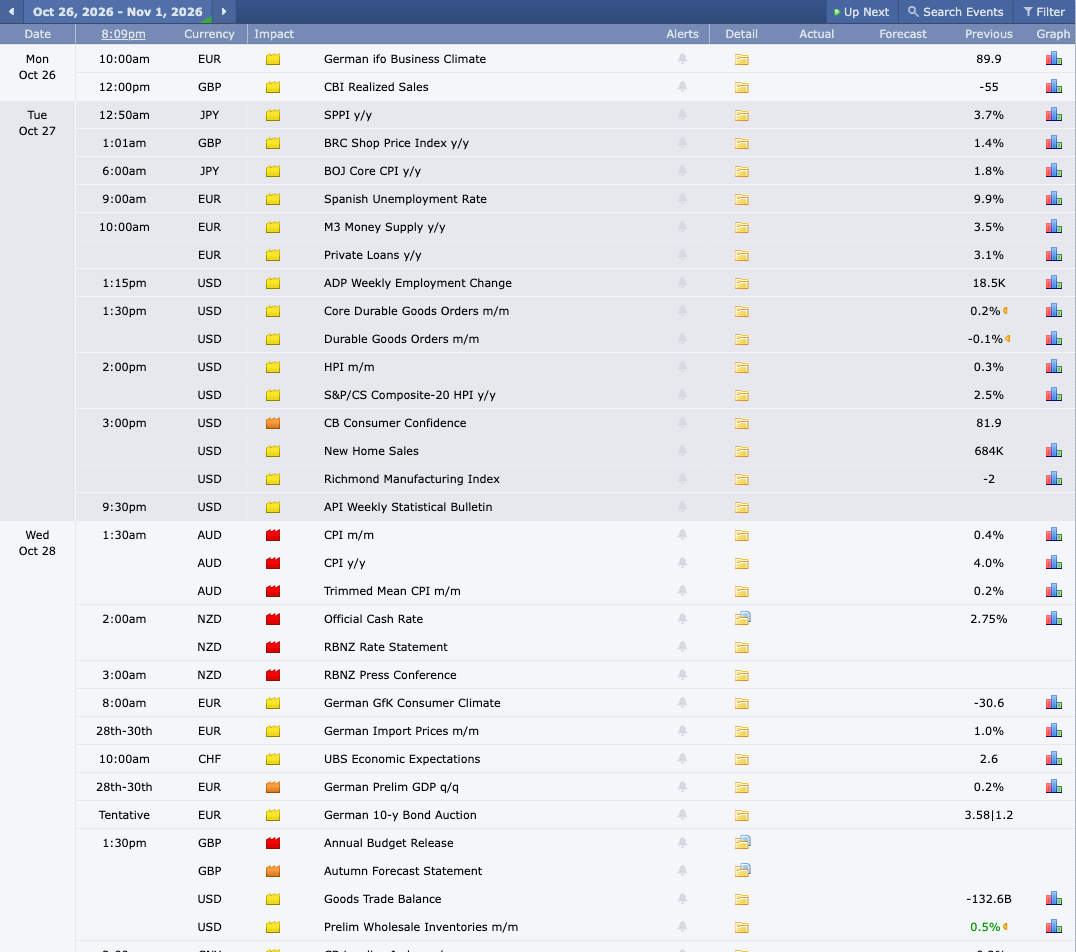 Click to enlarge
Source: Forex Factory.
What do the colours mean?
Each event carries an impact folder in one of three colours, labelled “High Impact Expected”, “Medium Impact Expected” and “Low Impact Expected”. The colour is Forex Factory’s own rating, not a promise that the market will move.
- Red, high impact: the events you must have on your radar, such as Fed and ECB decisions, the jobs report and US CPI. Prices can move a long way within seconds. I reduce my position size before red events or stay out of the market.
- Orange, medium impact: events that can move the market, but usually less and for a shorter time, such as individual PMIs or second GDP estimates.
- Yellow, low impact: routine data with little effect. Mostly irrelevant for short-term traders, worth a glance for swing traders.
Forecast, actual and previous: what the three numbers mean
Previous is the value of the last release, the starting point from which the market forms its expectations. Forecast is the consensus of analysts, what the market expects as a whole, and it is already in the price. Actual appears after the release, and that is where the market decides.
A worked example: the market expects 200,000 new jobs and the actual number comes in at 320,000. That is much better than expected, and it can support the US dollar, but the direction is not assured: revisions, wages and the unemployment rate in the same report also count. At 80,000 the dollar could have come under pressure. The colour of the actual number gives a quick hint: green means better than the forecast, red worse. Our guide to nonfarm payrolls shows the real release dates and how markets react.
How to set the time zone
The most common mistake on a first visit is the wrong time zone. Click the clock in the header of any page, or open the time zone settings directly. There you can choose “Match Automatically”, which uses your device’s time zone, or pick your zone from the list, for example New York or London. The settings adjust for daylight saving time automatically, according to the Forex Factory user guide.
Members keep their settings across computers and devices; without an account, they are not carried over. If you clear your browser data or switch devices, check the time in the header again before you rely on the calendar.
How I use the calendar every day
Every morning before the market opens, I look at the calendar for the current week. I filter for red events and note date and time. Before these events I avoid new entries or reduce open positions. The events that matter most for my forex trading:
- Jobs report: usually the first Friday of the month at 8:30 a.m. ET, one of the strongest drivers of EUR/USD, GBP/USD and USD/JPY.
- Fed decisions and press conferences: often two bursts of volatility, the statement and then the press conference. Our Fed rate decision guide has the dates.
- ECB decisions: a direct effect on euro pairs.
- US CPI and core CPI: inflation data steer rate policy and with it all major pairs. Our guide to the US CPI report has every release date.
The calendar can also be filtered by currency and impact. That helps if you focus on a few pairs; I use the USD and EUR filters most. If you trade with a prop firm, check whether its terms restrict trading around high-impact releases; our guide to prop firm drawdown covers the other rules that decide whether an account survives.
What else Forex Factory offers
Forex Factory describes itself as seven products: forums, trades, news, calendar, market, brokers and the Trade Explorer. The first six sit in the header of every page; the Trade Explorer is reached through your member profile. Here is what each one does, based on the site’s products page.
Forums
The forums are the heart of the site and its origin. On 18 November 2026 the main forums were Interactive Trading, Trading Systems, Trading Discussion, Platform Tech, Broker Discussion, Prop Firm Discussion, Trading Journals, Rookie Talk and Commercial Content. Each splits into many threads.
Looking for a moving average crossover system? Try “Trading Systems”. If you are a beginner with basic questions, for example about where to place a stop-loss order, start in “Rookie Talk”. Many threads are still active, with new posts every day, and “Trading Journals” shows how other traders document their trades.
Trades
The Trades product shows the trades of members who have connected live brokerage accounts. You see a streaming feed of their trades, a leaderboard of the month’s best returns and an analyzer that shows how traders are positioned, now and historically. Each trader profile shows the trade history and a performance graph.
Use it for ideas and market mood, not as a signal service. A good month on a leaderboard says little about risk or about the next month. If you want to keep your own record, our guide to the trading journal shows how.
News
The News product collects market-moving stories from the financial media and links to the source. Forex Factory says an editorial team works on it 24 hours a day. Members can also submit stories and comment on them. I use the news section mainly when I want to understand quickly why a market is moving and have no time to check several sources.
Market
The Market product shows live prices that Forex Factory aggregates from several sources. It also offers synthetic instruments that cross currencies with metals, energy and crypto, such as Gold/GBP or BTC/JPY. Fair Economy says it has developed this price aggregation since 2009.
Brokers
The broker guide lists regulated forex brokers with live spreads. The list is filtered by the country of the visitor: for a visitor from Germany it showed only brokers serving Germany, with their founding year, domestic licence, maximum leverage, platforms, live spreads on the major pairs and deposit options. That makes it a quick first filter, but read independent reviews and check the regulator yourself before you open an account.
Trade Explorer
The Trade Explorer is a free tool for members that analyses their own trading performance. It synchronizes automatically with a connected brokerage account and shows graphs of balance and equity. Fair Economy launched it in 2011. Our guide to trading journal software compares tools with more analysis features.
Membership: what you get with a free account
Membership is free, and only a username and a working email address are required. Guests can read almost everything. The user guide lists what only members can do:
- Post in the forums and submit stories to the news
- Set alerts for forums, news, prices and calendar events
- Create a Trade Explorer and manage a member profile
- Subscribe to news, calendar events, threads, stories and members
- Send private messages and keep settings across devices
Forex Factory encourages members to stay anonymous. Most of what you post is public and often permanent, so do not connect your username to your real name unless you have a reason to. Membership can be revoked for members who break the code of conduct.
The member impact ranking
Forex Factory ranks members by how many traders subscribe to them. Not every subscriber counts: according to the user guide, subscriptions from members who joined less than six months ago or have long been inactive are left out, and commercial members are not ranked at all. Members with impact get one of three icons: high impact for the top 2%, medium impact for the top 5% and low impact for the top 10%. It helps you see quickly whose posts many other traders follow, but it measures popularity, not trading results.
Is there support?
For questions about the website, you can submit a help request. For trading questions, the user guide points you to the forums. The whole site is in English.
My experience with Forex Factory: an honest conclusion
For me as an active forex trader, the Forex Factory calendar is an indispensable tool. I use it every day. It is the fastest way I know to keep market-moving events in view, and the combination of clear layout, filters and live updates is hard to beat among free calendars. How it compares with TradingView, Investing.com and three other calendars is in our guide to the economic calendar.
I use the forums less often, but with a purpose. When I work on a new strategy or want to check a setup, I look at what the community says. Threads in “Trading Systems” and “Trading Discussion” are often surprisingly substantial, much better than the average social media content on trading.
What Forex Factory is not: a substitute for structured trading education or a mentor. The site supplies data and a community; how you turn that into decisions is up to you. My verdict: for anyone who trades forex, Forex Factory is a must, at least the calendar. Beginners should understand the calendar first, before getting lost in the forums.
Frequently asked questions about Forex Factory
What is the Forex Factory calendar used for?
The Forex Factory calendar lists all upcoming economic releases by date, time, currency and expected impact. For numerical releases, the calendar shows actual, forecast and previous values where available. Traders use it to know when volatility is likely and to adjust positions or avoid new entries.
How do I change the time zone on Forex Factory?
Click the clock in the header of any page or open the time zone settings, then choose “Match Automatically” or pick your zone from the list. The site then shows all times in your zone and adjusts for daylight saving time automatically. Members keep the setting across devices.
What do the red, orange and yellow folders mean?
They show the expected impact of an event on the market. Red marks high impact, such as rate decisions, the jobs report or CPI, where strong moves are likely. Orange stands for medium impact, yellow for low impact.
Is there a Forex Factory app?
Forex Factory’s own pages describe a mobile version of the website, launched in 2016, but we found no app of its own. Calendar apps in the app stores come from third parties. The mobile website works well in a phone browser.
Is Forex Factory free?
Yes, Forex Factory is free, including membership. The calendar, forums, news, market data, broker guide and Trade Explorer cost nothing. The site is financed by advertising.
What is the difference between Forex Factory and Investing.com?
Both offer an economic calendar, but Forex Factory focuses on forex traders, while Investing.com covers far more markets. Forex Factory adds a strong community with forums and the trades feed. Investing.com covers stocks, crypto and commodities in more depth. For pure forex trading, I start with Forex Factory.
Does Forex Factory cover crypto?
Forex Factory focuses on currencies; for crypto, Fair Economy runs a separate site called Crypto Craft. It is built the same way as Forex Factory. The Market product on Forex Factory includes a few crypto crosses, such as BTC/JPY.
This English edition is based on our German edition on kagels-trading.de and has been adapted for international readers.
More Markets and Brokers guides
- Open your first account
What Is a Brokerage Account? A US Beginner's Guide
How to open and fund a US brokerage account, cash vs margin, what it costs and what SIPC and FDIC really cover.
- Know what trading really costs
Trading Costs: Every Fee You Pay and How to Cut It
Spread, commissions, SEC and FINRA fees, market data, margin interest and tax, with yearly totals for three trading styles.
- Choose a broker
Interactive Brokers Review 2026: Fees and Platforms
Fees, platforms, investor protection and real futures commissions from a client since 1996.
- Choose an options broker
tastytrade Review 2026: Options Fees, Margin and Safety
tastytrade from an options trader's own account and its October 2026 fee schedule: fees, the 6.75% margin rate, safety and FINRA fines.
- Check an offshore broker
PU Prime Review 2026: FCA Warning, Licences and Costs
Which PU Prime company you contract with, what the FCA warning means, and what 1:1000 leverage and the deposit bonus do to your account.
- Check an EU CFD broker
Tradeview Review 2026: Tradeview Europe, MFSA and Costs
What the Malta licence of Tradeview Europe covers, how it differs from the Cayman company, and what the three MetaTrader 5 accounts cost.
- Check ZuluTrade
ZuluTrade Review 2026: Costs, Regulation and US Status
Who runs the copy trading platform, what it costs through your broker, why the US was missing from its sign-up form and what the CFTC fined its US company for.
- Check CopyX
CopyX Review 2026: Is TAG Markets Copy Trading Legit?
Who runs the TAG Markets copy trading platform, which regulators warn about it, why US residents are excluded and how fast the 12x Amplify account eats your deposit.
- Choose a US forex broker
OANDA Review 2026: Fees, TradingView and US Rules
OANDA from its own pages and NFA records: spreads and fees, TradingView and the demo, FIFO and three penalties.
- Check a commission-free app broker
Webull Review 2026: Fees, Margin Rates and Safety
Webull from its own fee schedule and FINRA records: what is free, margin rates and Premium, overnight trading, crypto and three fines.
- Understand your price
Market Makers: Who Sets Your Price and How They Profit
How market makers earn on the spread, who sets prices at German trading venues and what the EU ban on payment for order flow changed.
- Size up a bull market
Bull Market: How Long It Lasts and How to Spot the End
When a rise becomes a bull market, how long the 27 completed S&P 500 bull markets since 1928 lasted and gained, and where the current one stands.
- Read bond market stress
MOVE Index: The VIX of the Bond Market, Explained
What the MOVE index measures, which readings signal stress, how it differs from the VIX and where its limits are.
- Read stock market fear
VIX Index: What the Fear Gauge Measures and Normal Levels
What the VIX measures, which levels have been normal since 1990, how closely it tracks the S&P 500 and how VIX futures, options and ETPs work.
- Read the risk mood
Risk-On vs Risk-Off: Meaning, Assets and Indicators
What risk-on and risk-off mean, which assets rise and fall in each mode, five market shocks since 2008 and the VIX, DXY and AUD/JPY signals.
- Read market sentiment
Fear and Greed Index: How It Works, Tested Since 2021
How CNN builds its Fear and Greed Index from seven measures, what the zones mean and how the S&P 500 moved after readings below 20.
- Size up a bear market
Bear Market: How Long It Lasts and How to Spot One
When a decline becomes a bear market, how long the 27 S&P 500 bear markets since 1928 lasted, how long the recovery took and why Bitcoin had three since 2025.
- Trade an index CFD
Index CFDs at Interactive Brokers: Symbols, Costs and Trading
All 13 IBKR index CFDs, margin, stop and close-out worked through for IBDE40, financing, UK hours and the TradingView limit.
- Size an index future
Micro Futures: MES vs MNQ, Tick Values and Risk
MES and MNQ tick values, a worked sizing example from the stop with costs and slippage, and why margin is not your risk.
- Choose between futures and CFDs
Futures vs CFDs: Regulation, Order Execution and Costs
Who your counterparty is, EU, UK and US rules, how stops are triggered on CME and at CFD providers, and booked costs in a DAX example.
- Understand the IBKR Exposure Fee
IBKR Exposure Fee: What It Is and How to Reduce It
Why Interactive Brokers charges a daily fee on high-risk accounts, why weekends count, where to find it and how to reduce it, with a real 1.12 euro notice.
- Read the futures curve
Contango vs Backwardation: Futures Curves Explained
What contango and backwardation mean, what rolling does to a position in each case, and real gold, oil and gas curves from 28 October 2026.
- Understand the spot market
Spot Market Explained: Definition and Settlement Times
What a spot market is, why two days is a minimum and not a limit, and when stocks settle at T+1 in the US, EU, UK and Switzerland.
- Choose a silver future
Silver Futures: SI vs Micro Silver vs 100-oz SIC
SI, Micro Silver and the 100-ounce SIC compared by tick value, risk per contract, margin and December 2026 deadlines.
- Read the chip sector
SOX Index: Holdings, Weighting and How to Use It
What the SOX holds, how Nasdaq caps the weights, its largest declines since 2004 against the Nasdaq-100 and which ETFs really track it.
- Read the biotech sector
Nasdaq Biotechnology Index: Holdings, Weighting and Risks
What the NBI holds, how Nasdaq caps the weights, its long declines since 2003 against the Nasdaq-100 and which ETFs really track it.
- Read the transport sector
Dow Jones Transportation Average: Stocks and Dow Theory
The 20 stocks in the Dow transport index, why the share price sets their weight, declines since 1992 and what Dow Theory can and cannot tell you.
- Read the French market
CAC 40 Index Explained: All 40 Stocks, Weights and Trading Hours
All 40 CAC 40 stocks, how Euronext caps the weights at 15 percent, trading hours in Eastern Time and how it differs from the DAX.
- Research stocks
InvestingPro Review: Screener, ProPicks AI and WarrenAI
What the InvestingPro screener, ProPicks AI and WarrenAI do, what Pro and Pro+ cost and who needs which plan.
- Judge a stock-picking newsletter
Motley Fool Stock Advisor Review: Cost and Track Record
What Motley Fool Stock Advisor costs after the first year, how the advertised return is calculated, refund and renewal terms, and who it suits.
- Use the free news portal
Investing.com Review: Free Tools, Data and Limitations
What the free Investing.com portal does well, where the quote prices come from and when InvestingPro is worth paying for.
- Find real AI revenue
AI Stocks 2026: How Listed Companies Earn From AI
Which listed companies earn from AI in cloud, software, infrastructure and chips, disclosed AI revenue against hope, plus AI ETFs and risks.
- Compare AI data center suppliers
AI Infrastructure Stocks: 10 Data Center Suppliers Compared
Ten suppliers for power, cooling, servers and optics compared on free cash flow, customer concentration and next dates, with filters and a two-stock comparison.
- Follow an IPO
Anthropic Stock: IPO Date, Valuation and How to Invest
Where the Anthropic IPO stands, how the valuation compares with revenue and how to get exposure before and after the listing.
- Invest in OpenAI before the IPO
OpenAI Stock: Can You Buy It, and Who Owns OpenAI?
Why there is no OpenAI stock yet, who owns OpenAI, where the IPO stands and how much OpenAI you get through Microsoft or SoftBank.
- Understand a stock split
Stock Splits Explained: Forward and Reverse Splits
What forward and reverse splits change and what they do not, the dates that matter, what happens to options and the $1 listing rule.
- Analyze a company
Fundamental Analysis: 12 Ratios, a Worked Example, 5 Steps
Twelve ratios with formulas and rules of thumb, worked through Microsoft's 2026 annual report, a five-step process and the fundamentals of forex, commodities and crypto.
- Value a stock
Value Investing: Intrinsic Value, Margin of Safety, Traps
Intrinsic value against price, a worked DCF with a sensitivity table, Coca-Cola as a real example, the value premium since 1926 and value traps.
- Value a new listing
SpaceX Stock (SPCX): Valuation, Risks and How to Buy
How to buy SpaceX stock, what the company is worth after the IPO and which risks the lock-up calendar brings.