
Investing.com Review: Free Tools, Data and Limitations


Contents
Investing.com is one of the most-used free financial portals. The platform is run by Fusion Media Limited, as the footer and risk warning page state, and covers quotes, news, charts, an economic calendar and alerts for stocks, ETFs, currencies, commodities, crypto and bonds. On the About page, Investing.com itself names “over 180,000 financial instruments across 250 exchanges in 33 languages” (checked 24 October 2026).
This review focuses on what the free portal does well, where its limits are, and where its paid add-on InvestingPro begins. We took the screenshots ourselves on 25 October 2026 without signing in. We disclose the English page carries no affiliate link; the German edition links to InvestingPro through a partner link. How we research is in our editorial policy.
Investing.com in 30 seconds
- What it is: a free news and data portal operated by Fusion Media Limited, with quotes, charts, news, a calendar and alerts, plus the paid stock-research add-on InvestingPro.
- Who it is for: readers who want a free overview of markets, releases and ratings. For order entry, use a broker chart.
- Watch the data source: each price page names its source, such as an exchange or a derived feed; two instruments on the same market can show different numbers.
- Free depth is real: quotes, the calendar and recent annual income statements, balance sheets and cash flows need no paid plan (Apple 2021 to 2025 checked on 25 October 2026); signed-in users can try WarrenAI and the Analyze Chart button with a limited monthly credit allowance.
- Paid service in short: InvestingPro Pro adds more WarrenAI credits and valuation tools; Pro+ adds the advanced screener, a 10-year history and data export.
Which part covers it, and does it cost money?
- Quotes, charts and newsFree
- Watchlists and price alertsFree sign-up
- Release times with an importance ratingFree
- Recent annual financial statementsFree
- A first try of WarrenAI or Analyze ChartFree sign-up, limited credits
- 50 WarrenAI credits a month, fair value, no adsInvestingPro Pro
- Advanced screener, 10-year history, data exportInvestingPro Pro+
- Placing an orderYour broker, not Investing.com
Checked on Investing.com's own pages on 25 October 2026. Click a line to jump to its section.
What Investing.com is
Investing.com is a free news and data portal, not a broker. The site is operated by Fusion Media Limited (named in the footer and in the risk warning), runs regional editions in 33 languages and lets you choose a language in the top-right dropdown. The portal shows quotes, news, charts, forecasts, the economic calendar and a portfolio feature, free with ads.
The core offering has stayed stable for years. The site lists prices for stocks, ETFs, currencies, commodities, crypto, bonds and indices. The instrument’s price page carries a chart, news, technical indicators and an opinion section. Quotes, news and the calendar need no account; watchlists, portfolios and push alerts need a free sign-up. The paid tools sit behind the “Pro” button.
The free portal is funded by advertising. You see banners, scrollers and sponsored content across the site. That is the trade for a free product. Keep an eye on the “sponsored” label when a card looks like editorial content.
Where the prices come from
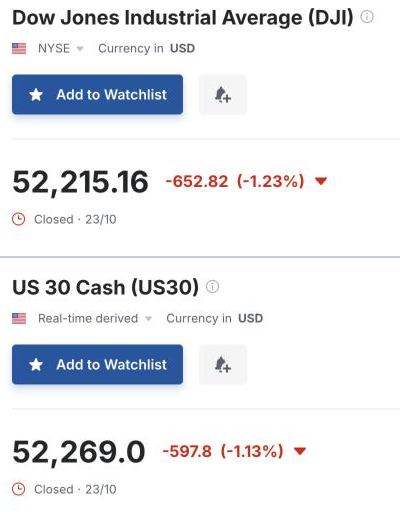
On a portal, the quoted price is a reference, not an executable number. Investing.com itself tells readers in its risk warning that data on the site is not necessarily real-time or accurate, and that prices may come from a market maker rather than from an exchange. Each price page names its source just below the instrument’s name: a venue such as NYSE, or a label such as “Real-time derived”.
 Click to enlarge
Source: Investing.com Dow Jones page.
The same market can carry two different instruments. Our screenshots from 25 October 2026 show two pages for the Dow: the Dow Jones Industrial Average itself, labelled NYSE, and US 30 Cash, labelled “Real-time derived”, which names the Dow as its underlying. Both show the close of 23 October, yet they sit 53.84 points apart, because they are different instruments that track the same index. Neither number is a bid or an ask you could trade at.
That matters when you plan an entry or a stop. If you read a level from an Investing.com chart and place the order through your broker, you may be looking at another instrument or another feed. Check which instrument the page shows, its timestamp and whether the number is a last price or a quote with bid and ask. The price you can actually trade at is the one in your broker’s order ticket.
The economic calendar
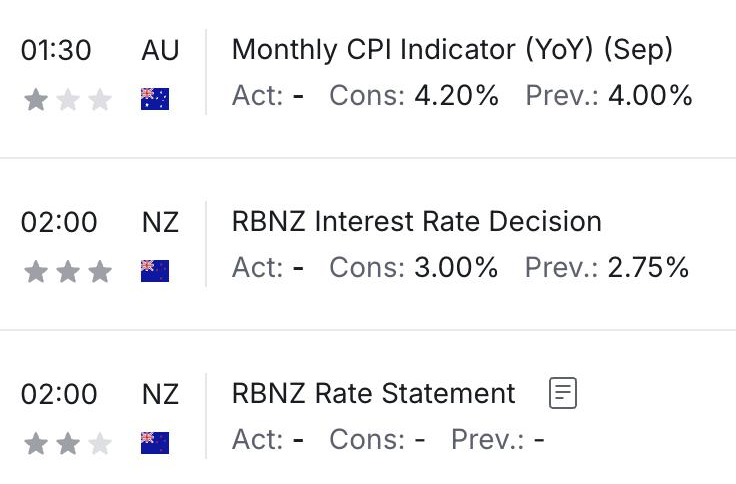
For a free economic calendar, Investing.com is a solid default. You get US releases, European prints and Asian data in one list, with a forecast, a prior value and a three-star importance scale that Investing.com assigns itself. Each entry links to a history page with past values and a quick chart. Filters cut the list by country, importance or event type.
 Click to enlarge
Source: Investing.com Economic Calendar.
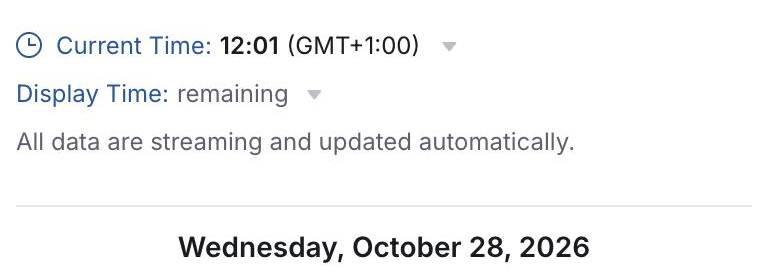
Set the time zone before you plan around a release. The calendar shows the current time and its zone at the top, with a dropdown to change it. In our check on 25 October 2026, from a browser set to Berlin time, it showed GMT+1:00; your page may show another zone. The dates around daylight saving switches are a known source of a one-hour error because US and EU clocks move on different weekends.
 Click to enlarge
Source: Investing.com Economic Calendar.
The importance scale is an editorial decision, not a market statistic. A three-star rating means Investing.com rates the release as market-moving. A Fed decision or a non-farm payroll is three stars for everyone; a mid-tier housing print may rate differently across portals. Add the releases that matter to the market you trade, even if Investing.com rates them lower.
News, alerts and watchlists
The news stream mixes staff reporting with syndicated content. You will see wire pieces, external bylines and third-party columns on the same page. The source is named in the byline. If you build a view of a stock, read the author line and date; a column from six months ago reads like today’s news if you only look at the headline.
Watchlists and push alerts are the main reason to keep a free account. A watchlist holds your instruments in one view, with price, change and quick links to the chart. Push alerts on price levels or on economic events reach the mobile app and your email.
Free fundamental data is more than you may think. The portal’s Financials tab shows an annual income statement, balance sheet and cash flow for listed stocks. We checked Apple on 25 October 2026 without signing in: the Annual view shows total revenues and the other lines for 2021 through 2025, while 2016 to 2020 are locked. The free portal hits its limit when you want a longer history, hundreds of screener filters or fair-value models; that is where InvestingPro comes in.
The mobile app
The Investing.com app brings the website to a smaller screen. You get quotes, watchlists, news, the calendar and push alerts; signed-in features sync between the web and the app. Ads are more noticeable on a phone than in the browser because the screen is smaller.
For actual order entry, use your broker app. Investing.com does not route trades. The app is for a quick quote, a release and an alert; the order lives at the broker.
What users say
Public review scores exist, but their meaning is limited. Investing.com has a Trustpilot profile with an overall score that changes over time, and App Store ratings for the mobile app sit on separate country pages. Scores vary enough that we quote them with a date when we do; this review does not pin a number here.
Read a few recent reviews before you form a view. The useful signal is the pattern, not the headline score: skim the five-star and the one-star tabs in the Trustpilot profile and look at what each cluster talks about. Numbers from a different quarter will give you a different answer.
InvestingPro, the paid service
InvestingPro is the paid add-on for deeper stock research. It sits behind the “Pro” button on the price pages. On the plan page we checked on 25 October 2026, Pro includes 50 WarrenAI credits a month, a fair-value calculator and an ad-free site; Pro+ adds 500 credits, the advanced screener, a 10-year financial history and data export. Prices change often, which is why our dated plan check lives in the InvestingPro review rather than in this article.
The chatbot and the chart analysis can be tried without a paid plan. Investing.com’s Help Center describes a monthly allowance of free credits for signed-in users, but its pages do not agree on one fixed number, so check your account for the current figure. The Analyze Chart button (which Investing.com calls Vision AI on the About page and WarrenAI-Powered Chart Analysis in its Help Center) runs about 60 seconds and uses 5 credits per analysis for all users (Help Center FAQ, updated 13 October 2026). The help pages also differ on whether credits reset on the original subscription day or on the renewal day, so check the reset date in your account.
For auto-renewing subscriptions, the Investing.com terms set out the rules. The current terms (Last Modified August 2026, Section 16) say that all charges are generally non-refundable, “subject to any applicable law”. Section 16(d) names jurisdictions (Israel, Korea, Turkey and Brazil) where partial or full refunds may apply, and separates refund routes for the Google Play Store (48 hours through Google, after that through Investing.com support) and the iOS App Store (always through Apple).
Who it’s for, who it isn’t
It fits the reader who wants a free overview of markets and news. Watchlists, push alerts, the economic calendar and free annual fundamentals cover most private investors who look up a quote, check the next release and read a headline before they act.
It does not replace a broker chart. Active traders who need tick-accurate data, custom indicators or algorithmic alerts belong on their broker’s platform or on a dedicated charting tool such as TradingView. For an institutional terminal with news, chat and professional-grade data, see our Bloomberg Terminal review.
It is not an investment advisor. The opinion pieces, “stocks picked by AI” lists and author columns are content, not advice. Treat them that way.
Frequently asked questions about Investing.com
Is Investing.com free?
Yes, the basic portal is free and ad-supported. Quotes, news, the economic calendar, charts and watchlists do not cost anything; an account saves settings and unlocks watchlists and alerts. The paid InvestingPro service is separate and runs under its own plans page.
Who operates Investing.com?
Investing.com is operated by Fusion Media Limited. The company is named in the footer and in the risk warning page and runs editions in 33 languages. Audience numbers that Investing.com publishes about itself live on the About page.
Can I trust the prices?
Use portal prices for direction, not for a stop or an entry. A portal number can come from an exchange, a market maker or a derived feed, and your broker will print its own. Check the source label under the instrument’s name and the timestamp before you draw a line in the chart.
Does Investing.com execute trades?
No, Investing.com is a data and news portal. For orders you use a broker. The portal shows a quote and a chart; the broker handles the order and the custody.
How does the economic calendar handle time zones?
Check the time zone shown at the top before you read release times. The calendar names the zone next to the current time and lets you change it in a dropdown. Daylight saving switches move the US and EU clocks on different weekends, so note the zone in your calendar entry when you plan around a release.
How does InvestingPro differ from the free portal?
InvestingPro raises credit allowances and unlocks the deeper tools. The free portal already lets signed-in users try WarrenAI and the Analyze Chart button with a limited monthly credit allowance. Pro adds 50 credits a month and valuation tools; Pro+ adds 500 credits, the advanced screener, a 10-year history and export. See the InvestingPro section above for the dated plan check link.
This US edition is based on our German edition on kagels-trading.de and has been adapted for US readers.
More Markets and Brokers guides
- Choose a broker
Interactive Brokers Review 2026: Fees and Platforms
Fees, platforms, investor protection and real futures commissions from a client since 1996.
- Understand your price
Market Makers: Who Sets Your Price and How They Profit
How market makers earn on the spread, who sets prices at German trading venues and what the EU ban on payment for order flow changed.
- Read bond market stress
MOVE Index: The VIX of the Bond Market, Explained
What the MOVE index measures, which readings signal stress, how it differs from the VIX and where its limits are.
- Research stocks
InvestingPro Review: Screener, ProPicks AI and WarrenAI
What the InvestingPro screener, ProPicks AI and WarrenAI do, what Pro and Pro+ cost and who needs which plan.
- Follow an IPO
Anthropic Stock: IPO Date, Valuation and How to Invest
Where the Anthropic IPO stands, how the valuation compares with revenue and how to get exposure before and after the listing.
- Invest in OpenAI before the IPO
OpenAI Stock: Can You Buy It, and Who Owns OpenAI?
Why there is no OpenAI stock yet, who owns OpenAI, where the IPO stands and how much OpenAI you get through Microsoft or SoftBank.
- Value a new listing
SpaceX Stock (SPCX): Valuation, Risks and How to Buy
How to buy SpaceX stock, what the company is worth after the IPO and which risks the lock-up calendar brings.