
Economic Calendar: Key US Dates and the 6 Best Calendars


Contents
- Economic calendar in 30 seconds
- What is an economic calendar?
- The key US dates to the end of 2026
- Where the dates come from: the official calendars
- The 6 best economic calendars compared
- How to read an economic calendar
- How I use the economic calendar in practice
- More calendars for traders and investors
- Conclusion: the best calendar is the one you check every day
- Frequently asked questions about the economic calendar
- About the author
Every trading day, scheduled numbers move prices within seconds: rate decisions, inflation data and the jobs report. If you do not have them on your radar, the market surprises you. An economic calendar solves exactly this problem. It shows you in advance when each number comes out and how strongly it is likely to move the market.
On this page you get the market-moving US dates to the end of 2026, checked at the official sources, and a fair comparison of six free calendars. I also explain how I use the calendar in my own trading preparation, which I have done for decades. I have traded since 1980 and have used TradingView as my main charting software since August 2017. This article follows our editorial policy.
Economic calendar in 30 seconds
The key points as of October 21, 2026:
- What it is: a list of scheduled economic releases, such as rate decisions, inflation data and the jobs report, each with forecast, previous value and actual result.
- The best free calendars: TradingView for chart traders, Investing.com for the most filters, Forex Factory for forex traders. All six calendars in this guide are free to use.
- Next big US dates: the Fed decision on October 28, the jobs report on November 6 and the CPI inflation data on November 10, 2026. The last Fed meeting of the year ends on December 9.
- The clock: most US data comes out at 8:30 am Eastern Time, one hour before Wall Street opens.
- In practice: check the calendar before you trade, and do not open new positions just before a high-impact release.
What is an economic calendar?
An economic calendar is a table of upcoming economic releases, such as central bank rate decisions, inflation data and labor market reports, with the date, time, affected currency, expected market impact and forecast for each event.
Other names for the same tool are financial calendar, macro calendar or forex calendar. They all mean a schedule that tells you when new economic data is published and how important it is for the markets. Many brokers embed a calendar from a data provider instead of building their own.
An economic indicator is a number published at regular intervals, such as inflation, the unemployment rate or gross domestic product. Market participants read the state of an economy from it. The calendar tells you when the next reading of each indicator is due.
The calendar matters most for short-term traders. Day traders often trade in exactly the minutes when new numbers come out. The most important US data is released at 8:30 am ET, one hour before the regular session opens at 9:30 am (see our guide to stock exchange hours). Futures and the pre-market react at once, so the first price move often happens before the opening bell.
The key US dates to the end of 2026
Late October is rate month: the Fed and the ECB decide within 24 hours of each other. In November and December the two most important US numbers follow, the jobs report and the CPI. Every date below comes from the release schedules of the Bureau of Labor Statistics (BLS), the Bureau of Economic Analysis (BEA), the Federal Reserve and the ECB, checked on October 21, 2026.
| Date | Event | Time (ET) | Time (CET) |
|---|---|---|---|
| Wed, Oct 28 | Fed rate decision (FOMC meeting Oct 27 to 28) | 2:00 pm | 7:00 pm |
| Thu, Oct 29 | ECB rate decision | 9:15 am | 2:15 pm |
| Thu, Oct 29 | GDP advance estimate Q3, PCE inflation (September) | 8:30 am | 1:30 pm |
| Fri, Nov 6 | Jobs report (Employment Situation, October) | 8:30 am | 2:30 pm |
| Tue, Nov 10 | CPI inflation (October) | 8:30 am | 2:30 pm |
| Wed, Nov 25 | GDP second estimate Q3, PCE inflation (October) | 8:30 am | 2:30 pm |
| Fri, Dec 4 | Jobs report (November) | 8:30 am | 2:30 pm |
| Wed, Dec 9 | Fed rate decision with projections (FOMC Dec 8 to 9) | 2:00 pm | 8:00 pm |
| Thu, Dec 10 | CPI inflation (November) | 8:30 am | 2:30 pm |
| Thu, Dec 17 | ECB rate decision | 8:15 am | 2:15 pm |
| Fri, Dec 18 | Triple witching (quarterly futures and options expiry) | all day | all day |
| Wed, Dec 23 | GDP third estimate Q3, PCE inflation (November) | 8:30 am | 2:30 pm |
Watch the clock change in the last week of October. Europe leaves summer time on October 25, the United States on November 1, 2026. In the week of the Fed meeting, New York is only five hours behind central Europe, not six. That is why the ECB decision shows at 9:15 am ET in October but at 8:15 am ET in December. A good calendar converts this for you, as long as you set your time zone once.
The jobs report is the monthly US labor market report. Its headline number, nonfarm payrolls, counts the jobs created outside agriculture. It usually comes out on the first Friday of the month and is one of the biggest movers in any calendar.
The consumer price index (CPI) measures the price change of a typical basket of goods and services. It is the most watched inflation number in the calendar, because it shapes what the market expects from the Fed. The Fed’s own preferred measure, the PCE price index, comes later in the month together with personal income.
For rate decisions, the press conference counts as much as the decision itself. At the Fed, the statement comes at 2:00 pm ET and the press conference at 2:30 pm. Rate expectations often turn again while the chair answers questions. What the market prices in before the meeting is shown by the CME FedWatch Tool; the Fed rate decision and the ECB rate decision have their own guides. The next big expiry day is triple witching on December 18.
Where the dates come from: the official calendars
Every economic calendar copies its dates from the agencies that publish the data. If a date looks wrong or a release is postponed, the official schedule is the final word. These four pages are free and need no account:
- BLS release calendar: the jobs report, CPI, producer prices and the Employment Cost Index, each with date and time.
- BEA release schedule: GDP and personal income and outlays, which contains the PCE price index.
- Federal Reserve FOMC calendar: all meeting dates for 2026 and 2027, with the meetings that bring new economic projections marked.
- ECB meeting calendar: the monetary policy meetings of the Governing Council, each followed by a press conference.
For daily trading, a commercial calendar is still more practical. It puts all countries on one page, adds the analyst forecast and shows the actual value seconds after the release. The official pages are the place to double-check a date that matters for an open position.
The 6 best economic calendars compared
All six calendars are free to use and show reliable dates. The differences are in handling, filters and extra features. I opened each one on October 21, 2026 and looked at the same week, the week of the Fed meeting.
| Calendar | Strength | Best for |
|---|---|---|
| TradingView | Calendar next to the chart, clean filters | Chart traders |
| Investing.com | Huge data range, fine filters | All-rounders |
| Forex Factory | Compact view, trader community | Forex traders |
| MarketWatch | US only, plain Eastern Time list | US stock investors |
| Trading Economics | Own forecast column, many countries | Macro readers |
| FXCM | Forward-looking volatility scale | Currency traders |
TradingView economic calendar
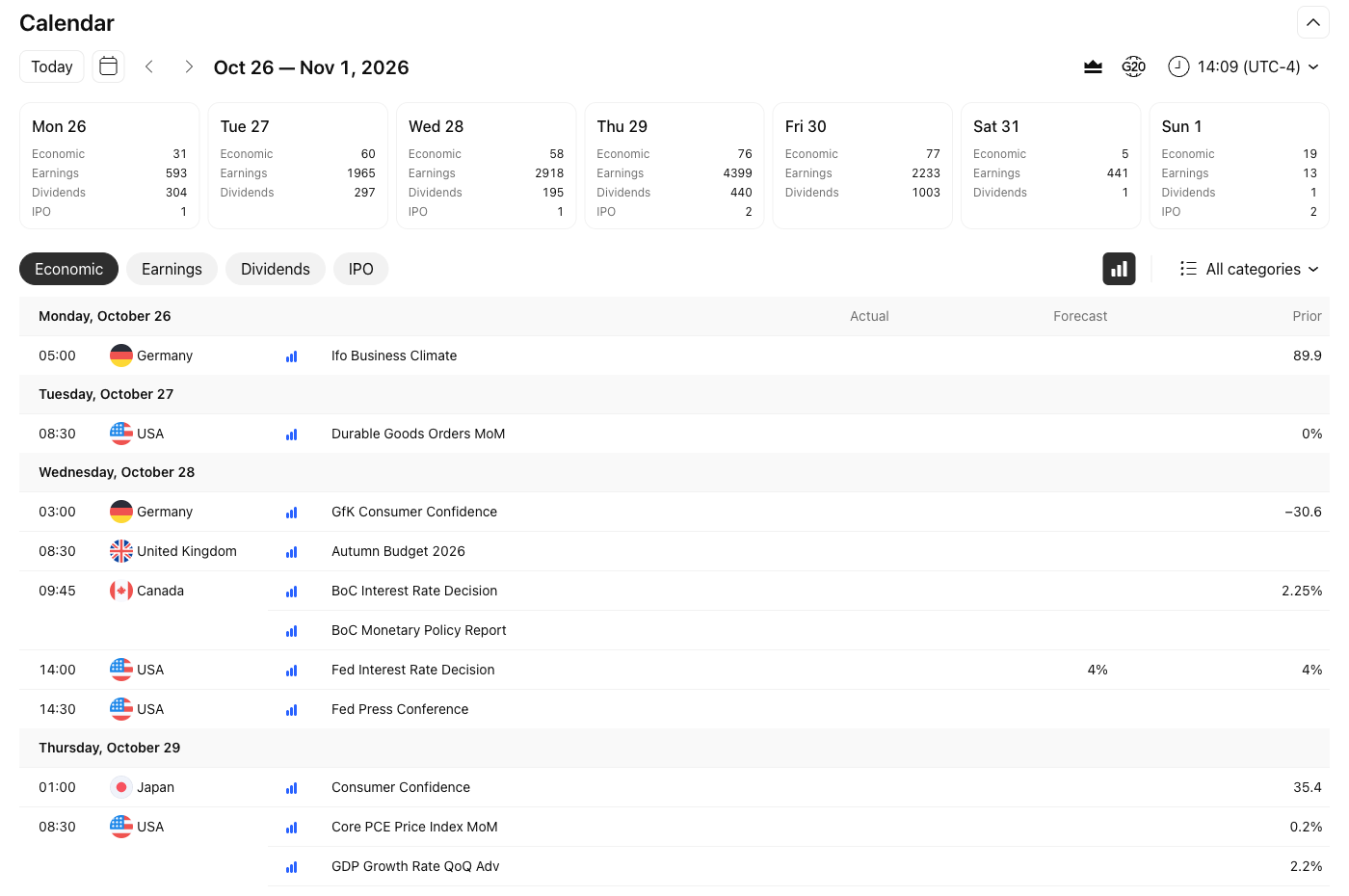 Click to enlarge
Source: TradingView.
TradingView’s calendar is the most practical one if you already work in the chart. Economic events, earnings, dividends and IPOs sit on separate tabs, and the importance filter and time zone take two clicks. In the screenshot above, I set the high-importance filter and New York time; the Fed decision on October 28 then sits between the Bank of Canada decision and the GDP data. I have paid for TradingView since 2017, and the calendar is part of my daily routine.
Who it does not suit: readers who want a bare table without a platform around it. For them, MarketWatch or Investing.com is faster. You find the calendar at tradingview.com/economic-calendar; our guide to TradingView plans and pricing explains what the free Basic plan covers.
Investing.com economic calendar
Investing.com’s calendar is the data giant among the free calendars. It covers a very wide range of countries and indicators, and you can filter by country, importance and category and save your own view. Importance is shown with one to three stars.
The downside of the size: the page carries a lot of advertising. On our visit a consent banner covered the calendar first, and beginners need a few minutes to tame the filters. The calendar is at investing.com/economic-calendar.
Forex Factory calendar
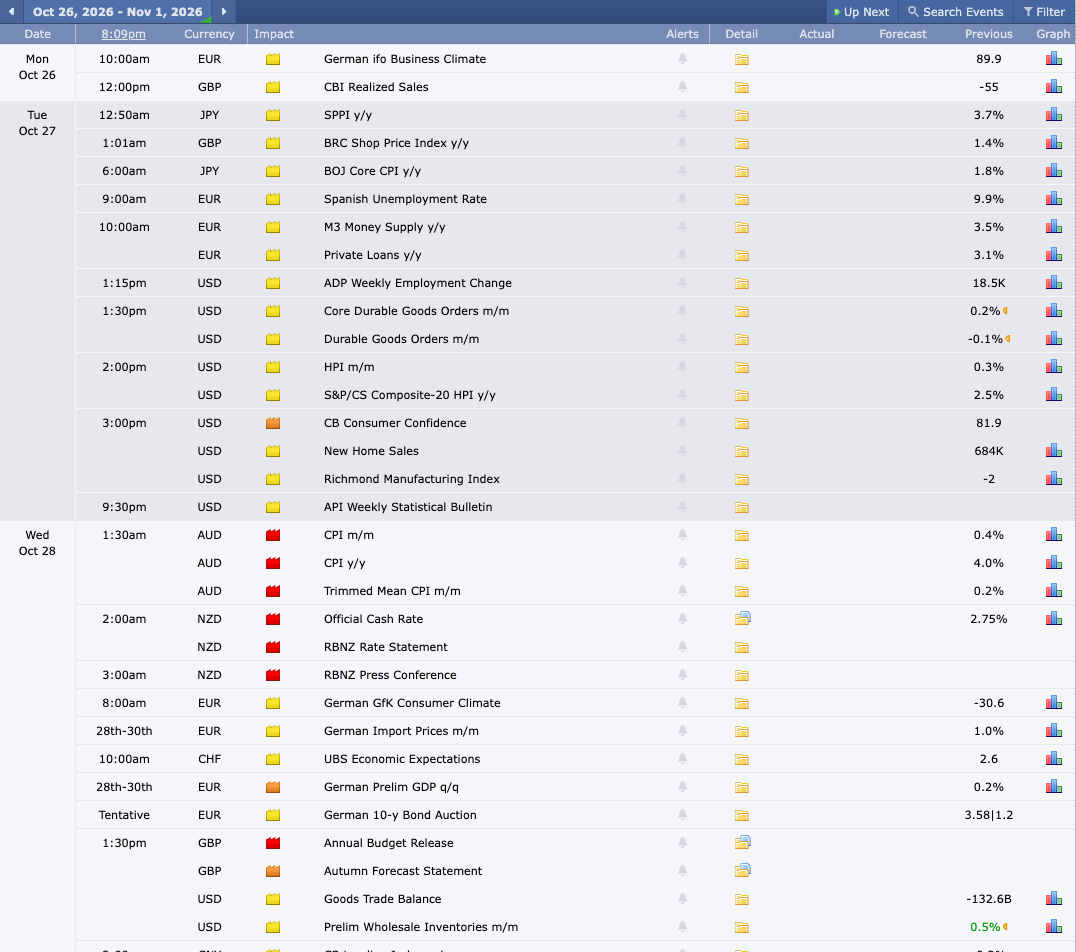 Click to enlarge
Source: Forex Factory.
Among professional forex traders, the Forex Factory calendar has been the standard for years. It scores with a compact view, clear impact colors (red, orange, yellow) and an active forum where traders discuss each release. Most rows have a detail folder, and numerical releases also have a graph of the earlier values.
Its weak point is the focus on currencies. If you only trade US stocks, the long list of foreign releases is noise, and MarketWatch gives you the shorter list. The calendar is at forexfactory.com/calendar.
MarketWatch economic calendar
MarketWatch shows only US releases, all in Eastern Time. On our visit, the page listed two weeks of major US reports and Fed speakers, with columns for period, actual, forecast and previous value. The data is supplied by Onclusive and Dow Jones.
That makes it the quickest calendar for US stock investors, but not for traders of other markets. There is no importance filter and no other countries. The calendar is at marketwatch.com/economy-politics/calendar.
Trading Economics calendar
Trading Economics adds its own forecast next to the analyst consensus. Each row shows actual, previous, consensus and a separate forecast column, and you can filter by three impact levels, region and category, from interest rates to bond auctions.
The calendar is open without an account; the company earns its money with data downloads and an API. For a trader it is a little slower to read than Forex Factory, for a macro reader it is one of the best references. The calendar is at tradingeconomics.com/calendar.
FXCM economic calendar
FXCM’s calendar is built for currency traders. It rates each release on a color-coded scale (low, medium, high) for the expected impact on prices. FXCM describes this scale as forward-looking; it is not a record of past reactions.
FXCM offers an enhanced version of the calendar to its own clients. As an everyday calendar it is less common than the big portals, and its filters are simpler than those of Investing.com or Trading Economics. The calendar is at fxcm.com/markets/economic-calendar.
How to read an economic calendar
Most rows in an economic calendar follow the same structure. For a numerical release, five pieces of information matter; speeches, press conferences and holidays usually show only the date and time:
- Date and time: when the number is released. Check the time zone; most calendars let you set it.
- Event name: what is published, for example a central bank meeting or a labor market report.
- Currency or country: which market reacts, shown by a flag or a code such as USD or EUR.
- Importance: usually one to three stars, bars or colors. The top level means high impact and therefore volatility risk.
- Forecast, previous, actual: the analyst consensus, the value of the prior period and, after the release, the actual result.
The consensus forecast is the average of analyst expectations for a release. If the actual value differs clearly from it, prices react the most. The calendar shows both values side by side for exactly this reason.
A high-impact event is a release with a high expected market effect. The calendar marks it with the top importance level, and it regularly causes strong price moves.
An example from practice: the jobs report is expected to show 150,000 new jobs, and only 80,000 come in. That is a negative surprise. The dollar often weakens, Treasury prices rise and stock indices swing hard. What counts is never the number alone, but the gap to the forecast. These figures are an illustration, not a real release.
How I use the economic calendar in practice
I have traded the markets since 1980, and the calendar has been part of my daily preparation for decades. Before the first trade, I check which high-impact releases are due and whether they affect the markets I trade: forex, stock indices and commodities.
Three rules have worked for me:
- No new positions just before high-impact releases. In the minutes before the numbers, spreads widen, and stops can be filled at a much worse price in the move.
- Wait for the first reaction. The first move after a release often turns within minutes. Chasing it is how many traders pay twice.
- Plan the week ahead. On Sunday I mark the jobs report Friday, the CPI day and the rate decision days. On these days I expect higher volatility and size my positions smaller (see position sizing).
The value of the calendar fits into three points. You stay informed and are not surprised by moves. You manage risk, because you do not run into a news spike with open stops. And you spot opportunities, because you can read the reaction to the data.
One thing even the best calendar cannot do: it does not tell you how the market will react. A good number can make prices fall if the market expected an even better one. The calendar gives you the schedule; the interpretation is your job, and it belongs in your risk management.
More calendars for traders and investors
Besides the six calendars above, a few more are worth a look. None of them changes the picture, but each fits a special case:
- Myfxbook: a calendar for forex traders inside the trading-account analysis platform.
- MQL5: the free calendar of MetaQuotes, the maker of MetaTrader. The former Tradays address now leads there.
- Your broker: most brokers, from Interactive Brokers to forex brokers, have a calendar in their platform, often supplied by a third party.
Conclusion: the best calendar is the one you check every day
An economic calendar is the simplest free risk management tool there is. It warns you about the days when markets swing the most. Trading without this overview leaves part of your risk to chance.
For the choice of calendar: TradingView for chart traders, Investing.com for the most data, Forex Factory for forex traders and MarketWatch for a short US list. In the end it matters less which calendar you use than that checking it becomes a daily routine.
My advice: open one calendar, set the filter to high impact for your markets and plan your trading week around these dates. That takes five minutes a week and saves you the most expensive surprises. This is market information, not investment advice.
Frequently asked questions about the economic calendar
What is an economic calendar and how does it work?
An economic calendar is a schedule of upcoming economic releases: rate decisions, economic data and central bank speeches. For numerical releases it shows the forecast, the previous value and the actual result, so traders and investors can put the market reaction into context.
Which economic calendar is the best?
For chart traders, TradingView is the best choice, because the calendar runs next to the chart. Investing.com offers the most data, and among forex traders Forex Factory is the standard. For a short US-only list, MarketWatch is the fastest. All of them are free.
Which events in the economic calendar matter most?
Rate decisions of the Fed and the ECB, the jobs report and CPI inflation move markets the most. After them come GDP, the PCE price index, purchasing managers’ indices and consumer confidence. Good calendars mark these events with the top importance level.
Is an economic calendar reliable?
The dates and the actual values are reliable, because they come from statistics agencies and central banks. The forecasts are not: the analyst consensus is missed regularly, and exactly these misses cause the biggest price moves. If a date matters for an open position, check it on the official BLS, BEA, Fed or ECB page.
Is there an economic calendar app?
Yes. The free Investing.com app includes an economic calendar. That lets you check the next releases on the way, without a desktop. The TradingView calendar and the other calendars in this guide also open in the mobile browser.
Can an economic calendar predict price moves?
No. The calendar tells you when something happens, not in which direction the market moves. Even a strong number can make prices fall if expectations were higher. The calendar is a scheduling and risk tool, not a forecasting tool.
This US edition is based on our German edition on kagels-trading.de and has been adapted for US readers.
More TradingView guides
- Choose a plan
TradingView Review 2026: Plans, Pricing and Is It Worth It?
Prices of all plans in US dollars, real-time data costs, Black Friday and whether it is worth it.
- Learn the basics
How to Use TradingView: A Beginner Tutorial in 11 Steps
A beginner tutorial in 11 steps: chart, symbol search, drawings, indicators, log scale, watchlists, alerts, layouts and trading.
- Save on a plan
TradingView Black Friday 2026: Dates, Deals and Best Plan
Expected 2026 timing, verified past deals and what to check before buying a plan.
- Practice without risk
TradingView Paper Trading: Setup, Limits and Tips (2026)
Set up the free paper trading account, place your first orders and learn where the simulation falls short.
- Compare platforms
TradingView Alternatives 2026: 7 Platforms Tested
Seven platforms compared, with a decision aid for when switching makes sense.
- Connect a broker
Best Brokers for TradingView 2026: A Guide for US Traders
Which US brokers work with TradingView and what to check before you connect one.
- Connect an AI assistant
TradingView MCP and API: What Is Official in 2026
What the official MCP server, webhooks and community MCP servers can do, and why there is no data API.
- Test a strategy
TradingView Backtesting: Test a Strategy Without Real Money
Manual testing with Bar Replay and automatic testing with the strategy report.
- Write an indicator
Pine Script in TradingView: Basics, Editor and Version 6
Pine Script basics, the editor and version 6, with code you can copy.
- Use the AI Copilot
TradingView AI Copilot Review: 7 Tests, Price and Limits
Seven real tasks for the paid AI add-on: what it costs, what it got right and where you must check it.
- Filter stocks with the screener
TradingView Stock Screener: How to Use It and What It Costs
How the stock screener works, what the free plan can do, the Pine Screener and three tested popular screens.
- Read volume inside each bar
TradingView Volume Footprint: Setup, Plans and Limits
Open and set up the volume footprint, which plan includes it and how accurate its buy and sell split is.
- Read the market on a heatmap
Stock Heatmap: How to Read It, TradingView and Finviz
What size, color and grouping mean, the free TradingView heatmap step by step and how it compares with Finviz.