
TradingView Black Friday 2026: Dates, Deals and Best Plan


Contents
- TradingView Black Friday in 30 seconds
- What is the TradingView Black Friday sale?
- When does the TradingView Black Friday sale start in 2026?
- How big is the discount? The deals from 2022 to 2025
- Which plan is worth buying in the Black Friday sale?
- The fine print: renewal, upgrades and app purchases
- How to prepare for the sale
- Are there TradingView discounts outside Black Friday?
- Pros and cons of the Black Friday deal
- Conclusion: Black Friday pays off if you really use the plan
- FAQ: TradingView Black Friday
- About the author
In TradingView’s Black Friday sale, the Premium plan cost almost exactly the same as the smaller Plus plan, three years in a row. At regular prices, Premium costs about twice as much. If you do not know this, you pick the wrong plan in the sale and then pay for a full year with fewer charts and fewer alerts than you could have had.
This guide shows when the 2026 sale will probably start, what the discounts of past years were really worth, and what the fine print says. All numbers come from TradingView’s own sale pages, saved in the Internet Archive, not from coupon sites. I have paid for TradingView myself since 2017, and at the end I tell you which plan is worth buying in the sale and who should skip it. The article follows our editorial policy.
TradingView Black Friday in 30 seconds
- Dates in 2026: Black Friday is on November 27, 2026, Cyber Monday on November 30. In 2025, the sale started a full week before Black Friday; in 2024, four days before.
- Size of the discount: in 2025, TradingView advertised up to 80% off. Premium cost $217 for 13 months, Plus $216, Essential $126 and Ultimate $576.
- The 13th month was a gift: in 2025, every plan in the sale came with 30 extra days, but only when bought on the website, not in the app.
- Renewal cost the full price: for a standard website purchase, the 2025 discount covered the first payment. After that, the plan renewed at the regular price.
- The best deal was Premium: it cost one dollar more than Plus and gives you twice as many charts per tab.
- 2026 is not announced yet: dates, prices and conditions may differ from past years.
What is the TradingView Black Friday sale?
The TradingView Black Friday sale is the yearly promotion of the charting platform TradingView around the US shopping day Black Friday. The paid plans are sold as yearly plans with up to 80% off and one extra free month.
Black Friday is the Friday after Thanksgiving, so it always falls on the day after the fourth Thursday in November. TradingView is a US company and ties its biggest sale of the year to this date. In 2024 and 2025, a Cyber Monday phase followed right after, with the same prices.
The past sales offered yearly plans only, no monthly plans. For a new purchase or an extension, you paid once, up front, for 13 months, and in return got the lowest price TradingView advertised that year. What each plan can do is explained in my TradingView review with all plans and prices.
One thing to keep in mind: the sale does not change the platform. You get the same features as with a plan bought at the regular price, just cheaper. Real-time data for exchanges such as NYSE, Nasdaq or CME was not part of past sales.
When does the TradingView Black Friday sale start in 2026?
The TradingView Black Friday sale 2026 will probably start in the week before November 27, 2026, and continue as a Cyber Monday sale after November 30.
TradingView has not announced a date yet. As of September 26, 2026, its Black Friday page only says the next countdown is coming and offers a reminder sign-up. The best guide is the past two years. I went through the archived versions of the sale page and worked out the dates from the countdowns shown there:
| Year | Sale started | Black Friday phase until | Cyber Monday phase until |
|---|---|---|---|
| 2025 | Fri, Nov 21 | Fri, Nov 28 | Tue, Dec 2 |
| 2024 | Mon, Nov 25 | Fri, Nov 29 | Wed, Dec 4 |
Each sale started at 00:00 Pacific Time (3 a.m. Eastern) and ran through 23:59 Pacific on the listed end date. Source: TradingView’s Black Friday page in the Internet Archive: 2024 on November 26 and December 2, 2025 on November 22 and November 30.
In 2025, the sale began on a Friday, a full week before Black Friday itself. In 2024, it began on the Monday of Thanksgiving week.
After the Black Friday phase, the page switched straight to Cyber Monday both times, and the prices stayed exactly the same. The full promotion ran for 10 days in 2024 and 12 days in 2025; how much time was left depended on when you visited the sale page. The archived pages show the same prices throughout the sale; buying on the first day gave no extra advantage.
How big is the discount? The deals from 2022 to 2025
The sale prices have not changed for three years. Only the percentage on the banner has. This is the offer from November 2025:
| Plan | Sale price for 13 months | Regular price per month (2025) |
|---|---|---|
| Essential (30% off) | $126 | $14.95 |
| Plus (40% off) | $216 | $33.95 |
| Premium (70% off) | $217 | $67.95 |
| Ultimate (80% off) | $576 | $239.95 |
Source: TradingView’s Black Friday page, archived on November 22, 2025.
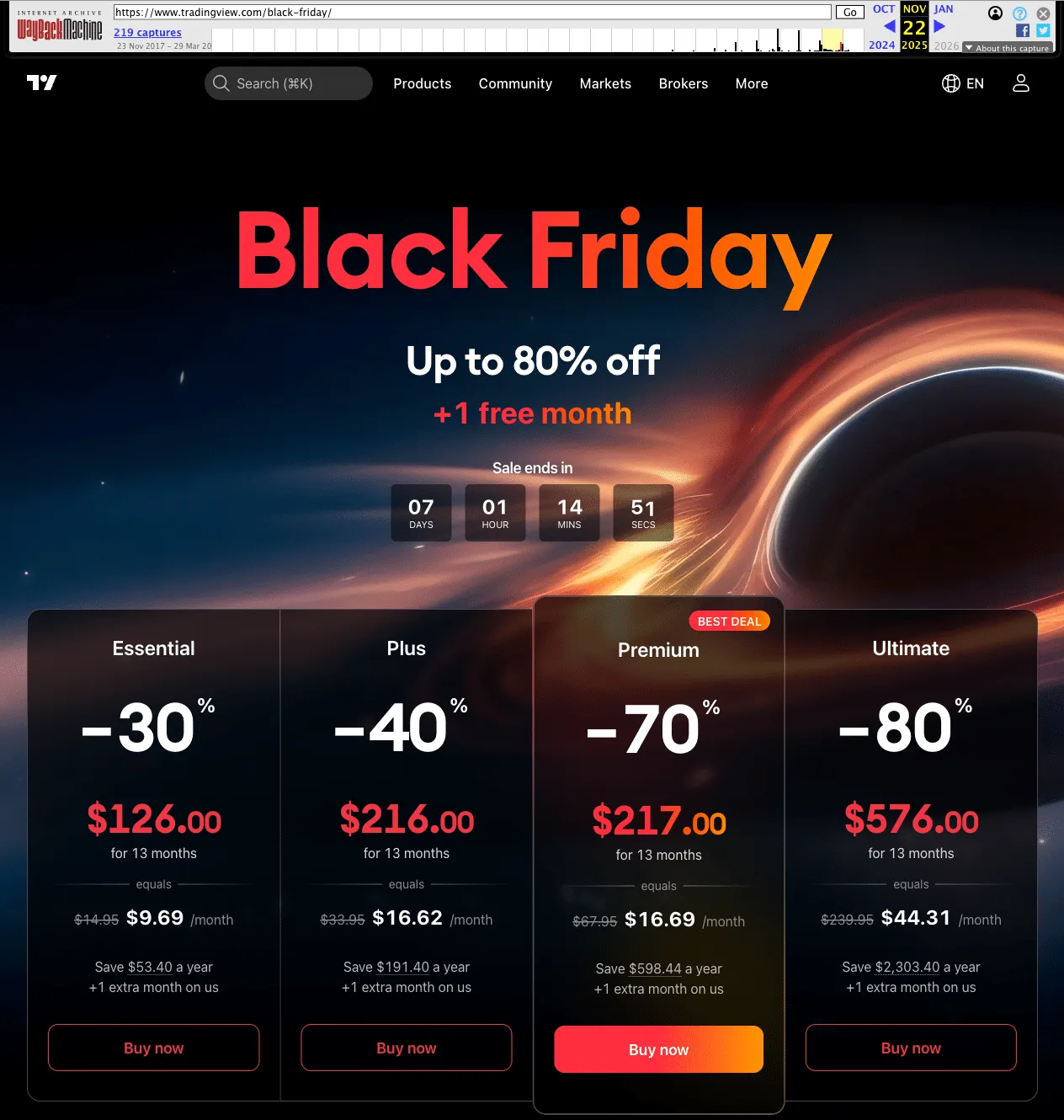 TradingView’s Black Friday page on November 22, 2025, saved in the Internet Archive: four yearly plans for 13 months, Premium marked as “best deal”. This is a historical page, not the 2026 offer.
The earlier years show the pattern. In 2022, the plans were still called Pro, Pro+ and Premium, and the discount went up to 60%. Premium then cost $288 for 13 months. Since 2023, with today’s plan names, the prices have been $126, $216 and $217. They stayed the same in 2023, 2024 and 2025.
Even so, the headline grew from “up to 70%” to “up to 80%”. The 80% applied only to Ultimate, which was in the sale for the first time in 2025. For Plus and Premium, the labels stayed at 40% and 70%, although the regular prices went up: Plus rose from $29.95 a month in 2024 to $33.95 in 2025, Premium from $59.95 to $67.95.
Because the sale price stayed the same, the saving grew with every price increase. For Premium, it was about $502 in 2023 and 2024 compared with 12 monthly payments, and about $598 in 2025. The chart puts the three years side by side.
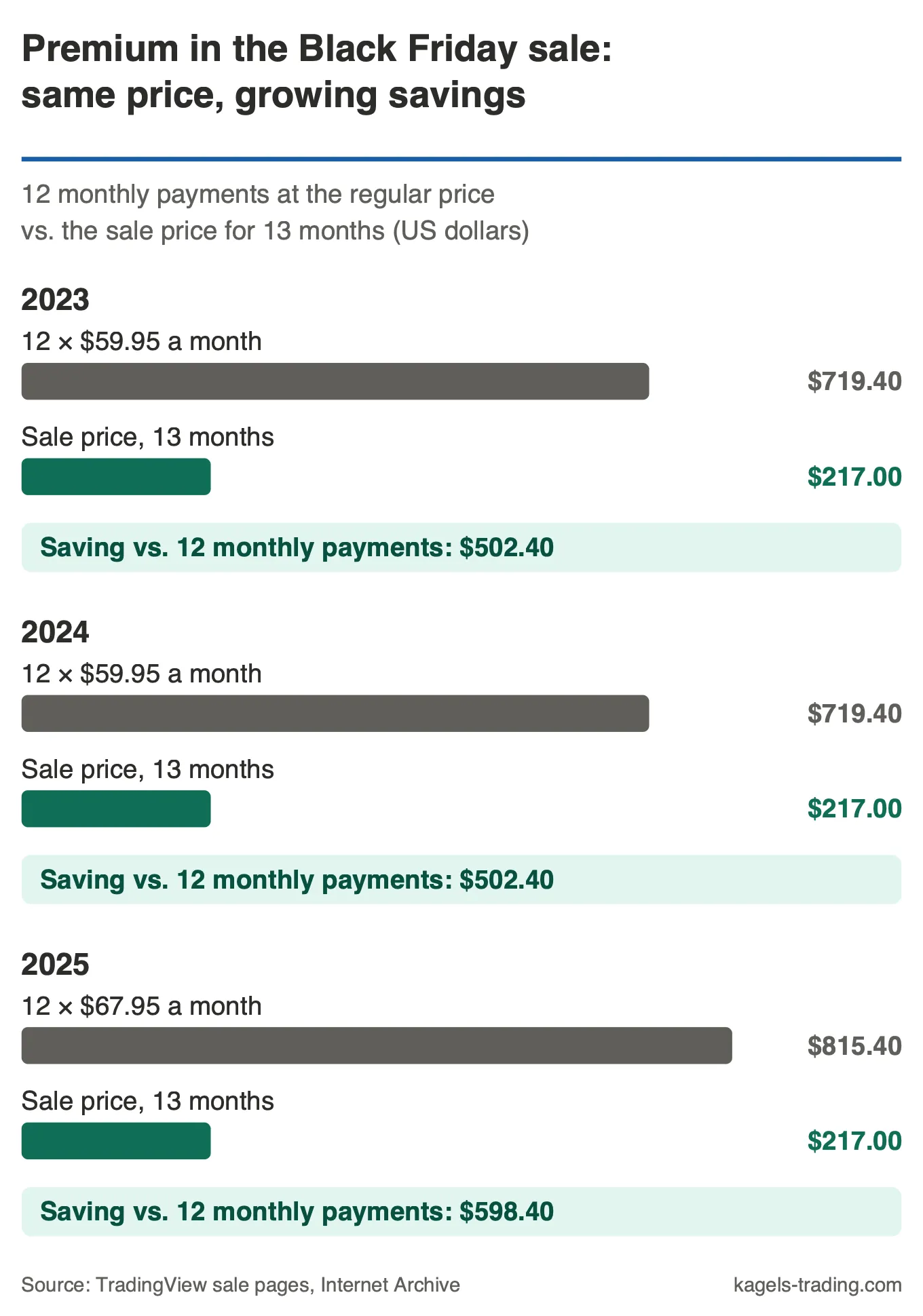 Premium in the Black Friday sale, 2023 to 2025: the sale price stayed at $217 for 13 months, while 12 monthly payments at the regular price rose from $719.40 to $815.40. Our own analysis of the archived sale pages.
Prices have risen again since. As of September 24, 2026, Premium costs $69.95 a month and Plus $34.95 on the pricing page. What the 2026 sale prices will be, nobody knows until the sale starts.
What the percentage is measured against
TradingView calculates the discount against 12 separate monthly payments. For Premium in 2025, that means 12 × $67.95 = $815.40 a year. The page subtracted the sale price of $217 and arrived at about $598 saved per year. The 13th month comes on top.
If you already pay yearly, you save less than the banner suggests. The regular yearly plan is already up to 17% cheaper than paying monthly, according to the pricing page. Against the yearly plan, the real advantage is smaller than the headline. It is still large. TradingView itself calls the sale its best offer of the year.
Which plan is worth buying in the Black Friday sale?
The most important number in the whole sale is the gap between Plus and Premium: one dollar. At regular prices, Premium costs twice as much as Plus. In the 2023, 2024 and 2025 sales, they cost $216 and $217. For that one dollar, you get 8 instead of 4 charts per tab, 25 instead of 10 indicators per chart and 400 instead of 100 price alerts.
Sale prices from TradingView's Black Friday page, archived November 22, 2025. Plan limits from the TradingView pricing page, September 24, 2026. The 2026 sale prices are not known yet.
Premium also adds second-based intervals and more intraday history in Bar Replay. If you choose Plus in the sale, you give these up to save one dollar. That matters most if you work with your own scripts or test strategies in TradingView, because every extra indicator per chart counts there.
These comparisons assume you are a non-professional subscriber. TradingView currently makes only Ultimate available to professional users, so check your classification on the pricing page before you compare plans.
My view on the other plans:
- Essential makes sense if you follow one market on the daily chart and want to get rid of the ads. At $126, it is the cheapest plan, but the step up to Premium was only $91 for 13 months.
- Premium fits most active traders. If you watch several markets at once, work with many alerts or trade intraday, this is your plan.
- Ultimate is for exceptions. I use it myself because I work in the platform all day and need 16 charts per tab. For most traders, the extra $359 over Premium is hard to justify.
- Basic is enough if you only look at a chart now and then. Then you do not need a plan in the sale at all, because the free version stays free.
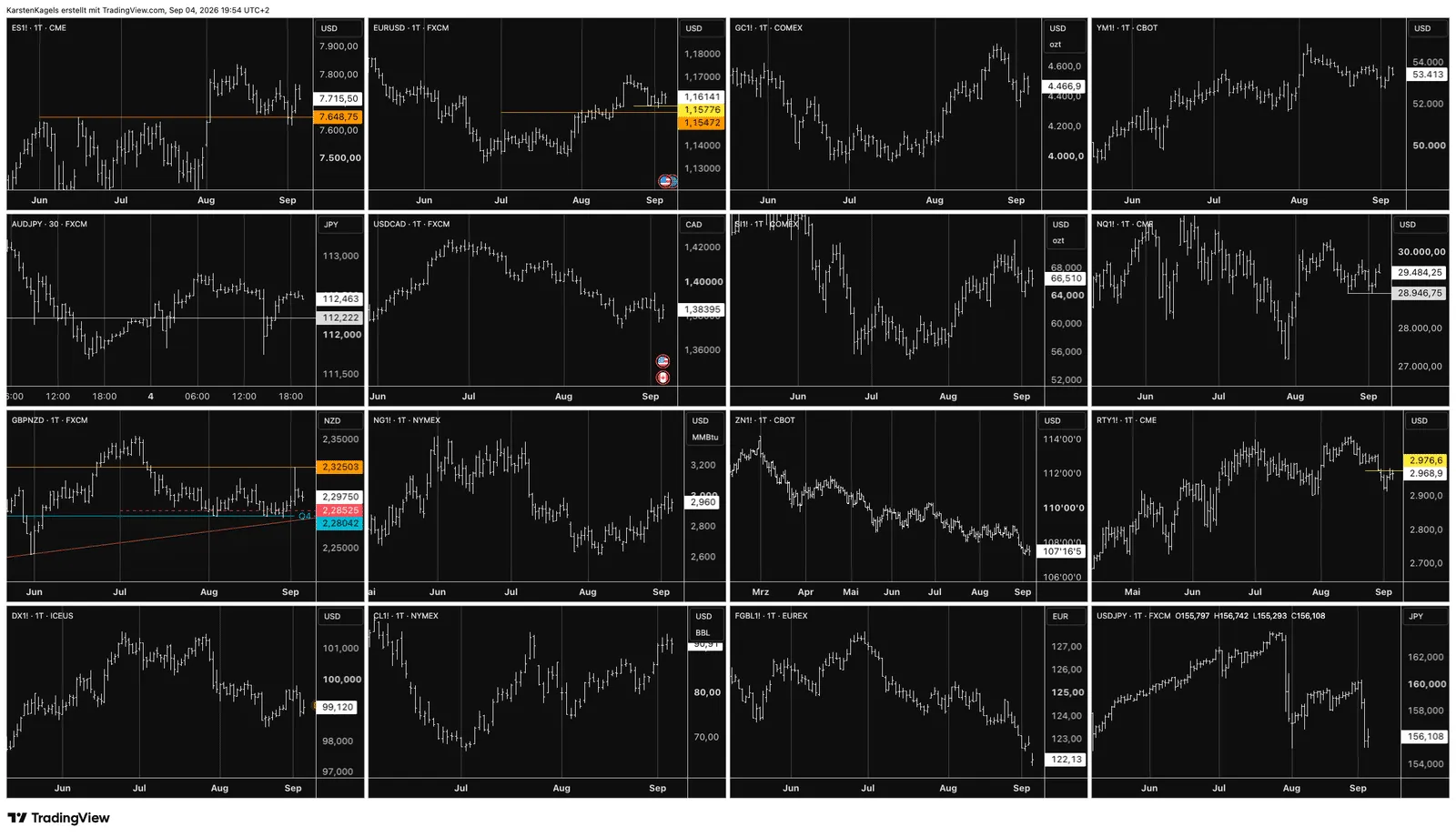 A tab with 16 charts: stock index, interest rate, energy and metal futures next to currency pairs. Only Ultimate offers this many; Premium allows 8 (my own account, September 4, 2026).
The screenshot shows my own layout with 16 charts. Few traders work like this, and this is what Ultimate is made for. If that is not you and you are a non-professional user, Premium was the sensible choice in past sales. Custom indicators and Pine Script are available on all paid plans, but indicator counts, execution limits and access to some advanced features depend on the plan. Check what the scripts you use need before you choose.
The fine print: renewal, upgrades and app purchases
The conditions below describe TradingView’s 2025 Black Friday offer. The dates, prices and conditions for 2026 have not been announced. Check the new sale FAQ and your checkout details when the offer opens. These points decided what buyers actually paid after 13 months.
Renewal was at the regular price
In the 2025 sale, the Black Friday price covered the first payment only. The sale FAQ said the offer worked only for the initial purchase, and the plan then renewed at the standard price. If you wanted to save again the next year, you had to buy again in the next sale, which extended your plan by hand. TradingView’s separate promo FAQ for local promotions says the same for those offers: the discount covers one payment.
The 2025 FAQ named one exception: if you had subscribed through the mobile app the year before, your plan renewed at the discounted rate. That is a special case of the app stores and no reason to buy in the app, because the app purchase comes without the free month.
Already subscribed? Remaining days carried over
In 2025, you did not have to wait until your current plan ran out. If you bought the same plan in the sale, TradingView added your unused days to the new plan automatically. If you upgraded, it converted the remaining days into days of the higher plan at a fixed ratio:
| Change | Days on old plan | Days on new plan |
|---|---|---|
| Essential to Plus | 2 | 1 |
| Plus to Premium | 2 | 1 |
| Essential to Premium | 4 | 1 |
| Premium to Ultimate | 4 | 1 |
Source: FAQ on TradingView’s Black Friday page, archived November 22, 2025.
A downgrade worked differently: the smaller plan started and was charged when the current plan expired. Only one downgraded plan could be bought. According to the 2025 FAQ, downgrades were available only to non-professional subscribers and not for plans paid with cryptocurrency.
The 13th month only came with a website purchase
In 2025, the free month was tied to buying in the browser. Orders through the iOS or Android app did not get it. According to the promo FAQ, a running app subscription cannot be extended in the app; you turn off auto-renewal in the App Store or on Google Play and buy the new plan on the website. A website plan works on all your devices as usual.
Up to three years in advance
The 2025 offer allowed purchases of up to three years, bought one after another. This did not apply to downgrades, which were limited to one plan. Check whether the 2026 offer keeps these rules before committing to several years. It only makes sense if you are sure you will use the platform for that long. Your money is then tied up for three years, and features and plans can change in that time.
No discount on real-time data
The subscription sale did not discount exchange-data subscriptions. TradingView’s help center explained that it offers no discounts on data subscriptions, because the fees go to the exchanges; the 2024 Cyber Monday FAQ said the same. If you need real-time prices for day trading, you pay these amounts every month on top. Include them before you compare the sale price with a regular plan. My TradingView review lists the data costs for US markets.
Three smaller points for US buyers
- Sales tax: TradingView is registered for sales tax in some places, so tax may be added at checkout depending on where you live. The order window shows the final amount before you pay.
- Gift plans: in 2025, you could also buy a sale plan as a gift for another user.
- Referral credit: money earned through TradingView’s referral program could not be used for the sale, only for regular plans.
How to prepare for the sale
Most bad purchases in a sale happen under time pressure, and the countdown on the page is there to create it. These five steps help you go in prepared:
- Test what you need first. A free trial shows you which features you really use: 30 days for Essential, Plus or Premium. Start it early enough that it does not run into the sale, and write down when it ends.
- Count your charts and alerts. How many charts do you have open at once, and how many price alerts are running? That tells you the right plan.
- Check your current plan. Note the plan, the end date and whether it runs through the app. App subscriptions must be canceled in the store before you buy.
- Buy in the browser. In 2025, only website purchases got the 13th month. Before you pay, the order window shows the term, the next renewal date and any tax.
- Set a reminder for the renewal. Use the renewal date shown in your account; unused time or extra purchases can move it. Check the renewal price and decide in advance whether to continue or turn off auto-renewal.
You can see the current regular prices at any time without an account on the TradingView pricing page. They are the yardstick for every offer in November.
Are there TradingView discounts outside Black Friday?
Yes, TradingView also offers annual-billing savings and occasional account or regional promotions. The pricing page currently marks the yearly prices as special prices and advertises up to 17% savings against monthly billing (as of September 24, 2026). Compare any offer and its conditions with the regular pricing page.
TradingView also sends personal coupons through pop-ups and banners in your account. According to its help page on discount coupons, these are linked to your account. TradingView also supports some partner codes and official promotional links, but a coupon cannot be added to an existing special deal.
Be careful with links from coupon-code websites. TradingView itself warns not to open links from unknown or unverified senders. A reliable way to lower costs is the choice of broker: some brokers that connect to TradingView refund subscription costs above a certain trading volume. If you are looking for a cheaper platform altogether, see our comparison of TradingView alternatives.
Pros and cons of the Black Friday deal
The sale is not the right choice for everyone. Here is the honest balance of past sales before you pay for 13 months in advance.
Pros
- Best offer of the year: that is what TradingView calls it. For Premium, the price was more than 70% below 12 monthly payments.
- 13 instead of 12 months: in 2025, the free month extended every yearly plan bought in the browser.
- Nothing was lost: remaining days from a current plan carried over, and on an upgrade they were converted into days of the higher plan.
- Premium for the price of Plus: a gap of one dollar makes the bigger plan the obvious choice.
Cons
- Paying 13 months up front: past sales only sold yearly plans, charged at purchase for new plans and extensions. If you are not sure you will use the platform for a year, you pay for months you do not use.
- Renewal at the regular price: after the term, a standard website purchase renewed at the full amount unless you canceled in time or bought again.
- No discount on data: exchange-data subscriptions were not part of the sale.
- The percentage flatters: it is measured against monthly payments. Against the normal yearly plan, the advantage is smaller.
- Time pressure from the countdown: the sale ran for only 10 to 12 days recently. If you go in unprepared, it is easy to buy the wrong plan.
Conclusion: Black Friday pays off if you really use the plan
I think Black Friday is the best time of the year to buy a TradingView plan. Prices were stable for three years, the 13th month came on top, and the remaining days of a current plan were not lost. If you use the platform every day anyway, mark the date in your calendar.
The downside is just as clear. The discount applied to one payment, and after that the plan cost the full price. The percentage on the banner is measured against monthly payments and sounds bigger than it is against the normal yearly plan. If you only want to try TradingView, the free Basic account is a better start than 13 months paid in advance.
My advice: for non-professional users choosing between Plus and Premium, Premium was the better value when the difference was just $1. Compare the actual 2026 prices and terms before buying, choose the features you need, and use the renewal date shown in your account for your reminder.
FAQ: TradingView Black Friday
How much does TradingView cost on Black Friday?
In the 2025 sale, Premium cost $217 for 13 months, Plus $216, Essential $126 and Ultimate $576. The Essential, Plus and Premium prices had not changed since 2023; Ultimate appeared in the archived 2025 offer. The 2026 prices will only be known when the sale starts.
When does the TradingView Black Friday sale 2026 start?
There is no official date yet. Black Friday falls on November 27, 2026. In past years, the sale started four to seven days before and ran on through Cyber Monday into early December, at the same prices.
Is there a TradingView Cyber Monday sale?
Yes. In 2024 and 2025, the Black Friday sale switched to a Cyber Monday sale right after Black Friday and ran until December 4 and December 2 respectively. The prices stayed exactly the same, so there is no reason to wait for Cyber Monday.
Does the Black Friday price apply when the plan renews?
For a standard website purchase in the 2025 sale, no. The discount covered the initial payment, and the subscription then renewed at the regular price. The 2025 FAQ also listed a special exception for subscriptions bought through the mobile app the year before. Use the date and renewal terms shown for your account, and check the 2026 conditions when they are published.
Can I take part if my plan is still active?
In 2025, yes. If you bought the same plan, your unused days were added to the new one. If you upgraded, TradingView converted them into days of the higher plan at a fixed ratio. A running app subscription had to be canceled in the store first, because it cannot be extended in the app.
Is there a TradingView coupon code for Black Friday?
In past sales, no code was needed; the prices applied automatically on the sale page. TradingView sends personal coupons through pop-ups and banners in your account, and a coupon cannot be added to an existing special deal.
Is Premium or Plus better in the Black Friday sale?
For non-professional users, Premium, as long as the gap stays as small as recently. From 2023 to 2025, Premium cost one dollar more than Plus in the sale but gives you 8 instead of 4 charts per tab, 25 instead of 10 indicators and 400 instead of 100 price alerts. Plus is only worth it if the gap becomes much larger in 2026.
This US edition is based on our German edition on kagels-trading.de and has been adapted for US readers.
More TradingView guides
- Practice without risk
TradingView Paper Trading: Setup, Limits and Tips (2026)
Set up the free paper trading account, place your first orders and learn where the simulation falls short.
- Connect a broker
Best Brokers for TradingView 2026: A Guide for US Traders
Which US brokers work with TradingView and what to check before you connect one.
- Connect an AI assistant
TradingView MCP and API: What Is Official in 2026
What the official MCP server, webhooks and community MCP servers can do, and why there is no data API.
- Test a strategy
TradingView Backtesting: Test a Strategy Without Real Money
Manual testing with Bar Replay and automatic testing with the strategy report.
- Plan around economic data
Economic Calendar: Key US Dates and the 6 Best Calendars
The key US release dates to the end of 2026, how to read a calendar and six free calendars compared, TradingView first.
- Write an indicator
Pine Script in TradingView: Basics, Editor and Version 6
Pine Script basics, the editor and version 6, with code you can copy.
- Use the AI Copilot
TradingView AI Copilot Review: 7 Tests, Price and Limits
Seven real tasks for the paid AI add-on: what it costs, what it got right and where you must check it.
- Filter stocks with the screener
TradingView Stock Screener: How to Use It and What It Costs
How the stock screener works, what the free plan can do, the Pine Screener and three tested popular screens.
- Read volume inside each bar
TradingView Volume Footprint: Setup, Plans and Limits
Open and set up the volume footprint, which plan includes it and how accurate its buy and sell split is.
- Read the market on a heatmap
Stock Heatmap: How to Read It, TradingView and Finviz
What size, color and grouping mean, the free TradingView heatmap step by step and how it compares with Finviz.