
InvestingPro Review: Screener, ProPicks AI and WarrenAI


Contents
- InvestingPro in 30 seconds
- What is InvestingPro?
- What does InvestingPro cost? Pro and Pro+ compared
- The stock screener in detail
- Watchlists with smart features
- ProPicks AI: stock picking with artificial intelligence
- WarrenAI: the AI chatbot
- AI chart analysis
- Stock analysis, data and charts
- Pros and cons of InvestingPro
- Who is InvestingPro worth it for?
- My verdict on InvestingPro
- Frequently asked questions about InvestingPro
- About the author
Do you want a tool that takes hours of stock research off your hands? That is what InvestingPro is built for. The premium service from Investing.com combines a stock screener, AI stock ideas and a chatbot in one interface. Instead of reading balance sheets one by one, you filter promising stocks in a few clicks.
In this review I look at what the individual features really do, what they cost and who the subscription is worth it for. I name the weaknesses as well as the strengths, because no tool makes your decisions for you; it only gives you a better basis of data. The screenshots come from our own account. How we research and write is described on our editorial policy page. We have no business relationship with Investing.com.
InvestingPro in 30 seconds
- What it is: the paid research service of Investing.com for fundamental and technical stock analysis, built for private investors and active traders.
- Two plans compared: Pro covers the essentials, Pro+ adds the deep data: 1,200+ metrics, 10 years of financials and 17 fair value models.
- AI on three levels: ProPicks AI builds stock strategies, WarrenAI answers questions in plain language, and an AI tool reads charts.
- Price: seen from Germany on October 8, 2026, Pro cost €9.49 a month and Pro+ €23.99 a month on a yearly plan, during a sale and before VAT.
- Strength and weakness: a lot of data for the money, but a flood of information for beginners and no guarantee from the AI strategies.
What is InvestingPro?
InvestingPro is the paid research package of the financial portal Investing.com. It combines a stock screener, the AI strategies ProPicks AI, the chatbot WarrenAI, an AI chart analysis, fair value estimates and ProResearch PDF reports in one ad-free interface. It is meant for private investors and active traders who want fundamental and technical analysis in one place.
The core is the stock screener. With it you search thousands of stocks for exactly the criteria that matter to you. For Pro+, the Investing.com help center names S&P Global, Morningstar, FactSet and Refinitiv among its data providers. For you, this means professional data quality without maintaining your own databases. What institutions pay for a full professional terminal with such data is shown in our guide to the Bloomberg Terminal.
The free Investing.com portal stays free. Quotes, news and the economic calendar remain available without a subscription; InvestingPro adds the analysis tools on top. It does not execute trades: you still buy and sell through your own broker.
What does InvestingPro cost? Pro and Pro+ compared
When we checked from Germany on October 8, 2026, the plans page showed two plans, Pro and Pro+. The Investing.com help center also mentions a Pro Max plan, which the plans page did not show to us, so look at the current offer before you buy. For most private investors, Pro is enough. The longer you commit, the lower the monthly price: the monthly plan is the most expensive, the two-year plan the cheapest.
| Billing | Pro | Pro+ |
|---|---|---|
| Monthly | €17.99 a month | €44.49 a month |
| Yearly | €9.49 a month (€113.88 a year) | €23.99 a month (€287.88 a year) |
| Two years | €8.99 a month (€215.76 for 24 months) | €21.99 a month (€527.76 for 24 months) |
Prices from the InvestingPro plans page, checked from Germany on October 8, 2026, during a sale of “up to 50% off”. Investing.com showed euros and adds sales tax or VAT where applicable. Prices for US readers may differ, so check the page before you buy.
The difference between the plans lies in the depth of the data. The table shows the points that matter most in practice, taken from the provider’s own plan comparison, not from a feature list we compiled ourselves.
| Feature | Pro | Pro+ |
|---|---|---|
| ProPicks AI strategies | 33 (6 US) | 88 (11 US) |
| WarrenAI credits per month | 50 | 500 |
| Metrics in the tools | 167 | 1,200+ |
| Predefined stock screens | 35 | 60+ |
| Fair value | one estimate | 17 models, export |
| Financial statements | 5 years | 10 years |
| Altman Z and Beneish M scores | no | yes |
ProPicks AI and WarrenAI are already part of Pro. For most private investors these two features bring the most value. If you want the full screener, more valuation models and ten years of financials, you need Pro+. There was no free trial when we checked. The plans renew automatically. Under the provider’s terms of use, payments are generally not refundable, subject to applicable law. You can cancel the auto-renewal at any time up to 24 hours before the billing date, and access runs until the end of the paid period.
The stock screener in detail
The stock screener is the heart of InvestingPro. You filter by fundamental and technical parameters and narrow thousands of stocks down to a handful of candidates. Pro gives you 100 filters, Pro+ the advanced screener with more than 1,200 metrics. If the choice feels overwhelming, start with a predefined screen.
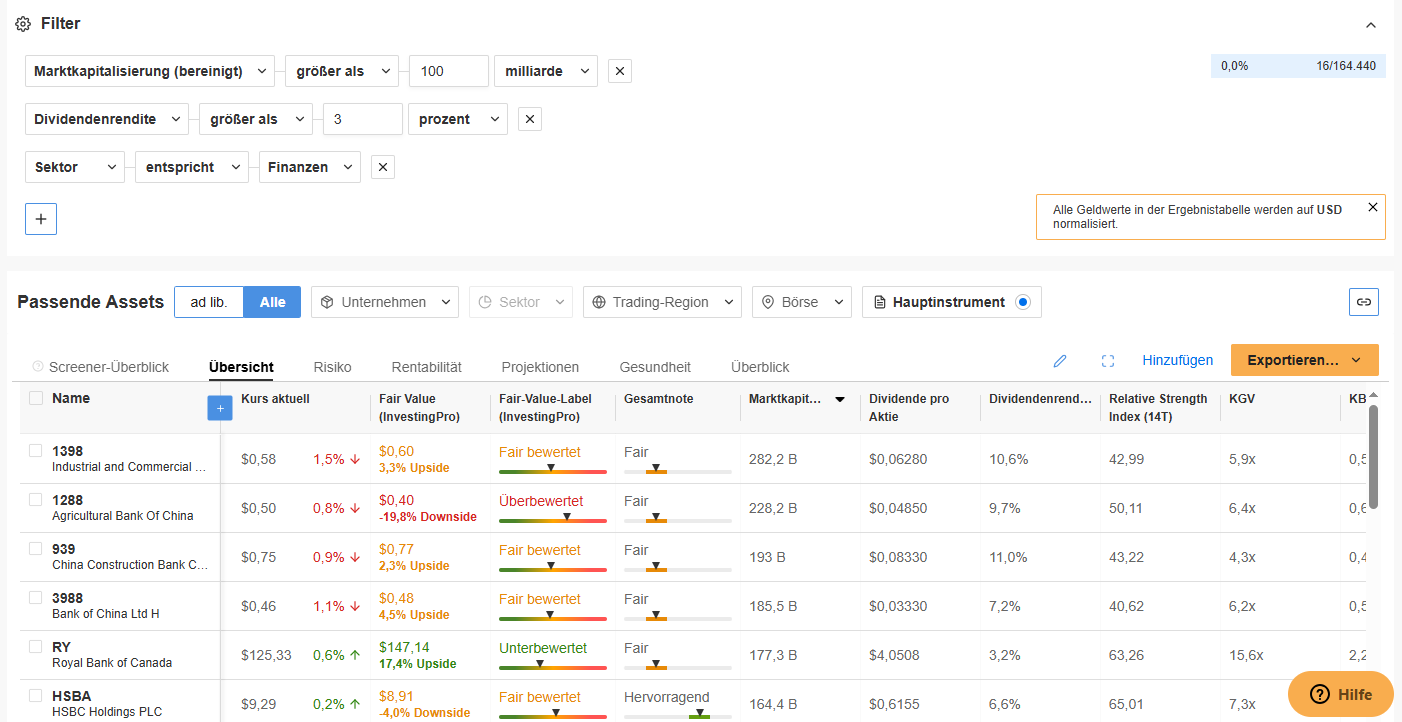 Click to enlarge
Source: InvestingPro stock screener.
Besides your own filters there are ready-made models and strategies. Pro+ includes valuation scores such as the Altman Z-Score, which estimates bankruptcy risk, and the Beneish M-Score, which looks for signs of manipulated earnings. Predefined screens set the filters for you, for example for cheap stocks near their 52-week low. You can then adjust every criterion.
A classic stock selection system can be rebuilt with these filters. William O’Neil’s CAN SLIM combines earnings growth with price strength, and most of its criteria can be expressed as screener filters. The same goes for dividend screens, such as stocks with a yield above 3 percent in one sector, as in the screenshot above.
Watchlists with smart features
A good watchlist keeps your portfolio easy to follow. If you run several investment ideas side by side, separate watchlists help. In InvestingPro each list shows the important key figures, risk measures and forecasts for every stock.
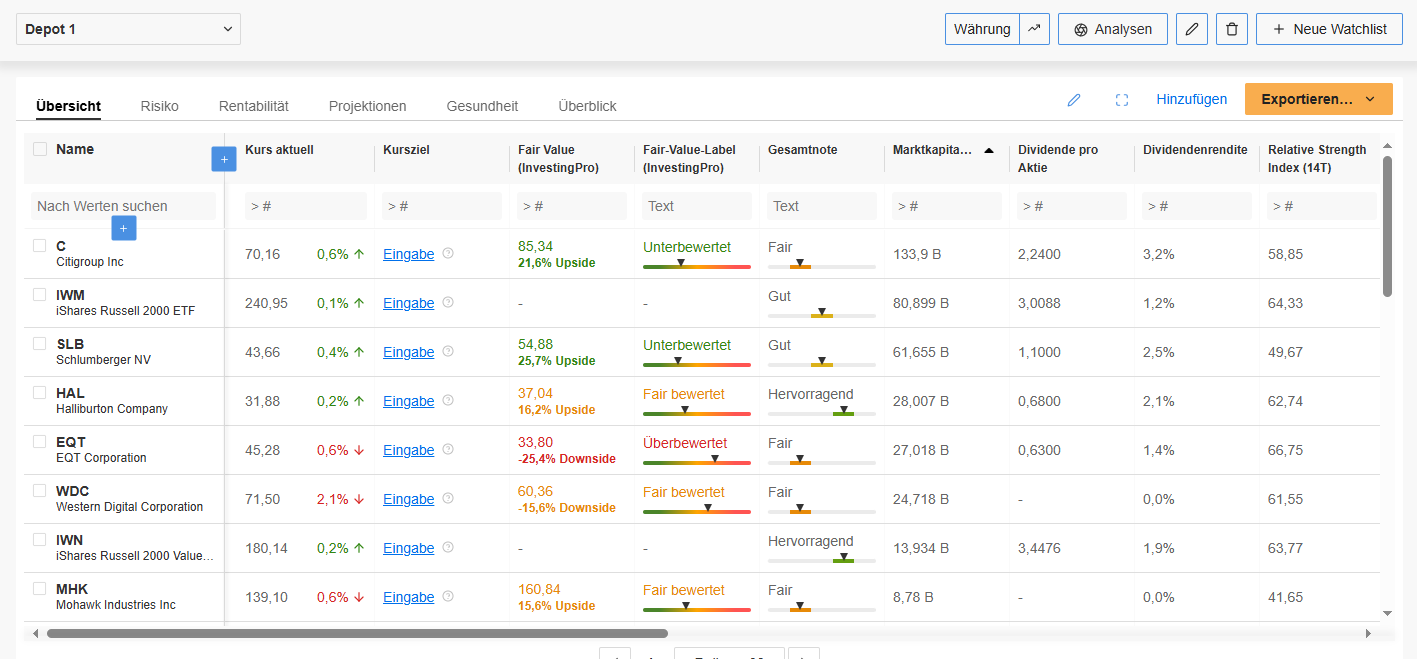 Click to enlarge
Source: InvestingPro watchlists.
In Pro+, one click checks the whole list. According to the plan comparison, the watchlist analysis, custom views and the export are Pro+ features. The analysis sums up the performance of all positions, compares it with the S&P 500 and shows the sector split, and the lists can be exported to Excel, Google Sheets or CSV.
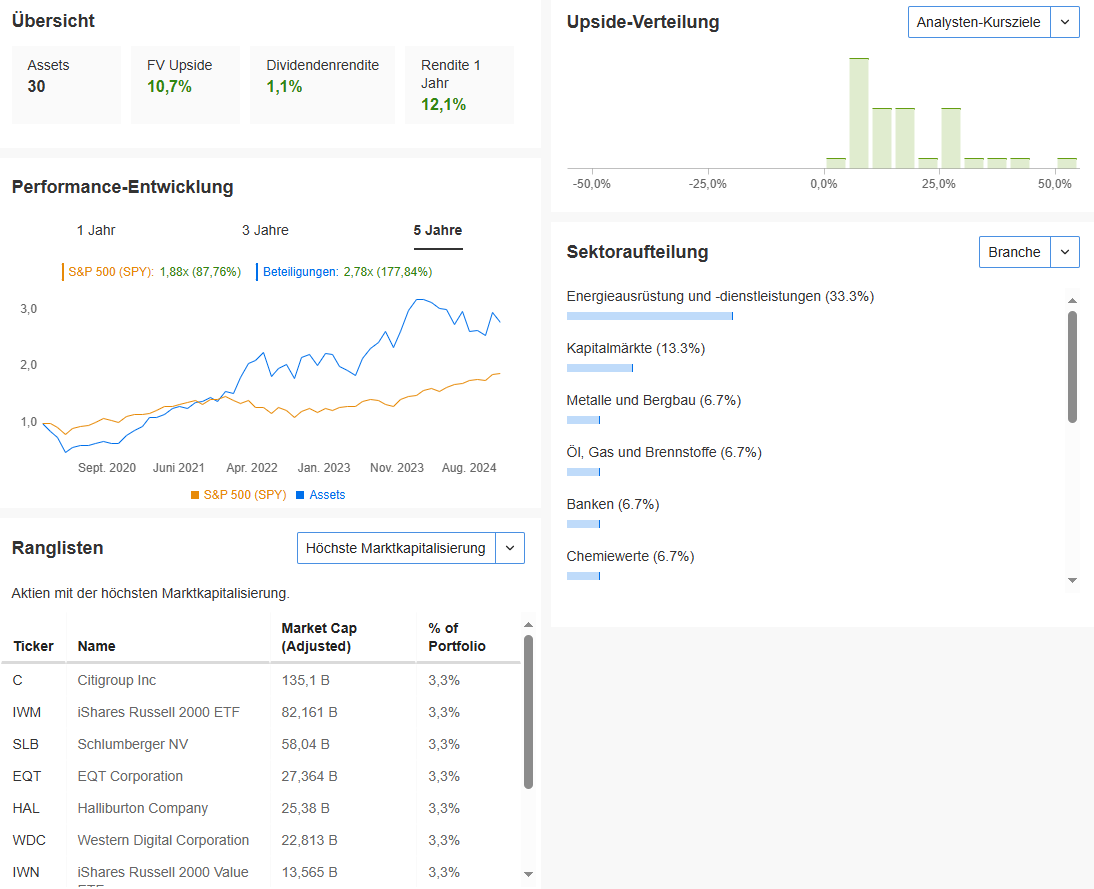 Click to enlarge
Source: InvestingPro feature overview.
ProPicks AI: stock picking with artificial intelligence
ProPicks AI is the AI stock selection of InvestingPro. According to the provider’s methodology page, a model ranks stocks on more than 50 financial metrics (the sales pages speak of 100+ metrics and 25 years of data) and builds portfolios of 10 to 20 stocks. They are held equally weighted and updated on the first trading day of every month.
The range has grown from a handful of US strategies into a global system. On October 8, 2026, the plans page listed 33 strategies for Pro, 6 for the US and 27 for international markets, and all 88 for Pro+, including 5 premium US strategies. In a press release on October 28, 2024, Investing.com reported on the first twelve months since the launch. The later figures are model performance tracked since publication, according to the provider, not trades actually carried out for clients; the earlier years are backtests.
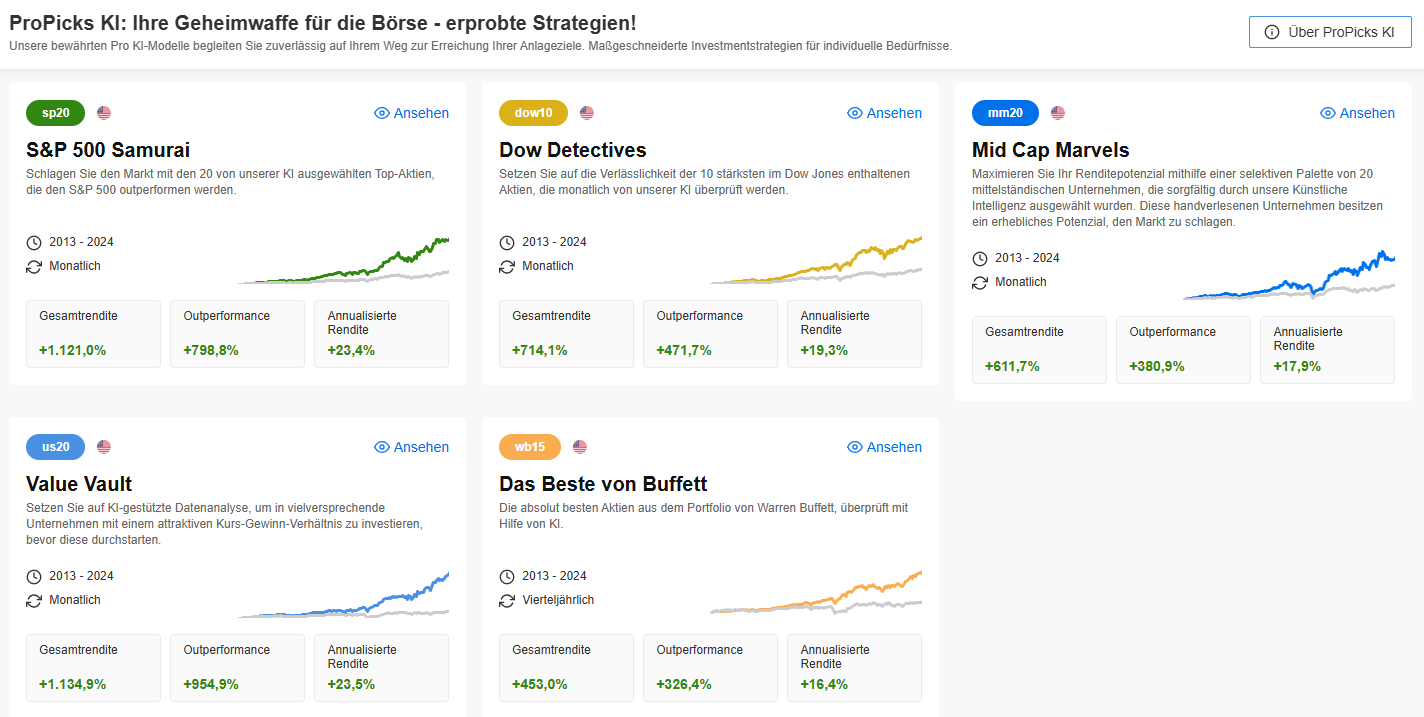 Click to enlarge
Source: InvestingPro ProPicks AI.
Past performance is not a promise for the future. The strategy cards show model results against a benchmark index, and part of the history comes from backtests. At every rebalancing some stocks drop out and new ones come in. Check the current figures and the ProPicks methodology directly at the provider, because the figures change all the time.
WarrenAI: the AI chatbot
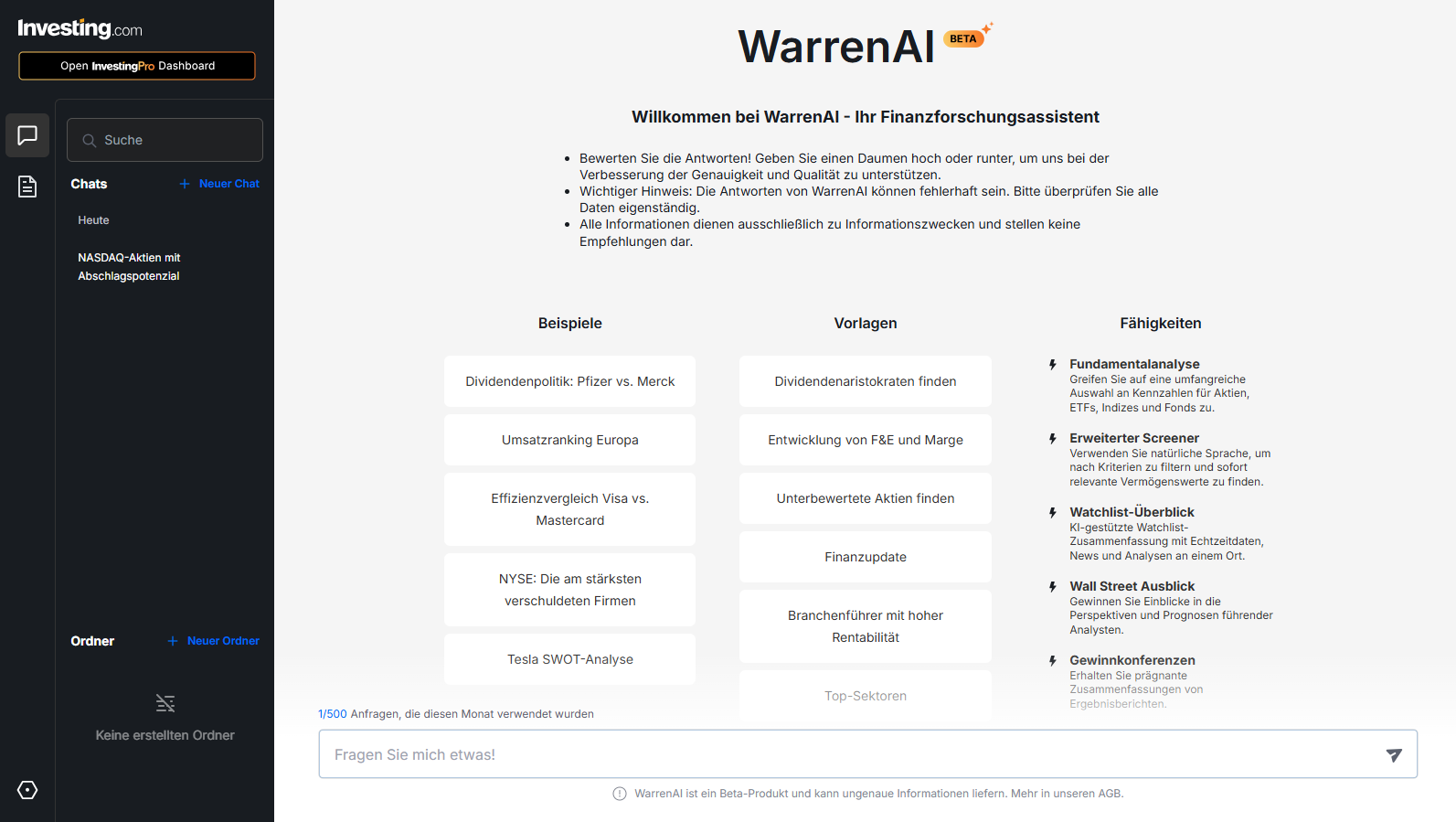
WarrenAI is the AI chatbot of InvestingPro. It answers questions about more than 180,000 financial instruments, including stocks, ETFs and bonds, in plain language. According to the WarrenAI help center, its answers come from live Investing.com data and connected data tools.
You can test the chatbot before you subscribe. With a free Investing.com account you get 5 messages; every plan, free accounts included, has a monthly credit allowance. With Pro you get 50 credits a month, with Pro+ 500. You can ask, for example, for the range of analyst price targets for a stock or for a summary of an earnings call.
The provider’s selling point is the data source. According to Investing.com, WarrenAI queries current Investing.com data rather than relying only on what a general AI model learned. That does not make every answer up to date or correct: check the figures, the date and the source yourself. The screen itself warns that answers can contain errors. The same checks apply to every AI research tool; our AI trading overview explains them.
 Click to enlarge
Source: WarrenAI.
AI chart analysis
The newest part of InvestingPro reads charts. Investing.com calls the feature WarrenAI-Powered Chart Analysis. You click “Analyze Chart” on the page of a stock, currency pair, commodity, index or crypto asset, and after about 60 seconds the AI delivers recognized patterns, key levels and suggested entry, stop-loss and target prices. Each analysis uses 5 WarrenAI credits, and the feature is available to all users.
For a first look this is useful, but the detailed work stays with you. The detected patterns and levels are a starting point, not a finished trade setup. As a price action trader I draw my levels myself, because that is where the decision is made; if you take technical analysis seriously, check the suggestions with your own tools.
Stock analysis, data and charts
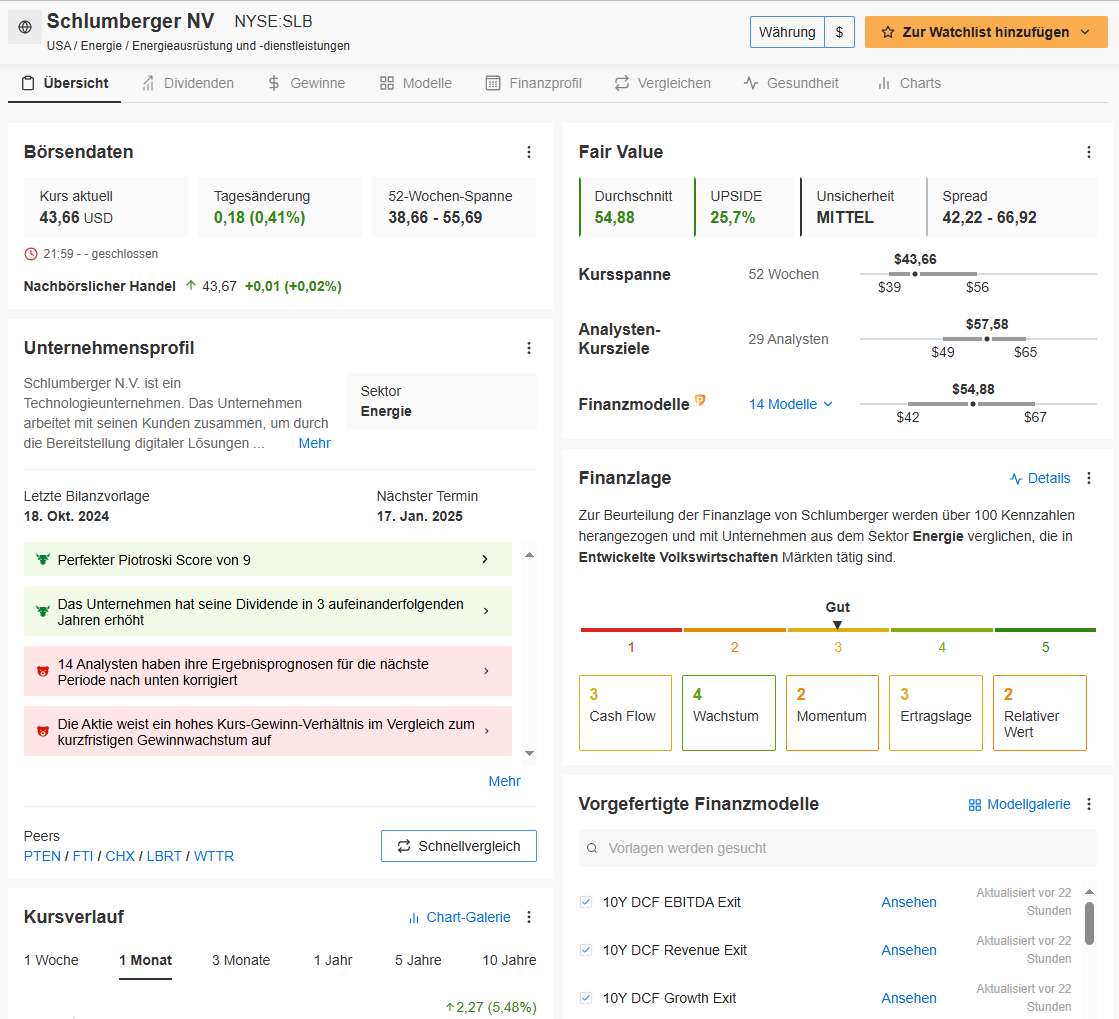
Click on a stock and a complete analysis page opens. You see the current price, the 52-week range, a comparison with competitors and the fair value. In Pro+ InvestingPro calculates the fair value with 17 models, including several DCF methods, and lets you export the results to Excel or Google Sheets.
 Click to enlarge
Source: InvestingPro stock page for SLB.
For covered stocks there are ProResearch PDF reports. These PDF reports bundle figures, history and forecasts for a company in one document, and both plans include unlimited reports for the covered stocks. Investing.com does not say on its plans page how many stocks are covered. They save you a lot of manual research.
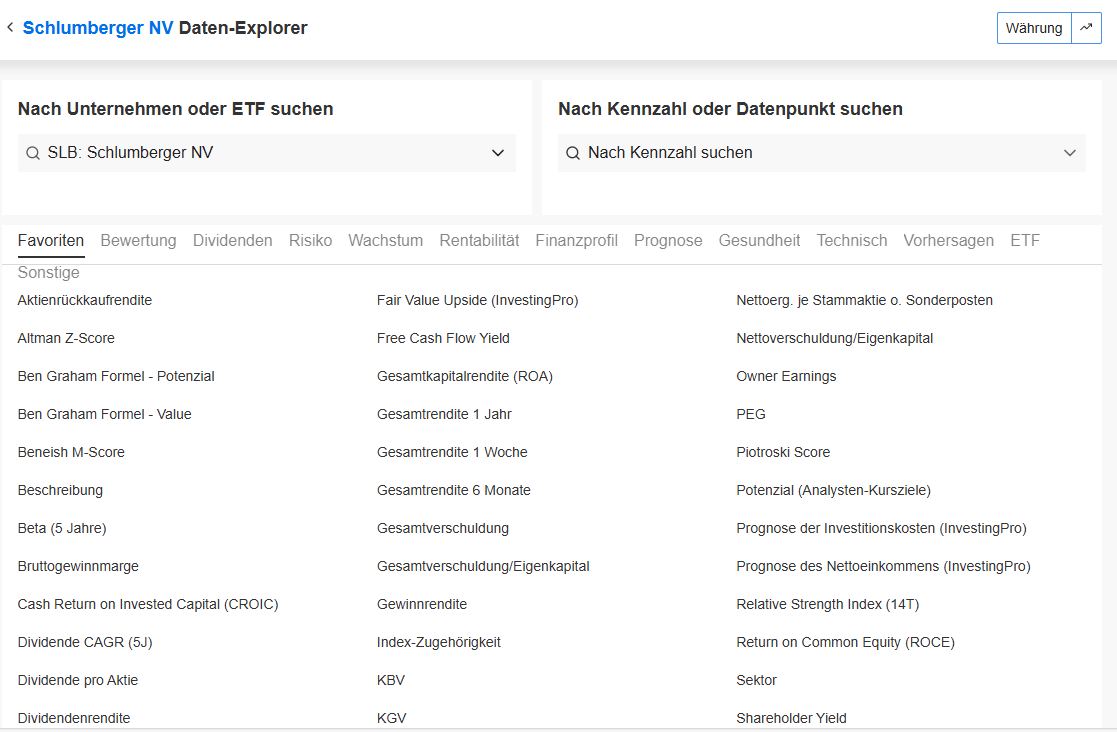
If you want to dig deeper, use the data explorer. Here you search for single metrics, much like an analyst at a fund. Technical values such as moving averages, the RSI or the stochastic oscillator are also available.
 Click to enlarge
Source: InvestingPro data explorer.
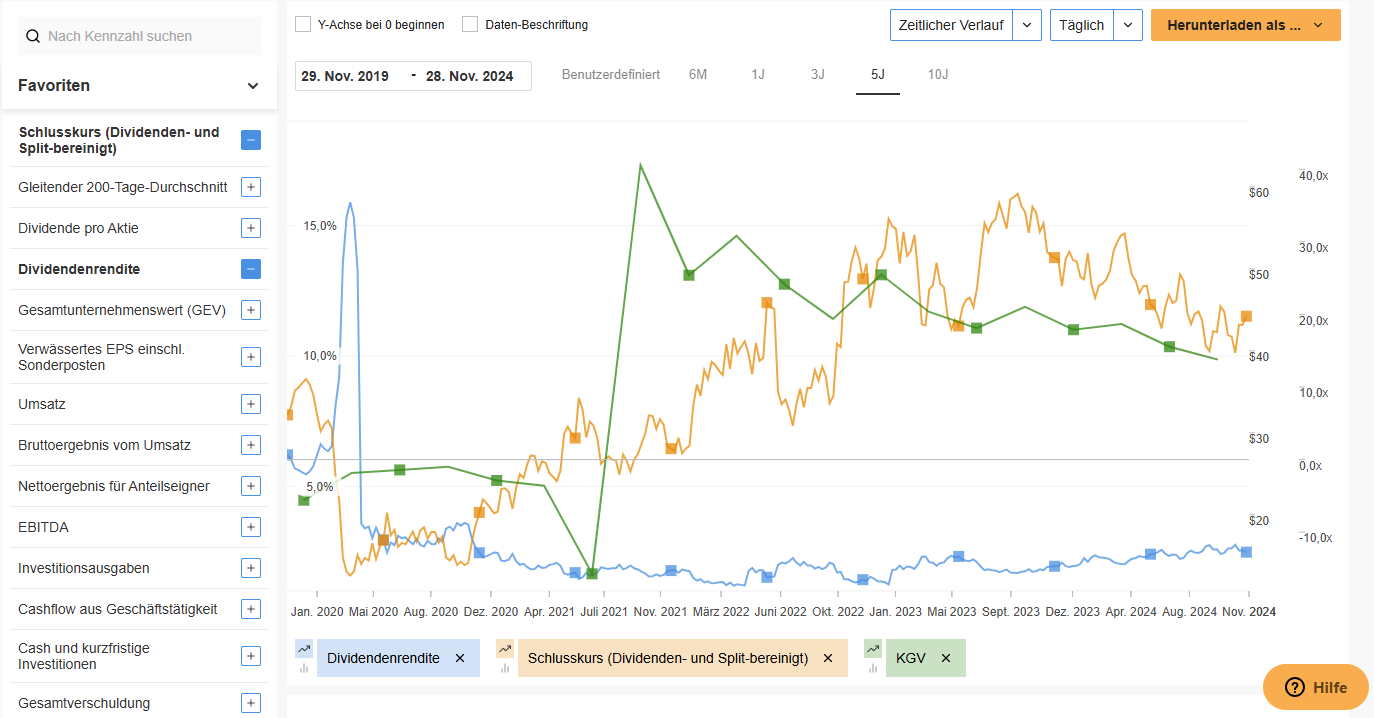
A special feature is the combination of price and fundamentals in one chart. You project key figures such as the dividend yield or the P/E ratio into the price history and compare them over time. The search finds the right metric quickly.
 Click to enlarge
Source: InvestingPro charts.
Pros and cons of InvestingPro
No tool is perfect. Here are the strengths and weaknesses of InvestingPro side by side.
Pros
- Large data base: up to 1,200+ metrics and 10 years of financials in Pro+, with stock data for the US and more than 70 other markets.
- AI in several places: ProPicks AI, WarrenAI and the chart analysis take routine work off your hands.
- Ready-made models and screens: predefined screens and, in Pro+, scores such as the Altman Z-Score give you a quick shortlist.
- Ad-free interface: no pop-ups and no distractions while you research.
- Export and investor portfolios in Pro+: watchlists go to Excel or Google Sheets, and you can add the holdings of large investors from their 13F filings to a watchlist.
Cons
- Information overload for beginners: the sheer amount of data is overwhelming at first.
- No promise of success: the ProPicks strategies partly rest on backtests and do not guarantee future gains.
- Ongoing costs, refunds rare: InvestingPro is a subscription that renews automatically, payments are generally not refundable under the provider’s terms (subject to applicable law), and the full data depth needs the more expensive Pro+.
- No trading platform: InvestingPro only analyzes; you still trade through your own broker.
- Prices move with promotions: the price you see depends on the current sale, the billing period and your country.
Who is InvestingPro worth it for?
InvestingPro pays off above all if you analyze individual stocks regularly. Investors with a pure ETF savings plan rarely need this depth. If you pick stocks on their fundamentals, the screener and the ProResearch reports save you real time.
When it comes to trust, independent reviews help. On Trustpilot, Investing.com had a score of 4.0 out of 5 from 1,441 reviews on October 8, 2026. That rating covers the whole portal, not only the Pro subscription.
Before you decide, compare alternatives. If you mainly work with charts, TradingView is the stronger tool; our comparison of TradingView alternatives shows where InvestingPro fits among other platforms. Koyfin combines charts with fundamental data and has a free plan, and Finviz is known for fast screening; we have not tested either of them for this review.
My verdict on InvestingPro
InvestingPro is one of the most complete research packages for private investors. The combination of stock screener, ProPicks AI, the chatbot WarrenAI and the AI chart analysis covers almost every step of stock analysis. The depth of data and the ad-free interface set it apart.
The price for this is some complexity and an ongoing subscription. Beginners should take their time before they use the full range sensibly, and the deepest data sits in Pro+. If you check individual stocks regularly, you get a data base close to professional level for comparatively little money. The AI takes work off your hands; the decision stays with you.
- Good fit for: investors who research individual stocks on their fundamentals and want screener, valuation and research in one place.
- Not a fit for: pure ETF savers, intraday chart traders and anyone who expects the AI to pick winners for them.
Investing in stocks carries a risk of loss. This review describes the features and costs of a research tool; it is not investment advice and not a recommendation to buy any stock.
Frequently asked questions about InvestingPro
What is InvestingPro used for?
InvestingPro is a research tool from Investing.com for selecting and valuing stocks. It offers a stock screener, the AI strategies ProPicks AI, the chatbot WarrenAI and fair value estimates. It suits private investors and active traders who want to base their decisions on data.
How much does InvestingPro cost?
Seen from Germany on October 8, 2026, Pro cost €9.49 a month and Pro+ €23.99 a month on a yearly plan. Billed monthly, the prices were €17.99 and €44.49, during a sale and before VAT. The longer the billing period, the lower the monthly price, and prices can differ by country.
Is WarrenAI free?
You can try WarrenAI for free with 5 messages after signing up for a free Investing.com account. With Pro you get 50 credits a month, with Pro+ 500. The credits renew monthly; the help center gives different rules for the exact day, so check the date in your account.
Is InvestingPro worth it?
InvestingPro is worth it above all for investors who analyze individual stocks regularly. For pure ETF savers the range is usually too large. If you select stocks on their fundamentals and want to save time, you benefit most; the deepest data needs Pro+.
What are the alternatives to InvestingPro?
Well-known alternatives are TradingView, Koyfin and Finviz. TradingView focuses on charting, Finviz on fast screening (see our Finviz review), and Koyfin combines charts with fundamental data. Which one fits depends on whether you value companies or trade charts.
How do I cancel InvestingPro?
You cancel the automatic renewal in your account settings or through Investing.com support, up to 24 hours before the billing date. Your access stays active until the end of the paid period. Under the provider’s terms, payments are generally not refundable, subject to applicable law; some countries have their own rules. If you subscribed through Apple or Google, refunds follow the rules of that app store.
This US edition is based on our German edition on kagels-trading.de and has been adapted for US readers.
More Markets and Brokers guides
- Choose a broker
Interactive Brokers Review 2026: Fees and Platforms
Fees, platforms, investor protection and real futures commissions from a client since 1996.
- Understand your price
Market Makers: Who Sets Your Price and How They Profit
How market makers earn on the spread, who sets prices at German trading venues and what the EU ban on payment for order flow changed.
- Read bond market stress
MOVE Index: The VIX of the Bond Market, Explained
What the MOVE index measures, which readings signal stress, how it differs from the VIX and where its limits are.
- Size an index future
Micro Futures: MES vs MNQ, Tick Values and Risk
MES and MNQ tick values, a worked sizing example from the stop with costs and slippage, and why margin is not your risk.
- Read the chip sector
SOX Index: Holdings, Weighting and How to Use It
What the SOX holds, how Nasdaq caps the weights, its largest declines since 2004 against the Nasdaq-100 and which ETFs really track it.
- Use the free news portal
Investing.com Review: Free Tools, Data and Limitations
What the free Investing.com portal does well, where the quote prices come from and when InvestingPro is worth paying for.
- Follow an IPO
Anthropic Stock: IPO Date, Valuation and How to Invest
Where the Anthropic IPO stands, how the valuation compares with revenue and how to get exposure before and after the listing.
- Invest in OpenAI before the IPO
OpenAI Stock: Can You Buy It, and Who Owns OpenAI?
Why there is no OpenAI stock yet, who owns OpenAI, where the IPO stands and how much OpenAI you get through Microsoft or SoftBank.
- Value a new listing
SpaceX Stock (SPCX): Valuation, Risks and How to Buy
How to buy SpaceX stock, what the company is worth after the IPO and which risks the lock-up calendar brings.