
Finviz Review: Free vs Elite, Screener and Limitations


Contents
- Finviz in 30 seconds
- What is Finviz?
- The Finviz stock screener in three steps
- Maps, news and groups
- Insider trading data with links to the SEC
- Futures, forex and crypto: the overview pages
- Backtests: no longer in the menu
- What does Finviz cost? Free vs Elite
- Is there a Finviz app?
- Pros and cons of Finviz
- Who is Finviz worth it for?
- Frequently asked questions about Finviz
- About the author
Finviz turns thousands of US-listed stocks into a short list in a few clicks, and the basic screener costs nothing. That is why many traders open it before the week starts. The first visit can still be confusing: a dense table, dozens of drop-down filters and abbreviations everywhere.
This review shows what the free version does, how a simple three-filter screen works and what Finviz Elite adds for its price. I also cover the limits: delayed data, US listings only, a backtest tool that no longer appears and an official mobile app that is only weeks old. The screenshots and counts come from public pages without an account, taken on October 25, 2026; we did not test the paid Elite features. How we research and write is described on our editorial policy page. We have no business relationship with Finviz.
Finviz in 30 seconds
- What it is: a browser-based screener and market overview for stocks and ETFs listed on NYSE, Nasdaq and AMEX, plus overview pages for futures, forex and crypto.
- Free use: the screener, maps, news and insider pages work without an account. Stock quotes are delayed one minute.
- Elite price: $39.50 a month or $299.50 a year (about $24.96 a month), checked on October 25, 2026. Real-time stock quotes, exports, alerts and intraday charts.
- Main limits: only US listings, delayed futures data, no backtesting tool in the current menu.
- Who it suits: traders and investors who screen US stocks and want a quick picture of the market before they start their own analysis.
What is Finviz?
Finviz, short for Financial Visualizations, is a US research website that filters stocks and ETFs by your own criteria and shows the results as tables, charts and maps. Its core is the stock screener. Around it sit market maps, insider trades, news, sector groups and price overviews for futures, forex and crypto.
The coverage follows the stock exchange, not the company’s home country. In its FAQ, Finviz names NASDAQ, NYSE and AMEX as the markets it covers and says there are no plans to add others. A company from Brazil, Ireland or Switzerland appears if its shares or ADRs trade in New York; my example screen below contained Ambev, Accenture and Amcor. A stock that trades only in Frankfurt, London or Tokyo does not appear.
The stock and ETF screeners are now separate. On October 25, 2026, the stock screener held 5,611 stocks and the new ETF screener 6,156 ETFs. Older reviews, including the German version of this article, still describe one list for both.
The Finviz stock screener in three steps
The screener is the reason most people come to Finviz. You can use it without registering, and every filter changes the result list at once. A free account is only needed to save screens and use the portfolio. The filters sit on tabs: Descriptive for size, sector, country and volume, Fundamental for valuation and growth, Technical for price behaviour.
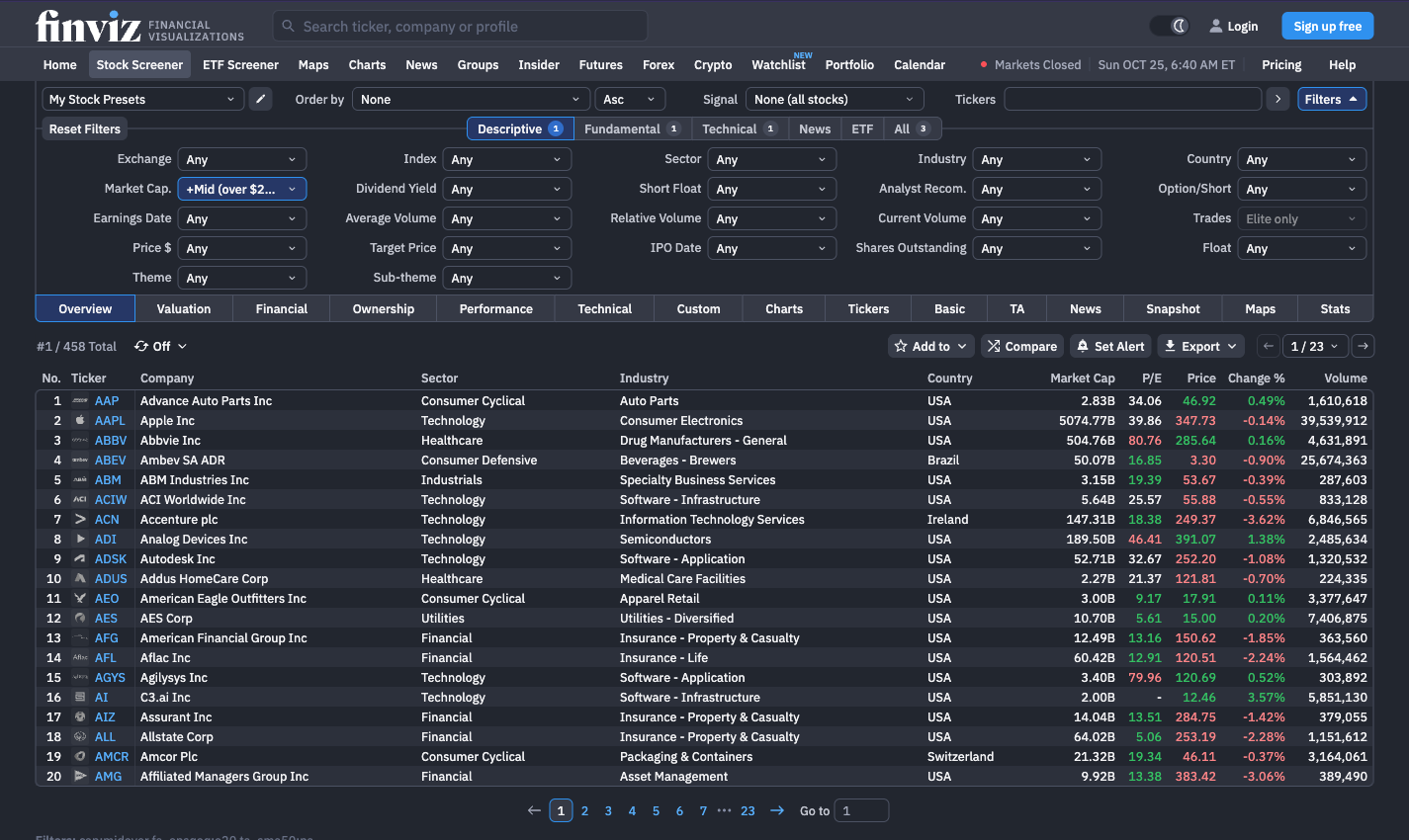
Here is a simple trend-following screen, built on October 25, 2026, with each step’s count. The counts show how quickly the list shrinks. They are a snapshot, not a performance claim: the same filters give a different list next week.
- Size first: Market Cap “+Mid (over $2bln)”. This removes micro and small caps, where a single larger order can move the price. The list fell from 5,611 to 2,006 stocks.
- Then growth: EPS growth qtr over qtr “Over 20%”. Finviz’s help page defines this as earnings per share in the last quarter compared with the same quarter a year earlier. Companies with strong recent growth remain: 980 stocks.
- Finally the trend: 50-day SMA “Price above SMA50”. Only stocks trading above their 50-day moving average stay, a rough filter for a medium-term uptrend. 458 stocks were left.
 Click to enlarge
The result is a list of candidates to study, not a list to buy. I would now open the charts, check where support and resistance lie and look at the next earnings date. Finviz helps with that step too: the tabs Valuation, Financial, Performance and Technical show the same stocks with different columns, and Charts shows small price charts instead of the table.
A few filters are for Elite only, and the free table shows fewer rows. In the screenshot the “Trades” filter is marked “Elite only”. Free users see 20 rows per page and the table refreshes every three minutes; Elite shows 100 rows and refreshes every ten seconds, according to the provider’s comparison table. If you want to scan stocks before the US open, our guide to pre-market and after-hours trading explains what those early prices mean.
Maps, news and groups
The market map is Finviz’s best-known picture. Each tile is a stock, its size shows the market capitalization and its colour the price change of the day. Besides the S&P 500 you can choose the Dow Jones 30, Nasdaq 100, Russell 2000, a world map, ETFs, crypto, futures and themes, shown as tiles, bubbles or a matrix (October 25, 2026). How to read such a map and how Finviz compares with TradingView’s version is covered in our stock heatmap guide. Intraday maps are an Elite feature.
The news page collects headlines and blog posts from many sources in two columns. Each item links to the original source, and ticker pages show the news for a single stock. Groups shows sectors, industries, countries or size classes with their key figures, which helps you compare the relative performance of different market groups. The calendar lists earnings, dividends and economic releases.
Insider trading data with links to the SEC
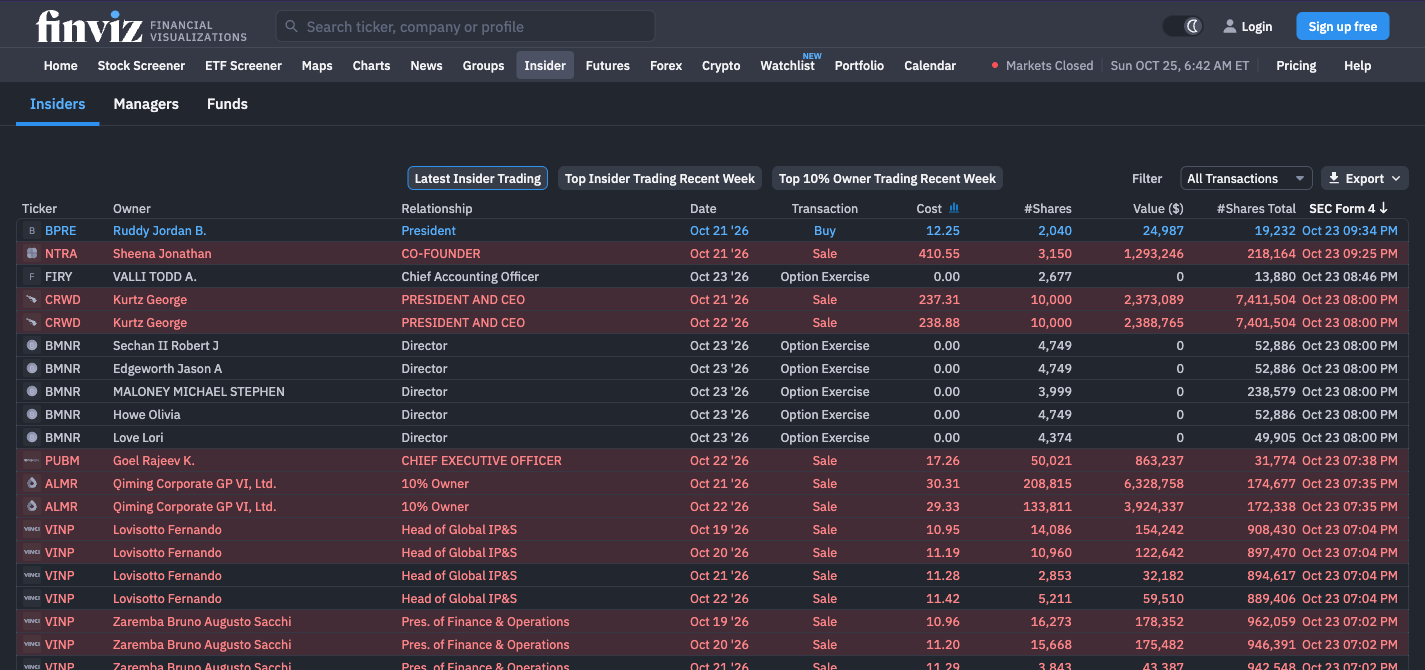
The insider page is one of the strongest free parts of Finviz. It lists reported purchases, sales and option exercises by company officers, directors and large shareholders, mainly from filings with the US Securities and Exchange Commission on Form 4. The feed also includes proposed sales from Form 144 notices; such a notice does not prove that a sale took place. Each row shows the person, their role, the date, price, number of shares and total value.
 Click to enlarge
Source: Finviz insider trading.
Every row can be checked at the source. The date in the “SEC Form 4” column links to the original filing on sec.gov, so you can read the original. Buttons filter for the latest trades, the largest trades of the week and trades by 10% owners. Many investors give purchases more weight than sales, because sales have many routine reasons such as taxes, diversification or planned selling programs. A purchase is still only a clue, never a trading signal on its own.
Futures, forex and crypto: the overview pages
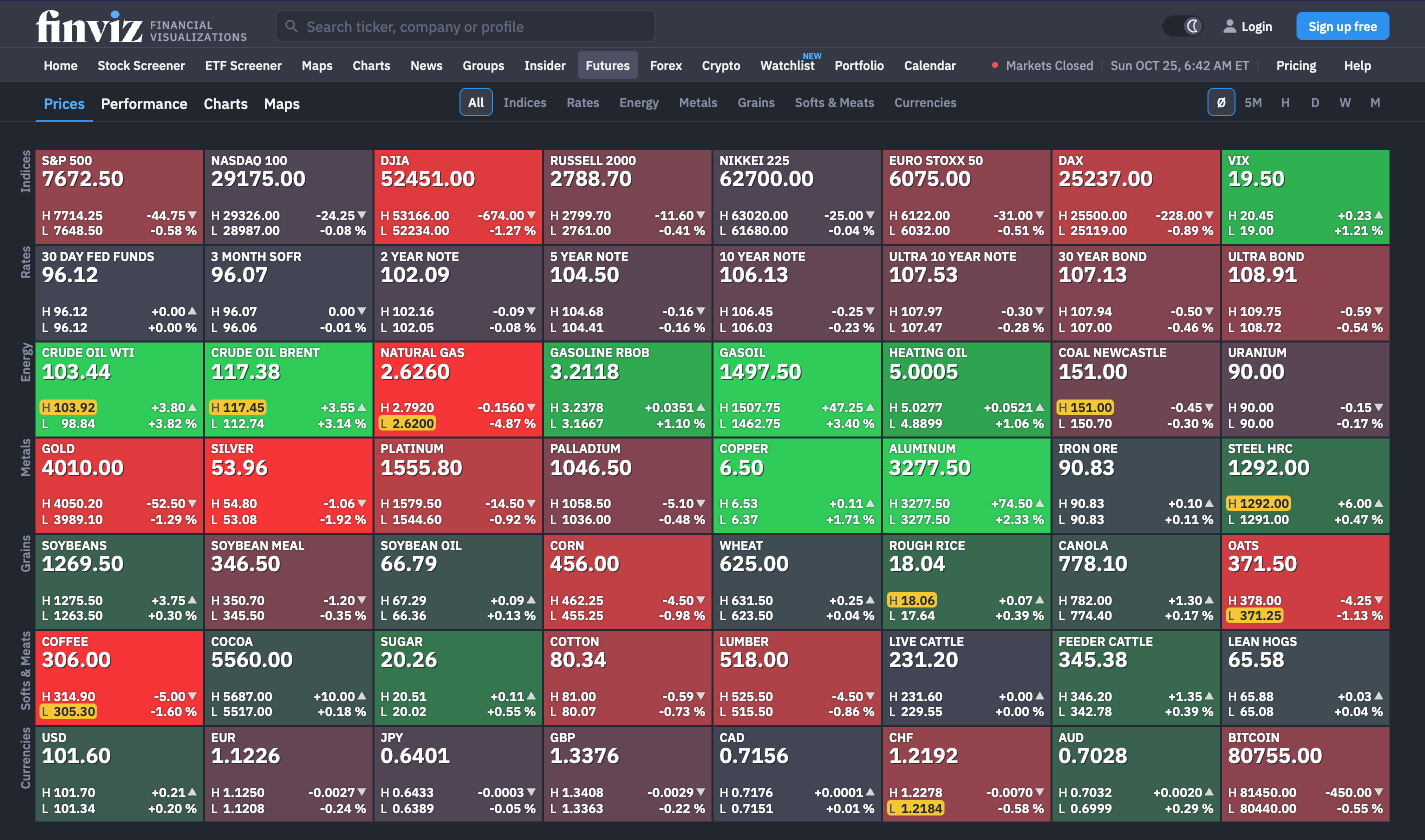
For futures, Finviz offers a free one-page overview. It covers stock indices, interest rates, energy, metals, grains, softs, meats and currencies, with price, high, low and change for each contract. Further tabs show performance over several periods, charts and a futures map.
 Click to enlarge
Source: Finviz futures.
The futures data is delayed, and Finviz’s own pages do not agree by how much. The FAQ on the Elite page said on October 25, 2026, that futures data is delayed 20 minutes, also for Elite members. The footer of the same page said futures and options are delayed by 15 minutes. Until the provider fixes this, check the timestamp of the quote before you rely on it. For trading decisions in futures you need real-time data from your broker or platform.
Forex and crypto have their own pages with prices, performance and charts. These are overviews, not screeners: you cannot filter currency pairs or coins by your own criteria the way you filter stocks. For real futures research with full contract lists and positioning data, a specialised data portal such as Barchart goes much deeper; see our Barchart review. Our guide to the COT report shows how to read futures positioning.
Backtests: no longer in the menu
Earlier Finviz Elite reviews describe a backtest tool, but we could not find it in the current product. The main menu on October 25, 2026, had no Backtests item, and the Elite comparison table did not list one. The old address finviz.com/backtests answered with HTTP status 410, while an address that never existed answered with 404.
A 410 status means “gone”: the server reports that the page was removed on purpose. That is what the server says, not an announcement by Finviz, and a tool can come back under a new address. For your decision it is enough to know that you should not buy Elite for backtesting. Testing rules on historical data needs software built for that job; our guides to backtesting and trading software explain the options.
What does Finviz cost? Free vs Elite
Most of Finviz is free, and a free account adds saved screens and a small portfolio. Elite costs $39.50 a month or $299.50 a year, which Finviz shows as $24.96 a month billed annually. I checked these prices on the Finviz Elite page on October 25, 2026. Prices are in US dollars; your card provider converts them.
| Feature | Free | Elite |
|---|---|---|
| Price | $0 | $39.50 a month or $299.50 a year |
| Stock quotes | 1 minute delayed | real-time, also before and after the session |
| Financial statements | 3 years | 8 years |
| Screener filters | basic | advanced |
| Saved screener presets | 50 | unlimited |
| Rows per page | 20 | 100 |
| Refresh | 3 minutes | 10 seconds |
| Intraday charts | no | yes, up to 12 per layout |
| Portfolios | 1 with 20 holdings | 100 with 500 holdings |
| Alerts | no | unlimited |
| Export to Excel or CSV | no | yes |
| Ads | yes | no |
Source: the comparison table and FAQ on finviz.com/elite, October 25, 2026. “Free” means a free registered account; the delay applies to NASDAQ, NYSE and AMEX quotes. Elite’s pre-market data runs from 4:00 to 9:30 a.m. and after-hours data from 4:00 to 8:00 p.m. Eastern Time, according to the FAQ.
 Click to enlarge
Source: Finviz Elite comparison.
The free trial needs a credit card and turns into a paid plan unless you cancel. The Elite page says so in several places but did not state the trial length when I checked, so look for it at sign-up. Paid plans renew automatically. Finviz offers refunds during the initial 30-day period on written request; later payments are not refundable, according to the same page. Put the cancellation date in your calendar the day you start.
Elite is worth it at a clear point. If you need real-time US stock quotes, intraday charts, alerts or regular exports to Excel, the subscription saves time. If you screen once a week and use the map for an overview, the free version is enough. Real-time stock data does not include real-time futures: Finviz states that futures stay delayed in Elite too.
Is there a Finviz app?
Finviz has official apps for iPhone and Android, checked on October 25, 2026. In Apple’s App Store the free app “Finviz” is listed by the seller Finviz s.r.o., with version 1.0 dated October 6, 2026, followed by version 1.0.1 on October 9 in Apple’s version history. On Google Play the app is listed under the developer name Finviz. According to the store description, the iPhone app focuses on watchlists, market overview, heat maps, the reasons behind price moves and notifications.
Other apps with similar names exist, so read the developer name, not the app name. On October 25, 2026, Google Play also listed an app by a developer called PeakStone under a Finviz-like name. If the developer is not Finviz, the app does not come from Finviz. We have not tested the official apps; the German version of this article, written before the launch, still says there is no app.
Pros and cons of Finviz
Pros
- The basic screener is free and works without an account. Few tools of this size give away that much.
- Every insider entry links to the SEC filing. You can check the source in one click.
- The market map shows the state of the market in seconds. Sectors, indices, ETFs and more.
- Free futures, forex and crypto overviews. Delayed, but broad enough for a daily look.
- Clear pricing with one paid plan. Monthly or yearly, with a refund window.
Cons
- Only stocks and ETFs listed in the US. Shares that trade only in Europe or Asia are missing.
- Delayed data in the free version, and delayed futures even in Elite. The provider’s own delay figures for futures conflict.
- No backtesting tool in the current menu. Older reviews still list it.
- Ads in the free version and a dense interface that takes time to learn.
- The official apps are new. There is little user experience with them yet.
Who is Finviz worth it for?
For screening US-listed stocks, the free version is one of the best starting points I know. I use the screener when I want to see quickly where there is movement, and the map answers that question at a glance. If you get used to the English filter names, you get more without registering than some paid tools offer.
Two groups should look elsewhere. If you need shares listed only on European or Asian exchanges, Finviz does not cover those listings, and Elite does not change that; a screener with global exchange coverage, such as the TradingView screener, fits better. If you want to test trading rules on history, use dedicated backtesting software. For deeper fundamentals and valuation models, see our InvestingPro review; for a wider comparison of research tools, our guide to Bloomberg Terminal alternatives.
My verdict: start free, pay only for real-time quotes or exports. Finviz Elite becomes interesting when delays cost you something or when screen results go into a spreadsheet every day. For the weekend screen and the market overview, the free version does the job. Whatever the screener shows, your own chart analysis and risk management still decide the trade.
Frequently asked questions about Finviz
What is Finviz used for?
Finviz is mainly used to screen US-listed stocks and to get a quick overview of the market. Besides the stock screener, it offers an ETF screener, market maps, insider transactions and proposed-sale notices linked to SEC filings, news and delayed overviews for futures, forex and crypto.
Is Finviz free?
Yes, the screener, maps, news and insider pages are free. A free account adds saved screens and one portfolio. The paid Elite plan costs $39.50 a month or $299.50 a year (checked October 25, 2026) and adds real-time stock quotes, exports and alerts.
How delayed is Finviz data?
In the free version, stock quotes are delayed one minute for NASDAQ, NYSE and AMEX. Elite shows real-time stock quotes. Futures stay delayed in both versions; Finviz’s FAQ says 20 minutes, its page footer 15 minutes, so check the timestamp.
Does Finviz cover European or Asian stocks?
Only if they are listed on a US exchange. Finviz covers NASDAQ, NYSE and AMEX. Foreign companies with US shares or ADRs appear; stocks that trade only in Europe or Asia do not.
Can you still backtest with Finviz?
We found no backtesting tool in the current Finviz menu or Elite comparison. The old backtest address returned HTTP 410 (“gone”) on October 25, 2026. For testing rules on history, use dedicated backtesting software.
Does Finviz have a mobile app?
Yes, official apps for iPhone and Android were available when we checked on October 25, 2026. Check that the developer is Finviz (Finviz s.r.o. in Apple’s App Store), because apps with similar names come from other developers.
This English edition is based on our German edition on kagels-trading.de and has been adapted for international readers.
More Market Data & Research Tools guides
- Check the Bloomberg Terminal
Bloomberg Terminal: Cost, Features and Who Needs It
What a Bloomberg Terminal is reported to cost, which products exist, who should pay for one and the cheaper tools private investors use instead.
- Find a cheaper research tool
Bloomberg Terminal Alternatives for Individual Traders
Koyfin, Finviz, Barchart, TradingView and InvestingPro compared on data timeliness, fundamentals, screening and price, plus the institutional alternatives.
- Research futures and options
Barchart Review: Free vs Premier, Futures and Options Tools
What barchart.com offers for futures contracts, COT charts and options, what Free, Plus and Premier cost, and what a membership does not include.
- Read futures positioning
COT Report: How to Read Commitments of Traders
Read CFTC reports, calculate net positions and the COT Index, and understand what delayed positioning data can and cannot tell you.