
TradingView Alternatives 2026: 7 Platforms Tested


Contents
- TradingView alternatives in 30 seconds
- When do you actually need an alternative to TradingView?
- The best TradingView alternatives compared
- MetaTrader 5: the alternative for automated trading
- ATAS: the alternative for order flow and volume analysis
- Bookmap: the alternative for the order book
- cTrader: the alternative for forex
- ProRealTime: the alternative for European markets
- TrendSpider: the alternative for automated chart analysis
- InvestingPro: the alternative for fundamental data
- thinkorswim: the alternative for Schwab clients in the US
- What to check before you switch
- Free alternatives to TradingView
- Where TradingView remains the first choice
- Conclusion: when switching is really worth it
- Frequently asked questions about TradingView alternatives
- About the author
For chart analysis, TradingView is hard to beat. I have used the platform every day since August 2017, and for pure charting I would not switch to anything else. Still, the question about alternatives comes up again and again, and there are good reasons for it.
TradingView has clear blind spots. If you want to trade automatically, read order flow in depth or want to value companies on their fundamentals, you hit limits that even the most expensive plan does not remove. For these cases there are tools that simply fit better.
This article shows you seven alternatives that my team and I have tested, sorted by the purpose they serve. For US readers I have added a section on thinkorswim, which many American traders compare with TradingView. I also name three tools we have not tested: Koyfin, TakeProfit and GoCharting. You will also see where TradingView remains the first choice, because switching is often not worth it.
TradingView alternatives in 30 seconds
- No alternative beats TradingView on every point. Switching makes sense only for a specific purpose, such as automated trading or order flow.
- For trading robots: MetaTrader 5 is the standard. The platform is free to download; brokers license it and offer it to you.
- For order flow and volume: ATAS shows market depth, the tape and volume at each price in a depth that TradingView does not offer.
- For Schwab clients in the US: thinkorswim comes with a Schwab account at no extra charge.
- My verdict: for chart analysis, market coverage and community, TradingView stays ahead. I use alternatives to add to it, not to replace it.
What is TradingView missing for you?
- Trading robots that place and manage orders on their ownMetaTrader 5
- The tape and the volume traded at each priceATAS
- The order book and its waiting orders over timeBookmap
- Forex analysis and order execution in one placecTrader
- Good coverage of European stocks and derivativesProRealTime
- Patterns and trendlines found automaticallyTrendSpider
- Valuation models and fair value for stocksInvestingPro
- Charting and trading inside a Schwab account (US)thinkorswim
- Nothing specific, only the priceStay: check a smaller plan
thinkorswim was not tested by us; the other seven were. Click a platform to jump to its section.
When do you actually need an alternative to TradingView?
A TradingView alternative is a charting or trading platform that covers an area where TradingView is weak by design: automated trading, order flow analysis or company valuation.
Before you switch, take an honest look at the problem. In most cases where traders look for an alternative, the platform is not the issue. The plan level or missing real-time data is. What each plan includes is in our TradingView review with all prices.
There are three situations in which another tool is objectively better. First, you want trading strategies to run on their own. TradingView can create signals and send them out through a webhook, but it does not manage orders by itself. Second, you trade futures by order flow and need the tape (time and sales) and full market depth in real time. Third, you are a fundamental investor and want to value companies with valuation models. TradingView itself shows 20 years of annual financial data on the chart from the Essential plan.
Outside these three cases, staying was the better choice in my own workflow. If you want to switch because of the price, check first whether a smaller plan is enough. If you are missing an indicator, the community library almost always has something that fits.
The best TradingView alternatives compared
These are the seven platforms we tested. The table shows what each one does better than TradingView and what it costs to start. Prices change often, so the details follow in each section.
| Platform | Strength compared with TradingView | Starting price |
|---|---|---|
| MetaTrader 5 | automated trading with Expert Advisors | free (through a broker) |
| ATAS | order flow, volume profile, market depth | free version, paid from €24.95/month (live futures from €69.95) |
| cTrader | order execution in forex | free (through a broker) |
| ProRealTime | European stocks and derivatives, backtesting | web version free, Complete $32/month |
| TrendSpider | automatic pattern and trendline detection | $59/month billed yearly |
| Bookmap | real-time view of the order book | free version, paid from $19/month (live stocks and futures from $49) |
| InvestingPro | fundamental data and stock valuation | €9.49/month billed yearly (seen September 25) |
Prices from the providers’ own pricing pages on 25 September 2026: TradingView, ATAS, Bookmap, ProRealTime, TrendSpider and InvestingPro. ATAS and InvestingPro showed prices in euros when we checked from Germany; the US price may differ.
Providers' own pages, 25 September 2026. Bars only for dollar prices; ATAS and InvestingPro showed euro prices from Germany, so they have no bar. Real-time data can cost extra on every platform.
A note on this list: many comparison lists online name thirty tools, including many niche products. This list is deliberately short. Every platform here has a concrete reason to be on it.
For pure backtesting there are more specialized tools than a charting platform. Forex Tester Online also runs in the browser, includes spreads and swaps in its results, and has a blind test mode that hides the instrument and the exact date. How backtesting works on TradingView itself is explained in our TradingView backtesting guide, the general method in our guide to backtesting a trading strategy.
MetaTrader 5: the alternative for automated trading
MetaTrader 5 is a trading platform by MetaQuotes that runs automated trading programs, called Expert Advisors, directly. For traders it is free to download; brokers buy the license and provide the platform.
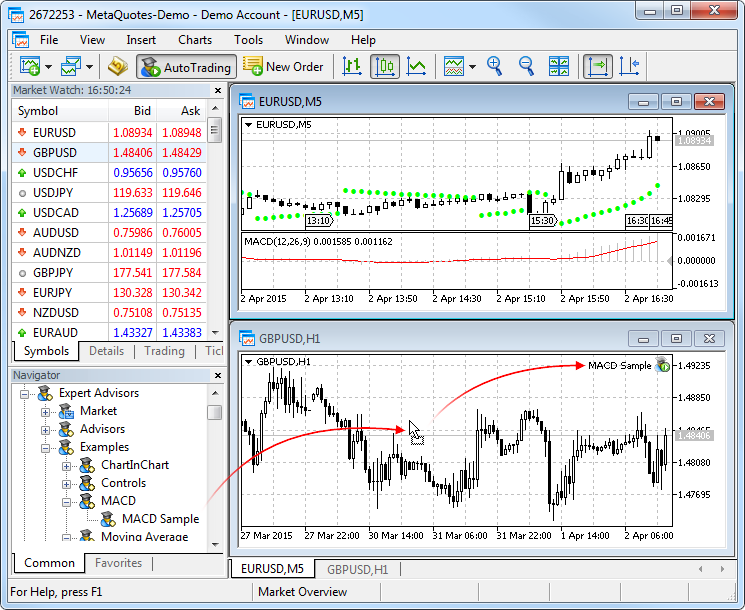
This is the key difference from TradingView. An Expert Advisor runs on MetaTrader by itself: it opens and closes positions and manages stop loss and take profit without you. TradingView can create signals and send them out through webhooks, but another system always has to do the actual trading. Check TradingView’s Terms of Use first: section 3 names “alerts, webhooks” among the information that may not be used “for any form of automated trading”. How TradingView’s own language works is explained in our Pine Script guide. How to test such a program before it trades real money is the subject of our guide to algorithmic trading.
 Click to enlarge
- Choose the robot. The Navigator lists Expert Advisors. The original red arrow illustrates dragging one onto a chart.
- Find it on the chart. MACD Sample appears at the top right of the lower chart. Automated trading also requires the relevant permissions.
Source: MetaQuotes, MetaTrader 5 Help.
You pay for this with usability. The interface looks dated, the charting is clearly weaker, and the markets you can trade depend entirely on your broker. If you only analyze charts, switching brought me no benefit. MetaQuotes itself provides no brokerage services, so you always need a broker that offers the platform. On a Mac, MetaTrader runs inside Wine, which MetaQuotes installs for you; before choosing a computer for your platform, check the operating-system guidance in our trading laptop guide.
Who it is not for: discretionary traders who decide by price action and market structure do not need MetaTrader. I trade this way myself and do not use it.
ATAS: the alternative for order flow and volume analysis
Order flow analysis means making the orders that were actually executed visible on the chart, instead of only looking at the finished price movement.
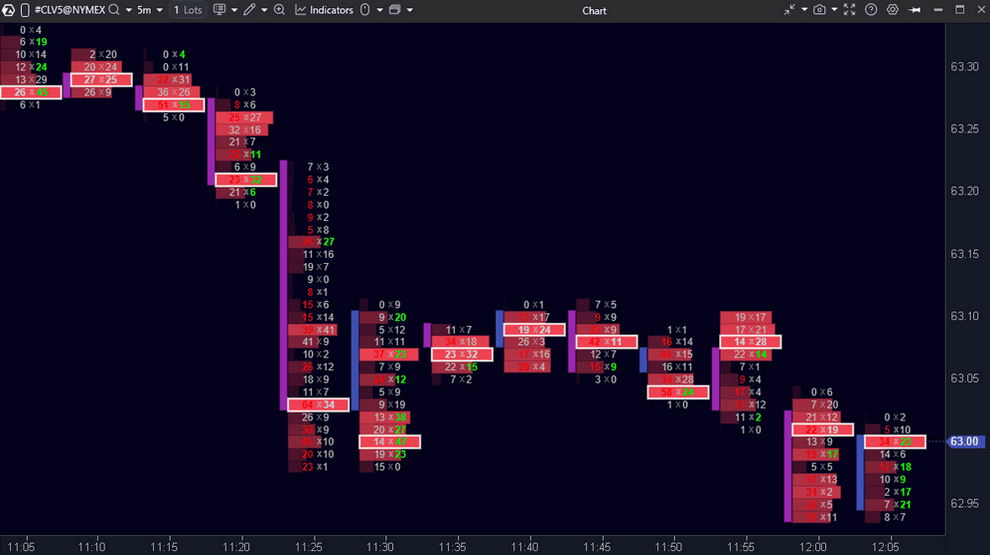
This is where TradingView has its biggest gap. Volume profiles are available from the Essential plan and volume footprint charts from Premium, and the volume weighted average price (VWAP) is built in. What is missing is a built-in time and sales window (the tape), and market depth only comes through a connected broker that supplies that data. ATAS is built for exactly this view: it shows how much was traded at each price level and which side was the aggressor.
 Click to enlarge
- Read across a price level. The paired numbers show volume executed at the bid and at the ask. They describe trades that have happened.
- Read through time. Each vertical group belongs to a five-minute candle. You can see where trading occurred within that candle.
Source: ATAS screenshot in our German review.
The free START version is limited: futures data is delayed by 15 minutes, crypto exchanges are real time. The paid plans cost from €24.95 to €89.95 a month (as shown on the ATAS site from Germany, September 2026). For live futures analysis, PLUS is not enough: it also has the 15-minute delay. You need PRO (€69.95 a month at the German price checked) or ULTRA, plus a supported broker or data subscription (ATAS pricing). If you plan long term, lifetime licenses start at €999.
Who it is not for: if you trade stocks on daily charts or invest long term, the extra cost brings you nothing. Order flow pays off in intraday futures trading, rarely elsewhere. If you mainly want to see the order book, look at Bookmap in the next section.
Bookmap: the alternative for the order book
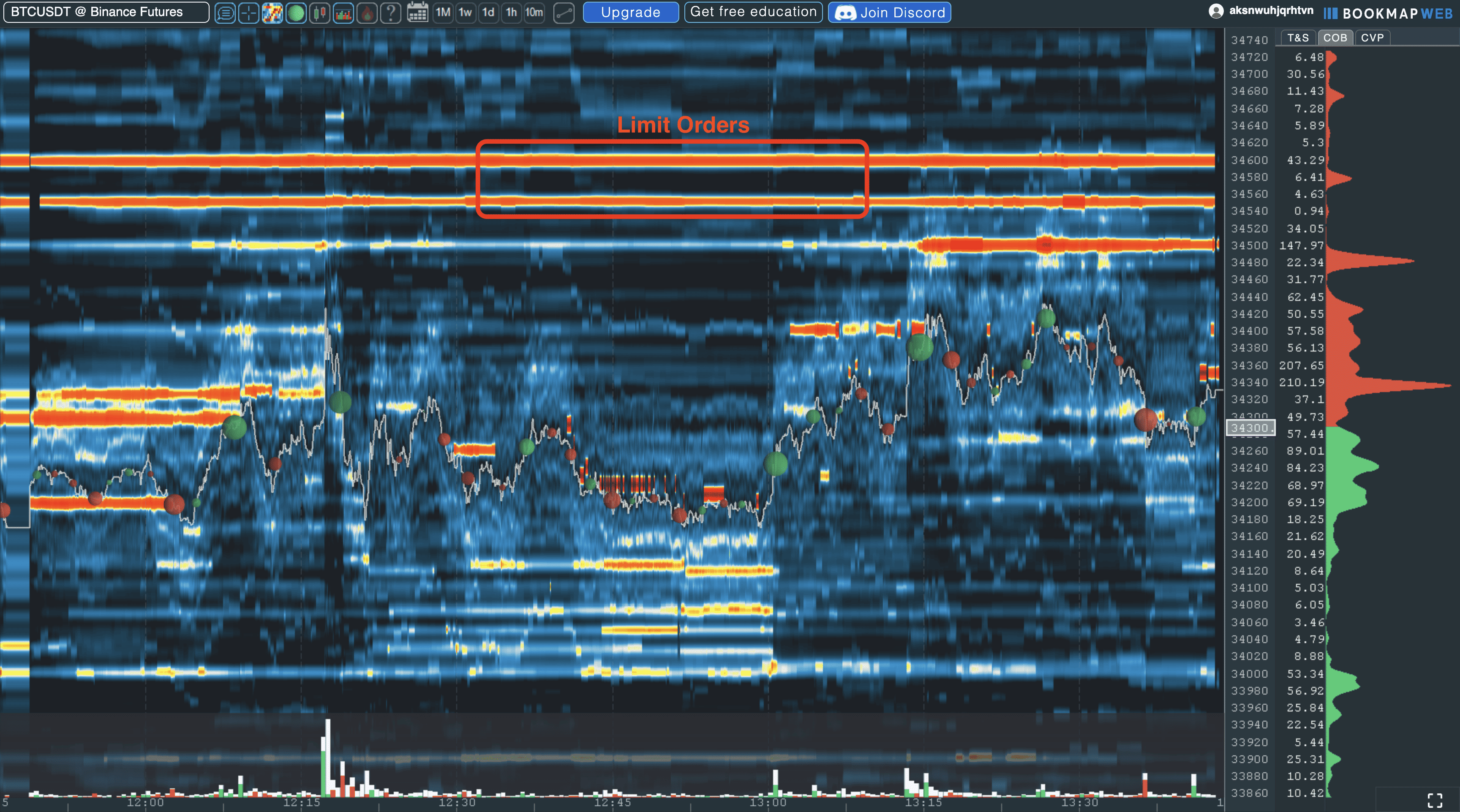
Bookmap is an order flow platform that shows the order book as a heatmap over time. You see at which prices limit orders are waiting and how this liquidity changes.
The difference from ATAS is the focus. ATAS condenses the executed trades of each candle into a footprint. Bookmap mainly shows the waiting orders, the resting liquidity, and adds the volume actually traded as dots on top of the heatmap. TradingView shows market depth only as a current snapshot through a connected broker; it has no order book heatmap over time.
 Click to enlarge
- Waiting orders. Bright horizontal bands show concentrations of resting limit orders over time. Orders can change or be canceled.
- Executed trades. The bubbles show trades that have taken place. This is different from liquidity still waiting in the order book.
The free Digital version shows crypto exchanges in real time and US stocks and futures delayed. The paid packages cost $19, $49 or $99 a month, less when billed yearly (as shown on the Bookmap site in September 2026). Digital Plus ($19) still uses delayed US stock and futures data. For live stock and futures analysis, start with Global ($49 a month, or $39 billed yearly) and add the required data feed, which costs extra.
Who it is not for: if you analyze daily charts or invest long term, you do not need the details of the order book. Bookmap pays off mainly in short-term futures and crypto trading, where liquidity shifts quickly.
cTrader: the alternative for forex
In forex, execution counts for more than the prettiest chart. That is where cTrader comes in: transparent order execution, visible market depth and an interface that looks much more modern than MetaTrader. You install it through your broker, like MetaTrader.
Compared with TradingView, the advantage is narrow but real: analysis and order management sit in one interface built for forex. For live trading you still need an account with a supported broker, just as with TradingView. For scalping and fast intraday trading that makes a noticeable difference. For the charting itself, TradingView stays ahead.
Who it is not for: if you trade stocks or futures, this is the wrong tool. cTrader is made for forex and CFDs, and the number of supporting brokers is limited. For US readers there is a second point: CFDs are generally not available to retail traders in the US, so cTrader matters mainly if your broker offers it for forex. US residents must also confirm that an eligible broker actually offers cTrader for their account.
ProRealTime: the alternative for European markets
If you trade European stocks, ProRealTime plays to its strengths. The platform has its roots in Europe, covers the European exchanges well and has its own backtesting area. For US-focused traders it is less relevant; I include it because it is the strongest choice in this list for European markets.
The most interesting point is the pricing. The Complete version costs $32 a month and Premium $91, each before tax. The web and mobile versions are free. Through some brokers, including Interactive Brokers, Saxo and IG, the fee for the desktop versions can be waived; the conditions depend on your trading activity and plan. That makes it an inexpensive option for active traders of European securities. If you already trade with IBKR, see our Interactive Brokers review.
Who it is not for: for US stocks, crypto and community features, TradingView is clearly ahead. And the interface takes some getting used to.
TrendSpider: the alternative for automated chart analysis
TrendSpider turns the usual way of working around. Instead of drawing trendlines yourself, you let the software detect patterns and lines automatically. On top of that come backtests without programming and an automatic check across several time frames at once. The Standard plan costs $89 a month or $59 a month billed yearly, before the frequent promotions.
For traders who watch many symbols at once, this saves real time. TradingView has caught up with automatic chart pattern detection, available on Premium and Ultimate. TrendSpider, by contrast, is built around this automation from the ground up. Whether the extra cost pays off depends strongly on your style.
Who it is not for: if you trade discretionarily by market structure, as I do, you do not need automatic line detection. I draw my levels myself on purpose, because that is where the decision is made.
InvestingPro: the alternative for fundamental data
TradingView shows balance sheet figures directly on the chart, from the Essential plan with 20 years of annual data. If you want to value companies on their fundamentals rather than just read their price, specialized providers give you more valuation tools.
InvestingPro offers a fair value calculation, a screener with many metrics and analyses over long periods. When we checked from Germany on September 25, 2026, the Pro plan cost €9.49 a month billed yearly as a discounted price, or €17.99 billed monthly. On September 27 the pricing page only showed a sale campaign without prices, so check the current price for your country before you buy. What TradingView’s own screener does for free is covered in our TradingView screener test. Our InvestingPro review covers the screener, ProPicks AI, WarrenAI and the difference between Pro and Pro+.
Koyfin is an additional option we have not tested, with a free plan that does not expire. Koyfin combines charts with fundamental data, market dashboards and portfolio analytics. The free plan shows two years of financials and one year of estimates, with two watchlists and two screens. The Plus plan, with ten years of financials, a stock and ETF screener and unlimited watchlists, costs $39 a month billed yearly or $49 billed monthly (October 2026). We have not tested Koyfin ourselves; the details come from the provider.
Who it is not for: pure chart traders do not need it. Fundamental data helps you pick stocks for medium and long holding periods, not for intraday trading.
thinkorswim: the alternative for Schwab clients in the US
This section is for US readers, and it is different from the seven above: we have not tested thinkorswim ourselves. What follows is based on Charles Schwab’s own information.
thinkorswim is the trading platform of the US broker Charles Schwab, available on desktop, web and mobile. Schwab clients get it at no extra charge, and a Schwab account is required to log in. Paper trading with paperMoney is built in. If you are not a client, Schwab offers a 30-day guest pass with virtual money, so you can look at the platform before you open an account.
The logic is the same as with MetaTrader or cTrader: analysis and trading in one place, tied to one broker. If your account is already at Schwab, thinkorswim is the natural option. If you trade with several brokers or want the widest market coverage and community, TradingView keeps its advantage.
What to check before you switch
Before you cancel a subscription, look at four points that comparison lists almost always leave out and that make the difference in daily use:
- Count data costs separately. For many exchanges, real-time prices for stocks and futures cost extra. One exception on TradingView: real-time US stock prices from Cboe are free, but they come from Cboe alone, not from all US exchanges. A cheaper platform with more expensive data packages can cost more in the end.
- Check broker compatibility first. Not every platform works with your broker. With MetaTrader, the broker even decides which markets you can trade. Which US brokers connect to TradingView is in our guide to TradingView brokers.
- Your analyses do not move with you. Drawn levels and layouts usually cannot be transferred between platforms. You can export a TradingView watchlist as a file, but whether another platform can read it depends on the format and the symbol names. Plan for setup time before you work productively.
- Test in parallel instead of canceling right away. Almost all providers have trial periods or free versions. Run both side by side for a while, then decide.
Free alternatives to TradingView
If you have no budget, you have more choice than you might think. These routes cost nothing and each covers a different need:
- MetaTrader 5 and cTrader: free through any broker that supports them, including trading robots on MetaTrader.
- Broker platforms: many brokers provide charting and order execution at no extra cost, such as thinkorswim for Schwab clients, often even with built-in TradingView charts.
- ATAS and Bookmap in their free versions: limited in data and instruments, but enough to get to know order flow.
- TradingView Basic itself: free for good, with the full chart and all drawing tools. For many traders this is the most honest answer to the question about a free solution.
If you mainly trade crypto and write your own indicators, TakeProfit is worth a look. TakeProfit is a browser platform with its own chart engine rather than embedded TradingView charts, and its Freeroll plan stays free for good with the core charting features. For Pine Script users the interesting part is Indie, a Python-based scripting language; according to the provider, existing Pine scripts can be converted. We have not tested TakeProfit ourselves; these details come from the provider.
The full feature set costs $20 a month or $120 a year (as of October 3, 2026). The All-In plan includes 400 cloud alerts that do not expire and backtesting, and every new account can try it free for 30 days. The focus is crypto: market data comes from more than 70 crypto exchanges, and you trade through API keys directly on the exchange. According to TakeProfit, these keys allow trading only, not withdrawals.
If you want to try order flow in the browser, GoCharting needs no installation. GoCharting runs in any modern browser, so it works on a Mac and on Linux too. The free plan includes real-time charts, more than 100 indicators, its own scripting language Lipi, basic market and volume profiles, and simulated trading. GoCharting’s comparison table lists footprint charts, time and sales and price alerts under Premium, although other parts of its pricing page describe some of these as free, so confirm what your account includes before you rely on them. For crypto and forex, Premium costs $20 a month, or $16.80 a month billed yearly (October 2026). We have not tested GoCharting ourselves; the details come from the provider.
A word of caution: free tools rarely save real money. If real-time data or reliable alerts are missing, you pay in the end with worse entries. When you compare, always include the data costs, not just the license fee.
Where TradingView remains the first choice
After all the tests, my verdict is clear for my charting work. In three areas none of the alternatives I tested has caught up:
- Charting and ease of use: change the symbol, switch the time frame, draw a level, set an alert. Nowhere else do these basic steps go as quickly.
- Market coverage: according to TradingView, more than 3.5 million instruments. No alternative in this list comes close.
- Sync and community: charts look identical on all devices, plus millions of published analyses and more than 150,000 community scripts.
That is why my recommendation in most cases is: add, do not replace. I use TradingView as the basis for analysis and signals and only reach for specialist tools where there is a concrete reason.
Conclusion: when switching is really worth it
The honest answer to the question about the best alternative is: it depends on what is missing. If you want to run trading robots, take MetaTrader 5. If you read order flow, take ATAS. If you trade European stocks, look at ProRealTime. If your account is at Schwab, try thinkorswim. For everything else, switching is usually a step back.
My practical advice: first say exactly what bothers you. Is it the price, the missing automation or a specific kind of display? Only for the last two does another platform help. For the price, look at the smaller plan first, and most alternatives can be tested for free before you cancel anything.
Frequently asked questions about TradingView alternatives
What is the best alternative to TradingView?
It depends on the purpose. For automated trading, MetaTrader 5 is the best choice; for order flow and volume analysis, ATAS; for European stocks, ProRealTime; for Schwab clients in the US, thinkorswim. For pure charting and market coverage, none of these platforms has caught up with TradingView.
Is there a free alternative to TradingView?
Yes, there are several free alternatives. MetaTrader 5 and cTrader are free through any broker that supports them, ATAS and Bookmap offer limited free versions, and many brokers provide their own charting platforms at no extra cost. TradingView itself also has a permanently free Basic plan. For crypto traders, the browser platform TakeProfit has a permanently free plan, which we have not tested.
Is MetaTrader 5 better than TradingView?
Only for automated trading. MetaTrader runs trading programs on its own, which TradingView cannot do. For charting, ease of use, market coverage and community, TradingView is clearly ahead. If you do not trade automatically, you gain nothing by switching.
Is thinkorswim better than TradingView?
It depends on your broker. thinkorswim combines charting and trading for Schwab clients at no extra charge. TradingView covers far more markets, works with many brokers and has the larger community. We have not tested thinkorswim ourselves; if you are at Schwab, the guest pass or paperMoney lets you compare both at no cost.
What can TradingView not do?
TradingView does not run automated trading strategies on its own, has no built-in time and sales window, shows market depth only through a connected broker, and offers volume footprint charts only from Premium. Real-time data for many exchanges also costs a monthly fee; free US stock prices from Cboe are an exception.
Is it worth switching from TradingView to an alternative?
In most cases, no. If you want to switch because of the cost, check first whether a smaller plan is enough. Switching makes sense only for a concrete need that TradingView cannot meet by design. Often the better solution is to add a specialist tool.
This article was written by Karsten Kagels, who has used TradingView daily since August 2017. The seven platforms were tested by him and his team as part of the software reviews on kagels-trading.de; thinkorswim was not tested. This is educational content, not investment advice.
This US edition is based on our German edition on kagels-trading.de and has been adapted for US readers.
More TradingView guides
- Learn the basics
How to Use TradingView: A Beginner Tutorial in 11 Steps
A beginner tutorial in 11 steps: chart, symbol search, drawings, indicators, log scale, watchlists, alerts, layouts and trading.
- Save on a plan
TradingView Black Friday 2026: Dates, Deals and Best Plan
Expected 2026 timing, verified past deals and what to check before buying a plan.
- Connect a broker
Best Brokers for TradingView 2026: A Guide for US Traders
Which US brokers work with TradingView and what to check before you connect one.
- Connect an AI assistant
TradingView MCP and API: What Is Official in 2026
What the official MCP server, webhooks and community MCP servers can do, and why there is no data API.
- Test a strategy
TradingView Backtesting: Test a Strategy Without Real Money
Manual testing with Bar Replay and automatic testing with the strategy report.
- Plan around economic data
Economic Calendar: Key US Dates and the 6 Best Calendars
The key US release dates to the end of 2026, how to read a calendar and six free calendars compared, TradingView first.
- Write an indicator
Pine Script in TradingView: Basics, Editor and Version 6
Pine Script basics, the editor and version 6, with code you can copy.
- Use the AI Copilot
TradingView AI Copilot Review: 7 Tests, Price and Limits
Seven real tasks for the paid AI add-on: what it costs, what it got right and where you must check it.
- Filter stocks with the screener
TradingView Stock Screener: How to Use It and What It Costs
How the stock screener works, what the free plan can do, the Pine Screener and three tested popular screens.
- Read volume inside each bar
TradingView Volume Footprint: Setup, Plans and Limits
Open and set up the volume footprint, which plan includes it and how accurate its buy and sell split is.
- Read the market on a heatmap
Stock Heatmap: How to Read It, TradingView and Finviz
What size, color and grouping mean, the free TradingView heatmap step by step and how it compares with Finviz.