
TradingView Paper Trading: Setup, Limits and Tips (2026)


Contents
- TradingView paper trading in 30 seconds
- What is TradingView paper trading?
- How to paper trade on TradingView
- What can you paper trade on TradingView?
- How realistic is TradingView paper trading?
- Paper trading, Bar Replay and backtesting
- Pros of paper trading
- Cons and limits of paper trading
- The psychology of paper trading
- Tips for paper trading that carries over
- From paper trading to real money
- Other ways to paper trade
- Conclusion
- FAQ about TradingView paper trading
- About the author
Paper trading on TradingView lets you buy and sell with virtual money, right on the chart you already use for analysis. It costs nothing, needs no broker and takes about a minute to set up. That makes it a useful first step for new traders, and a test bench for experienced ones.
This guide shows how to start, which settings matter, and where the simulation differs from a real account. Platform facts were checked against TradingView’s help center and pricing page. The screenshots and observed account settings come from our desktop app on September 26, 2026. The article follows our editorial policy.
TradingView paper trading in 30 seconds
- Free for everyone: paper trading is included in every TradingView plan, including the free Basic plan. No broker account and no deposit.
- Start: open a chart, click Trade in the top-right corner, select Paper Trading and click Connect.
- Balance: our setup screen showed $100,000, with an editable starting balance.
- Orders: market, limit and stop orders, with up to four take-profit and stop-loss levels per position.
- Markets: stocks, forex, crypto, and commodity and index futures. Indices such as the Nasdaq 100 index itself cannot be traded.
- Limits: the fills are simulated. Commissions are switched off by default, and your emotions are not part of the test. Treat good results as practice, not as proof.
What is TradingView paper trading?
TradingView paper trading is a free trading simulator built into TradingView. You place orders on real market prices with virtual money, and TradingView tracks your positions, profit and loss as if the trades were real. No order reaches a broker or an exchange.
Paper trading and demo account mean the same thing in practice. The name comes from a time when traders wrote their practice trades down on paper. Today the platform does the bookkeeping for you.
Do not confuse it with Bar Replay. Paper trading runs in real time, in the live market. Bar Replay plays back past price data candle by candle, so you can practice a whole trading day in an hour. Both have their place, and the decision guide below helps you choose.
What do you want to practice?
- Learn the order ticket, stops and position sizePaper trading
- Practice decisions in the live market, at market speedPaper trading
- Practice many past setups in a short timeBar Replay
- Test fixed rules on years of dataStrategy report (Pine Script)
- Find out how you react when real money is at riskA small live account
The last question cannot be answered with virtual money. That is the main limit of every simulator.
How to paper trade on TradingView
You need a TradingView account. The free Basic plan is enough. The steps below describe the web and desktop version, following TradingView’s help center. If the chart itself is still new to you, start with our TradingView tutorial for beginners.
Step 1: Connect the paper trading account
- Open a chart (TradingView calls it Supercharts).
- Click Trade in the top-right corner. A list of brokers available in your region appears.
- Select Paper Trading and click Connect.
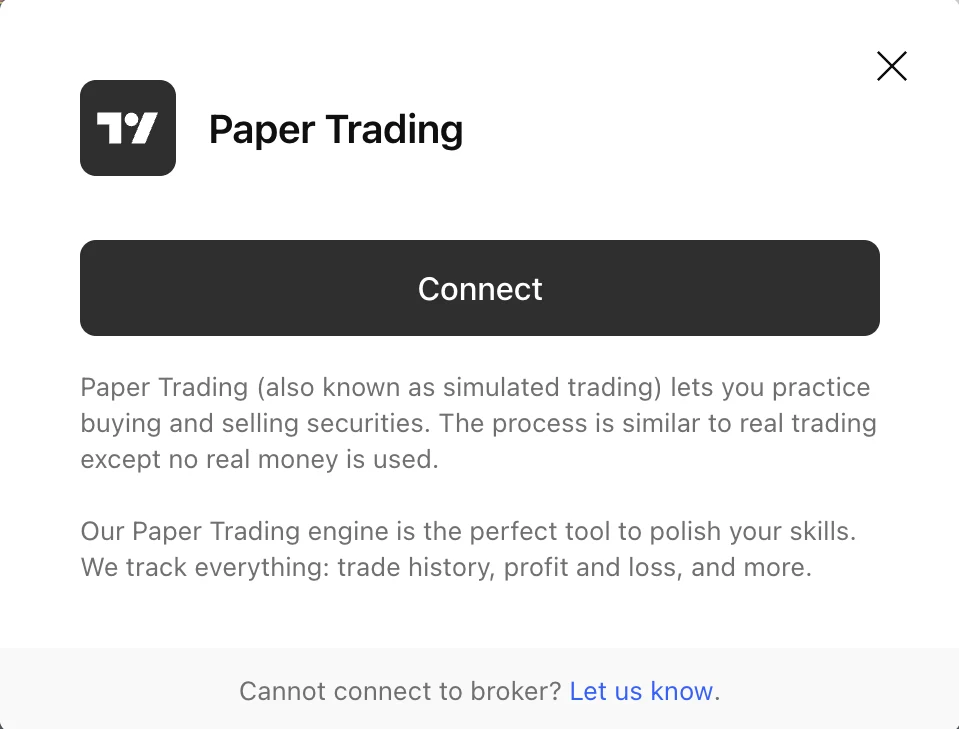 Click to enlarge
Source: Screenshot: Kagels Trading; steps per TradingView help center.
You can also open the Trading Panel at the bottom of the chart and choose Paper Trading there. To leave, open the menu at the top right of the Trading Panel and log out of Paper Trading.
Step 2: Place your first order
The order ticket opens on the right side of the chart. For paper trading, TradingView offers three order types:
- Market: buys or sells right away at the best available price. The fill price can differ from the price you expected.
- Limit: buys or sells only at your price or better. It may not be filled if the market does not reach your price.
- Stop: waits until a price level is reached and then becomes a market order.
You can add a take-profit and a stop-loss to every order, and up to four exit levels, for example to take half the position off at the first target. Each take-profit and stop-loss pair works as one-cancels-the-other: if one side fills, the other is canceled.
A setting worth using from day one: the order ticket can size a position by risk. Instead of typing a number of shares, you enter how much of your balance you are willing to lose, for example 1%, and the ticket calculates the quantity from your stop-loss. This is the habit you want to take into a real account later.
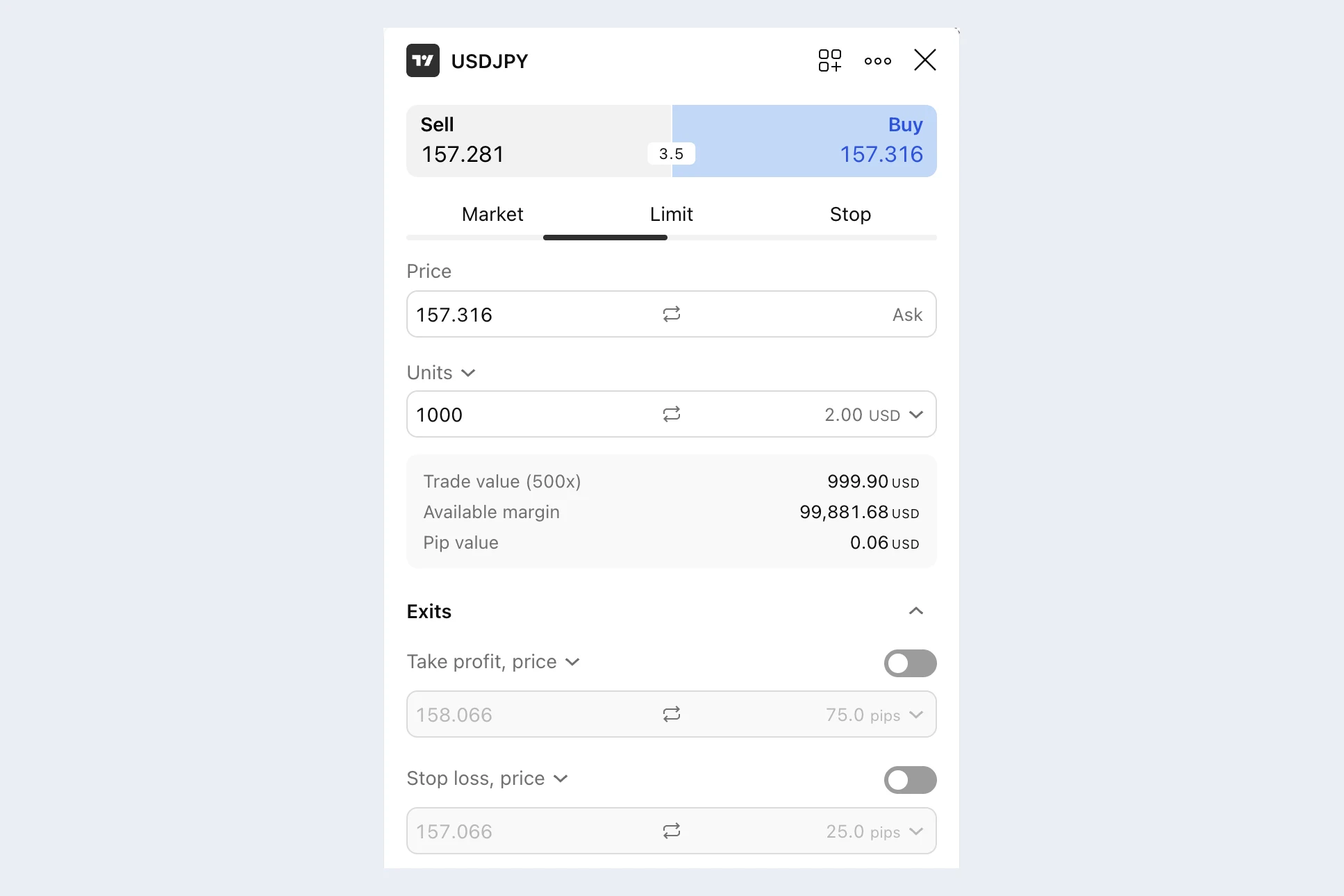 Click to enlarge
- 1 Order type: Market, Limit or Stop. Bid and ask are the buy and sell execution references; check your order type and limit.
- 2 Quantity: in units, or switch the field to size the position by risk.
- 3 Exits: switch on take profit and stop loss before you send the order.
Source: Screenshot: Kagels Trading; order types per TradingView help center.
For forex, enter the quantity in units, not lots. 100,000 units are one standard lot.
Step 3: Set up the account like a real one
Open the account settings with the gear icon next to the account name in the Trading Panel. The same settings appear when you create an additional paper account with Create account in the account menu. Three settings make the simulation more honest:
- Commission: switched off by default. Enter what your broker would charge, as a fixed amount, a percentage or a fee per contract for futures. Without it, every result looks better than it would be.
- Leverage: set per asset class. A new account starts with 1x for stocks, 20x for futures, 50x for forex and 10x for crypto. For the E-mini S&P 500 future, TradingView’s help center gives the matching example: a margin of 5%, which means leverage of 20:1. TradingView notes that it only simulates the behavior of real brokers and does not offer real margin trading.
- Currency and balance: in our new-account dialog on September 26, the displayed default was 100,000 US dollars. When you create an account, you can type in a different balance and choose another currency, and you can switch between several paper accounts in the Trading Panel.
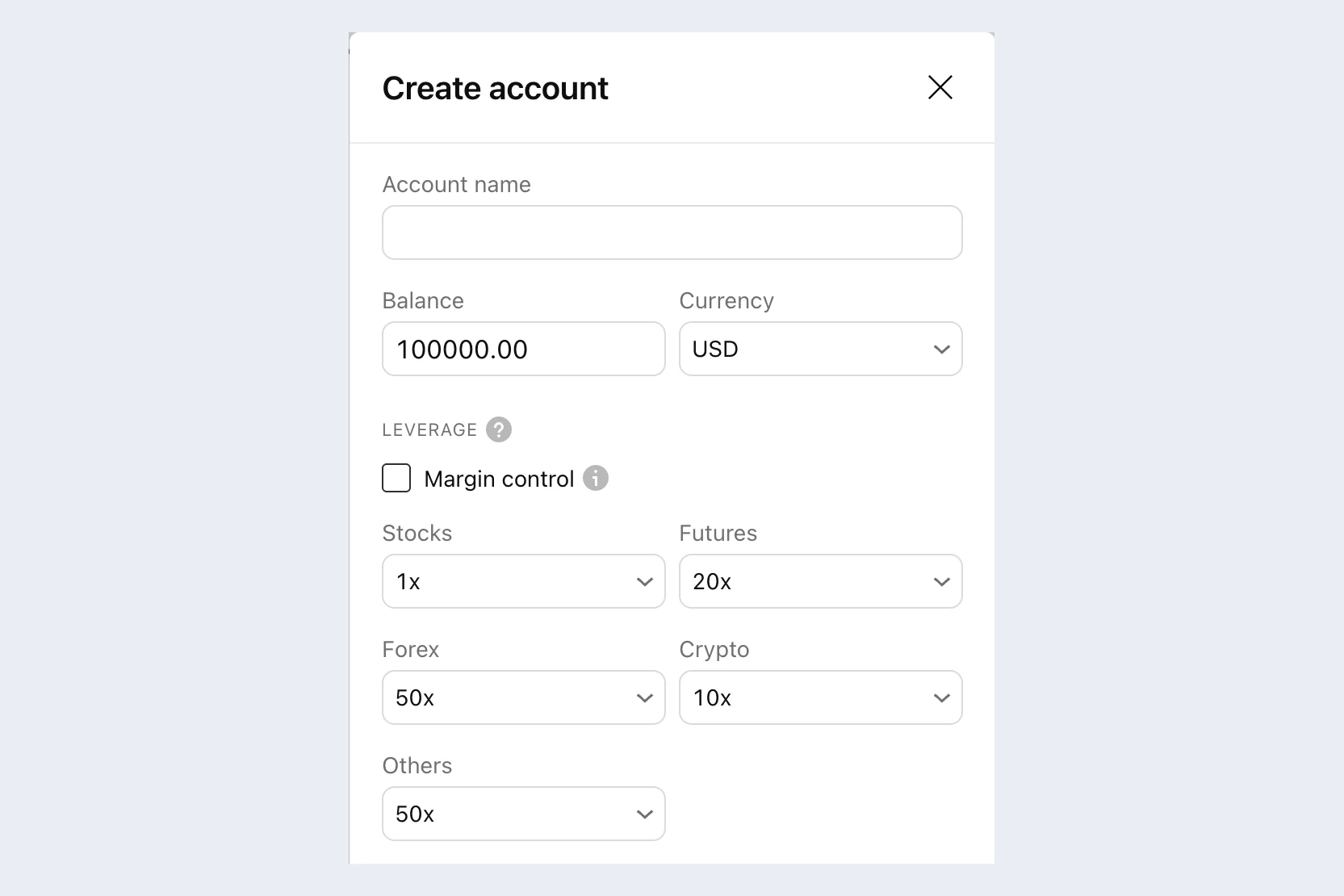 Click to enlarge
- 1 Balance: 100,000 shown in our dialog. Enter the amount you really plan to trade.
- 2 Leverage by asset class. Shown on September 26: stocks 1x, futures 20x, forex 50x, crypto 10x.
Source: Screenshot: Kagels Trading; leverage and commission per TradingView help center.
Reset: in the account settings you can reset the account. This deletes the trade history, all open orders and all positions, so export your history first if you want to keep it (see tips).
What can you paper trade on TradingView?
According to TradingView, the simulator covers almost every asset class on the platform, including stocks, forex, crypto, and commodity and index futures.
A few exceptions matter:
- Indices themselves cannot be traded, for example NASDAQ:NDX. Trade a future or an ETF on the index instead.
- Synthetic symbols, such as spreads you type yourself (for example gold divided by silver), are not tradable.
- Futures are treated as cash-settled. There is no physical delivery, and perpetual and continuous futures have no settlement date.
- Extended hours: for stocks, ETFs, bonds and depositary receipts, you can let limit orders fill outside regular trading hours. Tick “Fill order outside RTH” in the order ticket.
Options: TradingView’s commission documentation mentions options, but we have not verified which options contracts are available in paper trading. Check the exact contract before relying on it for options practice. IBKR’s paper account (see below) is another route with documented options support and its own simulation limits.
How realistic is TradingView paper trading?
Here TradingView’s own pages do not quite agree. The main help article says the execution experience is “identical to real trading”. Other help articles are more careful: TradingView says it “only simulates” the behavior of real brokers, and that simulated futures trading differs in some features from trading on the exchange. The second view is the more useful one when you judge your results.
What the simulation gets right: in most cases, TradingView fills buys at the ask and sells at the bid; the last chart price is not the execution reference. So you pay the spread, as you would with a real order. Actual simulated fills still depend on the order type and its conditions (TradingView help).
What it cannot reproduce:
| Paper trading on TradingView | Real account | |
|---|---|---|
| Fill | Simulated by TradingView | Real order at the exchange or dealer |
| Your order’s effect on the market | None | Large orders can move the price |
| Queue at a limit price | Not described in TradingView’s help pages | Others may be filled before you |
| Costs | Commission off unless you set it | Commissions, fees, financing |
| Emotions | Calm, no money at risk | Fear and greed decide more trades than you expect |
Two more rules differ from many brokers: TradingView offers no Good ’Til Canceled orders in paper trading, and you can hold only one position per symbol. A new order on the same symbol adds to, reduces, closes or reverses the existing net position.
Market data: US stocks show real-time prices from the Cboe exchange by default. Real-time data from the primary exchanges (Nasdaq, NYSE) and from futures exchanges costs extra; our TradingView plans and pricing guide lists the data packages. The public help pages do not say in detail which price feed the paper account uses for every symbol, so check the price in the order ticket before you trade a new market.
Paper trading, Bar Replay and backtesting
These three tools answer different questions:
- Paper trading tests your decisions in real time. It is slow: one trading day takes one trading day.
- Bar Replay plays back the past. You can practice dozens of setups in an evening and place orders during the replay.
- Backtesting with a Pine Script strategy tests fixed rules on years of data and shows the result in the strategy report. What makes such a test reliable is explained in our backtesting guide.
A sensible order is: backtest the rules, practice them in Bar Replay, then trade them in paper trading at market speed. Our guide to backtesting on TradingView shows both Bar Replay and the strategy report. Pine Script strategies simulate orders in the strategy report; they do not place orders in TradingView’s Paper Trading account. You can use alerts as prompts for manual paper trades. Automation through an outside service requires a separately supported broker or demo account, as explained in our Pine Script guide.
Pros of paper trading
You can make mistakes without paying for them. A demo account lets beginners learn the platform without risking capital. A wrong click there costs nothing.
You learn the platform. Order ticket, bracket orders, position size by risk, extended hours: it is much better to find out how they work before real money depends on it.
You build discipline. You learn to wait for good setups and follow your trading plan. If you trade without discipline in a demo account, real money will not make it better.
You develop a feel for the market. How does the dollar react to a Fed decision? What does a stock do after earnings? You learn this by watching and trading real markets, not from books alone.
Experienced traders use it too, for example to test a new idea or to learn a market they have not traded before.
Cons and limits of paper trading
Emotions are missing. This is the biggest blind spot. Without real money at stake, emotional pressure can be weaker and different. Wait until you see a real position $500 in the red for the first time, with your finger over the sell button. In the demo account you would have waited. In a live account, fear is often stronger than your trust in the strategy.
Simulated fills may be more favorable than live fills. TradingView does not publish a full model of order queues, partial fills or slippage for paper trading. In reality, the fill can be worse than the price you saw, especially in fast markets or thin stocks. This difference is called slippage.
Costs stay hidden by default. As long as the commission setting is off, your results leave out what a broker would charge. Enter realistic fees, or subtract them from your results.
Big virtual money leads to big risks. With a large virtual balance you take positions you would never take with your real savings. That distorts your results.
Success can make you overconfident. Months of profitable paper trading say only a limited amount about how you will trade with real money.
The psychology of paper trading
Whole books are written about trading psychology, and for good reason. Many traders do not fail because of their strategy but because they get in their own way. Paper trading teaches the technical side. The emotional preparation you have to work on deliberately.
The good news: some patterns already show up in the demo account, even if the feelings are weaker there.
- FOMO (fear of missing out): the price is rising, you have no setup, but you jump in anyway because you do not want to miss the move.
- Revenge trading: after a loss, you place the next trade right away to win the money back.
Both happen with virtual money too. If you notice them in the demo account, you can work on them before real money is involved.
Also read about loss aversion. Losses can feel more painful than equivalent gains feel rewarding. In trading, this means you tend to close winning positions too early to secure the profit, and hold losing positions too long in the hope that the price comes back.
Tips for paper trading that carries over
Trade the amount you will really use. If you plan to start with $5,000, create a new paper account with a balance of $5,000 and practice with it, not with the default six-figure balance. Only then do position sizes and losses feel realistic.
Write your rules down first. Which markets, which setups, how much risk per trade, when you stop for the day. A written trading plan keeps you from clicking around. If your plan is intraday, our day trading guide shows a practice path from the written plan to the journal.
Switch on commissions. Use the fees of the broker you plan to use.
Keep a journal, even though the Trading Panel keeps a record for you. In the current version, it has tabs for order history, balance history, activity log, trade history and analytics, and a download button to export your data (TradingView’s help center describes the export as a CSV file). Add a note to each trade about why you took it and how you felt. Were you unsure? Did you take profits too early?
Know your numbers before you switch to real money. Track your win rate, your realized average win and loss, your total costs and your drawdown over a meaningful sample of trades. These describe your practice results; they do not prove that the strategy will remain profitable with real money. An example: 60 % winners of $50 and 40 % losers of $100 lose $10 per trade before costs, even with a good win rate.
Tell a bad trade from a bad signal. A trade that followed all your rules and still lost is not a reason to change the strategy. A trade that broke your rules is a mistake, even if it made money.
From paper trading to real money
At some point the setups work in the demo account, your plan is stable, and you want to know whether it works with real money.
- Past dataBacktestCheck that the rules had an edge in the past.
- Past dataBar ReplayPractice the setups at your own speed.
- Live prices, simulated fillsPaper tradingTrade the plan in real time with realistic size and costs.
- Real moneySmall live accountLearn how fills and emotions change your trading.
Move to the next step when your results are consistent, not after a fixed number of weeks.
There is no fixed rule for when you are ready. Good signs are: you have followed your rules consistently over several weeks, you accept losses calmly, and your strategy has worked in different market phases. What counts is not the time you spent but how consistent your results are. Our guide on how to learn trading lists the conditions to check before real money.
Then start with a small live account, with an amount you can afford to lose without it hurting. You collect real experience with real emotions at limited risk. Keep your trading journal going, so you can see where your behavior changes once money is at stake.
If you want to keep the TradingView chart for real orders, you need a supported broker. Our guide to TradingView brokers for US traders shows which ones connect and what they let you trade from the chart.
Other ways to paper trade
TradingView’s simulator is the easiest start if you already chart on TradingView. Two US broker platforms also have practice accounts built in. We describe them from the brokers’ own information; we have not tested them for this article.
Interactive Brokers: new individual account holders automatically receive a paper trading account with USD 1,000,000 of virtual equity. It runs in IBKR’s own platforms, and its market data subscriptions and trading permissions follow your real account. That makes it a good way to practice IBKR’s own workflow and order types, including options; its simulator has its own documented limits. Non-clients can try the platform with a free trial.
thinkorswim (Charles Schwab): Schwab’s platform has paper trading with paperMoney built in. If you are not a Schwab client, Schwab offers a 30-day guest pass with virtual money. More in our comparison of TradingView alternatives.
Conclusion
TradingView paper trading is a good way to learn the order ticket, practice risk-based position sizing and trade your plan in the live market, at no cost and without a broker. Set it up like a real account: a realistic balance, your broker’s commissions and written rules.
Just do not expect the demo results to carry over one to one. The simulation cannot show how you react when real money is at risk. Use the time to master your platform and your rules, then take the step to a small live account.
This article is for education only and is not investment advice. Trading involves risk, and you can lose more than you expected.
FAQ about TradingView paper trading
Is TradingView paper trading free?
Yes, according to TradingView, paper trading is available to every user in every plan, including the free Basic plan. You need a TradingView account, but no broker account and no deposit. The paid plans add more charts, indicators and alerts, not a better simulator.
How do I start paper trading on TradingView?
Open a chart, click Trade in the top-right corner, select Paper Trading and click Connect. The order ticket then opens on the right side of the chart.
Is a TradingView demo account the same as paper trading?
Yes, TradingView calls its demo account Paper Trading. Both terms mean trading with virtual money on real market prices.
Can I reset my TradingView paper trading account?
Yes, in the account settings. A reset deletes the trade history, open orders and positions, and lets you choose the account currency again. Export your history first if you want to keep it.
Can I paper trade options on TradingView?
TradingView’s commission documentation mentions options, but we have not verified which options contracts are available in paper trading. Check the exact contract before relying on it for options practice. IBKR’s paper account is another route with documented options support and its own simulation limits.
Is paper trading illegal?
No. Practicing with virtual money through an authorized simulator is a normal educational use, and no real order is sent to the market. Follow the platform’s eligibility, market-data and contest rules.
Can Pine Script strategies trade my paper account automatically?
Not directly: Pine Script strategies calculate results in the strategy report, but they do not send orders to the paper account. You can place paper trades by hand from alerts, or use Bar Replay to practice faster.
What is The Leap on TradingView?
The Leap is TradingView’s trading competition, run on paper trading accounts. According to TradingView’s help center, you can join if you have an active subscription or trial, or had a subscription before, subject to that competition’s rules. Contest accounts cannot be reset.
This US edition is based on our German edition on kagels-trading.de and has been adapted for US readers.
More TradingView guides
- Choose a plan
TradingView Review 2026: Plans, Pricing and Is It Worth It?
Prices of all plans in US dollars, real-time data costs, Black Friday and whether it is worth it.
- Learn the basics
How to Use TradingView: A Beginner Tutorial in 11 Steps
A beginner tutorial in 11 steps: chart, symbol search, drawings, indicators, log scale, watchlists, alerts, layouts and trading.
- Save on a plan
TradingView Black Friday 2026: Dates, Deals and Best Plan
Expected 2026 timing, verified past deals and what to check before buying a plan.
- Compare platforms
TradingView Alternatives 2026: 7 Platforms Tested
Seven platforms compared, with a decision aid for when switching makes sense.
- Connect a broker
Best Brokers for TradingView 2026: A Guide for US Traders
Which US brokers work with TradingView and what to check before you connect one.
- Connect an AI assistant
TradingView MCP and API: What Is Official in 2026
What the official MCP server, webhooks and community MCP servers can do, and why there is no data API.
- Test a strategy
TradingView Backtesting: Test a Strategy Without Real Money
Manual testing with Bar Replay and automatic testing with the strategy report.
- Plan around economic data
Economic Calendar: Key US Dates and the 6 Best Calendars
The key US release dates to the end of 2026, how to read a calendar and six free calendars compared, TradingView first.
- Write an indicator
Pine Script in TradingView: Basics, Editor and Version 6
Pine Script basics, the editor and version 6, with code you can copy.
- Use the AI Copilot
TradingView AI Copilot Review: 7 Tests, Price and Limits
Seven real tasks for the paid AI add-on: what it costs, what it got right and where you must check it.
- Filter stocks with the screener
TradingView Stock Screener: How to Use It and What It Costs
How the stock screener works, what the free plan can do, the Pine Screener and three tested popular screens.
- Read volume inside each bar
TradingView Volume Footprint: Setup, Plans and Limits
Open and set up the volume footprint, which plan includes it and how accurate its buy and sell split is.
- Read the market on a heatmap
Stock Heatmap: How to Read It, TradingView and Finviz
What size, color and grouping mean, the free TradingView heatmap step by step and how it compares with Finviz.