
Stock Heatmap: How to Read It, TradingView and Finviz


Contents
- Stock heatmap in 30 seconds
- What is a stock heatmap?
- Size, color and grouping: how to read a heatmap
- TradingView stock heatmap: how to use it step by step
- Finviz stock market map: the free classic for US stocks
- Other US heatmaps compared
- Not every heatmap is the same: three types
- What a stock heatmap tells you in daily trading
- Pros and cons of a stock heatmap
- Who a heatmap is for, and who does not need it
- Conclusion: a compass, not a signal
- Frequently asked questions about stock heatmaps
- About the author
One look at a stock heatmap tells you in two seconds what a price list only shows after two minutes of scrolling. You see which sector carries the day, which one is being sold and whether the move comes from a few mega caps or from the whole market. That is why many traders keep one open on a second monitor.
The catch: most people only read the color. Every tile carries three pieces of information at once, and the other two often matter more than green or red. This guide shows you how to read all three, how to use the free TradingView heatmap step by step, how it compares with Finviz and why the word “heatmap” stands for three very different tools in trading. We checked every feature and price on the providers’ own pages on October 22, 2026. This article follows our editorial policy.
Stock heatmap in 30 seconds
The key points as of October 22, 2026:
- Three pieces of information per tile: the area shows the size of the company, the color shows the change, the grouping shows the sector.
- Its strength is the overview: a heatmap answers “Which sectors are outperforming today?”, not “When do I buy?”.
- TradingView and Finviz are free: both show the S&P 500 and the Nasdaq-100 without an account. Finviz shows quotes one minute delayed; real time costs $39.50 a month.
- Check the legend: on TradingView the color scale changes from day to day. On October 21 its end label was 3 percent, on October 22 it was 6.75 percent.
- One word, three tools: market heatmap, order flow heatmap and liquidation heatmap show completely different data.
What is a stock heatmap?
A stock heatmap is a chart that shows all stocks of an index or market as colored rectangles, where the size of a rectangle usually shows the market value of the company and its color shows the price change.
The chart type behind it is called a treemap. It comes from data visualization and solves a simple problem: you cannot take in a list of 500 rows at a glance, but you can take in an area of 500 tiles of different sizes. The eye reads size and color faster than numbers.
A treemap is a visualization that shows hierarchical data as nested rectangles, each with an area proportional to a value.
In daily trading, the heatmap replaces the quote list. Instead of checking line by line how each stock in the S&P 500 did, you see the pattern of the day in one picture. A green technology block next to a red finance block tells a different story than a map that is pale everywhere.
Size, color and grouping: how to read a heatmap
You can learn the three layers one at a time. Together they give you a picture that neither a quote list nor a watchlist can give you.
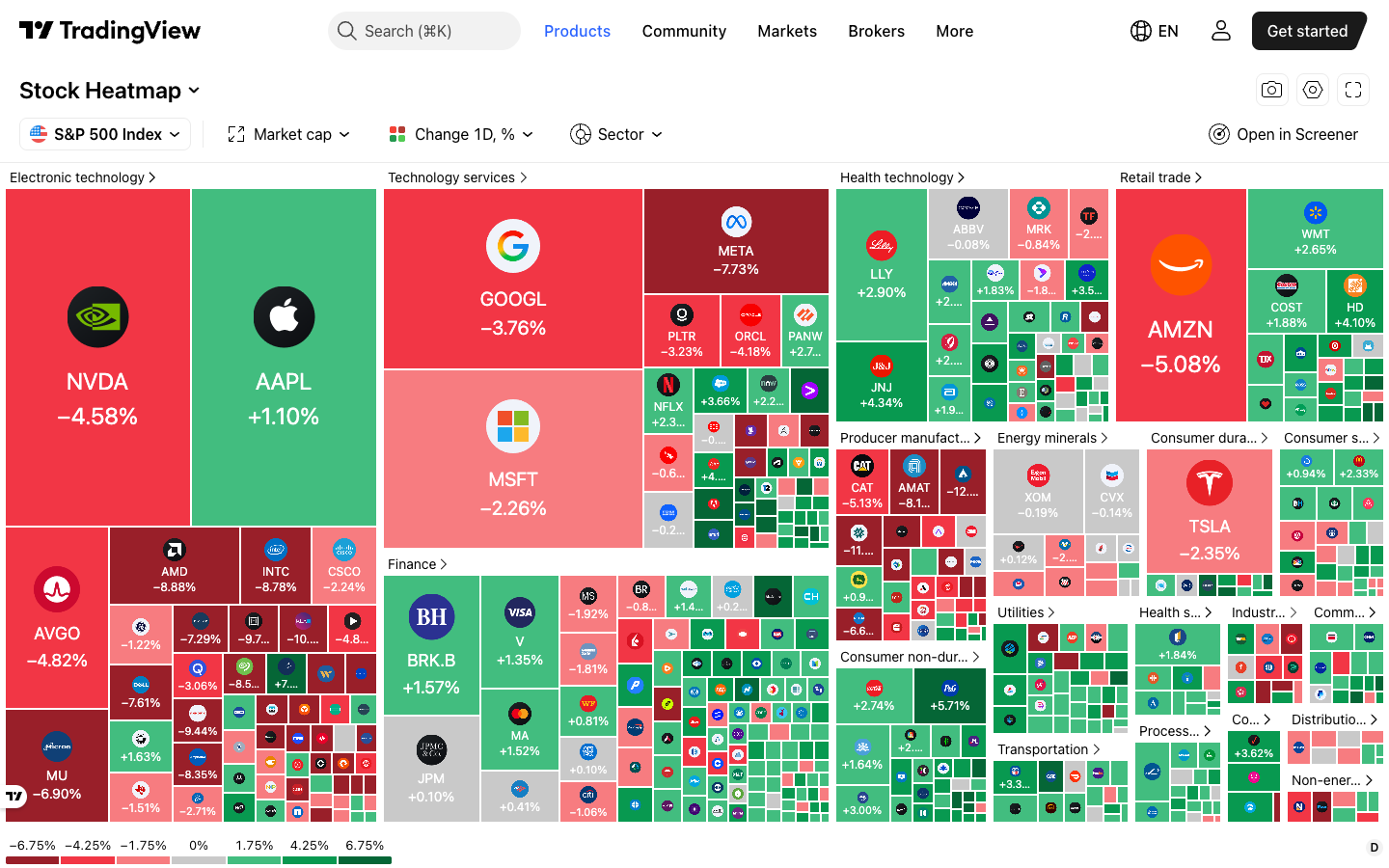 Click to enlarge
- Size: market cap. The largest companies get the largest tiles. That is a rough guide to their influence on the index, not the exact index weight.
- Group: sector. Each block is one sector in TradingView's own classification, not the 11 GICS sectors of the S&P 500.
- Color: the legend. The scale at the bottom left shows which shade stands for which range of change. On this day its end labels were minus 6.75 and plus 6.75 percent.
Source: TradingView Stock Heatmap.
Color: the change, and the scale matters
Color is the easiest layer: green is up, red is down, and the intensity shows the size of the move. On TradingView, grey means the price is almost unchanged, according to its help page on Size by and Color by, linked under the menu screenshot below. The default reference is the previous close: the daily change, or the change over 24 hours for crypto.
Always read the legend before you read the colors. TradingView calculates the color ranges from the minimum and maximum of the chosen metric and recalculates them whenever you switch the metric or the filter, as its help page on the legend explains (linked under the weekly map below). On October 21, 2026, the end labels of the daily S&P 500 legend were minus 3 and plus 3 percent; one day later, on a much busier day, they were minus 6.75 and plus 6.75 percent. The darkest green therefore stood for moves more than twice as large. The outer bands are open-ended: in the weekly view, Meta’s minus 11.41 percent sat in the darkest red, beyond the minus 8 label. Finviz, by contrast, kept its fixed scale of 3 percent in our captures.
Area: company size, a guide to index weight
Area is the layer most people overlook. By default it follows the market capitalization of the whole company. In a cap weighted index like the S&P 500, that is a good rough guide to the weight of the stock, but not the exact weight: S&P counts only the float-adjusted market value, the shares available to investors, as its index methodology explains. The Nasdaq-100 also caps its largest weights.
Market capitalization is the stock market value of a company: the number of shares multiplied by the current share price.
In practice, a small red tile at the edge usually has much less influence on the index than a large red tile in the middle. What a stock adds to the index move depends on its weight and on the size of its move. If a heatmap looks mostly green while the index closes lower, this is usually the reason. Many small winners can outweigh one big loser visually, but not mathematically. October 22, 2026, showed it well: health care, consumer staples and utilities were mostly green, but the large red tiles of Nvidia, Microsoft, Alphabet, Amazon and Meta pulled the S&P 500 ETF SPY down by about 1.2 percent.
Grouping: the sector, in whose classification?
Grouping sorts the tiles by sector. This is the layer that turns the heatmap into an analysis tool. One stock in the green is noise; a whole block in the green while the rest is red points to a shift you can follow up.
A sector is a group of companies with similar business models that are driven by the same economic factors.
Note which sector list the provider uses. S&P Dow Jones Indices assigns each S&P 500 company to one of the 11 GICS sectors, and the Finviz map uses similar names such as Technology and Communication Services. TradingView uses its own list: in our capture, Nvidia and Apple sat under “Electronic technology”, while Microsoft and Alphabet sat under “Technology services”. If you compare a TradingView block with a sector ETF such as XLK, you are not comparing the same group of stocks.
TradingView stock heatmap: how to use it step by step
The TradingView heatmap is free and works without an account. We opened it on October 22, 2026, without signing in and could switch the index, the size, the color and the grouping. Its big advantage is the setting: the heatmap sits on the same platform as your charts, the screener and the watchlist, so the step from a tile to the chart costs one click. How the platform does overall is covered in our TradingView review.
How to open it
On the TradingView website, hover over Products, choose Screeners and then the heatmap you need. That is the path TradingView describes in its heatmap guide. The direct address is tradingview.com/heatmap/stock. The title menu switches between the Stock Heatmap, the ETF Heatmap and the Crypto Coins Heatmap.
The four settings
Four menus above the map decide what you see. These are the options we found without an account on October 22, 2026:
| Menu | What it changes | Options (US view) |
|---|---|---|
| Source | Which stocks | S&P 500, Nasdaq-100, Nasdaq Composite, Dow Jones Industrial Average and three other Dow Jones averages, Russell 1000, 2000 and 3000, KBW Nasdaq Bank, all US companies, plus indices from many other countries |
| Size by | Tile area | Market cap, volume (1 day, week, month), turnover (price times volume), mono size |
| Color by | Tile color | Change 1 hour, 4 hours, 1 day; performance 1 week to 1 year and YTD; pre-market and post-market change; relative volume, volatility, gap |
| Group by | Blocks | Sector or no group |
Switching the source to the Nasdaq-100 takes two clicks. The map then shows 100 of the largest non-financial companies listed on Nasdaq, so banks drop out and the tech giants fill even more of the picture. On October 22, 2026, it also showed SpaceX under the ticker SPCX; our SpaceX stock guide covers the company. For the index itself, see our Nasdaq forecast.
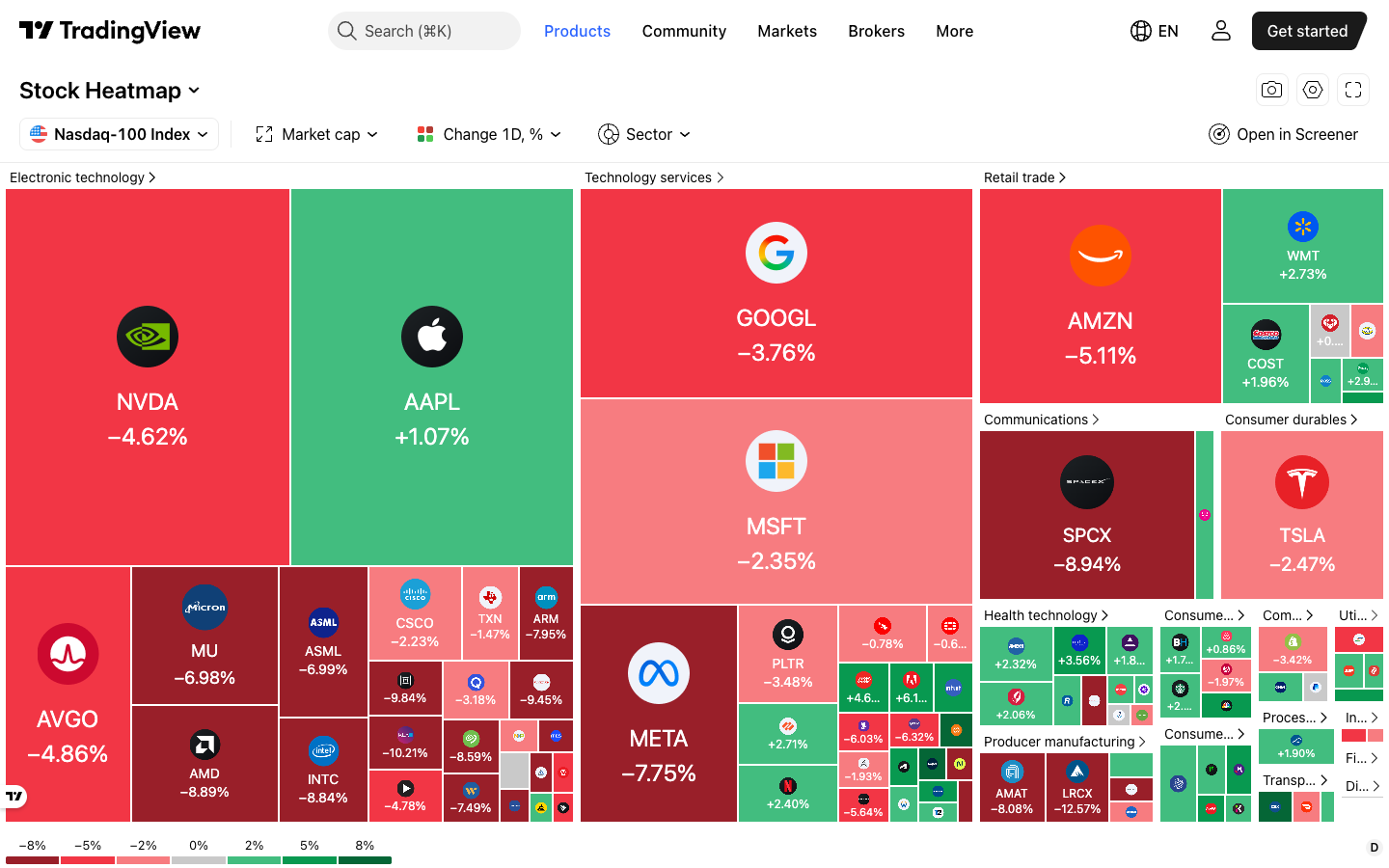 Click to enlarge
Source: Nasdaq-100 Index methodology.
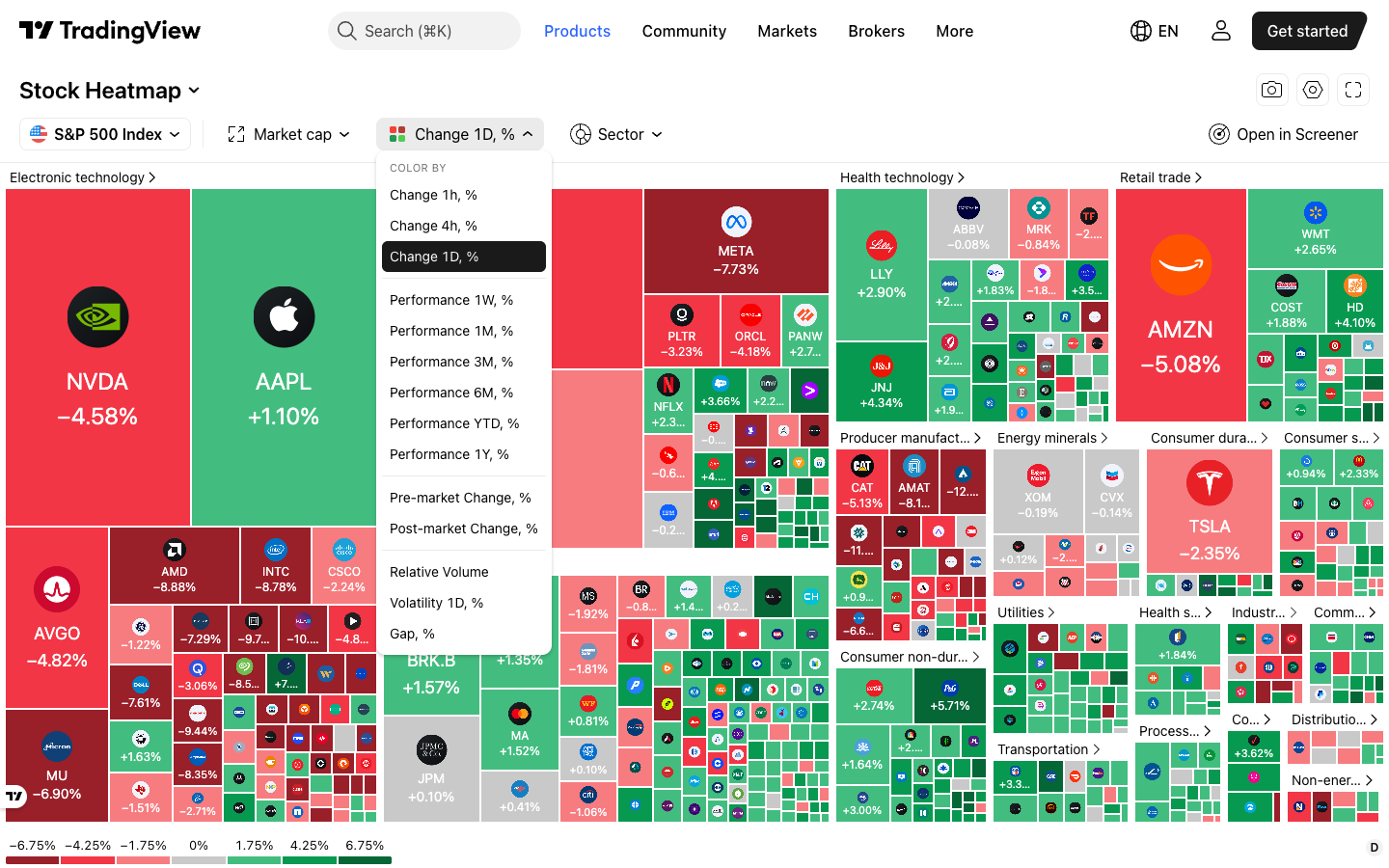 Click to enlarge
Three of these settings are worth trying early. Mono size gives every stock the same tile, so a small cap gets as much room as Apple; TradingView recommends it when you want to judge only the color. Pre-market change shows before the open which stocks are moving on news; when US stocks trade outside regular hours is covered in our guide to pre-market and after-hours trading. Relative volume shows where unusual activity is; because it can only rise, TradingView colors it on a single color scale instead of red and green.
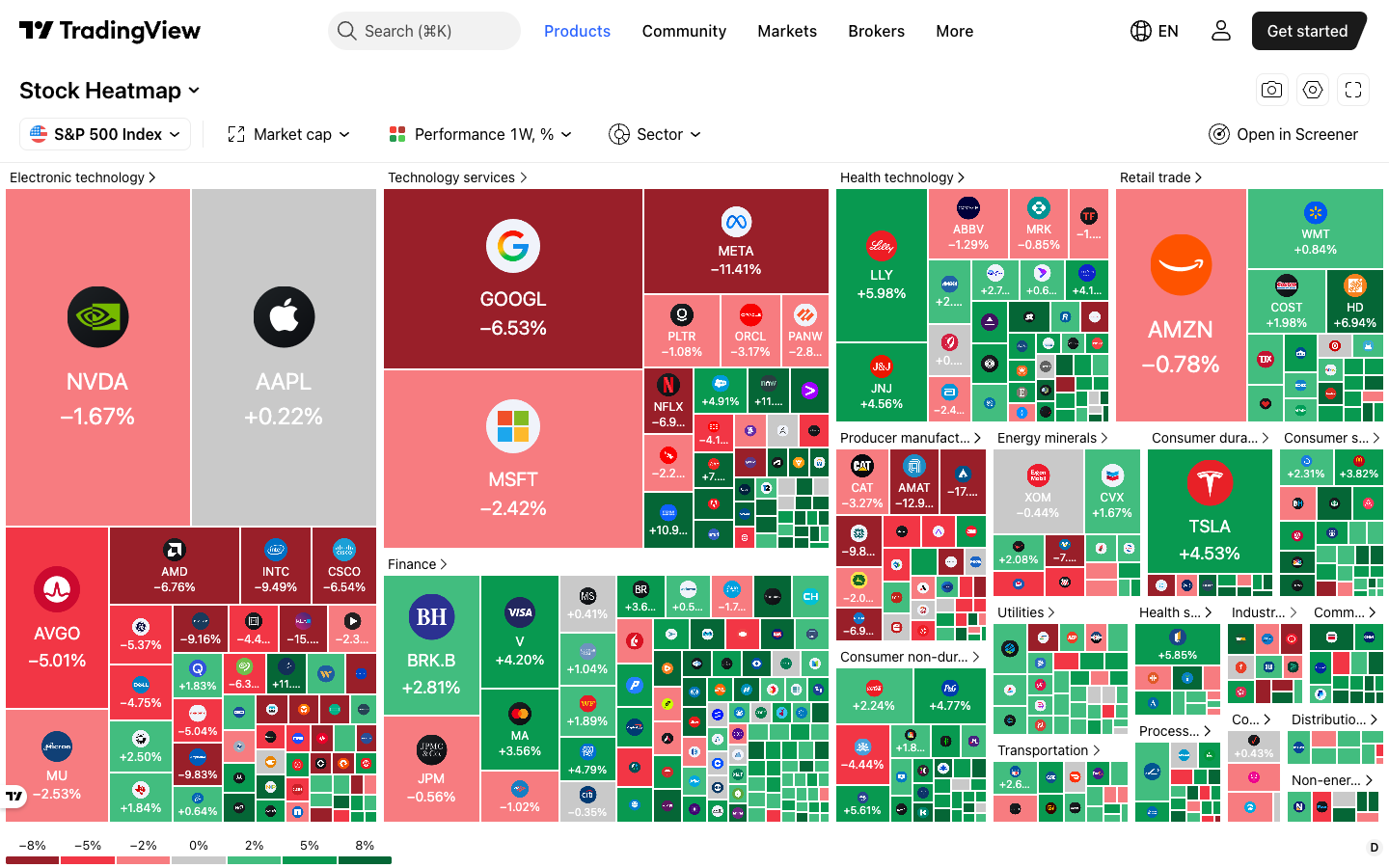 Click to enlarge
Source: TradingView Help Center, range calculation of the legend.
Small tricks that save time
- Click a sector name: the map zooms into that sector, with the same size and color settings.
- Hover over a tile: a tooltip shows the price, the market cap and the change, which helps with small tiles.
- Click a legend segment: TradingView hides all tiles in that range. Hide the five middle segments and only the strongest moves remain.
- Use the camera icon: it downloads the map as an image or copies a link to the current view.
Heatmap view in the screener
Since September 9, 2026, TradingView also shows screener results as a heatmap. According to the TradingView blog, this works in the stock, ETF and crypto screeners, takes the same size and color options and handles up to 16,000 symbols. This is useful when you have filtered a list first, for example all S&P 500 stocks near a 52-week high. How the filters themselves work is explained in our TradingView stock screener guide.
Finviz stock market map: the free classic for US stocks
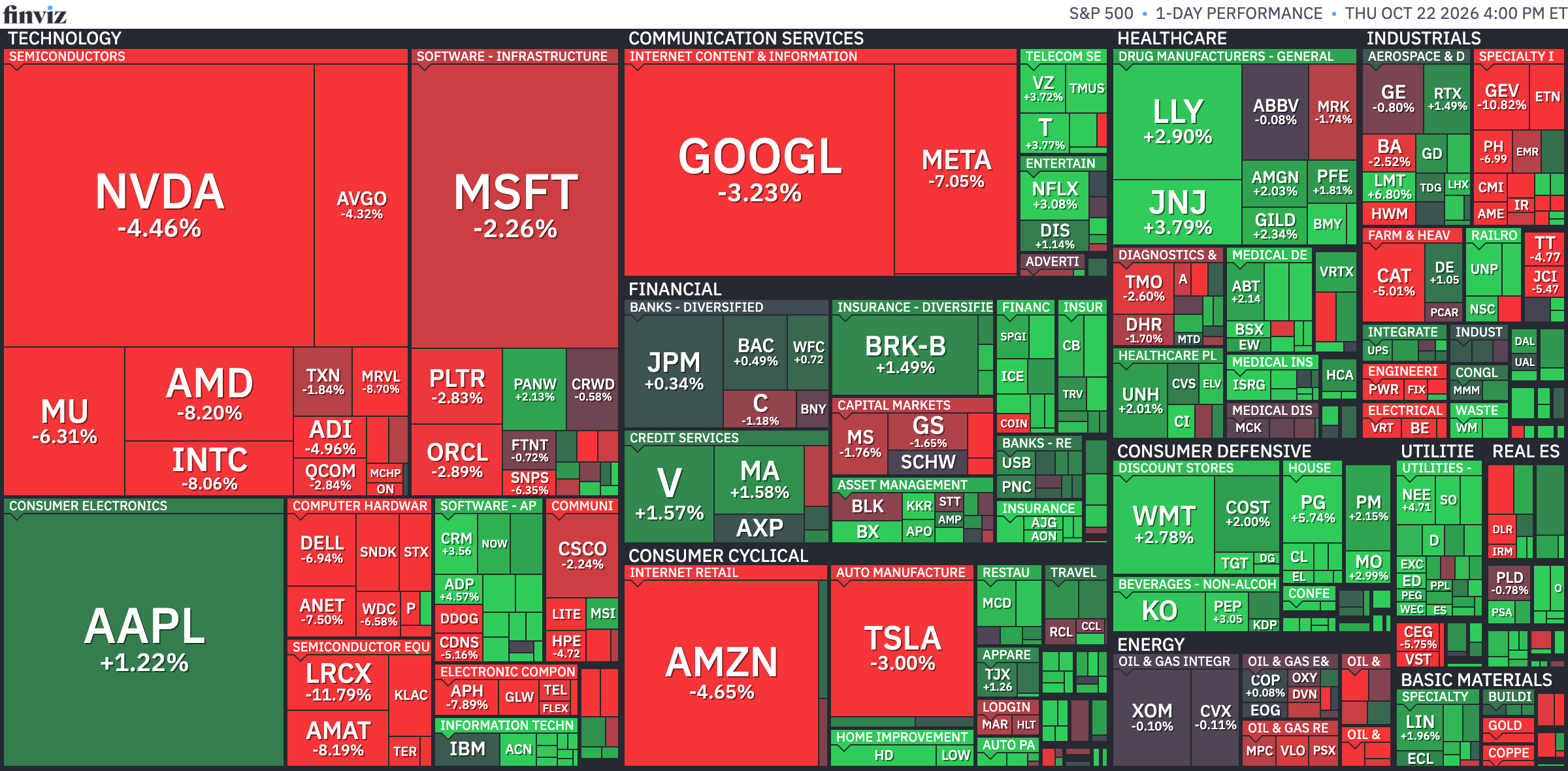
Finviz is the best known free stock map for the US market: “finviz heatmap” alone is searched about 5,400 times a month in the US. Its map covers the S&P 500, the Dow Jones, the Nasdaq-100, the Russell 2000 and all stocks, plus a world map, ETFs and crypto, and it groups stocks by sector and industry.
 Click to enlarge
Source: Finviz Maps.
The free version is enough for watching, not for entries. Finviz says on its Elite page that stock quotes in the free version are delayed one minute. Real-time data and intraday maps need Finviz Elite, which costs $39.50 a month or $299.50 a year (as of October 22, 2026). Finviz covers only US exchanges: NASDAQ, NYSE and AMEX.
Compare the time stamps when two maps disagree. On October 22, 2026, the Finviz image stamped 4:00 pm ET showed Meta at minus 7.05 percent, while TradingView showed minus 7.73 percent at 4:02 pm. Meta’s official regular-session close was down about 7.0 percent. We could not establish where the difference came from: neither map shows which data feed or session its value uses. For exact closing values, check the official closing quote on the chart.
The difference to TradingView is the workflow, not the picture. Both maps read the same way. Finviz shows sectors and industries in one picture and opens with the whole S&P 500 at once. TradingView offers more color metrics, works for markets outside the US and leads straight to the chart.
Other US heatmaps compared
All tools in this table show the basic map for free. They differ mainly in market coverage and in which number drives the color.
| Tool | Coverage and special feature | Cost (Oct 22, 2026) |
|---|---|---|
| TradingView | Stocks, ETFs and crypto worldwide; many color metrics; next to the chart | free, no account needed |
| Finviz | US stocks, sector and industry in one view; quotes 1 minute delayed | free; real time with Elite from $24.96 a month billed yearly |
| Yahoo Finance | Heatmap view of lists such as Top Gainers, not of a whole index | free |
| thinkorswim | Heat Map in the Schwab platform | for Schwab clients |
Yahoo Finance shows a different kind of map. Its heatmap view colors the stocks of a list such as Top Gainers, so it shows the biggest movers of the day, not the structure of an index. Charles Schwab has a tutorial on the Heat Map in thinkorswim desktop from 2023; we have not tested the thinkorswim heat map ourselves, and the platform needs a Schwab account. More charting platforms are compared in our TradingView alternatives.
Not every heatmap is the same: three types
This is where most of the confusion comes from. Someone searching for “heatmap” can mean three completely different tools. They only share the principle that color shows intensity.
The market heatmap is the type this article is about. It works with prices and market values and shows a whole market. Its time unit is the day, not the second.
The order flow heatmap looks completely different. It sits next to the chart and colors the price levels where large limit orders rest in the order book.
An order flow heatmap is a view of the order book in which the color intensity at each price level shows the size of the limit orders resting there.
It is a tool for very short-term traders who think in seconds. It needs order book data that your broker or data feed has to deliver. How this fits into reading the auction is covered in our guide to order flow trading.
The liquidation heatmap comes from crypto. It shows where many leveraged positions would be closed by force if the price got there.
A liquidation heatmap shows price zones in which many leveraged positions would be liquidated if the price reached them.
It answers a question about leverage risk, not about sectors. The zones are estimates from open interest and assumed leverage, not a measured order book, so read them as a map of possible pressure points.
What a stock heatmap tells you in daily trading
Three kinds of observation can be read from a market heatmap. All three are about the market context, not about the single trade.
Market breadth
The first is market breadth. It answers whether an index move has many shoulders or only a few heavyweights.
Market breadth describes how many individual stocks actually take part in an index move.
On the heatmap you see it immediately. A map that is green almost everywhere is something different from three large green tiles in a grey field. The second case is the more fragile one, because the move depends on a few stocks.
You can cross-check this with two ETFs instead of eyeballing it. The SPY follows the S&P 500 weighted by market cap, the RSP follows the same stocks with roughly equal weights: S&P resets each company to an equal weight at every quarterly rebalance, and the weights drift in between. On October 22, 2026, SPY closed at 763.96 after 773.09 the day before, about 1.2 percent lower, while RSP closed at 218.22 after 216.64, about 0.7 percent higher (regular-session closes). The cap weighted version fell, the roughly equal weighted one rose: the same picture as a few large red tiles in a mostly green map. For a direct count of participation, look at the number of advancing and declining stocks.
Sector rotation
The second observation is sector rotation. It shows up over several days, not on a single one.
Sector rotation is the shift of investor money from some sectors to others, which often follows the business cycle.
If the same block outperforms day after day while another stays red, that can be a sign of rotation. The map only shows price changes, not where the money actually flows. Switch the color to Performance 1W or 1M to see it in one picture. Whether a position can be built from it is a question for the chart; the Stage Analysis by Stan Weinstein is much better suited for that than the heatmap itself.
Outliers
The third observation is the outlier. A tile that moves against its whole block often has a single reason: earnings, a takeover, a changed forecast. The heatmap does not tell you which one. It only tells you where to look, and with 500 stocks that is already worth a lot. On October 22, 2026, Apple was such an outlier: a green tile, plus 1.1 percent on TradingView, in an “Electronic technology” block that was red almost everywhere.
What a heatmap cannot do: it gives no entry signal. It shows a state, not an expectation. For anything to do with timing, you need a chart and a method, not color and area.
Pros and cons of a stock heatmap
Like every overview tool, the heatmap has a clear strength and an equally clear limit. Know both before you build it into your daily routine and your watchlist work.
What speaks for a stock heatmap
- Speed: a whole market at a glance, where a quote list takes minutes.
- Context instead of single stocks: sector moves become visible that get lost in a watchlist of twenty stocks.
- Free: TradingView and Finviz deliver the basic map without a subscription.
- Weight built in: the area gives a quick idea of whether a move matters for the index.
What speaks against it
- No signal: the heatmap shows a state, not an entry or exit level.
- Distortion by heavyweights: a few large tiles dominate the picture.
- The wrong timeframe is easy to miss: if the view is set to one week, you read the wrong move.
- Small caps disappear: stocks with a small market value are so small that their moves stay invisible.
Who a heatmap is for, and who does not need it
The biggest benefit goes to everyone who has to keep several markets in view. Day traders use it for the market check before the open, swing traders for the weekly review, and investors to see why their portfolio moves today. For them the heatmap replaces ten minutes of reading lists. When each market is open is listed in our overview of stock exchange hours.
Two groups gain little from it. If you trade only one stock or one currency pair, you do not need a map of the market. And if you are looking for concrete entries, a stock screener with filter logic is the right tool, not a picture.
Conclusion: a compass, not a signal
After more than four decades in the markets, I see the heatmap where it belongs: at the start of the trading day, not at the end of the analysis. It answers reliably which corner of the market is moving today, and it answers faster than any list. That is its whole value, and it is real.
What it cannot do, you should not ask of it. I have seen enough traders take a position because a block was green, without even opening the chart of the stock. A color is not a setup. It is a hint where it pays to look.
My practical advice: use the heatmap twice a day, in the morning for the overview and in the evening for the review. Switch it to the weekly view once on purpose, and read the legend each time. Only then do you see rotations that look like noise in the daily map. This is a guide to a tool, not investment advice.
Frequently asked questions about stock heatmaps
What is a stock heatmap?
A stock heatmap shows all stocks of an index as colored tiles. The size of a tile usually shows the market value of the company, the color shows its price change. That lets you take in a whole market in a few seconds.
What do the colors on a stock heatmap mean?
Green means rising, red means falling, and the intensity shows the size of the move. The reference is usually the previous close. On TradingView, grey means almost unchanged, and the legend at the bottom shows which shade stands for which percentage.
Is the TradingView heatmap free?
Yes, the TradingView stock heatmap works without an account and without a paid plan. In our check on October 22, 2026, we could switch the index, size, color and grouping without signing in. For exact closing values, check the official closing quote on the chart: maps from different providers can show slightly different values right after the close.
Why are some tiles bigger than others?
By default, the area follows the market capitalization, the market value of the company. Large tiles are the heavyweights of the index and usually move it much more than the small tiles at the edge. The exact index weight can differ, because S&P counts only the shares available to investors. On TradingView you can also size by volume or turnover.
What is the best stock heatmap?
For US stocks, TradingView and Finviz are the two strongest free options. Finviz shows sectors and industries in one picture; TradingView offers more color metrics, other markets and the chart one click away.
What is the difference between a stock heatmap and a liquidation heatmap?
A stock heatmap shows the price changes of a whole market. A liquidation heatmap comes from crypto and shows price zones where many leveraged positions would be closed by force. Apart from the name, they have nothing in common.
This US edition is based on our German edition on kagels-trading.de and has been adapted for US readers.
More TradingView guides
- Choose a plan
TradingView Review 2026: Plans, Pricing and Is It Worth It?
Prices of all plans in US dollars, real-time data costs, Black Friday and whether it is worth it.
- Learn the basics
How to Use TradingView: A Beginner Tutorial in 11 Steps
A beginner tutorial in 11 steps: chart, symbol search, drawings, indicators, log scale, watchlists, alerts, layouts and trading.
- Save on a plan
TradingView Black Friday 2026: Dates, Deals and Best Plan
Expected 2026 timing, verified past deals and what to check before buying a plan.
- Practice without risk
TradingView Paper Trading: Setup, Limits and Tips (2026)
Set up the free paper trading account, place your first orders and learn where the simulation falls short.
- Compare platforms
TradingView Alternatives 2026: 7 Platforms Tested
Seven platforms compared, with a decision aid for when switching makes sense.
- Connect a broker
Best Brokers for TradingView 2026: A Guide for US Traders
Which US brokers work with TradingView and what to check before you connect one.
- Connect an AI assistant
TradingView MCP and API: What Is Official in 2026
What the official MCP server, webhooks and community MCP servers can do, and why there is no data API.
- Test a strategy
TradingView Backtesting: Test a Strategy Without Real Money
Manual testing with Bar Replay and automatic testing with the strategy report.
- Plan around economic data
Economic Calendar: Key US Dates and the 6 Best Calendars
The key US release dates to the end of 2026, how to read a calendar and six free calendars compared, TradingView first.
- Write an indicator
Pine Script in TradingView: Basics, Editor and Version 6
Pine Script basics, the editor and version 6, with code you can copy.
- Use the AI Copilot
TradingView AI Copilot Review: 7 Tests, Price and Limits
Seven real tasks for the paid AI add-on: what it costs, what it got right and where you must check it.
- Filter stocks with the screener
TradingView Stock Screener: How to Use It and What It Costs
How the stock screener works, what the free plan can do, the Pine Screener and three tested popular screens.
- Read volume inside each bar
TradingView Volume Footprint: Setup, Plans and Limits
Open and set up the volume footprint, which plan includes it and how accurate its buy and sell split is.