
TradingView AI Copilot Review: 7 Tests, Price and Limits


Contents
- TradingView AI Copilot in 30 seconds
- What is TradingView AI Copilot?
- What TradingView AI costs: my invoice and the US price
- My test: seven tasks for TradingView AI
- How reliable TradingView AI is: my results
- TradingView AI or your own AI: the alternative with more control
- Conclusion: who TradingView AI Copilot is worth it for
- Frequently asked questions about TradingView AI Copilot
- About the author
In my test, TradingView’s AI Copilot wrote an indicator in 42 seconds that never gives a signal, and showed me a green check mark next to it. When I pointed out the problem, it found the bug itself and fixed it properly. That is how the whole test went: fast, often right, and at the decisive points not reliable enough to follow blindly.
I have paid for TradingView since August 2017, and I bought the add-on for this review with my own money. On September 30, 2026, I gave the Copilot seven tasks: two chart analyses, a Pine Script indicator, a bug fix, a screener query and two alerts. We recalculated every number in its answers or checked it against a second source. This article follows our editorial policy.
TradingView AI Copilot in 30 seconds
The key points from my test on September 30, 2026:
- What it is: an AI assistant inside the TradingView chart. It reads the open chart, draws levels, writes Pine Script, looks up prices and creates alerts.
- What it costs: a monthly add-on on top of a paid plan. I purchased it from Germany at €7.50 a month before VAT (€8.93 including German VAT). I have not verified the US checkout price. The free Basic plan does not get the Copilot.
- What went well: its list of DAX losers was correct to the cent, and it diagnosed the bug in its own indicator correctly once I asked.
- What went wrong: a calculation error and an unclear entry basis in the DAX analysis, a missing lower low in gold, a probably outdated rate probability, and an indicator whose signal never fired.
- How much you can ask: during my seven tasks, the usage display dropped from 92 to 89 percent. I did not reach the limit in the test.
- My verdict: a fast assistant for preparation work. You have to check every level, every calculation and every signal yourself before money depends on it.
What is TradingView AI Copilot?
TradingView AI Copilot is a paid AI assistant that runs directly in the TradingView chart window. It answers questions in plain language, reads the open chart and TradingView’s data, and can draw lines, write Pine Script indicators and create alerts.
Since September 2026, the Copilot has been built into TradingView. According to the announcement of September 28, 2026, you open it with the AI Copilot icon in the right-hand panel of the chart. It works in the browser and the desktop app; it is not in the mobile apps yet. TradingView says every number in its answers is “grounded in TradingView data.”
Before that, it was a free Chrome extension. The public beta started on April 2, 2026 as a side panel in the browser, according to the beta announcement. In the Chrome Web Store, the extension was called “TradingView Remix: AI Chart Copilot.” TradingView no longer supports it and plans to discontinue it. Older reviews of the free Chrome extension describe the beta, not the paid built-in add-on tested here.
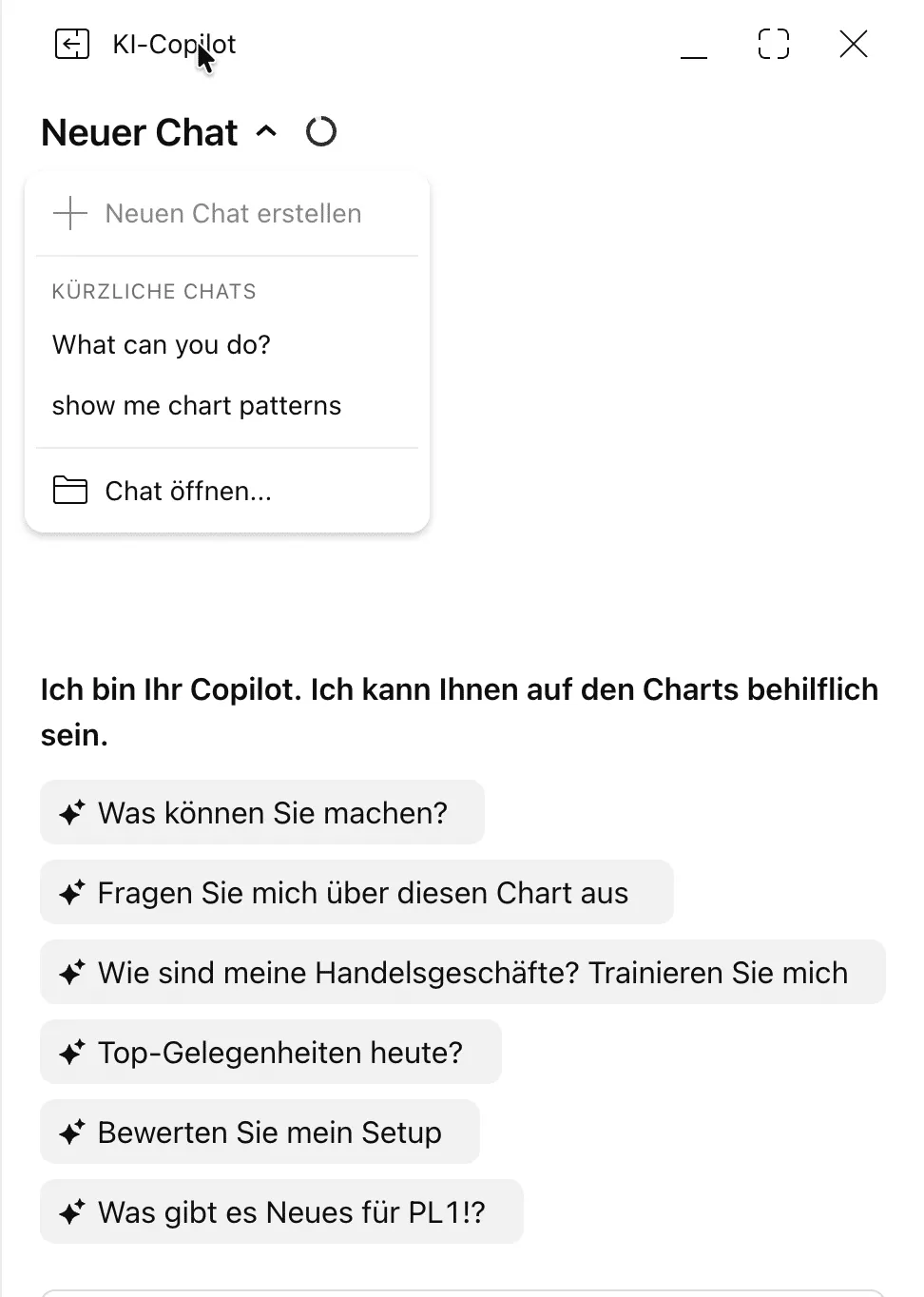 The Copilot panel in the German interface. Screenshot from Karsten Kagels’ account, September 30, 2026.
I used TradingView with a German interface, so the panel and the answers were in German. The panel is called “KI-Copilot” and offers six suggested prompts; one of them adapts to the open symbol. Earlier chats are saved and can be reopened, as the screenshot shows. The German translation has small flaws: one suggestion reads roughly “How are my trades? Train me.” Quotes from the answers in this article are my translations.
TradingView AI Copilot at a glance
| Provider | TradingView, Inc., New York (according to my invoice) |
| Product | AI Copilot, add-on to a TradingView subscription |
| Cost | monthly add-on on top of the plan |
| Requirement | Essential, Plus, Premium or Ultimate (trial works too) |
| Platforms | browser and desktop app, no mobile app |
| Term | monthly, cancel anytime (according to TradingView) |
| Available since | beta April 2, 2026, built in since September 2026 |
What TradingView AI costs: my invoice and the US price
When I purchased the Copilot on September 27, 2026, it cost €7.50 a month before tax. With 19 percent German VAT, I pay €8.93. You pay this on top of a paid TradingView plan.
TradingView does not publish the add-on price in its announcement. My invoice from TradingView, Inc. lists “AI Copilot, Monthly” at €7.50 plus 19 percent VAT. On the pricing page, the add-on only appears in the page code: as 7.5 in TradingView’s base currency and as 7.5 in euros. The same base value for the Plus plan is 34.95, which matches the US list price of $34.95. The public pricing configuration therefore suggests a US price of $7.50 a month. I have not verified that at a US checkout, so check the price shown in your account. Depending on your state, sales tax may be added.
Without a paid plan, there is no Copilot. According to the announcement, it is available for Essential, Plus, Premium and Ultimate, and a trial also works. The free Basic plan is excluded. You can find the plan prices on TradingView’s pricing page, and an overview of all plans in US dollars in my TradingView review.
How much you can ask: the monthly usage limit
Every subscription has a monthly usage limit, and the display only shows a percentage. Behind a circle icon next to the chat title, the panel shows “monthly usage” with the remaining share in percent and the end date. TradingView does not say how many requests 100 percent are, and the screenshot below shows only the percentage. According to the announcement, most users never reach the limit. Unused usage does not carry over to the next period. In my account, the period ends on October 27, one month after the booking.
In my test, the limit was not a bottleneck. Before the first test task, the display showed 92 percent. After all seven tasks with chart analyses, an indicator, a screener query and alerts, it showed 89 percent. Some tasks included follow-up questions. You cannot reliably calculate from this how many such tasks a whole month allows.
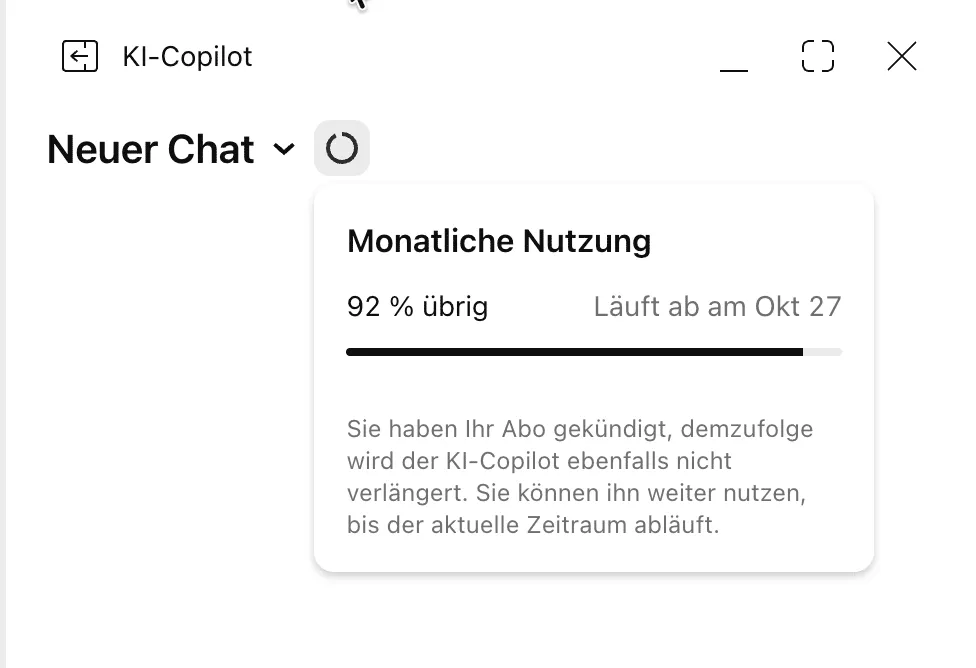 The usage display shows only a percentage, not a number of requests. The notice refers to canceling the add-on, not the TradingView subscription.
The cancellation notice is worded in a confusing way. I only canceled the add-on. The panel still says, translated: “You have canceled your subscription, so AI Copilot will not renew either.” That sounds like the whole TradingView subscription. My Ultimate plan continues, however, and I can use the Copilot until the end of the paid period.
My test: seven tasks for TradingView AI
I chose the tasks so that every answer could be checked. I read prices from the chart, checked the DAX values against Yahoo Finance and recalculated every number. The DAX is Germany’s benchmark index of 40 large companies. That let me check the screener’s list stock by stock. Response times ranged from 16 seconds to almost two minutes.
| Task | Result |
|---|---|
| DAX analysis, hourly chart | seven levels, one calculation error, unclear entry |
| Gold analysis, daily chart | calculations correct, lower low missing, probably outdated rate probability |
| Donchian indicator in Pine Script | bands correct, signal never fires |
| Debugging its own indicator | correctly diagnosed and fixed |
| DAX stocks down more than 2% | list exact, market breadth wrong |
| Alert on the indicator signal | not created, reported openly |
| Price alert | created, but not configured to trigger at the daily close |
DAX chart analysis: fast, but with a calculation error
When I asked for a DAX analysis on the hourly chart, a complete answer came after 1 minute 33 seconds. The Copilot drew three supports and four resistances into the chart, red and green in the screenshot below. It added a table with seven signals, a bull and a bear case, and three trade plans with entry, stop, target and position size. The daily change, all percentage distances and the distance to the moving average were correct.
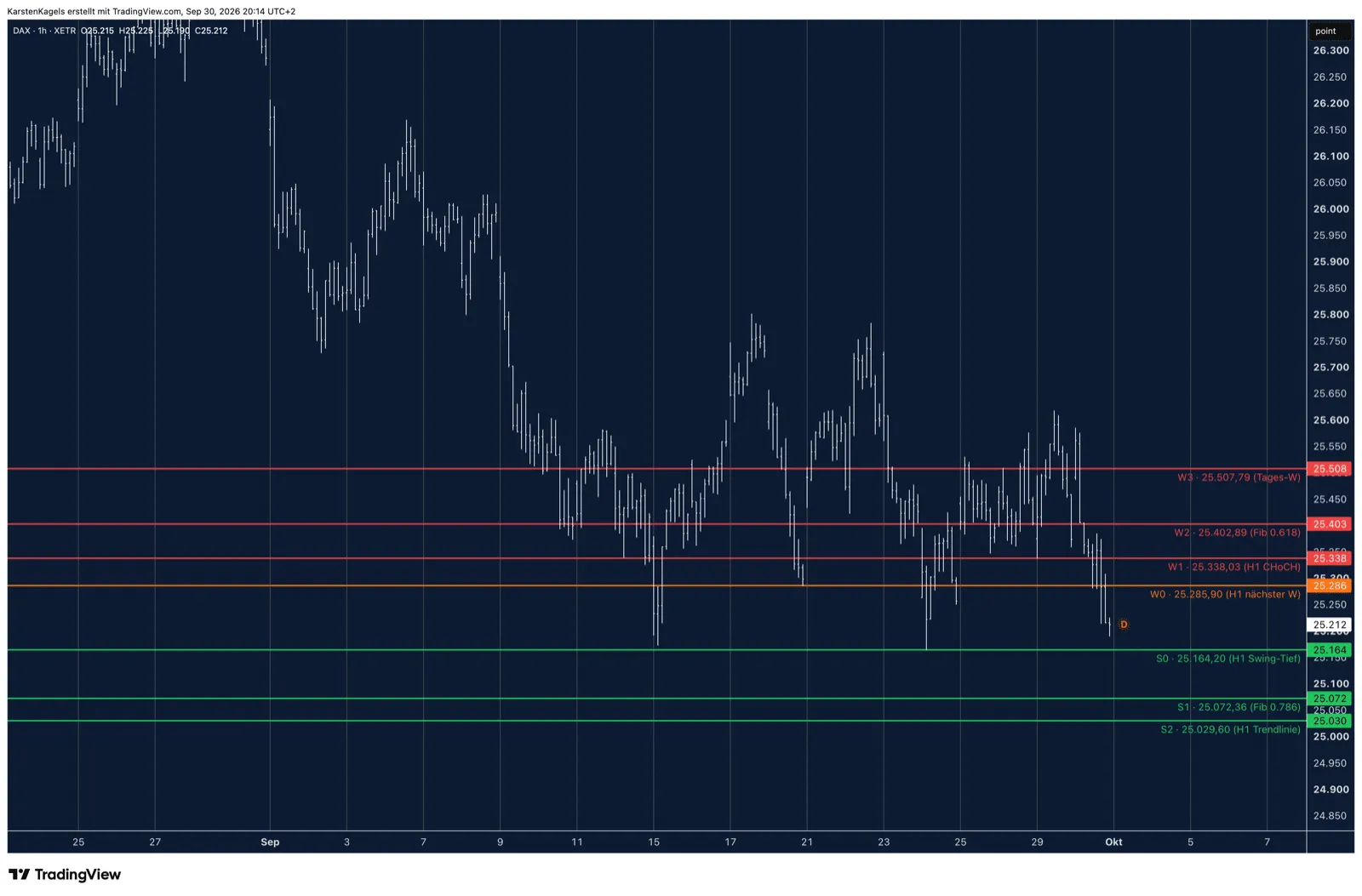 The Copilot drew these seven levels into the DAX hourly chart itself. Snapshot from September 30, 2026, 2:14 p.m. ET.
One number in the trade plans was wrong, and a second one could not be traced. In the first plan, the Copilot mentions a buffer of “just under 0.5 ATR” above the entry level. The Average True Range measures volatility and also counts gaps from the previous close; the Copilot gave it as 93.6 points. The stop sits 85.04 points above the level at 25,338.03. That is 0.91 ATR, and the Copilot states that number itself two lines earlier. In the third plan, the reward-to-risk ratios of 1.91 and 3.84 only fit an entry around 25,175 points, which the plan does not name. As the trigger, it only says the index should hold 25,164.20.
On top of that comes a lot of unexplained jargon. Terms like CHoCH (change of character), BOS (break of structure), ATR and confluence appear without explanation. If you do not know Smart Money Concepts, you cannot do much with part of the answer. It used the odd German phrase “Fenster-Put” for month-end moves. It probably meant window dressing, when portfolio managers adjust their holdings before a reporting date.
Gold chart analysis: a missing low and a probably outdated rate probability
For gold on the daily chart, I clicked the suggested prompt “What’s new for GOLD?” Instead of news, I got mostly technical analysis: eight drawn levels and a trade plan. This time all calculations were correct, including the reward-to-risk ratio of 3.6 to 1. Two details did not hold up, at least for my purposes.
As the lowest level, the Copilot set a “1D swing low” at $3,959.78. It left the lower low of June 30, 2026 at $3,943 unmarked, about $17 below. The line touches the higher minor lows. If you put your stop just below the Copilot’s level, you are right inside the zone the market has already traded through. For my stop planning, the selection was therefore incomplete. Our own view of gold is in the gold price forecast.
The rate probability differed from the figures in Yahoo’s live blog. The Copilot wrote that about 70 percent of an October rate hike was priced in, without a time stamp. At 9:34 a.m. ET on September 30, Yahoo Finance reported about 35 percent for a 0.25 percentage point hike, citing CME FedWatch; the summary on the same page says about 37 percent. According to Yahoo, it had been over 70 percent a week earlier. The Copilot’s figure was therefore probably outdated. How to read these probabilities yourself is explained in our guide to the CME FedWatch Tool.
Pine Script: an indicator in 42 seconds, but no signal
I know the Donchian Channel well, so I used it as my test case. I asked for the highest high and lowest low of the last 20 candles, the middle line and a green marker on breakouts. After 42 seconds, the Copilot reported with a green check mark that the indicator was “written, compiled and now on your chart.” The bands were right, and the middle line was exactly the average.
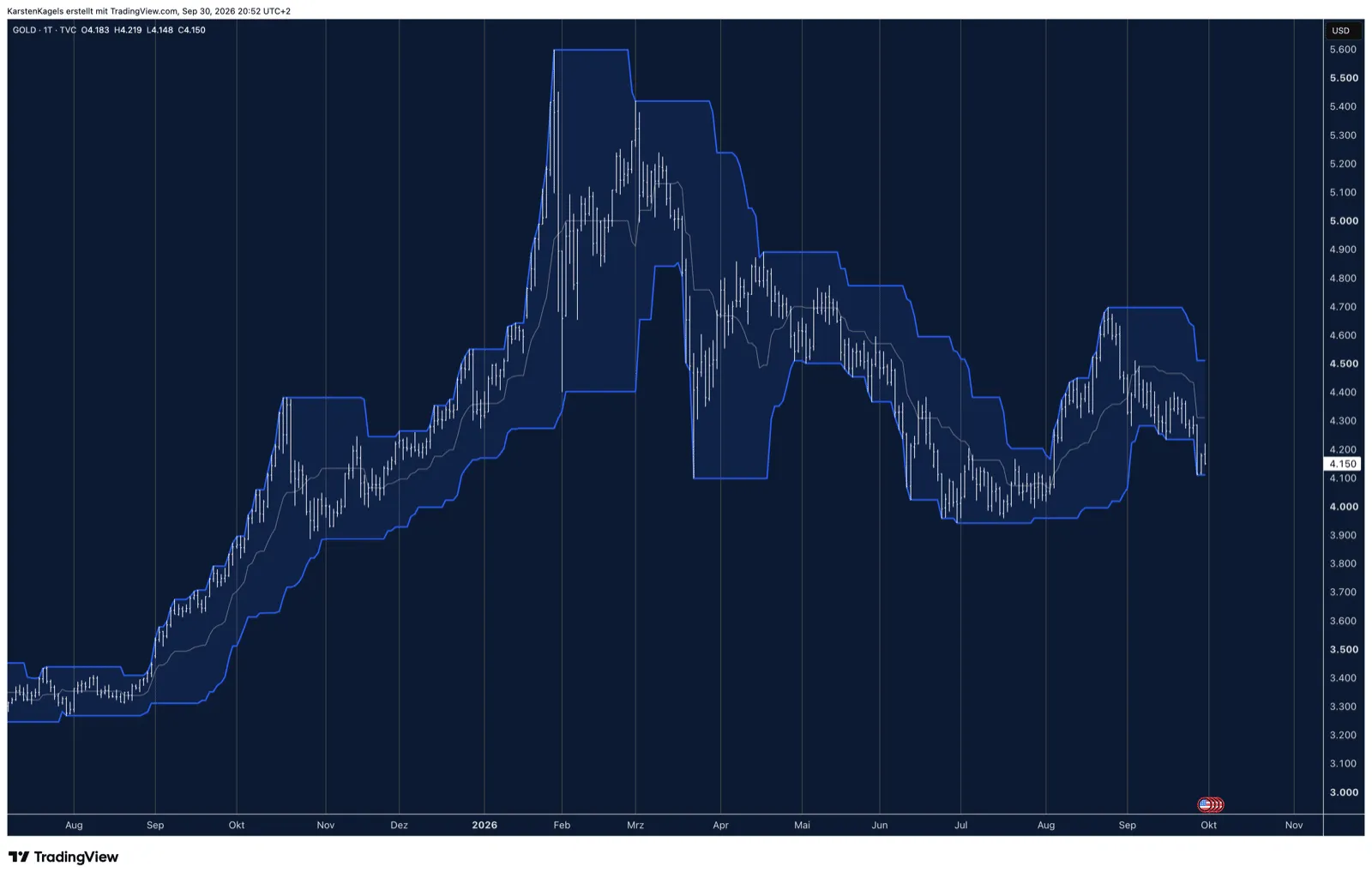 First attempt: the bands are right, but the green breakout signal does not appear once in more than a year of gold. Snapshot from September 30, 2026.
The green signal did not appear a single time in more than a year of gold. There is not one triangle in the screenshot above. During that time, gold rose from about $3,300 to $5,600 and made dozens of new 20-day highs. The reason is a classic logic error: the upper band includes the high of the current candle, and no close can be above that. A check mark for “compiled” only means the code has no syntax errors. What a working breakout rule looks like is covered in our guide to breakout trading.
Debugging: when asked, the Copilot finds the bug
When I told it that not a single signal appeared, the Copilot delivered a clean diagnosis. It called its own condition “mathematically impossible,” checked the signal series over 250 daily candles and changed the comparison to the band of the previous candle. After that, it reported eleven breakouts in the last 250 candles, the latest in mid-August. In the screenshot below, I count eleven triangles since early October 2025, roughly the last 250 trading days, the latest around August 19. That is a visual count, not a data export.
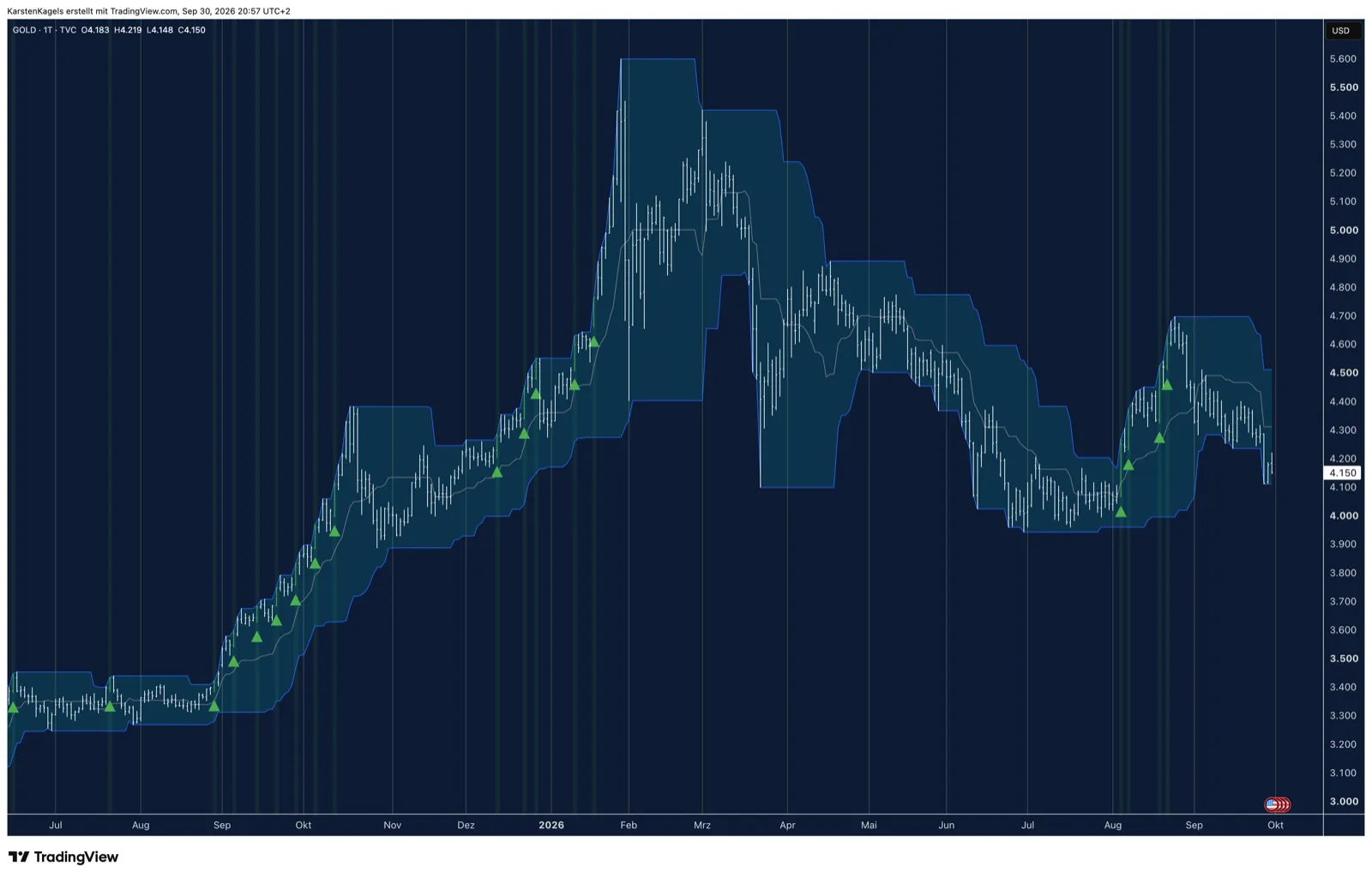 After I pointed out the bug: the Copilot now compares with the band of the previous candle, and the breakouts appear. Snapshot from September 30, 2026.
This is the real lesson of the Pine Script test. In this attempt, the Copilot fixed the bug only after I noticed it and asked. If you are not familiar with the language, learn the basics from our Pine Script guide and test every new indicator on breakouts you already know. Before a strategy trades real money, run it through TradingView backtesting.
Screener: the right list, but no control of the screener
I asked for all DAX stocks that had lost more than 2 percent on September 30. The answer named Commerzbank at minus 4.00 percent, Vonovia, Siemens and Siemens Energy. I checked all 40 DAX stocks from the current index composition against Yahoo Finance: the list was complete, and all Xetra closing prices were correct to the cent, including the gainers it named. So the screening in the chat worked.
The Copilot was wrong on market breadth and on the screener itself. It reported 25 stocks down and 14 up; the real numbers were 27 and 12, with one unchanged. It said it could not open and set up the TradingView screener itself and only gave instructions to rebuild the filter. For a saved search, you have to set the filters yourself. How the screener works without AI is explained in our guide to the TradingView screener.
Alerts: it failed on its own indicator
The Copilot could not create the alert on the breakout signal. Three attempts ended with the same error message from TradingView’s back end, which could not find the Copilot’s own script, written half an hour earlier. On the positive side, it reported this openly and explicitly did not create an “approximate” alert. By its own account, it cannot set an alert to trigger only on candle close at all.
It created a simple price alert in 16 seconds. The alert then showed up correctly in my alert list. Even though I had asked for the daily chart and the candle close, the Copilot set it with a one-minute resolution, so it could trigger on a short intraday spike. It only pointed this out afterwards. The same answer also contained an impossible reason: a high of $4,697 inside the 20-day window, while the upper band was at $4,510.90. If that high had been in the window, the band would have been at $4,697.
How reliable TradingView AI is: my results
In my seven test tasks, TradingView AI worked fast and many calculations were correct. At the same time, I found errors in chart levels, in a macro figure and in the logic of an indicator it wrote itself, which are easy to miss without checking.
What stands out is that the Copilot does not hesitate when it is wrong. The probably outdated rate probability and the calculation error appeared in the text with the same confidence as the correct numbers. At the same time, it delivers complete trade plans with position sizes and adds “for educational purposes, not investment advice” below them. What I noticed in the test:
What worked well
- Fast: answers in 16 seconds to almost two minutes, lines drawn directly on the chart.
- Mostly correct math: percentage distances, averages and most reward-to-risk ratios were right.
- Exact price data: the list of DAX losers was complete, and all prices were correct to the cent.
- Finds bugs when asked: it explained, proved and fixed the indicator bug.
- Honest about failures: it reported the failed alert openly instead of faking a replacement.
Where it fell short
- Trade-plan problems: a wrong ATR buffer and an unclear entry basis in the DAX analysis.
- Gaps in levels and facts: a missing lower low in gold and a probably outdated rate probability without a time stamp.
- Success message without function: the Pine Script indicator got a green check mark, but its signal never fired.
- Gaps in screener and alerts: no access to the screener interface, no alert on its own indicator.
- Cost and limits: a separate monthly fee on top of the plan, not in the mobile app, a lot of unexplained jargon.
TradingView AI or your own AI: the alternative with more control
In my view, the Copilot is the most convenient solution, but not the only one. It is built in, needs no setup and uses TradingView’s data and functions. If you want more control, you can connect an AI such as Claude yourself through TradingView’s official MCP server. According to TradingView, it is included from the Essential plan; trial plans are excluded from MCP access. Connections to a broker or a trading journal depend on their interfaces. This takes setup and practice, but you decide the steps and checks yourself.
The errors from my test do not go away with that. Your own AI can also miscalculate or set a level in the wrong place. The difference is that you build the process yourself and can plan fixed checks into it. If you are still choosing a charting platform, our overview of TradingView alternatives compares seven options.
Conclusion: who TradingView AI Copilot is worth it for
For experienced traders, the Copilot is a fast helper for preparation work. If you check levels and calculations yourself anyway, it can save you time when drawing levels, writing a first draft of an indicator and looking up prices, in my experience. The usage limit was not a bottleneck in my test, and the price is that of a small add-on.
For beginners, TradingView AI is risky in its current state. The errors in my test sounded just as convincing as the correct information, and the indicator without a signal came with a green check mark. If you cannot recalculate the answers yourself, use the Copilot as a learning aid, not as the basis for trades. You can find out in the first month whether it is worth it for you, because the add-on can be canceled monthly. To practice its ideas without risk, use TradingView paper trading.
Frequently asked questions about TradingView AI Copilot
How much does TradingView AI Copilot cost?
I purchased it from Germany on September 27, 2026, for €7.50 a month before tax. With 19 percent German VAT, that is €8.93. I have not verified the US checkout price, and sales tax may apply. It comes on top of a paid TradingView plan.
Is TradingView AI free?
No, the Copilot is a paid add-on since September 2026. You can only buy it with a paid plan; the Basic plan is excluded. The beta as a Chrome extension was free, but TradingView no longer supports it.
How do I turn on AI Copilot in TradingView?
Open a chart and click the AI Copilot icon in the right-hand panel. Then sign in and buy the add-on; you get access after payment. You need an active paid plan; according to TradingView, a trial of the main plan also works.
Is TradingView Copilot available in the app?
According to TradingView, the Copilot is not in the mobile apps yet. It runs in the browser and in the desktop app for Windows, macOS and Linux.
Can TradingView Copilot write Pine Script?
Yes, in my test it wrote a Donchian Channel in 42 seconds. It also added the indicator to the chart. But the breakout signal contained a logic error and never fired; the Copilot only fixed it after I asked.
How many requests does TradingView Copilot allow per month?
TradingView does not give a number. The display only shows the remaining usage in percent. During my seven test tasks, the value dropped from 92 to 89 percent. Unused usage does not carry over to the next period.
How do I cancel TradingView AI Copilot?
According to TradingView, you can cancel the add-on anytime in your profile settings. It renews monthly, and after you cancel, you can use it until the end of the paid period. In my case, the TradingView subscription itself continued independently.
This US edition is based on our German edition on kagels-trading.de and has been adapted for US readers.
More TradingView guides
- Choose a plan
TradingView Review 2026: Plans, Pricing and Is It Worth It?
Prices of all plans in US dollars, real-time data costs, Black Friday and whether it is worth it.
- Save on a plan
TradingView Black Friday 2026: Dates, Deals and Best Plan
Expected 2026 timing, verified past deals and what to check before buying a plan.
- Practice without risk
TradingView Paper Trading: Setup, Limits and Tips (2026)
Set up the free paper trading account, place your first orders and learn where the simulation falls short.
- Compare platforms
TradingView Alternatives 2026: 7 Platforms Tested
Seven platforms compared, with a decision aid for when switching makes sense.
- Connect a broker
Best Brokers for TradingView 2026: A Guide for US Traders
Which US brokers work with TradingView and what to check before you connect one.
- Test a strategy
TradingView Backtesting: Test a Strategy Without Real Money
Manual testing with Bar Replay and automatic testing with the strategy report.
- Write an indicator
Pine Script in TradingView: Basics, Editor and Version 6
Pine Script basics, the editor and version 6, with code you can copy.
- Filter stocks with the screener
TradingView Stock Screener: How to Use It and What It Costs
How the stock screener works, what the free plan can do, the Pine Screener and three tested popular screens.