
TradesViz Review 2026: Pricing, Broker Sync, Terms


Contents
- TradesViz in 30 seconds
- What is TradesViz?
- What features does TradesViz offer?
- Which brokers and markets does TradesViz support?
- How much does TradesViz cost?
- Is TradesViz legit?
- User reviews and experiences
- What are the alternatives to TradesViz?
- Pros and cons of TradesViz
- Conclusion: who TradesViz is for
- Frequently asked questions about TradesViz
- About the author
TradesViz lists 266 brokers and platforms, but only 69 of them have a native automatic sync. For a US trader that is less of a problem than it sounds: Interactive Brokers, Schwab, Webull and tastytrade are in that group. What decides the value of the journal is not the advertised 600+ statistics, but how your trades get in and what the contract says.
This review is based on TradesViz’s public pages, not on an account of our own. We counted the broker list, read the terms of use and the FAQ, and looked at the user reviews. We did not test features behind the login, and this article follows our editorial policy.
TradesViz in 30 seconds
- Online trading journal with AI analysis: TradesViz imports your trades and analyzes them with over 600 statistics. A simulator and backtesting come on top.
- Basic is free but limited to stocks and 3,000 executions a month. For options, futures or forex you need Pro for $19.99 a month or Platinum for $29.99.
- Many big US brokers sync automatically: Interactive Brokers, Schwab, Webull, tastytrade, TradeStation and Robinhood have a native connection. Fidelity, E*TRADE and Vanguard run through Plaid on a paid plan.
- Check before you subscribe: the FAQ says there are no refunds. The terms choose Indian law and arbitration in Chennai, India.
- User opinions are split: Trustpilot showed 3.7 out of 5 from 72 reviews on November 8, 2026, with 66 percent five stars and 29 percent one star.
What is TradesViz?
TradesViz is an English-language online trading journal run by Smirmatec Private Limited that imports trades from over 250 brokers and platforms, analyzes them with over 600 statistics and adds AI features, a simulator and backtesting.
The difference from a spreadsheet lies in the import. You upload your executions, meaning the single partial buys and sells, and the journal assembles them into complete trades. What a journal should record before and after each trade is explained in our guide on how to keep a trading journal, with a template to copy.
According to its terms of use, the operator is Smirmatec Private Limited. The same name appears as the seller in the App Store. We found no postal address and no founder names on the About, contact, terms and privacy pages. We did not check a company register.
 Click to enlarge
Source: TradesViz home page.
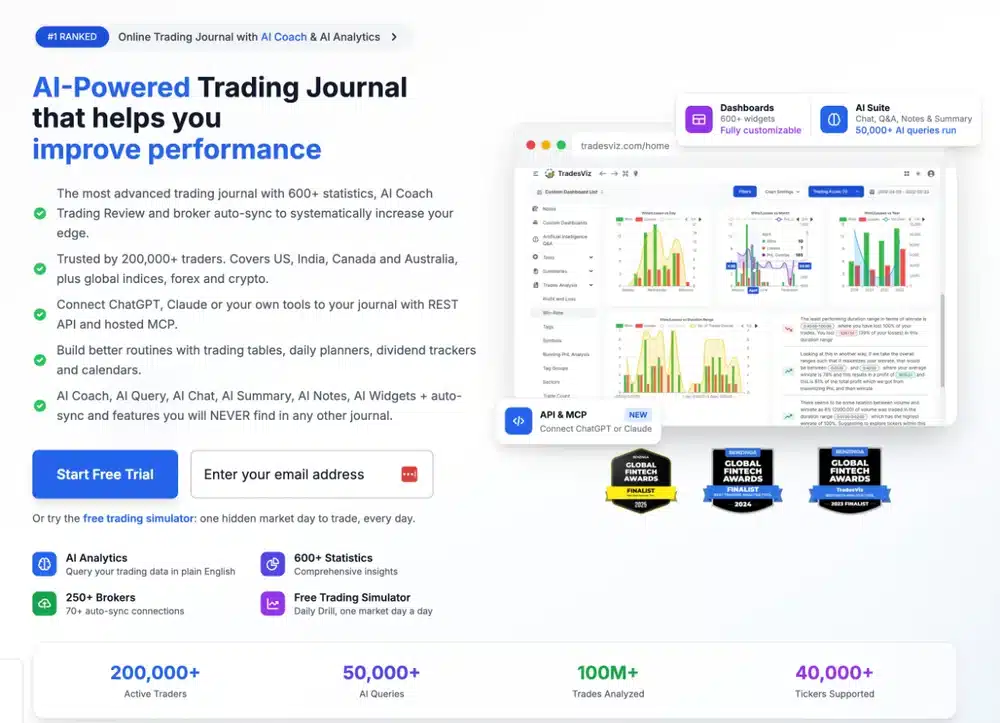
The big numbers on the home page come from the provider itself. The page does not explain the “#1 Ranked” label at that spot either. We could not verify the 200,000 active traders, so the fact sheet lists them as the provider’s own claim.
| Feature | Details |
|---|---|
| Operator | Smirmatec Private Limited |
| Governing law in the terms | India, courts and place of arbitration in Chennai |
| Plans | Basic (free), Pro, Platinum |
| Asset classes | stocks, options, futures, forex, crypto, CFDs, event contracts |
| Brokers | 250+, with 70+ auto-sync connections (provider’s own claim) |
| Users | 200,000+ active traders (provider’s own claim) |
| Market data | US, India, Canada and Australia (home page and FAQ) |
| Apps | iOS and Android |
| Servers | USA (according to the privacy policy) |
What features does TradesViz offer?
TradesViz wants to be more than a diary. Importing, analyzing, practicing and asking an AI questions all run on one platform. That explains the long feature list. It also explains one objection from the reviews: a user on Trustpilot suspects that most traders do not need this much.
Analysis and dashboards
The strength lies in the depth of the analysis. Pro includes fully customizable dashboards, trading rules and tracking of stop losses and fees. Platinum adds exit analysis, which shows you whether you sold too early. Metrics such as MFE and MAE fit in here: the largest open profit and the largest open loss during a trade.
By default, TradesViz shows your gross profit. That is stated in the FAQ. You have to switch to net yourself, and the plan overview lists commission and fee tracking only from Pro. The more often you trade, the more this flatters your numbers.
AI features and your data
According to the provider, the AI does not calculate your metrics itself. Profit, win rate and drawdown come from program code, and the language models sit on top. AI Coach ranks up to eight findings, with 16 checks on Pro and 21 on Platinum.
Where your data goes depends on the feature. For AI Query, only your question text goes to the model, according to TradesViz. AI Chat, AI Summary and AI Notes, by contrast, send trade data to models from OpenAI or Google, and only after you give consent in your account settings.
For technical users there are interfaces. Pro and Platinum include a REST API and an MCP server, a connection for AI assistants such as ChatGPT or Claude. According to the provider, these connections can read and change your journal but cannot place broker orders. How MCP connections work in general is explained in our TradingView MCP guide.
Simulator and backtesting
Every plan includes a small simulator. The Daily Drill shows you a hidden trading day from futures, stocks or forex each day, and you learn the date only at the end. The full simulator with free choice of symbol, Trade Replay and backtesting with over 70 indicators is in Platinum only.
For pure practice there are other routes. If you only want to trade without real money, a free simulated account works too, as our guide to TradingView paper trading shows. How to test results properly without fooling yourself is covered in our guide to backtesting.
Which brokers and markets does TradesViz support?
Auto-sync means that a trading journal pulls your trades automatically from the broker or trading platform, without you downloading and uploading files.
The number 250 says little about the effort. On November 10, 2026 we counted 266 entries in the broker list. 69 of them have a tick for native auto-sync, and 11 run through Plaid, a service for US and Canadian accounts. The other 186 carry a star: there, automation only works through a Google Drive detour, otherwise you upload a file.
| Import route | Entries | Examples from the broker list |
|---|---|---|
| Native auto-sync | 69 | Interactive Brokers, Schwab, Webull, tastytrade (listed as TastyWorks), TradeStation, Tradier, Robinhood, moomoo, Public, NinjaTrader, Tradovate, Rithmic, TopstepX, TradingView |
| Plaid (Pro and Platinum, read-only) | 11 | Fidelity, E*TRADE, Vanguard, Merrill Edge, SoFi, Firstrade, Chase, Wells Fargo, M1 Finance, Empower, Wealthsimple |
| Star: Google Drive route or file upload | 186 | thinkorswim, Lightspeed, Cobra Trading, AMP Futures, Optimus Futures, E*TRADE Power, Quantower, ATAS |
Own count of the TradesViz broker list on November 10, 2026. On November 8 it had 265 entries; the new one is the prediction market Polymarket. A tick is the provider’s statement, not a connection we tested.
For US stock and options traders, the main brokers are covered. Interactive Brokers, which we cover in our Interactive Brokers review, and Schwab connect directly, and so does Tradier from our Tradier review. Note one detail: Schwab has its own auto-sync entry, while the separate thinkorswim entry carries the star. According to the provider, established connections sync every 24 hours by default, usually after 6 PM Eastern Time.
Plaid fills gaps, but only on a paid plan. TradesViz says Plaid reaches “3,000+ US and Canadian brokers and banks”, including Fidelity, Vanguard and E*TRADE, which have no native connection. The broker list marks this route as Pro and Platinum only and read-only. We did not test whether Plaid delivers complete executions with fees for every broker.
Futures traders have it easiest. With NinjaTrader, Tradovate and Rithmic, the common order routes are connected directly, and TopstepX is too. Quantower and ATAS only carry the star. Pro also includes a rules check for prop firms, providers that fund traders after an evaluation; how their drawdown limits work is shown in our guide to prop firm drawdown.
The statements on market coverage do not fully match, but the US is in all of them. The pricing page lists the US, Canada, India, Australia, the EU, the UK and Singapore under market support. The FAQ speaks of market data for Australia, Canada, India and the USA only, and so does the home page. According to the FAQ, you can import trades in nearly any currency.
How much does TradesViz cost?
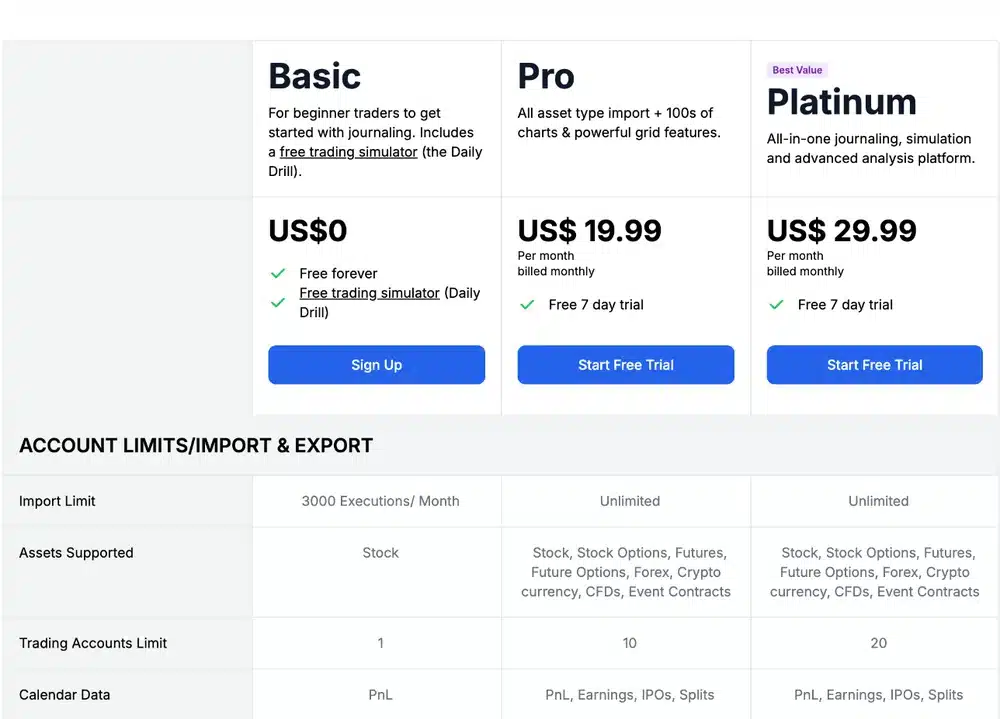
On monthly pricing, Pro sits below the other paid entry plans compared here. There are three plans, and the 7-day trial for Pro and Platinum costs nothing if you cancel in time. Paying yearly saves 25 percent, according to the provider. The screenshot shows the monthly prices and the most important limits.
 Click to enlarge
Source: TradesViz pricing.
| Plan | Price per month | Limits and scope |
|---|---|---|
| Basic | free | stocks only, 3,000 executions a month, 1 account; fees and export from Pro, per the overview |
| Pro | $19.99, or $14.99 billed yearly | all markets, unlimited import, 10 accounts, AI features, API, only the Daily Drill as simulator |
| Platinum | $29.99, or $22.49 billed yearly | as Pro plus 20 accounts, simulator, Trade Replay, backtesting, exit analysis, Options Flow |
Prices in US dollars from the TradesViz pricing page, checked November 8 and 10, 2026.
For most active traders, Basic is only a place to try things out. If you trade futures or options, you cannot import anything there. A stock trader gets far with 3,000 executions but, according to the overview, has no fee tracking. The label “Free forever” also has a limit: the terms of use allow the operator to change or withdraw the free plan at any time.
This is how the prices compare, each for the entry plan and, for TradesViz, also for Platinum:
| Journal | Monthly | Yearly |
|---|---|---|
| TradesViz Pro | $19.99 | $14.99 a month, about $180 |
| TradesViz Platinum | $29.99 | $22.49 a month, about $270 |
| Edgewonk | $35 | $197 |
| TraderSync Pro | $29.95 | depends on the current offer |
| TradeZella Essential | $35 | $315 |
| Tradervue Silver | $29.95 | monthly price only |
List prices in US dollars, before any tax, checked November 10, 2026 on each provider’s pricing page; TraderSync’s page blocked our check, so its monthly price is from November 8. Edgewonk’s price cards show $35 monthly and $197 a year, but other copy on the same page still says $169; we use the cards, so confirm the price at checkout.
The “one third of the price” claim is only partly true. TradesViz advertises “1/3rd the price” and names three unnamed competitors at $600, $834 and $250 a year. Against the two expensive ones, its own $179 a year for Pro is about a third or even less. Against competitor 3 at $20.75 a month it is not, and Platinum costs more per year than Edgewonk, whose plans do not cover the same features. The pricing page says nothing about sales tax, and the terms allow extra payment gateway charges.
Is TradesViz legit?
We see no grounds for a fraud allegation in what we found. The product exists, the prices are public, and individual users report positively on the features. You should still read the contract terms, because they are unusual for a US customer.
- Refunds: the FAQ simply says no. The terms of use leave a pro rata refund open for proven deficiencies, but only at the operator’s discretion.
- Cancellation: you have to cancel at least 24 hours before the billing date, on the subscriptions page or by email from your registered address. If PayPal does not confirm the cancellation, you must cancel in your PayPal account or write to support from your registered address.
- Disputes: the terms choose Indian law, courts in Chennai and English-language arbitration there. The sole arbitrator, described as independent and neutral, is identified by the operator. The terms also state that mandatory consumer and data-protection rights remain unaffected. We did not check whether the clause is enforceable against US consumers.
- Data: the privacy policy says data is stored on servers in the USA only. AI Chat, AI Summary and AI Notes send trade data to OpenAI or Google after your consent.
Back up your data before you cancel. The plan overview lists export management and the dedicated notes management only from Pro. A Trustpilot review from September 2026 complains that the user’s own notes and daily plans were readable only for a fee after the subscription ended. That is a single, unverified voice, and we did not test which data stays readable. So export everything while your subscription is still active.
User reviews and experiences
The reviews fall into two camps. On Trustpilot, TradesViz had 3.7 out of 5 from 72 reviews on November 8, 2026. 66 percent gave five stars, 29 percent one star, with almost nothing in between. According to Trustpilot, the profile is not claimed, so the provider does not manage it.
The positive reviews we read focus on the depth of analysis. An entry from August 2026 praises the data accuracy and the import guides. Others see TradesViz as a journal for serious traders. The provider’s own review page naturally shows mostly such voices, so it is not an independent source.
Four points repeat in the negative reviews we read. First come import errors: an entry from Germany in 2024 names wrong times and differing results, a US entry in 2026 problems separating stocks from options. Then there is the cluttered interface, many emails and the way support handles complaints. We could not verify these single cases.
For the apps, the data is thin. The Google Play page showed 3.4 out of 5 from 66 ratings on November 10, 2026, and the US App Store showed about 3.9 from only eight ratings. For comparison, Tradervue had 2.4 out of 5 on Trustpilot when we last checked it.
What are the alternatives to TradesViz?
The choice depends mainly on your broker and your budget. There is no clear best solution, and the main alternatives set different priorities. Our trading journal software comparison puts six tools side by side.
| Journal | Strength and limit |
|---|---|
| Edgewonk | strong focus on psychology and trading rules, no free plan |
| TraderSync | many broker connections, paid plans cost more than at TradesViz |
| TradeZella | journal with backtesting and AI features, but no trial and a higher price |
| Spreadsheet | fully flexible and no subscription, but no automatic import |
Against TradeZella, TradesViz scores mainly at the start. It has a free plan and a trial and is cheaper on Pro. On the other hand, some reviewers complain about the cluttered interface. If quick onboarding matters more to you than the last statistic, look at both first.
Pros and cons of TradesViz
After checking the public pages and reviews, this is the picture: a lot of functionality for little money, but a contract you should read first. We did not check the accuracy of the import ourselves.
Pros
- Generous entry: Basic imports 3,000 stock executions a month.
- Lower monthly price: Pro at $19.99 a month costs less than the other paid entry plans in our comparison.
- Major US brokers connected: Interactive Brokers, Schwab, Webull, tastytrade and the common futures platforms sync automatically.
- Much under one roof: journal, simulator, backtesting and AI on one platform.
- Clear AI rules: the site says which feature sends data outside.
Cons
- Plaid only on paid plans: Fidelity, Vanguard and E*TRADE users need Pro for automatic import.
- Gross profit by default: you have to switch to net yourself, and fee tracking starts at Pro.
- Unusual terms: no refunds according to the FAQ, Indian law, arbitration in Chennai.
- Unclear company details: no postal address or founder names on the public pages.
- Split reviews: 29 percent of Trustpilot reviews give only one star.
Conclusion: who TradesViz is for
TradesViz suits active traders who want deep analysis and trade at a connected broker. If you trade through Interactive Brokers, Schwab, tastytrade or NinjaTrader, you get many statistics for comparatively little money. It also fits options traders, because options analysis and strategies are among the focus areas of the site; the basics are in our guide to options trading for beginners.
It fits less well for long-term investors who only buy a few funds. At Fidelity or Vanguard, automatic import needs a paid plan through Plaid, and a few trades a month hardly justify 600 statistics. Then a spreadsheet is often less effort.
Our advice: start with the free plan or the trial and import real trades of your own. Then compare times, results and fees with your broker statement before you sign up for a yearly plan. Only this check shows whether the import really works for your broker. Chart your setups separately, for example on TradingView, and keep the journal for the review.
Frequently asked questions about TradesViz
Is TradesViz legit?
TradesViz is a real software product with a named operating company. We see no grounds for a fraud allegation. What we criticize are the strict terms: no refunds, Indian law and arbitration in Chennai. Our assessment rests on public sources, not on an account of our own.
Is TradesViz free?
Yes, the Basic plan costs nothing. It is limited to stocks, 3,000 executions a month and one account. Pro costs $19.99 and Platinum $29.99 a month, or $14.99 and $22.49 a month when billed yearly.
Which US brokers sync automatically with TradesViz?
Many large US brokers have a native connection. The broker list shows auto-sync for Interactive Brokers, Schwab, Webull, tastytrade, TradeStation, Tradier and Robinhood. Fidelity, E*TRADE and Vanguard run through Plaid, which requires Pro or Platinum.
Does TradesViz offer refunds?
No, according to the FAQ. The terms leave a pro rata refund open only for proven deficiencies and at the operator’s discretion. Use the 7-day trial and cancel at least 24 hours before the first billing date if it does not fit.
Can I connect TradesViz to ChatGPT or Claude?
Yes, from the Pro plan. The connection runs through an MCP server. You choose which accounts and permissions the assistant gets, and according to the provider it cannot place orders at your broker. Check first how the AI provider handles your data.
This US edition is based on our German edition on kagels-trading.de and has been adapted for US readers.
More Risk Management guides
- Manage your trading risk
Risk Management in Trading: Rules, Math, Psychology
The 1% rule, stops, risk/reward, daily loss limits, leverage caps and the psychology of losing streaks, with the math behind each rule.
- Calculate your position size
Position Sizing in Trading: Formula, Calculator, Examples
The formula, a free calculator, the 1% rule explained correctly, and examples for stocks, forex and futures.
- Read your account equity
Account Equity vs Balance: Margin and Free Margin Explained
Equity against balance, margin, free margin and margin level, with a worked example and the close-out rules for cash, US margin and CFD accounts.
- Size your risk per trade
Kelly Criterion for Traders: Formula, Calculator, Risks
The Kelly formula for traders with a calculator, and a simulation of why full Kelly is far too much.
- Keep a trading journal
Trading Journal: How to Record and Review Your Trades
What to write before and after each trade, a completed example with a win and a loss, a weekly review and a template to copy.
- Choose a journal
Best Trading Journal Software 2026: 6 Tools Compared
Six journals compared on price, free plans, refunds, automatic broker sync, costs and export, with a decision guide.
- Check TradeZella
TradeZella Review 2026: Pricing, Features and Limitations
The three plans since July 2026, what Essential leaves out, the no-refund terms, imports, export and what users report.
- Check TraderSync
TraderSync Review 2026: Pricing, Broker Sync and Limits
Plans and dated prices, broker imports and autosync, Market Replay, Cypher and the no-refund policy.
- Check Tradervue
Tradervue Review 2026: Imports, Reports and Costs
Silver or Gold, why net P&L needs Gold, few automatic imports, US-only stocks, the no-refund sign-up terms and how to cancel.
- Check Edgewonk
Edgewonk Review 2026: Features, Costs and Limitations
One feature set billed monthly or yearly, the refund period, MetaTrader auto sync, the psychology tools and our own test journal.