
Edgewonk Review 2026: Features, Costs and Limitations


Contents
- Edgewonk in 30 seconds
- What is Edgewonk?
- Edgewonk features: Chart Lab, Edge Finder and Psychology Lab
- Supported markets, brokers and auto sync
- Edgewonk pricing: one plan, billed yearly
- Edgewonk reviews: what users report
- Edgewonk or TradeZella? Alternatives compared
- Pros and cons of Edgewonk
- Conclusion: who Edgewonk is worth it for
- Frequently asked questions about Edgewonk
- About the author
A trading journal is the cheapest form of self-control a trader can have. It records not only what you traded but also when you broke your own rules and what that cost. Edgewonk is built around exactly that question: it analyzes your trades and shows which habit takes money from you.
This review combines a documentation check with a short look of our own. On October 3, 2026 we checked Edgewonk’s pricing page, its import list, its changelog and its imprint, and read its public Trustpilot profile. The two screenshots come from a small test journal in our own account from February 2024, not from a long-term test. This article follows our editorial policy.
Edgewonk in 30 seconds
- What it is: a web-based trading journal that imports your trades and searches them for strengths and weaknesses, with a strong focus on trading psychology.
- Who is behind it: Quantum Trade Solutions GmbH in Offenbach, Germany, the same company that runs the trading education site Tradeciety.
- Price: one plan, $197 billed every 12 months. EU and UK buyers pay VAT on top, for example $236.40 in the UK.
- Trial: no free trial, but a 14-day money-back guarantee.
- Imports: many brokers by file, and auto sync for MetaTrader 4 and 5 brokers and prop firms.
- Main limits: no mobile app, an English interface and a basic backtester.
What is Edgewonk?
Edgewonk is a web-based trading journal that analyzes imported trades and shows which habits improve your results and which cost you money. It runs in the browser; there is no app for iPhone or Android.
The difference to a spreadsheet lies in the analysis. A spreadsheet stores what you type. Edgewonk calculates win rate, expectancy and maximum drawdown and sets them against the features of your trades: time of day, weekday, instrument and setup. That answers the question a spreadsheet leaves open: what exactly causes the result? Our trading journal guide shows how to record trades so this kind of analysis works.
The company is German. According to its imprint, Edgewonk is run by Quantum Trade Solutions GmbH, Offenbach, registered at the Offenbach district court under HRB 48296, with Rolf Schlotmann and Moritz Czubatinski as managing directors. The same company runs Tradeciety, which sells trading education. That is not a criticism, but keep it in mind when the software recommends ways to improve.
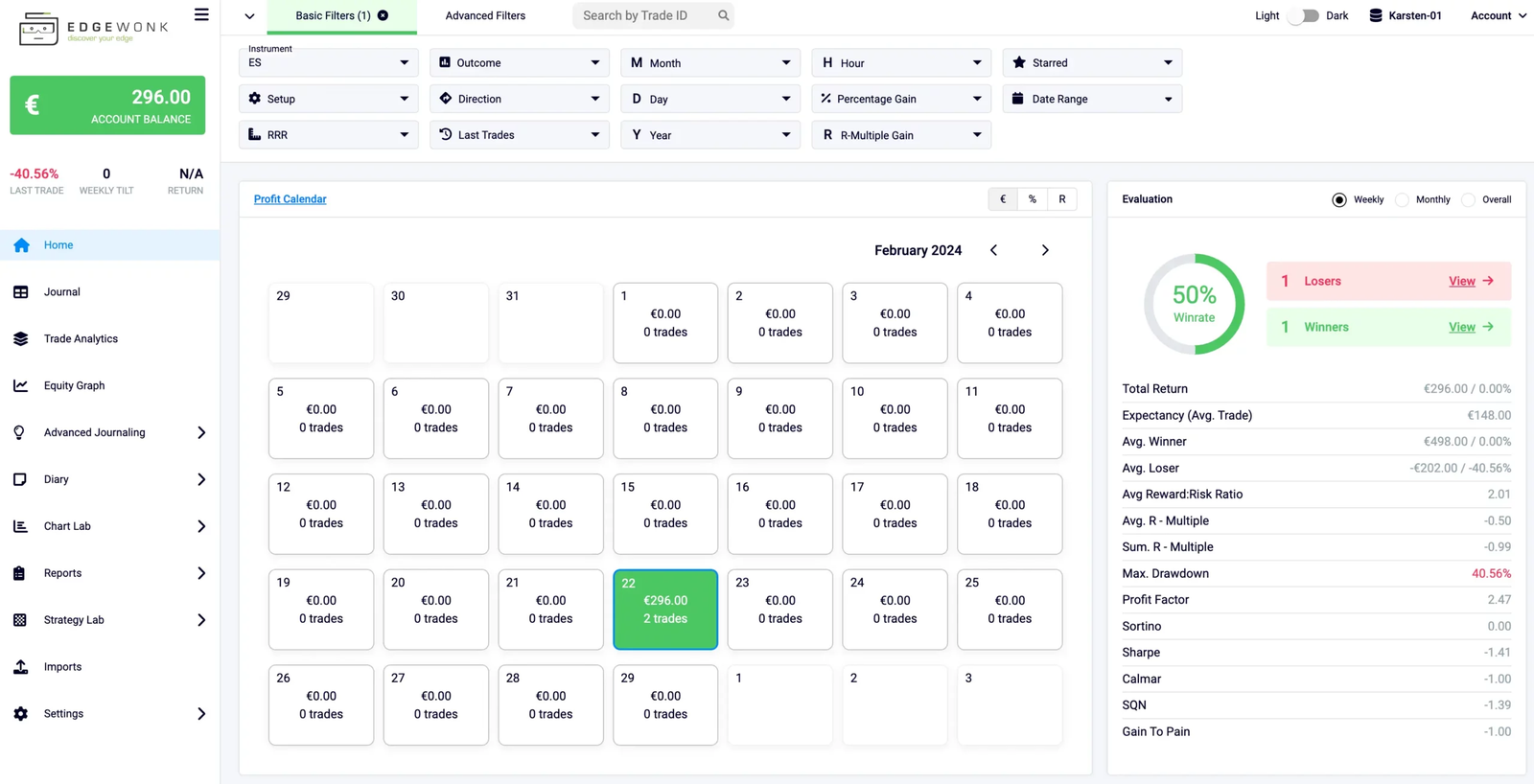 Click to enlarge
Source: Own screenshot, Kagels Trading.
Edgewonk features: Chart Lab, Edge Finder and Psychology Lab
The provider groups the features into labs. The pricing page lists everything as included in the single plan, with no extra cost for any report.
- Chart Lab and trade analytics: breaks your history into reports and charts and lets you filter by instrument, setup, direction, holding time, weekday or hour.
- Edge Finder: scans your journal automatically. The pricing page says it runs “every Sunday” and delivers a performance and mistake scan.
- Psychology Lab: record your emotional state for each trade, keep a diary with screenshots and see what impatience or revenge trading actually cost you.
- Tiltmeter: shows how often you break your trading rules, according to the provider.
- Session report cards and checklists: rate a trading day and measure how often you follow your own setup checklist.
- Missed trades: record setups you did not take. Often that is the more revealing half.
- Portfolio page: combined statistics across all your journals and accounts.
Strategy Lab: simulator and backtester
The Trade Simulator projects your own statistics forward. You set a number of runs and trades, and the software plays out possible equity curves from your win rate and reward-to-risk ratio. The most useful output is uncomfortable: how long a realistic losing streak can get.
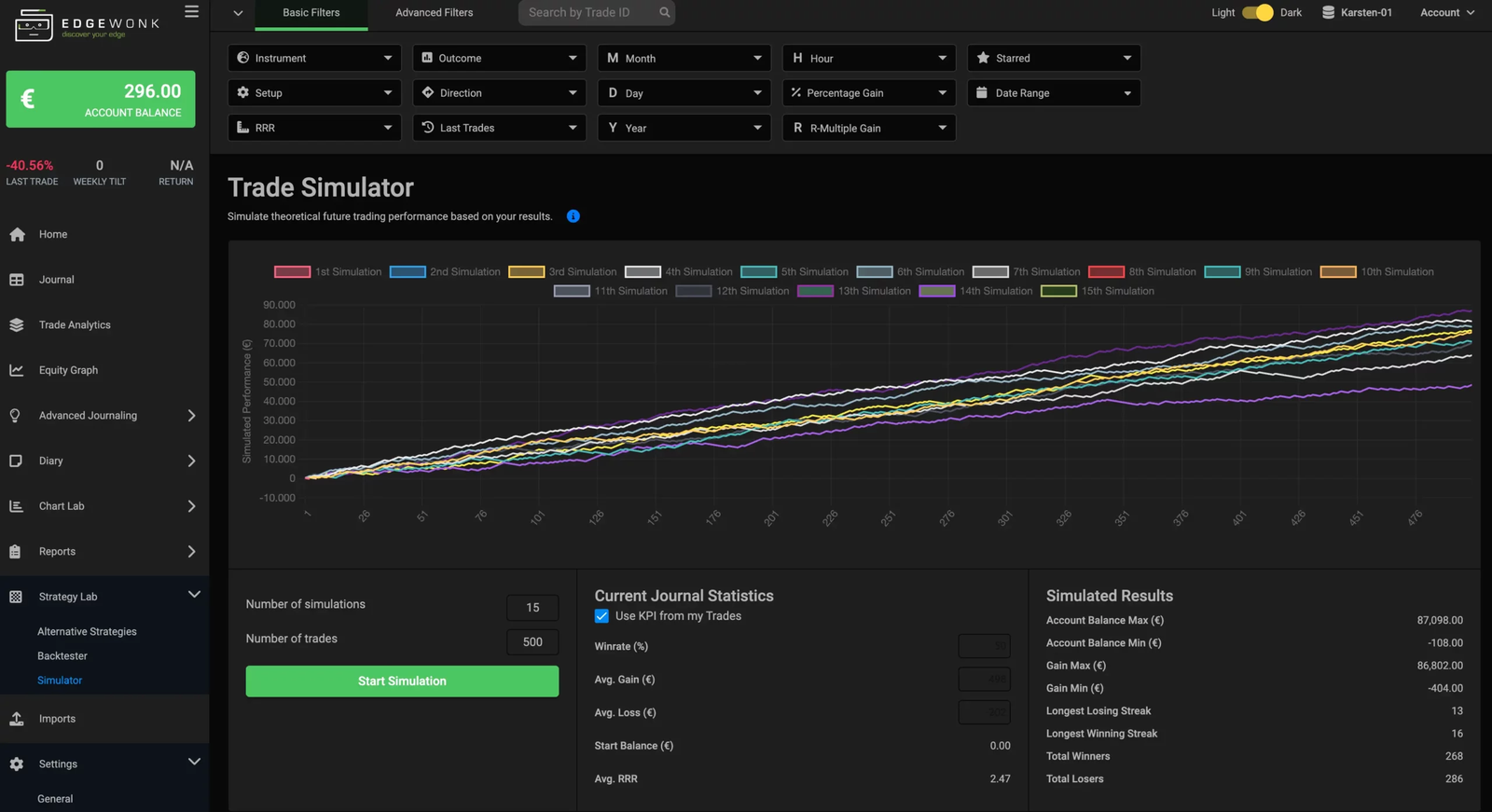 Click to enlarge
Source: Own screenshot, Kagels Trading.
The backtester stays basic. You define entry and exit rules, pick market and timeframe and compare results. That is enough for a rough comparison of two ideas. For bar-by-bar testing, use a dedicated tool such as Bar Replay in TradingView.
The software is clearly being developed. Edgewonk’s public changelog lists six updates between late July and September 28, 2026, including import fixes, custom layouts and a recycle bin for journals.
Supported markets, brokers and auto sync
Edgewonk covers all major markets. The pricing page names forex, stocks, futures, crypto, indices, commodities and options; the import list adds CFD brokers and prop firms.
Most imports are fast file imports. The import list includes Interactive Brokers, Charles Schwab, Fidelity, E-Trade, Webull, TradeStation, tastytrade, NinjaTrader, Tradovate, Saxo, IG, cTrader, Quantower and Sierra Chart, and in India Dhan and ICICI Direct. You export your trades and upload them; according to the provider, more than 1,000 trades take under 12 seconds. If your platform is missing, an Excel template is the fallback.
Auto sync exists for MetaTrader. The import page states auto sync “for all other MetaTrader 4 and MetaTrader 5 brokers and prop firms”. On August 5, 2026 the changelog added an MT5 auto import through an Expert Advisor, which the provider describes as read-only: it “cannot open, modify, or close trades”. Older reviews that say Edgewonk has no auto sync are out of date for MetaTrader users.
You can also move from another journal. The import list includes Tradervue, TraderSync and TradeZella as sources, and TradingView for paper trading only.
Prop traders are covered. The list names firms such as FTMO, FundedNext, Funding Pips, E8 Funding, The 5%ers and Topstep X, and one account can hold unlimited broker and prop firm journals. If you run several challenges at once, separate journals with a combined view show whether a loss came from your setup or from the firm’s rules.
Edgewonk pricing: one plan, billed yearly
Edgewonk sells one package with every feature included. There are no tiers and no monthly option.
| Edgewonk | |
|---|---|
| Price | $197 every 12 months |
| VAT | added for EU and UK buyers |
| UK example | $236.40 |
| Free trial | none |
| Refund | 14-day money-back guarantee |
| Accounts | unlimited |
From the Edgewonk pricing page, seen October 3, 2026. Prices are in US dollars; the page lists VAT-inclusive prices for each EU country and the UK.
The yearly price works out at about $16.40 a month. That is cheaper than the monthly plans of most competitors, but you pay the full year up front. The provider also promises to “lock in your price for life” as long as you keep renewing.
The German edition of this review, dated August 31, 2026, still showed an offer of 16 months for $197. That offer is gone: the current page sells 12 months for the same price.
Refund, renewal and cancellation
There is no trial, but there is a refund window. The pricing page promises a 14-day, 100% money-back guarantee, “no questions asked”. In practice: buy, import real trades and decide within two weeks. Clicking around without your own data is not a real test.
You cancel at the end of the period, and Edgewonk sends a reminder. According to the pricing FAQ, you receive an email before renewal with the option to cancel. After cancelling, “you will no longer be able to log into” the journal, so save your data and screenshots before the period ends.
Edgewonk reviews: what users report
On Trustpilot, Edgewonk has 4.7 out of 5 from 44 reviews. 98 percent give five stars and 2 percent one star (October 3, 2026). The company has not invited customers recently, according to Trustpilot.
Forty-four reviews are not a solid sample. Larger competitors collect hundreds or thousands. A 4.7 here mainly says there is no cluster of complaints, not that the software suits you.
The content repeats three points. Reviewers praise the depth of the reports, how well they adapt to their own setups and the effect of finally seeing which habit costs money. Criticism concerns the data entry when a broker is not directly connected.
Edgewonk or TradeZella? Alternatives compared
The alternatives differ mainly in how much automation they offer and how they bill.
- TradeZella: a more modern interface and more automation, billed monthly or yearly in three tiers, but no trial and no refunds. See our TradeZella review.
- TraderSync: 80 broker syncs, Market Replay in every plan and a seven-day trial, but no refunds. See our TraderSync review.
- Tradervue: strong charts and MFE/MAE, but net P&L needs its Gold plan and only five brokers import automatically. See our Tradervue review.
- A spreadsheet: free; our journal guide lists the columns.
Edgewonk’s position is clear. It goes deepest into behavior and psychology, it is the only one of these four with a stated refund guarantee, and its yearly price is below the regular yearly price of each of the other three. In return it has no trial, a simple backtester and no app.
All six tools side by side, with a decision guide: our trading journal software comparison.
Pros and cons of Edgewonk
Pros
- Depth of analysis: metrics against almost any trade feature, plus the automatic Edge Finder.
- Psychology built in: emotions, diary, Tiltmeter and rule checklists are core features.
- One plan, everything included: no feature tiers and unlimited accounts.
- 14-day refund: the clearest refund promise among the four tools we reviewed.
- Auto sync for MetaTrader: plus fast imports from many brokers and other journals.
- Active development: six changelog updates since late July 2026.
Cons
- No trial: you pay before you can see the software, softened only by the refund.
- Paid yearly up front: no monthly plan.
- No mobile app: browser only.
- Basic backtester: not enough for structured strategy testing.
- Needs data: reports become meaningful only after many trades.
- No access after cancelling: save your data before the period ends.
- Small review base: only 44 public reviews.
Conclusion: who Edgewonk is worth it for
Edgewonk answers a question most traders never ask cleanly. Not whether the last trade was good, but which behavior costs money over a hundred trades. The Edge Finder and the psychology tools give answers a homemade spreadsheet does not.
Know two things before you buy. First, there is no trial; you decide from screenshots and videos and then have 14 days to change your mind. Second, the reports need data: with twenty trades in the journal, as our two-trade test journal shows in the extreme, the numbers say nothing.
Our verdict: worth it for active traders with a fixed approach, especially MetaTrader and prop firm traders who get auto sync. If you trade irregularly, are still looking for a method or want to try before paying, start with a spreadsheet or a tool with a trial.
Frequently asked questions about Edgewonk
How much does Edgewonk cost?
Edgewonk costs $197, billed every 12 months. EU and UK buyers pay VAT on top, for example $236.40 in the UK. There is one plan with all features and no monthly option (pricing page seen October 3, 2026).
Can I try Edgewonk for free?
No, there is no free trial or free plan. Instead, the provider offers a 14-day money-back guarantee, “no questions asked”. Import your real trades during those two weeks to test it properly.
Does Edgewonk have an app?
No. Edgewonk runs in the browser and can be opened on a tablet or phone, but there is no native app, and small screens are less comfortable.
Does Edgewonk sync automatically with my broker?
For MetaTrader 4 and 5 brokers and prop firms, yes, according to the provider. Since August 2026 there is an MT5 auto import through an Expert Advisor. Most other brokers, including Interactive Brokers, use a fast file import.
Which markets can I journal in Edgewonk?
Forex, stocks, futures, crypto, indices, commodities and options, according to the pricing page. The import list also includes CFD brokers and prop firms such as FTMO.
What happens when I cancel Edgewonk?
The subscription ends at the end of the paid period, and after that you can no longer log in. Edgewonk sends a reminder email before renewal. Save your data before the period ends.
Edgewonk or TradeZella: which is better?
It depends on your focus. Edgewonk goes deeper into behavior and emotions, bills once a year and offers a 14-day refund. TradeZella has more automation and a more modern interface, but no trial and no refunds.
This review was written by Bjarne Claussen; the German edition was reviewed by Karsten Kagels. It is based on Edgewonk’s own pages checked on October 3, 2026 and two screenshots from a small test journal in our own account from February 2024, not on a long-term test. Prices and features change; check the provider’s pages before you buy. This is not investment advice.
This English edition is based on our German edition on kagels-trading.de and has been adapted for international readers.
More Risk Management guides
- Manage your trading risk
Risk Management in Trading: Rules, Math, Psychology
The 1% rule, stops, risk/reward, daily loss limits, leverage caps and the psychology of losing streaks, with the math behind each rule.
- Calculate your position size
Position Sizing in Trading: Formula, Calculator, Examples
The formula, a free calculator, the 1% rule explained correctly, and examples for stocks, forex and futures.
- Size your risk per trade
Kelly Criterion for Traders: Formula, Calculator, Risks
The Kelly formula for traders with a calculator, and a simulation of why full Kelly is far too much.
- Keep a trading journal
Trading Journal: How to Record and Review Your Trades
What to write before and after each trade, a completed example with a win and a loss, a weekly review and a template to copy.
- Choose a journal
Best Trading Journal Software 2026: 6 Tools Compared
Six journals compared on price, free plans, refunds, automatic broker sync, costs and export, with a decision guide.
- Check TradeZella
TradeZella Review 2026: Pricing, Features and Limitations
The three plans since July 2026, what Essential leaves out, the no-refund terms, imports, export and what users report.
- Check TraderSync
TraderSync Review 2026: Pricing, Broker Sync and Limits
Prices and the yearly sale, which of 502 brokers really sync automatically, Market Replay, Cypher and the no-refund policy.
- Check Tradervue
Tradervue Review 2026: Imports, Reports and Costs
Silver or Gold, why net P&L needs Gold, automatic import for 5 of 82 brokers, US-only stocks and how cancelling works.