
Myfxbook Review 2026: Free Tools, Fees and Track Records


Contents
- Myfxbook in 30 seconds (as of November 21, 2026)
- What is Myfxbook?
- What has changed at Myfxbook?
- How do you connect an account?
- What do the two verification marks mean?
- Which numbers matter on Myfxbook?
- How to read someone else’s Myfxbook account
- What does Myfxbook cost?
- The calculators
- What do users say about Myfxbook?
- Alternatives to Myfxbook
- Pros and cons of Myfxbook
- Conclusion: who is Myfxbook for?
- Frequently asked questions about Myfxbook
- About the author
Myfxbook turns a forex trading account into public statistics, and for many signal sellers it is still the place to show a track record. You connect your account, and Myfxbook reads the trades from your broker and calculates gain, drawdown and dozens of other numbers. That makes it useful for your own review and a first check on anyone who sells trading signals. Our guide to trading signals explains the other checks a signal service has to pass.
The site has changed a lot, and older reviews are out of date. The AutoTrade copy trading service is gone, a paid AI strategy builder has arrived, and some features now cost money. All facts here are as of November 21, 2026, read on Myfxbook’s own pages. We did not pay for any feature and have no business relationship with Myfxbook. How we work is on our editorial policy page.
Myfxbook in 30 seconds (as of November 21, 2026)
- What it is: a website of Myfxbook Ltd that analyzes forex trading accounts and publishes their statistics. It holds no money and places no trades for you.
- Free: account analysis, the economic calendar, sentiment data and 14 calculators. The free update runs every 2 to 4 hours.
- Paid: Strategy AI from $25 a month, Live Update for $60 a year per account and an ad-free plan for $10 a month.
- Gone: AutoTrade. The old address now leads to the home page.
- Main lesson: compare Gain and Absolute Gain, and check that both verification marks are green.
What is Myfxbook?
Myfxbook is an analysis website that reads a trading account from the broker and shows its performance as a track record. You add your account with the account number, the broker’s server and the investor password, a read-only password most MetaTrader brokers give you. From then on, Myfxbook pulls the trades and builds statistics such as gain, drawdown, win rate and profit factor. You can keep the account private or make it public.
Around this core, Myfxbook has grown into a toolbox for forex traders. The menu lists an economic calendar, interest rates, market hours, sentiment, correlation, spreads and a heat map. You can use most of these tools without an account. For news trading, our economic calendar and Forex Factory guides cover the same ground in more depth.
| Fact | Myfxbook |
|---|---|
| Operator | Myfxbook Ltd |
| Core function | Automatic analysis of trading accounts |
| Platforms | MetaTrader 4 and 5, cTrader, TradeLocker, MatchTrade, Oanda, DxTrade |
| Free | Analysis, calendar, sentiment, 14 calculators |
| Paid | Strategy AI, Live Update, Ad-Free |
| Copy trading | No longer offered |
Sources: myfxbook.com home page and help articles, read November 21, 2026.
What has changed at Myfxbook?
AutoTrade, Myfxbook’s copy trading service, has disappeared. With AutoTrade, users could copy other traders’ systems into their own accounts through Myfxbook’s servers. On November 21, 2026, the home page had no link to it, and myfxbook.com/autotrade redirected to the home page. If you want copy trading, you now need a separate platform such as ZuluTrade, with its own risks.
New are an AI strategy builder, a prop firm section and a backtest menu. Strategy AI writes Expert Advisors for MetaTrader 5 from a description in a chat. The Prop Firms section compares funded trading programs, and a menu item called Backtest is marked “New”. The calculators have grown to 14 tools.
How do you connect an account?
Myfxbook now lists seven platforms. These are MetaTrader 4, MetaTrader 5, cTrader, TradeLocker, MatchTrade, Oanda and DxTrade. MetaTrader 4 and 5 each have three connection methods; the others have one.
| Method (MetaTrader 4) | Update interval | Cost |
|---|---|---|
| Auto Update | every 2 to 4 hours, runs on Myfxbook’s server | free |
| EA Publisher | every 5 minutes, only while your platform is open | free |
| Live Update | real time, runs on Myfxbook’s server | $60 a year per account |
Source: Myfxbook help, MetaTrader 4 connection methods and Live Update, read November 21, 2026.
Never enter your master password, only the investor password. The investor password lets Myfxbook read the account but not trade. For verification, Myfxbook asks you to prove that you hold the master password by doing something in your own trading platform, not by typing it into Myfxbook. Both passwords are in your broker’s client area.
Karsten’s experience: setup takes a few minutes, and the free update sometimes lags. He finds the breakdown by holding time and commission most useful, because it shows costs you overlook day to day. On some days his history trailed the account by up to two working days. With the free Auto Update interval of 2 to 4 hours, some delay is built in.
What do the two verification marks mean?
Myfxbook verifies two different things, and they are often confused. Both checks are needed before an account can be made public or shared, according to Myfxbook’s help page on verification.
- Track Record verified: the trading history on Myfxbook matches the history the broker reports. This needs a valid account number, investor password, broker and server.
- Trading Privileges verified: the person who added the account holds the master password. They prove it either by changing the investor password or by placing a pending order that Myfxbook specifies.
The difference matters because an investor password can be passed on. With only the first mark, someone could show another trader’s successful account as their own. The second mark shows that the person can actually trade the account. If someone sells you a signal service with a Myfxbook link, check both marks. If one is missing, ask why.
Which numbers matter on Myfxbook?
Most of the statistics are detail; five numbers carry the message. Read gain, drawdown, profit factor, expectancy and equity together, never one alone.
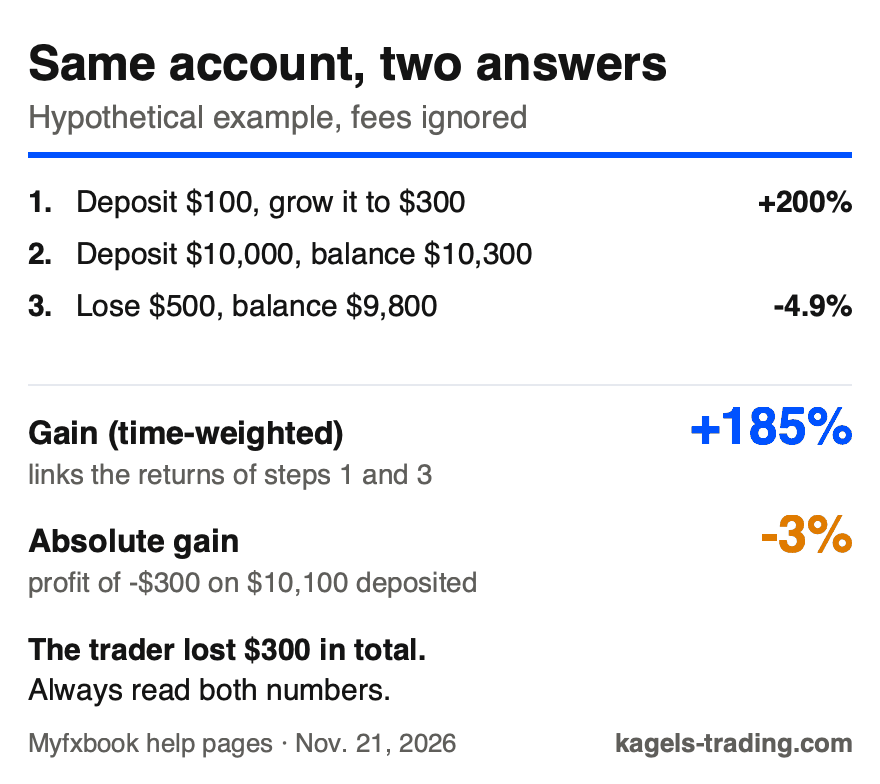
Gain is a time-weighted return. Myfxbook uses the time-weighted return (TWR), which links the return of each period and is not affected by deposits or withdrawals. That makes it fair for comparing traders. But it ignores how much money was at stake: a big percentage on $100 counts as much as the same percentage on $100,000.
Absolute Gain relates profit to the money paid in. It uses your net deposits, total deposits minus withdrawals, and ignores when they happened. When both profit and net deposits are positive, a later deposit without new profit lowers the percentage and a withdrawal raises it; when the account shows a loss, more deposits pull the negative figure toward zero. A big gap between Gain and Absolute Gain can mean that the best returns came before larger deposits, for example on a small starting balance. Check the cash flows before you draw a conclusion.
 Click to enlarge
Source: Kagels Trading, own graphic from the Myfxbook help definitions.
Drawdown measures the largest fall from a peak. Myfxbook calculates three versions: end of day (equity with open trades at the close of each day), intraday (equity at each update) and growth drawdown. The account shows the highest of the three. Moves between two updates may be missed, so a short spike in losses may not appear. Our guide to the prop firm drawdown explains why this number decides so much.
Profit factor divides gross profits by gross losses. A value above 1 means the account made money before you ask how. Very high values on a short history deserve skepticism. Our profit factor guide shows how the value shrinks as more trades come in.
Expectancy shows what an average trade earns. It combines win rate and the size of wins and losses, so it is more honest than the win rate alone. An 80 percent win rate is worthless if the few losses eat everything. How to test whether this adds up to a real edge is in our guide to the trading edge.
Watch balance and equity, not just the balance curve. Balance counts closed trades, deposits and withdrawals. Equity adds the profit or loss of open positions. A smooth balance curve can hide large open losses, a pattern typical of systems that hold losers or add to them. Our guide to account equity explains the difference in detail.
Myfxbook has a basic journal, but it is built around its own statistics. Its feature page lists a Trades Journal with comments and file attachments per trade, plus trade tagging with analysis by tags. It works only for accounts on the seven supported platforms. If you also trade stocks or futures elsewhere, or want playbooks and setup reports, a dedicated trading journal goes further.
How to read someone else’s Myfxbook account
Myfxbook shows what the broker reports; it does not judge whether the result is sensible. Huge returns sit next to accounts that lost most of their value. Before you pay for a signal or a course on the strength of a Myfxbook link, work through this list.
- Both marks green: Track Record and Trading Privileges verified, not just one.
- Gain and Absolute Gain: compare both. A big gap can mean the percentages were earned before larger deposits; check the cash flows.
- Twelve months or more: a long history with visible losing phases.
- Deposits and withdrawals: go through them in the detail view. Frequent cash moves are a warning sign.
- Equity and open trades: if equity sits far below the balance for long, the account carries losses.
- Drawdown basis: check how often the account updates, because the drawdown depends on it.
- A second source: a second independent tracker, such as FX Blue, is harder to manipulate than one.
Promises in a profile are advertising, not evidence. Sentences such as “no losing month so far” prove nothing about the future. Our CopyX review shows how a sales page can advertise figures that nobody can verify.
What does Myfxbook cost?
The core is still free and paid for by advertising. Account analysis, public profiles, the economic calendar, sentiment, calculators and the forum cost nothing. Three paid extras exist next to it.
| Product | Price | What you get |
|---|---|---|
| Strategy AI Starter | $25 a month | 25,000 credits, about 1 strategy |
| Strategy AI Plus | $50 a month | 60,000 credits, about 3 strategies |
| Strategy AI Pro | $150 a month | 216,000 credits, about 12 strategies |
| Live Update | $60 a year | real-time sync for one account |
| Ad-Free | $10 a month, or $8.32 a month yearly | no ads on the website, excluding VAT |
Sources: Strategy AI pricing window, Live Update help article and Ad-Free page on myfxbook.com, read November 21, 2026.
Strategy AI credits do not roll over. According to the FAQ, credits reset at the start of each billing cycle and “do not roll over unless stated otherwise”. All three plans include the same tools; they differ only in credits. Strategy AI builds Expert Advisors for MetaTrader 5 only.
Strategy AI is for traders who already automate on MetaTrader 5. If you trade by hand, as Karsten does, it adds nothing. A generated strategy still needs the same testing as any other; our guide to trading bots explains why a good backtest is not a promise.
The calculators
The most used part of Myfxbook may be the one that needs no account. The 14 calculators cover position size, pip value, margin, leverage, Fibonacci, pivot points, risk of ruin, compounding, drawdown, profit, rebates, swaps, consistency and currency conversion.
The position size calculator is the most important one. You enter the currency pair, account size, risk in percent and stop distance. Example: on a $10,000 account with 1 percent risk and a 30-pip stop on EUR/USD, you risk $100, which is about 0.33 lots at $10 per pip per lot. Our guide to position sizing shows the same math for other markets.
A calculator does not replace a rule. It tells you how big the position is at 1 percent risk, not whether 1 percent is right for you. That decision belongs in your risk management, made before the trade.
What do users say about Myfxbook?
On Trustpilot, Myfxbook had 2.4 stars from 42 reviews on November 21, 2026. The profile has been claimed by the company since May 2024, and Trustpilot says it does not fact-check reviews. With so few reviews, the rating says little. One recent review praises the analytics but complains that the paid Live Update sometimes disconnects.
Alternatives to Myfxbook
FX Blue is the best-known alternative for verified MetaTrader statistics. A second tracker is useful whenever someone wants to win customers with a performance record, because two independent sources are harder to fake than one.
If you want to understand your own trading across markets, a dedicated journal goes further. Many of them connect stock and futures brokers too and add playbooks and setup reports. Our comparison of trading journal software covers six of them, and the Tradervue review looks at one with a free plan.
Pros and cons of Myfxbook
Pros
- Free core: account analysis, calculators and market data at no cost.
- Two-step verification: a clear check that the record is real and the owner trades it.
- Fair Gain formula: the time-weighted return is not distorted by deposits.
- Many platforms: seven platforms, from MetaTrader to DxTrade.
Cons
- Misleading top lists: huge percentages on small balances are shown without comment.
- Slow free updates: 2 to 4 hours for Auto Update; real time costs $60 a year.
- Basic journal only: comments, attachments and tags, but no setup reports or other brokers.
- Weak reviews: 2.4 stars from only 42 reviews on Trustpilot.
Conclusion: who is Myfxbook for?
For analyzing your own forex account, Myfxbook is a good free tool. It is quick to set up and gives you the key numbers to judge a strategy honestly. The calculators and market data are worth a look even without an account.
For judging other traders, it is a starting point, nothing more. Myfxbook shows what a broker reports; it does not check whether the result makes sense. Read Gain next to Absolute Gain, check both marks and look at the drawdown before you trust anyone’s record. If you want copy trading, it is no longer here.
Frequently asked questions about Myfxbook
Is Myfxbook free?
Yes, the core features are free and paid for by advertising. Account analysis, the economic calendar, sentiment data and all 14 calculators cost nothing. Strategy AI from $25 a month, Live Update for $60 a year and the ad-free plan cost extra.
Does Myfxbook AutoTrade still exist?
No, AutoTrade is no longer offered on myfxbook.com. On November 21, 2026, the old AutoTrade address redirected to the home page, and the menu had no link to copy trading.
What do the two green checkmarks on Myfxbook mean?
They stand for two separate checks on the account. Track Record verified means the history matches the broker’s data. Trading Privileges verified means the person who added the account holds the master password. Only both together are meaningful.
What is the difference between Gain and Absolute Gain?
Gain is a time-weighted return; Absolute Gain relates profit to net deposits. Gain is not affected by deposits and withdrawals, so big percentages on a tiny balance stay in it. Absolute Gain shows what the money paid in actually earned. Compare both.
Is my money safe with Myfxbook?
Myfxbook holds no money and places no orders. It reads your account with the investor password, which only allows reading. Never type your master password into Myfxbook.
Which platforms does Myfxbook support?
Myfxbook supports seven platforms. These are MetaTrader 4, MetaTrader 5, cTrader, TradeLocker, MatchTrade, Oanda and DxTrade. Strategy AI works only with MetaTrader 5.
Can Myfxbook numbers be faked?
Faking the data directly is hard, but presenting it in a flattering way is easy. A big Gain on a tiny balance, a missing second verification mark or a short history can all look better than the money really did. Check Absolute Gain, the drawdown and the deposits and withdrawals.
This English edition is based on our German edition on kagels-trading.de and has been adapted for international readers.
More Risk Management guides
- Manage your trading risk
Risk Management in Trading: Rules, Math, Psychology
The 1% rule, stops, risk/reward, daily loss limits, leverage caps and the psychology of losing streaks, with the math behind each rule.
- Calculate your position size
Position Sizing in Trading: Formula, Calculator, Examples
The formula, a free calculator, the 1% rule explained correctly, and examples for stocks, forex and futures.
- Set a stop from volatility
Volatility Stop Loss: ATR Trailing Stops and 8 Methods
Measure, multiple and anchor, eight methods from the Chandelier Exit to the Parabolic SAR, and an SPY test of intraday against closing triggers.
- Read your account equity
Account Equity vs Balance: Margin and Free Margin Explained
Equity against balance, margin, free margin and margin level, with a worked example and the close-out rules for cash, US margin and CFD accounts.
- Avoid a margin call
Margin Call: What It Is, How It Happens and How to Avoid It
When a margin call comes, what your broker does next, whether you can owe money, and four rules that keep your account away from it.
- Size your risk per trade
Kelly Criterion for Traders: Formula, Calculator, Risks
The Kelly formula for traders with a calculator, and a simulation of why full Kelly is far too much.
- Calculate your risk-reward ratio
Risk-Reward Ratio: Formula, Calculator, Break-Even Win Rate
The formula, a free calculator, why 1:2 and 2:1 can mean the same trade, and the win rate each ratio needs to break even.
- Avoid costly mistakes
Trading Mistakes: 13 Costly Errors and How to Avoid Them
The 13 mistakes that cost accounts the most, the biases behind them, overtrading and revenge trading, and a checklist for your next trade.
- Build a trading mindset
Trading Mindset: How to Think Like a Disciplined Trader
Why traders sell winners too early and hold losers too long, what overtrading costs, and five habits that help you follow your plan.
- Keep a trading journal
Trading Journal: How to Record and Review Your Trades
What to write before and after each trade, a completed example with a win and a loss, a weekly review and a template to copy.
- Choose a journal
Best Trading Journal Software 2026: 6 Tools Compared
Six journals compared on price, free plans, refunds, automatic broker sync, costs and export, with a decision guide.
- Check TradeZella
TradeZella Review 2026: Pricing, Features and Limitations
The three plans since July 2026, what Essential leaves out, the no-refund terms, imports, export and what users report.
- Check TraderSync
TraderSync Review 2026: Pricing, Broker Sync and Limits
Plans and dated prices, broker imports and autosync, Market Replay, Cypher and the no-refund policy.
- Check Tradervue
Tradervue Review 2026: Imports, Reports and Costs
Silver or Gold, why net P&L needs Gold, few automatic imports, US-only stocks, the no-refund sign-up terms and how to cancel.
- Check Edgewonk
Edgewonk Review 2026: Features, Costs and Limitations
One feature set billed monthly or yearly, the refund period, MetaTrader auto sync, the psychology tools and our own test journal.
- Check TradesViz
TradesViz Review 2026: Pricing, Broker Sync, Terms
The free stock plan, Pro and Platinum prices checked November 10, 2026, which US brokers sync automatically, the no-refund terms and user reviews.