
TraderSync Review 2026: Pricing, Broker Sync and Limits


Contents
- TraderSync in 30 seconds
- What is TraderSync?
- TraderSync features: journal, reports, replay and Cypher
- Broker sync: 502 entries, 80 with automatic sync
- TraderSync pricing and plans
- Language, mobile app and regional points
- TraderSync reviews: what users report
- Alternatives to TraderSync
- Pros and cons of TraderSync
- Conclusion: who TraderSync is worth it for
- Frequently asked questions about TraderSync
- About the author
A trading journal is quick to buy and rarely used for long. Most traders stop after a few weeks because typing in trades costs more time than the reports give back. TraderSync tries to remove that step: it pulls trades from your broker where it can and then answers questions a spreadsheet struggles with, such as which setup really makes money and what your most frequent mistake costs.
This is a documentation review, not a hands-on test. On October 3, 2026 we checked TraderSync’s pricing page, its billing and refund policy, its full broker list and its ratings on Trustpilot and in both app stores. We did not open an account. At several points the result differs from what the provider’s own marketing says. This article follows our editorial policy.
TraderSync in 30 seconds
- What it is: an English-only web trading journal with reports, a market replay simulator and an AI assistant called Cypher.
- Price: $29.95, $49.95 or $79.95 a month for Pro, Premium and Elite. Paying yearly saves 25 percent.
- Trial: 7 days, with exports locked. After that, payments are non-refundable, not even pro rata.
- Brokers: the list has 502 entries, but only 80 sync automatically. For the rest you upload a file.
- Ratings: 4.2 out of 5 on Trustpilot from 323 reviews. The apps score lower: 2.7 on iOS and 3.1 on Android in the US stores.
What is TraderSync?
TraderSync is a web-based trading journal that imports closed trades, analyzes them by setup, market, time and mistake, and lets you replay past market sessions in a simulator. It covers stocks, options, futures, forex and crypto.
The company is based in Canada. Trustpilot lists Calgary as its location, and the iOS app is published by 1473010 Alberta Ltd. On its pricing page the provider calls itself “a trusted choice for thousands of traders for over a decade”.
The workflow has three steps. You log trades, the software analyzes them and highlights patterns, and you turn what you learn into your rules. The difference to a homemade spreadsheet lies less in the logging than in the depth of the reports, plus the simulator that lets you practise the situations you found.
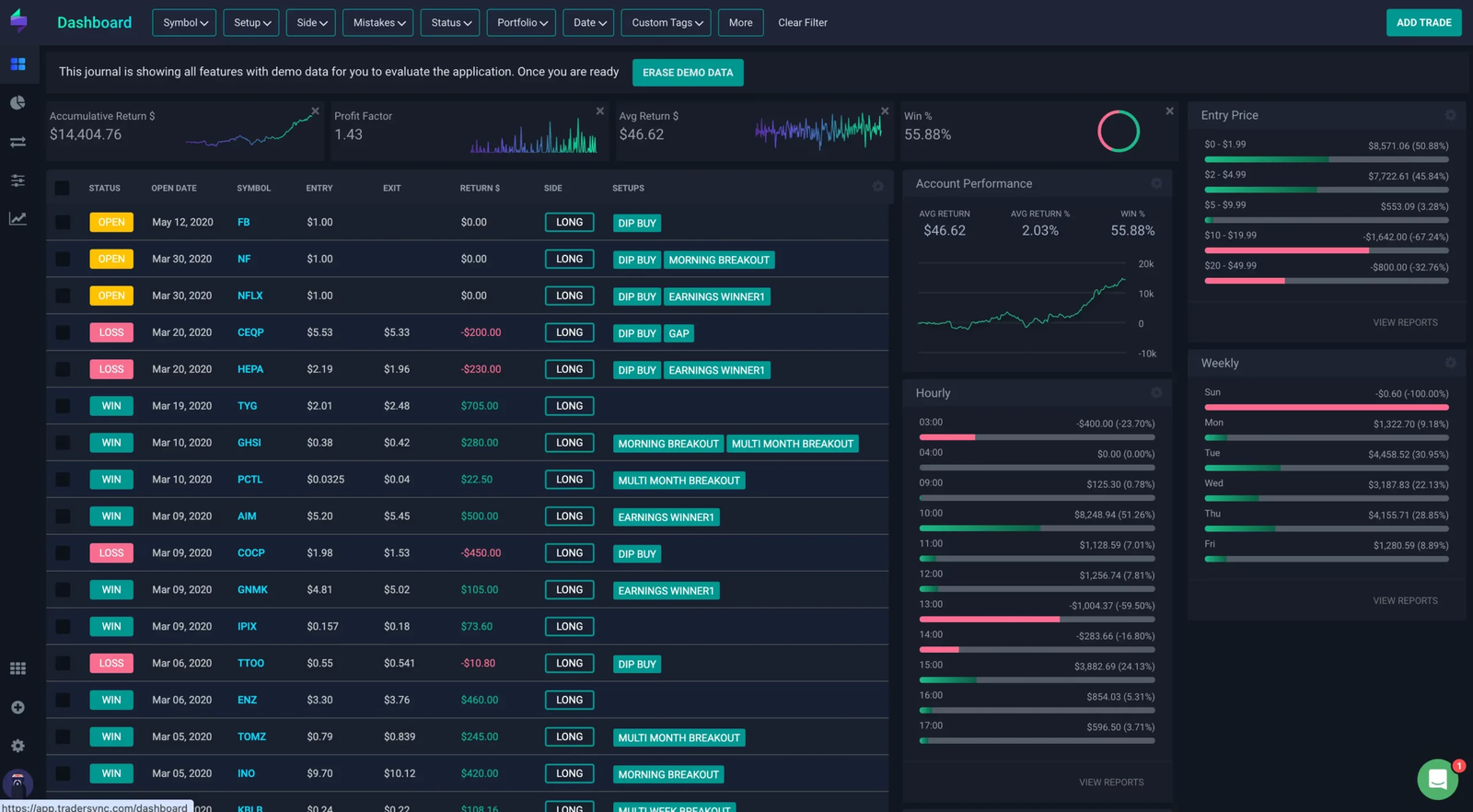 Click to enlarge
Source: Screenshot from the German edition on kagels-trading.de.
TraderSync features: journal, reports, replay and Cypher
The journal has four parts: trade logging, reports, the market simulator and, since 2025, the Cypher AI assistant.
- Trade charts: every trade is shown on a chart with its entry and exit, not only as a row of numbers.
- Planned target and stop: you can store your planned levels, and the software shows how often you kept to the plan.
- Trade statistics: return per share or contract, risk taken, and MFE and MAE, the best and worst point a position reached.
- Notes and screenshots: reasons, market context and images for every trade. Without them, every report stays shallow.
- Drill-down reports: filters down to the single execution, plus a calendar view of winning and losing days.
- Strategy Checker: tests a defined strategy against your own history. Premium and Elite allow unlimited strategies; for Pro the pricing page says 5 on the plan card and 3 in the comparison table.
Market Replay: included in every plan
Market Replay replays past sessions bar by bar, with indicators, several charts and adjustable speed. It is included in all three plans; what differs is the precision: 1 minute on Pro, 1 second on Premium and 250 milliseconds on Elite.
- Precision by plan: minute data is enough for swing traders; scalpers need the finest step.
- Markets: stocks, futures, crypto and forex in all plans; options in the simulator only on Elite.
- Order book and tape: TraderSync describes Elite as the plan “for scalpers needing ultra-realistic backtesting, tape + Level II”.
- The real use: go through a day you already traded and check your own execution, not chase excitement.
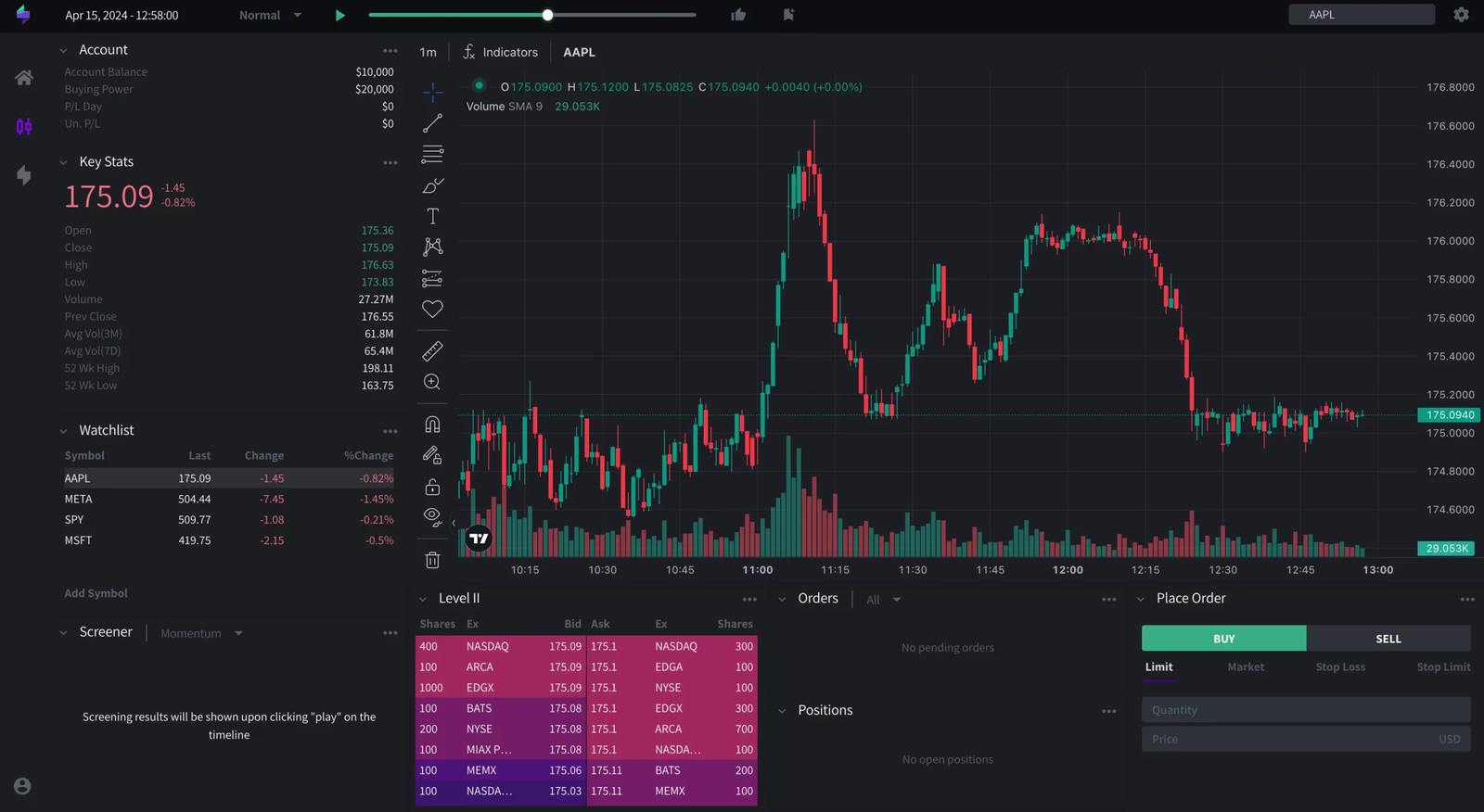 Click to enlarge
Source: Screenshot from the German edition on kagels-trading.de.
Cypher: the AI assistant
Cypher reads your own trade history and answers questions in plain language. Instead of clicking filters, you ask for all trades of a setup outside the first trading hour, and the report builds itself. TraderSync renamed its Android app “TraderSync: AI Trading Journal”.
The daily message limit matters more than the marketing. Pro allows 5 messages a day, Premium 15 and Elite 60. If you want to use the AI seriously, five questions a day run out quickly.
Cypher only analyzes your own closed trades. It gives no buy or sell signals, and its answers depend on how cleanly you tagged setups and mistakes. With 40 trades in the journal you get a nicely worded random observation, not a statistic.
Broker sync: 502 entries, 80 with automatic sync
TraderSync advertises “over 700 brokers and trading platforms”. Its own public broker list had 502 entries with 495 different names when we counted on October 3, 2026. Some brokers appear twice because they connect through more than one platform.
The column that matters is “Autosync”. It shows whether trades arrive without your help. 80 of 502 entries have it, about 16 percent. For all others you export a file from your broker and upload it, and that recurring step is where many journals are abandoned.
Markets are unevenly covered. Of the 502 entries, 200 cover stocks, 125 options, 116 futures, 115 forex and only 39 crypto. A broker on the list does not mean your market is supported there.
| Broker or platform | Autosync |
|---|---|
| Interactive Brokers | yes |
| Charles Schwab | yes |
| TradeStation | yes |
| Tradovate | yes |
| tastytrade | yes |
| NinjaTrader | yes |
| MetaTrader 4 and 5 | yes |
| OANDA | yes |
| Zerodha | yes |
| Robinhood | no, file upload |
| Webull | no, file upload |
| Fidelity | no, file upload |
| E*TRADE | no, file upload |
| Trading 212 | no, file upload |
Selection from the TraderSync broker list, checked October 3, 2026. The list also shows which markets each connection covers.
For many traders the broker decides the verdict. At Interactive Brokers, Schwab, TradeStation or a MetaTrader broker, the journal fills itself. At Robinhood, Webull or Fidelity you upload files, so the main time saving disappears. In India, Zerodha and Dhan sync automatically.
TraderSync pricing and plans
TraderSync bills in US dollars and has three plans. The monthly prices are $29.95, $49.95 and $79.95. Paying yearly saves 25 percent: $269.52, $449.52 or $719.52 a year.
| Plan | Monthly | Yearly |
|---|---|---|
| Pro | $29.95 | $269.52 |
| Premium | $49.95 | $449.52 |
| Elite | $79.95 | $719.52 |
Prices from the TraderSync pricing page, seen October 6, 2026. Until early October a “Flash Sale” cut the first year by 50 to 60 percent; it has ended.
Watch for sales, but read their terms. A flash sale in early October 2026 applied only to the first year of a yearly plan. TraderSync does say that customers keep their old rate as long as the subscription runs without a break; a cancellation or plan change means buying again at the current price.
- Pro: 5 accounts, Market Replay at 1-minute precision, 5 Cypher messages a day.
- Premium: unlimited accounts and strategies, 1-second replay, 15 Cypher messages a day.
- Elite: adds options in the simulator, 250-millisecond replay, Level II and the tape, 60 Cypher messages a day.
Trial, cancellation and refunds
The trial lasts seven days. The sign-up form asks only for an email and a password; we did not go further. According to the billing policy, the trial gives access to most features, but exporting trades and executions is locked.
After that, the refund rule is strict. The policy says: “All payments made are non-refundable and we do not offer pro-rated refunds.” If you stop after two months of a yearly plan, the rest is gone. TraderSync accepts credit cards only, and you cancel under Account Plan with the Cancel Subscription button. The policy page carries the date March 19, 2020.
Use the trial for one job: check that your broker imports cleanly. If the import does not work as expected in those seven days, the AI features do not matter.
Language, mobile app and regional points
TraderSync is available in English only, and billing is in US dollars by credit card. Depending on your card, a foreign currency fee may apply. There is no localized interface or support in other languages.
The mobile app is a companion, not a replacement for the browser. The pricing page lists the mobile app under analytics, and the store descriptions focus on reports, logging and notes rather than Market Replay or the Strategy Checker.
The app ratings are clearly weaker than the web ratings. In the US stores we found 2.7 out of 5 from 84 ratings on iOS (latest version September 18, 2026) and 3.1 from 231 reviews on Google Play (updated September 9, 2026, 50,000+ downloads). The apps are maintained, but they are not where TraderSync is strongest.
TraderSync reviews: what users report
On Trustpilot, TraderSync has a score of 4.2 out of 5 from 323 reviews. 88 percent give five stars and 5 percent one star (October 3, 2026). A month earlier our German edition recorded 4.4 from 321 reviews.
Two notes from Trustpilot belong next to that score. The company has not invited customers recently, so the reviews “may not be representative”, and it has not replied to negative reviews. That is Trustpilot’s own assessment, not ours.
The web and app scores tell different stories. Reading the reviews, praise goes to the reports and support of the web version; criticism concerns import problems and the app. If you use TraderSync on a computer, you are more likely to have the Trustpilot experience.
Alternatives to TraderSync
Which journal fits depends more on your broker and habits than on the feature list.
- TradeZella: the best-known name, with similar features but no trial and no refunds. Our TradeZella review checks its three plans.
- Edgewonk: focused on trading psychology, sold as a yearly plan with a 14-day refund window. See our Edgewonk review.
- Tradervue: built around sharing trades with a mentor, with automatic import for only five brokers. See our Tradervue review.
- A spreadsheet: costs nothing; our trading journal guide lists the columns you need.
Prices and trial terms of the other tools appear in their own reviews once we have checked them on the providers’ pages.
All six tools side by side, with a decision guide: our trading journal software comparison.
Pros and cons of TraderSync
Pros
- Market Replay in every plan: the simulator is included, even in Pro, though only at 1-minute precision there.
- Deep reports: results by setup, mistake, market, weekday and position size, with drill-downs.
- Cypher as a shortcut: builds reports on request without clicking through filters.
- Strong sync for many active traders: Interactive Brokers, Schwab, TradeStation, Tradovate, NinjaTrader and MetaTrader sync automatically.
- A real trial: seven days with most features, only exports locked.
Cons
- Autosync is the exception: only 80 of 502 list entries sync automatically.
- Popular US apps need uploads: Robinhood, Webull and Fidelity have no autosync.
- Weaker apps: 2.7 on iOS and 3.1 on Android in the US stores.
- No refunds: not even pro rata on a yearly plan.
- English only, credit card only: no other languages, no other payment methods.
- Price at the top: Level II and the finest replay cost $79.95 a month.
Conclusion: who TraderSync is worth it for
TraderSync is one of the strongest trading journals, but the verdict depends on one question: where do you trade? At Interactive Brokers, Schwab, TradeStation, Tradovate, NinjaTrader or a MetaTrader broker, the import runs by itself. At a broker without autosync, you upload files, and that is the step where most journals fail after a few weeks.
The second question is the simulator. Market Replay is in every plan, so the main argument for Elite is gone unless you scalp and need Level II and 250-millisecond precision. For everyone else, Pro or Premium is enough.
What argues against a quick purchase is the refund rule. Without refunds, a yearly plan is a bet on twelve months of use, discount or not. The seven-day trial is therefore the real decision point: test your broker import in that week.
Frequently asked questions about TraderSync
How much does TraderSync cost?
Monthly, TraderSync costs $29.95 for Pro, $49.95 for Premium and $79.95 for Elite. Paid yearly, the plans cost $269.52, $449.52 or $719.52, 25 percent less (October 6, 2026). Payment is in US dollars by credit card only.
Does TraderSync have a free trial?
Yes, seven days, with most features but no export of trades or executions. The sign-up form asks for an email and password. After the trial, payments are non-refundable.
Which brokers sync automatically with TraderSync?
80 of the 502 entries on TraderSync’s broker list have automatic sync, including Interactive Brokers, Charles Schwab, TradeStation, Tradovate, tastytrade, NinjaTrader, MetaTrader 4 and 5, OANDA and Zerodha. Robinhood, Webull, Fidelity and E*TRADE work by file upload.
Can I get a refund from TraderSync?
No. The billing policy states that all payments are non-refundable and that there are no pro-rated refunds. You cancel under Account Plan with the Cancel Subscription button.
Is the TraderSync mobile app a replacement for the web version?
No, it is a companion. It covers logging, notes and reports, and it rates 2.7 on iOS and 3.1 on Android in the US stores, well below the web version’s Trustpilot score.
Is TraderSync good for beginners?
Yes, with two limits. The help center and tutorials make logging easy to learn, but you need the English terms. And reports become meaningful only after many documented trades; before that, even the AI assistant can only describe chance.
This review was written by Bjarne Claussen; the German edition was reviewed by Karsten Kagels. It is based on TraderSync’s own pages, its broker list and public ratings checked on October 3, 2026, not on a paid account or a hands-on test. The screenshots come from our German edition and may show an older interface. Prices and features change; check the provider’s pages before you buy. This is not investment advice.
This English edition is based on our German edition on kagels-trading.de and has been adapted for international readers.
More Risk Management guides
- Manage your trading risk
Risk Management in Trading: Rules, Math, Psychology
The 1% rule, stops, risk/reward, daily loss limits, leverage caps and the psychology of losing streaks, with the math behind each rule.
- Calculate your position size
Position Sizing in Trading: Formula, Calculator, Examples
The formula, a free calculator, the 1% rule explained correctly, and examples for stocks, forex and futures.
- Size your risk per trade
Kelly Criterion for Traders: Formula, Calculator, Risks
The Kelly formula for traders with a calculator, and a simulation of why full Kelly is far too much.
- Keep a trading journal
Trading Journal: How to Record and Review Your Trades
What to write before and after each trade, a completed example with a win and a loss, a weekly review and a template to copy.
- Choose a journal
Best Trading Journal Software 2026: 6 Tools Compared
Six journals compared on price, free plans, refunds, automatic broker sync, costs and export, with a decision guide.
- Check TradeZella
TradeZella Review 2026: Pricing, Features and Limitations
The three plans since July 2026, what Essential leaves out, the no-refund terms, imports, export and what users report.
- Check Tradervue
Tradervue Review 2026: Imports, Reports and Costs
Silver or Gold, why net P&L needs Gold, automatic import for 5 of 82 brokers, US-only stocks and how cancelling works.
- Check Edgewonk
Edgewonk Review 2026: Features, Costs and Limitations
One plan at $197 a year with a 14-day refund, MetaTrader auto sync, the psychology tools, and screenshots from our own test journal.