
TradeZella Review 2026: Pricing, Features and Limitations


Contents
- TradeZella in 30 seconds
- What is TradeZella?
- TradeZella pricing: three plans since July 2026
- TradeZella features: journal, backtesting, replay and AI agents
- Brokers, markets, import and export
- TradeZella reviews: what users report
- Language and regional points
- TradeZella or TradingView?
- Alternatives to TradeZella
- Pros and cons of TradeZella
- Who TradeZella suits and who it does not
- Conclusion: a capable journal with a pricing problem
- Frequently asked questions about TradeZella
- About the author
TradeZella is one of the most heavily marketed trading journals, and in July 2026 it raised its prices. The company now sells three plans and promotes AI agents that tag trades and review your trading sessions. This review explains what you actually get for the money, what the terms say about refunds and where users report problems.
This is a documentation review, not a hands-on test. We checked TradeZella’s pricing page, its terms of service, its help center and its broker list on October 3, 2026, and read its public Trustpilot profile. We did not open a paid account. This article follows our editorial policy.
TradeZella in 30 seconds
- No free plan and no advertised trial: plans start at $35 a month. The terms say payments are non-refundable after sign-up.
- Three plans since July 2026: Essential $35, Pro $59 and Ultra $99 a month, or $315, $531 and $891 billed once a year.
- The cheapest plan leaves out key features: Essential connects one account and has no Trade Replay and no automated AI backtests beyond one free run.
- Imports: TradeZella says it supports 500+ brokers and platforms, by automatic sync or by uploading a file from your broker.
- User ratings: 4.8 out of 5 from 1,045 Trustpilot reviews. Recurring complaints concern broker syncs that break and settings that are not saved.
What is TradeZella?
TradeZella is a paid web-based trading journal that imports your trades from your broker, analyzes them and, since 2026, adds AI features on top. The company behind it is TradeZella LLC, which states in its terms that it runs the service from offices in Florida, United States.
The idea is older than the software. A journal records your plan and your result for every trade, so you can see which decisions to repeat. Our guide on how to keep a trading journal explains the method with a worked example; TradeZella automates the data entry and the reports, not the thinking.
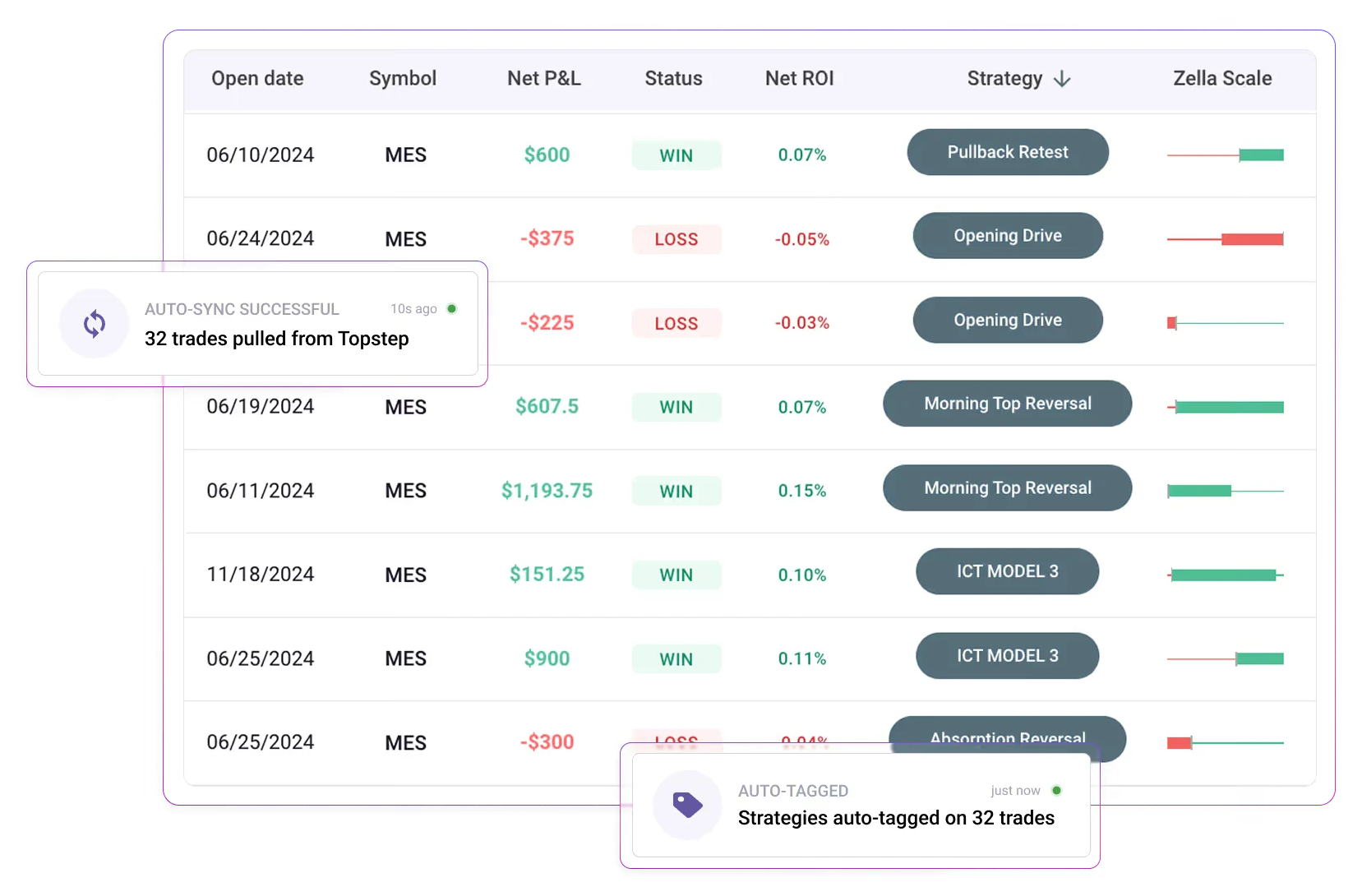
Stripped of the marketing, the software does four things: it imports trades, it reports on them, it replays past trades and it lets you backtest setups. The provider calls itself an “AI trading partner” on its website; that is a slogan, not a test result.
| TradeZella | |
|---|---|
| Company | TradeZella LLC, Florida, United States |
| Product | Web-based trading journal with backtesting and AI features |
| Price | from $35 a month |
| Free plan | none |
| Language | English |
| Imports | 500+ brokers and platforms, according to the provider |
| Markets | stocks, options, futures, forex, crypto |
| Trustpilot | 4.8 from 1,045 reviews (October 3, 2026) |
 Click to enlarge
TradeZella pricing: three plans since July 2026
TradeZella changed its prices in July 2026, for the first time since its launch. The provider’s own pricing article dated July 7, 2026 lists the old prices: Essential was $29 and Pro $49 a month. Older reviews elsewhere still show those numbers.
| Plan | Monthly | Billed yearly |
|---|---|---|
| Essential | $35 | $315 |
| Pro | $59 | $531 |
| Ultra | $99 | $891 |
Prices in US dollars from the TradeZella pricing page, seen October 3, 2026. Yearly plans are billed once a year. Taxes are not shown on the page.
The plans differ mainly in accounts, AI credits and AI backtests.
- Essential: 1 account, 500 AI credits a month, no Trade Replay, one free AI backtest.
- Pro: up to 50 accounts, 1,500 AI credits, Trade Replay, 10 AI backtests a month.
- Ultra: unlimited accounts, 3,000 AI credits, Trade Replay, 100 AI backtests a month, priority support.
Paying yearly saves 25 percent but ties up the full amount at once. Essential then works out to about $26 a month, billed as $315 up front. Because the terms exclude refunds, that is a real commitment for a tool you have not tried.
The Essential plan leaves out what the advertising shows. The pricing card lists no Trade Replay, no automated AI backtests apart from one free run, and only one trading account. If you trade a personal account and a prop firm account, you already need Pro.
AI credits are a monthly allowance, not a feature list. Every AI action, such as a session review, auto-tagging or a chat about your performance, spends credits, and the balance resets each billing month. Essential includes 500, Pro 1,500 and Ultra 3,000.
TradeZella’s own pages disagree on two points. On the pricing page, the Essential card says “Zella Agents not included”, while the comparison table further down ticks all three agents for Essential. And the July pricing article lists trade replay in the Essential plan, which the pricing page does not. Check the plan details on the checkout page before you pay.
Is TradeZella free? Trial and refunds
No. There is no free plan, and the pricing page does not advertise a free trial. You can create an account and look around, but importing and analyzing trades needs a paid plan.
The terms rule out refunds. Section 22 of the terms of service says TradeZella “has a no refund policy after sign-up” and that remembering to cancel is the customer’s job. According to the help center, a downgrade takes effect immediately and does not trigger a refund; any prorated balance goes to the next billing cycle.
Some users report goodwill credits anyway, but you cannot count on them. One reviewer writes that an annual plan booked by mistake was credited within two hours. That is the support team’s decision in a single case, not a policy.
TradeZella features: journal, backtesting, replay and AI agents
The import is the foundation, and everything else builds on it.
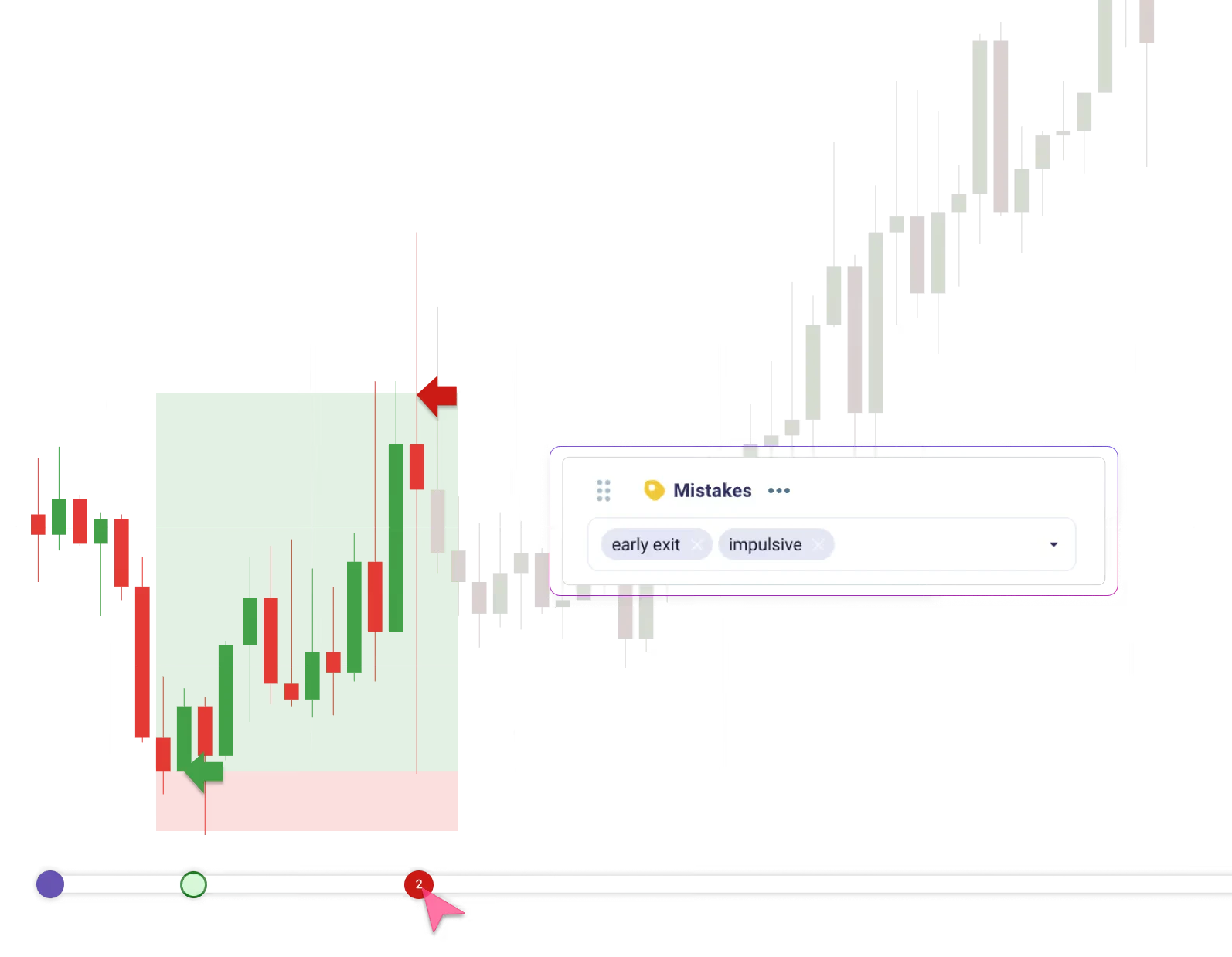
- Automated journaling: once your broker is connected, trades arrive with commissions and fees. You add notes, tags and screenshots. The pricing page also lists multiple currency support and breakeven settings in every plan.
- Reports: the provider names 300+ reports, MFE and MAE statistics, running profit and loss and drawdown. Most traders need a handful of them; the rest can bury the numbers that matter.
- Backtesting: manual bar-by-bar backtesting on 11+ years of data in all plans, with 1-second charts from Pro. Automated AI backtests take rules written in plain English: one free run on Essential, 10 a month on Pro, 100 on Ultra.
- Trade Replay: replays a past trade or day at 1-second resolution so you can judge a decision with the information you had at the time. Pro and Ultra only.
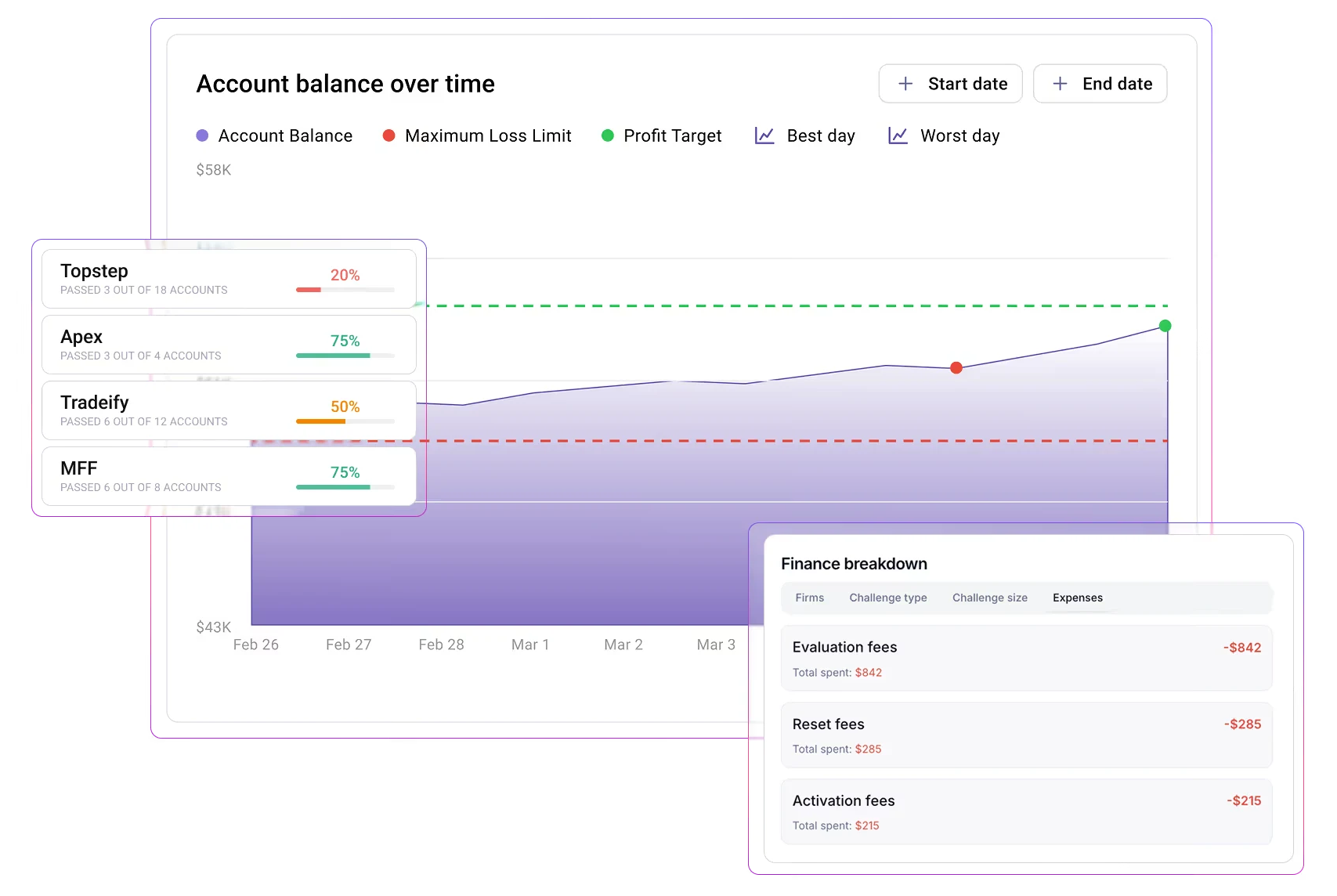
- Prop Firm Sync: shows a prop firm’s loss limit and profit target next to your account balance and adds up evaluation and reset fees. The comparison table lists it in all three plans.
 Click to enlarge
What the AI agents do
The pricing page names three agents. Trade Auto-Tagging and Trade Review run on every imported trade; a Market Sentiment agent runs when you ask for it. Weekly and monthly AI reports come on top.
Automatic tagging can save real time, but an AI summary does not replace your own review. Clean tags are the most tedious part of journaling, so help there is useful. The learning still comes from looking at your own decisions. The automated backtester is new: by early August 2026, one user had reported that it kept asking the same stop-loss questions and never produced a result.
 Click to enlarge
Source: TradeZella Prop Firm Sync page, seen October 3, 2026.
Brokers, markets, import and export
TradeZella states that it connects with 500+ brokers and trading platforms. Its broker list names Interactive Brokers, MetaTrader 4 and 5, Charles Schwab, NinjaTrader and Tradovate, among others, with markets from stocks and options to futures, forex and crypto.
There are two ways in: Auto Sync or File Upload. With Auto Sync, TradeZella pulls new trades from the broker connection; with File Upload, you export a CSV file from your broker and upload it. The broker list shows which method applies to each broker. We have not tested any of them, so check yours before you buy.
Broker syncs are the most frequent complaint. Several reviewers report connections that drop out, in one case a broker integration that stayed in beta for almost a year and lost its connection every week. A journal that misses trades loses its main purpose, so compare TradeZella’s totals with your broker statement at least once a month.
You can take your trades with you. The help center explains how to export selected trades from the trade log to a CSV file and notes as PDF files. Do that before you cancel, because what happens to your data afterwards is not stated on the pages we checked.
TradeZella reviews: what users report
On Trustpilot, TradeZella has a rating of 4.8 out of 5 from 1,045 reviews. 91 percent of the reviews give five stars and 3 percent one star (October 3, 2026).
Two notes from Trustpilot itself help to read that score. The company has not invited customers recently, so the reviews were written without a prompt, and such samples tend to come from very happy and very unhappy users. TradeZella replied to 7 percent of negative reviews.
Praise mostly concerns two things. Reviewers describe a clean interface that is easy to read without training, and fast, friendly support in many cases.
Criticism falls into four recurring patterns, based on our reading of the reviews for the German edition in August 2026:
- Unstable broker connections: automatic syncs that stop, sometimes reported as unresolved for months.
- Chart settings not saved: several users write that they must set time zone, interval and indicators again for every trade.
- Uneven support: answers range from “refunded within two hours” to “no reply for months”.
- Price rise and young AI features: one user criticized that the increase was justified with an AI backtester that did not work for them.
Language and regional points
TradeZella is available in English only, and prices are in US dollars. Website, app and help center have no language switch, and support answers in English.
If you buy for a business, check the invoice first. A user from Germany reported that no complete billing address could be stored and the first invoice could not be corrected later. Many tax systems require the buyer’s address on larger invoices, so ask support before buying if you want to claim the cost.
TradeZella or TradingView?
The two tools do different jobs. TradingView is a charting and analysis platform for the work before a trade. TradeZella analyzes what happened after the trade.
They overlap only in replaying price history. TradingView has Bar Replay, which we cover in our guide to TradingView backtesting. If you already pay for TradingView, check whether Bar Replay is enough before you add a second subscription; for structured analysis across many trades, a journal is the better fit.
Alternatives to TradeZella
Since every provider now advertises AI, it no longer separates them. What matters is price, whether your broker is supported, and whether you can try the tool first.
- TraderSync: the most direct competitor, with a seven-day trial. Our TraderSync review checks which brokers sync automatically.
- Edgewonk: sold as a yearly plan with a 14-day refund window, with a focus on trading psychology. See our Edgewonk review.
- Tradervue: built around sharing your journal with a mentor or a group; net P&L needs its Gold plan. See our Tradervue review.
- A spreadsheet: costs nothing and is enough for most traders who start. Our journal guide lists the columns you need.
All six tools side by side, with a decision guide: our trading journal software comparison.
Pros and cons of TradeZella
Based on the provider’s documentation and public reviews, the strengths are automation and ease of use, the weaknesses are stability and pricing.
Pros
- Automatic import: 500+ brokers and platforms according to the provider, including fees and commissions.
- Clean interface: reports are readable without long training, as many reviewers say.
- Trade Replay: reviewing a trade bar by bar shows mistakes that statistics hide.
- Auto-tagging: takes over the most tedious part of journaling.
- Prop Firm Sync: puts prop firm rules next to your own trades.
- Data export: trades to CSV, notes to PDF.
Cons
- No way to try it: no free plan, no advertised trial and no refunds under the terms.
- Thin entry plan: Essential has one account and no Trade Replay.
- Recurring sync problems: broken broker connections are the most frequent complaint.
- Settings not saved: several users must reset chart settings for every trade.
- Contradictions on the provider’s own pages: what Essential includes is stated differently in two places.
- Young AI features: the price rise was justified with features whose reliability users question.
Who TradeZella suits and who it does not
TradeZella makes most sense for active traders with several accounts who actually read their reports. If you take 20 or more trades a week, the automatic import saves enough time to justify the Pro plan, and prop firm traders get a useful rule overview, which matters with rules like the drawdown switch in our Take Profit Trader review.
It suits three groups poorly. Occasional traders pay for statistics that a dozen trades cannot support. Traders who want to try first have no risk-free way in. And anyone who needs support in a language other than English should look elsewhere.
Software does not replace rules. A journal can only check your trades against a written plan. If you have none yet, start there; the software analyzes, it does not discipline.
Conclusion: a capable journal with a pricing problem
TradeZella covers the core of a trading journal well. Imports are broad, the interface is clear and Trade Replay is a serious learning tool.
The weak point is how the plans are cut. Since July 2026 the entry plan costs $35 a month and leaves out Trade Replay and multiple accounts; the product shown in the marketing starts at $59. Together with no trial and no refunds, that makes the first purchase a blind one.
Our verdict: worth a look for high-volume traders with several accounts who accept an English-only tool. Everyone else should start with a free spreadsheet and move to software once manual logging becomes the bottleneck. Check your broker on the list and the plan details at checkout before you pay.
Frequently asked questions about TradeZella
How much does TradeZella cost?
TradeZella costs $35, $59 or $99 a month for Essential, Pro and Ultra. Billed yearly, the plans cost $315, $531 and $891, about 25 percent less. These prices apply since July 2026 (pricing page seen October 3, 2026); taxes are not shown.
Is TradeZella free, or is there a free trial?
No. There is no free plan, and the pricing page does not advertise a trial. You can sign up and look at the interface, but importing trades needs a paid plan. The terms say payments are non-refundable after sign-up.
Can I get a refund from TradeZella?
Not according to its terms. Section 22 states a no refund policy after sign-up, and a downgrade does not trigger a refund either. Some users report goodwill credits, but that is not a right.
Which brokers does TradeZella support?
The provider says 500+ brokers and platforms, including Interactive Brokers, MetaTrader, Charles Schwab, NinjaTrader and Tradovate. Some connect by Auto Sync, others by file upload. Check your broker on TradeZella’s list before you buy.
Can I export my data from TradeZella?
Yes, trades can be exported to a CSV file from the trade log, and notes as PDF. Export your data before you cancel; what happens to it afterwards is not stated on the pages we checked.
Is TradeZella worth it?
For active traders with several accounts, possibly; for beginners, rarely. The value comes from automatic imports and reports at high trade volume. With few trades, a spreadsheet gives you the same insight for free.
This review was written by Bjarne Claussen; the German edition was reviewed by Karsten Kagels. It is based on TradeZella’s own pages and public reviews checked on October 3, 2026, not on a paid account or a hands-on test. Images are TradeZella’s marketing material. Prices and features change; check the provider’s pages before you buy. This is not investment advice.
This English edition is based on our German edition on kagels-trading.de and has been adapted for international readers.
More Risk Management guides
- Manage your trading risk
Risk Management in Trading: Rules, Math, Psychology
The 1% rule, stops, risk/reward, daily loss limits, leverage caps and the psychology of losing streaks, with the math behind each rule.
- Calculate your position size
Position Sizing in Trading: Formula, Calculator, Examples
The formula, a free calculator, the 1% rule explained correctly, and examples for stocks, forex and futures.
- Size your risk per trade
Kelly Criterion for Traders: Formula, Calculator, Risks
The Kelly formula for traders with a calculator, and a simulation of why full Kelly is far too much.
- Keep a trading journal
Trading Journal: How to Record and Review Your Trades
What to write before and after each trade, a completed example with a win and a loss, a weekly review and a template to copy.
- Choose a journal
Best Trading Journal Software 2026: 6 Tools Compared
Six journals compared on price, free plans, refunds, automatic broker sync, costs and export, with a decision guide.
- Check TraderSync
TraderSync Review 2026: Pricing, Broker Sync and Limits
Prices and the yearly sale, which of 502 brokers really sync automatically, Market Replay, Cypher and the no-refund policy.
- Check Tradervue
Tradervue Review 2026: Imports, Reports and Costs
Silver or Gold, why net P&L needs Gold, automatic import for 5 of 82 brokers, US-only stocks and how cancelling works.
- Check Edgewonk
Edgewonk Review 2026: Features, Costs and Limitations
One plan at $197 a year with a 14-day refund, MetaTrader auto sync, the psychology tools, and screenshots from our own test journal.