
Tradervue Review 2026: Imports, Reports and Costs


Contents
- Tradervue in 30 seconds
- What is Tradervue?
- Tradervue features: charts, reports and sharing
- Which brokers and markets does Tradervue support?
- What does Tradervue cost?
- Cancelling, billing and refunds
- Tradervue reviews: what users report
- Alternatives to Tradervue
- Pros and cons of Tradervue
- Conclusion: who Tradervue is worth it for
- Frequently asked questions about Tradervue
- About the author
Tradervue is one of the oldest trading journals still on the market. It reads your closed trades, draws them on price charts and builds reports about your own decisions. Its strengths are clear, but three details decide whether it works for you: how your trades get in, which markets are supported and what the cheaper plan leaves out.
This is a documentation review, not a hands-on test. On October 3, 2026 we checked Tradervue’s pricing page, its help center, its full broker list and its terms of service, and read its public reviews. We did not open an account. This article follows our editorial policy.
Tradervue in 30 seconds
- Price: Silver $29.95 and Gold $49.95 a month. A free plan still exists, limited to 30 trades a month, but it is no longer in the price table.
- Costs only in Gold: commissions, fees and net P&L require the Gold plan. Silver reports results before costs.
- Automatic import for 5 of 82 entries: CMEG, DAS Trader Pro, NinjaTrader, PropReports and SpeedTrader. Everyone else, including Interactive Brokers, uploads files.
- US stocks only: stocks and options are supported on US markets only. Futures are broad, including Eurex and ICE, and all active forex pairs work.
- Cancelling means switching plans: there is no cancel button; you move to the free plan. The terms say nothing about refunds.
What is Tradervue?
Tradervue is a web-based trading journal that imports closed trades, plots them on price charts and turns them into reports about your own performance. It runs in the browser only; we found no app from the provider in the US App Store.
The owner is SureSwift Capital. The website’s copyright line names “SureSwift Capital, Inc.”, a company that buys and runs existing software businesses. The terms place the service under the law of Colorado, United States.
A professional user stands behind it. The New York proprietary trading firm SMB Capital runs its own Tradervue site at smbu.tradervue.com, and its sign-in page quotes co-founder Mike Bellafiore: “SMB traders rely on Tradervue for journaling and performance analysis.”
Tradervue features: charts, reports and sharing
The software has three parts: logging, analysis and sharing. The value lies in the analysis; any spreadsheet can log trades, but few can report across hundreds of them.
- Automatic charts: every imported trade gets a price chart with entry and exit marked, on several timeframes.
- Tags and a journal: you label trades with your own tags, such as a setup name, and can write daily notes even on days without trades.
- Reports: more than 100 reports in both paid plans, by holding time, time of day, symbol, volume and tag, plus a calendar of daily results.
- MFE and MAE: how far a trade went in your favor and against you before you closed it. The systematic exit analysis built on this is Gold only.
- Sharing and mentoring: you can share trades, with or without P&L, and give a mentor access to your journal.
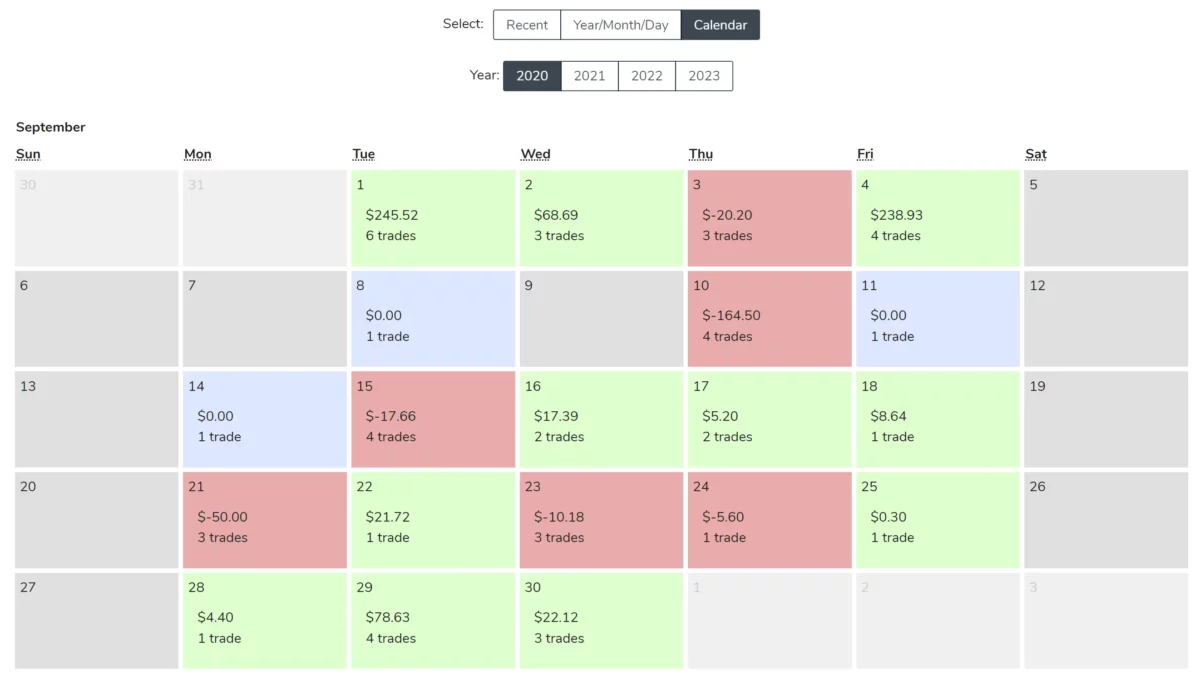 Click to enlarge
Source: Screenshot from the German edition on kagels-trading.de.
What is missing is everything around testing. Tradervue has no backtester, no trading simulator and no replay of past sessions. For practice, you need a second tool such as Bar Replay in TradingView or a simulator like TradingView paper trading.
Which brokers and markets does Tradervue support?
This is where Tradervue stands or falls for many traders outside the US.
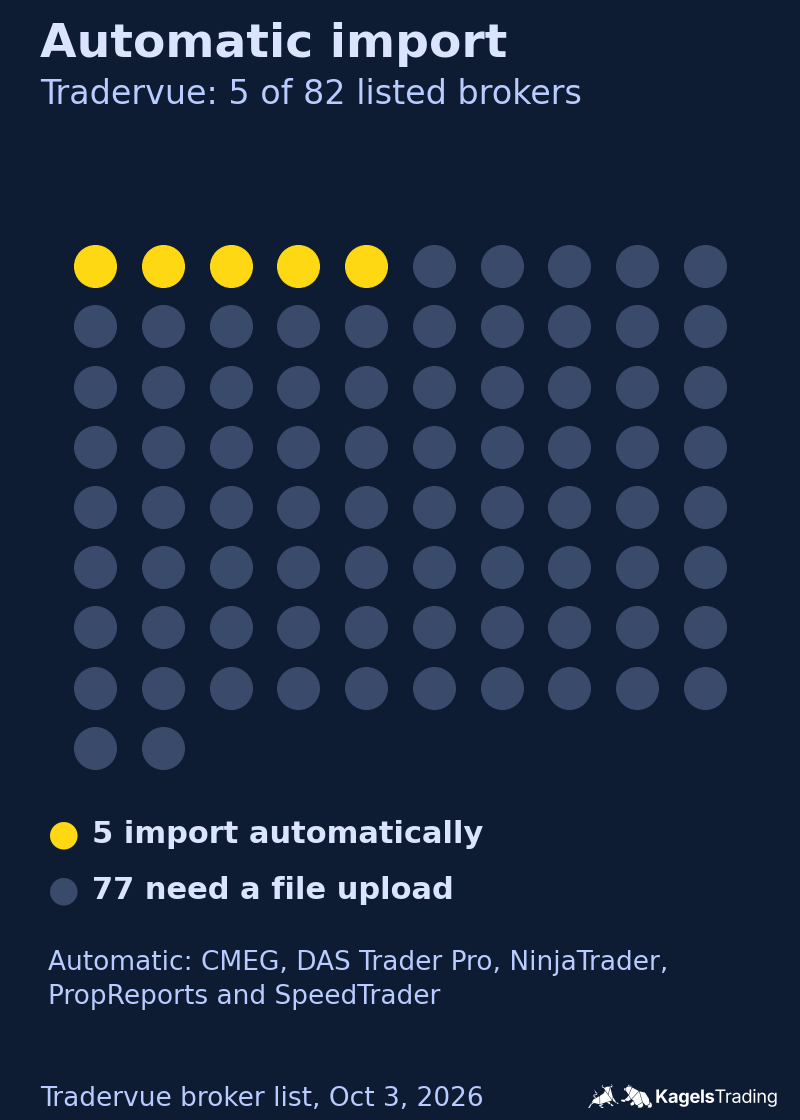
Automatic import for only 5 of 82 entries
Tradervue’s broker list has 82 entries, and the column “Automated” is ticked for five of them. They are CMEG, DAS Trader Pro, NinjaTrader, PropReports and SpeedTrader, about 6 percent. The pricing page advertises “Broker Sync” in both plans; in practice it applies to these five.
For the other 77 you upload a file. You export a trade report from your broker and upload it to Tradervue, according to the help center’s description of the standard import. That takes a few minutes each time, but it is manual work you must repeat. Interactive Brokers, Schwab, Fidelity, Robinhood, Webull and TradeStation all work this way.
 Click to enlarge
Source: Tradervue broker list, own graphic.
The list also still includes brokers that no longer exist, such as Scottrade, TD Ameritrade, OptionsHouse, optionsXpress and SureTrader. The number 82 is therefore an upper limit, not a count of current options.
Stocks only on US markets
Tradervue’s help center states that it supports “equities and options traded on U.S. markets”. Shares you buy on the London Stock Exchange, in Frankfurt, on India’s NSE or in Tokyo are not covered. For a stock investor outside the US, that alone can rule Tradervue out.
Futures and forex look very different. The supported list includes US index, rate and commodity futures and also Eurex (DAX, Bund, EURO STOXX 50, SMI), ICE Europe (FTSE 100, Gilt, Brent), the Montreal Exchange and Brazilian BMF futures. All active forex pairs are supported. Futures and currency traders are well served.
The generic import does not accept day-first dates
For brokers that are not on the list, Tradervue offers a generic import format. You build a CSV file with six columns: date, time, symbol, quantity, price and side.
The catch is the date. The help article allows only five formats: mm/dd/yyyy, mm-dd-yyyy, yyyy/mm/dd, yyyy-mm-dd and yyyymmdd. Day-first dates such as 03/10/2026, the standard in the UK, Europe and India, are not among them. You must convert the date column before every upload, or Tradervue reads March 10 instead of October 3.
Times need care too. They must be in 24-hour format; the time zone is chosen at upload. If the time is missing, Tradervue uses 12:00:00, which makes every time-of-day report meaningless.
What does Tradervue cost?
Tradervue shows two paid plans with monthly prices in US dollars. The pricing page shows no yearly option.
| Plan | Price a month | Main difference |
|---|---|---|
| Free | $0 | 30 trades a month |
| Silver | $29.95 | unlimited trades, gross P&L |
| Gold | $49.95 | adds costs and net P&L |
Prices from the Tradervue pricing page, free-plan limit from the help center, both seen October 3, 2026.
Why the plan choice matters for costs
Commissions and fees are a Gold feature. The pricing table shows “Commission and fee support” only for Gold, and the help center says that tracking commissions and net P&L “requires a Gold subscription”. On Silver, your reports show results before costs.
That is a bigger point than it looks. For an active day trader, commissions and fees can turn a small gross profit into a net loss. A journal that reports gross results makes your trading look better than your account, which is one of the common mistakes our trading journal guide warns about. If you want honest numbers, budget for Gold.
Gold also adds risk tracking, advanced filters, exit analysis and liquidity reports, and 5 GB of image storage instead of 1 GB.
The free plan
The free plan still exists but has disappeared from the price table. The help center confirms a limit of 30 trades per calendar month, counted as grouped trades, not single executions. If an import exceeds the quota, only part of it goes in; the rest can be imported after an upgrade or in the next month.
Thirty trades a month are enough for a swing trader, not for a day trader. Use it to find out whether you keep up the habit of journaling before you pay for software.
Cancelling, billing and refunds
Most complaints about Tradervue concern this topic, so we read the terms.
Subscriptions renew automatically by default. According to section 5 of the terms of service, ending a subscription changes your account to the no-charge, reduced-functionality plan once the paid period has run out. In other words, there is no cancel button; you switch plans. If you do not know that, you may think you cancelled when you did not.
The trial works the same way. Paid plans can be tried at sign-up, and the pricing page says your card “will be automatically charged when the trial period is up, unless you switch to a free plan” before it ends. Set a reminder when you start a trial.
The terms say nothing about refunds. The word does not appear in them, neither for partial periods nor for renewals by mistake. The terms place the service under Colorado law and say that users outside the US access it “on their own initiative”. Whether consumer rights in your country still apply is a legal question we cannot answer here; in practice you would have to enforce them against a US company.
Tradervue reviews: what users report
Public reviews are poor and very few. On Trustpilot, Tradervue has 2.4 out of 5 from just 10 reviews, nine of them one star (October 3, 2026). The profile is not claimed by the company.
Ten reviews say little about satisfaction across a large user base. What they do show is the main complaint. In our reading for the German edition in September 2026, six of the nine negative reviews described the same thing: cancelled or downgraded, but still charged, with no refund. Several reviewers wrote that there was no cancel button and they had to choose the free plan instead, which is exactly what the terms describe.
Two further reviews concern support, which they describe as slow or absent by email. The one positive review describes the use case Tradervue is built for: a US day trader with a supported broker who imported two years of trades in minutes.
Alternatives to Tradervue
- TraderSync: a much longer broker list with 80 automatic syncs, Market Replay in every plan and a seven-day trial. See our TraderSync review.
- TradeZella: reports, Trade Replay and Prop Firm Sync, but no trial and no refunds. See our TradeZella review.
- Edgewonk: focused on trading psychology, sold as a yearly plan with a 14-day refund window. See our Edgewonk review.
- A spreadsheet: free and fully under your control, including day-first dates. Our journal guide lists the columns.
All six tools side by side, with a decision guide: our trading journal software comparison.
Pros and cons of Tradervue
Pros
- Automatic charts: every trade on a price chart with entry and exit marked.
- MFE and MAE: show whether your stops are too tight or you exit too early.
- Broad futures and forex coverage: Eurex, ICE Europe, Montreal and all active currency pairs.
- Free plan: 30 trades a month to build the habit.
- Mentoring and sharing: a mentor can follow your trades; SMB Capital runs its own Tradervue site.
- Export: download your data to Excel in both paid plans.
Cons
- Few automatic imports: 5 of 82 list entries; Interactive Brokers needs uploads.
- Net P&L only in Gold: Silver reports before costs.
- Stocks only on US markets: no LSE, Frankfurt, NSE or Tokyo shares.
- Generic import rejects day-first dates: extra work for traders outside the US.
- Cancelling means switching plans: and the terms do not address refunds.
- No backtester, simulator or replay.
- No mobile app: we found none from the provider.
Conclusion: who Tradervue is worth it for
Tradervue is a mature journal for a specific audience. The automatic charts are practical, MFE and MAE answer a question many traders struggle with, and a firm like SMB Capital using it is a serious signal.
Its sweet spot is a US-market day trader or a futures and forex trader. If you trade US stocks through a supported platform, or futures through NinjaTrader, or currencies through MetaTrader, Tradervue has a working path in. If you hold shares on a non-US exchange, it does not cover them.
Two rules before you pay. Choose Gold if you want net results after costs, and remember that cancelling means switching to the free plan. Start with the free plan if you are new to journaling: whether you keep the habit matters far more than which provider you pick.
Frequently asked questions about Tradervue
Is Tradervue free?
Yes, there is a free plan limited to 30 trades per calendar month. It is no longer shown in the price table, but the help center confirms it. Silver costs $29.95 and Gold $49.95 a month.
How much does Tradervue cost?
Silver costs $29.95 and Gold $49.95 a month. The pricing page shows no yearly discount. Commissions, fees and net P&L require Gold (prices seen October 3, 2026).
Does Tradervue sync with Interactive Brokers?
Not automatically. On Tradervue’s broker list, Interactive Brokers is supported by file upload: you export your trades and upload them. Only five entries, including NinjaTrader and DAS Trader Pro, import automatically.
Does Tradervue support stocks outside the US?
No. Tradervue supports stocks and options traded on US markets. It does support many non-US futures, such as DAX, Bund and FTSE 100 futures, and all active forex pairs.
How do I cancel Tradervue?
Switch your plan to the free plan. There is no separate cancel button; according to the terms, the paid plan then runs until the end of the period you paid for and does not renew. The terms contain no refund rule.
Does Tradervue have a mobile app?
No. Tradervue runs in the browser only, and we found no app from the provider in the US App Store.
Can I backtest strategies with Tradervue?
No. Tradervue has no backtester, simulator or session replay; it only analyzes trades you have already made. For testing, use a separate tool such as Bar Replay in TradingView.
This review was written by Bjarne Claussen; the German edition was reviewed by Karsten Kagels. It is based on Tradervue’s own pages, help center, broker list and terms checked on October 3, 2026, not on a paid account or a hands-on test. Prices and features change; check the provider’s pages before you buy. This is not investment advice or legal advice.
This English edition is based on our German edition on kagels-trading.de and has been adapted for international readers.
More Risk Management guides
- Manage your trading risk
Risk Management in Trading: Rules, Math, Psychology
The 1% rule, stops, risk/reward, daily loss limits, leverage caps and the psychology of losing streaks, with the math behind each rule.
- Calculate your position size
Position Sizing in Trading: Formula, Calculator, Examples
The formula, a free calculator, the 1% rule explained correctly, and examples for stocks, forex and futures.
- Size your risk per trade
Kelly Criterion for Traders: Formula, Calculator, Risks
The Kelly formula for traders with a calculator, and a simulation of why full Kelly is far too much.
- Keep a trading journal
Trading Journal: How to Record and Review Your Trades
What to write before and after each trade, a completed example with a win and a loss, a weekly review and a template to copy.
- Choose a journal
Best Trading Journal Software 2026: 6 Tools Compared
Six journals compared on price, free plans, refunds, automatic broker sync, costs and export, with a decision guide.
- Check TradeZella
TradeZella Review 2026: Pricing, Features and Limitations
The three plans since July 2026, what Essential leaves out, the no-refund terms, imports, export and what users report.
- Check TraderSync
TraderSync Review 2026: Pricing, Broker Sync and Limits
Prices and the yearly sale, which of 502 brokers really sync automatically, Market Replay, Cypher and the no-refund policy.
- Check Edgewonk
Edgewonk Review 2026: Features, Costs and Limitations
One plan at $197 a year with a 14-day refund, MetaTrader auto sync, the psychology tools, and screenshots from our own test journal.