
Trading Software: Charts, Platforms and Research Tools


Contents
- Trading software in 30 seconds
- What trading software does, and what it does not do
- Choose by task, not by brand
- A short comparison on consistent criteria
- What it costs: license, data and broker fees
- Compatibility: operating system, markets and feed
- Forex compatibility: your broker must support the platform
- What to test before you pay
- Frequently asked questions about trading software
- About the author
Trading software helps traders analyze markets, research ideas, or manage and route orders. Its role depends on the product: some tools only read charts, others also place orders through a broker. This guide shows which trading software fits which job, with dated prices and the data entitlements you still need.
Trading software in 30 seconds
- Think of three functions, not one product. A platform shows charts and indicators and, for many products, also lets you place orders. A data feed supplies prices for your markets. A broker holds your money and executes orders. The three may be bundled, or you may put them together yourself.
- Pick the platform by task. For general charting, TradingView fits most traders. For specialist order flow on futures, ATAS, Bookmap and Sierra Chart (Package 11 for footprint-style analysis; Package 12 adds Market by Order for per-order queue data). For stock research, InvestingPro, Finviz Elite and Koyfin. For seasonal patterns, Seasonax. The task sections below link to each deep review.
- Watch the data entitlement, not just the plan price. A paid TradingView plan raises platform limits (chart counts, indicators, screens). Live data is a separate question: fees and entitlements vary. On TradingView, Cboe One US stock data is the free default and is not the same as consolidated or primary-exchange feeds; the matching add-ons are listed on TradingView’s additional-data support page.
- Three warnings. A plan does not include a broker. A broker that advertises “free trading” still charges exchange and clearing fees on futures. Software reads the market, it does not decide the trade.
What trading software does, and what it does not do
Trading software is any program a trader uses to analyze markets, research ideas, or manage and route orders. Its role depends on the product.
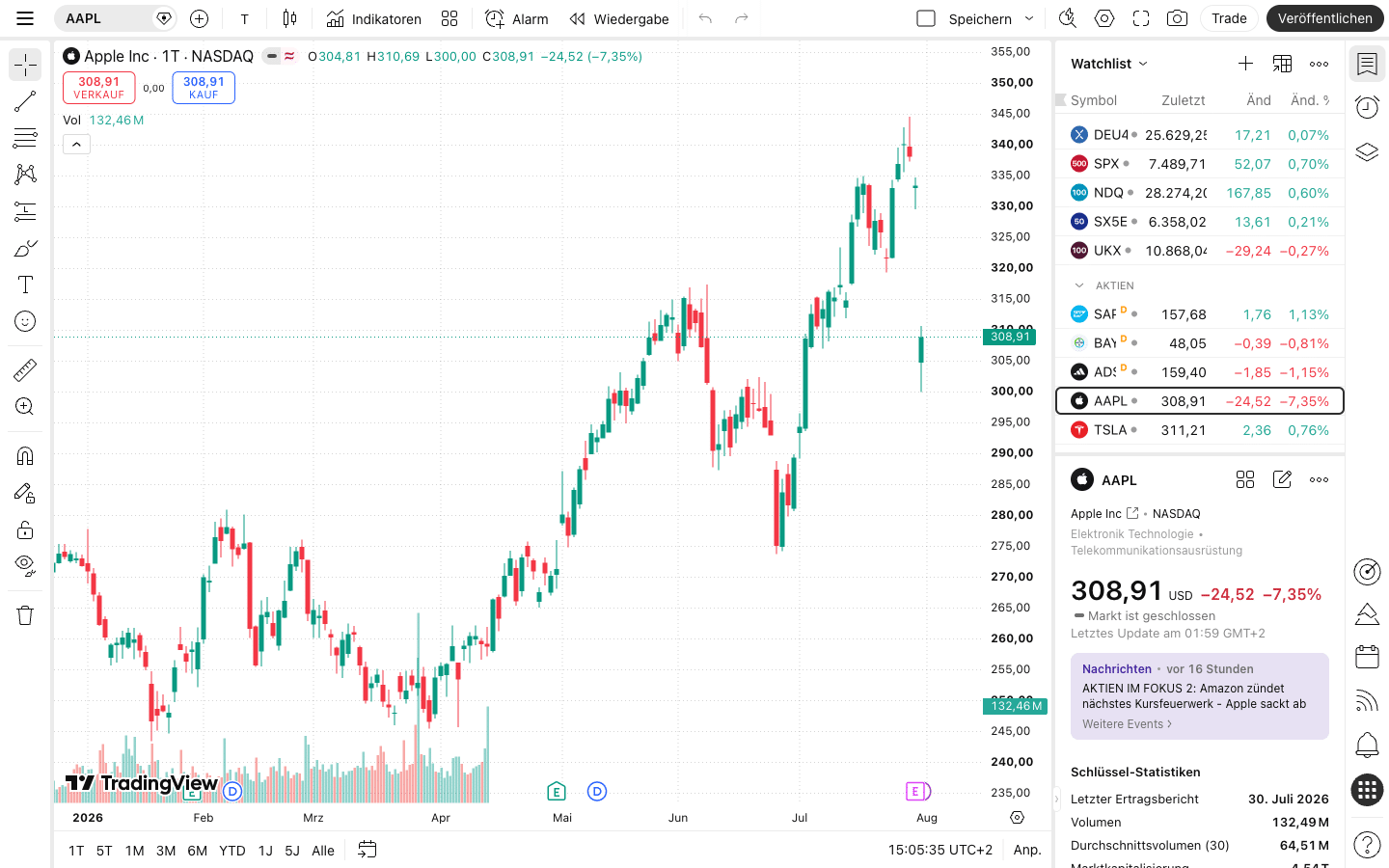
Three functions sit behind every live trade, and they may be bundled or kept apart. The platform reads prices and lets you set up charts, screens and (where supported) orders. The data feed supplies the live prices, which many exchanges sell on a separate monthly subscription. The broker holds client money and executes orders through the exchange or, for over-the-counter forex, may route liquidity through its own book or external venues depending on the model. A broker-provided platform bundles all three; a third-party platform like TradingView bundles the first two for most markets and still needs a supported broker for order execution.
Most retail disputes about “which software is best” are really about these three pieces, not about the chart tool. A platform that works with your broker and your markets, with a data feed you can afford, beats a prettier platform that does not. Our broker review for Interactive Brokers walks through one working stack; which US brokers connect to TradingView today is in our TradingView brokers guide.
 Click to enlarge
Software reads the market, it does not decide the trade. No program in this guide gives you an edge on its own. The rules by which you buy and sell have to come first. Without a rule set, a better subscription just gives you more expensive charts.
Choose by task, not by brand
What is your main trading job right now?
- Draw charts and watch many markets in one placeTradingView
- Screen stocks and read fundamentalsInvestingPro, Finviz Elite, Koyfin
- Research seasonal patterns across many yearsSeasonax
- Read order flow and the tape on futuresATAS, Sierra Chart, Bookmap
- Enter and exit futures quicklyTradovate, NinjaTrader, TWS
- Backtest a rule set honestlyTradingView, ProRealTime, Amibroker
- Automate a strategy that already worksMetaTrader 5, NinjaTrader, Pine Script
- Record and review your tradesTradeZella, TraderSync, Tradervue, Edgewonk
- Nothing specific yetStart free with TradingView Basic and watch yourself for a month
Each link jumps to the matching section below. For deep reviews, follow the article links in that section.
Charts and technical analysis
The job that applies to almost everyone: read a chart and act on it. For most traders, TradingView is the natural starting point. It runs in the browser, has a permanently free Basic plan, and offers four paid tiers (Essential, Plus, Premium and Ultimate). Paid tiers raise platform limits such as chart counts, indicators per chart and saved screens; current US dollar prices and the live-data entitlements live in that review. Live exchange data is a separate question from the plan itself: some feeds are included, some are delayed and some are a paid exchange subscription.
For traders who want pattern detection as a core feature, TrendSpider is a browser-based alternative. Its pricing page lists Standard, Premium, Enhanced and Advanced tiers plus a paid trial, and mixes promotional, monthly, annual and renewal amounts on the same page. We do not quote a monthly figure here because the checkout basis changes often; read the current numbers directly on the provider page before you subscribe.
For stock traders focused on classic chart books and sector rotation, StockCharts offers three plans. When checked on 17 October, StockCharts pricing listed Basic $19.95, Extra $29.95 and PRO $49.95 per month, with the 13th month free when prepaid yearly.
Stock research and screening
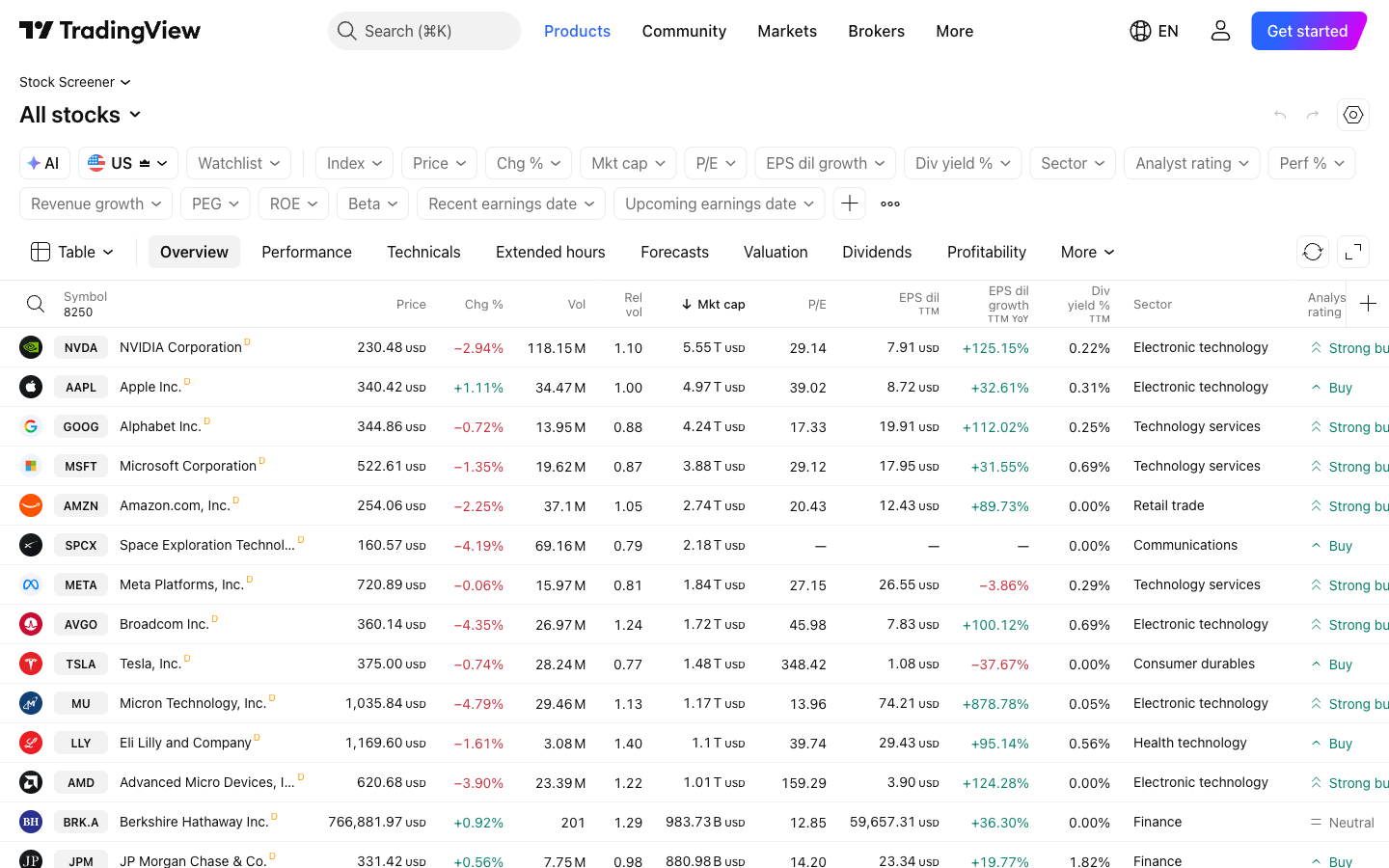
Research tools show the fundamentals and context behind the price. Three tools cover most retail jobs. InvestingPro offers a fundamental screener, fair-value models and valuation views; plan prices and the differences between Pro and Pro+ live in that review.
 Click to enlarge
For stock scanning, Finviz Elite and Koyfin cover different styles. Finviz Elite at $39.50 a month, or $299.50 a year ($24.96 a month billed yearly), turns the free Finviz screener into a research tool with real-time quotes, premarket and after-hours and intraday charts (checked 17 October on finviz.com/elite). Koyfin adds fundamental dashboards and portfolio views; its pricing page lists Free, Plus and Premium tiers with monthly and annual billing. Dollar figures and the exact billing basis (monthly, annual, or discounted first term) change often, so read the Koyfin page directly before you subscribe. TradingView’s own screener is reviewed separately in our screener guide.
Seasonal research
Seasonal research asks when a market has typically moved up or down in past years, and how reliable the pattern has been. The specialist tool is Seasonax, which advertises more than 25,000 instruments, event studies and a seasonal screener. The pricing page lists Basic and Professional plans; check current prices and trial terms with Seasonax directly. Treat a historical hit rate across many years as one input, not a signal that this year will repeat it.
Order flow and footprint
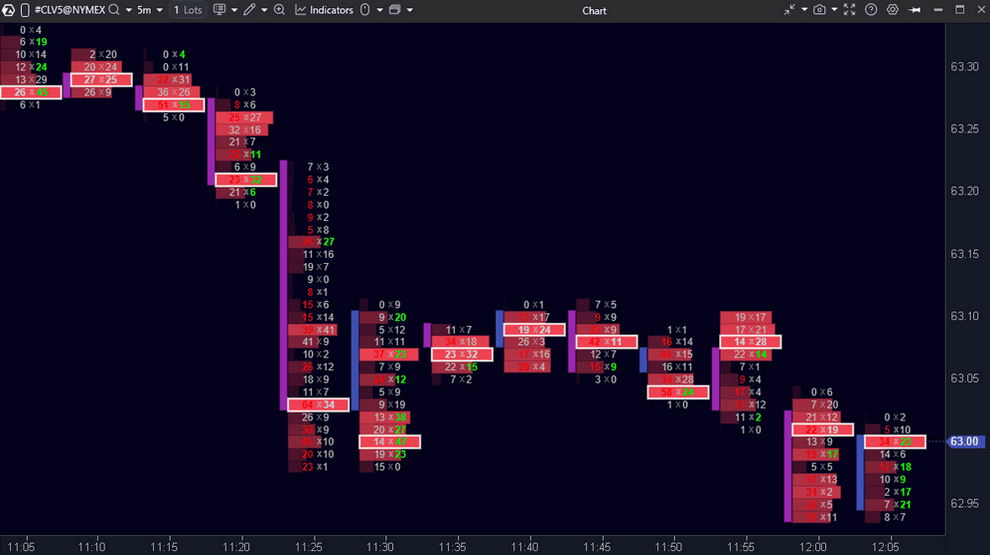
Order flow replaces the finished price bar with the trades and orders behind it. Two things are usually meant: the footprint (the executed trades at each price inside a bar) and the order-book heatmap (resting bids and offers over time). Different tools emphasize different parts: ATAS is best known for the footprint; Bookmap is best known for the order-book heatmap.
Sierra Chart is a full desktop platform with a staged package list. Package 11 adds advanced tools such as Numbers Bars on top of the integrated features and is enough for traders who want footprint-style analysis. Package 12 adds Market by Order (MBO) on top of Package 11 and is the only Sierra package with MBO; choose it only if your workflow actually needs per-order queue data. Package 12 was listed at $56 a month on 17 October 2026, and live exchange data is billed separately by the exchange (Sierra Chart Packages). Jigsaw Trading and Quantower sit in the same specialist category.
 Click to enlarge
Source: ATAS screenshot in our German review.
For the method itself, our volume analysis guide explains what the footprint and the order book actually show. A practical shortlist of specialist platforms, with current prices, lives in our TradingView alternatives review.
Trade execution and order routing
For live trading, broker and platform are chosen together, not one before the other. Three paths cover most retail traders. Interactive Brokers uses Trader Workstation (TWS) and handles futures, stocks, options and forex worldwide. NinjaTrader is a desktop platform that is free for advanced charting, backtesting and trade simulation, with no monthly plan fee for live trading on its own; commissions, exchange, clearing and NFA fees depend on contract type and the chosen plan, and the current conditions are listed on the NinjaTrader pricing page.
On 17 October 2026, Tradovate’s pricing page listed three fee tiers for its combined futures broker and cloud platform. The Free plan has no monthly fee and allows live trading at $1.29 per standard contract per side. Monthly ($99) drops the standard commission to $0.99 per side. Lifetime is $1,499 one-time (or four payments of $499 totaling $1,996) at $0.59 per side. All tiers include access to the NinjaTrader platforms. Exchange, clearing and NFA fees still apply, and top-of-book market data is included on funded accounts.
For forex-and-CFD platforms, the broker provides MetaTrader 5 or cTrader as part of the account. You install the platform through the broker rather than subscribing to it separately; which charting tool you can connect for execution follows from the broker’s supported-platforms list, so broker and platform are decided together.
Backtesting
A backtest tells you how a rule would have done in the past, under the assumptions you chose. TradingView offers two separate testing tools: Bar Replay lets you step through past bars by hand on supported charts, subject to plan and history limits; a Pine Script strategy applied to a chart produces an automatic strategy report with trades, metrics and curves. Our TradingView backtesting guide covers both. For a more rigorous workflow, ProRealTime and AmiBroker can run large historical tests using suitable historical data; AmiBroker uses imported or connected feeds, which must be set up separately (AmiBroker database settings). The general method, with the mistakes that make a bad rule look good, is in our guide to backtesting a trading strategy.
Automation
Automation turns a tested rule into a program that trades on its own. On MetaTrader 5, an Expert Advisor opens and closes positions by itself; the platform is free through supported brokers. On NinjaTrader, strategies written in NinjaScript can do the same job on futures. On TradingView, a Pine Script alert can send an HTTP message to any configured webhook URL (TradingView webhook alerts); a compatible external execution service must receive that alert and place the order through a broker. Our overview of algo trading covers the stages of a trading system, and our Pine Script guide covers how far TradingView’s scripting language goes.
Trading journals
A journal turns a trading record into feedback. The deep comparison, with prices and import support, is in our journal software test. You can also keep a journal in a spreadsheet; our trading journal guide shows a template and a weekly review routine. If your broker offers an automatic import to a given tool, that one practical point often matters more than any feature chart.
A short comparison on consistent criteria
This table names the first tool each task section calls out, with the entry commitment we read on the provider’s page or in our own earlier review. These are starting points, not full comparisons; the linked reviews carry the current detail, and the prices below change often.
| Task | First tool | Entry commitment | Deep review |
|---|---|---|---|
| Charts and technical analysis | TradingView | Basic free; four paid plans, current prices in the review | See the TradingView review linked above |
| Stock research and screening | InvestingPro | Pro and Pro+, current prices in the review | See the InvestingPro review linked above |
| Seasonal research | Seasonax | Basic and Professional, prices on provider page | seasonax.com/pricing |
| Order flow and footprint | ATAS | free START (delayed futures), paid tiers on provider page | atas.net |
| Trade execution and routing | Tradovate | Free (no monthly fee), $99/mo, $1,499 lifetime | tradovate.com/pricing |
| Backtesting | TradingView Bar Replay or Pine strategy | availability and history limits depend on tool and plan | See the TradingView backtesting guide linked above |
| Automation | MetaTrader 5 Expert Advisor | free through supported broker | See the algo trading guide linked above |
| Trading journals | TradeZella, TraderSync, Tradervue, Edgewonk | free tiers vary; see the comparison | See the journal software test linked above |
Provider rows (Seasonax, ATAS, Tradovate) link to the provider’s own public page checked on 17 October 2026. Our-own-review rows (TradingView, InvestingPro, TradingView backtesting, algo trading, journal software test) are linked contextually above and carry their own dates. Real-time exchange data is often, but not always, a separate subscription; the entitlement varies by platform, feed and broker.
What it costs: license, data and broker fees
The license is only one of three line items on a monthly trading bill. The license or subscription pays the platform maker. Real-time data may incur a separate exchange or provider fee, depending on the plan. The broker charges commissions, financing on margin and sometimes platform fees of its own. A low license can hide expensive data; a broker that advertises zero platform fees can still carry exchange, clearing and regulatory fees on every futures contract.
Build the monthly bill yourself from these three lines. Pick each number from the provider’s own current pricing page, not from a review, and keep the license, data and broker fees separate while you add them up:
- License or subscription. The platform maker’s monthly or annual fee for your intended plan. TradingView, StockCharts, Finviz Elite, Koyfin and most browser platforms publish current prices on their pricing pages. Sierra Chart charges per package. NinjaTrader is free for charting, backtesting and simulation. MetaTrader 5 and cTrader are provided free through the broker.
- Real-time data. Not one price. Some feeds are free (for example TradingView’s default Cboe One US stock data), some are delayed on a free plan, and some are sold as a separate exchange subscription (CME, NYSE, Nasdaq packages on TradingView, Denali or broker-routed exchange fees on NinjaTrader and Sierra Chart). The entitlement your plan actually includes depends on platform, feed and broker together.
- Broker fees. Commissions per contract or per share, financing on margin, and any exchange, clearing and regulatory fees the broker passes through. On futures, these are charged on every contract on every tier.
Pro-grade terminals sit in a different world. The Bloomberg Terminal is sold on an annual contract per user and is aimed at institutional desks; Bloomberg does not publish a price on its product page, so we do not quote one here.
Compatibility: operating system, markets and feed
Not every platform runs on every machine, and not every data feed covers every market. Four compatibility checks save money. Walk them in order before you commit to a plan; data entitlements and broker support are the two that trip people up most often.
- Operating system. NinjaTrader Desktop and Sierra Chart run on Windows. TradingView and most browser platforms work on Windows, macOS and Linux. On a Mac, MetaTrader 5 runs inside Wine; MetaQuotes installs it for you. Our trading laptop guide covers supported models.
- Markets. The platforms differ in which exchanges and instruments they list, so check your actual symbols on a free tier or trial before you commit. A side-by-side view across tools lives in the TradingView alternatives review linked above.
- Broker connection. On TradingView, the list of supported brokers is country-dependent and changes over time; check the current list on TradingView’s broker page before you decide. MetaTrader and cTrader come from the broker, so the broker’s supported-platforms list and your platform choice are decided together.
- Data feed. Market data may be real-time or delayed; fees and entitlements vary. TradingView publishes rates per feed on its data coverage page; NinjaTrader and Sierra Chart route the data through the broker or Denali, with the exchange’s own fees passed through. Confirm the specific entitlement for your plan before you subscribe.
Forex compatibility: your broker must support the platform
In forex, broker and platform are chosen together. MetaTrader 5 and cTrader are provided by the broker and installed from the broker’s download page. If you want to use TradingView or ProRealTime for forex, the broker must support that connection; the current list varies by country.
Three practical checks matter more than the platform brand. First, your country of residence and the broker’s authorization to serve it: confirm this on the broker’s own regulatory page before you open an account. Second, the markets you actually want to trade (spot forex, CFDs, futures) and whether a given broker offers them to your residence. Third, the execution platform you will use day to day, which is usually MetaTrader, cTrader, TradingView or the broker’s own platform.
What to test before you pay
Four short checks catch most of the mistakes that cost money later. Walk them in order: data entitlement, total monthly bill, one order through the whole stack and written notes of what happened.
- Run the free tier or trial on your market. Most charts, screeners and journals have a permanently free plan or a short paid trial. Try the one you plan to use on the instruments you really trade. Check whether the limitation is removed on the intended paid tier before you cancel the trial.
- Add up the real monthly bill. License plus data plus commissions. Real-time US stock quotes, CME Group futures and option chains are often separate line items; the exact entitlement varies by platform, feed and broker.
- Try one order through the whole stack. Open a demo or paper account, place a resting limit order and a stop order, then cancel both. Investigate demo issues before relying on the live setup: broker demo and live systems can differ.
- Keep written notes while you test. What worked, what did not, how long each step took. The notes become the first entry in your trading journal and your decision record.
A subscription is not a trading plan. If you cannot describe your rule set in a short paragraph, add a plan before you add a tool. Our risk management guide covers the money side; our price action guide covers the chart side.
Frequently asked questions about trading software
What is trading software?
Trading software is a program a trader uses to analyze markets, research ideas, or manage and route orders. It usually means a charting platform such as TradingView, a desktop trading platform such as NinjaTrader or Sierra Chart, or a research tool such as InvestingPro or Finviz. Its role depends on the product; a broker is still needed to execute the orders, and a data feed is needed for live prices.
What is the best trading software?
There is no single best, because trading software is chosen by task. For general charting, TradingView fits most traders. For order flow on futures, ATAS and Bookmap on the specialist side, with Sierra Chart (Package 11 for footprint, Package 12 for Market by Order). For stock research, InvestingPro, Finviz Elite and Koyfin. For seasonality, Seasonax. The task sections above name the first tool to try for each.
Is there free trading software that is actually useful?
Yes, in three practical forms. TradingView Basic gives you full charting for good and does not expire. NinjaTrader is free for advanced charting, backtesting and simulation, with commissions on the futures account when you trade live. Finviz gives a free stock screener. The usual catch is live exchange data: entitlements vary by platform and market, so confirm them on the provider’s own page.
Is trading software for beginners different?
Not really; beginners need the same stack as anyone else, with less of it. Start with a free charting plan, a broker demo and a notebook. A paid tier makes sense once you can name what the free plan does not do for you.
Can I run trading software on a Mac?
Any browser-based platform runs on a Mac, including TradingView, Finviz, Koyfin and Seasonax. For Windows-only desktop software (NinjaTrader Desktop, Sierra Chart), two routes exist: run them in a Windows virtual machine on an Intel Mac, or add a small Windows PC next to the Mac (our trading computer guide covers current mini PC models). MetaTrader 5 runs on macOS through Wine, installed by MetaQuotes.
What is the difference between futures trading software and stock trading software?
Futures platforms handle different symbols and different data. Futures markets quote in contracts with exchange-specific trading hours and tick values; data comes from the CME, ICE and others on a monthly fee per exchange. Stock trading software reads cash equities data (consolidated US tape, Nasdaq, NYSE, Cboe) and uses lot sizes. A browser platform like TradingView can show both asset classes side by side provided you add the right data bundle.
Can trading software automate my trading?
Partially, and only within the limits of the platform. MetaTrader 5 and NinjaTrader can run strategies that place and manage orders on their own. TradingView’s Pine Script can send an HTTP alert to a configured webhook URL; a compatible external execution service must receive that alert and place the order through a broker. Treat an automated strategy like a trader with no judgment: give it a strict risk limit and watch it closely.
This article was written by Karsten Kagels and reviewed by Christian Möhrer. The dates next to each price are the dates we last checked the provider’s own page; plans and prices change frequently. This is educational content, not investment advice.
This US edition is based on our German edition on kagels-trading.de and has been adapted for US readers.