
StockCharts Review 2026: Plans, Prices and Free Tools


Contents
- StockCharts in 30 seconds
- What is StockCharts?
- Free version: what I tested
- Plans and prices
- Real-time data and markets
- Scans, alerts and ranking tools
- Mobile apps
- StockCharts vs TradingView and Finviz
- Who StockCharts is for
- Conclusion: strong for scans, fair in price
- Frequently asked questions about StockCharts
- Sources
- About the author
StockCharts.com is a charting and scanning website built for technical analysis of stocks, ETFs and indices. It has been online since 1999 and is best known for its classic SharpCharts, its scans and alerts, and tools such as Relative Rotation Graphs that few other platforms offer. You use it in the browser; there is no software to install.
This review shows what you get for free and what the three paid plans add. I tested the free version without an account on 31 October 2026 and took the screenshots below; I did not test a paid plan. Prices, plan limits, data costs and markets come from StockCharts’ own pricing page and help center on the same day.
StockCharts in 30 seconds
- Free without an account: daily and weekly charts of up to five years, three indicators and three overlays per chart, US real-time stock prices from the BATS exchange, with ads.
- Paid plans: Basic $19.95, Extra $29.95 and PRO $49.95 a month (US dollars). Annual billing gives you the 13th month free.
- Real-time data costs extra: $9.95 a month each for NYSE and Nasdaq, Canada or the UK. Other stock markets are delayed by at least 15 minutes; cryptocurrency data is real-time.
- Strengths: scans and alerts on technical criteria, Relative Rotation Graphs, the SCTR ranking, Point & Figure and the free ChartSchool.
- Limits: scans run on daily, weekly or monthly bars only, intraday history is short, and real-time data plans exist only for the US, Canada and the UK.
What is StockCharts?
StockCharts.com is a subscription website for charts, scans and market analysis. Chip Anderson, a former Microsoft Windows developer, founded it in April 1999 in Redmond, Washington, and still leads the company. It covers stocks and ETFs from the United States, Canada, the UK and India, plus indices, commodities, currencies, bonds and cryptocurrencies.
The platform is built around end-of-day technical analysis. Its classic chart tool, SharpCharts, draws static charts with dozens of indicators. StockChartsACP, launched in 2020, is the interactive full-screen platform. Around them sit scans, alerts, ranking tools and a large library of articles and education.
Free version: what I tested
 Click to enlarge
Source: StockCharts SharpCharts.
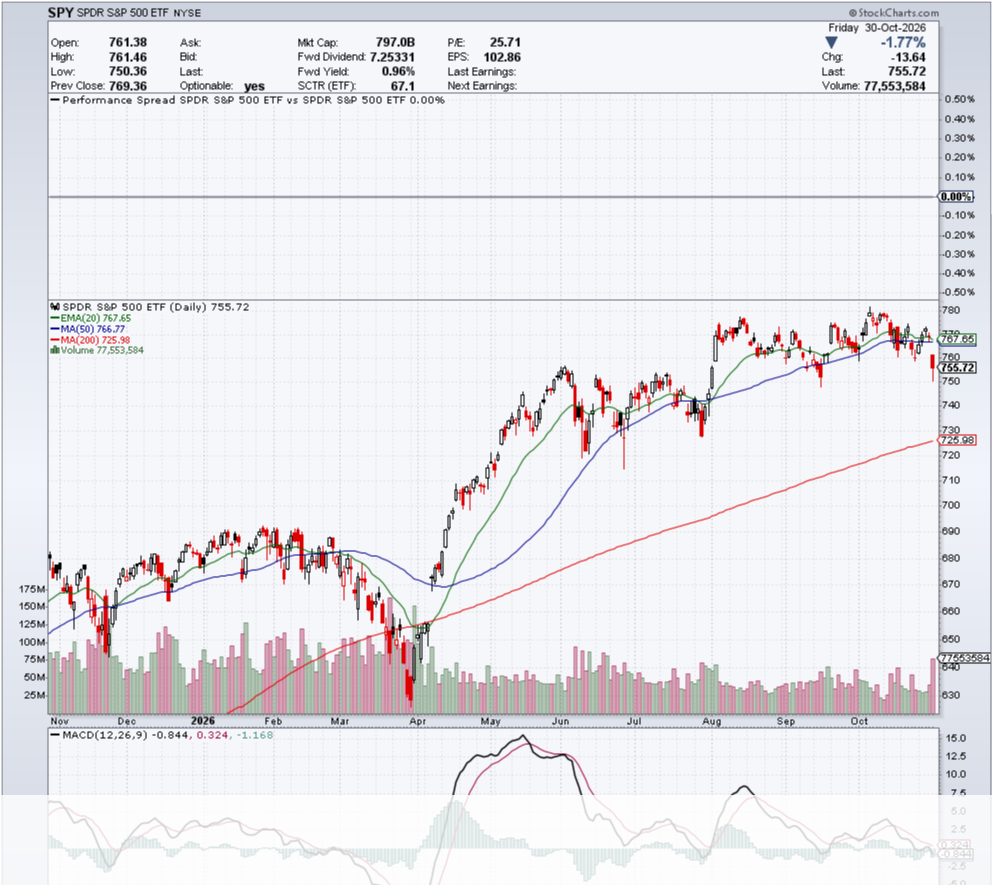
Without an account you can already draw serious daily charts. I opened SPY, the S&P 500 ETF, as a visitor on 31 October 2026. The default chart showed one year of daily candlesticks with the 20-day exponential and the 50- and 200-day simple moving averages, volume, MACD and a header with the SCTR rank of 67.1. The cookie banner offered a full rejection, which I used.
The free limits are clear and fair. According to StockCharts, non-members can chart only daily and weekly bars, up to five years back, with at most three indicators and three overlays and a chart width of 900 pixels. Saving charts, intraday bars, scans and alerts all need a membership. US stock prices on the free plan come in real time from the BATS exchange; other stock markets are delayed, while cryptocurrency data is real-time.
 Click to enlarge
Source: StockCharts RRG.
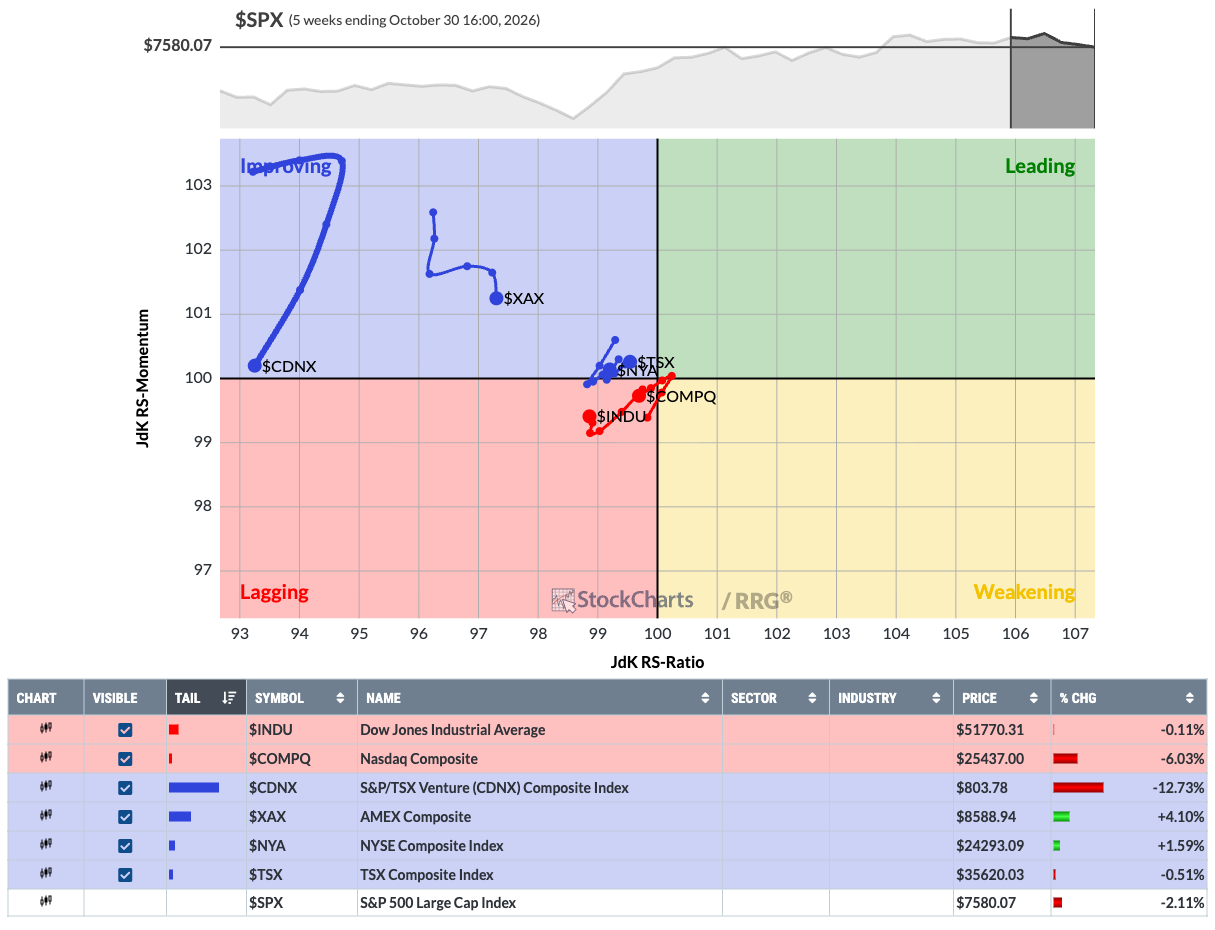
The Relative Rotation Graph is the tool I would show anyone first. The free version plots several symbols against a benchmark in four quadrants: leading, weakening, lagging and improving. On 30 October 2026, the Nasdaq Composite and the Dow Jones sat just inside the lagging quadrant against the S&P 500, while the TSX Venture index moved through improving. RRGs were created by Julius de Kempenaer, whose firm RRG Research provides them to StockCharts in partnership; members can build their own RRGs.
Plans and prices
StockCharts has three paid service levels, and the differences are mainly in quantity. All paid plans remove ads and unlock intraday charts, real-time data plans, saved charts and up to 25 indicators per chart. Extra and PRO add many more lists, scans and alerts; PRO adds all available price history (coverage varies by symbol) and faster refresh.
Official pricing page, 31 October 2026, prices in US dollars. Annual billing: pay 12 months, get the 13th free. Real-time data plans cost extra. History coverage varies by symbol.
- Free (no account): 3 indicators and 3 overlays per chart, daily and weekly bars only, up to five years of history, no saved charts, scans or alerts.
- Basic, $19.95: 25 indicators and 25 overlays, intraday charts, 1 ChartList, 1 saved scan, 2 price alerts and 1 advanced alert, daily history from 1980, refresh every 15 seconds.
- Extra, $29.95: as Basic, plus 250 ChartLists, 200 saved scans, 10 scheduled scans, 100 price alerts and 100 advanced alerts.
- PRO, $49.95: 500 ChartLists, 500 saved scans, 25 scheduled scans, 500 price alerts and 250 advanced alerts, all available history (some indices back to 1900; coverage varies by symbol), quarterly and yearly charts, refresh every 5 seconds.
From the feature table on StockCharts’ pricing page, checked on 31 October 2026. Prices in US dollars per month, billed monthly.
Extra is the plan StockCharts itself recommends for newcomers, and I agree. Basic is too tight for scanning: one saved scan and two price alerts. Extra gives you enough lists, scans and alerts for a real watchlist routine. PRO is worth it mainly if you need long history, quarterly and yearly charts or many alerts.
The free trial runs one month at the Extra level. You can switch level during the trial and cancel without being charged. After the month, StockCharts charges your card for the level you last chose. Subscriptions and data plans are non-refundable, and accounts are billed month to month unless you choose annual billing.
Real-time data and markets
Real-time data is a separate monthly charge that reflects exchange fees. StockCharts offers three data plans at $9.95 a month each: official real-time data for NYSE and Nasdaq, for the Toronto exchanges, and for the London Stock Exchange. They are billed monthly, separately from the plan, and are non-refundable.
| Market | Free data | Real-time plan |
|---|---|---|
| United States (NYSE, Nasdaq, AMEX) | BATS real-time | $9.95 a month (NYSE, Nasdaq) |
| Canada (TSX, TSX Venture) | delayed | $9.95 a month |
| United Kingdom (LSE) | delayed | $9.95 a month |
| India (NSE) | delayed | not offered |
| Cryptocurrencies | 24/7 real-time | included |
StockCharts pricing page and help center, 31 October 2026. Delayed data lags by at least 15 minutes.
Charts refresh automatically, but they do not stream tick by tick. StockCharts says its real-time charts update every few seconds, every 15 seconds in Basic and Extra and every 5 seconds in PRO. Intraday history is short: 1-, 2-, 3-, 5- and 15-minute charts go back 20 days, 10- and 30-minute charts 40 days. For day trading with a live order book, a trading platform is the better tool.
Scans, alerts and ranking tools
Scanning is where StockCharts is strongest. The Advanced Scan Workbench lets you write your own technical scans over more than 50,000 symbols, and since July 2026 a no-code screener adds technical and fundamental filters. Scans run on daily, weekly or monthly bars, not on intraday bars. Extra allows ten scheduled scans that run automatically.
The SCTR ranks every stock on six technical measures. The StockCharts Technical Rank gives a score from 0 to 99.9: 60 percent from the long-term trend (distance to the 200-day average and 125-day rate of change), 30 percent from the medium term and 10 percent from the short term. It ranks stocks within groups such as US large caps, ETFs, Toronto, London or India. It is a momentum rank, not a valuation.
Point & Figure, PerfCharts and Seasonality round off the toolkit. PerfCharts compare up to 12 symbols on one chart, Seasonality shows average monthly returns, and Point & Figure charts filter out small moves with Xs and Os. The free ChartSchool explains most indicators and patterns in plain language and is worth bookmarking even if you never pay.
Mobile apps
There are official StockCharts apps for iPhone and Android, for members only. The iOS app launched in December 2022, the Android app in June 2023. The app shows markets, your ChartLists and ad hoc charts with your saved chart styles. The website also works in a mobile browser. Watch out for unrelated apps with similar names in the app stores; the official one is published by StockCharts.
StockCharts vs TradingView and Finviz
StockCharts sits between a pure screener and a full trading platform. TradingView has more interactive charts, a larger community, more markets and many broker connections for trading from the chart. In my assessment, Finviz is quicker for a simple screen of US stocks, and it has its famous heat maps. StockCharts is the choice if you want scheduled technical scans, RRGs and SCTR on one site at a moderate price.
What do you want to do first?
- Run scheduled technical scans and alertsStockCharts Extra
- Trade from interactive charts in many marketsTradingView
- Screen US stocks quickly for freeFinviz
- Not sure yetFree StockCharts version and ChartSchool
Our own assessment from documentation and the free version, 31 October 2026.
Who StockCharts is for
StockCharts suits swing traders and investors who work with daily and weekly charts. If your routine is to scan the market after the close, keep watchlists and get alerts when a stock crosses a level, the Extra plan covers it well. Its education content also makes it a good learning platform for technical analysis.
It is less suited to day traders and to investors in markets outside the US, Canada and the UK who want real-time data. Intraday history is short, scans do not run on intraday bars, and real-time plans exist only for the US, Canada and the UK. If you trade European or Asian stocks in real time, you need another data source, and for fast intraday execution a broker platform or TradingView fits better.
Conclusion: strong for scans, fair in price
StockCharts is a mature, focused tool for technical scans, rankings and classic charts. The free version is generous enough to judge the chart quality, and the Extra plan at $29.95 a month gives most traders all the scans and alerts they need. RRGs and the SCTR are real differentiators.
Check the data costs and the history before you subscribe. Real-time data adds $9.95 per market a month, intraday history is short and refunds are excluded. Use the free month at the Extra level to test your own scans, and compare it with your current chart tool before the trial ends. If you mostly need a quick US screen, our Finviz review linked above shows the free alternative.
Frequently asked questions about StockCharts
Is StockCharts free?
Yes, StockCharts has a free version without an account. You can draw daily and weekly charts of up to five years with three indicators and three overlays. Saving charts, intraday charts, scans and alerts need a paid plan.
How much does StockCharts cost?
StockCharts costs $19.95 (Basic), $29.95 (Extra) or $49.95 (PRO) a month. With annual billing you pay 12 months and get the 13th free. Real-time data for NYSE and Nasdaq, Canada or the UK costs $9.95 a month per market.
Does StockCharts have a free trial?
Yes, the first month is free at the Extra level. You can change the level during the trial and cancel without being charged. After the month, StockCharts bills your card for the level you last chose, and charges are non-refundable.
Is StockCharts real-time?
US prices are real-time from the BATS exchange even in the free version. Official real-time data for NYSE and Nasdaq, Canada and the UK costs $9.95 a month each. Other stock markets are delayed by at least 15 minutes; cryptocurrencies are real-time.
Is StockCharts better than TradingView?
It depends on the task. StockCharts is stronger for scheduled technical scans, RRGs and the SCTR ranking. TradingView has more interactive charts, more markets and trading from the chart through many connected brokers.
Sources
All prices and limits come from StockCharts’ own pages, checked on 31 October 2026. The screenshots show the free version without an account; no paid plan was tested. Prices and limits can change, so check the pricing page before you subscribe.
- Prices and plans: StockCharts pricing and feature table, service levels and data plans.
- Data and history: markets covered, historical data, bar periods, FAQ on intraday history.
- Tools and company: features overview, SCTR in ChartSchool, Julius de Kempenaer and RRG, mobile app, What’s New, About, 20th anniversary press release.
This article is our own review. We have no partnership with StockCharts and receive no commission.
This English edition is based on our German edition on kagels-trading.de and has been adapted for international readers.
More Market Data & Research Tools guides
- Check the Bloomberg Terminal
Bloomberg Terminal: Cost, Features and Who Needs It
What a Bloomberg Terminal is reported to cost, which products exist, who should pay for one and the cheaper tools private investors use instead.
- Find a cheaper research tool
Bloomberg Terminal Alternatives for Individual Traders
Koyfin, Finviz, Barchart, TradingView and InvestingPro compared on data timeliness, fundamentals, screening and price, plus the institutional alternatives.
- Screen US stocks for free
Finviz Review: Free vs Elite, Screener and Limitations
What the free Finviz screener, maps and insider pages do, a three-filter example with real counts, and what Finviz Elite costs.
- Choose a stock screener
Stock Screeners Compared: Free and Paid Tools by Task
Finviz, TradingView, StockCharts, ChartMill, Koyfin, Barchart, InvestingPro and MarketSurge sorted by task, with free limits, data delay and dated prices.
- Check ChartMill
ChartMill Review 2026: Screener, Ratings and Prices
What the ChartMill screener and its technical, setup and fundamental ratings do, which data delays apply and what the plans cost.
- Research futures and options
Barchart Review: Free vs Premier, Futures and Options Tools
What barchart.com offers for futures contracts, COT charts and options, what Free, Plus and Premier cost, and what a membership does not include.
- Read futures positioning
COT Report: How to Read Commitments of Traders
Read CFTC reports, calculate net positions and the COT Index, and understand what delayed positioning data can and cannot tell you.