
LuxAlgo Review 2026: Plans, Prices, Free Tools and Limits


Contents
- LuxAlgo in 30 seconds
- What is LuxAlgo? From script author to platform
- Free versus paid: what you get without paying
- The TradingView toolkits: three paid scripts
- Quant and Vela: what the AI part does
- LuxAlgo pricing: four plans and what renews
- The refund and cancellation rules
- User reviews on Trustpilot
- Pros and cons of LuxAlgo
- Who LuxAlgo suits, and who can skip it
- Conclusion: start free, pay monthly, read the terms
- Frequently asked questions about LuxAlgo
- About the author
LuxAlgo is no longer just a seller of three TradingView indicators. The Boston company now runs its own charting platform, Vela, with a coding agent called Quant and a library of more than 800 indicators. The well-known paid toolkits still run on TradingView as well. This review shows what each part does, what the four plans cost in US dollars on November 10, 2026, and where the refund rules catch buyers out.
We separate what we checked ourselves from what we took from LuxAlgo’s documentation. On November 10, 2026 we opened Vela in a browser without an account and searched its indicator library. We bought no plan, created no account, and did not use Quant, the backtester or the TradingView toolkits for this edition. Those parts are described from LuxAlgo’s own pages, which we name in each section. The German edition of this review describes earlier hands-on use of the TradingView toolkits; its version and date are not documented, so we mark those observations as such. This article contains no affiliate link.
LuxAlgo in 30 seconds
- What it is: a US company founded in 2020 that sells charting software, a coding agent and technical indicators, some of them also on TradingView.
- What is free: the Free plan of Vela, with charts, free Library indicators and limited Quant usage, and many public scripts on TradingView, such as the Smart Money Concepts script.
- What it costs: four paid plans from $39.99 to $229.99 a month, or $299.88 to $1,439.88 a year, standard list prices checked November 10, 2026.
- The TradingView toolkits: Signals & Overlays, Price Action Concepts and Oscillator Matrix come with Premium and higher, not with Essential.
- The catch: the 30-day refund covers the first payment only. Sale prices also apply only to the first payment, and renewals bill at the standard rate.
What do you want from LuxAlgo?
- Automatic SMC labels on TradingView at no costFree public script
- Signals and SMC toolkits on TradingViewPremium plan or higher
- Write and test strategies in plain EnglishQuant on Vela
- Know the real cost before you subscribePlans and terms
- You already trade a written rule setProbably none: mark your chart by hand
Click a row to jump to its section. Plan contents from LuxAlgo's documentation, checked November 10, 2026.
What is LuxAlgo? From script author to platform
LuxAlgo began in 2020 by publishing free technical analysis scripts on TradingView. According to its about page, the company was founded in Boston and today has a team of about ten people, mostly engineers and traders. Sean Mackey is co-founder and CEO, Alex Pierrefeu co-founder and chief product officer. Pierce Crosby, a former general manager at TradingView, is listed as an advisor.
Today LuxAlgo describes itself as a trading technology company with four parts. Vela is its browser charting platform. Quant is a coding agent inside Vela. The Library holds the indicators, and an Orderflow suite builds footprint and volume profile charts from trade data. LuxAlgo says that more than 100,000 traders have been paying customers; that is the company’s own figure, and we cannot check it.
The change matters because older reviews describe a product that no longer exists in that form. LuxAlgo’s terms state that its charts are rendered by its own charting engine and that only certain tools are also published on TradingView. If a review talks only about three TradingView indicators and credits, it describes the offer as it was before 2026. The paid toolkits still exist, but they are now one part of a larger subscription.
Free versus paid: what you get without paying
You can use a good part of LuxAlgo without paying anything. The best-known free tool for SMC traders is the Smart Money Concepts (SMC) script, a public script on TradingView with visible source code. On November 10, 2026 its feature list included internal and swing BOS and CHoCH labels, order blocks, equal highs and lows, fair value gaps and premium and discount zones.
The script’s own description is unusually frank. It says that these concepts do not guarantee that a trader is acting alongside institutional liquidity, and that “there is no supporting data regarding the validity of these teachings.” That matches what we found in our own Smart Money Concepts guide: the labels describe a price sequence, not who traded it.
Vela’s Free plan adds charts, free Library indicators and a small Quant allowance. It needs no credit card and has no time limit. It does not include live CME futures data or webhook automation, and you get 5 Custom Alerts. In our test, charts and the Library search worked without any account, but adding a Library indicator to the chart required a free account.
 Click to enlarge
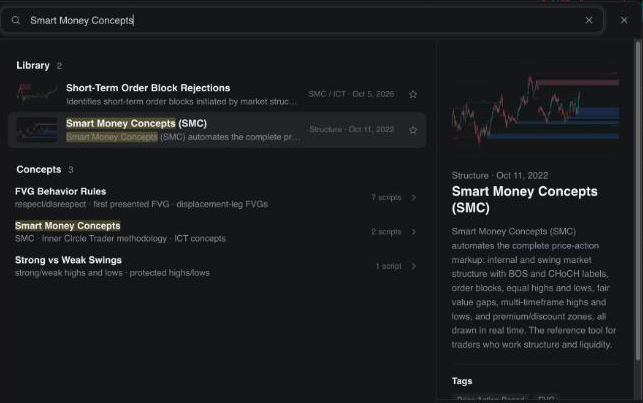
The Library covers most SMC terms, but under its own definitions. Searching Vela on November 10, 2026 showed a SMC / ICT family with 92 scripts, among them “Sweeps & IFVGs” and “MSS Sweeps”, plus several supply and demand zone scripts. Each one draws by its own rules. We could not see which of these are among the free indicators without an account, so check the label before you plan around a specific script.
The TradingView toolkits: three paid scripts
The three flagship toolkits are invite-only scripts on TradingView. You cannot see their code, and you get access by entering your TradingView username in LuxAlgo’s Connect Accounts page. The scripts then appear under Indicators, Invite-only. LuxAlgo’s documentation says that the toolkits work on TradingView’s free plan, so no paid TradingView plan is required for them.
According to LuxAlgo’s plan page, the toolkits come with Premium and higher. Essential includes the full Library inside Vela but not the TradingView toolkits. That is the most important detail in the plan table if you came for the scripts you saw on TradingView. Check it on LuxAlgo’s plans page before you pay, because plan contents have changed during 2026.
Price Action Concepts: the SMC toolkit
Price Action Concepts automates what a price action trader marks by hand. LuxAlgo’s Library page lists CHoCH, CHoCH+ and BOS labels on internal and swing structure, volumetric order blocks with breaker blocks, liquidity grabs, equal highs and lows, premium and discount zones, and fair value gaps including inverse FVGs.
The labels map onto our concept guides, but not one to one. A BOS label is a structure break in the direction of the trend, as in our break of structure guide. A CHoCH label is the first break against it, as in our change of character guide. The toolkit has no MSS label. Under our convention a market structure shift is a CHoCH after a sweep, in a move that leaves a fair value gap, so a CHoCH label alone does not tell you that a sweep happened or that a gap formed.
Zones are drawn by the toolkit’s rules, not by yours. Its order blocks carry volume figures and a mitigation method you choose, which is more than the textbook order block definition. It marks fair value gaps and inverse FVGs, the flipped gaps we test in our inverse fair value gap guide. Its liquidity grabs are the wick events our liquidity sweep guide describes.
Some features repaint by design, and LuxAlgo says so. Its Price Action Concepts page states that structure labels are detected in real time, while swing labels, equal highs and lows and liquidity trendlines appear only once their swing points are confirmed. On a finished chart those marks sit exactly at the turning points. In live trading they appear several bars later, so a historical chart full of perfect labels looks better than the toolkit could have looked at the time.
Signals & Overlays: buy and sell signals
Signals & Overlays is the toolkit that draws buy and sell signals on the chart. Its TradingView page lists Confirmation signals that follow the trend, Contrarian signals that look for reversals, exit marks, overlays such as the Smart Trail and Reversal Zones, a dashboard and optional take-profit and stop-loss points. The page itself says that the signals are “not to be followed blindly”. The script was last updated on October 1, 2026.
Two settings decide most of what you see. The script page lists a Sensitivity setting and an Autopilot mode that adjusts it by itself. In the earlier hands-on use described in the German edition, lower sensitivity values gave more and earlier signals, higher values fewer and later ones. That is convenient, but you then no longer know why one signal appeared and another did not, which makes your own backtest hard to repeat.
Candle coloring can mean opposite things. The script page describes purple, green and red candles for developing trends. The German edition found that in the confirmation modes green and red mark trend strength, while in the contrarian mode strong colors mark stretched markets that may turn. If you switch modes and keep reading the colors the old way, you read the chart backwards. Decide on one mode and write it down.
Oscillator Matrix: momentum below the chart
Oscillator Matrix is the third toolkit and sits in a pane below the chart. LuxAlgo’s Library describes it as the toolkit that reads momentum. The German edition called its oscillators smoothed versions of familiar tools with divergence detection. If you already work with the RSI or the MACD, expect a variation, not a new kind of information. We have not tested it and make no claim about its signals.
Quant and Vela: what the AI part does
Quant is a coding agent that writes indicator and strategy code from plain English. According to LuxAlgo’s documentation, it writes and repairs Pine Script, runs the script on the Vela chart, reports backtest figures, and can mark up a chart with levels and zones. It can also propose paper trades for you to approve on a $100,000 simulated account.
Quant is measured in plan usage, not in credits. Usage refills over a 5-hour session and resets weekly on Fridays at 5:00 p.m. ET. Free includes a base allowance, Essential three times that, Premium five times, Ultimate twice Premium and Ultra eight times Premium. Paid plans can buy extra usage from $10. Credits bought under the old model were converted into extra usage.
A backtest from an AI agent is still only a backtest. LuxAlgo’s own disclaimer says that strategies, optimizations and backtests created with Quant are hypothetical results with the benefit of hindsight. The faster a tool tries new settings, the easier it becomes to find one that fits the past by chance. Our backtesting guide and our overview of AI trading show how to test a rule on data it has not seen. We did not use Quant for this review.
LuxAlgo pricing: four plans and what renews
LuxAlgo sells four paid plans, billed monthly or yearly. The prices below are the standard US dollar list prices from LuxAlgo’s plans page and pricing page on November 10, 2026. LuxAlgo notes that some countries see prices in local currency at checkout.
Standard monthly list prices, LuxAlgo plans and pricing pages, November 10, 2026. The documentation calls the top plan AI Ultra. Sale prices for the first payment are not shown.
| Plan | Billed yearly | Toolkits |
|---|---|---|
| Free | $0 | no |
| Essential | $299.88 | no |
| Premium | $479.88 | yes |
| Ultimate | $719.88 | yes |
| Ultra | $1,439.88 | yes |
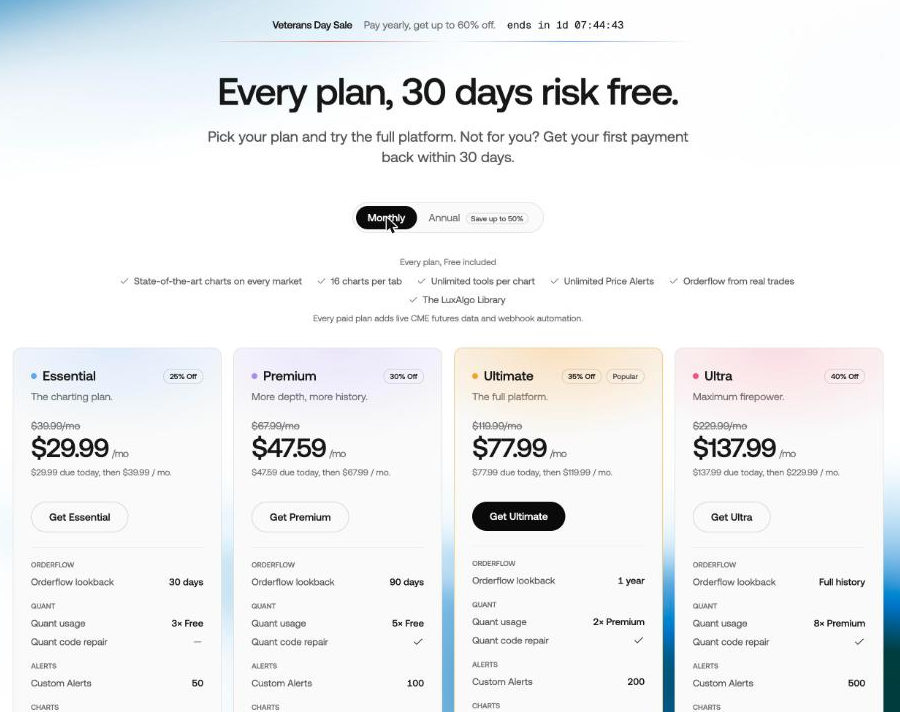
Yearly billing roughly halves the monthly rate on the larger plans. On Ultimate the yearly price equals $59.99 a month instead of $119.99; on Premium it is $39.99, on Essential $24.99 and on Ultra $119.99. Custom Alerts grow from 5 on Free to 50, 100, 200 and 500. “Toolkits” means the three TradingView toolkits. Every paid plan adds live CME futures data and webhook automation; Quant code repair starts with Premium. Orderflow history grows from 1 day on Free to 30 days, 90 days, 1 year and the full history on Ultra.
 Click to enlarge
- 1 Standard price, crossed out. This is what a monthly plan renews at.
- 2 Due today, then the standard rate: the discount covers the first payment only.
- 3 Quant code repair starts with Premium; Essential shows a dash.
The sale prices on the page apply to the first payment only. On November 10, 2026 a Veterans Day sale offered, for example, Premium at $47.59 for the first month, then $67.99, or $311.92 for the first year, then $479.88. LuxAlgo’s terms say that promotional pricing applies only to the initial payment, and that renewals are billed at the then-current standard rate. Budget with the standard price, not with the banner.
The refund and cancellation rules
The 30-day money-back guarantee covers one payment, once per customer. LuxAlgo’s Terms of Service, last updated November 3, 2026, say that you can ask for a refund of your first subscription payment within 30 days. The guarantee does not extend to renewals, plan changes, any later payment, extra usage or gifts. There is no trial on paid plans; the Free plan takes its place.
Cancelling and asking for a refund are two separate steps. You cancel in your account settings, and LuxAlgo says that no call or email is needed. Cancelling stops the next renewal; you keep access until the end of the period you already paid for, and you get no money back for it. A refund within the 30 days is a separate request to support@luxalgo.com. After a refund, paid access ends at once and the account returns to the Free plan.
A chargeback ends access at once. If you dispute a charge with your bank, LuxAlgo’s terms say that access to the paid features ends immediately, including TradingView and Discord access, and that the account may be closed. LuxAlgo asks customers to contact support first. If you want out, cancel in the account, keep a screenshot of the confirmation and send the refund request within the 30 days.
User reviews on Trustpilot
LuxAlgo scores 4.3 out of 5 on Trustpilot from 1,708 reviews. We read the Trustpilot profile on November 10, 2026. The split is unusual: 86% five-star, 2% four-star, 1% three-star, under 1% two-star and 10% one-star. Most products have a smoother spread; this one has praise and a block of complaints, with almost nothing in between.
Trustpilot shows that LuxAlgo replied to 52% of negative reviews. The profile also shows a paid Trustpilot subscription and “No recent history of asking for reviews”, which Trustpilot explains as the company not having invited customers recently. Trustpilot’s AI summary of recent reviews says that many reviewers praise the live chat. The German edition of this review read the German one-star reviews; most were about billing, cancellation and refunds, not about the indicators.
Those complaints match the terms above. A buyer who expects the 30 days to cover a renewal, or a cancellation to refund the rest of a year, will be disappointed by the contract as written. That is not proof of bad faith, but it is the most common source of trouble with this product.
Pros and cons of LuxAlgo
Pros:
- Large free offer: the public SMC script on TradingView and the Vela Free plan cost nothing and need no card.
- Clear documentation: plans, limits, refunds and repaint behavior are written down in the docs.
- Labels for the common SMC terms: structure, order blocks, gaps and liquidity on one chart.
- No paid TradingView plan needed: the toolkits work on TradingView’s free plan, according to LuxAlgo.
- Quant writes code for you: you describe a rule in English and get Pine Script you can read.
Cons:
- Refund covers the first payment only: renewals and plan changes are not refundable.
- Sale prices do not renew: the second payment is at the standard rate.
- Toolkits need Premium: the cheapest plan does not include the TradingView scripts.
- No published live results: LuxAlgo does not publish an audited record of its signals, and says it does not review customer results.
- Labels follow fixed definitions: they may differ from your written rule and from other SMC teachers.
Who LuxAlgo suits, and who can skip it
LuxAlgo suits traders who want automatic labels or fast code, and who will test what they get. If you already understand Smart Money Concepts and want a tool that marks structure, gaps and order blocks for you, the free script shows you the idea at no cost. If you write strategies in Pine Script, Quant can save typing time.
You can skip it if you already trade a written rule set. Market structure needs only highs and lows. A label that someone else defined does not make a setup better, and a chart full of boxes can hide the one level that matters. If you want to see an SMC rule tested on real data first, start with our concept guides and their SPY tests.
Conclusion: start free, pay monthly, read the terms
LuxAlgo is a serious software company, and its free tools are the best place to start. The public SMC script and the Vela Free plan let you see whether automatic labels help your analysis before any money changes hands. The paid toolkits and Quant add convenience, not an edge, and LuxAlgo itself makes no profit claim.
If you pay, pay monthly first and keep the refund rules in mind. The yearly price is lower, but the 30 days cover only the first payment, and a sale price renews at the standard rate. Treat any signal as the computer’s opinion, and keep your own rule in charge.
This review is an assessment of a product, not investment advice. Prices and plans change; we checked them on November 10, 2026. Trading involves the risk of loss, and no indicator removes it.
Frequently asked questions about LuxAlgo
Is LuxAlgo free?
Partly, because the basic tools cost nothing. The Vela Free plan and many public LuxAlgo scripts on TradingView, including the Smart Money Concepts script, cost nothing. The full Library starts with Essential at $39.99 a month, and the three TradingView toolkits start with Premium at $67.99 a month (standard prices, November 10, 2026).
How much does LuxAlgo cost?
Four paid plans cost $39.99 to $229.99 a month. Billed yearly they cost $299.88, $479.88, $719.88 and $1,439.88. Sale prices on the pricing page apply to the first payment only; renewals bill at the standard rate.
Is LuxAlgo legit?
LuxAlgo is a real US company, founded in Boston in 2020, with published terms. Its Trustpilot score was 4.3 from 1,708 reviews on November 10, 2026. Most one-star reviews concern refunds and renewals, which the terms limit to the first payment.
How do I get a refund from LuxAlgo?
Email support@luxalgo.com within 30 days of your first subscription payment. Cancelling in the account alone does not trigger a refund; it only stops the next renewal. Renewals, plan changes and extra usage are not covered by the guarantee.
Do I need a paid TradingView plan for LuxAlgo?
No, according to LuxAlgo’s documentation. The invite-only toolkits work on TradingView’s free plan. You need a LuxAlgo plan that includes them, which is Premium or higher, and you link your TradingView username in the Connect Accounts page.
Does the LuxAlgo SMC indicator show market structure shifts?
The free SMC script and Price Action Concepts label BOS and CHoCH, not MSS. Some Library scripts in Vela use MSS in their names, with their own rules. Our market structure shift guide, linked above, explains how we define the term and how it differs from a CHoCH, so you can check whether a label matches your definition.
Does LuxAlgo repaint?
Some features appear only after their swing points are confirmed. LuxAlgo’s Library page for Price Action Concepts says that structure labels are detected in real time, while swing labels, equal highs and lows and liquidity trendlines are drawn once the swing is confirmed. On a past chart they look earlier than they were available live.
This US edition is based on our German edition on kagels-trading.de and has been adapted for US readers.
More Trading Software guides
- Choose software for your trading
Trading Software: Charts, Platforms and Research Tools
A task-based guide to charting, screening, seasonality, order flow, execution, backtesting, automation and journals, with dated US dollar prices.
- Check Quiver Quantitative
Quiver Quantitative Review 2026: Data, Pricing, Limits
Free Congress and insider data, Premium prices checked 8 November 2026, and why we recalculated its backtests before trusting them.
- Check Kavout
Kavout Review 2026: Kai Score, InvestGPT, Pricing
Kavout InvestGPT and Kai Score: Pro and Premium prices checked 10 November 2026, the strict cancellation terms and why its "Live" sample raises questions about data freshness.
- Check QuantConnect
QuantConnect Review 2026: Pricing, LEAN and Who It Suits
The LEAN engine and cloud platform: tier prices checked 8 November 2026, what the free plan leaves out, and who it suits.
- Check Deepcharts
Deepcharts Review: Order Flow, Pricing, and IQ Capital Access
Deepchart footprint, profile and DOM for futures: bundle prices checked 7 November 2026, data costs, the narrow refund terms and access through IQ Capital.
- Check Seasonax
Seasonax Review: Pricing, Screener and Limitations
Seasonax seasonal charts and screener: Basic and Professional prices checked 25 October 2026, the 30-day trial, the annualization pitfall and four alternatives.