
QuantConnect Review 2026: Pricing, LEAN and Who It Suits


Contents
- QuantConnect in 30 seconds
- What is QuantConnect?
- Who is QuantConnect for?
- Key features: research, data, backtests and live trading
- What does QuantConnect cost?
- What users say about QuantConnect
- QuantConnect alternatives
- Pros and cons of QuantConnect
- Who is QuantConnect worth it for?
- Frequently asked questions about QuantConnect
- About the author
QuantConnect lets you backtest for free and then charges by the server, so the real price depends on your setup. The headline figure of $84 a month is a recommended package, and you can cut it down or run the open source engine on your own machine. The harder cost is time: this is a programming platform, not a chart tool.
This review rests on public sources checked on November 8, 2026, and on the German edition of this review. That edition reports using QuantConnect for backtesting and live trading. All prices, limits and ratings come from the provider’s pages, the GitHub API and Trustpilot. For this English version we did not run a new account test.
QuantConnect in 30 seconds
- What it is: a platform to research, backtest and live trade algorithmic strategies in Python or C#, built on the open source LEAN engine.
- Free plan: unlimited backtesting on minute, hour and daily data, but no live trading node.
- Paid setup: the recommended Researcher package costs $84 a month or $888 a year. A seat costs $10 and each server is billed separately.
- Free alternative: run LEAN locally. The software is free, but you supply data, hardware and setup work.
- Limits: a steep learning curve, no ready-made signals and, in our assessment, not suited to high-frequency trading.
What is QuantConnect?
QuantConnect is a cloud platform for algorithmic trading on which you write strategies in Python or C#, test them on historical data and run them live through connected brokers.
The heart of the platform is LEAN, an open source trading engine. On GitHub it had 22,442 stars and 5,394 forks on November 8, 2026, under the Apache 2.0 licence, with the last code change two days earlier. You can read the code, change it and use it without a QuantConnect subscription.
QuantConnect says it has deployed more than 375,000 live strategies since 2012. Its home page also claims more than $100 billion in notional volume a month and 562,000 community members. These are the company’s own figures, and notional volume says nothing about profits. The founder and CEO is Jared Broad.
It helps to know what QuantConnect does not offer. It sells no trading signals and is no broker, so you still need an account elsewhere. Its public strategy library is a place to study code, and it does not replace your own testing. Anyone who wants to place trades from a chart is better served by the tools in our trading software guide.
Who is QuantConnect for?
QuantConnect fits people who want to build and test systematic rules in code. That includes quant developers, systematic traders who work across several asset classes, and students. Researchers can apply for an academic grant. Our guide to algo trading explains the basics first.
| If you are | Better choice |
|---|---|
| A Python or C# developer | QuantConnect |
| A programming beginner | TradingView with Pine Script |
| Looking for charts only | TradingView |
| Chasing very low latency | A specialist engine such as Nautilus Trader |
| A MetaTrader forex trader | MetaTrader with MQL |
You need basic coding skills and patience with documentation. Variables, loops and functions should be familiar, and so should terms like slippage. AI tools now lower the barrier: the QuantConnect MCP server connects Claude Code, Codex, Copilot or Cursor to its API, so an assistant can create projects and start backtests. Check every result yourself, because an AI assistant can sound sure and still be wrong.
Key features: research, data, backtests and live trading
Most of the work happens in four stages, from a first idea to a running strategy. You code in the browser or, on paid plans, in VS Code through the LEAN CLI. The local route suits serious development because debugging is easier. Everything else builds on the same API.
Research notebooks
Before you build a strategy, you can test an idea interactively. The research environment gives you Jupyter notebooks with Python libraries and the platform’s data. You check a pattern cell by cell, then move the code into an algorithm without switching tools.
Data library
The data is the main reason many people choose QuantConnect. The dataset page lists free and paid sets, for example the US Equity Security Master with 27,500 US stocks back to January 1998. QuantConnect names more than 40 alternative data vendors. One example is the Congress trading data from Quiver Quantitative, which costs $5 a month in the cloud.
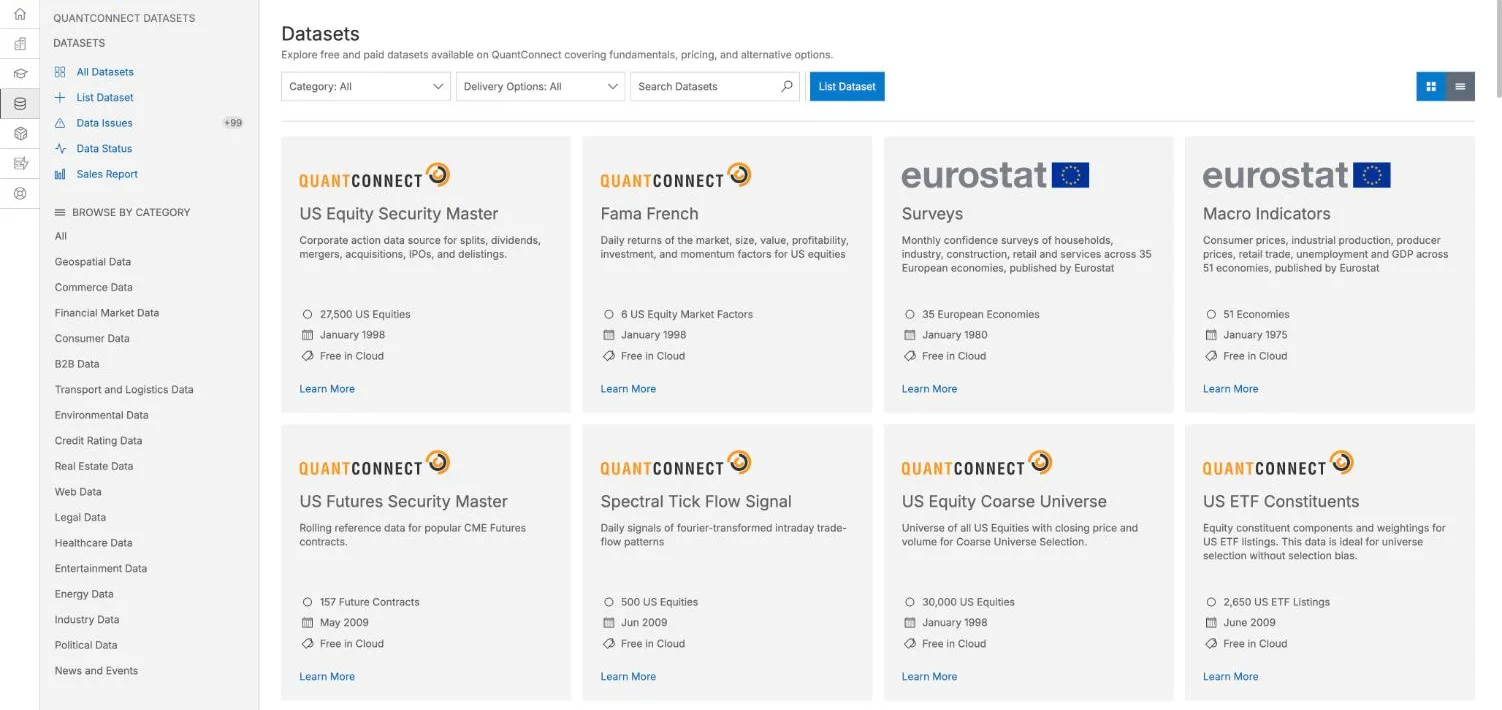 Click to enlarge
Source: QuantConnect, screenshot of the public dataset page.
Free does not mean everything is free. According to the pricing table, the free plan has no tick or second data and no alternative data. Live feeds for futures and alternative data are add-ons on the Researcher tier. Check the card and the table before you plan a strategy around a dataset.
Backtesting
LEAN simulates events one by one, which is closer to real trading than a simple calculation over a price table. The reality modeling documentation covers fills, slippage, fees and settlement. You can select stocks dynamically by rule, for example by volume, and mix timeframes in one strategy. A backtest can still flatter you, so read our guide to backtesting before you trust a result.
QuantConnect learned this lesson itself. When it stopped supporting version 1.0 of its Alpha Streams strategy market, Jared Broad wrote that the submission process “results in strong overfitting”, meaning rules that fit the past too closely. The Strategies page replaced Quant League, whose last season was Q4 2025.
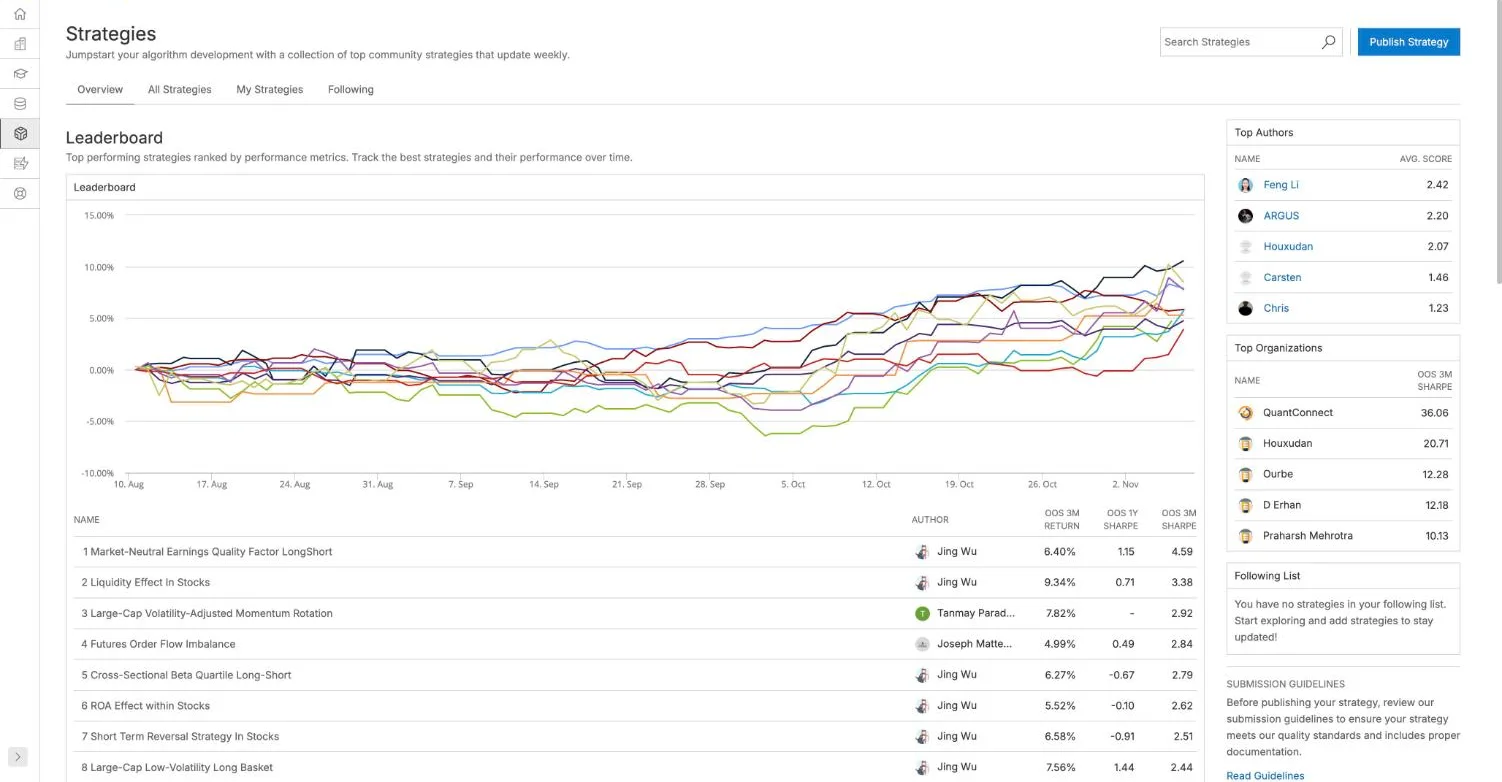 Click to enlarge
Source: QuantConnect, screenshot of the public Strategies page.
Live trading and brokers
QuantConnect says it connects to 20 destinations, and several matter for US traders. The pricing table lists Interactive Brokers, tastytrade, Charles Schwab, TradeStation and Alpaca, as well as Tradier, Coinbase and Kraken. We have separate reviews of Interactive Brokers, Alpaca and Tradier. Connections such as FIX and Trading Technologies start at higher tiers.
One restriction is easy to miss. According to the broker page, Binance and Bybit restrict access from the United States. For these connections QuantConnect’s Binance documentation has you select its Europe region. A server location does not change who the exchange accepts as a customer, so check your own eligibility first. Paper trading comes first on paid plans, and you should use it. Outside the US, check early whether your broker is among the listed connections.
What does QuantConnect cost?
The plan prices on the pricing page are recommended setups, not fixed fees. All figures are in US dollars and were read from the pricing page with its billing switch on November 8, 2026. The annual saving applies per user, and Team and Trading Firm need at least two users.
| Plan | Monthly billing | Annual billing |
|---|---|---|
| Free | $0 | $0 |
| Researcher | $84 | $888 |
| Team | $168 per user | $1,728 per user |
| Trading Firm | $480 per user | $4,992 per user |
| Institution, 5 users minimum | $1,272 per user | $12,912 per user |
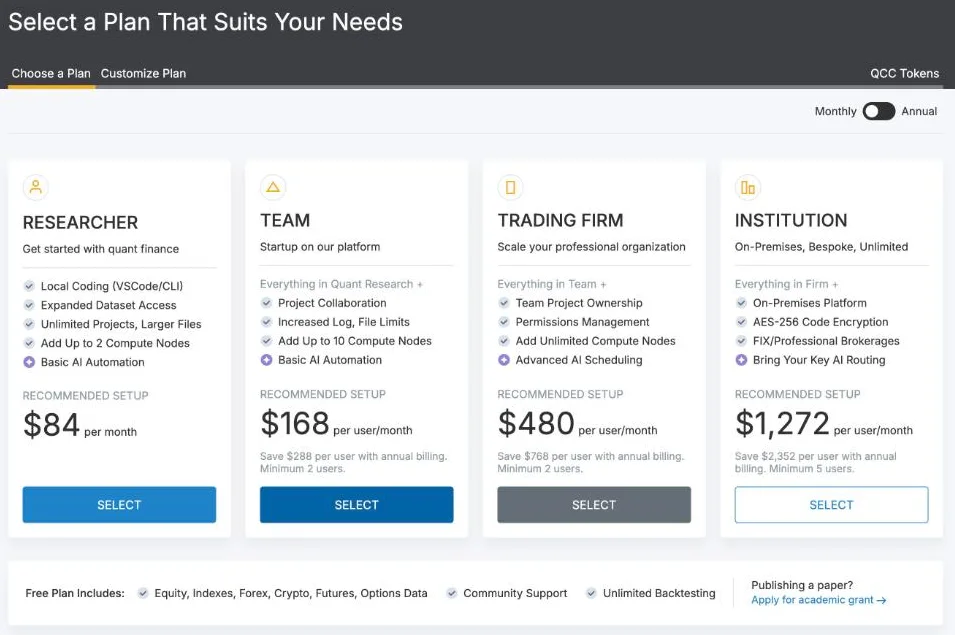 Click to enlarge
Source: QuantConnect, screenshot of the public pricing page.
The $84 Researcher setup breaks down into five items. It holds a $10 seat, a $14 backtest node, a $12 research node, a $24 live node and a $24 assistant node for AI work. Using those list prices, a seat plus the live node alone comes to $34 a month. Data add-ons and support cost extra, so your bill can be higher.
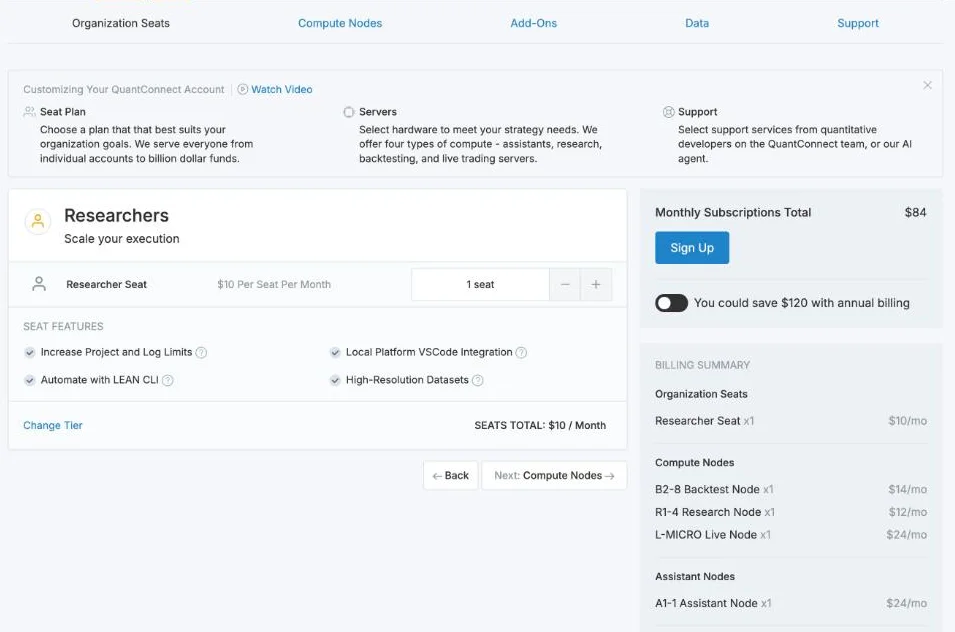 Click to enlarge
Source: QuantConnect, screenshot of the public pricing page.
You can use QuantConnect in three ways. The cloud works in the browser and has a free tier without live trading. The LEAN CLI lets you code locally and use the cloud, from the Researcher tier. LEAN alone runs on your own machine for free, which saves the subscription, but it takes real setup time and you pay for your own data and server.
What users say about QuantConnect
Ratings on Trustpilot are split rather than simply good. On November 8, 2026, Trustpilot showed 3.7 out of 5 from 69 reviews: 70% five stars and 18% one star. With so few reviews, a handful of new ratings can move the score. The profile is claimed by the company.
Our assessment matches that split. The data and the documentation are the strengths, and the community is active. Cloud backtests can take a while, which is annoying when you test many small changes. The learning curve is real, because the framework has its own logic that takes time to absorb.
QuantConnect alternatives
The right alternative depends on your market and how much you want to code. These tools were compared on their main purpose, not in a shared test. For charts and quick ideas, start with our TradingView backtesting guide and the guide to Pine Script.
| Platform | Best for | Main trade-off |
|---|---|---|
| MetaTrader | Forex and CFD robots | Own language, MQL |
| NinjaTrader | Futures with strong charts | NinjaScript, tied to the platform |
| TradingView | Charting and simple tests | Alerts and webhooks need external order execution |
| Nautilus Trader | Fast engine, Rust core | You set up everything |
| QuantRocket | JupyterLab and Docker workflow | Paid license |
Nautilus Trader is the most interesting challenger for developers. It had 31,355 GitHub stars on November 8, 2026, more than LEAN, and describes itself as a Rust-native engine. It offers no hosted cloud platform like QuantConnect’s, so data and servers are your job. Python users who want to start smaller can follow our Python trading bot guide.
Pros and cons of QuantConnect
The balance depends on whether you enjoy programming. For a developer, the data and open engine are hard to match; for someone who wants a finished tool, the setup work outweighs them.
Pros
- Open source engine: LEAN can run without a subscription.
- Many asset classes: stocks, options, futures, forex and crypto in one framework.
- Free start: unlimited backtesting on the free plan.
- Python and C#: no platform-only language to learn.
- Modular pricing: you pay per seat and per server.
Cons
- Steep learning curve: not for complete beginners.
- Costs add up: nodes, data and support are billed separately.
- Free plan limits: no live node, no tick data and no alternative data.
- Local setup: demanding, and you bring data and hardware.
- Mixed ratings: 18% of Trustpilot reviews give one star.
Who is QuantConnect worth it for?
QuantConnect is worth it if you can code and want one framework from research to live trading. The free plan lets you test that claim without paying. Work through the Bootcamp tutorials, run a first backtest, and only then decide on a live node.
It is not worth it if you want quick results without code. Then the time you spend learning the framework costs more than any subscription. Backtests also prove nothing about future returns, so start small. This review is general information, not investment advice.
Frequently asked questions about QuantConnect
Is QuantConnect free?
Yes, the free plan includes unlimited backtesting, community support and data on minute, hour and daily bars. Live trading needs a paid live node. LEAN itself is free to run on your own machine, but you supply the data and hardware.
How much does QuantConnect cost?
The recommended Researcher setup costs $84 a month or $888 a year (as of November 8, 2026). It consists of a $10 seat and four nodes. Team starts at $168 per user a month with at least two users.
Is QuantConnect good for beginners?
Only if you are ready to learn programming. The free tutorials help, and AI assistants lower the barrier, but you still need to understand your own code. Complete beginners usually get faster results with Pine Script.
Which brokers work with QuantConnect?
The list includes Interactive Brokers, tastytrade, Charles Schwab, TradeStation and Alpaca. Crypto connections include Coinbase and Kraken. Binance and Bybit restrict access from the United States, and some institutional connections need a higher tier.
Can I run QuantConnect locally?
Yes, LEAN is open source and runs on your own machine. The LEAN CLI also lets you code in VS Code and use the cloud, from the Researcher tier. Running everything yourself means you handle data and servers.
This US edition is based on our German edition on kagels-trading.de and has been adapted for US readers.
More Trading Software guides
- Choose software for your trading
Trading Software: Charts, Platforms and Research Tools
A task-based guide to charting, screening, seasonality, order flow, execution, backtesting, automation and journals, with dated US dollar prices.
- Check Quiver Quantitative
Quiver Quantitative Review 2026: Data, Pricing, Limits
Free Congress and insider data, Premium prices checked 8 November 2026, and why we recalculated its backtests before trusting them.
- Check Deepcharts
Deepcharts Review: Order Flow, Pricing, and IQ Capital Access
Deepchart footprint, profile and DOM for futures: bundle prices checked 7 November 2026, data costs, the narrow refund terms and access through IQ Capital.
- Check Seasonax
Seasonax Review: Pricing, Screener and Limitations
Seasonax seasonal charts and screener: Basic and Professional prices checked 25 October 2026, the 30-day trial, the annualization pitfall and four alternatives.