
Day Trading Simulators: Paper Trading and Replay Compared


Contents
- Day trading simulators in 30 seconds
- What is a day trading simulator?
- Paper trading, replay, backtest or stock market game?
- Day trading simulators compared: cost, access and replay
- Broker simulators: practice where you will trade
- Charting platforms without a broker tie
- How realistic are simulated fills?
- Which simulator fits you?
- A practice routine that makes the simulator useful
- From simulator to live trading
- Conclusion: choose the simulator by market and practice time
- Frequently asked questions about day trading simulators
- Sources
- About the author
A day trading simulator saves you the cost of clicking errors, not the cost of decisions under pressure. You place the same orders, read the same charts and learn the same order ticket as in live trading. What is missing is real money, real fear and often a realistic execution. That gap is where good and weak simulators differ.
This guide compares the main ways to practice and seven options US traders use. We checked each provider’s official pages on 10 November 2026. That is a review of documentation, not a product test. This article contains no affiliate links; Kagels Trading has an affiliate partnership with TradingView, used only in our TradingView guides. This article follows our editorial policy.
Day trading simulators in 30 seconds
- Four ways to practice: live paper trading, historical market replay, backtesting a fixed rule and a stock market game. For day trading, the first two matter most.
- Free rarely means unconditional: TradingView’s paper trading is free on every plan, Schwab’s paperMoney needs a Schwab account, and the Interactive Brokers paper account opens only after the live account is funded.
- Replay often costs extra: TradingView replays intraday charts only on paid plans, and Sierra Chart starts at $26 a month.
- Fills are the weak point: most providers describe their fill logic only in part. Simulated results do not carry over automatically to real money.
What is a day trading simulator?
A day trading simulator is trading software that executes buy and sell orders with virtual money against live or historical market data, without a real transaction.
The value lies in the platform, not in the play money. A simulator is usually the same software you will later use live. You learn the order ticket, the hotkeys and the places where a wrong click costs money. Paper trading means trading simulated capital in the live market; a market replay plays back a past session so you can trade it again as if it were happening now.
For people with a day job, replay is often the most important feature. Without it you can only practice while your market is open. With it you can trade the morning open in the evening. Our day trading guide explains the sessions and why the first hour matters.
Paper trading, replay, backtest or stock market game?
The four terms are often mixed up, but they train different things. To practice decisions under time pressure you need live simulation or replay. To find out whether a rule holds up statistically you need a backtest. A stock market game motivates, but it rarely trains what a day trader does.
| Type | What happens | Good for |
|---|---|---|
| Paper trading | Orders with virtual money against live prices | Platform, routine, real-time decisions |
| Market replay | A past session plays again, outcome unknown to you | Practice outside market hours, the same situation several times |
| Backtest | A fixed rule runs over finished data | Statistics of a rule, not decision practice |
| Stock market game | Virtual portfolio in a contest, often delayed prices | A first look at the market, hardly day trading |
A simulator trades forward, a backtest calculates backward. How to build a clean test and which mistakes make it worthless is covered in our backtesting guide. This page compares the practice tools.
What do you want to train?
- Learn an order ticket, stops and position sizePaper trading
- Practice the open after workMarket replay with simulated orders
- Find out whether a rule works on years of dataBacktest
- Train with the platform you will trade liveYour broker's simulator
- Learn how you react when real money is at riskA small live account
The last question cannot be answered with virtual money. That is the main limit of every simulator.
Day trading simulators compared: cost, access and replay
The software itself is rarely the expensive part. You pay for real-time data, for replay and sometimes with a funded broker account. The table shows what the providers’ official pages said on 10 November 2026. Check the current terms before you sign up.
| Option | Cost and access | Replay |
|---|---|---|
| TradingView | Paper Trading free on every plan | Bar Replay with a separate Replay Trading mode; intraday replay on paid plans |
| Schwab thinkorswim paperMoney | free, Schwab account required | not described on the page |
| Webull paperTrade | virtual funds, resets anytime | not described on the page |
| Interactive Brokers | paper account for funded clients; free trial with delayed data | not described on the page |
| TradeStation simulator | for funded accounts | not described on the page |
| NinjaTrader | US terms not viewable from our location | Market Replay |
| Sierra Chart | from $26 a month | intraday chart replay |
“Not described” means only that the page we checked did not say it. Several platforms may offer more inside the software. Where a feature decides your choice, ask the provider before you pay or open an account.
Broker simulators: practice where you will trade
If you know which broker you will trade with, practice there. You learn the same order ticket, the same charts and the same hotkeys. The price is almost always an account opening, sometimes with a deposit.
Schwab’s paperMoney gives clients $100,000 of virtual buying power inside thinkorswim. Schwab calls it a live market simulation with real-time market data for equities, options, futures and forex. Its FAQ says paperMoney is free for Schwab clients and that a Schwab account is required to log in; non-clients can look at thinkorswim through a Guest Pass.
Webull’s paperTrade mirrors the live platform with virtual money. The page promises unlimited virtual funds, resets at any time and orders filled against real-time data, plus Level 2 data and the active-trader layouts. It does not state the account conditions, so check them in the app.
Interactive Brokers gives existing clients a paper trading account once the live account is funded. It starts with $1,000,000 of virtual equity, uses the market data subscriptions of the real account and runs in Trader Workstation and IBKR’s other platforms. Without an account you can use the free trial. Its data is delayed by 10 to 15 minutes, except OTC spot FX and spot metals; that is fine for learning the order entry, but too slow to practice live intraday timing. More on the broker is in our Interactive Brokers review.
TradeStation’s simulator is meant for its customers. The page offers unlimited paper dollars, balance resets and free real-time data for non-professional traders, and adds “Fund an account to get started.” It covers stocks, options and futures, and you can switch between paper and live trading inside the platform.
Charting platforms without a broker tie
TradingView is the easiest start because nothing needs installing. Paper trading is included in every plan, including the free Basic plan. Bar Replay plays the chart back, on daily and higher charts in Basic and on intraday charts with a paid plan. To trade the replayed bars, you switch to Replay Trading, a separate mode with its own starting capital and commission settings, market, limit, stop and stop-limit orders and a session report. Orders in the ordinary Paper Trading account still execute at real-time prices during a replay, and Replay Trading results are kept only for that session unless you export them. Our TradingView paper trading guide shows the setup step by step.
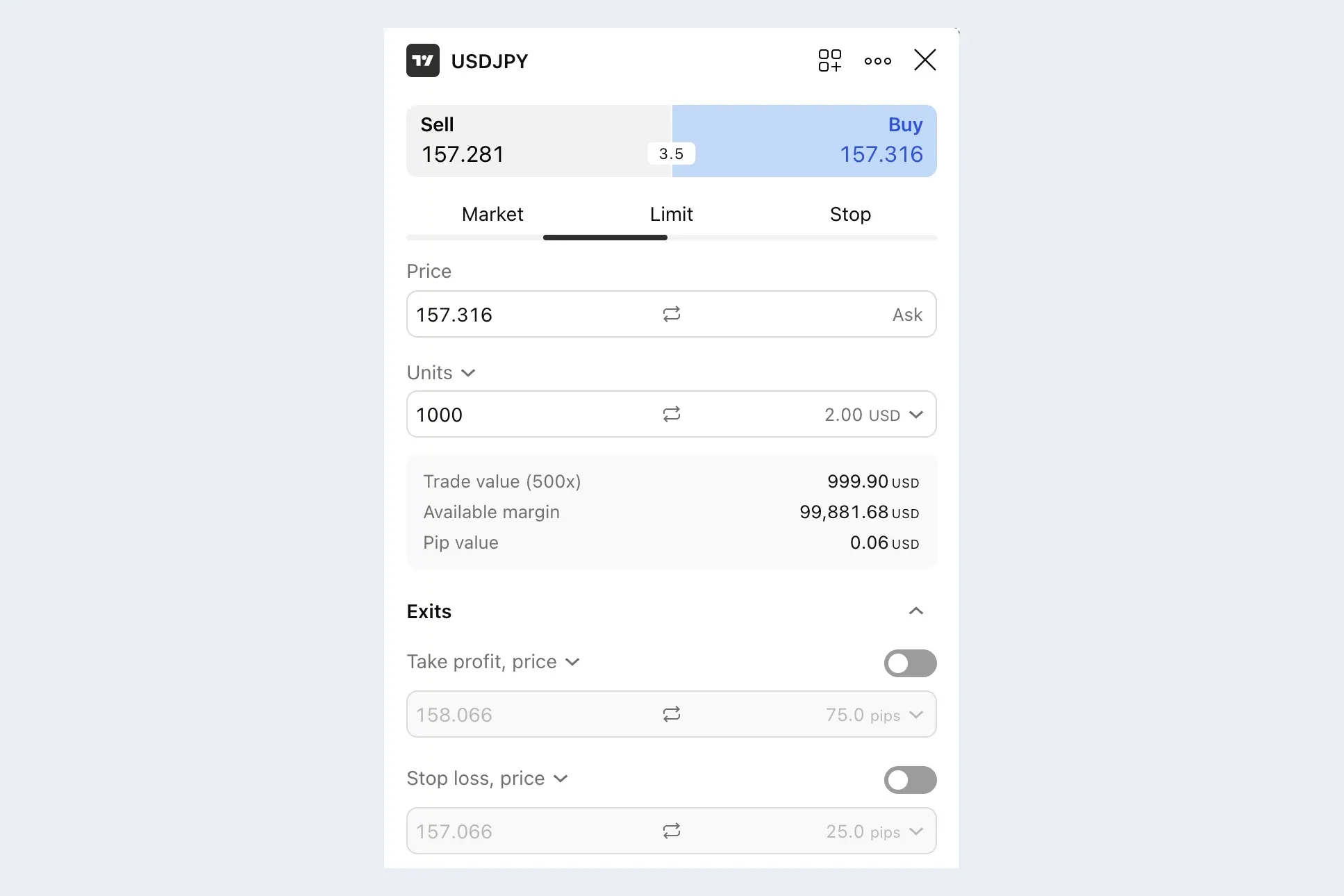 TradingView Paper Trading: the order ticket for USD/JPY, opened but not sent. TradingView desktop app, 26 September 2026.
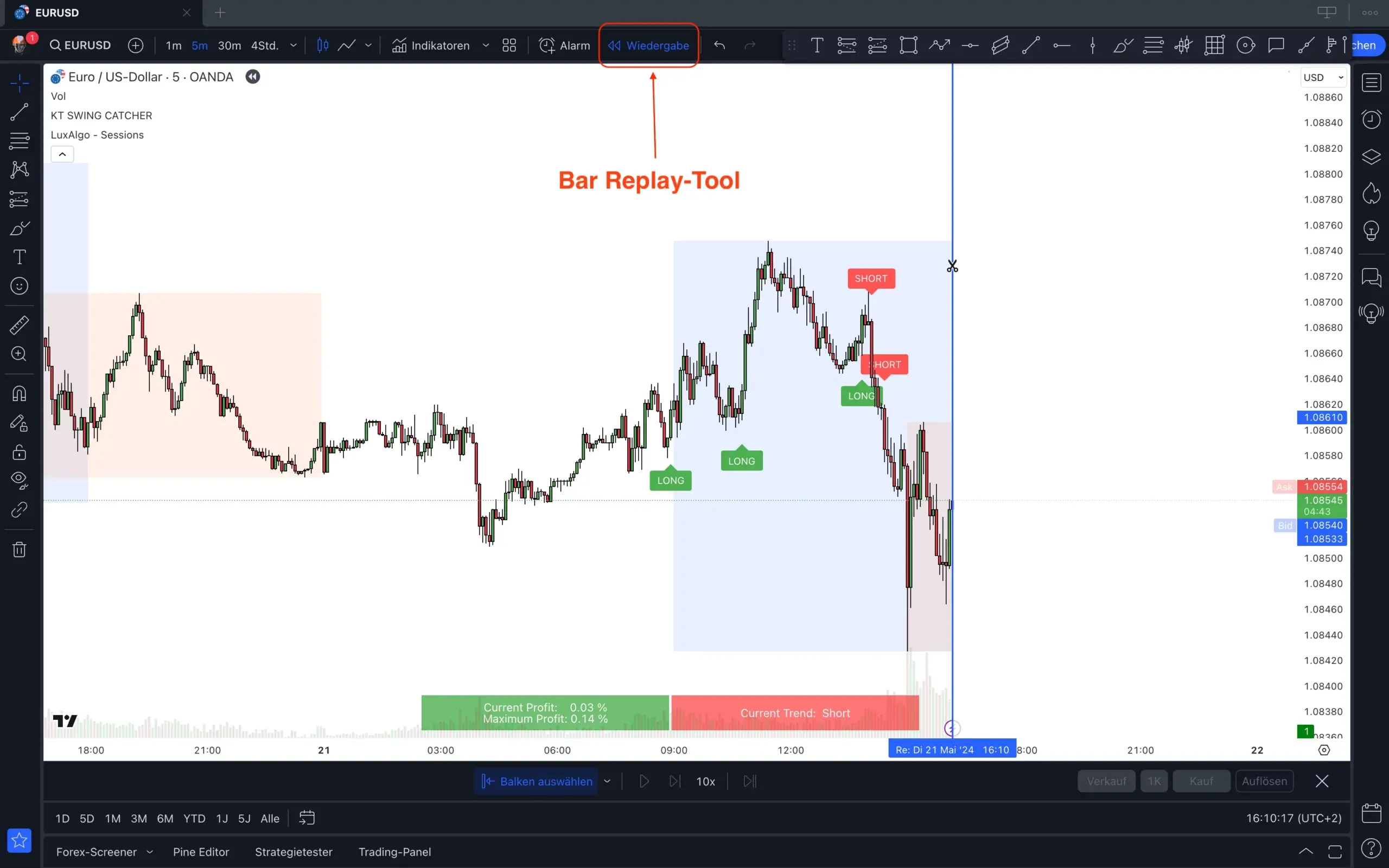 Historical screenshot: Bar Replay cuts the chart off at a chosen bar and plays it forward. EUR/USD, 5-minute chart, 21 May 2024, German interface (“Wiedergabe” = Replay).
NinjaTrader is built for futures and is known for its Market Replay. We could not check its US terms: on 10 November 2026 the site redirected our visit from Germany to the EU version. That EU page says the platform is free for charting, backtesting and trade simulation. Read the US site’s terms yourself before you rely on a free simulator there.
Sierra Chart has a trade simulation mode and an intraday chart replay. Its documentation calls the replay, used together with Trade Simulation Mode, a powerful simulation platform, and the base package costs $26 a month, or $36 with advanced features. Real-time exchange data is a separate decision, so add it to the price.
How realistic are simulated fills?
It would be wrong to say that simulators never model slippage, and just as wrong to trust their fills. Providers handle execution very differently, and most describe their fill logic only in part. What a simulator usually cannot know is your place in the order queue, the market impact of your own order and partial fills in thin markets.
Interactive Brokers documents its limits unusually clearly. Its guide says paper fills are simulated from the top of the book without deep book access, stops and other complex orders are always simulated, and the remainder of a partly filled exchange-directed market order is rejected, which “may or may not match” a real exchange. Read the equivalent page of your own simulator before you trust its results.
Your own emotions are missing in every simulator. Without real money there is no fear of loss, which is what breaks rules in live trading. Plan for worse results live than in simulation, and add your own cost buffer per trade to every simulated result. Our day trading strategies guide uses an assumed $0.03 per share round trip as an example.
Which simulator fits you?
Asking for the best simulator is the wrong question. The right one depends on three things: which market you trade, when you have time and whether you will later trade live with the same provider.
| Your situation | Fitting option | Why |
|---|---|---|
| First try, no account | TradingView Paper Trading | free, in the browser |
| Stocks and options at a US broker | your broker’s simulator, such as paperMoney | the same platform you will trade |
| Futures, practice in the evening | a platform with intraday replay | trade the open after work |
| Trade whole past sessions in replay | TradingView Replay Trading on a paid plan, or Sierra Chart | intraday replay with simulated orders |
If you already know where you will trade, the comparison gets short. Practice with your own broker and nowhere else, because every other platform means relearning. Our guide to trading software helps if the platform question is still open.
A practice routine that makes the simulator useful
A simulator only trains you if you treat it like the real market. Use the account size you will really trade, not the default balance. Trade only the setups from your strategy, at the times you will trade live, and stop when your daily limit is reached.
Write the plan before the session and the journal after it. Our day trading plan turns a strategy into a checklist for one session, and our trading journal guide shows how to record what actually happened. Size every trade from the stop distance, as explained in our position sizing guide, and keep the risk per trade in line with our risk management guide.
From simulator to live trading
No number of simulated trades proves that you will make money live. The simulator checks your process: whether you can follow your own rules, place orders without errors and stop when the plan says stop. A move to a small live account is the only way to learn how you react when real money is at risk.
Start live with the smallest size your market allows and the same rules. Compare live results with your simulated ones after a few weeks, including costs. If the gap is large, go back to the simulator and find out why before you add size.
Conclusion: choose the simulator by market and practice time
The right day trading simulator is the one that matches your market, your hours and your future broker. For a first try, TradingView’s free paper trading is enough. If you know your broker, practice in its simulator. If you can only practice in the evening, you need intraday replay, which usually costs money.
Treat simulated profits as a test of your routine, not as proof of an edge. Trading carries a high risk of loss, and no simulator changes that. This guide is not investment advice.
Frequently asked questions about day trading simulators
Is there a free day trading simulator?
Yes, several. TradingView’s paper trading is free on every plan, and Schwab’s paperMoney is free for Schwab clients. Interactive Brokers’ paper account is free for funded clients, and its free trial runs on data delayed by 10 to 15 minutes, except OTC spot FX and spot metals. Free versions often limit replay or data.
What is the difference between paper trading and market replay?
Paper trading runs in real time, market replay plays back the past. With paper trading, one trading day takes one trading day. With market replay, you can practice several past sessions in an evening, which helps if you work during market hours.
Can I practice futures day trading in a simulator?
Yes, several platforms simulate futures. Schwab’s paperMoney and TradeStation’s simulator include futures, and NinjaTrader and Sierra Chart are built around futures with replay functions. Check the data costs, because real-time futures data is often a separate subscription.
Do simulator results transfer to live trading?
Not automatically. Simulated fills can be better than real ones, and the fear of loss is missing. Use the simulator to check your process and expect weaker results live.
Have you tested these simulators?
No. We compared the providers’ official pages on 10 November 2026 and did not open accounts or trade in their simulators. Our TradingView paper trading guide, linked above, describes that one platform in more detail.
Sources
- TradingView: Paper trading main functionality, Bar Replay and Replay Trading, checked 10 November 2026
- Charles Schwab: thinkorswim paperMoney, page and FAQ, checked 10 November 2026
- Webull: paperTrade, page and FAQ, checked 10 November 2026
- Interactive Brokers: Free trial and paper trading accounts, checked 10 November 2026
- TradeStation: Simulated trading, checked 10 November 2026
- Sierra Chart: Service packages and pricing and Chart replay, checked 10 November 2026
More Day Trading guides
- Understand day trading
Day Trading for Beginners: Markets, Risk and Practice
Definition, markets, a session from open to close, costs and capital, the 2026 US account rules, study evidence and a practice path.
- Choose a strategy
Day Trading Strategies: Rules, Examples and When to Skip
Opening range breakout, trend pullback and range fade compared, VWAP as a filter, with a win, a loss and a skipped trade on SPY.
- Plan one session
Day Trading Plan: A Session Checklist and Worked Example
What to decide before the open, follow during the session and review after, with a worked SPY example and a free Excel template.