
Quantower Review 2026: Prices, Free Version and Limits


Contents
- Quantower in 30 seconds (as of November 19, 2026)
- What is Quantower?
- What does Quantower cost?
- Does Quantower run on Mac, Linux or in the browser?
- How can you use Quantower for free?
- Which brokers, exchanges and data feeds does Quantower support?
- What can Quantower do in volume and order flow analysis?
- What is Quantower Algo?
- Pros and cons of Quantower
- What do users say about Quantower?
- What are the alternatives to Quantower?
- Conclusion: who is Quantower for?
- Frequently asked questions about Quantower
- About the author
Quantower is a well-known name among order flow platforms, and one fact matters before anything else: it runs only on Windows. The platform is known for its footprint charts, volume profiles and its depth of market ladder. If you work on a Mac, you need a virtual machine or a separate Windows computer before you see a single chart. If you want to learn the method first, start with our guide to order flow trading.
All prices and rules in this review are as of November 19, 2026. We read Quantower’s pricing page, its FAQ, its download and connections pages, the pages of two brokers that bundle the software and Topstep’s connection instructions. We did not buy a license for this review and have no business relationship with Quantower. How we research and write is described on our editorial policy page.
Quantower in 30 seconds (as of November 19, 2026)
- What it is: desktop trading software for Windows 10 and 11, 64-bit. Quantower is not a broker and holds no money.
- Cost: the All-in-One license costs $70 a month, $588 a year or $1,690 for a lifetime license. Single extensions start at $20 a month.
- Free routes: a free version without registration, a seven-day trial of the full version, AMP Futures and Optimus Futures, which give their clients the paid features without a license fee, and Topstep, which includes a premium bundle for its accounts.
- Strength: volume and order flow tools such as the cluster chart, volume profiles, TPO and the DOM Surface heatmap.
- Extra cost: market data is not included in any license.
What is Quantower?
Quantower is broker-neutral trading software that connects to brokers, exchanges and data feeds and focuses on volume and order flow analysis. You bring your own broker account and use Quantower as the chart and order screen on top of it. The software is developed by Quantower LLC, which its FAQ describes as a Ukrainian company that “operates under Ukrainian legislation”; the website footer also names QUANTOWER WEST LTD in Sheffield, England.
Quantower is not a broker. It does not execute orders itself and does not hold client money. To trade, you need an account with a connected broker and, in most cases, a paid market data subscription.
Several connections can run side by side, but only with a paid feature. With the Advanced Features extension, a futures account, a crypto exchange and a separate data feed can run in the same workspace. The free version allows one active connection.
Quantower at a glance
| Developer | Quantower LLC, Dnipro, Ukraine |
| Type | Trading software, broker-neutral, not a broker |
| System | Windows 10/11, 64-bit |
| Mac, Linux, browser | No official version |
| Connections page | 68 entries, 2 of them marked “soon” |
| All-in-One license | $70 a month, $1,690 lifetime |
| Free | Free version, 7-day trial |
| Market data | Not included |
| Refund | 10 days on first orders, none on lifetime |
| Trustpilot | 4.6 from 368 reviews |
What does Quantower cost?
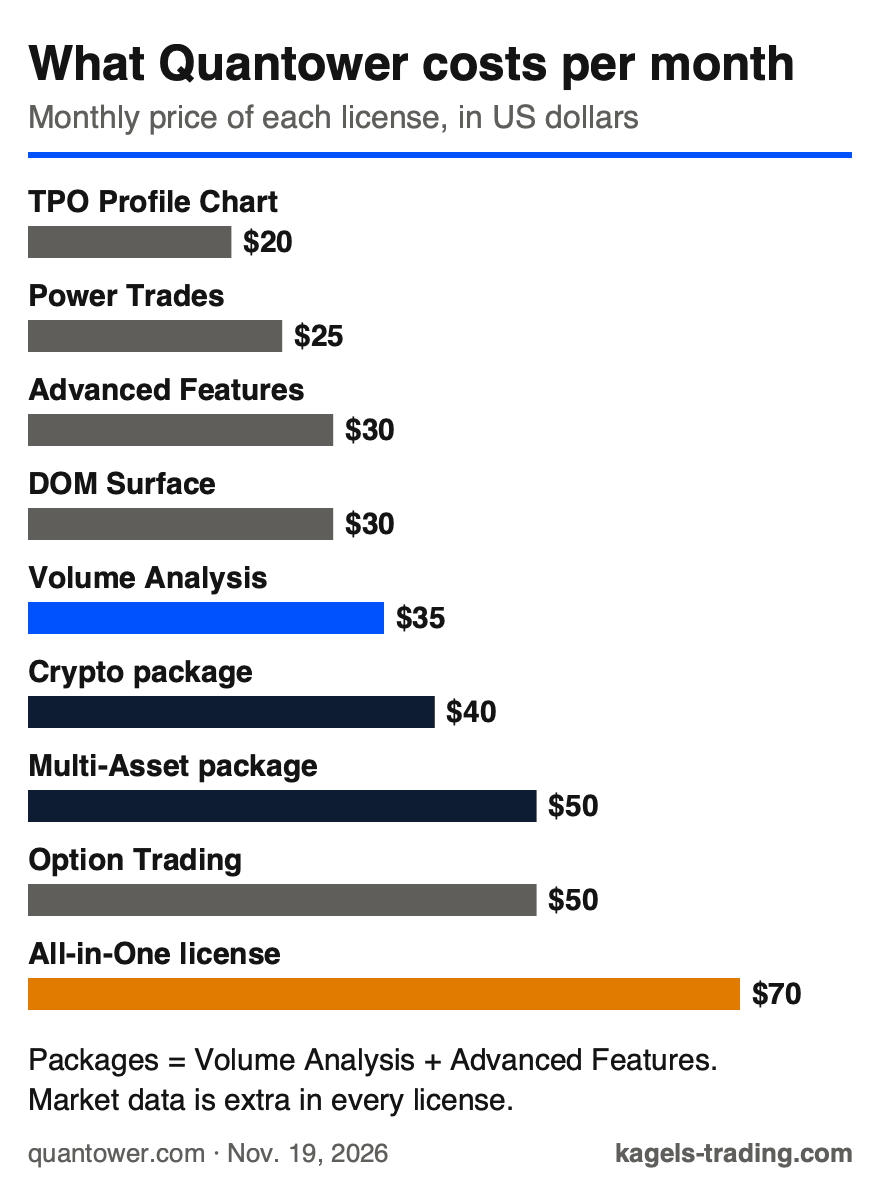
Quantower sells features, not program editions. There is a free base version, single extensions you add to it, two packages and the All-in-One license that contains everything. This structure is the most common reason for confusion about the price.
 Click to enlarge
Source: Kagels Trading, own graphic from the Quantower pricing page.
The full version costs $70 a month, and longer terms are cheaper. The pricing page shows 10% off for three months, 20% for six months and 30% for a year. The table shows the monthly, annual and lifetime price of each license.
| License | Month / year | Lifetime |
|---|---|---|
| All-in-One | $70 / $588 | $1,690 |
| Multi-Asset package | $50 / $420 | $1,290 |
| Crypto package | $40 / $336 | $990 |
| Volume Analysis | $35 / $294 | $720 |
| Advanced Features | $30 / $252 | $650 |
| DOM Surface | $30 / $252 | $650 |
| Option Trading | $50 / $420 | $690 |
| Power Trades | $25 / $210 | $490 |
| TPO Profile Chart | $20 / $168 | $490 |
Both packages contain the same two extensions: Volume Analysis and Advanced Features. The Crypto package only connects to crypto exchanges and is $10 cheaper; the Multi-Asset package connects to all markets. The free version and the single extensions also work with futures and stocks. According to the FAQ, TPO, DOM Surface and Power Trades are “not included in Multi-Asset”; you can buy them separately or get them with the All-in-One license.
Always add market data to the budget. Quantower states that third-party market data “must be purchased additionally” with every license. What exchange data costs is shown in our dxFeed review, with prices per exchange and per depth level; your platform or broker may charge different amounts.
Check how you pay before you buy. According to the pricing FAQ, a checkout through Stripe “sets up an automatic recurring subscription”; other payment methods do not renew automatically. Refunds are possible within ten calendar days on first orders only, and “refunds are not available for lifetime licenses”. A paid license works on one computer at a time.
Does Quantower run on Mac, Linux or in the browser?
No, Quantower runs only on Windows. The download page offers one build: “For Windows 10/11 64-bit”. There is no native macOS version and no Linux version.
On a Mac, you need virtualisation. Quantower’s FAQ suggests Parallels, VirtualBox or VMware Fusion and adds that it “cannot guarantee the stability” of the platform in such a setup. The same FAQ says a Mac version is planned, without a date. Order flow charts with tick data need real computing power, which a virtual machine has to share.
There is no browser version either, so your charts and alerts stop when your computer is off. Quantower runs locally on your PC. If you want to trade from a tablet or phone, or if you work on a Mac and don’t want a Windows setup, compare the platforms with browser access in our trading software comparison.
Plan your hardware. The FAQ names Windows 10 with the latest update and .NET Framework 4.8 as the minimum and recommends 16 GB RAM, a four-core CPU and an SSD for a fast system.
How can you use Quantower for free?
There are three routes to Quantower without a license fee, and they differ a lot in what you get. The free version is permanent but limited, the trial is complete but short, and the broker route depends on one account.
The free version needs no registration. You download it and start; the software tells you when you reach a paid feature. According to the FAQ, it includes one active connection, two indicators and one overlay per chart, the DOM Trader, time and sales, chart alerts and the free API. The volume analysis tools, the main reason to choose Quantower, are not part of it.
The seven-day trial unlocks the full version, but Quantower describes the activation in two ways. The pricing page says you “get your trial instantly assigned” after you register an account. The FAQ still says you need to “contact us in support for activation”. Plan a short wait in case the second rule applies.
Two futures brokers give their clients the paid features without a license fee. AMP Futures offers a special AMP version of Quantower; its page promises the “FREE FULL Version”. Optimus Futures sells Optimus Flow, which it describes as “built on the industry-leading Quantower engine” and “100% free for all funded” clients.
The broker route has two limits. The free license is tied to the account with that broker and its special application; if you change brokers, it is gone. Market data fees still apply.
Which brokers, exchanges and data feeds does Quantower support?
Quantower’s connections page lists 68 entries, two of them marked “soon”. The FAQ elsewhere still speaks of “40+ supported brokers and data feeds”, and other reviews name higher numbers. The connections page itself is the most current source.
Futures and prop firms
The futures section is the broadest. Among others, AMP, Optimus Futures, Cannon Trading, GFF Brokers, EDGE Clear, Striker Securities and TradePro are connected, often through Rithmic or CTS. These are the two order routing technologies behind many US futures brokers.
Many prop firms appear as their own connections. The list includes Topstep, Apex Trader Funding, Bulenox, Earn2Trade, Take Profit Trader and Elite Trader Funding. Our prop trading overview compares the firms.
Topstep publishes its own conditions for Quantower. According to its connection instructions, updated June 18, 2026, Quantower connects through ProjectX with your TopstepX login and works for the Trading Combine and the Express Funded Account only. Topstep accounts include DOM Surface, the TPO chart, the volume analysis tools and charting with at most two indicators per chart for free; Level 2 data is required for full access to these features. Market Replay, Strategy Manager, Strategy Runner and the Trading Simulator are not included, and other features may need a paid Quantower license.
Stocks, forex and options
For stocks and forex, the choice is solid. Interactive Brokers, LYNX, OANDA, Pepperstone, IC Markets, FxPro, LMAX, Tradeview, AXIORY and cTrader are listed, and Alpaca and Tradier for US stocks. For options, Interactive Brokers, Rithmic and CTS are among the connections.
Crypto and data feeds
The crypto exchanges include Binance, Kraken, Bitfinex, Bybit, OKX, KuCoin, Deribit, Crypto.com and BitMEX. Which of them you may use depends on where you live; Binance.us has its own entry. Check your exchange’s terms first.
For data, Quantower connects to dxFeed, Barchart, IQFeed, Polygon.io, Intrinio, Quotemedia, AlphaVantage and MetaStock. Without a data feed, even the best software shows nothing. Some older lists still name TD Ameritrade, which is no longer on the page.
For trade journals, check the import route. Our TradesViz review shows that Quantower trades are imported there by file, without a direct auto sync.
What can Quantower do in volume and order flow analysis?
The core tools sit in the Volume Analysis extension for $35 a month and in three further extensions. According to the FAQ, Volume Analysis includes the cluster chart, all volume profile types and VWAP variants.
- Cluster chart: the footprint chart shows how much volume traded at each price, with an imbalance marker.
- Volume profiles: right, left, custom and step profiles, plus the Volume Impact and dynamic VPOC indicators. Our volume profile guide explains how to read them.
- TPO Profile Chart ($20): shows at which prices the market spent the most time. Quantower recommends Volume Analysis as well for full use.
- DOM Surface ($30): shows changes in order book liquidity as a heatmap.
- Power Trades ($25): finds unusually large executions in a very short time.
Advanced Features and chart types
The Advanced Features extension adds the special chart types and the replay. It contains Renko, Kagi, Point & Figure, Heikin Ashi, Range Bars, Line Break and Volume Bars, unlimited indicators per chart, synchro connections and an RTD Excel link.
The Market Replay is the most useful part for practice. It replays past sessions so you can practise manual backtesting and reading order flow; a trading simulator panel is included too. More simulated options are in our day trading simulator guide.
What is Quantower Algo?
Quantower Algo is the programming interface for indicators, strategies and own extensions in C#. The FAQ lists the free API and an “Algo extension for Visual Studio” as part of the free version.
The big difference to many competitors is the language. Quantower uses C# and standard development tools, not its own scripting dialect. If you already program, you don’t need to learn a new language.
An open API does not replace a strategy. I trade discretionary and do not use such interfaces myself. For automated trading, an open C# API is a strong argument, but an idea that loses money by hand will not make money as code.
Pros and cons of Quantower
These points speak for the platform:
- Broad connections: 68 entries, including prop firms and crypto exchanges.
- Several accounts in one workspace, with the Advanced Features extension.
- Strong order flow tools: cluster chart, volume profile, TPO and DOM heatmap.
- Modular prices: if you only need volume analysis, you pay $35 instead of $70.
- Open C# API without a proprietary language.
- Paid features without a license fee through AMP or Optimus Futures.
These points you should know before you buy:
- Windows only: no Mac, Linux, browser or app version.
- Market data is not included, and the extra cost is easy to underestimate.
- A steep learning curve: the interface is powerful and therefore complex.
- No refund on lifetime licenses at $1,690.
- Stripe checkouts renew automatically unless you cancel.
What do users say about Quantower?
On Trustpilot, Quantower has a rating of 4.6 out of 5 from 368 reviews (November 19, 2026). 87% of reviewers give five stars, 4% give one star. Trustpilot notes that the company “hasn’t invited customers recently, so reviews may not be representative”, so most reviews come unprompted.
Expect to invest time before the platform feels natural. The interface is built from freely combined panels, templates and workspaces, which makes it flexible but complex. In our view, Quantower rewards time invested and punishes impatience.
Support hours are stated in two ways. The website footer offers a live chat Monday to Friday from 1:00 a.m. to 3:00 p.m. CST. The FAQ says answers come Monday to Friday from 9 a.m. to 6 p.m. Central European Time. US traders in the afternoon session should not expect an instant reply.
What are the alternatives to Quantower?
Quantower is not alone in the order flow segment. Bookmap focuses on the visual display of liquidity over time. Deepcharts is a Windows desktop platform like Quantower; its free browser version, DeepChart Web, is meant for learning and paper trading with delayed futures data. ATAS is another order flow platform with footprint charts and volume profiles.
The decision depends more on your broker than on features. All of these platforms offer footprint charts and volume profiles. First check which platform your broker or prop firm supports and whether it covers the license fee. That can save several hundred dollars a year.
Conclusion: who is Quantower for?
Quantower is a serious order flow platform with one clear limit. Its long list of connections covers futures, stocks, forex and crypto, and the modular pricing is fairer than a flat subscription: if you only need volume analysis, you pay $35 instead of $70.
Windows is the main limit. Without a Mac version, browser access or app, the platform suits traders with a fixed Windows workstation. It is not made for mobile trading.
The cheapest route goes through the broker. If you trade futures and already have an account with AMP Futures or Optimus Futures, you get the paid features without a license fee. Market data still costs extra.
My suggested order is simple. First install the free version and see whether the interface suits you. Then use the seven-day trial for the volume tools. Only then decide on a license, and choose lifetime only if you plan to use the platform for at least two years; at $1,690 without a refund, that is no small decision.
Frequently asked questions about Quantower
What is Quantower?
Quantower is trading software for Windows that connects to brokers, exchanges and data feeds. Its focus is volume and order flow analysis. Quantower is not a broker and holds no money.
How much does Quantower cost per month?
The All-in-One license costs $70 a month, as of November 19, 2026. A year costs $588, a lifetime license $1,690. Single extensions start at $20 a month. Market data is not included.
Is Quantower free?
There is a permanent free version without registration, but with limits. It allows one connection and two indicators per chart and has no volume analysis. You can also test the full version for seven days, and AMP Futures and Optimus Futures give their clients the paid features without a license fee.
Does Quantower run on a Mac?
No, there is no official Mac version. Quantower offers only a build for Windows 10 and 11, 64-bit. On a Mac, it runs only in a virtual machine such as Parallels; Quantower says a Mac version is planned.
Is there a Quantower app or browser version?
No, there is no web terminal and no mobile app. Quantower runs locally on your computer. When your PC is off, neither charts nor alerts run.
Can I use Quantower with a prop firm?
Yes, many prop firms are listed as connections, among them Topstep, Apex Trader Funding, Bulenox and Take Profit Trader. Topstep connects Quantower through ProjectX for Combine and Express Funded accounts and includes DOM Surface, TPO and the volume tools, but not Market Replay or the simulator. Ask other firms whether they cover the license fee.
What is Optimus Flow?
Optimus Flow is the broker Optimus Futures’ own version of Quantower. Optimus Futures says it is “built on the Quantower engine” and free for funded clients. It adds its own features and a trading journal.
This English edition is based on our German edition on kagels-trading.de and has been adapted for international readers.
More Trading Software guides
- Choose software for your trading
Trading Software: Charts, Platforms and Research Tools
A task-based guide to charting, screening, seasonality, order flow, execution, backtesting, automation and journals, with dated US dollar prices.
- Check Quiver Quantitative
Quiver Quantitative Review 2026: Data, Pricing, Limits
Free Congress and insider data, Premium prices checked 8 November 2026, and why we recalculated its backtests before trusting them.
- Check Kavout
Kavout Review 2026: Kai Score, InvestGPT, Pricing
Kavout InvestGPT and Kai Score: Pro and Premium prices checked 10 November 2026, the strict cancellation terms and why its "Live" sample raises questions about data freshness.
- Check QuantConnect
QuantConnect Review 2026: Pricing, LEAN and Who It Suits
The LEAN engine and cloud platform: tier prices checked 8 November 2026, what the free plan leaves out, and who it suits.
- Check Deepcharts
Deepcharts Review: Order Flow, Pricing, and IQ Capital Access
Deepchart footprint, profile and DOM for futures: bundle prices checked 7 November 2026, data costs, the narrow refund terms and access through IQ Capital.
- Understand the Rithmic feed
Rithmic Explained: Costs, Platforms and Who It Suits
What the futures data feed and order routing cost through a broker, R | Trader Pro, the 35 listed platforms, the APIs and the limits.
- Check dxFeed data
dxFeed Review 2026: Market Data Prices and Platforms
What the dxFeed market data packages for CME futures, Eurex and US stocks cost per month, which platforms use them and when Rithmic fits better.
- Check LuxAlgo
LuxAlgo Review 2026: Plans, Prices, Free Tools and Limits
Vela, Quant, the indicator library and the TradingView toolkits: four plans checked 10 November 2026, what is free, and the first-payment-only refund.
- Check Seasonax
Seasonax Review: Pricing, Screener and Limitations
Seasonax seasonal charts and screener: Basic and Professional prices checked 25 October 2026, the 30-day trial, the annualization pitfall and four alternatives.