
Sierra Chart Review 2026: Packages, Prices, Data Feeds and Who It Suits


Contents
- Sierra Chart in 30 seconds
- What is Sierra Chart?
- Features of Sierra Chart
- Data feeds and brokers
- What does Sierra Chart cost?
- Support and documentation
- Sierra Chart on Mac, Linux and mobile
- Pros and cons of Sierra Chart
- Who Sierra Chart suits
- Conclusion: a lot of platform for little money, if you invest the time
- Frequently asked questions about Sierra Chart
- About the author
Among futures traders, Sierra Chart is the platform that can do everything and explains nothing. The interface looks like the early 2000s and learning it takes weeks, yet it runs on the screens of many order flow traders. The reason is simple: it is fast, it is stable and it costs a fraction of comparable charting software.
This review answers the three questions your buying decision really depends on. Which of the five service packages you need, which brokers and data feeds connect, and where the software reaches its limits. All facts come from sierrachart.com, read on 23 November 2026, and one point most comparisons miss comes first: the two Base packages connect to no external broker. This article follows our editorial policy.
Sierra Chart in 30 seconds
- Five packages: from $26 a month; the package with footprint charts and broker connection costs $46.
- Base packages connect to no broker: to use Interactive Brokers, CQG or Rithmic, you need an Integrated package from $36.
- Prepay discount: 12 months ahead cut the price by 35%; a lifetime licence does not exist and never will.
- Windows only: on a Mac, only through Wine or CrossOver, and there is no mobile app.
- Not a broker: Sierra Chart supplies charts, data and order routing; your trading account sits elsewhere.
What is Sierra Chart?
Sierra Chart is a Windows charting and trading platform for futures, forex and stock markets that combines market data, order routing and technical analysis in one program, billed through monthly service packages.
You pay for the software directly, not through spreads or commissions. That sets it apart from most broker platforms. Sierra Chart is explicitly not a broker: you open no trading account there and deposit no money; the software connects to your broker’s account and sends orders to it.
Without a broker behind it, Sierra Chart is a pure analysis program. That is where most misunderstandings start, so decide on your broker and data feed before you pick a package.
Features of Sierra Chart
Sierra Chart covers the whole chain from chart to order. It shows real-time prices, processes historical data and sends orders to your broker without switching to a second trading platform. The focus is clearly on futures and order flow, not on occasional investors:
- Charting: all common chart types, including candlestick, line, OHLC and point and figure charts.
- Order flow: footprint charts, called Numbers Bars, and the TPO chart study for market profile, in the Advanced packages.
- Trading: a DOM (depth of market) ladder, order tickets and positions shown in the chart.
- Spreadsheets: a built-in module with Excel-compatible formulas and live access to price data.
- Scanning: real-time scans across symbol lists, linked to alerts that can trigger orders.
Footprint charts split the volume of each bar by price level. Our guide to order flow trading explains how to read them, and the market profile guide covers TPO charts. Since version 2778, the Volume Profile drawing tool is included in every package, so you no longer need an Advanced package for it alone.
Data feeds and brokers
Sierra Chart supplies part of the data itself and connects external providers for the rest. This split matters for your package choice: included historical, delayed and simulation services work in every package; Denali and external connections require an Integrated package. Exchange fees for real-time data always come on top.
What Sierra Chart supplies itself
The Denali Exchange Data Feed is Sierra Chart’s own real-time feed. According to Sierra Chart, it provides real-time, historical, full market depth and market by order data for CME, CBOT, NYMEX, COMEX, EUREX and CFE, and also for the NASDAQ, NYSE and AMEX stock exchanges. Denali requires an Integrated package.
- Teton Futures Order Routing: Sierra Chart’s own order routing to the CME Group through supported brokers and clearing firms.
- Delayed Exchange Data Feed: delayed streaming data with market depth, without exchange fees, fine for practice and testing.
- Simulated Trading Service: unlimited server-based sim trading for futures, forex and crypto, with results and statistics saved.
- Historical and forex data: historical daily and intraday data plus real-time forex and CFD data, included in every package.
- Crypto data: data from exchanges including Binance, Bitfinex, Coinbase and Deribit.
Crypto has a hard limit: live trading is not possible. Sierra Chart’s crypto page lists “Live Trading: No” and “Simulated Trading: Yes”, so you get prices, depth and history, but you cannot send live orders to a crypto exchange. If you want to trade bitcoin for real, you need a different crypto platform.
Which external brokers and data providers connect
The list of external services has shrunk over the years. On 23 November 2026, Sierra Chart named six external services, all of which need an Integrated package:
- Interactive Brokers: trading and data; see our Interactive Brokers review for the broker itself.
- CQG: trading and data.
- Rithmic: trading and data; our guide to Rithmic explains the data feed.
- LMAX: trading only.
- DTN IQFeed: data only, with its own fees.
- Global Data Feeds: data only, for India.
Interactive Brokers is the classic among these connections. If you know Trader Workstation, you know how clunky it can be; Sierra Chart keeps your IB account and puts a faster interface in front of it. Some futures brokers, such as AMP, also list Sierra Chart among their platforms, as our AMP Futures review shows for a futures commission merchant.
What does Sierra Chart cost?
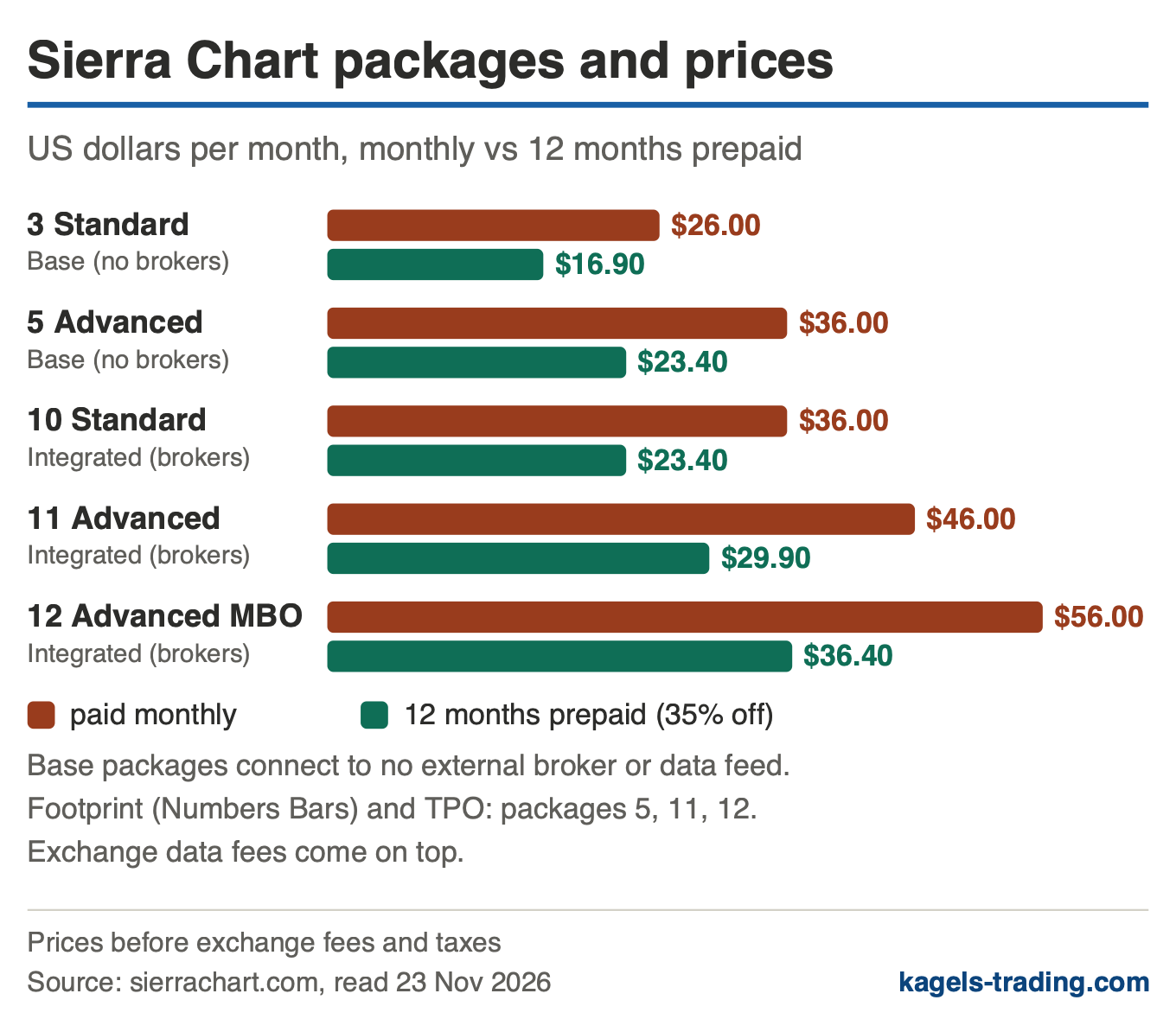
Sierra Chart bills monthly and offers five service packages. The pricing overview splits them into Base and Integrated, and that split decides whether a Base package works for you at all.
| Service package | What it adds | Per month |
|---|---|---|
| 3, Base Standard | all core features, Sierra Chart data only | $26 |
| 5, Base Advanced | plus Numbers Bars and TPO, still no external connection | $36 |
| 10, Integrated Standard | core features plus external brokers and Denali | $36 |
| 11, Integrated Advanced | Numbers Bars and TPO plus external connection | $46 |
| 12, Integrated Advanced MBO | plus market by order data | $56 |
Source: sierrachart.com, Packages page, read November 23, 2026. Exchange fees and taxes not included.
 Click to enlarge
For most active futures traders, package 11 is the realistic choice. It includes the footprint charts and allows a connection to your own broker. Package 5 supports TPO charts with Sierra Chart’s historical EUREX data service, while package 11 is needed for TPO with Denali real-time data or an external connection. Package 12 with market by order data only pays off if you really want to follow every single order in the book; for executed trades, a normal time and sales window is enough.
Paying ahead lowers the monthly price. The discount applies to all five packages: 15% for three months, 25% for six and 35% for twelve. For package 11, that means $46.00 paid monthly, $39.10 a month for three months, $34.50 for six and $29.90 for twelve.
A lifetime licence does not exist, and Sierra Chart rules it out for the future. Its reason: it sells not just software, but market data, order routing, support and constant updates for changing broker interfaces. A new account starts with a 21-day free trial, and you can switch packages at any time.
Support and documentation
Support runs mainly in writing through the Support Board, where Sierra Chart staff answer. On top of that comes an extensive online manual that documents every function. All documentation is in English, so solid English helps a lot during setup.
Sierra Chart on Mac, Linux and mobile
Sierra Chart is a 64-bit Windows application. According to its download page, it runs on Windows 7 to 11 and Windows Server, and only on 64-bit systems. There is no native Mac or Linux program and no mobile app.
On a Mac, you can use Wine or CrossOver, a compatibility layer that runs Windows programs. Sierra Chart publishes its own instructions to fix poor network performance under Linux and Wine. For Apple M-series chips, there is a separate ARM version of the program.
One detail makes moving to a new computer easy. Program, settings and data sit together in one installation folder, and Sierra Chart writes nothing to the Windows registry, so you can copy the folder and keep working.
Pros and cons of Sierra Chart
Sierra Chart divides opinion more than most platforms. If you get through the learning phase, you get a lot of functionality for little money; if you expect a tidy user interface, the first days will be hard.
Pros of Sierra Chart
- Value: even the package with footprint charts and broker connection costs under $30 a month on a 12-month plan.
- Speed and stability: built to display large data sets fast, even with many charts open.
- Order flow built in: Numbers Bars, TPO and market depth are part of the platform, not a paid add-on.
- Own data feed: Denali covers US futures, EUREX and US stock exchanges.
- Unlimited sim trading: server-based, with saved history and statistics.
Cons of Sierra Chart
- Steep learning curve: the interface is functional, and many settings hide in deep menus.
- Windows only: no Mac or Linux program and no mobile app.
- Package trap: the two Base packages connect to no external broker.
- No live crypto trading: crypto only as data and in simulation.
- Short broker list: six external services, down from more than a dozen connections in the past.
Who Sierra Chart suits
The software suits short-term, data-driven traders. If you trade futures on minute or tick charts and watch volume and market depth, you get a tool with little competition in its price range. It also works well for day traders who run fixed trade setups across many markets.
For beginners, it is the wrong first platform. It explains nothing by itself, and you spend time on configuration instead of on price action. For a similar volume focus with a gentler start, see our ATAS review or the Quantower review; our overview of trading software compares more charting platforms.
Conclusion: a lot of platform for little money, if you invest the time
For its price, Sierra Chart offers more function than almost any other charting software. If you need order flow and market depth, other providers quickly charge two or three times as much for a similar feature set. That it runs fast and stable is the real reason for its popularity among active futures traders.
Karsten’s view after more than four decades of trading: settle one question before you buy, which package you really need. If you want to connect your existing broker, do not land on a Base package, and use the 21-day trial to test exactly that broker connection.
Frequently asked questions about Sierra Chart
Is there a lifetime licence for Sierra Chart?
No, Sierra Chart does not offer a one-time purchase and says it never will. It argues that it provides ongoing market data, order routing, support and updates for changing broker connections, which a single payment cannot cover.
Is Sierra Chart a broker?
No, Sierra Chart is software only. You keep no account and deposit no trading money there. The platform connects to your broker’s account and routes orders to it, and the two Base packages connect to no external broker at all.
Is Sierra Chart free?
Only the 21-day free trial that every new account gets is free. After that, you need a paid service package from $26 a month. There is no free version and no lifetime licence.
Does Sierra Chart run on a Mac?
Not as a native Mac program. Sierra Chart is a Windows application and runs on a Mac only through a compatibility layer such as Wine or CrossOver. On Apple M-series chips, use the separate ARM version.
Can you trade crypto with Sierra Chart?
Only in simulation, not live. Sierra Chart supplies prices, depth and history from exchanges such as Binance, Bitfinex, Coinbase and Deribit, but its crypto page lists live trading as not available.
This English edition is based on our German edition on kagels-trading.de and has been adapted for international readers.
More Trading Software guides
- Choose software for your trading
Trading Software: Charts, Platforms and Research Tools
A task-based guide to charting, screening, seasonality, order flow, execution, backtesting, automation and journals, with dated US dollar prices.
- Understand the Rithmic feed
Rithmic Explained: Costs, Platforms and Who It Suits
What the futures data feed and order routing cost through a broker, R | Trader Pro, the 35 listed platforms, the APIs and the limits.
- Check Quantower
Quantower Review 2026: Prices, Free Version and Limits
The Windows order flow platform: license prices checked 19 November 2026, the limits of the free version, broker routes without a license fee and the Mac question.
- Check NinjaTrader
NinjaTrader Review 2026: Free Plan, Fees, Margins and Kraken
Free platform and Kraken-owned futures broker: plans and fees checked 21 November 2026, the $35 inactivity fee, day vs overnight margins and the US and EU entities.
- Check TrendSpider
TrendSpider Review 2026: Plans, Prices and AI Tools
Automated trendlines, backtests and the Sidekick AI: plan limits and prices checked 19 November 2026, the paid trial, data fees and the 72-hour refund rule.
- Check Trade Ideas
Trade Ideas Review 2026: Holly AI, Prices and Limits
The real-time US stock scanner with Holly AI: Standard and Premium prices checked 19 November 2026, the free web dashboard, Money Machine in simulation and the no-refund rule.
- Check LuxAlgo
LuxAlgo Review 2026: Plans, Prices, Free Tools and Limits
Vela, Quant, the indicator library and the TradingView toolkits: four plans checked 10 November 2026, what is free, and the first-payment-only refund.
- Try free order flow
OpenMarket Review 2026: Free vs Plus, AI Agents and Limits
OpenMarket tested in our own account: heatmap, footprint, AI on the chart, Free vs Plus and where it falls short.
- Check Northtrader
Northtrader Review 2026: Free vs Pro, Order Flow and Limits
The new all-in-one futures terminal tested in our account: Free vs Pro prices checked 23 November 2026, Rithmic, CQG and dxFeed, order flow tools and the beta gaps.