
TrendSpider Review 2026: Plans, Prices and AI Tools


Contents
- TrendSpider in 30 seconds (as of November 19, 2026)
- What is TrendSpider?
- What can TrendSpider do?
- What are TrendSpider’s AI features?
- How does trading from TrendSpider work?
- What does TrendSpider cost?
- Pros and cons of TrendSpider
- What do users say about TrendSpider?
- TrendSpider or TradingView: which fits better?
- Conclusion: who is TrendSpider for?
- Frequently asked questions about TrendSpider
- About the author
TrendSpider is charting software that tries to take routine work off your hands: it draws trendlines, finds chart patterns and tests strategies without code. More recently the company has added a layer of AI tools, led by the Sidekick assistant. This review looks at what the platform does, what it costs once the paid trial, data fees and sale prices are sorted out, and who is better served by TradingView.
All prices and rules in this review are as of November 19, 2026. We read TrendSpider’s pricing page, refund policy, company pages and product pages, and its Trustpilot profile. We did not buy a plan for this English version and have no business relationship with TrendSpider. How we research and write is described on our editorial policy page.
TrendSpider in 30 seconds (as of November 19, 2026)
- What it is: a browser-based charting and research platform from TrendSpider LLC in Illinois. It is not a broker.
- Core tools: automatic trendlines and chart patterns, multi-timeframe analysis, backtests without code, dynamic alerts, scanners and trading bots.
- AI: the Sidekick assistant builds scanners, indicators and alerts on request; 25 messages a month are free.
- Plans: Standard, Premium, Enhanced and Advanced, with the same tools and different limits. The plan boxes show $82 to $321 a month before the current sale.
- Trial: 14 days for a fee; trial fees are never refunded.
What is TrendSpider?
TrendSpider is a cloud platform for technical analysis that automates the drawing and checking work of a chart trader. It detects trendlines, chart patterns and Fibonacci levels by algorithm, runs backtests without programming and checks several time frames on one chart. If you want to understand the patterns it marks, read our guide to chart patterns first.
The company behind it is TrendSpider LLC in Illinois. Its about page says the founders set out in 2016 to build a new kind of charting platform; the company’s own fact sheet names 2018 as the founding year and speaks of more than 20,000 active users.
TrendSpider is research software, not a broker. It holds no client money and executes no trades itself. Orders reach your broker through supported connections or the order routing service SignalStack.
TrendSpider at a glance
| Company | TrendSpider LLC, Illinois, USA |
| Type | Charting and research platform, not a broker |
| Access | Browser, iOS and Android apps, browser extensions |
| Markets | US stocks and ETFs, options, futures, forex, crypto |
| Plans | Standard, Premium, Enhanced, Advanced |
| Trial | 14 days, paid, fee not refundable |
| Refunds | Eligible non-promotional purchases: cancel, then request within 72 hours; trial fee deducted |
| Trustpilot | 4.8 from 963 reviews (Nov. 19, 2026) |
What can TrendSpider do?
Automatic pattern and trendline detection
The core of TrendSpider is automatic detection of chart patterns, trendlines, Fibonacci levels and support and resistance zones. This saves drawing time, especially if you watch many symbols. The catch: you still need to understand what the algorithm marks, or you end up trusting a line that means little in its context.
Backtesting without code
The strategy tester checks trading rules on historical data without a line of code. Simple rules are set up quickly; complex ones take time and solid trading knowledge. How depth limits differ by plan is shown below. Our guide to backtesting explains how to read the results without fooling yourself with overfitting.
Scanners, alerts and bots
Scanners filter the market for setups that match your conditions, including across several time frames. Dynamic alerts follow moving objects such as a rising trendline instead of a fixed price. Trading bots act on rules, and all plans include five free automated orders a month. For the principle of scanning, see our overview of stock screeners.
Further tools
Beyond charts, TrendSpider adds fundamentals, seasonality and custom code. The pricing page lists corporate fundamentals, analyst estimates, seasonality profiles and “over 300+” indicators; its fact sheet says “200+”. Own indicators can be written in JavaScript or generated by an AI coding assistant. For a specialist in seasonal charts, see our Seasonax review.
What are TrendSpider’s AI features?
Sidekick is TrendSpider’s AI assistant, which can see your charts, drawings, indicators and backtest results and build work inside the platform on request. You ask for a scanner, an indicator or an alert in plain language, and the result stays in TrendSpider for you to inspect.
Every plan includes 25 Sidekick messages a month; more cost extra. The pricing page lists Basic with 100 messages for $49 a month, Plus with 300 for $129 and Max with 1,000 for $349. Plus and Max add access to “frontier” AI models.
The Quant Model Lab trains machine learning models that you can use as signals in charts, alerts and bots. How well such models work in live trading is hard to judge from the outside. Treat model signals like any other strategy: test them and size them small. For a critical look at AI stock scores, see our Kavout review, where we compared live labels with real prices.
How does trading from TrendSpider work?
You link a supported broker or exchange account through SignalStack and trade through a widget in the platform. TrendSpider writes that supported instruments, order types and costs vary by broker; some integrations work directly, others through SignalStack or webhooks.
Check your own broker before you plan around automation. TrendSpider points to its broker directory for the current list. If your broker is not supported, you can still use TrendSpider for analysis and place orders at your own broker.
What does TrendSpider cost?
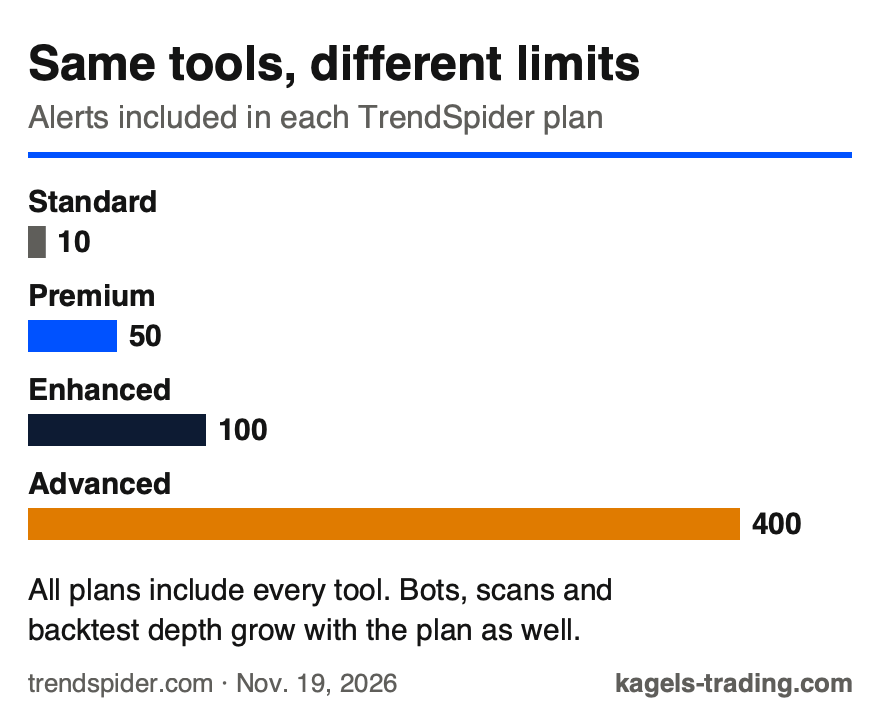
All four plans include every tool and the same market data; they differ in usage limits. That is TrendSpider’s own description in its pricing FAQ. More active and systematic traders need higher limits for alerts, bots, scans and backtest depth.
 Click to enlarge
Source: Kagels Trading, own graphic from the TrendSpider pricing page.
| Plan | Alerts and bots | Backtests and scans |
|---|---|---|
| Standard | 10 alerts, 5 bots | 2 hr backtests (2K depth), 2 hr scanning |
| Premium | 50 alerts, 10 bots | 5 min backtests (10K depth), 5 min scanning |
| Enhanced | 100 alerts, 50 bots | 1 min backtests (20K depth), 1 min scanning |
| Advanced | 400 alerts, 100 bots | 1 min backtests (30K depth), 1 min scanning |
The price is harder to pin down than the limits, because the pricing page shows two sets of numbers. The plan boxes show $82, $137, $183 and $321 a month as crossed-out prices, with the tooltip “The standard trial price”. The page’s structured data lists monthly billing at $89, $149, $199 and $349, and yearly billing at $708, $1,188, $1,596 and $2,796. In our TradingView alternatives comparison, the checkout on November 8, 2026 showed $82 a month for Standard billed monthly and $54 a month billed yearly. Confirm the amount at checkout.
The Black Friday sale runs from November 16 to 22, 2026. The plan boxes then show annual plans, with the first year expressed as a monthly equivalent: from $32.94 a month for Standard to $74.90 for Advanced, “up to 65% off” for the first year only, plus a bonus of AI and SignalStack months. The offer is for new customer accounts buying through the website. A second phase from November 23 to 27 offers a discount and a smaller bonus. Read the terms: promotional sales are “final and non-refundable”, and the discount excludes add-ons and market data.
Subscriptions renew automatically by default. You can switch off auto-renewal in your account settings. When you cancel a paid plan, you keep access until the prepaid period ends; downgrades also take effect at the end of the billing cycle. Cancelling a trial, by contrast, ends access immediately.
Market data fees
Real-time US stocks, ETFs, forex and crypto are included for non-professional traders; futures and options cost extra. Real-time futures data costs $7.50 a month or $90 a year, OPRA options data $9.50 a month. Professional traders pay a NASDAQ fee of $29 a month for US equity data. Cboe indexes are delayed.
Trial and refunds
TrendSpider has no free trial: the 14-day trial costs a fee that depends on the plan. The pricing pages we read do not show the amount. On request, the trial can be extended by up to another 14 days. If you do not cancel, it renews into a paid plan; TrendSpider sends one reminder three to seven days before.
Refunds have a short window. According to the refund policy, trial fees are never refunded. After a full charge for an eligible, non-promotional plan, you first cancel and then ask for a refund within 72 hours, minus the trial fee. Sale plans are final. Cancelling online does not refund anything by itself.
Pros and cons of TrendSpider
These points speak for TrendSpider:
- Automation: trendlines, patterns and multi-timeframe checks without drawing by hand.
- Backtests and scans without programming.
- AI tools: Sidekick and the Quant Model Lab build scanners, indicators and models.
- Real-time US stocks, forex and crypto included for non-professionals.
- Learning material: blog, TrendSpider University and training sessions.
These points speak against it:
- Paid trial with no refund on the trial fee.
- A 72-hour refund window and non-refundable sale plans.
- Unclear prices: two sets of regular prices on the same page.
- Extra costs for futures and options data and for more AI messages.
- A steep learning curve because of the many tools.
What do users say about TrendSpider?
On Trustpilot, TrendSpider has a rating of 4.8 out of 5 from 963 reviews (November 19, 2026). 89% of reviewers give five stars, 4% give one star. Trustpilot notes that the company invites customers to review and has a paid Trustpilot subscription.
Read the score with that in mind. Inviting reviews is allowed and common, but it can lift the average rating. Before you buy, read the one-star reviews and the refund policy side by side; that tells you more about the cancellation risk than the average.
TrendSpider or TradingView: which fits better?
TrendSpider is stronger where analysis is automated; TradingView is stronger where people read charts by hand. TrendSpider builds its platform around pattern detection, no-code backtests and AI tools. TradingView offers a large community, a broad indicator library and lower entry prices.
For the typical discretionary trader, TradingView is usually the simpler and cheaper choice. If you want to test and automate rules systematically, TrendSpider gives you more ready-made automation. Our TradingView backtesting guide shows what TradingView’s own tester can do.
Conclusion: who is TrendSpider for?
TrendSpider is a strong but specialised platform. Its strength is automation: patterns, trendlines, backtests and now AI tools that build scanners and indicators for you. For traders who want to test rules systematically, it is a serious option.
The cost structure needs care. Two sets of regular prices, a paid trial, a 72-hour refund window and sale plans that are final make the start more expensive and riskier than a simple monthly plan. Add data fees for futures and options.
If you read charts by hand, start elsewhere. For discretionary chart work, a platform such as TradingView is simpler and cheaper. If you choose TrendSpider, note the renewal date of your trial and decide before it renews.
Frequently asked questions about TrendSpider
Is TrendSpider legit?
TrendSpider is an established US software company, TrendSpider LLC in Illinois. On November 19, 2026, it had a Trustpilot rating of 4.8 from 963 reviews, and it actively invites reviews. Before you pay, read the refund policy, because trial fees and sale plans are not refunded.
How much does TrendSpider cost?
The plan boxes show $82 to $321 a month before discounts, as of November 19, 2026. The page’s structured data lists monthly billing from $89 to $349 and yearly billing from $708 to $2,796. During the Black Friday sale of November 16 to 22, annual plans for new customers start at the equivalent of $32.94 a month for the first year.
Is there a free TrendSpider trial?
No, TrendSpider offers only a paid 14-day trial. The fee depends on the plan and is never refunded. You can ask to extend the trial by up to 14 days; without cancelling, it renews into a paid plan.
Which markets does TrendSpider cover?
TrendSpider covers US stocks and ETFs, options, futures, forex and crypto. Real-time US stocks, ETFs, forex and crypto are included for non-professional traders; futures data costs $7.50 a month and options data $9.50.
Does TrendSpider have an app?
Yes, TrendSpider lists native iOS and Android apps next to the browser version. The main platform runs in the browser, and there are browser extensions for quick charts.
Is TrendSpider better than TradingView?
It depends on how you trade. TrendSpider is stronger in automation, backtests and AI tools. TradingView is simpler, has the bigger community and lower prices, which suits discretionary chart traders.
This English edition is based on our German edition on kagels-trading.de and has been adapted for international readers.
More Trading Software guides
- Choose software for your trading
Trading Software: Charts, Platforms and Research Tools
A task-based guide to charting, screening, seasonality, order flow, execution, backtesting, automation and journals, with dated US dollar prices.
- Understand the Rithmic feed
Rithmic Explained: Costs, Platforms and Who It Suits
What the futures data feed and order routing cost through a broker, R | Trader Pro, the 35 listed platforms, the APIs and the limits.
- Check Quantower
Quantower Review 2026: Prices, Free Version and Limits
The Windows order flow platform: license prices checked 19 November 2026, the limits of the free version, broker routes without a license fee and the Mac question.
- Check NinjaTrader
NinjaTrader Review 2026: Free Plan, Fees, Margins and Kraken
Free platform and Kraken-owned futures broker: plans and fees checked 21 November 2026, the $35 inactivity fee, day vs overnight margins and the US and EU entities.
- Check Trade Ideas
Trade Ideas Review 2026: Holly AI, Prices and Limits
The real-time US stock scanner with Holly AI: Standard and Premium prices checked 19 November 2026, the free web dashboard, Money Machine in simulation and the no-refund rule.
- Check LuxAlgo
LuxAlgo Review 2026: Plans, Prices, Free Tools and Limits
Vela, Quant, the indicator library and the TradingView toolkits: four plans checked 10 November 2026, what is free, and the first-payment-only refund.
- Try free order flow
OpenMarket Review 2026: Free vs Plus, AI Agents and Limits
OpenMarket tested in our own account: heatmap, footprint, AI on the chart, Free vs Plus and where it falls short.