
Northtrader Review 2026: Free vs Pro, Order Flow and Limits


Contents
- Northtrader in 30 seconds
- What is Northtrader?
- Who is behind Northtrader?
- How much does Northtrader cost?
- Which brokers and data feeds can you connect?
- Charting, heatmap and order flow in the test
- Trading and protecting your risk
- Building and testing strategies
- Reviewing and trading together
- How safe are your data and logins?
- Where Northtrader is still a beta
- Pros and cons from my point of view
- Who is Northtrader worth it for?
- Frequently asked questions about Northtrader
- About the author
Six programs, six logins and a second data subscription for the phone app: that is the example Northtrader uses to explain why futures traders need a single terminal. The platform is meant to show the same workspace in the browser, on the desktop and on the phone. It launched as a public beta on November 20, 2026, presented by Eugen Denisenko, whose trading education Tralgo I have already reviewed for our German site.
For this review I opened a free account on November 23, 2026 and tried the terminal without a broker, on the provider’s delayed data. On top of that I used the launch presentation, the website, the FAQ, the terms of use and the Swiss commercial register. Anything I could not check myself is marked as such. This article follows our editorial policy.
Northtrader in 30 seconds
- What it is: trading software from MarketsDNA AG in Baar, Switzerland, that combines charting, order flow, algo building and a journal in one terminal. Public beta since November 20, 2026.
- Markets: only futures today, through Rithmic, CQG and dxFeed. CFDs and crypto are planned, without a date.
- Cost: Free stays free. Pro costs $90 a month (€79 including VAT) and is free until January 1, 2027. After that the account drops back to Free automatically.
- Extra costs: you pay real-time market data and broker fees to your provider on both plans.
- Who it is for: futures day traders, prop traders with several accounts and traders who want to build and test their own strategies.
What is Northtrader?
Northtrader is a browser-based trading platform for futures that combines charts, an order book heatmap, order flow analysis, strategy automation, a trade journal and chat in one terminal and syncs the same workspace across all devices.
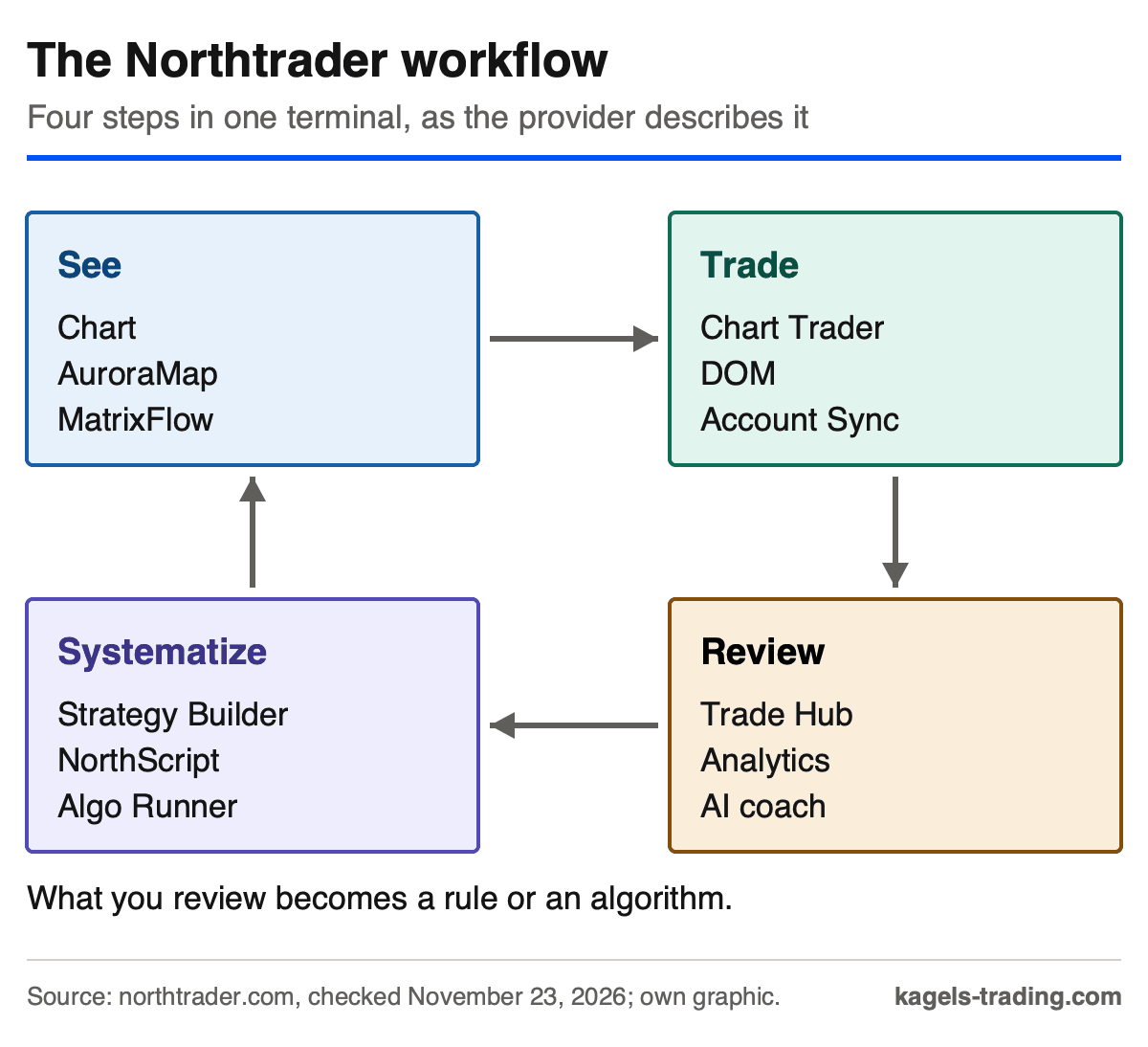
The provider describes it as a loop: see, trade, review, systematize. You analyze on the chart, trade from the chart or the order book, review your trades in the journal and turn what works into a rule or an algorithm. The graphic below shows the four steps with their modules.
 Click to enlarge
Source: Kagels Trading, own graphic based on northtrader.com.
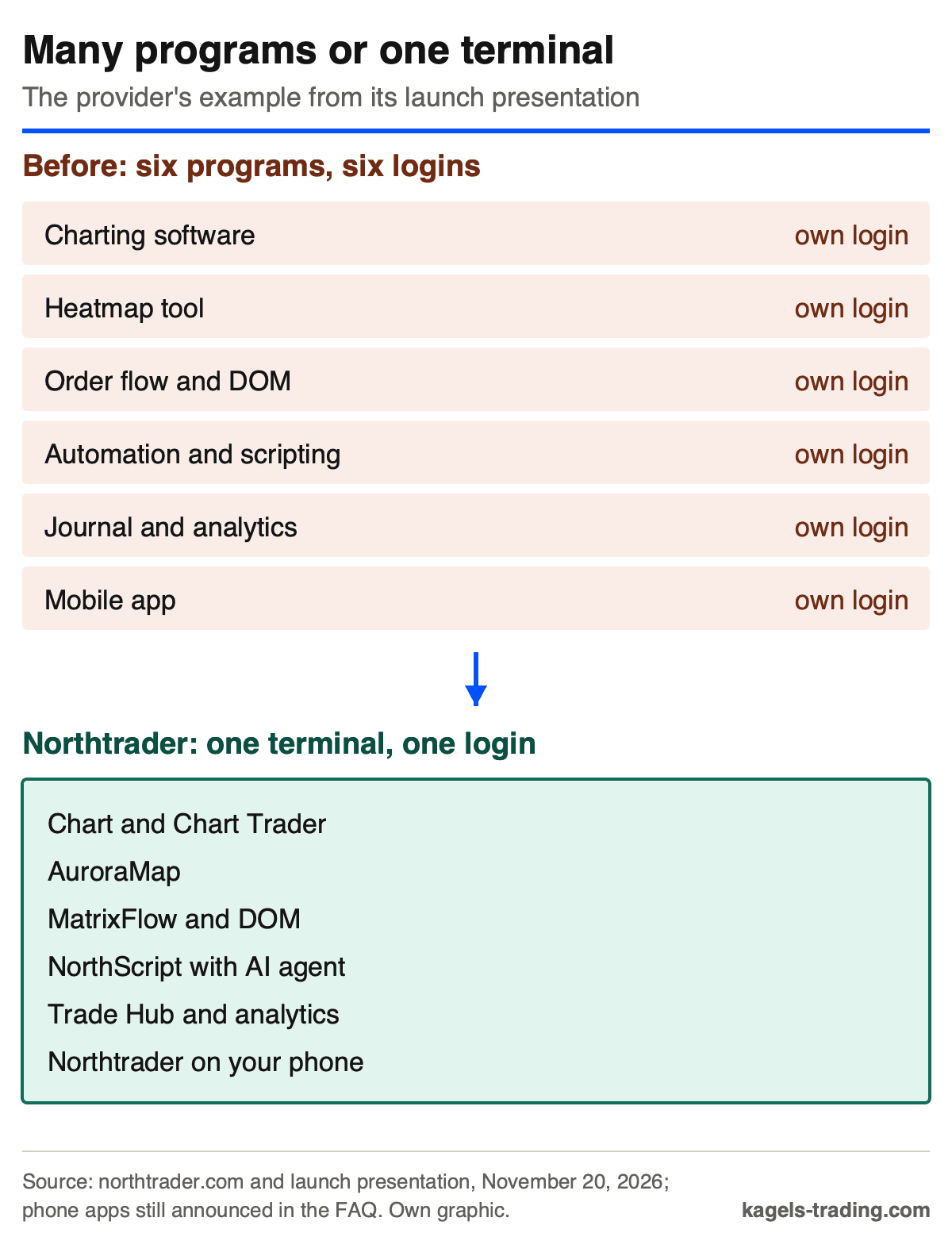
Anyone who trades futures intraday knows the problem behind it. One program for charts, a second for the heatmap, a third for the journal and a fourth for algos. Each has its own login, its own subscription and its own layout.
According to Eugen Denisenko in the launch presentation on YouTube, there is also an expensive detail. If you want to use the phone app on top of your desktop platform with CQG, you need a second user and a second data feed.
 Click to enlarge
Source: Kagels Trading, own graphic based on northtrader.com and the launch presentation.
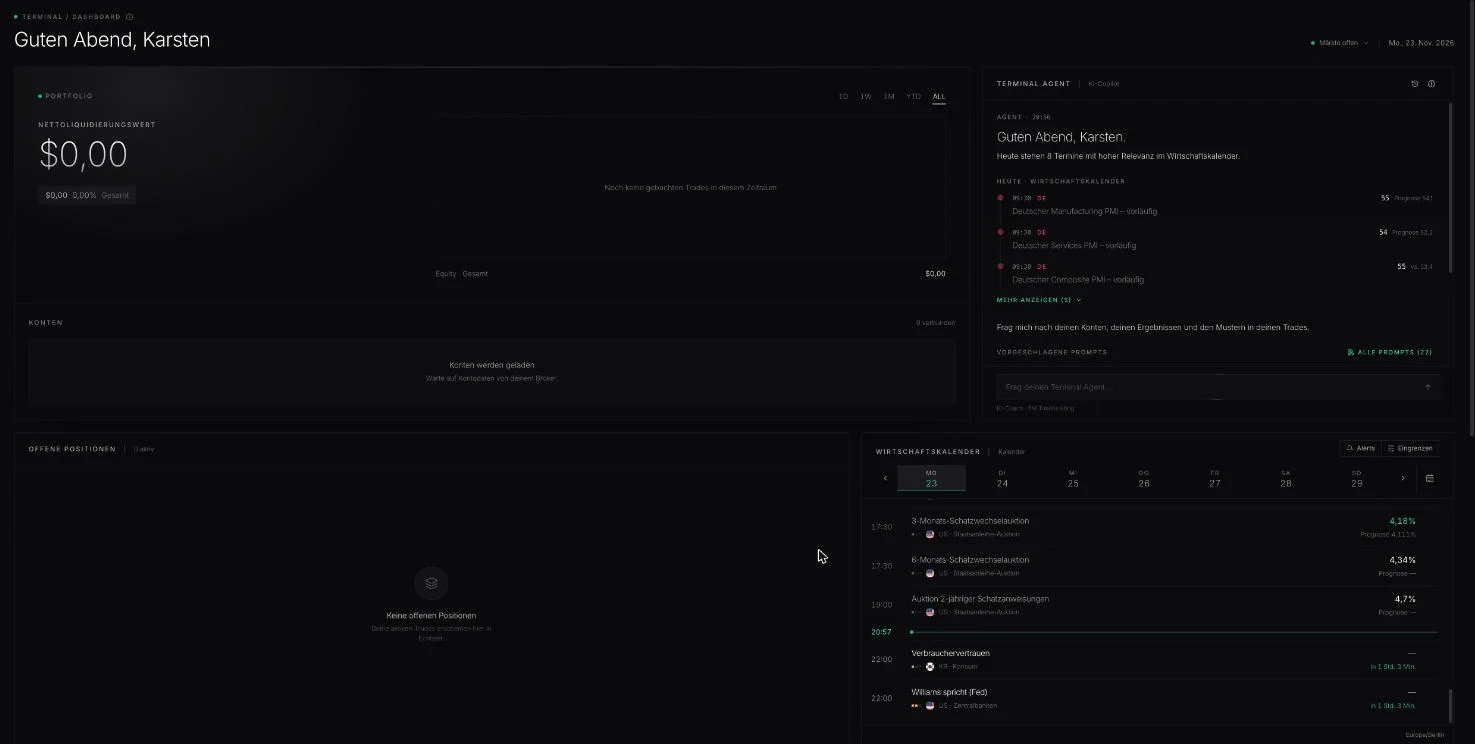
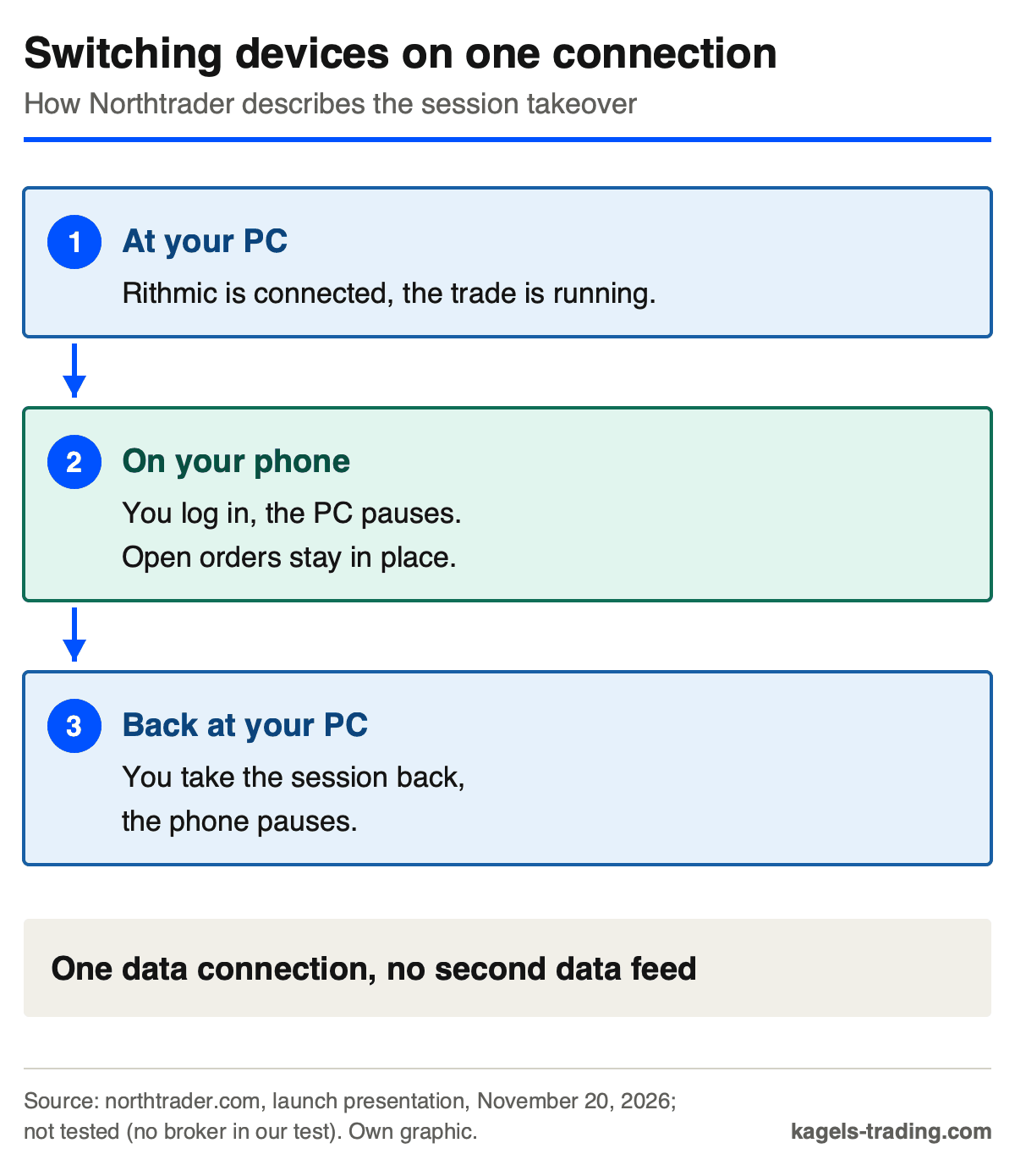
Northtrader wants to solve this with a session that moves with you. According to the provider, the terminal drops the connection on the PC as soon as you log in on your phone and takes it over on the new device, while open orders stay in place. That way one data connection is supposed to be enough.
 Click to enlarge
Source: Kagels Trading, screenshot from our Northtrader account.
Who is behind Northtrader?
According to the imprint, the operator is MarketsDNA AG, based in Baar in the canton of Zug. The company was founded in January 2026, as the commercial register of the canton of Zug shows. The chairman of the board of directors is Christian Wessel.
The closeness to Tralgo AG is worth noting. Both companies have the same address at Grabenstrasse 15a in Baar, and Christian Wessel also sits on the board of Tralgo AG, whose chairman is Eugen Denisenko. Denisenko himself is not listed at MarketsDNA. The register does not show who owns the company.
In the presentation, Denisenko says that Tralgo uses the platform and helps develop it. I reviewed the trading education in my German Tralgo review. The provider of that education is TRALGO LLC-FZ in Dubai, not the Swiss Tralgo AG. The registers do not show how the two companies are connected, and this review is about the software only.
Important for you: Northtrader is not a broker. According to the FAQ and the terms of use, the provider holds no client funds and runs no trading accounts. Your orders go through the connection to your broker or your prop firm.
How much does Northtrader cost?
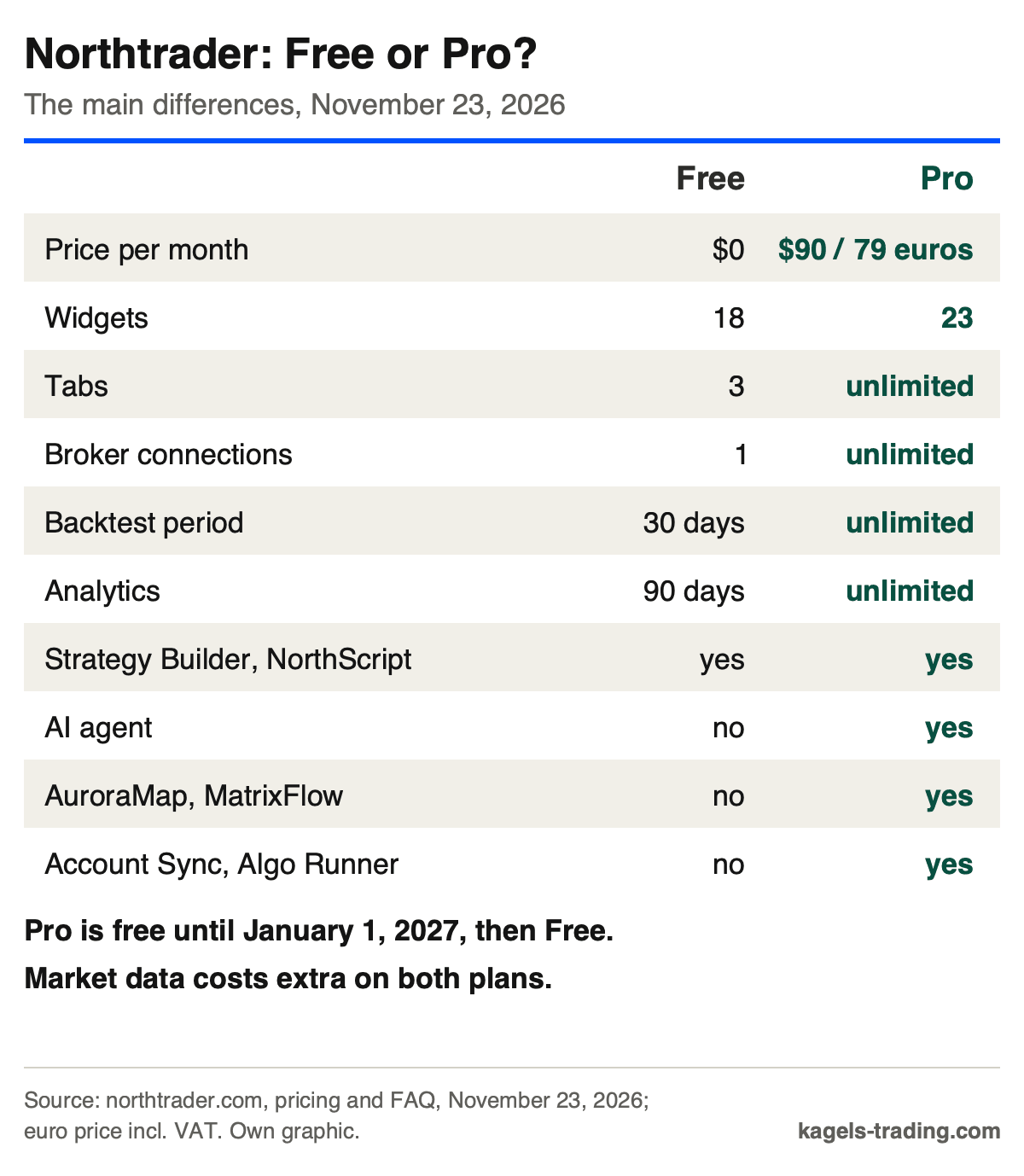
Northtrader comes in two plans. Free stays free with no time limit and needs no credit card. Pro removes the limits and unlocks the expensive modules.
| Free | Pro | |
|---|---|---|
| Price | $0 | $90 a month or $878 a year (€79 a month or €758.40 a year including VAT) |
| Launch offer | $0 until January 1, 2027 | |
| Widgets | 18 of 23 | all 23 |
| Tabs | 3 with 4 widgets each | unlimited |
| Broker connections | 1 | unlimited |
| Backtest period | up to 30 days | unlimited |
| Analytics | 90 days | unlimited, with Deep Analytics |
| AI agent, AuroraMap, MatrixFlow, Account Sync, Algo Runner | no | yes |
| Strategy Builder and NorthScript | yes | yes |
As of November 23, 2026, according to the northtrader.com pricing table and the FAQ. The euro prices include VAT; the FAQ does not say whether the dollar prices do.
With yearly billing, Pro works out at about $73 a month. In euros that is €63.20 a month, 20 percent less than monthly billing. If you cancel, Pro runs to the end of the paid period, and there are no refunds for partial months. You pay by card through Stripe or with PayPal.
The launch offer is fairly designed. If you sign up by the end of the year, you get Pro free until January 1, 2027. After that the account switches to Free automatically, with no cancellation and no cost. Layouts and data are kept.
 Click to enlarge
Source: Kagels Trading, own graphic based on the Northtrader pricing table and FAQ.
Extra costs: market data and broker
In the presentation it sounded as if market data were included in the Pro price. The FAQ says otherwise: your provider charges market data, exchange fees and broker fees, and the plan does not change that. If you trade live through Rithmic or CQG, you keep paying the exchange data packages yourself.
With CQG this can get expensive. According to Denisenko, a data feed costs about $35 a month, but $70 to $80 with a second user for the phone app. This calculation is his statement; I have not checked it.
Without a broker, the terminal shows prices from its own data feed MDNA, but delayed. In my test that was enough for charts, the volume profile and the bias widget. Denisenko announced a paid real-time MDNA feed for December.
Northtrader compared on price
The table shows the monthly prices of the paid plans from our own reviews. The feature sets differ, so the table does not replace a feature comparison. Each price carries the date we checked it.
| Software | Paid plans per month (date checked) | Free version and browser |
|---|---|---|
| Northtrader | Pro $90 or €79 (Nov 23, 2026) | Free plan, permanent; runs in the browser |
| ATAS | €24.95 to €89.95 (Nov 21, 2026) | START plan; browser version in beta |
| Bookmap | Global $49 to Global Premium $199 (Nov 12, 2026) | Digital plan; Bookmap Web in the browser, with fewer features than the desktop version |
| Quantower | All-in-One $70, extensions from $20 (Nov 19, 2026) | Free version with limits; no browser version |
| TradingView | Essential $14.95 to Ultimate $239.95 (Sep 24, 2026) | Basic plan; runs in the browser |
Futures market data is not included in the plan price of any of the five.
Which brokers and data feeds can you connect?
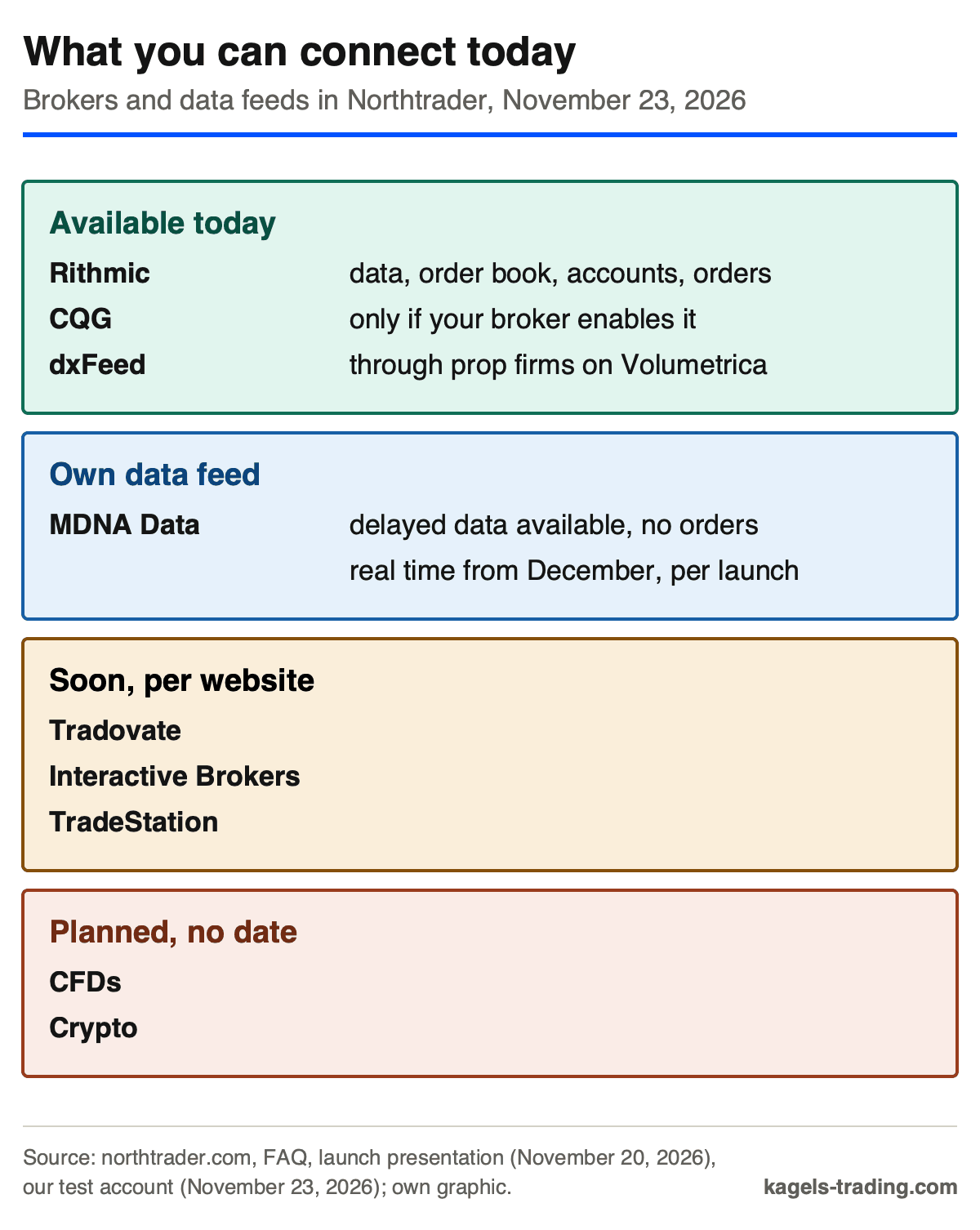
According to the FAQ, Northtrader connects directly to the data feed or broker, without a detour through its own servers. As of November 23, 2026, there are four routes for futures data and orders:
- Rithmic: market data, order book, accounts and order execution. It works with most prop firms and futures brokers that connect through Rithmic.
- CQG: the same functions for your own accounts. Your broker has to enable Northtrader first. If the login is refused, only a request to your broker helps.
- dxFeed: for prop firms that run on the Volumetrica platform.
- MDNA Data: the in-house data feed. It provides prices, but no order execution.
Tradovate, Interactive Brokers and TradeStation are listed on the website as “soon”. According to the FAQ, CFDs and crypto are in preparation; the provider names a date only once a connection is finished.
 Click to enlarge
Source: Kagels Trading, own graphic based on northtrader.com, the FAQ and our test account.
For CFD traders this is the biggest limitation. Outside the US many retail traders use a CFD broker, and US retail traders cannot trade CFDs at all. If you trade through a CFD broker, you can only use Northtrader for analysis for now. Our guide to futures vs CFDs explains the difference.
Rithmic or CQG: the difference in level 3 data
In the presentation Denisenko recommended Rithmic. His argument: Rithmic delivers MBO data (market by order), meaning every single order in the book with its place in the queue. With CQG, according to him, you only see ten price levels above and below. In his view you therefore need Rithmic for the full heatmap and the MBO view in the DOM.
Switching devices on a single connection
Many data feeds allow only one active connection. According to the website, Northtrader works with that rather than against it: if you log in on a second device, the first one pauses its connections. According to the presentation, you enter your broker password once on each device, because it is not stored on the provider’s servers. Without a broker I could not test the switch.
 Click to enlarge
Source: Kagels Trading, own graphic based on northtrader.com and the launch presentation.
The desktop app is available for macOS, Windows and Linux. On the phone apps the sources disagree. The home page lists iOS and Android as platforms, while the FAQ and the platform page say “Apps for iOS and Android follow”. In the presentation, Android was said to be usable already and iOS to be in Apple’s review. The website itself comes in eleven languages, English included.
Charting, heatmap and order flow in the test
The trading area is the heart of the platform. There you create tabs as in a browser and fill them with widgets. In my test account I counted 23 widgets in four groups: market data and trading, accounts and positions, strategy and automation, discipline and tools.
Chart, chart types and indicators
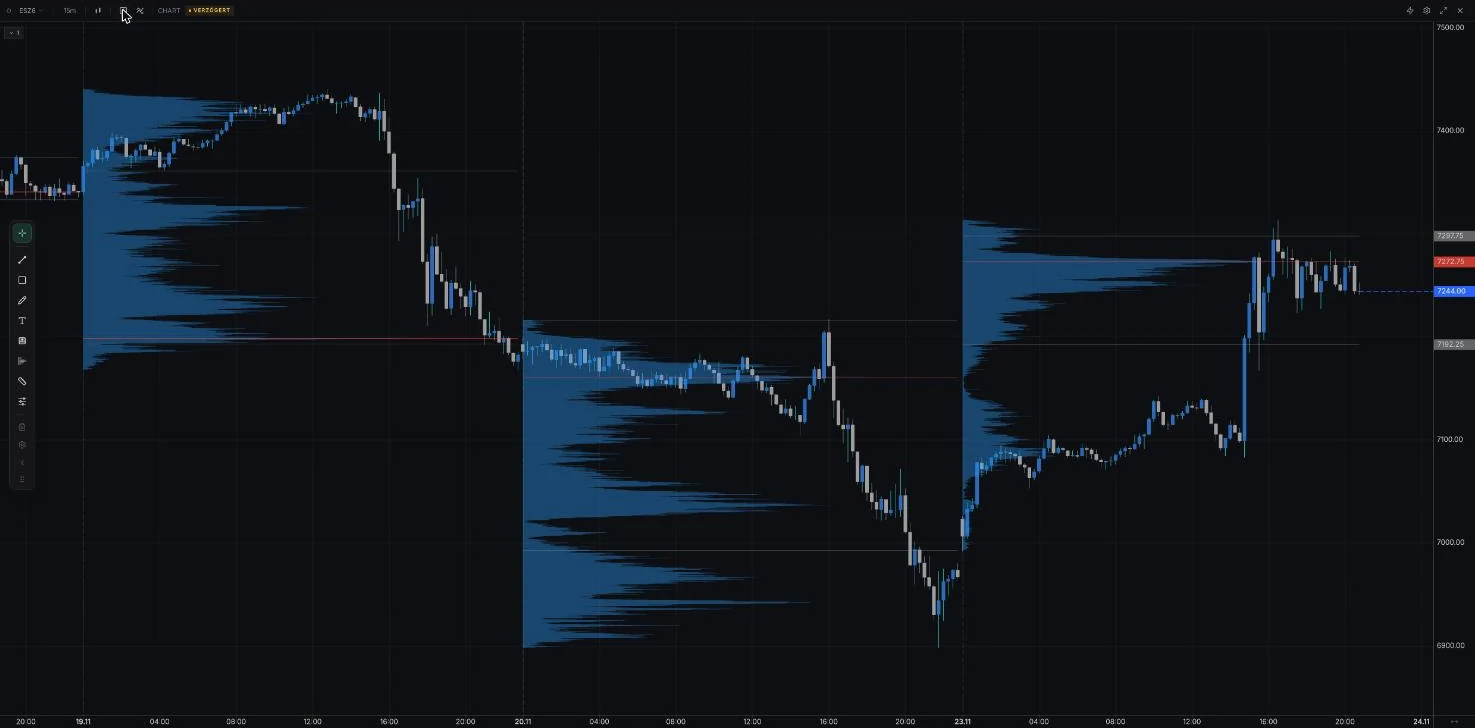
In my test account the chart delivered delayed prices for futures from CBOT, CME, COMEX and NYMEX, which all belong to the CME Group. I counted eight chart types in the terminal: candles, hollow candles, Heikin Ashi, line, area, bars, cluster and point and figure. The indicator library lists 50 entries, among them VWAP, the volume profile, Market Profile with TPO, cumulative volume delta and Ichimoku.
 Click to enlarge
Source: Kagels Trading, screenshot from our Northtrader account.
The numbers on the website do not match this. The platform page names “33 built-in indicators” and further down “49 indicators”, plus “6 chart types”. In the presentation, Denisenko spoke of 49 indicators and seven chart types.
To me this points to a fast-growing beta rather than to embellishment. But it shows that the website and the product are not moving in step.
AuroraMap: the liquidity heatmap
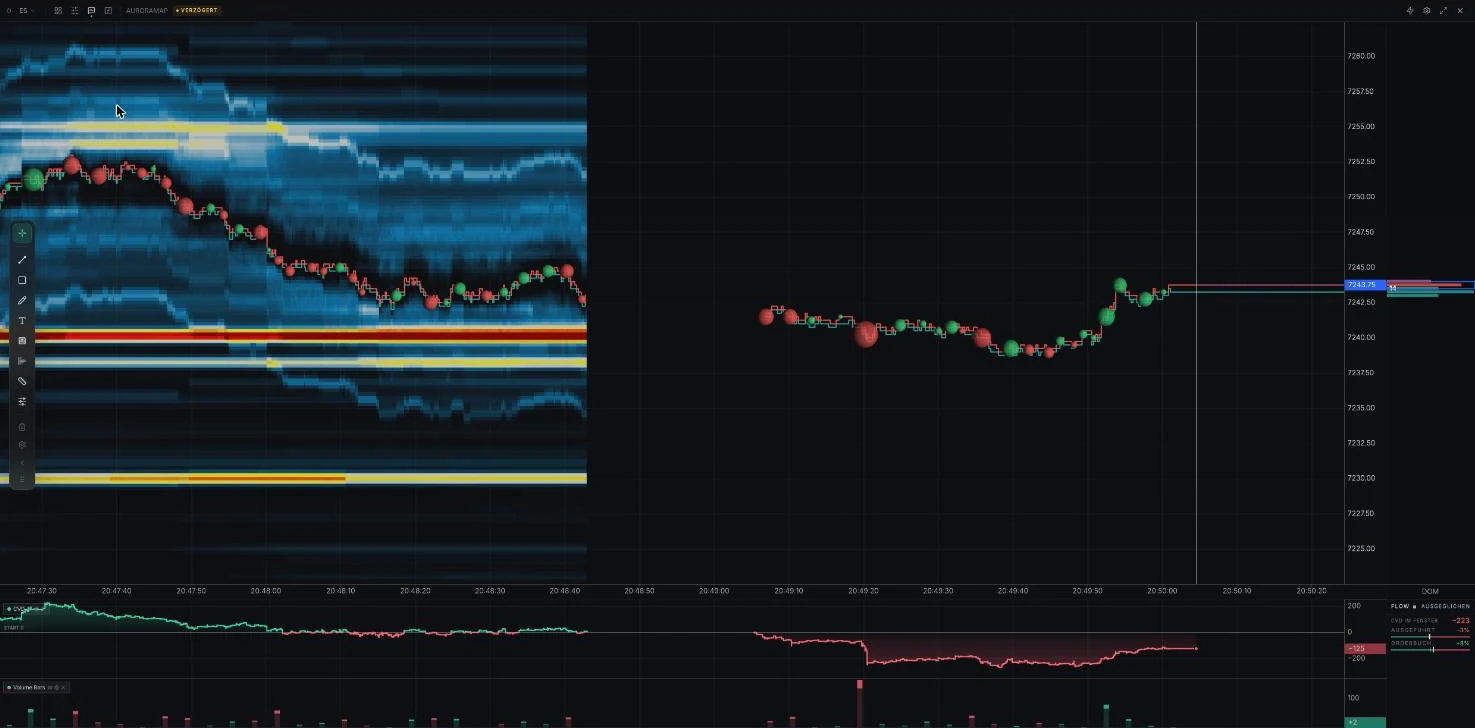
AuroraMap shows the order book as a colored heatmap above the price. Bright bands stand for a lot of liquidity at one price, bubbles for executed trades. Below it run the CVD and volume bars.
If you know Bookmap, you will find your way around at once. Denisenko himself said the similarity would surprise many people.
 Click to enlarge
Source: Kagels Trading, screenshot from our Northtrader account.
With delayed data, the heatmap showed liquidity only in the loaded history. In the running stream the trades arrived, but no order book depth. To really work with the heatmap you therefore need a live connection. AuroraMap is part of Pro.
MatrixFlow: absorption, sweeps and delta divergences
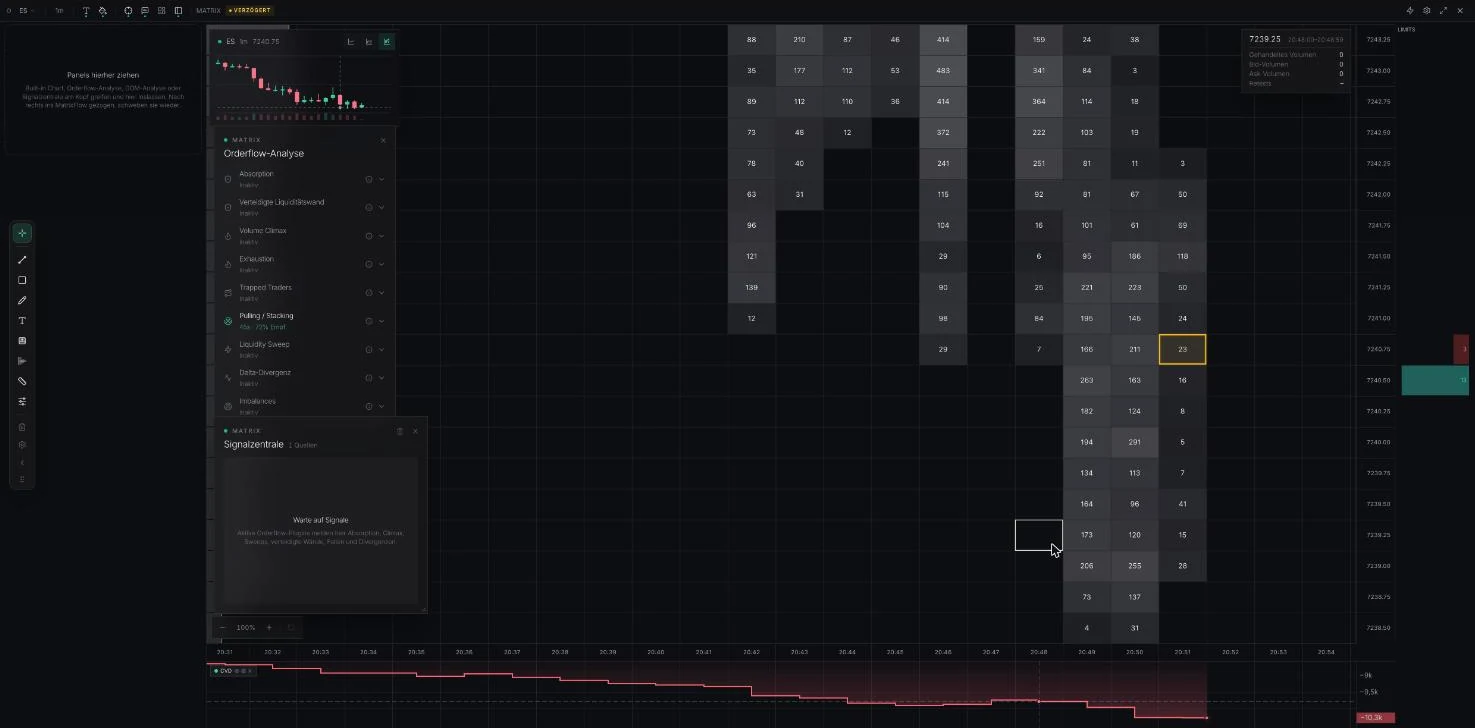
MatrixFlow is the most original tool. It shows the traded volume per price and minute as a grid, similar to a footprint chart. On top come modules such as volume profile, depth profile, CVD and an order flow analysis with nine pattern detectors: absorption, defended liquidity wall, volume climax, exhaustion, trapped traders, pulling and stacking, liquidity sweep, delta divergence and imbalances.
 Click to enlarge
Source: Kagels Trading, screenshot from our Northtrader account.
When a module detects a pattern, the signal center reports it. One click jumps to that spot in the grid. With delayed data the signal center stayed empty in my test, so I cannot judge the hit quality. MatrixFlow is also a Pro feature. Our guide to order flow trading explains what such patterns can and cannot show.
DOM with the MBO queue
With MBO data, the DOM, the order book ladder, can show every single order. In the presentation this showed that 50 contracts sat in one single order. This view needs level 3 data through Rithmic; in my test account without a broker I could not check it.
Bias widget: market direction as a score
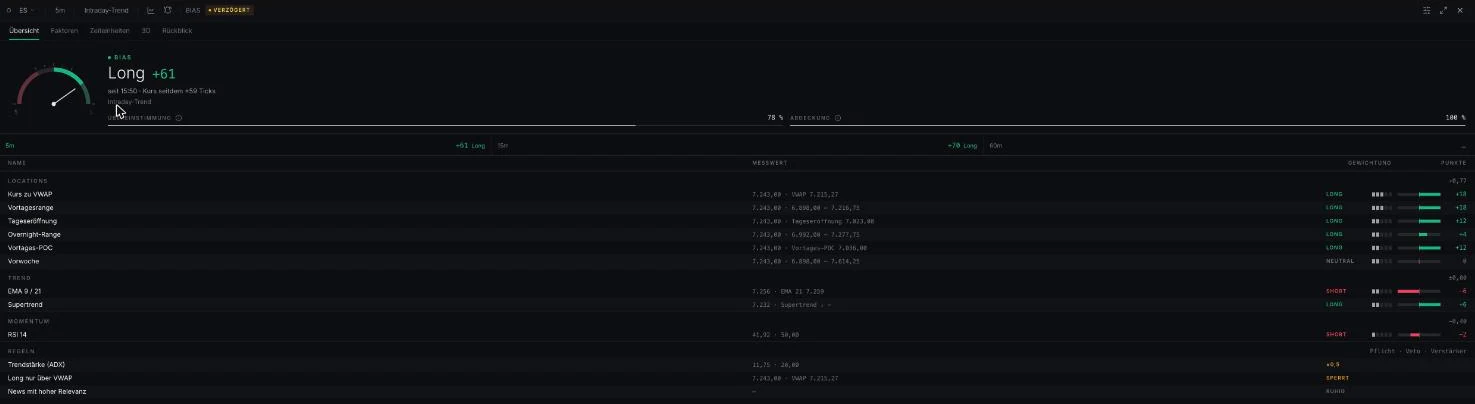
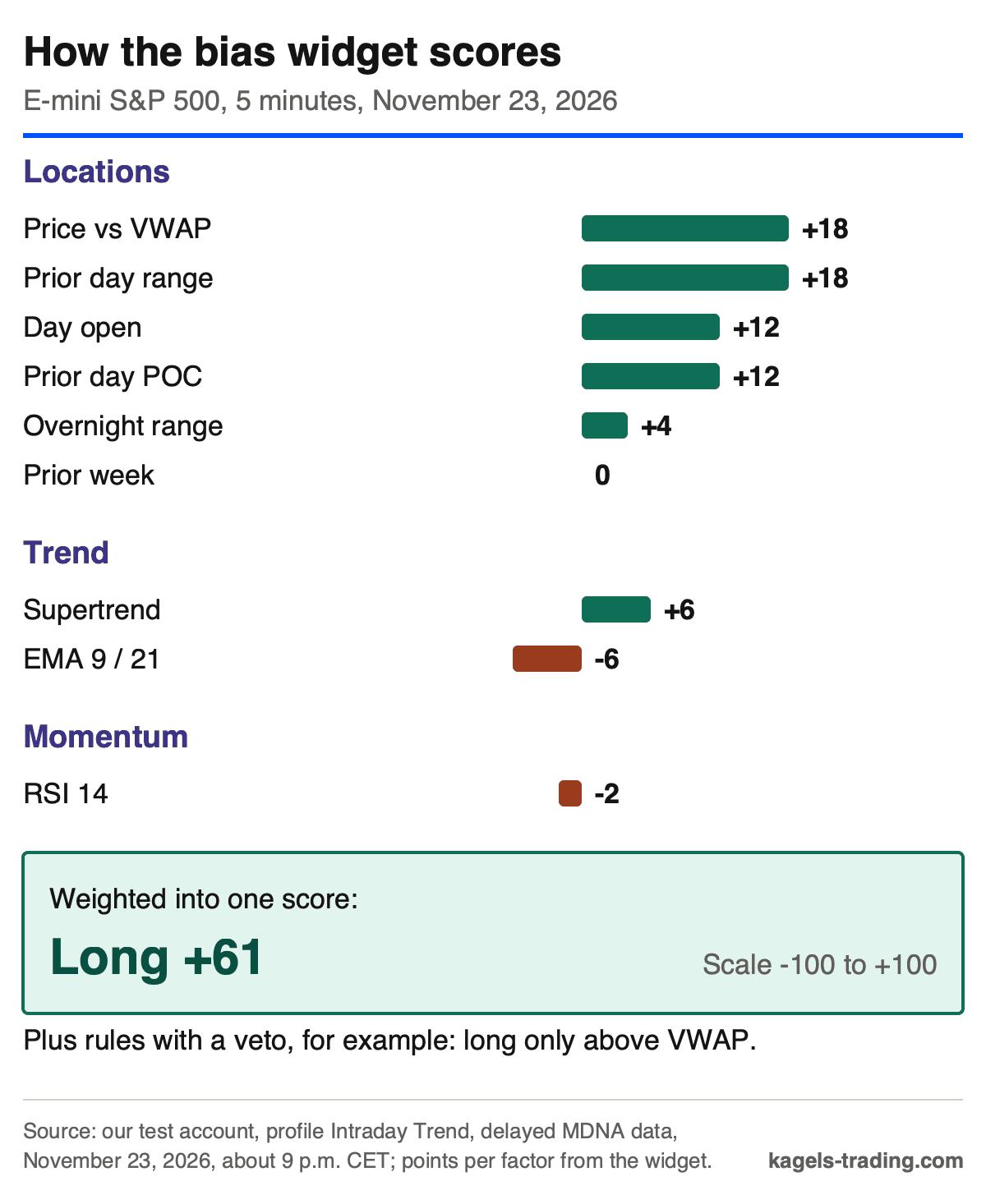
The bias widget calculates a score between long and short from several factors. In my test the Intraday Trend profile ran on the E-mini S&P 500. On the evening of November 23 it stood at “Long +61”, at +70 on 15 minutes and at +71 on 60 minutes. The screenshot below shows that state.
 Click to enlarge
Source: Kagels Trading, screenshot from our Northtrader account.
The factors are sorted into groups. Under “Locations” the widget checks, for example, whether the price is above VWAP, the day’s open or the prior day’s point of control. Under “Trend” you find EMA 9 and 21 plus Supertrend, under “Momentum” the RSI.
On top come rules with a veto, such as “long only above VWAP” or a lock around important news. You can weight each factor, add your own factors or set the whole thing up in a chat with the AI.
 Click to enlarge
Source: Kagels Trading, own graphic from our Northtrader account.
For me as a price action trader this is not a signal generator, but a checklist that does the math. On the test day the bias changed ten times in the five-minute profile. It is best to decide in advance how you react to such changes.
Trading and protecting your risk
The functions in this section need a broker connection. I therefore did not try them myself; the descriptions are based on the presentation and the website.
Chart Trader and management scripts
You trade directly from the chart, the heatmap or the DOM. You can rearrange the Chart Trader and remove buttons you do not need. A practical detail is cross trading: you watch the E-mini and trade the Micro.
You can assign a playbook to every order, so the review later knows which setup was behind it. Besides stop, target, break-even and trailing stop, you can store your own management scripts, for example a stop that trails every 50 ticks.
Account Sync for several accounts
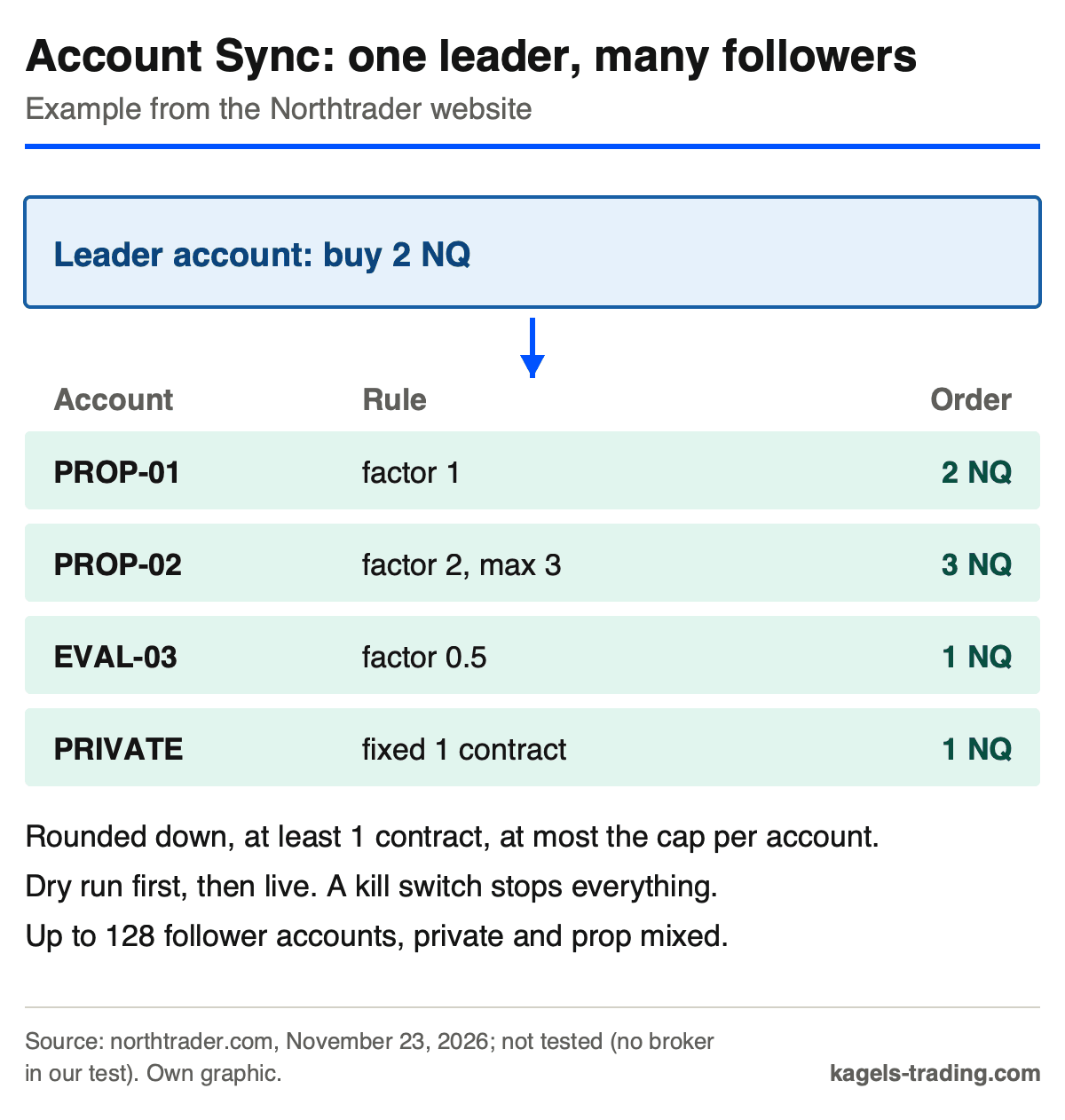
Account Sync copies the orders of a leader account to up to 128 follower accounts. For each account you set a multiplier or a fixed number of contracts. The size is rounded down, to at least one contract and at most the cap you set per account. Before going live there is a dry run, and a kill switch stops everything with one click.
 Click to enlarge
Source: Kagels Trading, own graphic based on northtrader.com.
For prop traders with several evaluation accounts, this is one of the strongest points on paper. Whether Account Sync can replace a separate trade copier can only be judged with a broker connection.
Vault: profits out of sight
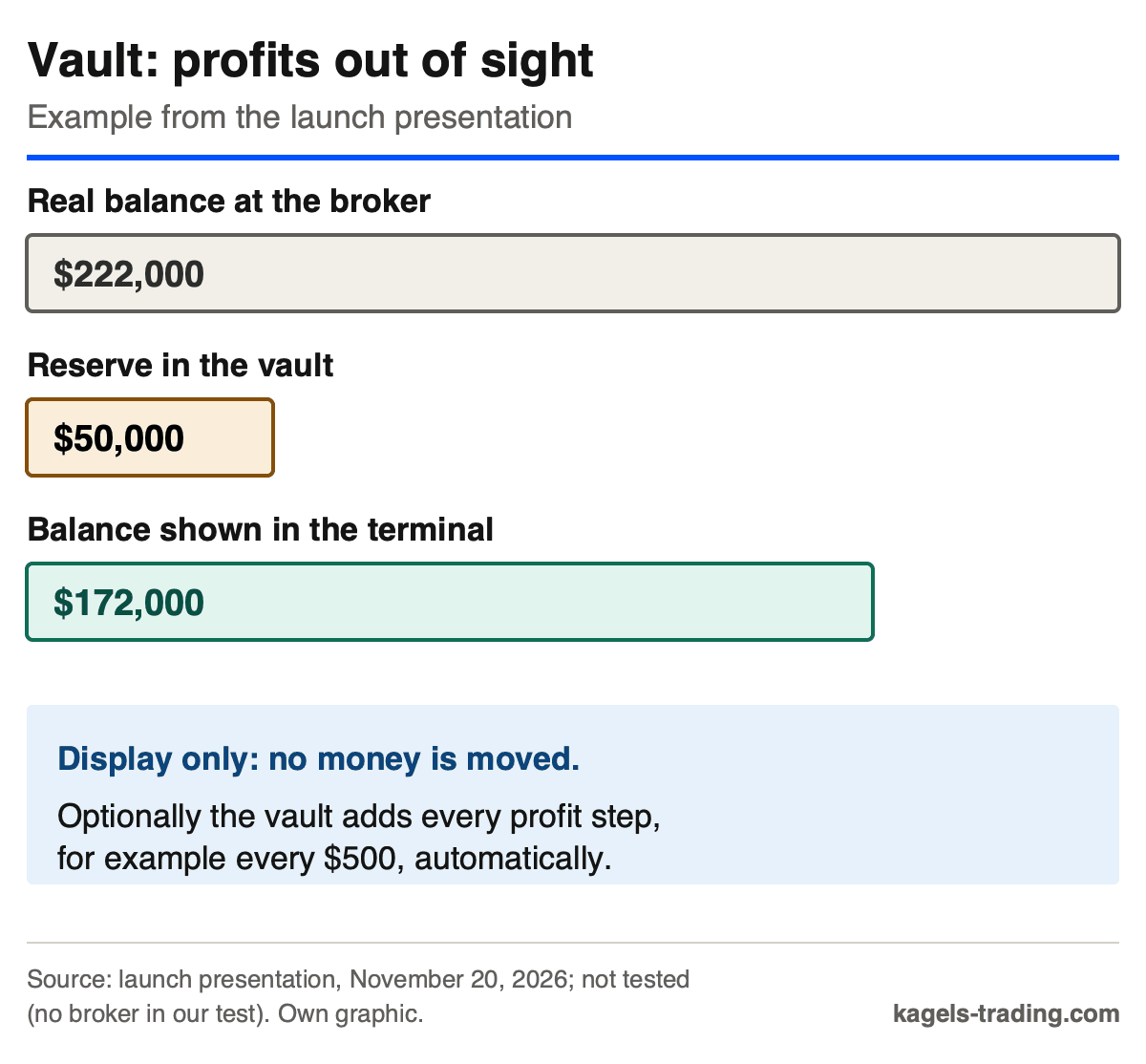
The vault widget is an idea I have not seen in this form before. You book a reserve, and the terminal subtracts it from the displayed balance. In the presentation the broker showed $222,000; after a reserve of $50,000, the terminal showed $172,000. If you want, the widget adds every profit step, for example every $500, automatically.
 Click to enlarge
Source: Kagels Trading, own graphic based on the Northtrader launch presentation.
No money is moved; it is a display only. The idea behind it: after a good day, anyone who sees a higher account balance tends to raise their risk. The vault keeps the number you size your risk on constant.
Prop trading widget and Goals & Limits
In the prop trading widget you enter the rules of your evaluation, such as the daily loss limit, the profit target and the drawdown type. The widget tracks your standing and reports a rule breach. Goals & Limits sets daily targets and loss limits per account. In the live presentation Goals & Limits did not load, and Denisenko could not show it.
Building and testing strategies
Northtrader offers three ways to your own strategy. You find the Algo Lab tools side by side, from no code to code:
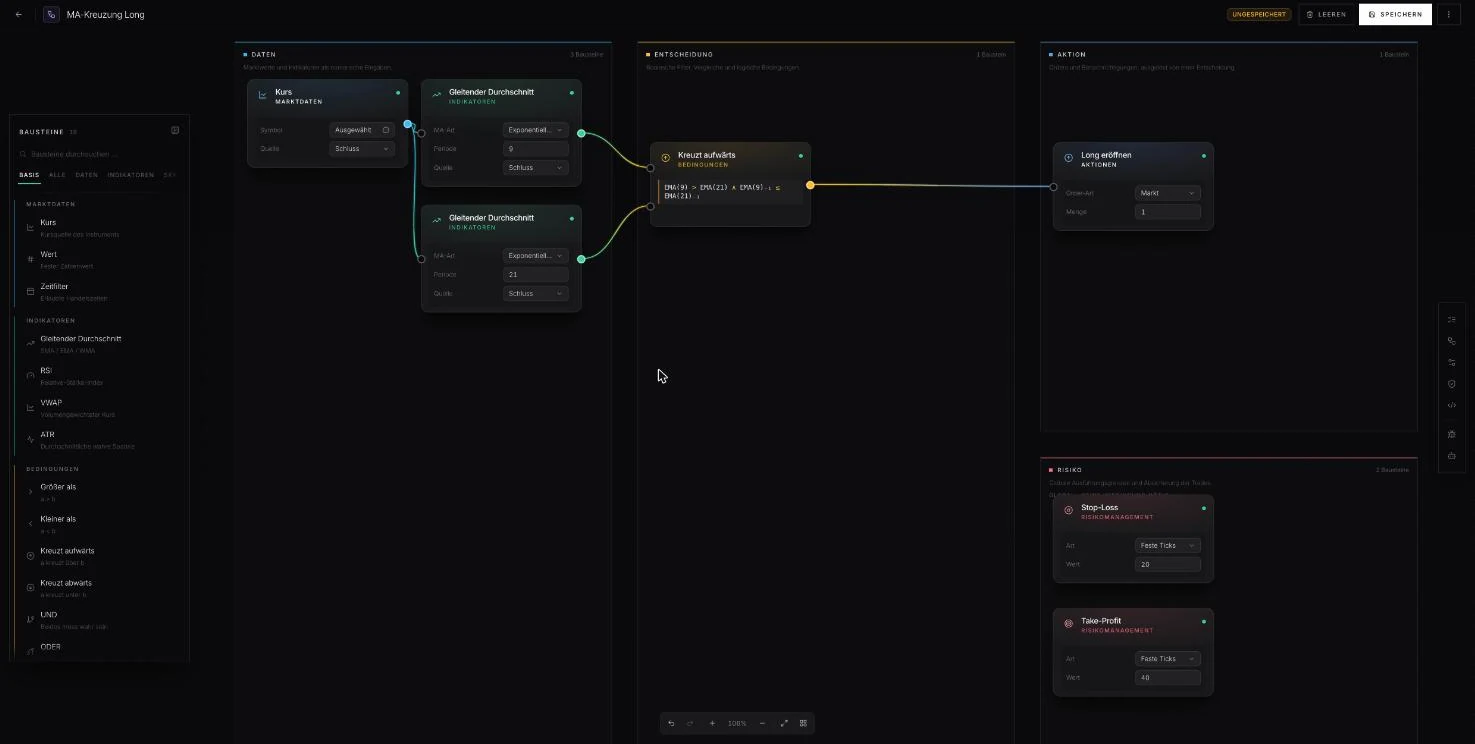
- Strategy Builder: you connect building blocks on a canvas, without any code. The “MA crossover long” template shows the idea: price, two moving averages, a “crosses above” condition, an “open long” action and a stop and target in ticks as the risk.
- NorthScript IDE: the platform’s own scripting language, according to the provider with more than 500 functions.
- AI agent: you describe the idea in one sentence, and the agent builds the blocks and the code. Alternatively you connect your own AI assistant through MCP, for example a Claude or ChatGPT subscription.
 Click to enlarge
Source: Kagels Trading, screenshot from our Northtrader account.
According to the provider, finished strategies run through backtesting, either as a visible replay bar by bar or as a fast background run with a report. After that the Algo Runner sends them live to the market.
Here is a limit you need to know. A strategy on the chart only shows entry, stop and target. It sends no orders, not even to a paper account.
Live trading runs only through the Algo Runner, and that is part of Pro. On Free the backtest is also limited to 30 days and needs a data connection.
TradeLab replays your own trades with different rules. What if the stop had been 20 instead of 30 ticks, what without the trades on Tuesdays? According to the presentation, the tool calculates exactly such questions on your real trades. Without trades of my own I could not test it.
Reviewing and trading together
Without trades of my own, the Trade Hub stayed empty in my test, so the following description is based on the presentation and the website. It collects every trade with entry, exit, the highest open profit and the highest open loss. You can replay every trade on the chart.
Playbooks hold the entry, exit and risk rules per setup, and daily journals hold your notes. An AI coach writes weekly and monthly reports, and the “Trader DNA” function analyzes twelve months. If you already keep a trading journal, here you find it all in the same software.
For storage you choose per connection: on the provider’s server, only in your browser or not at all. Only with server storage do analysis on all devices, Trade Cards and performance reports work.
A performance report can be shared by link. According to Denisenko it cannot be faked, because Northtrader records the orders itself. That is the provider’s claim; I could not check it.
There is also a chat inside the terminal. In the Trading Floor you meet other traders in rooms, with calls, screen sharing and shared trades. A community feature for posting ideas is due from December 1, 2026, as is a marketplace where developers sell indicators. Sellers keep 80 percent of the price there, 85 percent with Pro.
How safe are your data and logins?
According to the provider, your broker password never reaches its servers. In the desktop app it sits in the system keychain, in the browser it is stored encrypted in that browser. Only the login name is synced. You protect the Northtrader account itself with an authenticator app as a second factor.
As a Swiss company, MarketsDNA is subject to the Swiss Federal Act on Data Protection. According to the website the provider sells no data. It sets advertising cookies for Meta, X and Google Ads only with consent. In my test I could reject all non-essential cookies with one click.
These are the provider’s statements. I found no independent security audit of Northtrader in my research.
Where Northtrader is still a beta
Denisenko said openly that the platform needs another four to five weeks to reach a stable version. That matches my impression from the test account and the launch presentation:
- The numbers do not match: website, video and terminal give three different values for indicators and chart types.
- The phone apps are available or announced, depending on the source.
- In the presentation the first stream broke off, and Goals & Limits did not load.
- In my test the symbol search also listed expired contracts. If you pick the wrong one, you see an empty heatmap.
- For support the provider names no fixed response time. For problems with an order it refers you to your broker.
For a platform that has been public for three days, that is normal. If you switch today, keep your current software running in parallel. That is exactly what Denisenko recommended as well.
Pros and cons from my point of view
These points speak for and against the platform; what I could not test myself is marked as a provider claim. The pros are about the idea and the free plan, the cons about markets, data and the beta.
Pros
- One terminal for charts, heatmap, order flow, algos and journal.
- Runs in the browser, with desktop apps for macOS, Windows and Linux according to the provider.
- Device switch without a second data feed, according to the provider.
- The Free plan already includes Strategy Builder, NorthScript and 18 of the 23 widgets.
- Bias widget, vault and MatrixFlow are original ideas.
- Account Sync with one leader and up to 128 follower accounts, according to the provider.
- Broker password stays on your device, according to the provider.
Cons
- Futures only today, no CFDs and no crypto.
- Real-time data only through a separate data provider.
- Public beta with visible gaps and contradictory figures.
- Full heatmap and MBO data only with Rithmic, according to Denisenko.
- No fixed response time from support.
- Security promises I could not check independently.
Who is Northtrader worth it for?
Northtrader is the most serious attempt I have seen so far to pack a futures trader’s software stack into one terminal. The bias widget, the vault and the session that moves between devices are ideas from practice, not from marketing.
The platform can pay off for futures day traders with Rithmic access, for prop traders with several accounts and for anyone who wants to build and test strategies without programming. If you trade through a CFD broker, you can only analyze for now. Our overview of trading software helps you sort the alternatives by task.
Until January 1, 2027, Pro costs no license fee. My advice: test the platform with a demo account and keep your current software running in parallel until Northtrader is stable. This review is product analysis, not investment advice.
Frequently asked questions about Northtrader
Is Northtrader free?
Northtrader Free stays free with no time limit and needs no credit card. Pro costs $90 a month or $878 a year (€79 or €758.40 including VAT). Until January 1, 2027, Pro is free; after that the account switches to Free automatically. You pay market data and broker fees extra on both plans.
Which brokers does Northtrader support?
Northtrader connects to futures brokers and prop firms through Rithmic, CQG and dxFeed. With CQG your broker has to enable the platform, and dxFeed runs through prop firms on Volumetrica. Tradovate, Interactive Brokers and TradeStation are announced.
Can I trade CFDs with Northtrader?
No, not as of November 2026. Northtrader connects only futures today. According to the provider, CFDs and crypto are in preparation, without a date.
Which company runs Northtrader?
The operator is MarketsDNA AG, based in Baar, Switzerland. The chairman of the board is Christian Wessel, who also sits on the board of Tralgo AG, chaired by Eugen Denisenko. Denisenko presented the platform and, by his own account, helps develop it.
Is Northtrader legit?
The operator is entered in the commercial register of the canton of Zug and gives a full address in its imprint. Northtrader is software only, holds no client funds and runs no trading accounts. But the platform is a young beta, and security promises such as the local password storage are the provider’s claims without independent verification.
This article is translated from the German edition on kagels-trading.de.
More Trading Software guides
- Choose software for your trading
Trading Software: Charts, Platforms and Research Tools
A task-based guide to charting, screening, seasonality, order flow, execution, backtesting, automation and journals, with dated US dollar prices.
- Understand the Rithmic feed
Rithmic Explained: Costs, Platforms and Who It Suits
What the futures data feed and order routing cost through a broker, R | Trader Pro, the 35 listed platforms, the APIs and the limits.
- Check Quantower
Quantower Review 2026: Prices, Free Version and Limits
The Windows order flow platform: license prices checked 19 November 2026, the limits of the free version, broker routes without a license fee and the Mac question.
- Check Sierra Chart
Sierra Chart Review 2026: Packages, Prices, Data Feeds and Who It Suits
The five service packages and prices, why the Base packages connect to no broker, Denali and external feeds, Windows only and who it suits.
- Check NinjaTrader
NinjaTrader Review 2026: Free Plan, Fees, Margins and Kraken
Free platform and Kraken-owned futures broker: plans and fees checked 21 November 2026, the $35 inactivity fee, day vs overnight margins and the US and EU entities.
- Check TrendSpider
TrendSpider Review 2026: Plans, Prices and AI Tools
Automated trendlines, backtests and the Sidekick AI: plan limits and prices checked 19 November 2026, the paid trial, data fees and the 72-hour refund rule.
- Check Trade Ideas
Trade Ideas Review 2026: Holly AI, Prices and Limits
The real-time US stock scanner with Holly AI: Standard and Premium prices checked 19 November 2026, the free web dashboard, Money Machine in simulation and the no-refund rule.
- Check LuxAlgo
LuxAlgo Review 2026: Plans, Prices, Free Tools and Limits
Vela, Quant, the indicator library and the TradingView toolkits: four plans checked 10 November 2026, what is free, and the first-payment-only refund.
- Try free order flow
OpenMarket Review 2026: Free vs Plus, AI Agents and Limits
OpenMarket tested in our own account: heatmap, footprint, AI on the chart, Free vs Plus and where it falls short.