
Trade Ideas Review 2026: Holly AI, Prices and Limits


Contents
- Trade Ideas in 30 seconds (as of November 19, 2026)
- What is Trade Ideas?
- What does Trade Ideas cost?
- What does the free version show?
- Standard or Premium: what is the difference?
- Holly AI: what the signals are and what is missing
- TI Wave and Money Machine
- Scanners, OddsMaker and trading
- System requirements
- What do users say about Trade Ideas?
- Alternatives to Trade Ideas
- Pros and cons of Trade Ideas
- Conclusion: who is Trade Ideas for?
- Frequently asked questions about Trade Ideas
- About the author
Trade Ideas is one of the oldest real-time stock scanners for the US market, and today it sells itself mostly through AI. Its Holly AI signals, the TI Wave chart signals and the automated Money Machine get most of the attention. This review looks at what the platform does, what it costs, which parts are still a simulation, and what you should know about its no-refund rule before you pay.
All prices and rules in this review are as of November 19, 2026. We read Trade Ideas’ pricing page, its billing policy, its feature pages and its Trustpilot profile. We did not buy a plan for this English version and have no business relationship with Trade Ideas. How we research and write is described on our editorial policy page.
Trade Ideas in 30 seconds (as of November 19, 2026)
- What it is: a real-time scanner for US stocks with AI signals, from Trade Ideas LLC, founded in 2002 according to its website.
- Plans: TI Free (web dashboard, 15-minute delay), TI Standard at $127 a month or $1,068 a year, TI Premium at $254 a month or $2,136 a year.
- Premium only: Holly AI signals, OddsMaker backtesting, auto trading on your own rules and the Money Machine simulator.
- System: the full program runs on Windows; the free dashboards run in any browser, including a phone.
- Refunds: none for ordinary cancellation or unused time. The billing policy says “All sales are final”, with narrow exceptions.
What is Trade Ideas?
Trade Ideas is a real-time scanner that watches the whole US stock market and alerts you the moment a stock meets your conditions. It adds AI signals from Holly, ready-made scan templates and in-app trading through connected brokers. For the basics of scanning, see our overview of stock screeners.
The company has been in the market for more than 20 years. Its website says “Founded in 2002” and names a place on the Inc. 5000 list six years in a row (2017 to 2022). It also reports 161 million shares traded in September through its brokerage integrations.
Trade Ideas is built for active US stock traders. It covers NYSE, Nasdaq, AMEX, OTC markets, ETFs, SPACs and warrants, with limited TSX coverage. It is the wrong tool if you mainly trade forex, futures, crypto or non-US indexes.
What does Trade Ideas cost?
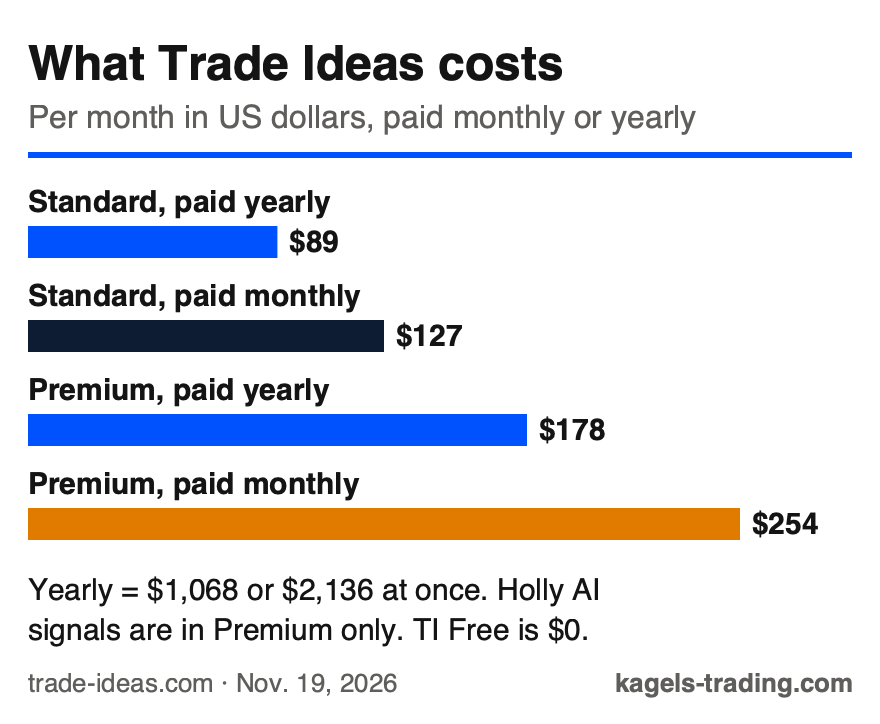
There are three plans: a free web version and two paid Windows plans. TI Free runs the market dashboards in any browser with 15-minute delayed data. TI Standard adds real-time data and the full Windows program; TI Premium adds Holly and the automation tools.
 Click to enlarge
Source: Kagels Trading, own graphic from the Trade Ideas pricing page.
| Plan | Monthly billing | Yearly billing |
|---|---|---|
| TI Free | $0 | $0 |
| TI Standard | $127 | $1,068 ($89 a month) |
| TI Premium | $254 | $2,136 ($178 a month) |
Yearly billing saves about 30%, but it ties up a lot of money, and ordinary cancellations are not refunded. According to the billing policy, “All sales are final. No refund is payable on a paid invoice.” When you cancel, access runs until the end of the period already paid, without proration. A first-period promotional price renews at the standard price. Exceptions are narrow: discretionary refunds in individual cases, corrected billing errors, and a refund of unused time if Trade Ideas ends a subscription for its own convenience.
Our advice: start monthly, not yearly. Use the free dashboard first, then one month of the plan you need. Only switch to yearly billing when you know you will use the tool for a full year; at $2,136 for Premium, that is a real commitment.
What does the free version show?
TI Free is a set of web dashboards, not the Windows program. You open it with an email address and no card. It shows pre-built scans, heat maps, stock races and the TI Wave signals on one chart, all with a 15-minute delay.
The delay rules out day trading with the free version. A momentum signal that is 15 minutes old is usually gone. For learning the interface, the channel logic and the scan ideas, the free dashboards are a sensible first step before you pay for real-time data.
Standard or Premium: what is the difference?
Both paid plans include real-time data, streaming alerts, screeners, charts, in-app trading and the AI Assistant. The AI Scan Building Assistant turns a plain-English description into a scan; Trade Ideas stresses that it is “not the same as Holly AI signals”. Standard shows 10 charts at once, Premium 20.
Premium adds the signal and automation layer. It includes Holly AI signals, OddsMaker backtesting, auto trading on your own scan strategies, the Money Machine simulator, AI-based stop and target levels and the RBI / GBI windows.
Holly AI: what the signals are and what is missing
Holly is Trade Ideas’ AI that fires buy and sell signals during the trading day, each with a symbol, an entry and a stop. Behind it is a bank of strategies that Holly retests every night against recent data; only the strongest go live the next day. That is classic quant selection: the single strategies follow fixed rules, and the selection is data-driven.
On the pages we reviewed, we found no full track record. The Holly signals page marks its examples as “Selected examples, not all signals”. On the pages we read, we found no statistics across all Holly signals over a defined period: no win rate, no average win and loss, no maximum drawdown and no independent check.
Without those numbers, Holly is hard to judge from the outside. Any trading system should be measured by its full results, not by its best trades. Ask for the complete statistics before you pay for Premium because of Holly.
There is also a structural problem with shared signals. Many subscribers see the same signal at the same moment. If many of them buy at once, the price moves before you are filled, and identical stop and target levels can cluster orders at the same prices. This slippage risk applies to every signal service with many users, however good the system behind it is.
Karsten Kagels’ view
“A scanner does not replace reading the market.” Karsten, a discretionary price action trader since 1980 and the reviewer of this page, sees impressive technology in Holly, TI Wave and the Money Machine. What makes him sceptical is the idea itself: a signal sent to thousands of subscribers at the same time creates a built-in execution disadvantage, and the more popular a setup, the worse the fill. His advice: if you can read clean price action, you find the relevant setups without an expensive subscription; if you cannot, a scanner will not make you consistently profitable.
TI Wave and Money Machine
TI Wave marks trend starts and ends on any chart with a green B for buy and a red S for sell. It works on any stock and time frame, and Trade Ideas includes it in all plans, even TI Free. The pages we read give no public statistics on how robust these signals are in different market regimes, so test them in the simulator first.
Money Machine is the automated trading part of Trade Ideas, but today it only trades in a simulator. Its feature page says it trades from your own Top Lists and streaming alerts, sets a stop and target per stock, and that “no orders go to a broker yet”; live trading is “coming soon”. It is included in Premium as the Money Machine Simulator. The download page still says “Money Machine places trades for you”, so read the feature page, not the headline.
Scanners, OddsMaker and trading
Streaming alerts are the core of Trade Ideas. They fire the moment a condition is met, with more than 500 data points for alerts and filters, and a Channel Bar with more than 20 ready-made trading templates in both paid plans. Historical scanning shows what a scan returned over the past 60 trading days.
OddsMaker is the backtester in Premium, and it works differently from most backtesters. It finds every past moment an alert fired under your filters, across all stocks, and measures what happened next: win rate, average winner and loser, profit factor and number of trades. It covers the last 60 days, which is a short sample. Our guide to backtesting explains why a short sample can mislead.
Brokerage Plus sends orders from the scanner to your broker. The pricing page lists API connections to Interactive Brokers, E*TRADE, TradeStation and Alpaca, plus chart trading and one-click order templates. Both paid plans include a real-time simulator with several practice accounts.
Check whether your broker accepts you before you plan around in-app trading. Interactive Brokers serves clients in many countries; check eligibility and Trade Ideas integration support for your country. Trade Ideas also names CenterPoint Securities and Cobra Trading as partners on its home page.
System requirements
The full program, Trade Ideas Pro, runs only on Windows. The download page offers version 5.9.1 and a beta. For a Mac, Trade Ideas suggests Parallels Desktop or a cloud Windows desktop on Amazon Web Services; both add cost and complexity.
The browser and phone only get the dashboards. TI Free and the paid plans include the Market Dashboards in any browser, but they “are not customizable” and focus on the essentials. For the full scanner with custom alerts, you need Windows.
What do users say about Trade Ideas?
On Trustpilot, Trade Ideas had a rating of 3.9 out of 5 from 52 reviews when we checked on November 19, 2026. The spread is wide: 54% of reviewers give five stars, 34% give one star. Trustpilot notes that the company “hasn’t invited customers recently, so reviews may not be representative”.
A rating split like this calls for care. With only 52 reviews, a handful of voices moves the average. Read the one-star reviews next to the billing policy before you commit to a yearly plan.
Alternatives to Trade Ideas
Which alternative fits depends on what you need from a scanner. If you want automatic chart patterns and no-code backtests in the browser, TrendSpider is the closest alternative; our TradingView alternatives comparison covers it. For charting and a stock screener on any device at lower prices, TradingView is the broader choice.
AI stock rankings are a different approach. Our Kavout review checks how one such provider’s live labels compare with real prices. For an overview of what AI can and cannot do in trading, see our guide to AI trading.
Pros and cons of Trade Ideas
These points speak for Trade Ideas:
- Real-time scanning of the whole US stock market with 500+ data points.
- Free web dashboard to try the interface without a card.
- AI Scan Building Assistant in both paid plans.
- OddsMaker backtesting and a real-time simulator.
- Broker connections to Interactive Brokers, E*TRADE, TradeStation and Alpaca.
These points speak against it:
- High price: $254 a month or $2,136 a year for Premium.
- No refunds for ordinary cancellation or unused time.
- Holly: we found no complete performance statistics on the pages reviewed, only selected examples.
- Money Machine trades only in a simulator so far.
- Windows only for the full program.
Conclusion: who is Trade Ideas for?
Trade Ideas is a serious real-time scanner for active US stock traders. Its strength is the streaming alert engine and the depth of filters; Premium adds Holly, OddsMaker and automation tools.
Three points hold it back. We found no complete Holly performance statistics on the pages reviewed, only selected examples; the full program runs only on Windows; and because ordinary cancellations are not refunded, a yearly plan is a real risk.
It fits if several things are true at once. You trade US stocks actively, you use momentum, gap or breakout setups that need real-time scans, you work on Windows, and your trading results already carry the subscription cost. Start with the free dashboard, then one month, before you consider a year.
Frequently asked questions about Trade Ideas
What is Trade Ideas?
Trade Ideas is a real-time scanner for US stocks with AI signals. It watches the whole market and alerts you when a stock meets your conditions; Premium adds Holly AI signals and backtesting.
How much does Trade Ideas cost?
TI Standard costs $127 a month or $1,068 a year, TI Premium $254 a month or $2,136 a year, as of November 19, 2026. TI Free costs nothing but has delayed data. Ordinary cancellations and unused time are not refunded.
Is Trade Ideas free?
Yes, there is a free web dashboard with 15-minute delayed data. You only need an email address, no card. Real-time data and the full Windows program start with TI Standard.
Does Trade Ideas have a refund policy?
There are no refunds for ordinary cancellation or unused time. The billing policy says “All sales are final”; if you cancel, access runs until the end of the paid period. Exceptions are narrow: Trade Ideas may refund at its own discretion in individual cases (not for promotional purchases), corrects billing errors such as duplicate charges, and refunds the unused part if it ends a subscription for its own convenience.
Does Trade Ideas run on a Mac or phone?
The full program runs only on Windows. On a Mac you need Parallels or a cloud Windows desktop. The Market Dashboards run in any browser, including a phone, but they are not customizable.
Is Money Machine live trading?
Not yet, it only runs in a simulator. Money Machine runs in Simulated Mode, and its orders do not go to a broker; Trade Ideas says live trading is “coming soon”. It is part of TI Premium.
Is Trade Ideas good for beginners?
Usually not, it is built for experienced traders. The tool is built for active day traders, the learning curve is steep, and Premium only pays off if your trading is already profitable. Beginners should start with cheaper tools and the free dashboard.
This English edition is based on our German edition on kagels-trading.de and has been adapted for international readers.
More Trading Software guides
- Choose software for your trading
Trading Software: Charts, Platforms and Research Tools
A task-based guide to charting, screening, seasonality, order flow, execution, backtesting, automation and journals, with dated US dollar prices.
- Understand the Rithmic feed
Rithmic Explained: Costs, Platforms and Who It Suits
What the futures data feed and order routing cost through a broker, R | Trader Pro, the 35 listed platforms, the APIs and the limits.
- Check Quantower
Quantower Review 2026: Prices, Free Version and Limits
The Windows order flow platform: license prices checked 19 November 2026, the limits of the free version, broker routes without a license fee and the Mac question.
- Check NinjaTrader
NinjaTrader Review 2026: Free Plan, Fees, Margins and Kraken
Free platform and Kraken-owned futures broker: plans and fees checked 21 November 2026, the $35 inactivity fee, day vs overnight margins and the US and EU entities.
- Check TrendSpider
TrendSpider Review 2026: Plans, Prices and AI Tools
Automated trendlines, backtests and the Sidekick AI: plan limits and prices checked 19 November 2026, the paid trial, data fees and the 72-hour refund rule.
- Check LuxAlgo
LuxAlgo Review 2026: Plans, Prices, Free Tools and Limits
Vela, Quant, the indicator library and the TradingView toolkits: four plans checked 10 November 2026, what is free, and the first-payment-only refund.
- Try free order flow
OpenMarket Review 2026: Free vs Plus, AI Agents and Limits
OpenMarket tested in our own account: heatmap, footprint, AI on the chart, Free vs Plus and where it falls short.