
Stock Watchlist: What It Is and How to Build One


Contents
- Stock watchlist in 30 seconds
- What is a watchlist?
- How to build a watchlist in five steps
- How many symbols should a watchlist have?
- Watchlist, screener or portfolio?
- Advantages of a watchlist
- Potential drawbacks
- What a watchlist is good for
- Tools to build a watchlist
- My conclusion on the stock watchlist
- Frequently asked questions about stock watchlists
- About the author
A watchlist is the short list of markets you have decided to look at, before the market decides for you. It saves time, because you check ten charts instead of scrolling through thousands. And it makes your trading more consistent, because every name on it is there for a reason you can write down.
This guide explains what a stock watchlist is, how to build one from your own setups and how big it should be. It also covers the tools that keep a watchlist and the limits of the free TradingView plan, checked on 12 November 2026. This article follows our editorial policy.
Stock watchlist in 30 seconds
- Definition: a watchlist is a list of stocks, indices, commodities, currencies or other instruments that you follow closely.
- Purpose: it narrows the market down to the names where a setup is forming, so you are ready when price reaches your level.
- Build it from criteria: sector, size, trend, a screener result or a chart pattern. Every name needs a reason to be there.
- Keep it short: a list you can check every day beats a long list you only scroll past.
- Tools: trading platforms, broker apps and research tools all offer watchlists, usually free, often with price alerts.
- Review it: remove names whose setup is gone and keep a copy of the list outside one single platform.
What is a watchlist?
A watchlist is a list of financial instruments that a trader or investor follows closely to spot trading or investment opportunities.
The instruments can be anything you trade: stocks, ETFs, bonds, commodities, currencies or indices. What turns a list of symbols into a watchlist is the selection: you put a market on it because it may soon offer a trade, not because it exists. In practice, a watchlist grows out of the trading setups you look for: a stock near a breakout level, an index pulling back to support, a currency pair before a central bank decision.
How to build a watchlist in five steps
A useful watchlist follows the same five steps every time, whatever the platform. The steps below are our own structure for this English edition; they turn the German original’s idea that a watchlist starts from your setups into a routine. The details of your criteria depend on your style: a day trader works with a different list than a long-term investor.
- Start from your setup, not from the market. Write down what you trade: for example breakouts above a multi-week high, or pullbacks to the 50-day moving average. Only markets that can show this setup belong on the list.
- Filter the universe with clear criteria. Use sector, market capitalization, price, average volume or a screener. Our guide to stock screeners compares free and paid tools for this step.
- Check each candidate on the chart. A screener result is a candidate, not a trade. Mark the level that matters, such as support and resistance, and drop names without a clear level.
- Group the list and add alerts. Split it into sections, for example indices, metals and currencies, and set a price alert at each level so the platform tells you when to look.
- Review the list on a fixed schedule. Remove names whose setup has failed or played out, and add new candidates. For a day trader that may be every evening, for a swing trader once or twice a week.
How many symbols should a watchlist have?
There is no fixed number, but a watchlist only works if you can check every name on it. A day trader who looks at each chart before the open needs a short list; a long-term investor can follow more names with a weekly review. If you scroll past symbols without looking at the chart, the list is too long.
Platforms set technical limits that are far above what most traders can follow. On TradingView’s free Basic plan, a watchlist holds up to 30 symbols; the paid plans allow 1,000 symbols per list, according to the pricing page checked on 12 November 2026. Thirty is more than enough for a daily routine.
 Click to enlarge
Source: German edition of this guide (screenshot uploaded March 2024).
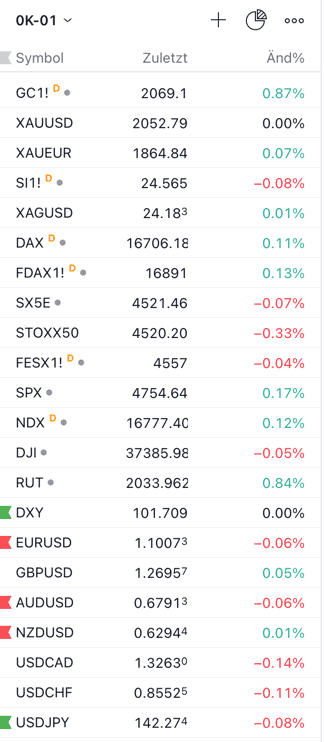
The example above shows a list sorted by market, not alphabetically. Gold futures and spot prices come first, then silver, the DAX and Euro Stoxx 50 as cash index and future, the main US indices, the US dollar index and seven currency pairs. Grouping by market lets you read related moves together, for example gold against the dollar.
Watchlist, screener or portfolio?
A screener finds candidates, a watchlist keeps the ones you want to follow, and a portfolio holds what you own. The three tools work in this order. The screener result is a long list that changes with every filter. The watchlist is your short list of names with a reason and a level. The portfolio tracks positions you have already bought.
Keeping them apart protects you from treating a candidate as a decision. A name on your watchlist is not a buy signal. It is a market you watch until price confirms your setup, or until you remove it.
Advantages of a watchlist
Focused market observation
A watchlist lets you concentrate on the markets that fit your strategy. Your analysis becomes deeper because it covers fewer names, and you notice when a known level is reached.
Time saving
Instead of watching the whole market, you follow a selected group of instruments. That frees time for the charts that matter and for your day trading plan before the session.
Better decisions
Following the same names day after day sharpens your judgement. You learn how a stock usually moves, how it reacts to earnings and where its support lies, which leads to better-founded decisions to buy, sell or wait.
Risk management
A watchlist helps you spot risks before you commit money. You see the volatility, the gaps and the news flow of a name while it is still on the list, not after you have opened a position.
Potential drawbacks
Information overload
A watchlist that is too long creates noise instead of focus. With too many symbols, alerts and price changes compete for your attention, and the important setup gets lost.
Missing other opportunities
Focusing on a fixed selection can make you overlook good opportunities elsewhere. A regular screener run and a fixed review day keep the list from going stale.
What a watchlist is good for
Developing a strategy
A watchlist is a practical tool for developing and refining a trading strategy. You can note for each name which setup you expect and later check whether it played out, much like a trading journal does for trades.
Learning without risk
New traders can learn how markets move without putting capital at risk. Watching the same names through news, reports and quiet days builds a feel for price behavior before the first real trade.
Regular adjustment
Your watchlist can and should change with the market. Add names when new setups form, remove names after their move or when the reason for them is gone.
Tools to build a watchlist
Trading platforms
Most trading platforms have a built-in watchlist with real-time or delayed prices. In TradingView, the watchlist sits in the right sidebar of the chart; a click on a symbol loads its chart with your drawings. Our guide on how to use TradingView shows how to add symbols, create sections and flag names.
Broker and mobile apps
Broker platforms and their mobile apps let you follow and update your watchlist anywhere. That is useful for checking alerts on the go. The list in the app is often a separate list from the one in your charting platform, so decide which one is your master list.
Research tools
Specialized research tools add data to the list, such as valuation, analyst ratings or dividends. Our InvestingPro review shows how its watchlists combine fundamental figures with a performance check. These features are usually part of a paid plan.
Keep a copy of your list
A watchlist that lives on one platform alone can disappear with that platform. Services change, accounts are closed and imports do not always work. Keep a simple copy, for example a text file or a spreadsheet with symbol, reason and level, and update it on your review day.
My conclusion on the stock watchlist
A well-kept watchlist is one of the most useful tools a trader or investor has. It helps you keep track of the market, links every name to a setup and helps you plan decisions in advance instead of making them on the spot. The one thing to manage is its size: a short list you really check beats a long list you only collect.
Market analysis and education, not investment advice. Trading involves the risk of loss.
Frequently asked questions about stock watchlists
What is a watchlist?
A watchlist is a list of financial instruments that you follow closely to find trading or investment opportunities. It can hold stocks, bonds, commodities or currencies, selected by your own criteria.
Why should I use a watchlist?
A watchlist helps you follow the market, spot trends and decide in a structured way. You keep potential trades in view without watching the whole market, and you see when a name reaches your level.
How do I create a watchlist?
You create a watchlist on your trading platform or in your broker’s app. Choose instruments that match your criteria, such as sector, size, trend or a screener result, add them to the list and mark the level that matters for each one.
Can I have more than one watchlist?
Yes, many traders and investors keep several watchlists for different strategies or markets. A common split is one list for day trading, one for swing trades and one for long-term ideas. How many lists you can keep depends on the platform and your plan.
How often should I update my watchlist?
That depends on your trading style. Many day traders update their list every evening for the next session, while long-term investors may adjust it weekly or monthly.
Can I set alerts on my watchlist?
Yes, most trading platforms let you set alerts for price levels or news. On TradingView, the free Basic plan allows 3 active price alerts; the paid plans allow 20 to 1,000, according to the pricing page checked on 12 November 2026.
Is a watchlist only for active traders?
No, long-term investors use watchlists as well. They follow companies they may buy at a better price and adjust their portfolio when the moment comes.
How many stocks should be on my watchlist?
That varies from trader to trader, but every name should be one you actually check. Some traders keep a focused list of five to ten names, others prefer a broader selection with a weekly review.
Does a watchlist cost anything?
Usually not: a watchlist is a standard feature of most trading platforms and brokers. Costs can come from real-time data or from a paid plan with more symbols or alerts.
How does a watchlist help with risk management?
By following the names before you trade them, you can judge their risk earlier. You see their volatility and news flow in advance and can size a later trade with position sizing rules instead of guesswork.
This English edition is based on our German edition on kagels-trading.de and has been adapted for international readers.
More Day Trading guides
- Understand day trading
Day Trading for Beginners: Markets, Risk and Practice
Definition, markets, a session from open to close, costs and capital, the 2026 US account rules, study evidence and a practice path.
- Choose a strategy
Day Trading Strategies: Rules, Examples and When to Skip
Opening range breakout, trend pullback and range fade compared, VWAP as a filter, with a win, a loss and a skipped trade on SPY.
- Practice without risk
Day Trading Simulators: Paper Trading and Replay Compared
Paper trading, market replay and backtests compared, with seven simulators US traders use, their cost, account conditions and fill limits.
- Plan one session
Day Trading Plan: A Session Checklist and Worked Example
What to decide before the open, follow during the session and review after, with a worked SPY example and a free Excel template.
- Understand your taxes
Trading Taxes in the US: How Traders Are Taxed in 2026
US federal rules for 2026: short and long term rates, the $3,000 loss limit, wash sales, the 60/40 rule for futures and trader tax status.