
ChartMill Review 2026: Screener, Ratings and Prices


Contents
ChartMill is a stock screener that combines technical and fundamental filters with its own ratings. The Belgian company scores every stock it covers from 0 to 10 on its technical health, its chart setup and five fundamental areas. You can filter on these ratings, use ready-made screens inspired by well-known traders, or build your own screens.
This review shows what ChartMill offers, what it costs and where its limits are. I used ChartMill as a visitor without an account on 31 October 2026; I did not test a paid plan. Prices, markets, data delays and the meaning of the ratings come from ChartMill’s own pages on the same day. Where a fact could not be checked on an official page, I leave it out.
ChartMill in 30 seconds
- What it is: a browser-based stock screener with technical and fundamental filters, its own 0-to-10 ratings, charts and stock reports.
- Markets: US stocks (15 minutes delayed), Canada (end of day), Euronext and Xetra (end of day) and CBOE Europe (15 minutes delayed). No real-time data, also not with a subscription.
- Prices: $299.97 or €269.97 a year with a swing trading course, or $34.97 or €29.97 a month; the first month costs $13.97 or €12.97.
- Free use: visitors see the screens and an unfiltered list; filtered results need a free account, with ads.
- Best for: swing traders and growth investors who screen after the US close, not day traders.
What is ChartMill?
ChartMill is a screening and analysis website run by ChartMill.com in Sint-Niklaas, Belgium. It describes itself as developed by traders and long-term investors and claims more than 300,000 investors and more than 15 years in the market. Its documentation is written and reviewed by the ChartMill team, including Aldwin Keppens and Kristoff De Turck. The site is in English.
Its core is the screener, its added value are the ratings. Many screeners filter on raw values such as growth or price-to-earnings ratios. ChartMill also condenses them into scores, so you can, for example, ask for stocks with a high technical rating and a good setup rating at the same time. Around the screener sit charts with automated support and resistance, stock reports, watchlists and alerts.
Markets and data delay
ChartMill covers stocks in North America and Europe, with delayed or end-of-day data. There are no futures, forex or crypto screens. For Europe, fundamentals, estimates and analyst ratings are only available for Xetra and Euronext.
| Region | Exchanges | Data |
|---|---|---|
| United States | Nasdaq, NYSE, Amex | 15 minutes delayed |
| Canada | TSX, TSX Venture | end of day, with intraday data |
| Europe | Euronext, Xetra | end of day |
| Europe | CBOE Europe (main stocks from London, Paris, Frankfurt, Zurich and other venues) | 15 minutes delayed |
ChartMill’s market data documentation, checked on 31 October 2026.
The screener is updated once a day, about an hour after the US close. All ChartMill ratings are recalculated then. Only price and volume fields of the current day can be screened live for US stocks and CBOE Europe. ChartMill states plainly that its market data stays 15 minutes delayed, including with a subscription. For day trading it is therefore not the right tool.
The ChartMill ratings
Two technical ratings sit at the heart of the screener. The Technical Rating is a score from 0 to 10 for the technical health of a stock, built from relative strength and its history, short- and long-term trends and moving averages. The Setup Rating scores from 0 to 10 how good the current consolidation is for an entry: distance to short-term averages, a tight price range, support below and falling volatility.
Five fundamental ratings cover growth, valuation, health, profitability and dividend. Each is a weighted score from 0 to 10, calculated from the company’s quarterly and annual results, and each can be used as a filter. That makes it easy to combine, for example, strong growth with acceptable valuation without setting a dozen single filters.
Ratings save time, but they are ChartMill’s own model. A score of 8 is not a recommendation; it shows how a stock ranks on ChartMill’s inputs at the last update. Before you trade, check the underlying numbers and the chart yourself. The weights are described in the documentation, which is worth reading once before you rely on the scores.
Ready-made screens and what I could test
 Click to enlarge
Source: ChartMill trading ideas.
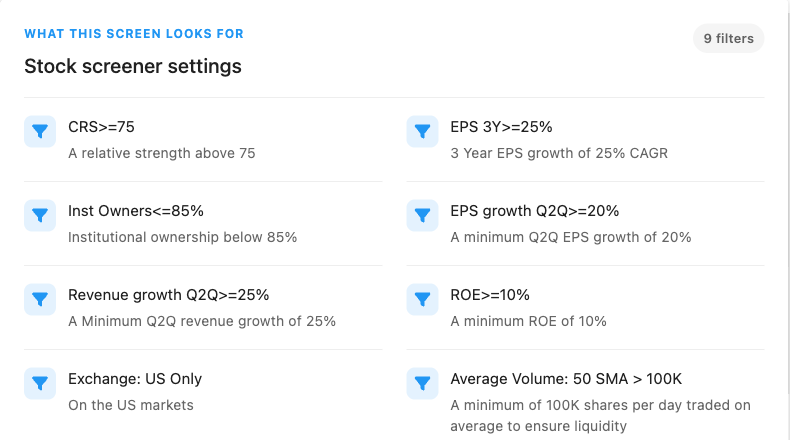
ChartMill offers ready-made screens inspired by well-known investors. They include an “O’Neill CANSLIM High Growth” screen, a Mark Minervini trend template screen, Martin Zweig’s growth at a reasonable price, James O’Shaughnessy’s Tiny Titans and Weinstein stage analysis setups. ChartMill calls them starting points; they are not endorsed by the investors named. Our CAN SLIM guide explains the original rules behind the first one.
The published filters let you recreate each screen in ChartMill; other screeners can only approximate it. The CAN SLIM screen uses nine filters: ChartMill relative strength (CRS) of at least 75, quarterly EPS growth of at least 20 percent, quarterly revenue growth of at least 25 percent, three-year EPS growth of at least 25 percent a year, return on equity of at least 10 percent, debt to equity of at most 2, institutional ownership of at most 85 percent, a 50-day average volume above 100,000 shares and US exchanges only. Other screeners use their own relative strength rankings, so their results can differ.
 Click to enlarge
Source: ChartMill stock screener.
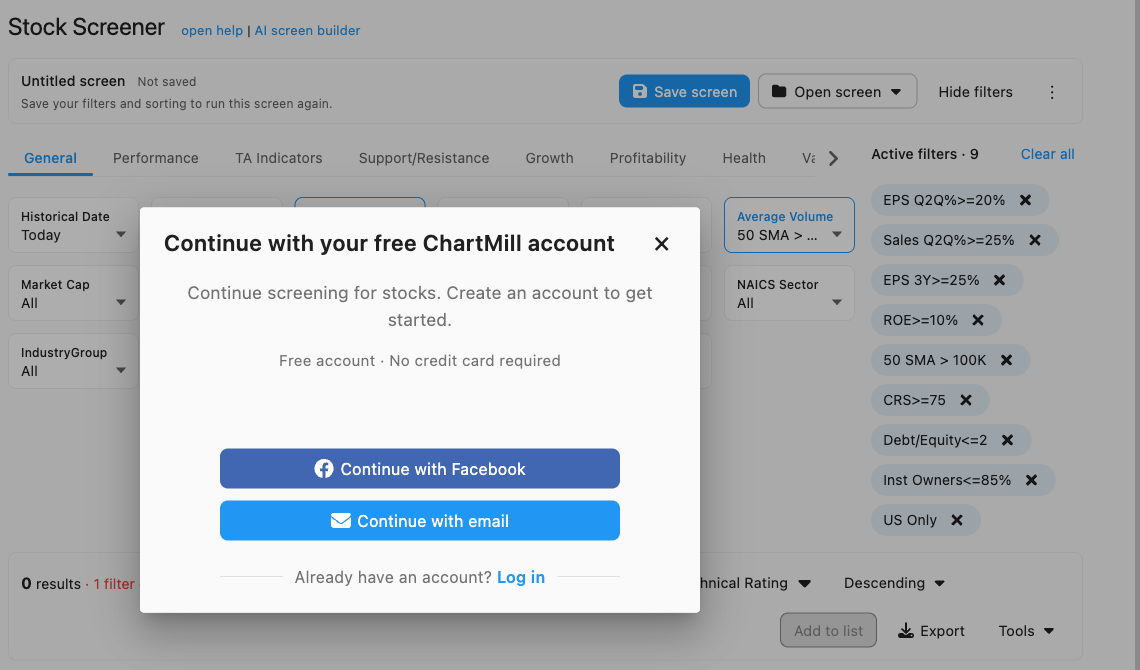
Without an account, I could load the screen but not see its results. On 31 October 2026 the screener showed all nine filters as active, then asked me to continue with a free account, without a credit card. Without filters, a visitor sees the full, unfiltered list of covered stocks. So the free account is the real entry point; I did not create one, so this review contains no dated result count for the screen.
Prices and plans
ChartMill has two paid plans, and both include the full set of tools without ads. The annual plan includes the 175-page “Mastering Swing Trading” course. The monthly plan starts with a cheaper first month. There are no additional usage charges.
Official subscription page, 31 October 2026. In euros: €269.97 a year or €29.97 a month, first month €12.97.
| Plan | US dollars | Euros | Includes |
|---|---|---|---|
| Annual + course | $299.97 a year | €269.97 a year | all tools, no ads, swing trading course |
| Monthly | $34.97 a month | €29.97 a month | all tools, no ads; first month $13.97 / €12.97 |
| Free account | free | free | screening results, with ads (limits not published) |
ChartMill subscription page, checked on 31 October 2026. ChartMill does not say on that page whether VAT is included.
Cancellation stops the renewal; unused time is not refunded. You pay in advance and the plan renews automatically. After cancelling you keep access until the end of the paid period. Payment runs through Stripe or, for euro payments, PayPal. I found no free trial on the subscription page, only the cheaper first month.
ChartMill vs other screeners
ChartMill fits between a free screener and an all-in-one platform. Finviz is the quick free choice for US stocks; TradingView’s screener comes with live charts for many markets; our StockCharts review covers scheduled technical scans. ChartMill’s strength is the combination of technical and fundamental ratings with ready-made screens whose filters are published.
On user reviews, the sample is too small to judge. On 31 October 2026, ChartMill had seven reviews on Trustpilot with a TrustScore of 3.4. Seven opinions say little about a product used by many investors, so I draw no conclusion from them. Test the free account and the cheap first month with your own screens instead.
Who ChartMill is for
ChartMill suits swing traders and growth investors who prepare their list after the US close. The daily update, the setup rating and the ready-made growth screens match that routine well. European investors also get Xetra and Euronext with fundamentals.
It is not for day traders or for markets outside North America and Europe. All data is delayed or end of day, and Asia and Australia are not covered. If you need real-time prices or futures and forex, look at a trading platform instead. If you only screen US stocks occasionally, a free screener may be enough.
Conclusion: strong ratings, delayed data
ChartMill is a capable screener with useful ratings and transparent ready-made screens. The combination of technical, setup and fundamental scores saves time, and the published filter lists make every ready-made screen easy to recreate in ChartMill. At $299.97 or €269.97 a year it sits at a moderate price for a research platform.
Start with the free account, then decide on a plan. The free account unlocks screening results, and the first paid month costs only $13.97. Keep in mind that the data is delayed and that a rating is a model, not a signal. For the method behind the most popular screen, read our CAN SLIM guide linked above; for a broader comparison of screeners, see our StockCharts and Finviz reviews.
Frequently asked questions about ChartMill
Is ChartMill free?
ChartMill has a free account, but visitors without an account cannot see filtered screening results. With the free account you can screen, with ads. The full tools without ads need a paid plan.
How much does ChartMill cost?
ChartMill costs $299.97 or €269.97 a year, or $34.97 or €29.97 a month. The first month of the monthly plan costs $13.97 or €12.97, and the annual plan includes a swing trading course.
Does ChartMill have real-time data?
No, ChartMill’s market data is delayed, also with a subscription. US stocks and CBOE Europe are 15 minutes delayed, Euronext, Xetra and Canada are end of day. The screener updates about an hour after the US close.
What is the ChartMill Technical Rating?
The Technical Rating is a score from 0 to 10 for the technical health of a stock. It combines relative strength, short- and long-term trends and moving averages. The separate Setup Rating scores how good the current consolidation is for an entry.
Which markets does ChartMill cover?
ChartMill covers US, Canadian and European stocks. In the US it covers Nasdaq, NYSE and Amex, in Canada the TSX and TSX Venture, in Europe Euronext, Xetra and CBOE Europe. Futures, forex and Asian markets are not listed.
Sources
Product specifications and prices come from ChartMill’s own pages, checked on 31 October 2026; access observations come from our visitor test. The screenshots show the free view without an account; no paid plan was tested. Check the subscription page before you buy.
- Prices and terms: ChartMill subscription page.
- Data and markets: stock screener market data.
- Ratings and screens: Technical Rating and Setup Quality, fundamental reports and ratings, ChartMill overview, O’Neill CANSLIM High Growth screen.
- Company and reviews: ChartMill disclaimer (company address), Trustpilot.
This article is our own review. We have no partnership with ChartMill and receive no commission.
This English edition is based on our German edition on kagels-trading.de and has been adapted for international readers.
More Market Data & Research Tools guides
- Check the Bloomberg Terminal
Bloomberg Terminal: Cost, Features and Who Needs It
What a Bloomberg Terminal is reported to cost, which products exist, who should pay for one and the cheaper tools private investors use instead.
- Find a cheaper research tool
Bloomberg Terminal Alternatives for Individual Traders
Koyfin, Finviz, Barchart, TradingView and InvestingPro compared on data timeliness, fundamentals, screening and price, plus the institutional alternatives.
- Screen US stocks for free
Finviz Review: Free vs Elite, Screener and Limitations
What the free Finviz screener, maps and insider pages do, a three-filter example with real counts, and what Finviz Elite costs.
- Choose a stock screener
Stock Screeners Compared: Free and Paid Tools by Task
Finviz, TradingView, StockCharts, ChartMill, Koyfin, Barchart, InvestingPro and MarketSurge sorted by task, with free limits, data delay and dated prices.
- Check StockCharts
StockCharts Review 2026: Plans, Prices and Free Tools
What the free StockCharts version and the Basic, Extra and PRO plans include, what real-time data costs and where scans, RRGs and the SCTR help.
- Research futures and options
Barchart Review: Free vs Premier, Futures and Options Tools
What barchart.com offers for futures contracts, COT charts and options, what Free, Plus and Premier cost, and what a membership does not include.
- Read futures positioning
COT Report: How to Read Commitments of Traders
Read CFTC reports, calculate net positions and the COT Index, and understand what delayed positioning data can and cannot tell you.