
Benzinga Pro Review 2026: Pricing, Free Trial, Worth It?


Contents
- Benzinga Pro in 30 seconds
- How we reviewed Benzinga Pro
- What is Benzinga Pro?
- Benzinga Pro pricing: what does it cost in 2026?
- Which plan: Basic, Streamlined or Essential?
- Is there a Benzinga Pro free trial?
- Benzinga Pro features: newsfeed, squawk, scanner and signals
- Is Benzinga legit?
- Is Benzinga Pro worth it?
- Benzinga Pro alternatives
- Pros and cons of Benzinga Pro
- Our verdict on Benzinga Pro
- Frequently asked questions about Benzinga Pro
- About the author
Benzinga Pro is a real-time news terminal for active US stock traders, and in 2026 it costs between $37 and $197 a month. The cheapest plan, Basic, gives you the full newsfeed and real-time quotes. The audio squawk starts with Streamlined at $147, and the scanner, signals and AI tools come only with Essential at $197 a month. A 14-day free trial is offered, but it needs a card and turns into the $197 plan unless you cancel.
We did not open an account or start a trial for this review. Everything below comes from Benzinga’s own pricing page, the trial page, its terms and conditions, its about page and Apple’s App Store, all read on November 17, 2026. Where a figure is only Benzinga’s own claim, we say so. We have no business relationship with Benzinga at the time of writing. How we research and write is described in our editorial policy.
Risk warning: fast news does not make a trade safe. Trading stocks and options can lose you money quickly. This review is not investment advice.
What do you need most?
- Breaking stock news and real-time quotes, nothing elseBasic, $37 a month
- News read out loud while I watch my chartsStreamlined, $147 a month
- Scanner, signals, calendars and the AI assistantEssential, $197 a month
- A screener or charts for occasional researchA cheaper tool
- Not sure yetRead the trial and refund rules first
Click a line to jump to the section that explains it.
Benzinga Pro in 30 seconds
- What it is: a browser-based news and data terminal from Benzinga, a US financial media company based in Detroit.
- Prices on November 17, 2026: Basic $37, Streamlined $147 and Essential $197 a month with monthly billing; up to 17% less with annual billing.
- Free trial: 14 days, card required, then $197 a month unless you cancel.
- Refunds: no cash refunds under the terms; within 7 days of the first payment you can ask for an account credit.
- Who it suits: day traders and active swing traders in US stocks who trade on news and catalysts.
How we reviewed Benzinga Pro
This is a documentation review, not a hands-on test. We separate what Benzinga states from what we could check ourselves, because the most important claim, the speed of the news, cannot be checked without a paid account.
- Read by us on November 17, 2026: the pricing page in the annual and monthly view, the trial sign-up page (read only, nothing submitted), the terms and conditions dated October 2026, the about page and the App Store entry.
- From Benzinga only: the speed of the news, the number of sources, the number of users and what the AI can do.
- Not tested: the platform itself, the trial, the squawk, the scanner, the chat rooms, the cancellation process and support response times.
What is Benzinga Pro?
Benzinga Pro is the paid trading terminal of Benzinga, a financial news site that, by its own account, launched in 2010. It streams headlines and Benzinga’s own exclusive stories into one feed that you can search by keyword and filter by source and category. Around the feed sit real-time quotes, watchlist alerts, a list of the day’s movers, calendars, a chat and, in the higher plans, the audio squawk and a stock scanner.
The free site benzinga.com and Benzinga Pro are two different products. The website and the free app publish articles for everyone. Benzinga Pro is the subscription for traders who want the headlines as they come out, in one workspace. It runs in the browser; according to the FAQ on the pricing page, there is no software to install and watchlists and alerts sync across devices.
Benzinga’s central promise is speed. The pricing page says Benzinga can publish news 5 to 15 minutes before mainstream sources, through its contacts with companies and investor relations firms, and that the feed draws on 1,000+ sources. These are Benzinga’s own statements. We found no independent measurement of them, and we could not measure the speed ourselves without an account.
Benzinga Pro pricing: what does it cost in 2026?
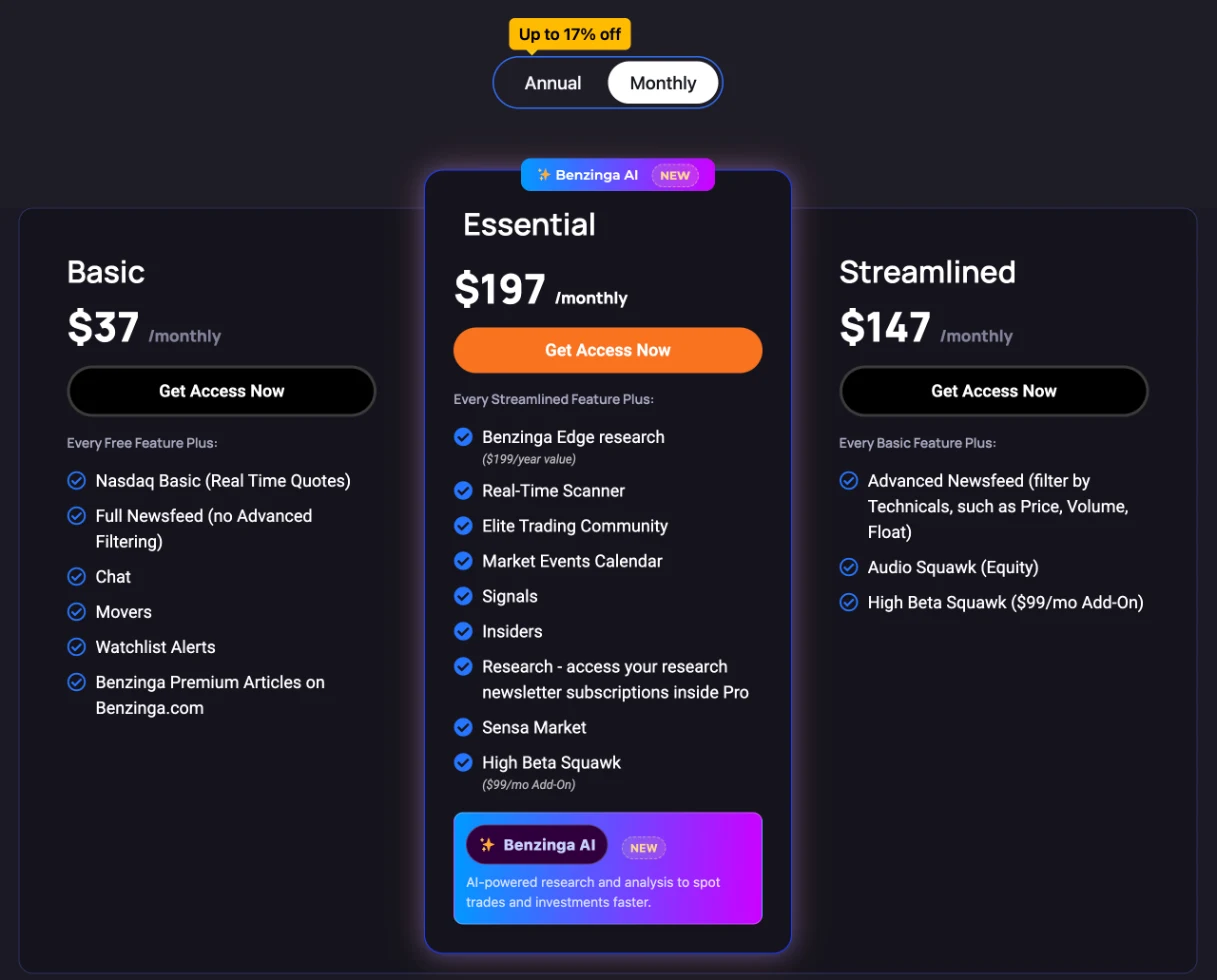
Benzinga Pro has three plans, and the price depends on the plan and the billing period. We read these prices on the Benzinga Pro pricing page on November 17, 2026. All prices are in US dollars per month; with annual billing you pay the year in advance.
| Plan | Monthly billing | Annual billing, per month | Saving shown |
|---|---|---|---|
| Basic | $37 | $30.58 | 17% |
| Streamlined | $147 | $124.75 | 15% |
| Essential | $197 | $166.42 | 16% |
Source: Benzinga Pro pricing page, monthly and annual view, November 17, 2026. For Essential the FAQ states the annual total: $1,997 a year. For Basic and Streamlined the page shows only the monthly equivalent. The High Beta Squawk costs $99 a month on top in Streamlined and Essential.
 Click to enlarge
Source: Benzinga Pro pricing page.
The step from Basic to Streamlined is large, so check which feature you actually need. From $37 to $147 a month you pay $110 more mainly for the advanced newsfeed filters and the equity squawk. The next $50 to Essential add the scanner, signals, calendars, insider data, Benzinga Edge research and the AI assistant. Benzinga itself says on the page that most traders choose Essential, and the free trial is set up to renew into it.
Prices change, so always check the date of a review. If an article does not say when its prices were checked, treat them as historical. Ours are from November 17, 2026, and we will update them when the pricing page changes.
Which plan: Basic, Streamlined or Essential?
Basic is the plan for traders who want fast headlines and nothing else. It includes Nasdaq Basic real-time quotes, the full newsfeed without the advanced filters, the chat, the movers list, watchlist alerts and Benzinga’s premium articles on benzinga.com. Nasdaq Basic is a real-time quote feed from Nasdaq’s own venues, not the consolidated tape of all exchanges, so volume and price can differ slightly from your broker’s full quote.
Streamlined adds filters and sound. The advanced newsfeed lets you filter headlines by technical criteria such as price, volume and float, which helps a small-cap trader cut the feed down to the stocks they can actually trade. The audio squawk (equity) reads important headlines out loud, so you can keep your eyes on the chart. The High Beta Squawk is a separate add-on for $99 a month.
Essential is the full package. On top of Streamlined you get the real-time scanner (Benzinga says it monitors more than 3,000 stocks), signals, the market events calendar, insider data, all seven chat rooms including a room run by trader Anne-Marie Baiynd, and Benzinga Edge research, which Benzinga sells separately and values at $199 a year. Essential also includes access to Sensa Market, an options analytics platform covered in our SensaMarket review, and Benzinga AI, which the FAQ calls exclusive to Essential.
| Feature | Basic | Streamlined | Essential |
|---|---|---|---|
| Real-time quotes (Nasdaq Basic) | yes | yes | yes |
| Newsfeed | full, no advanced filters | advanced filters | advanced filters |
| Watchlist alerts, movers, chat | yes | yes | yes |
| Audio squawk (equity) | no | yes | yes |
| High Beta Squawk | no | $99 a month add-on | $99 a month add-on |
| Real-time scanner | no | no | yes |
| Signals, insiders, events calendar | no | no | yes |
| Benzinga Edge research | no | no | yes |
| Benzinga AI | no | no | yes |
| Price, monthly billing | $37 | $147 | $197 |
Source: plan lists and FAQ on the Benzinga Pro pricing page, November 17, 2026. Each plan includes everything in the plan below it; “no” means the feature is not listed for that plan.
Is there a Benzinga Pro free trial?
Yes, Benzinga offers a 14-day free trial, and it needs a credit card. The trial page asks for card details and states: “14 day free trial. Renews at $197.00/mo unless cancelled.” So the trial runs on Essential and becomes the most expensive plan with monthly billing if you do nothing. According to the pricing FAQ, the trial also applies to annual plans.
The trial is limited to one per customer. The terms say that duplicate trials from the same IP address are treated as “bad faith” and lose any right to refunds or account credit later. If several people in one household want to try Benzinga Pro, keep this in mind.
Cancel in writing, and do it before day 14. The two documents describe cancellation differently. The trial page says you can cancel by email or in your account settings. The terms say cancellations “must be in writing” to complete the termination. To be safe, cancel by email and keep the reply. Put the date of day 13 in your calendar on the day you start.
There are no cash refunds once you pay. The terms state that all subscription purchases are final and that Pro accounts renew automatically. If you are unhappy within the first 7 days of your first payment, you can contact Benzinga by chat or email, and Benzinga then issues an account credit, not money back. Later renewals are not covered.
Benzinga Pro features: newsfeed, squawk, scanner and signals
The newsfeed is the core of Benzinga Pro, and everything else is built around it. You can search headlines by keyword, filter by source and category, and see positive or negative sentiment markers on stories, according to the product page. Benzinga’s newsdesk marks some stories as exclusives: news Benzinga says it published first, such as drug trial results or merger talks.
The squawk sets Benzinga Pro apart from an ordinary news site. An announcer reads the market-moving headlines out loud during the session. For a day trader who watches several charts, hearing a headline is often faster than finding it in a scrolling feed. The squawk is part of Streamlined and Essential; Benzinga’s free iPhone app sells the equity and options squawk channels separately for $46.99 a month as an in-app subscription (App Store, November 17, 2026).
The scanner, signals and calendars are reserved for Essential. The real-time scanner monitors more than 3,000 stocks, according to the pricing FAQ, and Benzinga’s product page calls it the scanner “most trusted by day traders”. The pricing page also lists signals and a calendar suite of more than 12 specialized calendars with historical context. We could not open these tools, so we cannot describe their filters in detail. If you only need the economic dates, our guide to the economic calendar shows free sources.
Benzinga AI is the newest part, and the hardest to judge from outside. According to the pricing page, the assistant is trained on market data and answers questions like finding biotech stocks with upcoming FDA dates and insider buying. Without a subscription we cannot say how good these answers are. Treat any AI stock list as a starting point for your own chart analysis, never as a signal to buy.
Is Benzinga legit?
Yes, Benzinga is an established US financial media business, but this documentation review does not verify every product or marketing claim. According to its about page, benzinga.com launched in 2010 and is headquartered at 1 Campus Martius in Detroit, Michigan. It runs a public newsroom, sells news and data APIs to businesses, and offers paid products such as Pro, Edge and newsletters. We have cited a Benzinga news report ourselves, in our breakout trading guide.
Its iPhone app has a long and well-rated track record. On November 17, 2026, the free app “Benzinga Financial News & Data” in Apple’s App Store had a rating of 4.7 from 7,606 ratings and its latest version dated November 15, 2026. The seller is listed as Accretive Capital LLC, and the store entry links to Benzinga’s own terms and privacy policy. This is the news app, not a separate Benzinga Pro app.
Legit does not mean every claim is checked. Benzinga’s own pages speak of 40,000+ traders, around 25 million readers a month and news up to 15 minutes ahead of other sources. These are marketing statements. The testimonials on the pricing page show “4.5/5, 155 reviews” without naming where the ratings come from. Beyond Pro, Benzinga also sells trade alert newsletters with performance claims; judge each of those products on its own.
The risk you can see in the documents is the subscription terms. The trial needs a card and renews into $197 a month, there are no cash refunds, and the terms ask for cancellation in writing. Read the payment terms before you start, as summarised in the trial section above.
Is Benzinga Pro worth it?
Benzinga Pro is worth it if news moves your trades and minutes matter to you. A day trader in US small caps, a momentum trader who trades earnings and catalysts, or an options trader who needs to know why a stock is moving right now, can save real time with the newsfeed and the squawk. For these traders, one avoided bad entry can matter more than the monthly fee, although that is a judgement, not a promise.
It is not worth it for swing traders and investors who decide on daily charts. If you look at the market once a day, the free benzinga.com site, your broker’s news and a free screener give you the same information early enough. I have traded price action since 1980, and on daily and weekly charts the chart usually tells me more than the headline. A $197 subscription would mostly pay for speed I do not use.
Start with the cheapest plan that answers your question. If you mainly want faster headlines, Basic at $37 a month is a fair test. If the trial convinces you of the squawk or the scanner, decide consciously before day 14 whether those features are worth $147 or $197 a month to you. With annual billing Essential costs $1,997 a year, so pay annually only after you know you use it every day.
Benzinga Pro alternatives
The right alternative depends on which part of Benzinga Pro you need. No single tool copies the whole package, but each of the following covers one part of it, often for a lower price.
- Trade The News: a squawk and news service for forex, US, European and Asian equities. Its pricing page showed no plan prices in the page text when we checked on November 17, 2026, so compare its offer directly.
- TradingView: charts with a built-in news panel and a stock screener. Better for chart analysis, but not a dedicated squawk service. Plans and prices are in our TradingView review.
- Finviz Elite: a screener with real-time US stock quotes, alerts and news, for $39.50 a month or $299.50 a year when we last checked on November 8, 2026. See our Finviz review.
- Investing.com: free news, quotes and an economic calendar for all markets, with delays you should know about; see our Investing.com review.
- Bloomberg Terminal: the institutional standard, at a price far above any retail tool. Our guide to Bloomberg Terminal alternatives compares the cheaper research tools.
For screening alone, Benzinga Pro is expensive. If your main need is to filter stocks by price, volume and fundamentals, our stock screener comparison shows tools that do this from $0. Benzinga Pro earns its price only when you also use the news and the squawk.
Pros and cons of Benzinga Pro
Pros
- A news feed built for traders. Filters by ticker, keyword, category and, from Streamlined, by price, volume and float.
- The audio squawk. Headlines read out loud, so your eyes can stay on the chart.
- Real-time quotes in every plan. Nasdaq Basic from $37 a month.
- A free trial of the full Essential plan. 14 days to test before you pay.
- An established company. Benzinga has run its newsroom since 2010.
Cons
- Expensive in the useful plans. The squawk starts at $147, the scanner and signals at $197 a month.
- Strict payment terms. No cash refunds, only an account credit in the first 7 days.
- The trial renews into the most expensive plan. $197 a month unless you cancel.
- Speed claims cannot be checked from outside. “5 to 15 minutes ahead” is Benzinga’s own statement.
- Focused on US stocks. Traders of European shares, forex or futures get less out of it.
Our verdict on Benzinga Pro
Benzinga Pro is a serious tool for a narrow group of traders. If you trade US stocks intraday and react to news, earnings and catalysts, the feed and the squawk can be worth their price. For everyone else, the free site, a good screener and your broker’s news are enough. My advice: decide which feature you need before you start the trial, test exactly that feature for 14 days, and cancel in writing if it does not change your trading.
Check the terms before your card is charged. You can see current plans and the trial on the Benzinga Pro page. The prices and rules in this review were checked on November 17, 2026, and Benzinga changes its plans from time to time, so compare them with the pricing page on the day you sign up.
Frequently asked questions about Benzinga Pro
How much does Benzinga Pro cost?
On November 17, 2026, Benzinga Pro cost $37, $147 or $197 a month with monthly billing. These are the plans Basic, Streamlined and Essential. With annual billing the page shows $30.58, $124.75 and $166.42 a month; Essential then costs $1,997 a year.
Is there a Benzinga Pro free trial?
Yes, a 14-day free trial of the Essential plan. It needs a credit card and renews at $197 a month unless you cancel. Only one trial per customer is allowed.
Can I get a refund from Benzinga Pro?
Not in cash, according to Benzinga’s terms. All subscription purchases are final. Within the first 7 days of your first payment you can ask for an account credit.
Is Benzinga legit?
Yes, Benzinga is an established US financial media company. It launched in 2010 and is based in Detroit. Its claims about the speed of its news are marketing statements that we could not check independently.
Is Benzinga Pro worth it for beginners?
Usually not. Beginners gain more from learning chart analysis and risk management than from faster headlines. If you want to try news trading, start with Basic at $37 a month rather than the $197 plan.
Does Benzinga Pro have a mobile app?
Benzinga Pro runs in the browser on any device, according to its FAQ. The free iPhone app “Benzinga Financial News & Data” is Benzinga’s news app; it sells the squawk separately as an in-app subscription for $46.99 a month.
More Market Data & Research Tools guides
- Check the Bloomberg Terminal
Bloomberg Terminal: Cost, Features and Who Needs It
What a Bloomberg Terminal is reported to cost, which products exist, who should pay for one and the cheaper tools private investors use instead.
- Find a cheaper research tool
Bloomberg Terminal Alternatives for Individual Traders
Koyfin, Finviz, Barchart, TradingView and InvestingPro compared on data timeliness, fundamentals, screening and price, plus the institutional alternatives.
- Get market data through an API
Financial Modeling Prep Review 2026: API, Pricing, Limits
What the FMP API delivers, what each plan covers, and why its personal plans exclude business use and public data display.
- Connect market data to an AI assistant
Alpha Vantage Review 2026: API, MCP Server, Pricing
Our test of the official Alpha Vantage MCP server with Claude: what the free API covers, what each tier costs, and the errors we found in Apple fundamentals.
- Screen US stocks for free
Finviz Review: Free vs Elite, Screener and Limitations
What the free Finviz screener, maps and insider pages do, a three-filter example with real counts, and what Finviz Elite costs.
- Choose a stock screener
Stock Screeners Compared: Free and Paid Tools by Task
Finviz, TradingView, StockCharts, ChartMill, Koyfin, Barchart, InvestingPro and MarketSurge sorted by task, with free limits, data delay and dated prices.
- Check StockCharts
StockCharts Review 2026: Plans, Prices and Free Tools
What the free StockCharts version and the Basic, Extra and PRO plans include, what real-time data costs and where scans, RRGs and the SCTR help.
- Check ChartMill
ChartMill Review 2026: Screener, Ratings and Prices
What the ChartMill screener and its technical, setup and fundamental ratings do, which data delays apply and what the plans cost.
- Research futures and options
Barchart Review: Free vs Premier, Futures and Options Tools
What barchart.com offers for futures contracts, COT charts and options, what Free, Plus and Premier cost, and what a membership does not include.
- Read futures positioning
COT Report: How to Read Commitments of Traders
Read CFTC reports, calculate net positions and the COT Index, and understand what delayed positioning data can and cannot tell you.