
Barchart Review: Free vs Premier, Futures and Options Tools


Contents
- Barchart in 30 seconds
- What is barchart.com?
- What does Barchart cost? Free, Plus and Premier compared
- Which markets does Barchart cover, and how fresh is the data?
- Futures research: contract pages and lists
- The stock screener
- Charts and indicators
- COT data and the COT Index on Barchart
- Options research in Premier
- How I use Barchart before a futures trade
- Barchart Trader and Barchart for Excel: separate products
- Pros and cons of barchart.com
- Barchart, TradingView or Finviz?
- Who is Barchart worth it for?
- My verdict on barchart.com
- Frequently asked questions about Barchart
- About the author
A futures trade does not start with the chart, but with the data behind it. Contract months, open interest, the positioning of large traders and the contract specifications all matter before you place an order. barchart.com puts these tools on one website, and a good part of them works without paying and even without an account.
This review shows what the Free, Plus and Premier memberships really separate, which markets Barchart covers well and where it stops. It also explains three separate products that are often confused: the website membership, the trading platform Barchart Trader and the add-in Barchart for Excel. I checked prices and features on Barchart’s own pages on October 25, 2026, without an account and without a trial. How we research and write is described on our editorial policy page. We have no business relationship with Barchart.
Barchart in 30 seconds
- What it is: a market data company from Chicago, founded in 1995. barchart.com is its research website for stocks, futures, options, ETFs and currencies.
- Plans: Free ($0), Plus from $9.99 a month and Premier from $29.95 a month, or $239.95 a year, checked on October 25, 2026. Free is capped at 20 page views a day.
- Strengths: futures contract research, COT charts, a screener with more than 150 filters and, in Premier, the full options toolkit with all results and custom filters.
- Limits: website quotes are delayed (stocks 15 minutes except Cboe BZX, futures 10 or 15 minutes), the interface is crowded, and the website does not execute trades.
- Not included: a membership does not buy real-time exchange data for trading or a broker connection. Those come with Barchart Trader and your broker.
What is barchart.com?
Barchart is a market data and technology company, founded in 1995 and based in Chicago, according to its own About page. It sells data and software to businesses in finance, media and commodities. The website for private traders is the visible front of that business. The business solutions sit on a separate part of the site.
For traders this background matters, because the futures and options coverage is unusually complete. You see not only the front month but the whole contract list, with volume, open interest, expiration dates and contract specifications. Fundamental data for stocks comes from Zacks and Morningstar, as the page footer states.
The site can be switched to five regions: US, Canada, UK, Australia and Europe. The switch sits behind the flag icon at the top right. It changes the home page, search results and suggested lists, not the language: the site stays in English.
What does Barchart cost? Free, Plus and Premier compared
Barchart sells two paid memberships on top of a free account, and the main difference is quantity. Many tools are visible in the free account, but the limits come quickly. If you use the site every day, the cap of 20 page views a day in Free is the first thing you will notice.
| Plan | Monthly | Yearly |
|---|---|---|
| Free | $0 | $0 |
| Plus | $9.99 | $99.00 |
| Premier | $29.95 | $239.95 |
Prices in US dollars from Barchart’s membership comparison and Premier sign-up page, checked October 25, 2026. Two-year plans: Plus $179.00, Premier $419.95. Barchart shows these longer plans as $8.25 (Plus yearly), $7.46 (Plus two years) and $17.49 (Premier two years) a month.
Barchart’s own pages disagree on the monthly equivalent of the yearly Premier plan. The comparison page says $19.95 a month, the sign-up page $19.99. The arithmetic gives $239.95 divided by 12 = $19.996, so about $20.00 a month. What you pay is the yearly amount of $239.95.
Both paid plans start with 30 free days and need a credit card. After the trial, billing starts automatically, and plans renew “at the then current price”, according to the sign-up page. The same page says yearly and two-year Premier plans are fully refundable within 30 days of the billing date. Note the cancellation date when you start the trial.
| Feature | Free | Plus | Premier |
|---|---|---|---|
| Page views a day | 20 | no limit | no limit |
| Saved lists and screens | 1 each | 10 each | no limit |
| CSV files a day | 1 | 10 | 250 |
| Screen results | first 20 | all | all |
| Basic price alerts | 50 | 50 | no limit |
| SMS alerts | no | no | yes |
| COT net reports | no | yes | yes |
| Full options toolkit | no | no | yes |
| History from 2000 | no | no | yes |
| Ads | yes | no | no |
Source: Barchart membership comparison, October 25, 2026. Saved lists means watchlists and portfolios; saved screeners and custom views follow the same 1, 10 and unlimited steps. SMS alerts are the advanced real-time price alerts with SMS and templates. History means downloading historical data back to January 1, 2000. CSV files are the daily data downloads; COT net reports are the detailed and summary COT net position reports. Full options toolkit means advanced options screeners, complete unusual options activity, options flow and time and sales; some options reports show a limited set of results without Premier.
Plus is mainly an ad-free plan with more saved items. It adds the COT net position reports, point and figure charts and grid charts. If you need the full options tools, the advanced alerts or more than ten daily downloads, you end up with Premier. If you look at a contract now and then, Free is enough.
Premier’s “real-time” alerts are not a real-time data feed for trading. For US stocks, Barchart says the advanced alerts trigger on real-time Cboe BZX prices. Most website quotes remain delayed, with the Cboe BZX exception described below, and no website membership gives you an order button.
Which markets does Barchart cover, and how fresh is the data?
Barchart is strongest in North American markets. US stocks, ETFs and options, futures from CME Group exchanges and ICE, the main currency pairs and Canadian stocks are covered in depth. The pre-market and after-hours views are part of Plus and Premier.
Outside North America, check which exchange a quote comes from. Barchart lists many international stocks and futures, but a stock may come from an alternative trading venue rather than its home exchange. SAP, for example, appears as SAP.D.DX with the exchange code DXE, which is Cboe Europe, not the Frankfurt Xetra market. Prices and volume on such a venue can differ from the main market, so use your broker’s data for the home exchange.
The website’s quotes are delayed. The page footer said on October 25, 2026: stocks 15 minutes delayed, except Cboe BZX prices, which are real-time; futures and forex 10 or 15 minutes delayed. That is fine for research and preparation, but not for timing an entry in a moving market. Delayed quotes are prices an exchange releases only after a set waiting time, because real-time data needs a paid licence.
Futures research: contract pages and lists
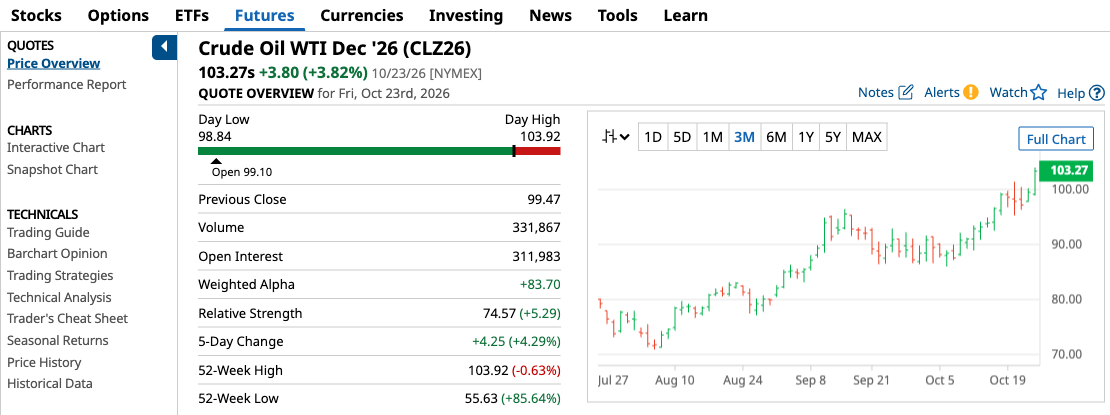
Every futures contract has its own overview page. It shows the last price, day range, previous close, volume, open interest and the 52-week range, with a small chart. The side menu leads to interactive charts, seasonal returns, options, spreads, all contract months and the contract specifications.
 Click to enlarge
Source: Barchart CLZ26 overview.
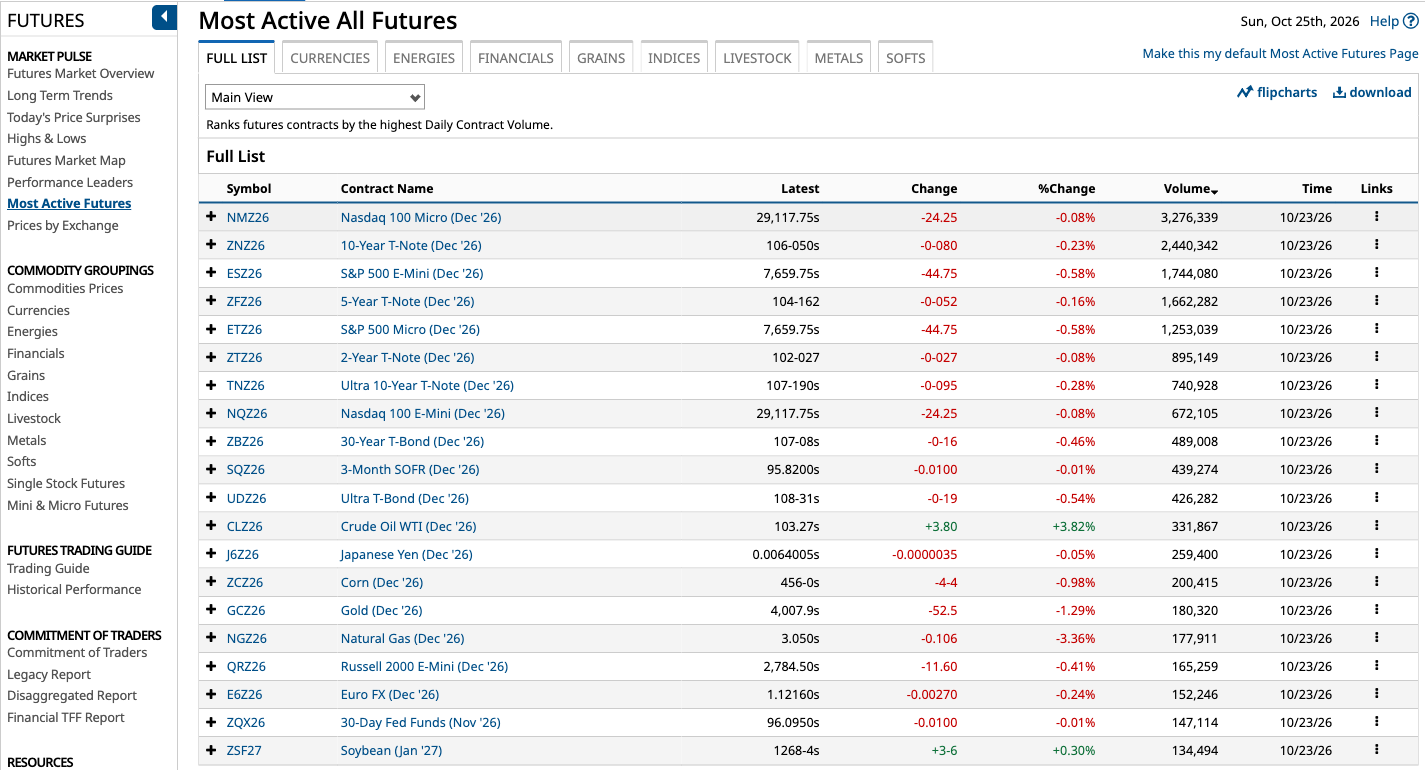
The futures section is organised by sector, with ready-made lists. Most active contracts, highs and lows, performance leaders and expiration calendars are a click away. The tables can be switched to other views, and with a membership you save your own custom view with the columns you check every day.
 Click to enlarge
Source: Barchart most active futures.
If you trade futures, this is the part of Barchart that saves the most time. Instead of collecting contract data from several exchange websites, you see it in one place. For the basics of trading hours across these markets, see our guide to futures market hours.
The stock screener
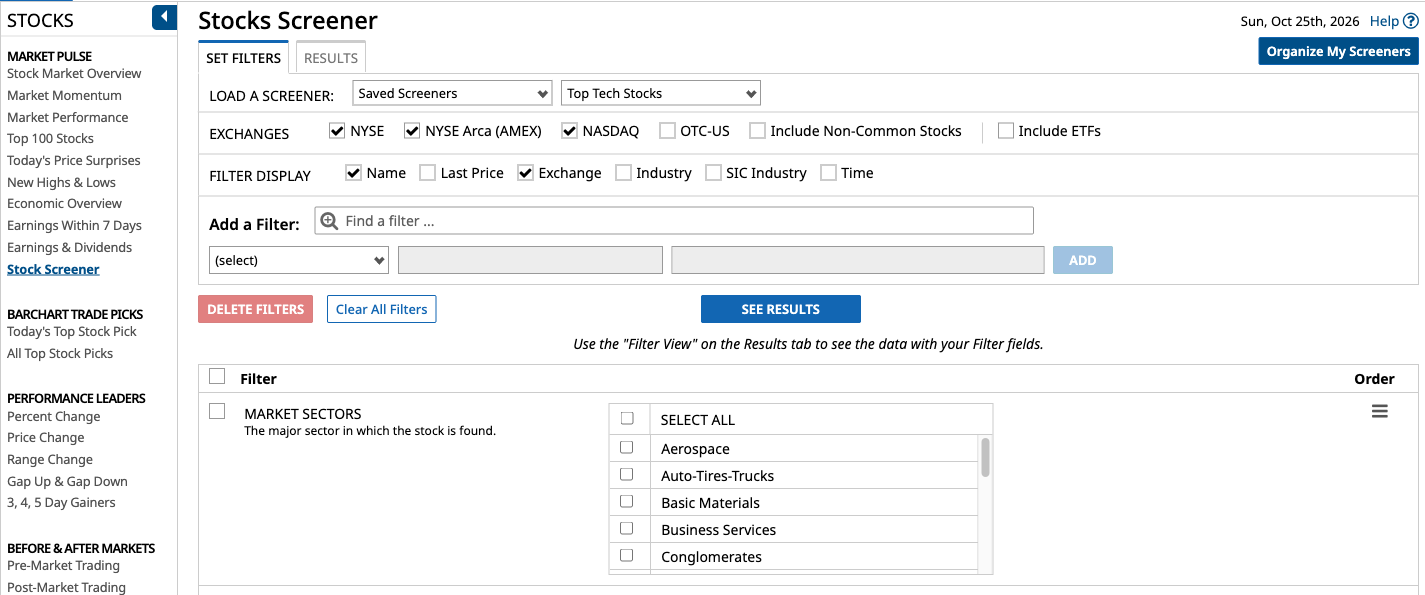
A screener filters thousands of securities down to those that meet your conditions. Barchart’s stock screener offers more than 150 filters, from fundamental figures to technical indicators and volume. You choose the exchanges, add filters and run the screen; the results can be shown in your own custom view.
 Click to enlarge
Source: Barchart stocks screener.
The free account shows only the first 20 results and saves one screener. Plus shows all results and saves ten screeners; Premier saves an unlimited number and can e-mail the results to you each day, with a CSV file. If you only screen US stocks, our Finviz review covers a free tool that is faster to learn.
Charts and indicators
The interactive charts cover what technical analysis needs. You get drawing tools, Fibonacci tools and a long list of studies, from moving averages and Bollinger Bands to options and COT studies. Barchart’s education page lists each study with its formula and parameters, and marks which ones exist only in the interactive charts.
The charts are functional, but they feel older than modern charting platforms. If charts are your main tool, a dedicated charting platform such as TradingView is smoother. Barchart’s strength is the data around the chart, not the chart itself.
COT data and the COT Index on Barchart
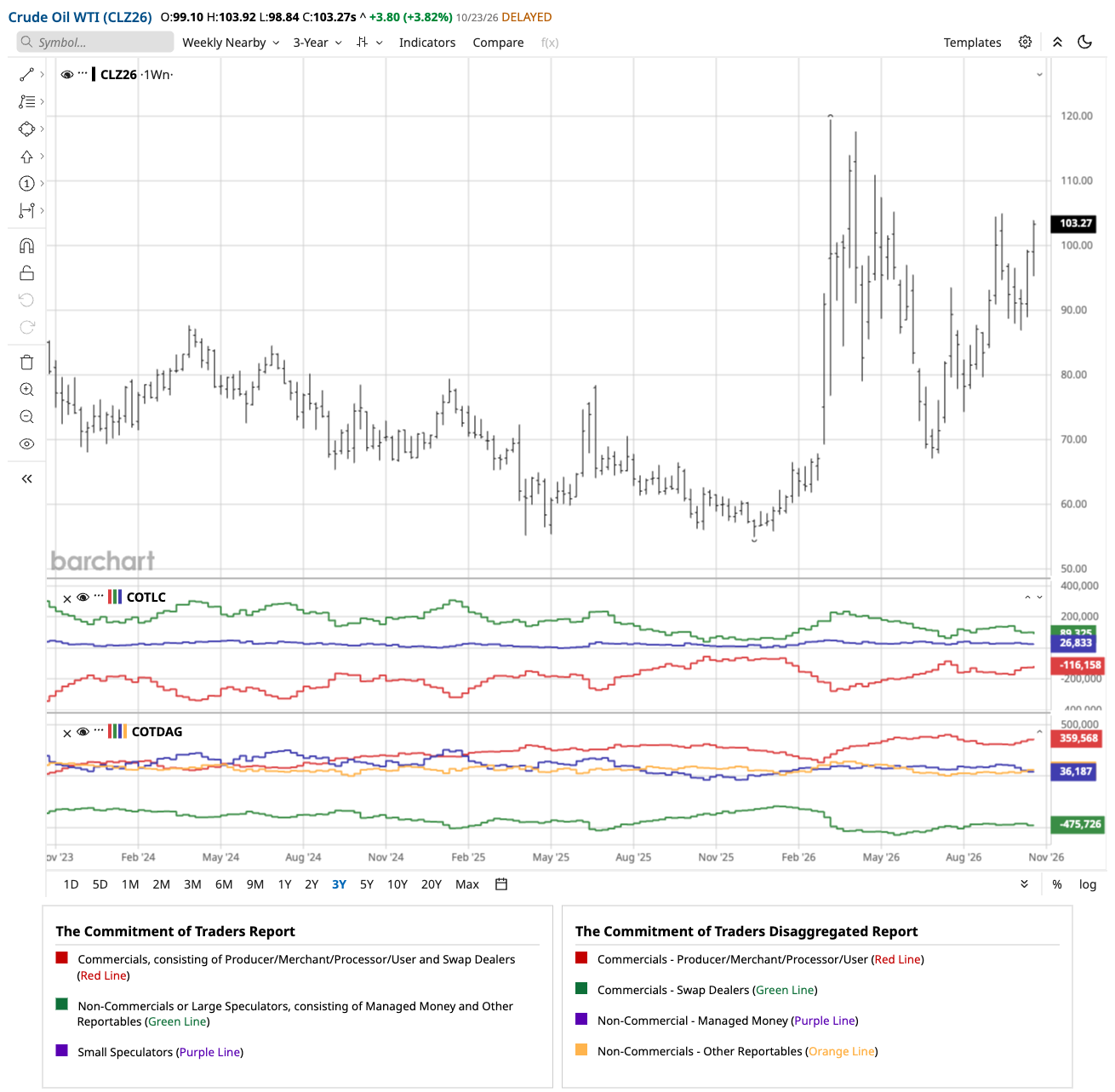
Barchart turns the weekly CFTC Commitments of Traders reports into charts below the price. The COT chart pages cover the legacy, disaggregated and financial futures reports, and Barchart says they update each Friday at 3:00 p.m. Central Time. We opened them without an account. The net position reports, with up to 52 weeks of data in a table, need Plus or Premier.
 Click to enlarge
Source: Barchart COT charts.
Raw net positions and a COT Index are two different things. The panels in the screenshot show net positions in contracts, long minus short, for each trader group. A COT Index puts the current net position into its own range over a chosen period, on a scale of 0 to 100. Barchart documents such a study: it is based on the commercials by default, uses (current minus lowest) divided by (highest minus lowest) times 100, and looks back three years unless you choose six months to ten years.
The COT Index study is available only in the interactive charts, and Barchart’s documentation does not say which membership it needs. We did not test it with an account. How to read the reports, which trader group to follow and why an extreme is not a turning point is explained in our guide to the COT report.
Options research in Premier
The options tools are the main reason traders pay for Premier. Some options reports are available without Premier. Premier adds advanced options screeners, all results of unusual options activity and options flow, custom filters, options time and sales, volatility tools and historical options data, according to the membership comparison and the notes on the report pages. On October 25, 2026, those pages said that Premier members can view all results and set custom filters.
Unusual options activity lists option contracts whose volume is unusually high compared with their open interest. For options traders it is a starting point for research, not a signal. A large trade can be a hedge, a spread leg or a closing order, so the direction of a bet is often not clear from the data alone.
How I use Barchart before a futures trade
I use Barchart as a research page, not as a trading platform. First I check the positioning of the large groups in the COT charts. Then I look at the contract: which month carries the volume, where open interest is building and what the seasonal pattern shows.
The trade plan itself comes from the price chart. The stop-loss goes behind the last clear reversal, the target at the next resistance zone, and both together give the risk-reward ratio. The order is placed in my broker’s platform, not on barchart.com.
Barchart Trader and Barchart for Excel: separate products
You cannot place an order on the barchart.com website. For trading, Barchart offers a separate platform, Barchart Trader, for desktop, Android, iPhone and iPad. The download is free, but a login is needed to use its features. Integrated trading works through the CQG gateway: you ask a supported broker for a CQG login, enter it in the settings and switch to live trading for futures.
Real-time data in Barchart Trader is billed separately, by exchange. A real-time trial of up to 14 days covers CME Group, EUREX and forex, if selected. A credit card is required and billing runs from the first of the month. The download is free, but ongoing service charges and applicable exchange fees depend on the subscription you select, so check the total before you start the trial. Optional Dow Jones news feeds cost between $80 and $165 a month, according to the Barchart Trader pricing page on October 25, 2026.
The broker list matters more than the software. Barchart lists dozens of partner brokers and clearing firms, many of them US futures brokers. Whether one of them accepts clients from your country is a question for the broker, not for Barchart. Integrated trading covers futures; for stocks and options you need your own broker’s platform.
Barchart for Excel is a third product. The add-in pulls quotes and history into spreadsheets through formulas. It costs $89.95 a month after a free trial, with billing from the first business day of the next month, according to the Barchart for Excel page. For a single trader that is expensive; for a team with spreadsheet models it can pay off.
Barchart also offers a mobile app for iPhone and Android, according to its app page. We have not tested it. A phone app is useful for a quick look on the way, but it does not replace a desk with a large screen and your broker’s order entry.
Pros and cons of barchart.com
Pros
- Deep futures coverage for free. Full contract lists, volume, open interest, specifications and seasonal returns.
- COT charts under the price. Legacy, disaggregated and financial reports without handling raw CFTC files.
- A screener with more than 150 filters. Fundamental, technical and volume conditions in one place.
- Strong options research in Premier. All results for unusual activity and flow, custom filters, time and sales and volatility tools.
- Data from a data company. Barchart sells market data to businesses, which shows in the breadth of coverage.
Cons
- Delayed quotes on the website. Stocks 15 minutes (except Cboe BZX), futures and forex 10 or 15 minutes.
- Tight limits in Free. 20 page views a day, one watchlist, the first 20 screener results.
- Inconsistent price display. Two pages show different monthly equivalents for the same yearly plan.
- Crowded interface. Every sub-page is on offer at once, with no guided start.
- Trading needs extra products. Barchart Trader’s data service, a supported broker and exchange fees are separate costs.
Barchart, TradingView or Finviz?
These tools solve different problems, so the question is which job you need done. TradingView is a charting platform with a community, its own script language and broker connections. Barchart is a data portal with a chart attached. Finviz is a fast screener for US-listed stocks.
| Need | Better fit |
|---|---|
| Charting, drawing, own indicators | TradingView |
| Futures contract data, COT charts, options research | Barchart |
| Fast free screening of US stocks | Finviz |
Many traders combine them. Research on Barchart, chart work on a charting platform, execution with the broker. For a wider comparison of research tools, including Koyfin and InvestingPro, see our guide to Bloomberg Terminal alternatives. For charting, our TradingView review covers plans and prices.
Who is Barchart worth it for?
Futures and commodity traders get the most out of Barchart. If you want to know how the commercials are positioned in wheat, which contract month carries the volume and what the seasonal pattern says, you find it here, much of it free.
Options traders are the main audience for Premier. The advanced options screeners and the full unusual activity reports with custom filters need Premier. Swing traders in US stocks also benefit if they use the screener seriously, not just for an occasional quote.
Barchart suits you less in three cases. If you mainly trade stocks outside North America, the data may come from an alternative venue. If you need fast execution, the delayed website quotes are no help. If you want a simple, guided interface, the first hours on Barchart will cost patience.
My verdict on barchart.com
Barchart is a strong research portal with clear limits. For preparing a futures trade, the free account already gives you contract data, positioning and seasonal patterns. That is a lot for zero dollars.
Consider Premier if you need its advanced options tools, advanced alerts, longer historical downloads or more than ten CSV downloads a day. Free includes one daily download and Plus ten, so Plus can be enough for occasional exports. Remember that a membership is research access, not live trading data and not a broker.
Use Barchart for analysis and your broker’s platform for the trade. And if you start a trial, put the cancellation date in your calendar on the first day. Trading futures and options involves a high risk of loss; this review is not investment advice.
Frequently asked questions about Barchart
Is barchart.com free?
Yes, a free account costs nothing, but it has tight limits. Free members get 20 page views a day, one watchlist, one portfolio, one saved screener and the first 20 screener results, and they see ads.
How much does Barchart Premier cost?
Premier costs $29.95 a month, $239.95 a year or $419.95 for two years (checked October 25, 2026). The yearly plan works out at about $20.00 a month; Barchart’s pages show $19.95 or $19.99. The first 30 days are free, then billing starts automatically.
Are Barchart quotes real-time?
Most website quotes are delayed, but Cboe BZX equity prices are real-time. Stocks are delayed 15 minutes, except Cboe BZX prices, which are real-time; futures and forex are delayed 10 or 15 minutes. Real-time futures data comes with Barchart Trader and is billed by exchange.
Can you trade on Barchart?
Not on the website. The separate platform Barchart Trader connects to supported brokers through the CQG gateway and then allows futures orders from the chart. Stocks and options are traded through your own broker.
Does Barchart have a COT Index?
Yes, Barchart documents a COT Index study for its interactive charts. It rescales the commercials’ net position to 0 to 100 over three years by default. The COT charts themselves show raw net positions, and the net position reports need Plus or Premier.
Does Barchart cover markets outside the US?
Yes, but the depth varies. You can switch the site to Canada, the UK, Australia or Europe. Some international stocks come from an alternative venue such as Cboe Europe rather than the home exchange, so check the exchange code.
This English edition is based on our German edition on kagels-trading.de and has been adapted for international readers.
More Market Data & Research Tools guides
- Check the Bloomberg Terminal
Bloomberg Terminal: Cost, Features and Who Needs It
What a Bloomberg Terminal is reported to cost, which products exist, who should pay for one and the cheaper tools private investors use instead.
- Find a cheaper research tool
Bloomberg Terminal Alternatives for Individual Traders
Koyfin, Finviz, Barchart, TradingView and InvestingPro compared on data timeliness, fundamentals, screening and price, plus the institutional alternatives.
- Screen US stocks for free
Finviz Review: Free vs Elite, Screener and Limitations
What the free Finviz screener, maps and insider pages do, a three-filter example with real counts, and what Finviz Elite costs.
- Read futures positioning
COT Report: How to Read Commitments of Traders
Read CFTC reports, calculate net positions and the COT Index, and understand what delayed positioning data can and cannot tell you.