
Order Types Explained: Market, Limit, Stop and Stop-Limit


Contents
- Order types in 30 seconds
- What is an order type?
- Choose by task: which order fits what you want to do
- Market order: speed first, price second
- Limit order: your price or better, if it fills
- Limit order vs market order: what each one gives up
- Stop order: the stop price is a trigger, not a fill price
- Stop-limit order: price control with the risk of no sale
- Stop order vs stop-limit order: the same gap, two outcomes
- Trailing stop: a stop that follows the price
- Time in force: how long an order lives
- Who holds your stop: your broker or the exchange?
- Linked orders: OCO, OTO and bracket
- Conclusion: choose the failure you can live with
- Frequently asked questions about order types
- About the author
Every order type buys you one thing and costs you another. A market order buys speed and gives up control of the price. A limit order buys control of the price and gives up the certainty of a fill. A stop order watches a level for you, but its stop price is only a trigger, not the price you get.
This guide starts with what you want to do, not with the name of the order. You get the five basic types with US examples, the trade-off in limit vs market and stop vs stop-limit, how long an order lives, and who actually holds your stop. All examples use the same hypothetical position: 200 shares bought at $45.00, with a stop at $42.00 and a target at $51.00.
Order types in 30 seconds
- Market order: buy or sell now at the next available price. It usually fills quickly, but the price is not guaranteed.
- Limit order: your price or better. The price is protected, but the order may fill only in part or not at all.
- Stop order: becomes a market order once the stop price is reached. It can sell well below that price.
- Stop-limit order: becomes a limit order once the stop price is reached. Your price is protected, but you may stay in the position.
- Trailing stop: a stop that follows a favorable move by a set dollar amount or percentage and does not move back.
- Broker rules decide the details: what triggers a stop, in which hours it is watched and how long an order lasts differ from broker to broker.
What is an order type?
An order type is the instruction that tells your broker at what price and under what conditions to buy or sell. The basic types are market, limit, stop, stop-limit and trailing stop orders.
The type sets the condition, and a time instruction sets how long that condition applies. The SEC’s overview of order types and FINRA’s order type guide describe the general mechanics. Your broker’s documents add the rules for your account, and not every firm offers every order type.
Choose by task: which order fits what you want to do
Many ticket mistakes start with the wrong question. Do not ask which order is best, ask what you want the order to do and which failure you can live with. The guide below takes you from your task to the section with the details.
What do you want the order to do?
- Get in or out now and accept the priceMarket order
- Buy or sell only at your price or betterLimit order
- Take profit at a target above the priceSell limit order
- Enter only after a breakoutBuy stop order
- Get out of a losing position, even at a worse priceSell stop order
- Set a lowest sale price, and accept that you may not get outStop-limit order
- Let a stop follow a winning positionTrailing stop
- Manage a target and a stop togetherOCO or bracket order
Availability and rules depend on your broker.
 Click to enlarge
Source: Kagels Trading, own learning graphic.
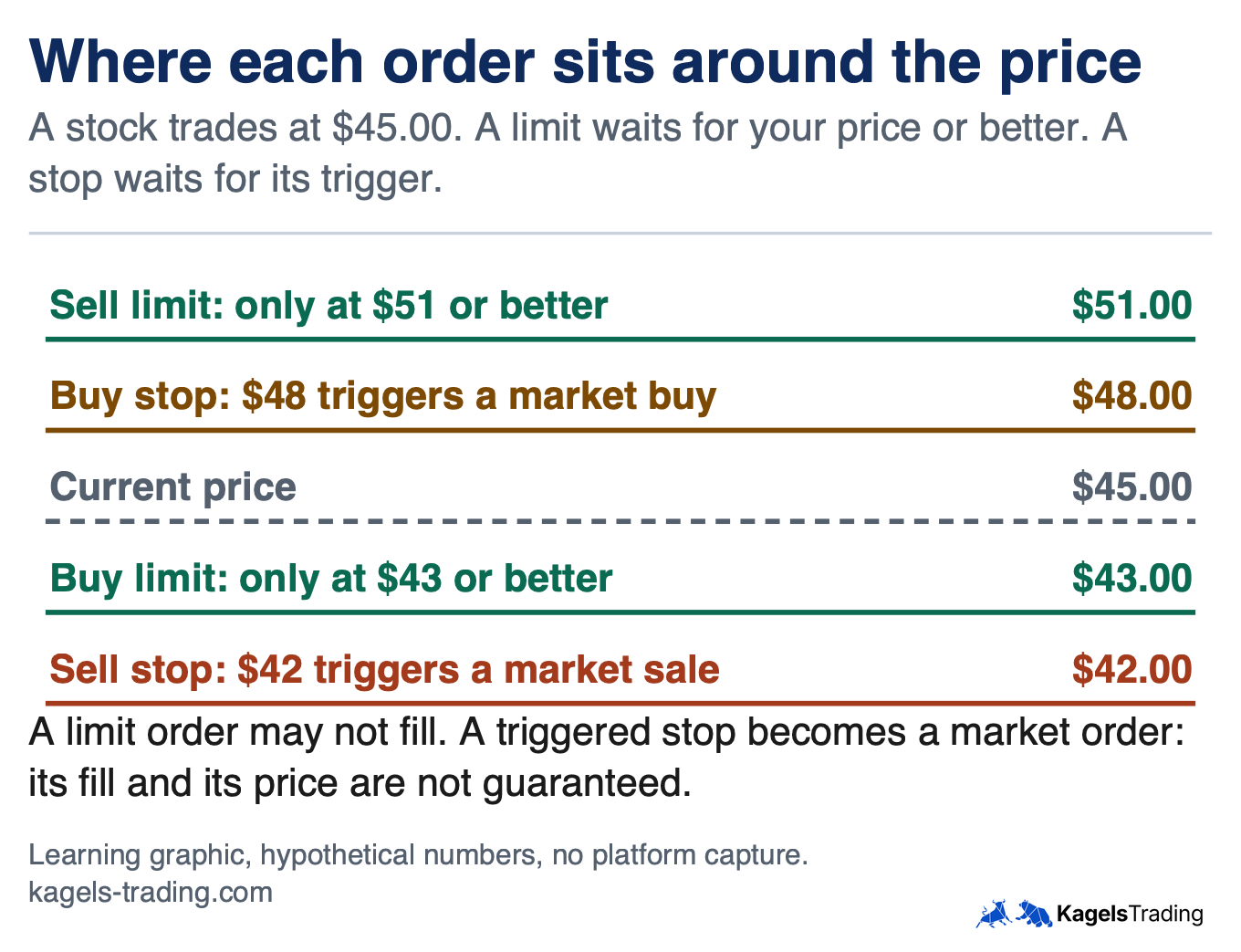
The picture shows a placement rule worth remembering. A sell limit normally sits above the current price, and a buy limit below it. A sell stop sits below the price and a buy stop above it, which is the mirror image.
Market order: speed first, price second
A market order asks for a fill now, at whatever price is available. Fidelity’s order FAQ describes it as an order to trade “at the next available price”. A sale generally executes near the bid, the best price buyers offer, and a purchase near the ask, the best price sellers want. The SEC reminds investors that the last-traded price is not necessarily the price you get.
Large orders can fill at several prices. In the SEC’s example, a market order for 1,000 shares could fill 500 shares at $3.00 and the rest higher. The less liquidity a stock has at that moment, the wider that spread of prices can be.
A market order is the most likely to fill, but do not read that as unconditional. The SEC page says this type “guarantees that the order will be executed”, while FINRA says more carefully that it gives “the most certainty”. Trades cannot happen while a stock is halted, and the Limit Up-Limit Down mechanism blocks trades outside a price band and can pause a stock for five minutes. Some brokers also refuse market orders in extended hours; our guide to pre-market and after-hours trading has the details.
Limit order: your price or better, if it fills
A limit order protects your price and leaves the fill open. A buy limit at $43.00 can only execute at $43.00 or lower, and a sell limit at $51.00 only at $51.00 or higher. The SEC puts the other side plainly: a limit order “is not guaranteed to execute”.
A price that touches your limit does not promise a fill. Fidelity’s FAQ says that a reached limit “does not guarantee an execution”, because market center rules set the sequence of orders at each price, and there may not be enough buyers or sellers at that level. You can also get a partial fill: of your 200 shares at $51.00, perhaps only 80 sell and 120 stay in the account. Check what remains after every fill, because the rest of your plan may now fit the wrong share count.
Limit order vs market order: what each one gives up
The choice is about which risk costs you more in this trade. If missing the trade is worse than a few cents, a market order fits. If the price matters more than the fill, for example in a thin stock or around the open, a limit order fits.
| Market order | Limit order | |
|---|---|---|
| Price | Not guaranteed | Your limit or better |
| Fill | Most likely, but not unconditional | Not guaranteed, can be partial |
| Main risk | Worse price than the last quote | Price runs away without you |
| Typical use | Must trade now, liquid stock | Entry at a planned price, profit target |
A marketable limit gives you part of both. A buy limit set a little above the ask can execute at once if shares are on offer, and Fidelity’s FAQ confirms that a buy limit can fill at or below the limit, “but never above it”. This caps your purchase price, but some or all of the order may stay unfilled, and any shares you do get still carry market risk.
Stop order: the stop price is a trigger, not a fill price
A stop order waits, and then becomes a market order. A sell stop sits below the current price and is mostly used to limit a loss or protect a profit on shares you own. A buy stop sits above the price and is used to cover a short position or to enter after a breakout. The SEC uses stop-loss order as another name for a stop order; traders usually mean a sell stop used for protection.
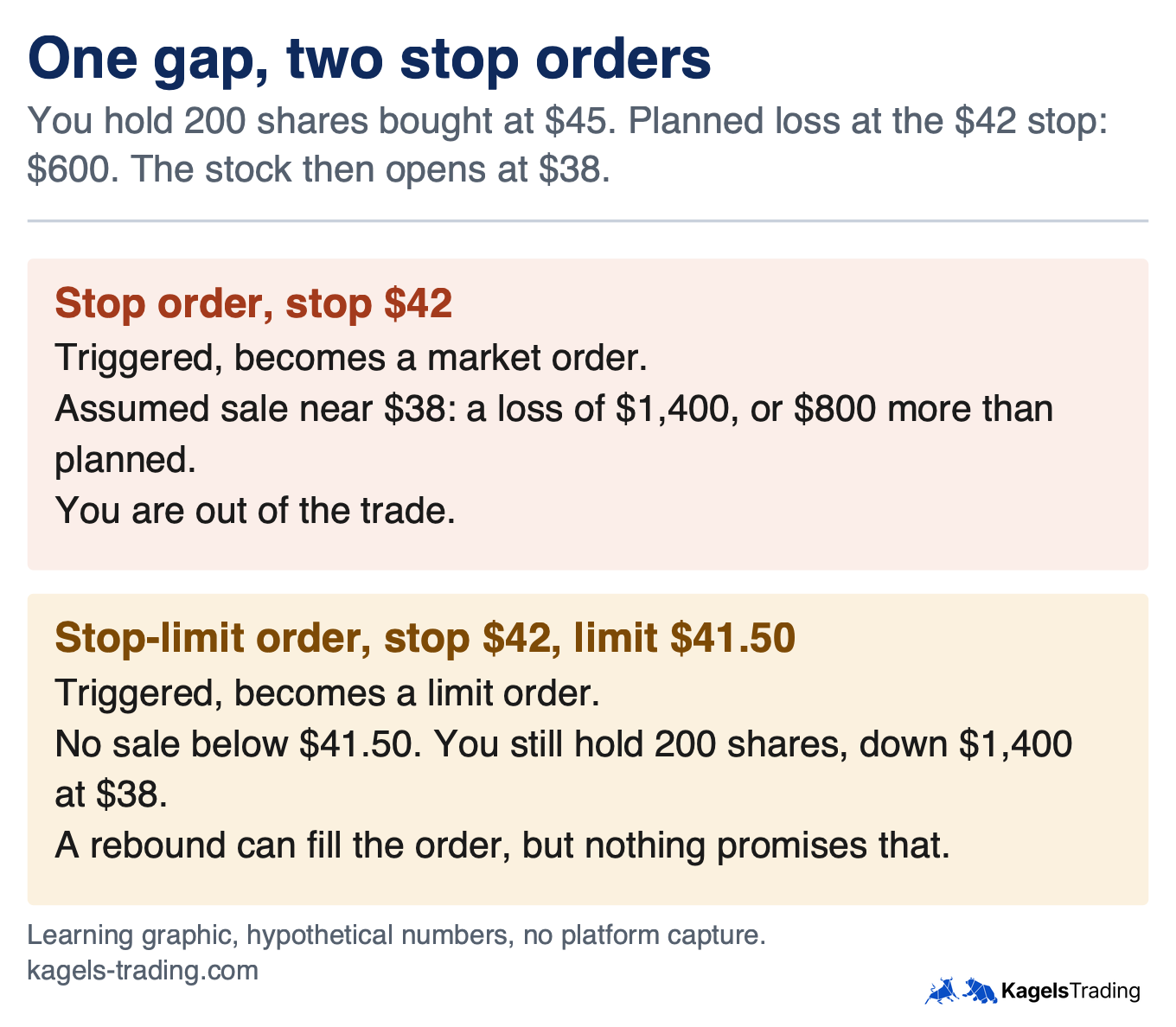
The stop price does not cap your loss. The SEC’s bulletin on stop orders states that the stop price “is not the guaranteed execution price”. In our example, a stop at $42.00 plans a loss of $600 before costs. If the stock opens at $38.00 and the order sells there, the loss is $1,400. Plan your size with that in mind, using the position sizing formula and the wider risk management rules.
What counts as reaching the stop price depends on the order and your broker. Under FINRA Rule 5350, a stop order becomes a market order when a transaction occurs at or beyond the stop price. A firm may also offer an order that triggers on something else, such as a quote, but it must not call that order a stop or stop-limit order, and it must describe the trigger to you before you place it. The rule does not apply to “not held” orders, and the SEC notes that firms use different standards, so check the actual trigger in your broker’s terms. Fidelity’s FAQ, for example, says its equity stops trigger on a round lot trade of 100 shares or more. A short spike can also trigger a stop, so the SEC advises choosing the stop price with care.
Stop-limit order: price control with the risk of no sale
A stop-limit order has two prices: the stop price wakes the order, and the limit price sets what it may accept. For a sale with a stop of $42.00 and a limit of $41.50, nothing happens until the stop is reached. Then the order becomes a sell limit at $41.50, so it can sell at $41.50 or higher, but never lower.
The limit is a floor, not a range around the stop. If the stock trades above $41.50 after the trigger, the order can fill, and this can include prices above $42.00. If the stock is already below $41.50, it stays open and unfilled. A wider distance between stop and limit raises the chance of a fill and lowers your price control, and there is no distance that removes both risks.
The risk is staying in a falling position. In Schwab’s words on advanced order types, a trader “risks missing the market altogether”. A rebound to your limit can fill the order, but that also depends on available buyers, and it may be only a partial fill. Use a stop-limit only if you have a plan for the case where it does not sell.
Stop order vs stop-limit order: the same gap, two outcomes
A gap shows the difference better than any definition. A gap means the stock opens away from the last close without trading in between. The graphic takes our position through a gap from above $42.00 to $38.00, and our guide to gap trading explains how gaps form.
 Click to enlarge
Source: Kagels Trading, own learning graphic.
| Stop order | Stop-limit order | |
|---|---|---|
| After the trigger | Market order | Limit order |
| Sale price | Not guaranteed, can be far below the stop | Limit or better |
| Sale itself | Likely, but not unconditional | Not guaranteed, can be partial |
| Risk after a gap | Loss larger than planned | Still in the position, loss can grow |
| Fits when | Getting out matters most | Price matters more, and you watch the trade |
Neither order is the safer one in every case. Ask yourself one question: if the stock gaps through your stop, do you want to be out at a bad price, or do you want to still hold it? FINRA’s note on stop orders shows the same trade-off for volatile markets. Your answer decides the type, not a general rule.
Trailing stop: a stop that follows the price
A trailing stop moves up with a winning long position and stays put when the price falls. You set a distance in dollars or percent. Say you hold at $45.00 and set a $3.00 trail when the stock is at $47.00, so the stop sits at $44.00. At a peak of $50.00 the stop has moved to $47.00. If the price then falls to $47.00, the order is triggered.
A trailing stop has the same weaknesses as the order behind it. In Fidelity’s conditional order disclosure, dated 2012, the trailing stop loss triggers a market order and the trailing stop limit triggers a limit order. So the first can fill below the trigger and the second may not fill. A trail that is too tight can also be triggered by normal price swings, and our guide to the ATR indicator shows one way to measure them.
Time in force: how long an order lives
Unless you choose otherwise, a stock order is normally a day order. The SEC says day orders generally cancel at the end of regular trading hours and do not carry into extended hours or the next day. A good-til-canceled (GTC) order lasts longer, but rarely as long as the name suggests. Fidelity’s FAQ gives its GTC orders 180 calendar days, and Schwab says brokers typically allow no more than 90 days, so check your own firm’s limit.
| Instruction | What it means | Watch out |
|---|---|---|
| Day | Good for the trading day it is entered | Generally gone after the regular close |
| Good-til-canceled (GTC) | Open until filled or canceled, within the broker’s limit | Expiry can leave a position without its stop |
| Immediate-or-cancel (IOC) | Fills what it can at once, cancels the rest | Partial fill is possible |
| Fill-or-kill (FOK) | All at once, or canceled | No partial fill, often no fill |
| All-or-none (AON) | All or nothing, but it can stay open | May wait a long time |
| On open, on close | Executes in the opening or closing trade | Any balance is canceled; cut-off times apply |
Opening and closing orders run on exchange timetables. At NYSE the entry cut-off for market-on-close and limit-on-close orders is 3:50 p.m. ET, apart from orders that offset an imbalance, according to its auction page. Our guide to stock exchange hours covers the sessions, early closes and holidays that can affect a GTC order.
Who holds your stop: your broker or the exchange?
A stop can be held by your broker rather than resting in an exchange’s order book. NYSE stopped accepting stop and GTC orders in 2016, and its client notice adds that this “does not prevent brokers from accepting stop orders”. FINRA also says that certain exchanges ceased accepting them. Fidelity’s disclosure says its conditional and trailing stop orders are held in a separate order file until triggered, and then sent to the marketplace; that statement covers those order categories.
So a stop depends on your broker’s systems and hours. The same disclosure says Fidelity monitors those orders from 9:30 a.m. to 4:00 p.m. Eastern, and warns that market data problems and timing near the close can matter. Alpaca says its trailing stops do not trigger outside regular hours. A stop that is not watched overnight cannot react until the next session starts.
Three questions to your broker clear this up. First, what triggers my stop: trades or quotes? Second, in which sessions is it active? Third, where is it held before the trigger, and what happens if market data fails? These answers belong in your plan before you rely on a stop, and you can practise the ticket itself with our guide to TradingView paper trading.
Linked orders: OCO, OTO and bracket
Linked orders connect several orders, so that one event starts or ends another. An OCO (one-cancels-the-other) order links a target and a stop, an OTO (one-triggers-the-other) order starts a second order after the first, and a bracket order combines an entry with a target and a stop. Our guide to OCO and bracket orders covers them in detail.
Partial fills are where these links differ most. Fidelity’s 2012 disclosure says a partial fill on one side of an OCO triggers an attempt to cancel the other side. Alpaca says that if the take-profit order of a bracket partly fills, the stop-loss is adjusted to the remaining quantity, and that the bracket’s exit orders only become active once the entry has filled completely. After any partial fill, check that your stop still exists, its status and its share count.
Conclusion: choose the failure you can live with
No order type removes market risk; each one only decides how the risk shows up. A market order can get a worse price, a limit order can miss the trade, a stop can sell far below its trigger, and a stop-limit can leave you in a falling stock. Once you see that, the choice in the ticket becomes a planned decision.
I have been trading since 1980, and I would give you two things from that time. First, never trade a position without a planned exit: the stop belongs to the order just like the entry price. Second, check honestly whether your broker offers the orders your strategy needs. A missing trailing stop or OCO order is a legitimate reason to change provider.
This guide explains order mechanics and is not investment advice. The numbers are hypothetical, before costs. We read the SEC, FINRA, NYSE and broker documents named above on November 8, 2026; some are older, and broker rules change, so your own firm’s current terms decide.
Frequently asked questions about order types
What are the main types of stock orders?
The five basic types are market, limit, stop, stop-limit and trailing stop orders. They differ in the price condition they set. Time instructions such as day or GTC set how long the order stays open, and linked orders such as OCO connect several orders.
What is the difference between a limit order and a market order?
A market order trades at the next available price, a limit order only at your price or better. The market order gives up control of the price, and the limit order gives up certainty of the fill. A limit order can also fill only in part.
What is a stop-limit order?
A stop-limit order becomes a limit order once its stop price is reached. A sale with a $42.00 stop and a $41.50 limit can then sell at $41.50 or higher, and not lower. If the stock is already below the limit, the order stays unfilled and you keep the position.
Does a stop-loss order guarantee my price?
No, the stop price is only a trigger. Once it is reached, the order becomes a market order, and the fill can be well below the stop, especially after a gap. A stop-limit protects the price instead, but it may not sell at all.
Is a market order always filled?
It is the order most likely to fill, but not in every situation. A stock can be halted or paused by the Limit Up-Limit Down mechanism, and some brokers restrict market orders in extended hours. In normal trading of a liquid stock, a fill usually comes quickly, at a price that can differ from the quote.
How long does a good-til-canceled order last?
It lasts until it is filled, canceled or reaches your broker’s time limit. Fidelity states 180 days, and Schwab says brokers typically allow no more than 90 days. Check when yours expires, because an expired stop leaves a position unprotected without any other visible change.
This US edition is based on our German edition on kagels-trading.de and has been adapted for US readers.