
OCO and Bracket Orders: Link a Target and a Stop


Contents
- OCO and bracket orders in 30 seconds
- What is an OCO order?
- OCO, OTO and bracket: three links compared
- Step by step: enter a target and a stop as an OCO
- What happens on a partial fill
- Who runs the link: your broker’s systems, in the documents we read
- Both orders can fill: the risk an OCO does not remove
- Change, cancel, close: what happens to the other order
- Which brokers offer OCO and bracket orders?
- Common mistakes with OCO orders
- Pros and cons of OCO orders
- Conclusion: the OCO saves work, not the look at your order list
- Frequently asked questions about OCO and bracket orders
- About the author
You have a target and a stop, but only one position, and once one order has done its job, the other becomes a danger. If the second sell order stays open after you are out, it can execute later against shares you no longer hold and open a short position. An OCO order exists to prevent exactly that.
This guide shows how OCO and bracket orders link your exit orders, and where that link can fail. The awkward cases are partial fills, both sides filling at once, and closing a position by hand. For those we read what Fidelity, Schwab, Interactive Brokers and Alpaca say, because the rules differ from broker to broker. We did not place any orders for this guide.
OCO and bracket orders in 30 seconds
- OCO: one cancels the other. Two orders, usually a limit and a stop, are linked, so that execution of one is meant to cancel the other.
- Bracket: an entry order with a target and a stop attached. The two exits then work like an OCO.
- OTO: one triggers the other. A second order is released after the first has executed.
- Partial fills: rules differ. An attempt to cancel at Fidelity, a smaller stop after a partial take-profit fill at Alpaca, a setting at Interactive Brokers.
- No guarantee: Fidelity and Alpaca both warn that in fast markets both orders can fill.
- The habit that matters: after every fill, check that your stop exists, its status and its share count.
What is an OCO order?
An OCO (one-cancels-the-other) order links two orders, usually a limit order and a stop order for the same position, so that execution of one is meant to cancel the other. The exact conditions are set by your broker.
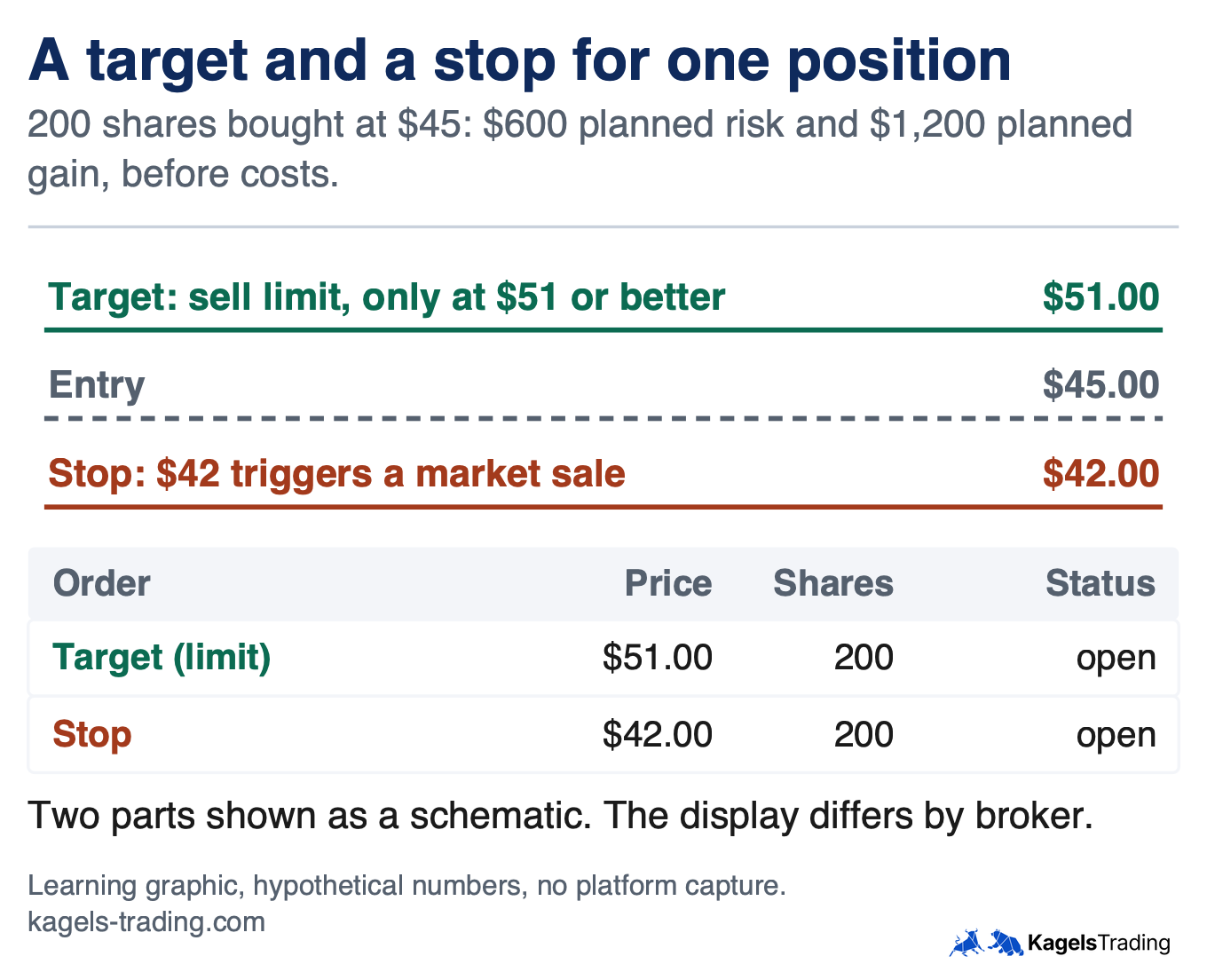
In daily use, an OCO protects an open position in two directions. If the stock rises to your target, a sell limit can sell at that price or better, as long as buyers are there. If it falls to the level where your trade idea has failed, a sell stop is triggered and becomes a market order, whose fill can differ substantially from the stop price. Schwab’s guide to advanced orders names the benefit: canceling the stop removes the risk of inadvertently opening a short position.
The name and the scope change with the broker. Interactive Brokers calls its version one-cancels-all (OCA), and a group can hold more than two orders. Alpaca says its OCO is for exit orders only, with both orders on the same side. So an OCO for entries exists at some brokers and not at others.
 Click to enlarge
Source: Kagels Trading, own learning graphic.
OCO, OTO and bracket: three links compared
The three terms differ in when an order becomes active and which order ends which. An OCO links two orders from the start, and your broker’s rules decide when each part is active and routed. An OTO keeps the second order back until the first has executed. A bracket combines both ideas.
| Order | What is linked, and when it starts | Typical use |
|---|---|---|
| OCO | Target and stop linked from the start; routing per broker | Protect a position you already hold |
| OTO | Entry first, second order after it executes | Enter and add a stop in one step |
| Bracket (OTOCO) | Entry first, then target and stop as an OCO | Set the whole trade before entry |
A partial fill of the entry is the trap in OTO and bracket orders. Fidelity’s conditional order disclosure, dated 2012, says a partial fill of the primary order does not release the secondary order, and that its OTOCO exits go out when the primary executes in full. Alpaca says its exits are not active until the entry has completely filled. So at these two brokers, 150 of 200 bought shares can sit there without an active stop from the bracket. Check your broker’s rule, and consider what you would do with such a partial position.
The documents we read do not all answer this. Interactive Brokers’ bracket documentation describes a parent order with two opposite-side orders, and Schwab says a bracket places its exits “after a position is opened”. Neither passage states a rule for a partly filled entry. The Interactive Brokers FIX specification, for a technical order connection, says partial executions of a parent activate the respective quantity of the child orders, but that covers one interface and not every ticket. So ask your broker, or test it in a paper account.
Step by step: enter a target and a stop as an OCO
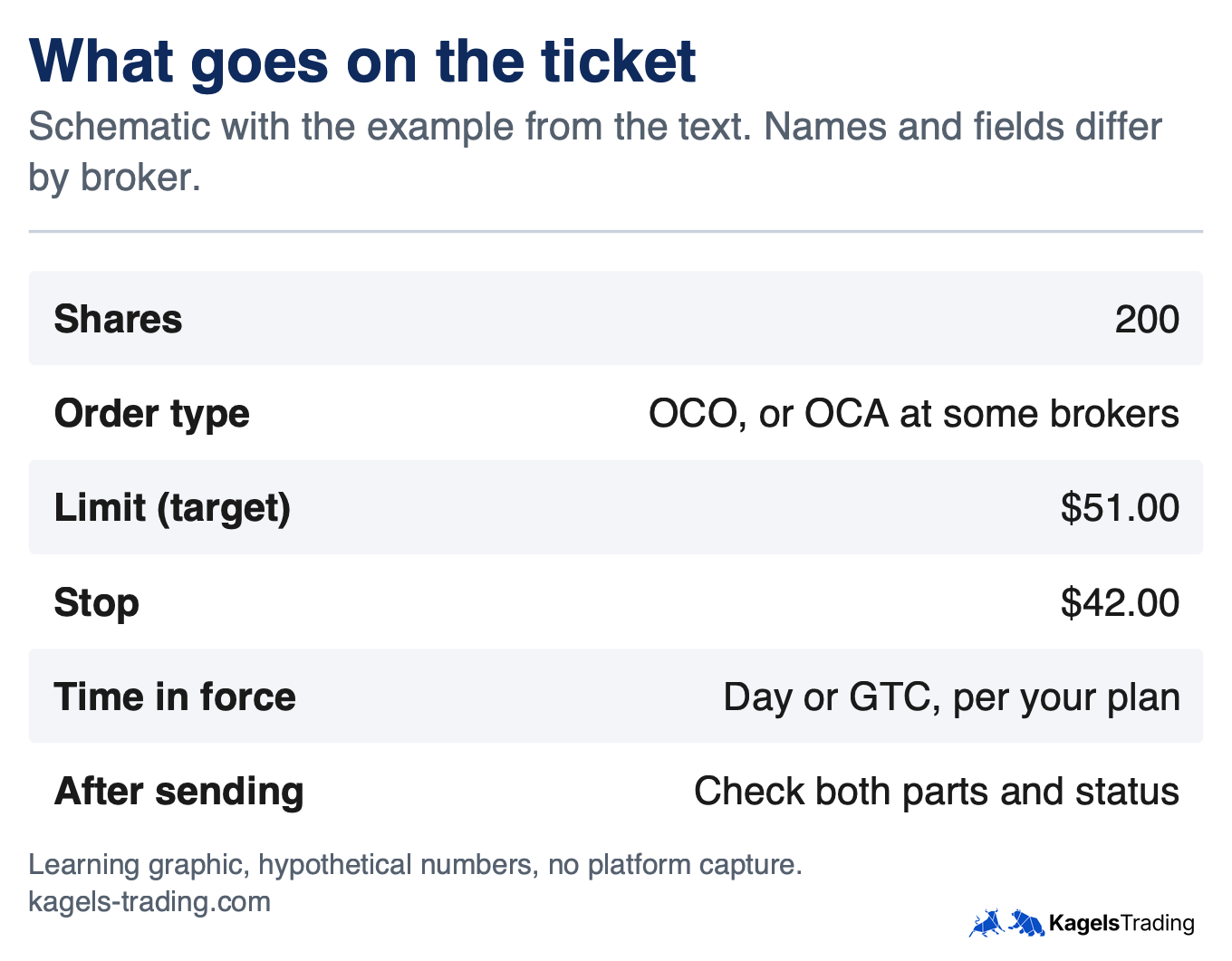
Our example is hypothetical: 200 shares bought at $45.00, with a stop at $42.00 and a target at $51.00. That plans $600 of risk and $1,200 of gain before costs, a ratio of 2 to 1, if both orders fill at their prices. You get the share count from your position sizing. The graphics are schematics, not captures of a platform.
- Check the position and share count: the OCO is for 200 shares. A different number protects too much or too little.
- Choose the order type: look for OCO, one cancels other or OCA. Schwab’s how-to lists it as a conditional order. On platforms with brackets, you add a target and a stop to the entry.
- Enter the limit: a sell limit at $51.00. It can execute only at that price or better.
- Enter the stop: a stop at $42.00. Some brokers also offer a stop-limit here, which trades a price floor for the risk of no sale; our guide to order types compares them.
- Set the time in force: Fidelity and Schwab say both parts should carry the same time in force. Note when a GTC order expires.
- Send it, then check the status: your order list shows the actual status of each part, which at some brokers can be held or not yet routed.
 Click to enlarge
Source: Kagels Trading, own learning graphic.
What happens on a partial fill
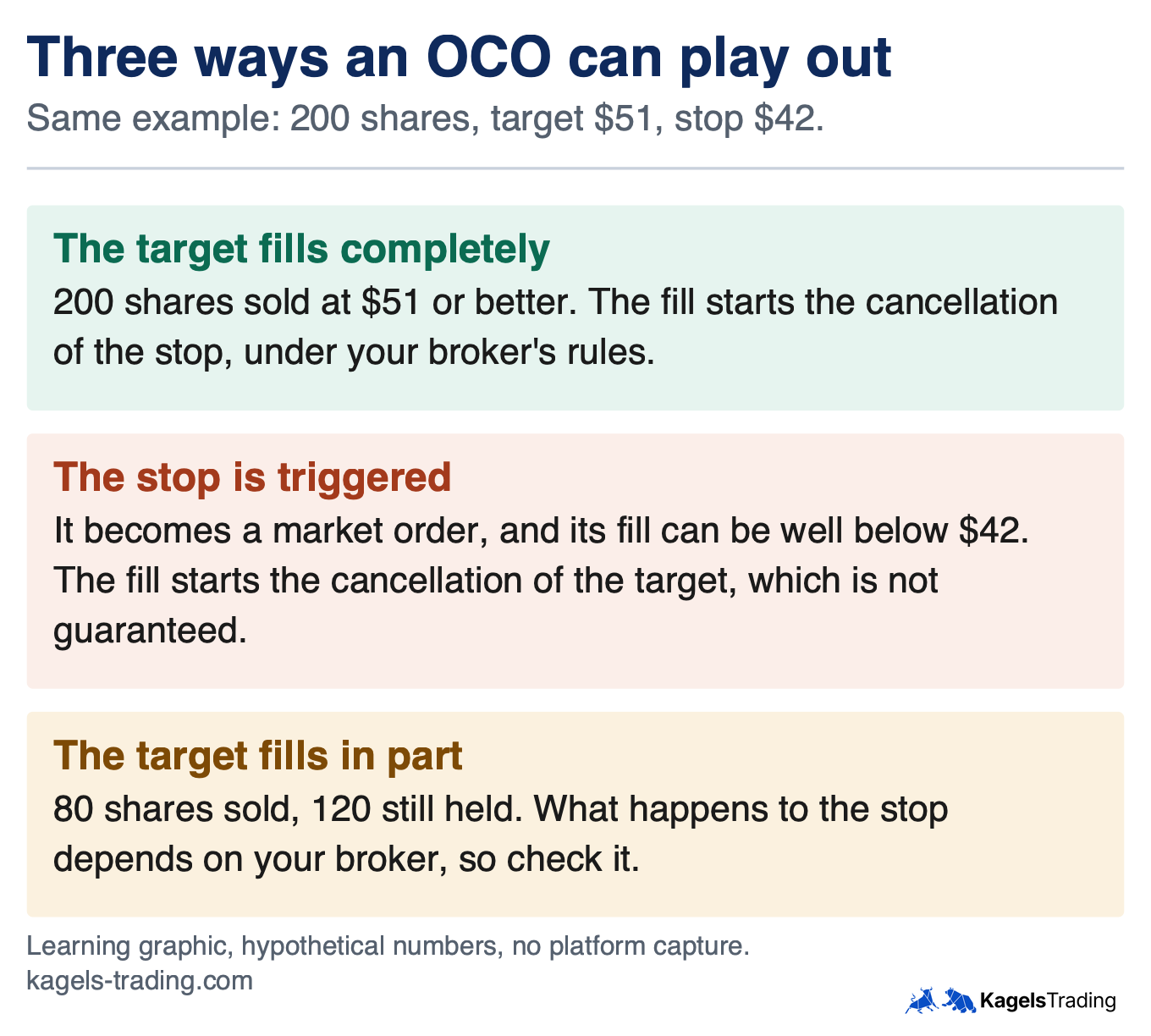
Most explanations stop at “one cancels the other”, but real trouble starts when the target fills only in part. Say a buyer takes just 80 shares at $51.00, and the other 120 stay in your account. There are three basic outcomes for an OCO, and the third is the one to study.
 Click to enlarge
Source: Kagels Trading, own learning graphic.
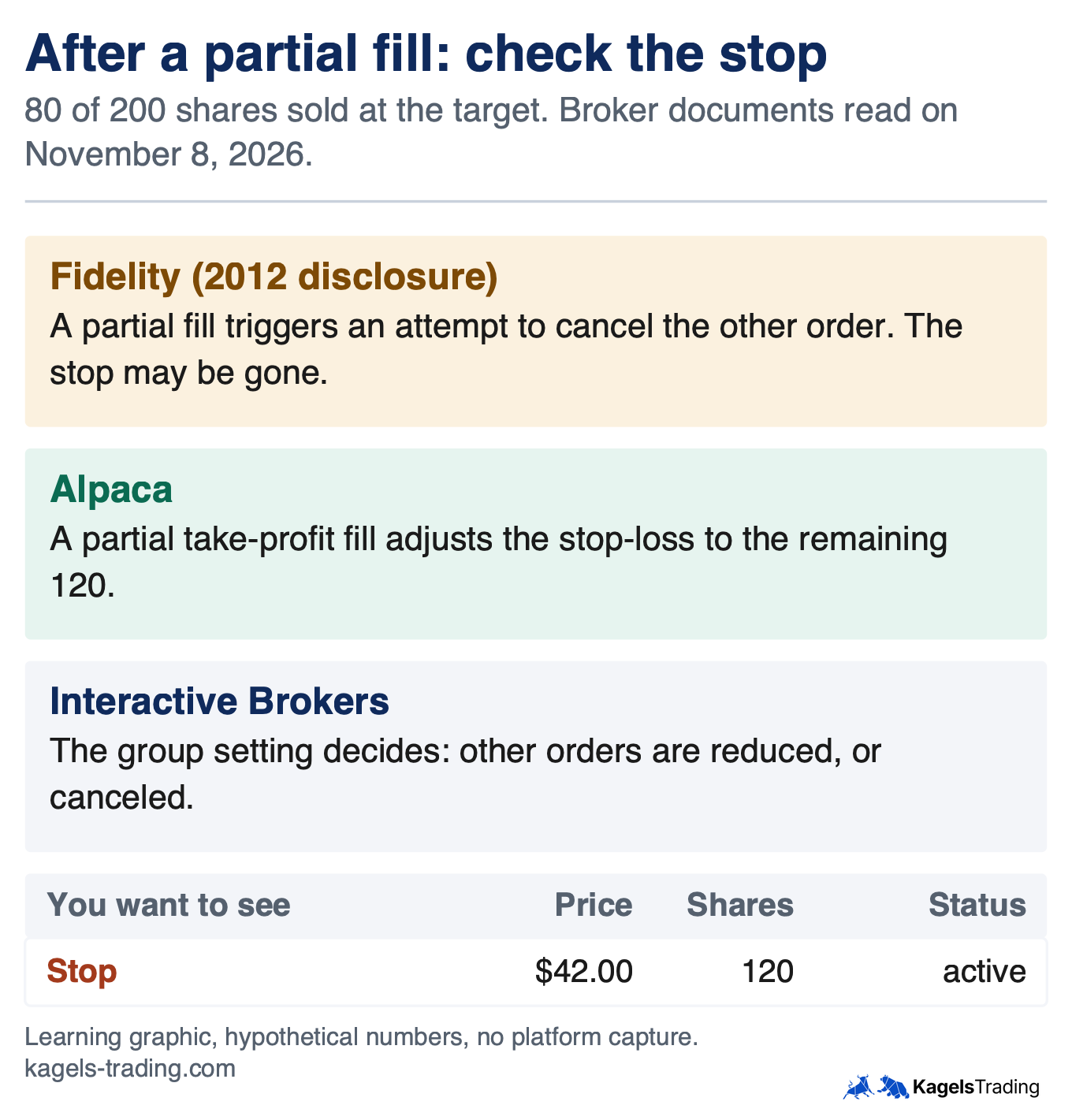
The brokers’ documents give different answers. Read this table as a statement about those documents, not as a rule for all brokers. We read each on November 8, 2026, and Fidelity’s is an older text that is still online.
| Broker | Partial fill, per the document | Your 120 shares |
|---|---|---|
| Fidelity (2012) | Attempt to cancel the other order | Stop may be gone |
| Alpaca | Partial take-profit fill: stop-loss adjusted to the rest, for OCO legs too | Stop for 120 |
| Interactive Brokers | Others reduced by default; a setting can cancel them | Depends on the setting |
| Schwab (May 2025 guide) | No partial-fill rule in that guide | Ask |
So after a partial fill, look at three things: does the stop still exist, what is its status, and how many shares does it cover? If the stop is gone or too large, correct it yourself. The TWS order settings at Interactive Brokers show that “canceled” is one of the available choices, so even at one broker the answer can vary with how the group was set up.
 Click to enlarge
Source: Kagels Trading, own learning graphic.
Who runs the link: your broker’s systems, in the documents we read
In the US documents we read, the broker’s systems run the link. Fidelity says that when one order executes, an attempt to cancel the other is initiated automatically. Alpaca says its system recognizes the orders as a group, and Interactive Brokers says that completing one order causes TWS, its trading platform, to cancel the others. We found no US exchange document that offers an OCO for stocks, but we do not claim that this holds for every venue or broker.
A link run by software takes time, and that gap is a risk. In the time between one execution and the cancellation of the other order, a second order that is working can still trade. Fidelity also says conditional orders rely on trigger processing and market data, and that it holds them in a separate order file until their conditions are met. The same document says both OCO orders are live in the marketplace at once, so ask your broker where each part of yours sits.
Ask whether the link needs your computer to be on. Orders held at your broker do not depend on your computer, while a function that runs only in your own program can. MetaTrader is the common example: its trailing stop runs in the client terminal, so the stop stops following the price when the terminal closes, while the last stop set stays in force. That example is about trailing, not about an OCO, but it shows why the question matters.
Both orders can fill: the risk an OCO does not remove
An OCO reduces the risk of a double execution, but does not rule it out. Fidelity says that in volatile markets both orders could receive executions, and that a delayed execution can have the same result. Alpaca says that in extremely volatile and fast markets both orders “may fill before the cancellation occurs”. Sold twice, a long position of 200 shares can turn into a short position of 200.
Interactive Brokers shows the same issue as a setting. Its order settings warn that reducing other orders without overfill protection can lead to several orders being routed and to an overfill. With protection on, only one order of the group is routed to an exchange at a time. Whether that fits your plan is your decision: an order that is not routed still belongs to the group, but it is not at the exchange at that moment.
Check your position, not only your orders, after a fast move. A position that shows the wrong sign, such as minus 200 shares, needs action at once. A stop in the OCO also keeps all the normal weaknesses: its price is only a trigger, and a gap can take the fill far below it.
Change, cancel, close: what happens to the other order
An OCO is not a sealed package, and every change raises the question of the second order. You can move the target or the stop, cancel one side, or close the position yourself. Three cases come up most often, and in each the order list gives the answer.
Move the target or the stop
A change counts only when your broker has confirmed it. Until then, the old order can still execute, and Fidelity notes for OTO orders that a primary order with a pending cancel status may still be filled after some delay. Alpaca says it supports replacing the prices of its OCO orders; at other brokers, look up whether you can change a part or must cancel and re-enter.
Cancel one side
What happens to the other side depends on who canceled and why. The Interactive Brokers glossary says that if you cancel an order before execution, the remaining orders in the group are canceled too. If the system rejects or cancels one, the others are not automatically canceled. So canceling your target there can also remove your stop, which leaves the position unprotected until you set a new one.
Close the position by hand
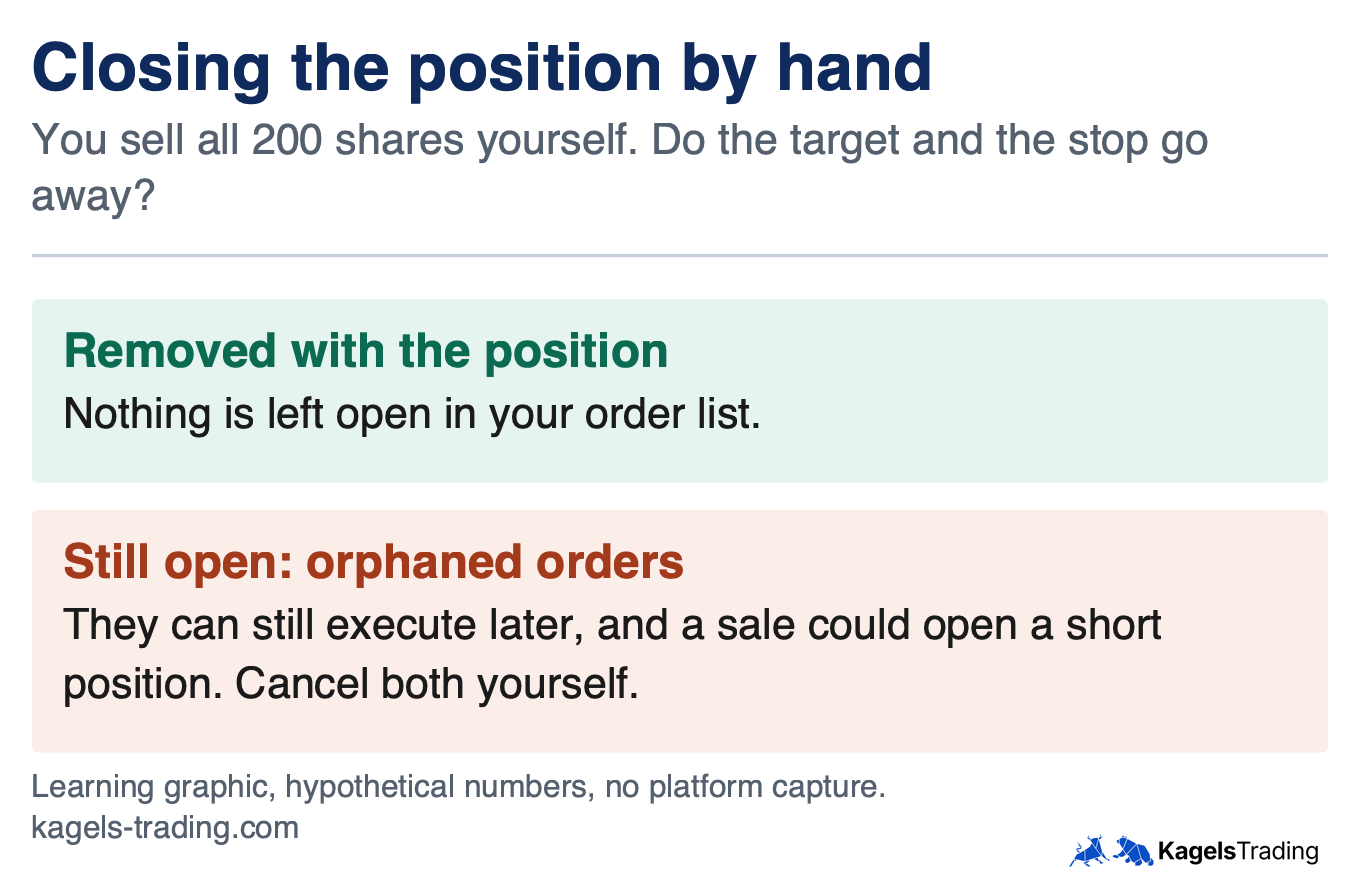
Do not assume that selling the position yourself cancels the OCO. The documents we read do not state that your target and stop go away with the position, so check your order list at once. If they are still open, you have orphaned orders, which can execute later. Cancel them yourself.
 Click to enlarge
Source: Kagels Trading, own learning graphic.
Which brokers offer OCO and bracket orders?
This overview names only what we read in the broker’s own documents on November 8, 2026. Offers change, and a mention here is no recommendation. Our reviews of Interactive Brokers and Alpaca cover those firms in more depth, so look in your own order ticket for the current state.
| Broker | Linked orders named | Detail in the document |
|---|---|---|
| Fidelity | OCO, OTO, OTOCO | Same time in force on both OCO orders; GTC up to 180 days |
| Schwab | OCO, first triggers, first triggers OCO | Brackets on active-trader platforms such as thinkorswim |
| Interactive Brokers | OCA, bracket | Groups can hold several orders; overfill setting |
| Alpaca | OCO, OTO, bracket | No extended hours for brackets; day or GTC only; exit-only OCO |
If your broker has no OCO, two separate orders are not a sure replacement. Alpaca explains that without a bracket or OCO, its system would treat a second closing order as exceeding your position. Where a broker does allow two independent exit orders for the same shares, you carry the link yourself: after each exit, you cancel the other order by hand. That takes discipline, and a look at the order list after every fill.
Common mistakes with OCO orders
The mechanics are simple, but the mistakes happen at the edges. Nearly all of them have to do with the share count or with an assumption about the broker. These five are the ones I see most often.
- Wrong size after a partial sale: after you sell some shares by hand, the OCO no longer fits the position. Check the quantity of every open order.
- Orphaned orders after closing: a position closed by hand can leave the OCO in the market, where it can open a new position.
- A stop-limit inside the OCO with no plan: after a gap through the limit, the stop-limit can stay unfilled and you still hold the stock.
- Missed expiry: when a GTC order runs out, the position is unprotected without any other visible change.
- Assuming another broker’s rule: a rule from one firm, or from this guide, is not your firm’s rule. Read your current terms.
Pros and cons of OCO orders
An OCO solves a real problem, but it does not replace watching your orders. Weigh both sides before you make it your standard.
What speaks for it:
- Fewer orphaned orders: after a normal exit, the second sell order is meant to go away by itself.
- Planning before the trade: the target and stop are set while you are still calm.
- Less screen time: orders held at your broker do not need your computer to be on.
What speaks against it:
- Broker-dependent: partial fills, cancellation and time in force follow each broker’s rules.
- No protection against gaps: a stop can sell far below its trigger, and a stop-limit may not sell at all.
- No guarantee of cancellation: in fast markets, both sides can fill.
Conclusion: the OCO saves work, not the look at your order list
An OCO order is a clean tool for managing a position in both directions at once. It is meant to prevent the orphaned order that lingers after an exit. How well it does this depends on your broker, and the paper trading guide is one way to learn an order ticket without real money at risk.
I have been trading since 1980, and I would pass on one habit. After every fill, every partial fill and every change, I look at my order list before I do anything else. It takes ten seconds, and it has saved me more unwanted positions than any order technique.
This guide explains order mechanics and is not investment advice. The numbers are hypothetical and before costs, and we did not test these orders at any broker. We read the documents named above on November 8, 2026; your own firm’s current terms decide, and for the wider picture see our risk management guide.
Frequently asked questions about OCO and bracket orders
What does OCO mean in trading?
OCO stands for one cancels the other. Two orders, usually a limit order and a stop order, are linked, so that execution of one is meant to cancel the other. A typical OCO has a target above the price and a stop below it.
What is the difference between an OCO and a bracket order?
An OCO links a target and a stop for a position you already hold. A bracket order also includes the entry, and its exits become active after the entry. At Fidelity and Alpaca, that means after the entry has filled completely.
What happens to an OCO order on a partial fill?
It depends on your broker, so check the stop right away. Fidelity’s disclosure describes an attempt to cancel the other order, Alpaca adjusts the stop-loss after a partial take-profit fill, and Interactive Brokers has a group setting. Confirm that the stop exists, its status and its share count.
Can both sides of an OCO order fill?
Yes, it can happen in fast markets. Fidelity and Alpaca both warn about it, because the cancellation takes time. A long position can then turn into a short position, so check your position after a fast move.
Can I use an OCO order to enter a trade?
At some brokers, yes, but not at all of them. Interactive Brokers’ OCA groups can hold several entry orders, for example, while Alpaca says its OCO supports only exit orders. Look in your broker’s documents before you plan on it.
Does an OCO order work when my computer is off?
Orders held at your broker do not depend on your computer. Only a function that runs inside your own program stops when the program closes. Ask your broker where each part of your OCO is held, and check the status when you are back.
This US edition is based on our German edition on kagels-trading.de and has been adapted for US readers.