
Volume Profile: POC, Value Area and a Test of 1,450 Days


Contents
- Volume profile in 30 seconds
- What is a volume profile?
- POC, value area, HVN and LVN: the terms of a volume profile
- Where the volume comes from: futures, stocks, forex and crypto
- The six volume profiles in TradingView
- Volume profile settings: rows, value area and volume type
- My test: what 1,450 daily profiles in SPY show
- Volume profile trading: reaction and acceptance at the value area
- Volume profile vs Market Profile vs VWAP
- Pros and cons of the volume profile
- Conclusion: the volume profile shows where trading happened, not where price goes
- Frequently asked questions about the volume profile
- About the author
The prior day’s point of control is reached on the next trading day only slightly more often than a counter level at the same distance. In my test of 1,450 daily profiles of the S&P 500 ETF SPY, it was 53.7 against 50.6 percent, in 1,383 cases with at least one row of distance from the open. For untouched daily POCs, my sample showed no magnet effect at all. The volume profile is still an honest picture of where the market traded, and that is useful enough.
This guide explains the point of control, the value area and volume nodes, and how to set up the six volume profiles in TradingView. You will see why the profile measures something different in forex and CFDs than in the E-mini S&P 500 futures, and which popular rules of thumb my measurement supports and which it does not. This article follows our editorial policy.
Volume profile in 30 seconds
- What it shows: traded volume at each price level, drawn as horizontal bars, instead of volume per bar of time like the bars under the chart.
- The levels: the point of control (POC) is the price with the most volume. The value area usually holds just under 70 percent of the volume, bounded by the VAH above and the VAL below.
- Check the data first: stocks and futures deliver exchange volume. For forex and CFDs TradingView uses tick volume, for crypto the volume of a single exchange.
- My SPY test: after an open above the value area, the day closed above its open in 52.3 percent of cases, on all days in 53.6 percent. Untouched POCs were not reached more often than counter levels at the same distance.
- Best use: a map of zones where you wait for price to react, not a signal on its own.
What is a volume profile?
A volume profile is a charting tool that spreads the volume traded over a period across the price levels and shows it as a horizontal histogram next to the price.
The difference from normal volume is the axis. The bars under a chart answer the question of when a lot traded, in which bar. The volume profile answers where a lot traded, at which price. A long horizontal bar means many contracts or shares changed hands at that level. A short bar means price moved through quickly.
Why does that help? Every trade is a deal between a buyer and a seller who agreed on that price. Where a lot of volume sits, the market accepted a price. Where little volume sits, it rejected it. When price comes back later, the profile shows whether it runs into a zone with a lot of trading history or very little. TradingView’s help on volume profiles calls the profile a reactive tool: it shows what happened, not a forecast.
I trade without indicators myself, from price movement and market structure alone. The volume profile is still closer to my way of working than most indicators, because it lays no formula over price. It only counts where trading took place. How these zones relate to classic price levels is covered in our guide to support and resistance.
The volume profile is related to the Market Profile, but they are not the same. The Market Profile, developed by J. Peter Steidlmayer at the Chicago Board of Trade, spreads time across the price levels; the volume profile spreads volume. Both produce a POC and a value area. This guide is about volume and the tools most traders use today.
POC, value area, HVN and LVN: the terms of a volume profile
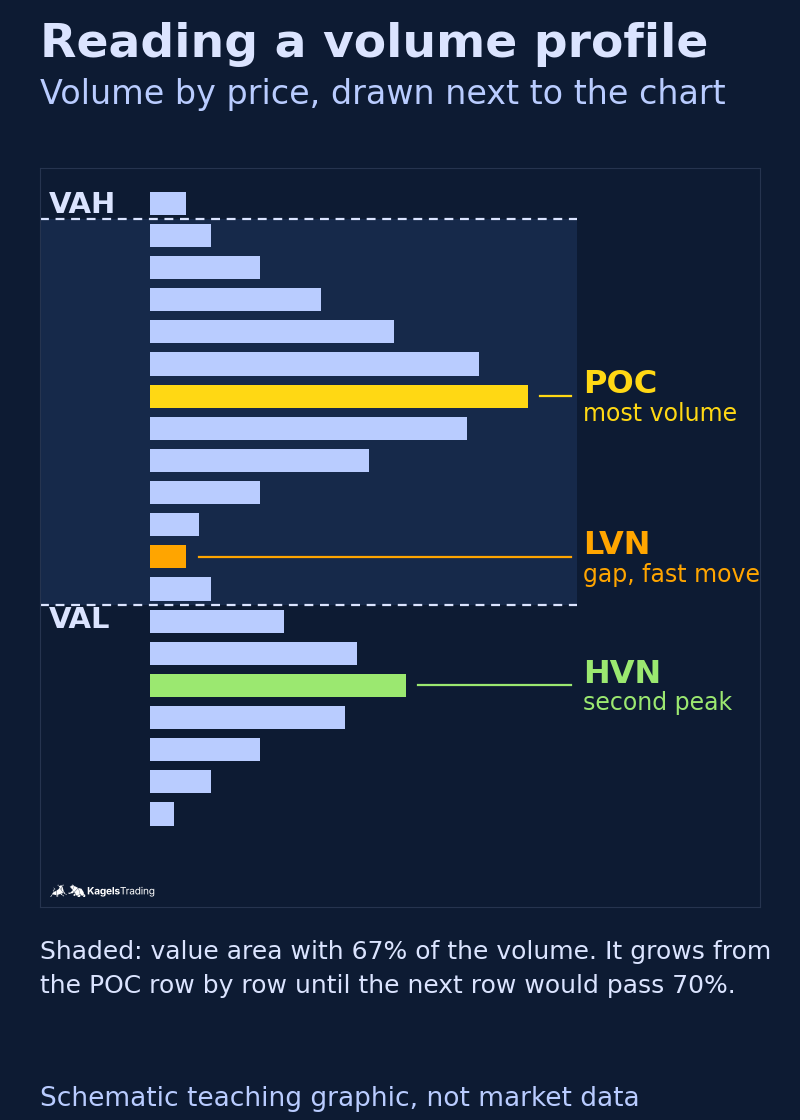
A volume profile has only a few fixed levels, and each has a name. Once you know the four terms below, you can read any profile in any software. The graphic shows all of them on a schematic profile.
 Click to enlarge
Source: Method from TradingView help, drawing by Kagels Trading.
Point of control (POC)
The point of control (POC) is the price level with the highest traded volume in the period you look at.
The POC is the price the market agreed on most often, so many traders call it the fair price of the period. Because it is a row with a certain height, it is always a narrow zone and never one exact price. How wide that zone is depends on the row setting further below.
Value area, VAH and VAL
The value area is the price range in which a set share of the volume traded, usually 70 percent; its upper edge is the value area high (VAH), its lower edge the value area low (VAL).
The value area grows outward from the POC, one row at a time. The English TradingView help describes the method like this: starting at the POC, the next row above and the next row below are compared, and the one with more volume is added. If adding it would take the total past the 70 percent target, the value area is complete. The POC row always belongs to it. That is why the value area does not have to sit symmetrically around the POC. In my SPY measurement the value area was 0.43 percent wide in the median, the whole daily range 0.95 percent.
High volume node and low volume node
A high volume node (HVN) is a peak in the profile with a lot of volume; a low volume node (LVN) is a gap with little volume between two peaks.
At an HVN the market traded for a long time, usually in a sideways phase. When price returns there, many traders expect it to slow down. At an LVN price moved through quickly, often in an impulse. When it returns, they expect a fast run to the next HVN. These are rules of thumb, not laws. I did not measure them, because a node can only be counted with a definition you choose yourself.
Naked POC
A naked POC is a point of control that price has not touched again since it formed.
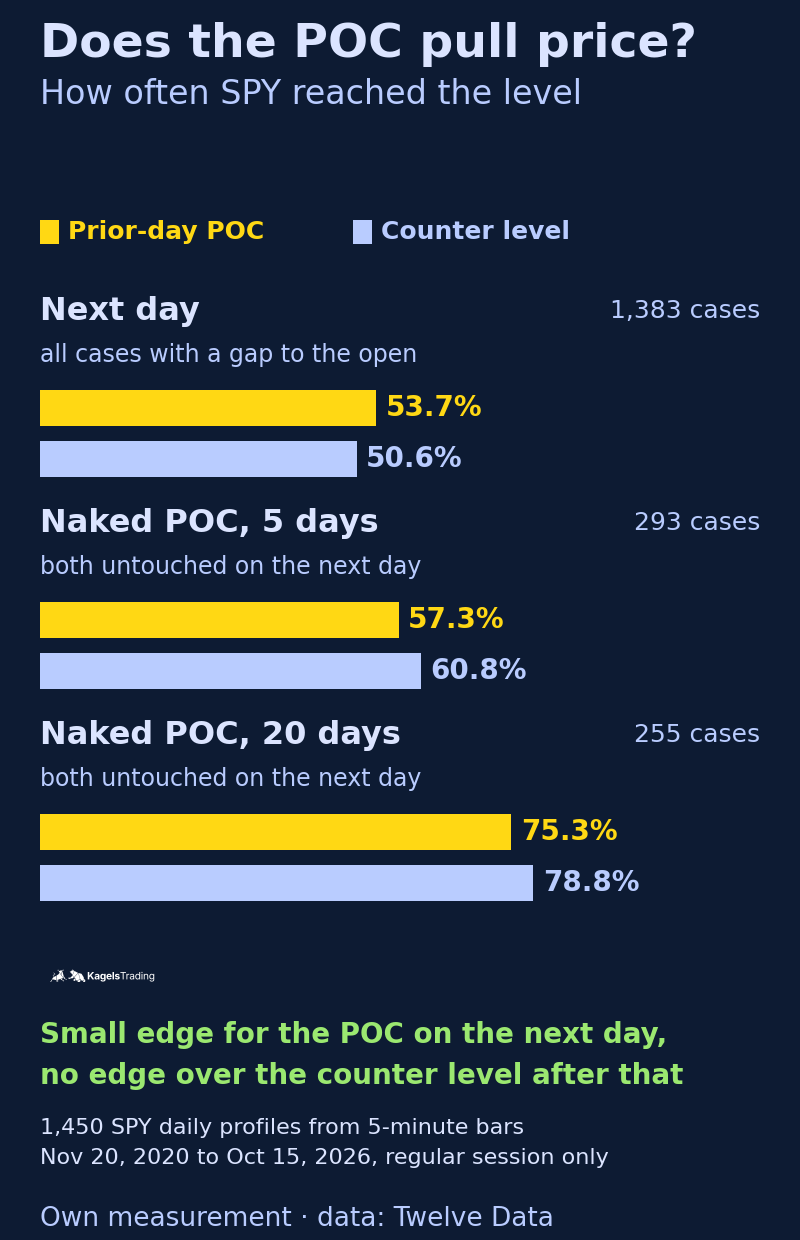
The popular reading is that an untouched POC pulls price back later. In TradingView’s session and periodic profiles, the option Extend POC Right draws the line on until a bar crosses it, so you see open POCs at a glance. Whether they attract price more than a counter level at the same distance is in my test below. In short: when both stayed untouched on the next day, price reached the POC within the following 5 trading days in 57.3 percent of cases and the counter level in 60.8 percent.
Profile shapes: D, P and b
Many traders also read the shape of a profile, and three letters cover most of it. A D-shape has its POC near the middle and tapers evenly above and below, a picture of balance. A P-shape has its bulk of volume near the top and a thin tail below, often seen when a market rallied and then traded higher. A b-shape is the mirror image after a decline. NinjaTrader’s overview of profile shapes adds the double-distribution B-shape. These are descriptions of what happened in the period, and I have not tested whether a shape predicts the next move.
Where the volume comes from: futures, stocks, forex and crypto
A volume profile is only as good as the volume it is built from. Most courses on the topic skip this question, yet it decides whether the profile shows real trading at all. TradingView’s help names three types of volume: trade volume for stocks, tick volume for indices, forex and crypto CFDs, and base or quote volume for crypto.
Futures and stocks: real exchange volume
On an exchange, every trade is counted. A future such as the E-mini S&P 500 (ES) trades on one exchange, CME Globex, so its volume is complete for that contract. For stocks and ETFs it is the volume of the trading venues your data vendor captures; our guide to volume analysis explains the US consolidated tape behind it. Here the profile measures what it is supposed to measure.
With futures, the session question comes on top. The ES trades from Sunday 6:00 p.m. to Friday 5:00 p.m. ET with a one-hour break each day, while the regular stock session runs from 9:30 a.m. to 4:00 p.m. ET. A daily profile of the whole Globex session looks different from one of the regular hours only, because the thin overnight trading adds other prices. According to TradingView’s help on the session volume profile, the default setting All combines pre-market, main session and post-market into one profile when extended hours are shown on the chart. The full schedule is in our overview of futures market hours.
Forex and CFDs: tick volume instead of turnover
Tick volume is the number of price changes in a period, not the number of contracts, shares or currency units traded.
The spot forex market has no central exchange; trading happens between banks and brokers. A comprehensive international survey comes only every three years from the Bank for International Settlements, and it covers the survey month of April. What TradingView shows as volume on a spot currency chart is tick volume, the number of price changes at the data vendor. The same goes for index CFDs, which you trade with a broker instead of on an exchange.
Tick volume measures activity, not turnover. Many price changes often coincide with heavy trading, but not always, and every data vendor counts differently. A profile built from tick volume shows where price moved often. If you want profiles in currencies, the time-based Market Profile is often the more honest choice, or you switch to a currency future such as the Euro FX future (6E) on CME, which has real exchange volume.
Crypto: every exchange has its own profile
For cryptocurrencies, the chart shows the volume of exactly one exchange. Open Bitcoin on TradingView through Coinbase, and you see Coinbase’s turnover only. I measured how much that moves the levels. The basis is 5-minute bars from October 5 to 11, 2026 (UTC) from Coinbase (BTC/USD) and the global Binance exchange (BTC/USDT, not Binance.US), with rows of 50. USDT is a stablecoin pegged to the dollar, not a dollar quote, so the Binance values are in USDT.
| Bitcoin weekly profile | Coinbase | Binance |
|---|---|---|
| Volume traded | 34,525 BTC | 98,019 BTC |
| Point of control | $82,975 | 83,025 USDT |
| Value area high | $84,950 | 85,100 USDT |
| Value area low | $80,350 | 80,450 USDT |
The amount differed a lot, the levels hardly at all. Binance reported about 2.8 times as much volume. Yet the POC was only 50 units apart, one row, and the value area high and low were 150 and 100 apart. So the two profiles gave similar levels that week, from very different amounts. Whether one exchange represents the whole market the comparison cannot show, because there is no total for all exchanges. One week is a sample, and with smaller exchanges or less liquid coins the gap can be larger.
The six volume profiles in TradingView
TradingView offers the volume profile in six versions, as an indicator, as a drawing tool and as a chart type. They calculate the same way but differ in the period they summarize. The indicators build the profile from bars of a lower timeframe, for example from minute bars for a daily profile. The table lists all six:
| Version | Which period |
|---|---|
| Fixed Range | a section you set with two clicks |
| Session | each trading day or a part of the session |
| Session HD | each trading day, detail adapts to the zoom |
| Visible Range | everything currently on the screen |
| Periodic | each day, week or month, as you choose |
| Auto Anchored | from a start point the tool picks itself |
Fixed range volume profile: the profile for a section you choose
The fixed range volume profile calculates the volume profile for a section of the chart whose start and end you set yourself.
The fixed range volume profile is where most traders start. It is quickest as a drawing tool: according to TradingView’s help on the drawing tool, you pick it in the toolbar on the left of the chart and click two points, start and end. Its Extend right option keeps building the profile beyond the second point with every new bar. The profile also exists as an indicator. For the calculation, the help on the fixed range indicator says TradingView tries the timeframes 1, 5, 15, 30, 60, 240 minutes and daily in that order until the section has fewer than 5,000 bars; on futures and spread charts it uses the next lower timeframe of the chart instead. A useful section has market structure: a finished sideways phase from its first to its last day, such as a stock that moved sideways for three weeks after earnings, or a move from low to high, the way you would anchor a Fibonacci retracement. A profile over a random stretch mixes phases that have nothing to do with each other.
Session and Session HD: one profile per trading day
The session volume profile calculates a separate volume profile for each trading day or each session part you choose.
You see nothing of it on a daily chart, only on an intraday chart such as the 5- or 15-minute chart. For day traders it is the basis, because the prior day’s POC, VAH and VAL provide the levels for the new day. Session HD calculates the same but adjusts the number of rows automatically when you zoom in or out. If you only want the regular hours, set the session accordingly. The main sessions worldwide are in our guide to trading sessions.
Visible range volume profile: convenient, but it moves
The visible range profile calculates everything that is currently on your screen. That is convenient for a first look. But it has a trap: as soon as you scroll or zoom, it recalculates, and the POC and value area move with it. A level you read from it yesterday may be a different one today. For trading levels, a fixed profile is the better choice.
Periodic and auto anchored volume profile
The periodic profile starts again at fixed intervals, every day, week or month. For swing trades over several days, a weekly profile on the hourly chart is often the right scale. The auto anchored profile finds its own start point, depending on the setting at the highest high, the lowest low, the start of a quarter or the last earnings report of a stock. A profile over several weeks or months is also called a composite profile. It shows the large zones where a market settled over a long time.
TradingView lists the built-in volume profile indicators from the Essential plan upward, as of our check of its pricing page on October 20, 2026. What else separates the plans is in our TradingView review with all plan costs. Other US platforms have the tool too: Schwab’s thinkorswim offers a Volume Profile study, and futures platforms such as NinjaTrader and Sierra Chart include profiles as well.
Volume profile settings: rows, value area and volume type
Three settings change what you see, and you find all three in the indicator’s inputs. The names below are the ones in TradingView’s English help and interface:
- Rows (Rows Layout and Row Size): with Number of Rows you set how many rows the profile is split into. With Ticks Per Row you set the height of one row in ticks, the smallest price change of the market. More rows show finer peaks, but also more noise.
- Value Area Volume: the share of volume the value area holds, usually 70 percent. A smaller value makes the value area narrower.
- Volume (Total, Up/Down, Delta): Total shows all volume in each row. Up/Down splits it into two sides, Delta shows the difference between them.
In TradingView, the split into up and down volume is an approximation. The help says so plainly: if a bar of the lower timeframe closes at or above its open, its whole volume counts as up volume, otherwise as down volume. The tool does not see who bought or sold at a price. A real split into bid and ask volume needs order flow software, as our guide to order flow trading explains with the footprint chart. For a start, Total is the most honest view.
How fine should the rows be? There is no single best number, because it depends on market, period and price range. I ran my measurement with three row heights, 0.01, 0.02 and 0.05 percent of the price. The overall rates shifted by up to 2.3 percentage points, single subgroups by up to 3.2 percentage points. The conclusions did not change. More important than the exact number of rows is that you do not keep changing it, or your POC moves with it.
Extending POC, VAH and VAL to the right is the setting that makes the profile tradable. In the session and periodic profiles the options are called Extend POC Right, Extend VAH Right and Extend VAL Right. The lines then run on until a bar crosses them. With the fixed range drawing tool, you can drag the levels to the right yourself as horizontal lines. A profile does not act inside itself, but at the levels price returns to later.
My test: what 1,450 daily profiles in SPY show
I wanted to know whether the rules from courses and videos hold up in real data. So I calculated daily profiles of SPY, the SPDR S&P 500 ETF Trust, for the trading days from November 20, 2020 to October 15, 2026. SPY has exchange volume and one continuous price series, while the ES rolls into a new contract every quarter. The basis is 5-minute bars of the regular session from 9:30 a.m. to 4:00 p.m. ET from Twelve Data.
It is my own approximate profile, not a copy of TradingView. I spread the volume of each 5-minute bar evenly across the rows between its low and high, with a row height of 0.02 percent of the prior day’s close. The value area follows the method of the English TradingView help with 70 percent. Profiles come only from complete sessions with all 78 bars. I excluded 24 days with data gaps, together with every comparison they appear in. Half days before holidays count as the following day but produce no profile. “Reached” means the level lay between the day’s low and high. TradingView picks a lower timeframe by profile type and chart timeframe; on a 5- to 15-minute chart its session volume profile uses 1-minute bars, according to the help page linked above. How far my values differ from TradingView’s I did not measure. How to build a test like this without fooling yourself is in our guide to backtesting.
Where does the market open relative to the prior day’s value area?
| Open | Days | Share |
|---|---|---|
| above the prior day’s VAH | 556 | 38.9% |
| inside the value area | 474 | 33.1% |
| below the prior day’s VAL | 401 | 28.0% |
Two out of three days opened outside the prior day’s value area. The reason is that the value area is narrow: 0.43 percent in the median, the whole daily range 0.95 percent. The count covers 1,431 pairs of a profile day and the next trading day. If you read an open outside the value area as a special situation, know that in SPY it was the normal case.
Open outside the value area: direction or return?
A popular rule says: if the market opens above the VAH, buyers are in control. I measured what happened on these days until the close and compared it with all days:
| During the opening day | above VAH | below VAL | all days |
|---|---|---|---|
| Close above the open | 52.3% | 55.6% | 53.6% |
| Price returns to the edge | 63.5% | 61.1% | n/a |
| Prior-day POC reached | 44.2% | 44.1% | n/a |
| Close back inside the value area | 13.3% | 17.0% | n/a |
This sample showed no clear directional edge. After an open above the VAH, the day closed above its open in 52.3 percent of cases (556 days), on all days in 53.6 percent. After an open below the VAL it even closed higher a little more often, in 55.6 percent (401 days). A return was common, though: in about six out of ten cases price came back to the edge of the old value area during the day. But it rarely closed back inside, in 13.3 and 17.0 percent.
In practice this means the edge of the old value area is a place price often visits again. What it does there the open did not predict in this sample. The decision comes from the reaction at the edge, and that is what the trading plan in the next section is built on. By the way, when the market opened inside the value area, it closed inside in only 29.7 percent of cases. On 36.5 percent of those days it ran beyond both edges.
Does the point of control pull price?
I measured how often price reached the prior day’s POC on the next day. Across all 1,431 pairs it was 55.1 percent. On its own that number says little, because a nearby POC is almost always reached. So I set a counter level for every POC: the same distance from the open, but on the other side. Cases in which the POC and the open were less than one row apart do not count. That leaves 1,383 cases.
| Reached on the next day | POC | Counter level |
|---|---|---|
| all (1,383) | 53.7% | 50.6% |
| POC below the open (766) | 51.6% | 49.5% |
| POC above the open (617) | 56.2% | 52.0% |
On the next day the POC had a small edge, 53.7 against 50.6 percent, on both sides of the open. The split is needed because the counter level always lies on the other side: if the POC is below the open, the counter level is above it, and in the rising market of these years levels above the open were reached a little more easily. Over several days the picture turned. New POCs, tracked from the next session, were reached within 5 trading days in 76.1 percent of cases, the counter levels in 78.1 percent (1,312 fully observed cases). Within 20 days it was 87.6 against 89.3 percent (1,135 cases).
The naked POC in the test
The real naked POC is a POC that survived the next day untouched. For a fair comparison I took only cases in which both levels, POC and counter level, stayed untouched on the next day. I tracked both from day 2 on:
| Reached from day 2 | within 5 days | within 20 days |
|---|---|---|
| untouched POC | 57.3% | 75.3% |
| untouched counter level | 60.8% | 78.8% |
| Cases | 293 | 255 |
The untouched POC was reached slightly less often than the untouched counter level. Part of that is probably the upward drift, because the counter level sits above the open when the POC is below it. If you count POCs and counter levels separately, all that stayed untouched on the next day, the gap grows to 52.6 against 59.7 percent in 5 days. Those groups are made up differently, though, so that is no clean comparison. Either way, within these windows the untouched POC was not reached more often than its paired counter level, so this sample shows no magnet. It is true that old POCs are usually reached at some point, but the counter level at the same distance was reached about as often. The windows overlap and are not independent, so this is no statistical proof. The graphic sets the next day and the naked POC side by side.
 Click to enlarge
Source: Kagels Trading, own measurement.
The limits of this test
It is a hypothetical evaluation of a single market. SPY is very liquid and rose clearly over the period; single stocks, futures in the overnight session or crypto can behave differently. I measured only daily profiles, not profiles over weeks or over a sideways phase. And I only counted whether a level was reached, not what price did there. That reaction is exactly what matters when you trade. With row heights of 0.01 and 0.05 percent, the overall rates shifted by up to 2.3 percentage points, single subgroups by up to 3.2 percentage points. The conclusions stayed the same.
Volume profile trading: reaction and acceptance at the value area
In my test the levels themselves gave no clear direction. They become useful when you wait at them for an answer from price. There are two terms for that answer: reaction and acceptance.
Reaction means that price tests a level of the profile and bounces off; acceptance means that it breaks through and closes on the other side. Both are read from closing prices, not from a single tick through the line.
Here is one possible trading plan in five steps, and expressly not a tested rule. It works for long and short trades alike:
- Set the profile: the prior day’s session profile or a fixed range profile over a finished sideways phase. Extend POC, VAH and VAL to the right.
- Wait for price to reach an edge: for a long the VAL from above, for a short the VAH from below. Do not trade inside a profile that is still forming.
- Wait for the reaction: a reversal bar such as a hammer at the VAL for a long, or a shooting star at the VAH for a short. Only the close of the bar counts.
- Enter if it still fits: at the open of the next bar. If price has already reached the POC by then, from below for a long or from above for a short, skip the trade.
- Set stop and target: for a long the stop below the wick at the VAL, for a short above the wick at the VAH. The first target is the POC, then the opposite edge. If the distance from entry to the POC is shorter than the distance to the stop, skip the trade as well.
A worked example in the ES
The numbers in this example are made up to show the arithmetic; they are not a real trade. Say the prior regular session of the E-mini S&P 500 left a VAL at 7,662.25, a POC at 7,680.00 and a VAH at 7,695.50. The next morning price falls to the VAL, and a 5-minute hammer prints a low of 7,657.75 and closes at 7,664.50.
The plan gives entry, stop and target before any money is at risk. You buy at the next bar’s open, 7,664.75, with the stop one tick below the wick at 7,657.50. That is 7.25 points of risk, or $362.50 per contract, because one ES point is worth $50 and one tick of 0.25 points $12.50. The first target, the POC at 7,680.00, is 15.25 points away, $762.50. The path to the POC is longer than the path to the stop, so the trade passes the last check; the second target would be the VAH at 7,695.50. Had the open of the entry bar already been at 7,680.00, the plan would say skip it.
Acceptance is the opposite case. If price closes several bars above the VAH, the market has accepted a higher price. Then the old VAH becomes support on a pullback for a long, and for a short a broken VAL becomes resistance. How to tell such breakouts from false ones is covered in our guide to breakout trading. A short stab through an edge with an immediate return is often a stop run, where resting stops are taken out.
Put your stop at price, not at the line. A value area edge is a zone, and the wick of the signal bar shows how far the market tested it. Whether target and stop fit together, and how much you risk per trade, is in our guide to risk management. In sideways markets, where price swings between VAH and VAL, the range itself gives you the frame.
Volume profile vs Market Profile vs VWAP
Three tools work with price and volume, and they are often confused. The table shows what the volume profile, the Market Profile and VWAP each measure and give you:
| Tool | What it measures and gives you |
|---|---|
| Volume profile | volume at each price: POC, value area, volume nodes |
| Market Profile (TPO) | time at each price: POC, value area, profile shapes |
| VWAP | average price weighted by volume: one running line |
VWAP condenses the same volume into a single number, the average price traded since the session began. The profile, by contrast, shows the whole distribution, including whether there are several centers of gravity. How day traders use the average price is in our guide to the VWAP indicator. The Market Profile counts time instead of volume, and TradingView offers it as the TPO indicator. It is the more honest view where there is no central volume, as in spot forex.
Pros and cons of the volume profile
The volume profile is a good tool as long as you know what it cannot do. The list sums up what its design and my measurement show.
What speaks for the volume profile
- No formula over price: it only counts where trading took place.
- Clear zones: POC and value area give you places where you wait for a reaction.
- Often revisited: after an open outside, SPY came back to the old edge in about six out of ten cases.
- Available almost everywhere: TradingView, thinkorswim, NinjaTrader, Sierra Chart and the order flow platforms all have it.
What speaks against it
- No signal: an open above the VAH showed no clear directional edge in the test.
- No magnet: untouched POCs were not reached more often than counter levels at the same distance in the days after.
- Depends on the data: in forex and CFDs only tick volume, in crypto the volume of one exchange.
- Depends on the settings: rows and period move the levels, and the visible range profile moves even when you scroll.
Conclusion: the volume profile shows where trading happened, not where price goes
The volume profile answers one question very well: where did the market accept a price? POC, value area and volume nodes make that visible without laying a formula over price. In stocks and futures with real exchange volume the answer is solid; in forex and CFDs it only shows where price moved often.
As a signal, it did not convince in my measurement. Neither the open outside the value area nor the untouched POC had a clear edge in SPY over what happens anyway. That is one sample from one market and six years, but it contradicts two of the most popular rules of thumb.
In practice: check the data first, then use the profile as a map. It tells you where to look, for example at the edges of the old value area, which price often visits again. What you do there depends on how price reacts, and the entry comes from price action.
Frequently asked questions about the volume profile
What is a volume profile in simple terms?
A volume profile is a charting tool that shows how much traded at each price. Instead of bars under the chart you see horizontal bars next to price. Long bars mark prices the market accepted, short bars prices it moved through quickly.
What does the point of control mean?
The point of control (POC) is the price level with the most volume in the period you look at. Many traders see it as the fair price. In my SPY test, the prior day’s POC was reached on the next day in 53.7 percent of cases, a counter level at the same distance in 50.6 percent.
Which volume profile should I use?
For day trading, the session profile of the prior day is the usual start; for a chart pattern, the fixed range profile. Use the fixed range version over a finished sideways phase or a clear move, and a weekly periodic profile for swing trades. Avoid the visible range profile for trading levels, because it recalculates whenever you scroll.
What is the difference between volume profile and Market Profile?
The volume profile spreads volume across the price levels, the Market Profile spreads time. Both give a POC and a value area. Where there is no central volume, as in spot forex, the Market Profile is the more honest view.
Is volume profile the same as order flow?
No, the volume profile is a summary of where volume traded, while order flow looks at the individual orders and trades. A footprint chart built from trade data shows how much traded at the bid and at the ask at each price, so you see which side was aggressive. The order book shows only resting orders, which can still be cancelled. TradingView’s profile only estimates up and down volume from the direction of lower-timeframe bars.
Does the volume profile work in forex?
Only to a limited extent. The spot forex market has no central exchange, so TradingView uses tick volume, the number of price changes at the data vendor. That shows activity, not turnover. Currency futures on CME have real exchange volume.
Which TradingView plan includes the volume profile?
TradingView lists the built-in volume profile indicators from the Essential plan upward, as of October 20, 2026. Drawing tools and community scripts are a separate matter. Our TradingView review linked above compares the plans and their prices.
What settings and timeframe are best for a volume profile?
For a start: volume on Total, value area at 70 percent, and POC, VAH and VAL extended to the right. The number of rows depends on market and period; in my test, a different row height changed the overall rates by up to 2.3 percentage points. Read a daily session profile on a 5- or 15-minute chart, a weekly profile on the hourly chart.
This article is market education, not investment advice. The SPY test is a hypothetical evaluation of past data before costs and says nothing certain about future results.
This US edition is based on our German edition on kagels-trading.de and has been adapted for US readers.