
Bookmap Review 2026: Pricing, Data Costs and Who It Suits


Contents
- Bookmap in 30 seconds
- What is Bookmap?
- How the liquidity heatmap works
- Bookmap features: what you get beyond the heatmap
- How much does Bookmap cost?
- Market data costs extra
- Is Bookmap free? What the free version does
- Bookmap for Bitcoin and crypto
- Bookmap vs ATAS: how they differ
- System requirements: Windows, Mac and Bookmap Web
- Brokers and data feeds: two separate decisions
- Learning resources and community
- Pros and cons of Bookmap
- Bookmap alternatives
- Conclusion: who Bookmap is worth it for
- Frequently asked questions about Bookmap
- About the author
Most trading platforms show you what has already happened. A candle closes, a volume bar grows, an indicator turns. Bookmap turns this around and shows the limit orders that are waiting in the market before they trade. On the screen this becomes a colored heatmap in which supply and demand build up and disappear again.
The heatmap made Bookmap famous among order flow traders, but it has a price in two places. You pay for the software licence and, for US futures and stocks, separately for the market data. Many reviews skip the second part. If you book a paid package and only then find out that the CME data costs almost as much again, you have miscalculated. How the order book, the tape and the footprint fit together is explained in our order flow trading guide.
I have traded price action since 1980 and do not use the heatmap as a signal. As a context tool it still convinced me. This review explains what Bookmap really does, what the four packages include, where the hidden costs are and who should not buy it. It is a documentation review: on October 20, 2026 we checked Bookmap’s package comparison, its knowledge base and its connectivity guide, and on November 12, 2026 we checked the package comparison again after Bookmap changed its packages. We did not open an account or buy a package for this English edition. This article follows our editorial policy.
Bookmap in 30 seconds
- What it is: order flow software that draws the limit order book as a colored heatmap over the price chart and adds executed trades as bubbles.
- Four packages: Digital is free, Global costs $49, Global Plus $99 and Global Premium $199 a month. Billed yearly, the paid packages cost $39, $79 and $158 a month.
- Market data is usually extra: real-time US futures and stock data is not included in any package price. BookmapData for CME futures costs $34 a month per exchange or $79 for the four-exchange bundle; some broker setups, such as Plus500, include the data.
- Free means crypto: the free version shows crypto exchanges in real time, but US stocks and futures only delayed.
- Trading futures from the chart needs Global Plus: with Global you can watch live futures data, but only Global Plus and Global Premium send orders to your funded account.
- Not for beginners: without basic order flow knowledge the heatmap shows colorful stripes, not information.
What is Bookmap?
Bookmap is a trading and analysis platform that shows the full limit order book of a market as a colored heatmap over time, so you can see where liquidity sits, grows or disappears.
The difference from a normal chart is easy to explain. A candlestick chart shows four values per time unit: open, high, low and close. Bookmap shows the resting orders at each price instead, and it keeps their history. Bookmap’s own website says the chart updates at 40 frames per second. From this history comes a picture that a normal chart cannot provide.
On top of the heatmap come the executed trades. They appear as bubbles of different sizes right in the chart. So you see two things at once: the passive liquidity in the heatmap and the aggressive execution in the bubbles. Order flow trading works with exactly this contrast. A classic time and sales window lists the same trades as lines of text; Bookmap turns them into a picture.
Bookmap is software, not a broker. The company behind it is Bookmap Ltd., based in Nicosia, Cyprus. The software runs as a desktop application on Windows and Mac (Linux with limited support), and there is also a browser version, Bookmap Web. Bookmap connects you, your broker and a data provider; it does not hold your money.
| Bookmap at a glance | |
|---|---|
| Provider | Bookmap Ltd., Nicosia, Cyprus |
| Category | order flow and volume trading software |
| Core feature | heatmap of the limit order book over time |
| Markets | US futures, US stocks, crypto |
| Operating systems | Windows, Mac, Linux (limited), browser (Bookmap Web) |
| Packages | Digital (free), Global, Global Plus, Global Premium |
| Market data | not included in the package price (except crypto) |
How the liquidity heatmap works
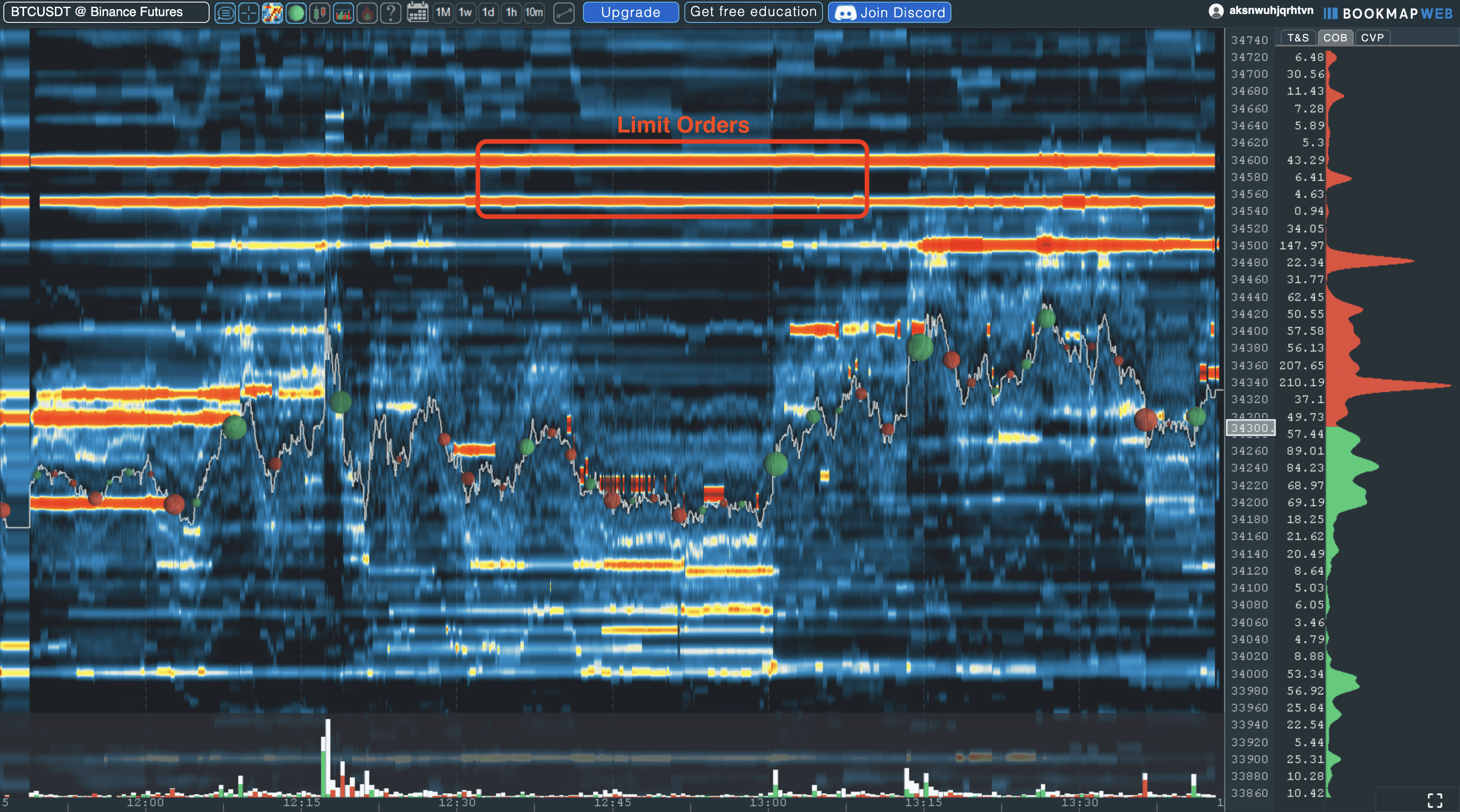
The heatmap colors every price level by how many limit orders rest there. Bright and warm areas mean a lot of liquidity, dark areas little. The highest occupied level on the buy side is the bid, the lowest on the sell side the ask.
 Click to enlarge
The real value comes from the time axis. A single look at an order book shows only the moment. The heatmap shows the history of the orders and answers the interesting question: has this large order been there for an hour, or did it just appear?
Two patterns come up again and again. If a thick liquidity band stays in place and price bounces off it several times, the level is being defended for now. If the band disappears as soon as price comes close, it was not there to be filled. Such orders can be ordinary cancellations, but placing orders you intend to cancel is spoofing, which is illegal on US futures exchanges. The order flow guide linked above explains this in its section on what order flow does not show.
The heatmap does not tell you the direction. It shows where orders are resting, not who will win. Displayed orders can be cancelled at any time, and iceberg orders show only part of their size. If you look at the heatmap without preparation, you see colorful stripes and read meaning into them that is not there. Without a level you marked before the session, the heatmap is mostly noise.
Do not confuse the order book heatmap with a market heatmap. A market heatmap shows a whole index as colored tiles by daily performance. Bookmap’s heatmap shows resting orders at each price of one instrument.
Bookmap features: what you get beyond the heatmap
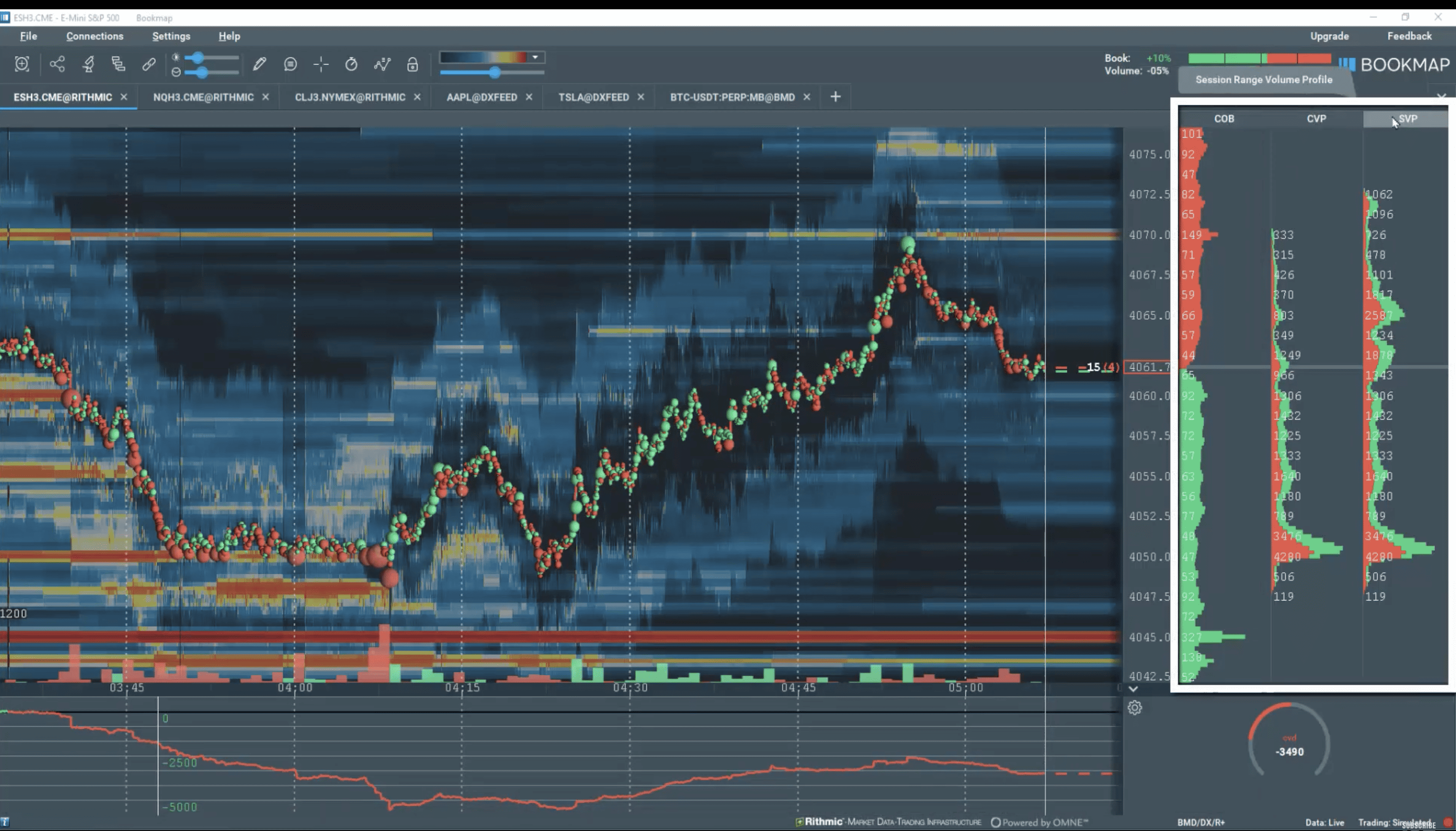
Besides the heatmap, Bookmap brings a set of tools that work on the same data. They support the heatmap; they do not replace it. Which of them you get depends heavily on the package, so the table in the pricing section matters.
 Click to enlarge
Source: Screenshot from the German edition on kagels-trading.de.
Volume bubbles and cumulative delta
Volume bubbles show the traded volume as circles. The bigger the bubble, the more contracts traded at that price. The color shows the aggressor side: whether buyers lifted the ask or sellers hit the bid. A burst of large bubbles at one level often marks the place where a move stalls. Cumulative volume delta (CVD), which adds up the aggressor volume over the session, is included in every package, even the free one.
Order book and market depth
The DOM sits at the right edge of the chart and shows the resting liquidity at each price. Its advantage over a standard DOM is the depth: with a full-depth data feed you see more than the best five or ten levels. With BookmapData CME, Bookmap delivers CME’s market by order (MBO) data, which lists individual orders instead of totals per price. Like every public feed, it does not tell you who placed an order.
Record and replay
Bookmap records trading sessions and plays them back later, from Global upward. For reviewing your trades this is the most underrated feature of the software. You can go through an FOMC day or an earnings release step by step afterwards, including the full order book depth. Global Plus and Global Premium add a second licence for replay mode on another computer.
Add-ons that start with Global Plus
Several of the tools people associate with Bookmap come bundled with the two upper packages. According to the package comparison, the Footprint, the Absorption Indicator, the Sweep Indicator, DOM Pro, Execution Pro and multi-account trading start with Global Plus. In Global, the order book and volume imbalance indicator, the large lot tracker and the strength indicator run in replay mode only.
The market by order tools are included in Global Premium, and you can also buy them separately. The MBO Bundle (Stops & Icebergs Tracker, Liquidity Tracker Pro, Tradermap Pro and Market Pulse Algorithms) and Options Strike, which draws SPX options gamma levels on the heatmap, are part of Global Premium; Bookmap’s connectivity guide says both can also be added separately from its marketplace. For futures the MBO tools need a market by order feed such as BookmapData CME or Rithmic MBO. Three of the four tools also work with BookmapData Nasdaq and EDGX stock data; the Stops & Icebergs Tracker does not.
You cannot test the Global Plus tools on live data without paying for Global Plus or Global Premium. The free version does not include the Footprint, Absorption, Sweep, DOM Pro or Execution Pro tools, and they come bundled with the two upper packages. At this price level that is a fair point of criticism: you decide on $99 a month partly on the basis of tools you have only seen in videos. The MBO Bundle and Options Strike are different: you can buy them with Global Premium or separately.
How much does Bookmap cost?
Bookmap has four packages, and the monthly price drops if you pay yearly. For the three paid packages there is also a one-time lifetime licence at $990, $1,990 and $3,990. Bookmap changed its line-up in the autumn of 2026: Digital Plus is no longer offered to new subscribers (existing plans continue until cancelled), and Global Premium is new. The table shows the prices on Bookmap’s package comparison on November 12, 2026.
| Package | Billed monthly | Billed yearly, per month |
|---|---|---|
| Digital | free | free |
| Global | $49 | $39 |
| Global Plus | $99 | $79 |
| Global Premium | $199 | $158 |
Source: Bookmap package comparison, checked on November 12, 2026; all Bookmap prices in this review come from this page. Prices exclude market data.
The decisive step is between Digital and Global. The free Digital package uses delayed data for US stocks and futures and real-time data only for crypto. Only from Global can you connect the professional data providers BookmapData, dxFeed and Rithmic and see US futures live. The packages also differ in how many symbols you can watch at once: 1 in Digital, 10 in Global and 20 in the two upper packages.
The second step is between Global and Global Plus, and it is about trading. Bookmap’s connectivity guide is clear: to trade from the Bookmap chart to your funded account, you need Global Plus; Global Premium includes everything in Global Plus. With Global you watch live futures data in Bookmap and place your orders in another platform. Simulated trading works in every package; crypto trading from the chart starts with Global.
Global Plus is the package for daily users. It adds the special add-ons, trading from the chart and DOM, and the second replay licence. If you use it every day, do the math on the lifetime licence: $1,990 equals about 20 monthly payments, or just over two years on the yearly plan.
Global Premium is for traders who work with market by order data. It adds the MBO Bundle and Options Strike to Global Plus and doubles the price. The $3,990 lifetime licence includes Options Strike only for the first year, according to Bookmap’s FAQ on the same page.
Honestly, Bookmap is too expensive for occasional trading. If you place two trades a week, you will hardly earn back the licence plus the data fees. The software pays for itself, if at all, only with active daily use.
Market data costs extra
For US futures and stocks, the package price is only part of the monthly bill. The licence covers the software; live exchange data comes from a data provider or, in some setups, from your broker.
Real-time market data for US futures and stocks is not included in any Bookmap package price; in most setups you buy it separately from a data provider.
In most setups you pay twice: once for the software and once for the data feed. The exception is a broker that includes the data: Bookmap’s connectivity guide says that with Plus500, Level 2 data is included for eligible non-professional users and no separate data subscription is required, though you still need a Global or Global Plus licence. Otherwise, Bookmap says the data offers can be bought only after you subscribe to a Bookmap plan, and its own BookmapData requires one of the Global packages. Three providers are on offer, each with its own price model.
| Data provider | Price per month (Bookmap’s pricing page) |
|---|---|
| BookmapData futures, per exchange (CME, CBOT, NYMEX or COMEX) | $34 |
| BookmapData CME bundle (CME, CBOT, NYMEX, COMEX) | $79 |
| BookmapData Nasdaq TotalView stocks | $59 |
| BookmapData Cboe EDGX stocks | $49 |
| BookmapData Nasdaq + EDGX bundle | $99 ($50 in the first month) |
| dxFeed futures, per exchange | $37 |
| dxFeed US stocks | $34 to $119 |
| Rithmic | $40 to $101 |
Source: Bookmap package comparison (linked above), checked on November 12, 2026. Prices for non-professional users; exchange rules decide who counts as professional.
Three examples show the scale for a US futures trader who buys BookmapData separately. If you only trade the E-mini S&P 500 or the Micro E-mini (both CME), Global plus one exchange costs $49 + $34 = $83 a month, without trading from the chart. If you trade from the chart across CME, CBOT, NYMEX and COMEX, Global Plus with the CME bundle costs $99 + $79 = $178 a month before your first trade. With the MBO tools of Global Premium it is $199 + $79 = $278 a month.
Two details deserve attention. Users classified as professional pay extra exchange fees for BookmapData: $125 a month per futures exchange, $500 for the CME bundle, $130 for Nasdaq and $70 for Cboe EDGX. And the backfill, the recent history loaded when you open a symbol, differs by provider: the package page lists 72 hours for BookmapData, 24 hours for dxFeed, and for Rithmic 1 hour free or 24 hours for $14 a month per exchange. Bookmap’s connectivity guide says “up to 48 hours” for BookmapData CME, so the two Bookmap pages do not quite agree. We have not tested either value; if history matters to you, confirm the backfill for your feed and instrument with Bookmap before you buy.
Is Bookmap free? What the free version does
The question comes up often, and the answer is more sober than the marketing.
The free Digital package gives you real-time data only for crypto; US stocks and futures are shown delayed.
For crypto traders this is a usable offer. Binance, Bitfinex and more than 20 other crypto exchanges connect at no extra cost. The free version shows one symbol at a time and already includes cumulative volume delta, large trade alerts and Bookmap’s 4-hour order flow course. If you trade Bitcoin, you can use Bookmap for free without a time limit.
For futures and stock traders, the free version is good for looking only. Delayed data shows you how the heatmap works, but you cannot trade on it. Live US futures data starts with Global at $49 a month; the data feed is usually billed separately, unless your broker arrangement includes it, as Plus500 does for eligible users.
Bookmap for Bitcoin and crypto
Crypto is the entry point into the platform for a structural reason. Crypto exchanges publish their order book data free through open interfaces, while futures exchanges such as CME charge for it.
The heatmap is especially telling for Bitcoin. On the large crypto exchanges thick order walls sit for long periods, and their disappearance is easy to see.
One limitation belongs here: crypto order books are easier to manipulate than regulated futures markets. Large orders that are placed and cancelled quickly are common there. The heatmap shows you this behavior, but it does not protect you from falling for it. In crypto you also see only the order book of the exchange you connect, not the whole market.
Bookmap vs ATAS: how they differ
The most common comparison is with ATAS. Both programs serve order flow traders, but they set different priorities.
| Criterion | Bookmap | ATAS |
|---|---|---|
| Core strength | heatmap of resting liquidity over time | footprint and volume analysis |
| What it draws | order book history | volume by price inside each candle |
| Free version | Digital: crypto real time, US futures and stocks delayed | START: crypto real time, futures 15 minutes delayed |
| Typical user | scalpers and order book readers | volume and footprint traders |
Sources: Bookmap package comparison (linked in the pricing section) and ATAS pricing, both checked on November 12, 2026. ATAS showed its paid prices in euros when we checked from Germany, so we do not quote them here.
The dividing line runs between passive and executed liquidity. Bookmap is strong at showing resting limit orders and how they change over time. ATAS is strong in the footprint: how much volume traded at which price and on which side inside one candle. In Bookmap, the footprint is an add-on that starts with Global Plus.
The lines are blurring. ATAS now lists its own heatmap on its pricing page, and Bookmap sells footprint and absorption tools. The heatmap is still the feature people buy Bookmap for. If you mainly read footprints, ATAS is the more natural start; if you mainly watch the order book, Bookmap is.
System requirements: Windows, Mac and Bookmap Web
Bookmap runs on Windows and Mac, and with limited support on Linux. The software is demanding because it processes the full order book all the time.
On Windows, Bookmap lists as minimum a 64-bit Windows 8 or higher, 8 GB RAM, 10 GB of free disk space, an Intel Core i5 or equivalent and a stable connection of at least 5 Mbit/s. For one-click trading you need a mouse with a middle button. For heavier use the recommendations rise to 16 GB and, for heavy use with full depth data, 32 GB of RAM.
On the Mac, Bookmap needs macOS 11 or higher, with 8 GB RAM as minimum and 24 GB as the preferred configuration. There are separate versions for Intel Macs and Apple Silicon; on M-series chips, graphics acceleration works only from macOS 13.
Mac users should check their connection before buying. Available on macOS are BookmapData, Rithmic, dxFeed, CQG, Interactive Brokers, iqFeed, Cedro and the crypto adapters. Not supported are Stage 5, Gain, NinjaTrader and XTrader. If you trade through one of these, you need a Windows computer. Our guide to trading laptops explains what these numbers mean when you buy hardware.
You may install the licence on several computers, but it runs on only one at a time. Global Plus and Global Premium add a second licence for replay mode. Bookmap Web runs in the browser without installation, but it does not offer everything the desktop version does.
Brokers and data feeds: two separate decisions
For US futures and stocks, Bookmap connects to your broker and your data feed separately.
Your broker executes the order, the data provider delivers the order book. You set up both in Bookmap, and both can cost money. Among the connections in Bookmap’s guide are Interactive Brokers, TradeStation, Tradovate, NinjaTrader and futures brokers that offer Rithmic or CQG.
Not every connection gives Bookmap a full order book. Bookmap itself notes that most NinjaTrader data feeds do not contain full depth. Rithmic through NinjaTrader does, but without MBO data. Check this before you pay for the package, because Bookmap without depth is only half the product.
Is Bookmap a broker?
No, Bookmap is a trading and analysis interface that passes orders to your connected broker; it does not hold an account and does not execute orders itself. Your contract for execution stays with the broker. Bookmap sees your orders, but it does not hold client money.
Learning resources and community
Bookmap invests a lot in education, which a product this hard to read needs. Every package, including the free one, includes a 4-hour order flow course, live trading sessions with professional traders and full access to the Bookmap Discord. There is also a written knowledge base and a marketplace for third-party add-ons.
Pros and cons of Bookmap
After going through the documentation, the picture is clear: a technically convincing specialist tool with a price problem and a steep learning curve.
Pros
- A distinctive heatmap: in my experience, few tools show the history of the limit order book this clearly.
- Crypto free for good: for Bitcoin and other coins there are no licence or data costs.
- Strong review tools: record and replay of whole sessions with full order book depth, from Global upward.
- Direct CME data: BookmapData delivers market by order data for CME futures.
Cons
- You usually pay twice: unless your broker includes the data, US futures and stock data costs $34 to $119 a month on top of the licence, and more for professionals.
- Trading from the chart only in the upper packages: for your funded futures account you need Global Plus at $99 or Global Premium.
- Key add-ons not testable: footprint, absorption and sweep tools start with Global Plus; the MBO tools come with Global Premium at $199 or as a separate purchase.
- Steep learning curve: without order flow basics the heatmap gives colorful pictures, not insight.
- Mac with gaps: several adapters, including NinjaTrader and Stage 5, do not run on macOS.
Bookmap alternatives
The market for order flow software is crowded, and each product sets a different focus. Looking at alternatives is worth it mainly if the data costs put you off. We have not tested these platforms in depth for this review.
- ATAS: the closest competitor, focused on footprint and volume profile (see the comparison above).
- Sierra Chart: technically very complete, with a plain interface.
- Quantower: modular, with strong volume analysis tools.
- NinjaTrader: a full trading platform with order flow as an add-on.
If you only need charts without order book depth, TradingView is the obvious and much cheaper choice. Our overview of TradingView alternatives compares Bookmap, ATAS and other platforms by purpose and price.
Conclusion: who Bookmap is worth it for
In its core discipline Bookmap is, in my view, among the strongest tools available. The heatmap shows market structure that no candlestick chart reveals, and record and replay make it a serious review tool. If you scalp or trade short term in futures and already understand order flow, you get one of the sharpest instruments available.
The limits are just as clear. With separately bought BookmapData, live futures analysis costs about $83 a month, Global Plus with trading from the chart and the CME bundle costs $178 a month, Global Premium with the MBO tools $278, and the learning curve is steep. On top of that, the expensive add-ons cannot be tested first. For beginners this is the wrong software, and for position traders holding for weeks the order book depth adds nothing.
I do not trade by the heatmap myself, but as a context tool it has a place. It answers the question whether orders are really resting at a level or whether the market only looks that way. If you want to check that for yourself, start with the free crypto version, learn to read it, and decide on a licence only after that.
Frequently asked questions about Bookmap
How much does Bookmap cost per month?
Bookmap has four packages: Digital is free, Global costs $49, Global Plus $99 and Global Premium $199 a month. Billed yearly, the prices drop to $39, $79 and $158 a month. The paid packages are also sold as lifetime licences for $990, $1,990 and $3,990 (Bookmap’s package comparison, November 12, 2026).
Is Bookmap free?
Yes, but only with limits. The free Digital package shows crypto exchanges in real time; US stocks and futures appear only delayed. For crypto traders the free version is usable for good, for futures traders only for learning how it works.
Is market data included in the Bookmap price?
No, the package price never includes real-time data for US futures and stocks. Bought separately, it costs $34 to $119 a month for non-professional users depending on provider and exchange, for example $79 for BookmapData’s CME bundle. Crypto data is free, and some brokers, such as Plus500 for eligible non-professional users, include futures data.
Can I trade futures directly from Bookmap?
Only with Global Plus or Global Premium. Bookmap’s connectivity guide says that trading from the Bookmap chart to a funded account requires the Global Plus package, and Global Premium includes everything in Global Plus. Simulated trading works in every package, and crypto trading from the chart starts with Global.
What is the difference between Bookmap and ATAS?
Bookmap shows resting limit orders as a heatmap over time, ATAS shows executed volume in a footprint by price and candle. Bookmap is therefore stronger for scalping and watching the order book, ATAS for volume analysis inside the candle. Both now offer a little of the other’s core feature.
Does Bookmap work on a Mac?
Yes, from macOS 11, with separate versions for Intel and Apple Silicon. Some adapters are missing on macOS, including NinjaTrader, Stage 5, Gain and XTrader. Available are BookmapData, Rithmic, dxFeed, CQG, Interactive Brokers and the crypto adapters.
Is Bookmap a broker?
No, Bookmap is analysis and trading software and does not execute orders itself. Execution always runs through a connected broker, where your money stays. Bookmap only passes your orders on.
Who is Bookmap not worth it for?
Beginners, position traders and occasional traders. Without order flow basics the heatmap stays unreadable, and with holding periods of several weeks the order book depth adds no usable information. If you trade only now and then, the monthly licence and data costs will hardly pay off.
This US edition is based on our German edition on kagels-trading.de and has been adapted for US readers.
More Order Flow & Volume Analysis guides
- Read order flow
Order Flow Trading: What the Data Shows and What It Hides
Market and limit orders, DOM, tape, footprint and profile, three patterns, a worked ES example with a failure, and the limits of the data.
- Read volume by price
Volume Profile: POC, Value Area and a Test of 1,450 Days
POC, value area and volume nodes, the six TradingView profiles, and what 1,450 SPY daily profiles say about the popular rules.