
ATAS Review 2026: Prices, Free Plan and Order Flow Tools


Contents
- ATAS in 30 seconds (as of November 21, 2026)
- What is ATAS?
- Which order flow tools does ATAS offer?
- Does ATAS run on Mac or in the browser?
- What does ATAS cost?
- Trial, refund and contract: what to check before you pay
- What changes on November 27 and December 1, 2026?
- Which brokers and data feeds work with ATAS?
- ATAS vs Bookmap, Quantower and TradingView
- What do users say about ATAS?
- Pros and cons of ATAS
- Conclusion: who is ATAS for?
- Frequently asked questions about ATAS
- About the author
ATAS is desktop software for traders who want to see the orders behind a price move, not just the candle. It shows footprint charts, volume profiles, the tape and the order book in one place. It is built for intraday futures traders, and it is often mentioned together with Bookmap and Quantower. If you are new to the method, read our guide to order flow trading first.
All prices and rules in this review are as of November 21, 2026. We read the ATAS pricing page, its license agreement, its terms of use, the ATAS X page and the current sale page. We did not buy a paid plan for this review and have no business relationship with ATAS. How we research and write is described on our editorial policy page.
ATAS in 30 seconds (as of November 21, 2026)
- What it is: order flow and volume analysis software from SIA ATAS in Riga, Latvia. ATAS is not a broker and holds no money.
- Cost: the free START plan stays free. Paid plans cost €24.95, €69.95 and €89.95 a month, or from €19.95 a month with yearly billing. Lifetime licenses cost €999 to €1,999.
- The catch: real-time futures and stock data need the PRO plan or higher. START and PLUS show futures with a 15-minute delay.
- Platforms: Windows, plus ATAS X for Windows and macOS and a browser version, both marked as early or beta versions.
- Change on December 1, 2026: the MBO Bundle leaves the ULTRA plan and becomes a paid add-on, except for some ULTRA customers.
What is ATAS?
ATAS stands for Advanced Time And Sales, and it started as a better version of the tape. According to its company history, the team built an algorithm in 2009 that groups the print tape by large traders, and released the first product in 2010. Today the company is SIA ATAS (ATAS LLC), registered in Riga, Latvia. Its contracts fall under Latvian law, with Latvian courts as the place of jurisdiction.
ATAS is analysis and trading software, not a broker. You connect it to a broker or data feed of your choice, and ATAS turns that raw data into charts and order screens. The home page names more than 360,000 traders and over 240 indicators. These are the company’s own figures; we could not check them.
| Fact | ATAS |
|---|---|
| Company | SIA ATAS (ATAS LLC), Riga, Latvia |
| First product | 2010 (company history) |
| Platforms | Windows; ATAS X for Windows and macOS (early version); browser (beta) |
| Markets | Futures, US stocks, crypto exchanges |
| Free use | START plan without time limit, no card needed |
| Trial | 14 days of a paid plan, card or PayPal needed |
Sources: atas.net contacts, terms of use, company history, home page and pricing page, read November 21, 2026.
Which order flow tools does ATAS offer?
The core of ATAS is the footprint, which ATAS calls a cluster chart. A footprint chart shows for every candle how much volume traded at each price, split into the bid and the ask side. You see the inside of the candle: where buyers pushed, where sellers absorbed and where the delta flipped. TradingView now offers a simpler version, which we explain in our guide to the TradingView volume footprint.
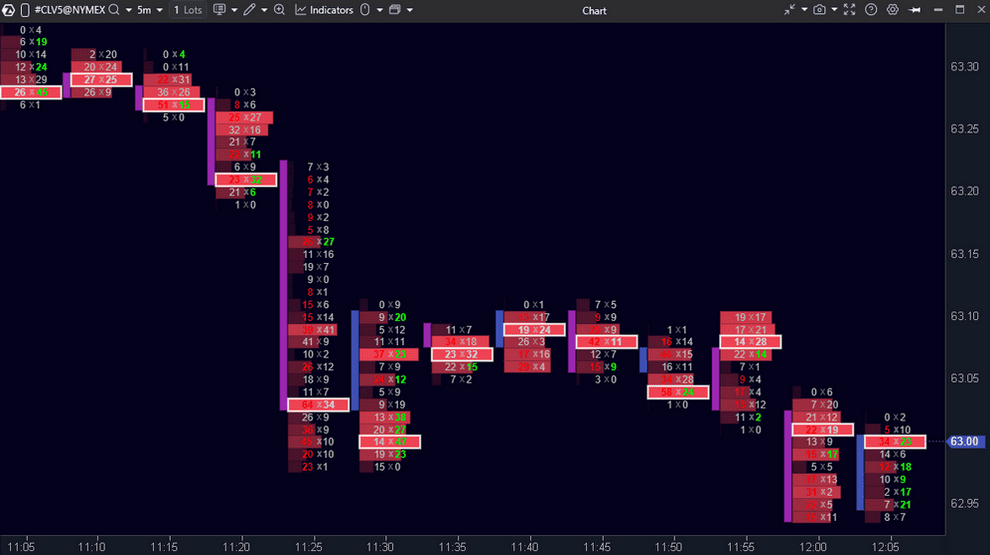 Click to enlarge
Source: ATAS screenshot in our German review.
ATAS says its Smart Tape reconstructs split orders. Exchanges report a large market order as many small fills. According to ATAS, the Smart Tape rebuilds the original order from these pieces, so you can filter for large traders in real time. How well this works in practice depends on the market and the data feed.
The Smart DOM is an order book ladder with extra history. It shows resting limit orders, executed trades and changes in the book in one window. ATAS markets it as a way to spot orders that appear and disappear quickly, a pattern known from high-frequency trading. The MBO DOM goes one level deeper and shows single orders with their place in the queue, if your data feed delivers market by order data.
The volume tools cover the full auction toolkit. ATAS draws volume profiles and Market Profile for any range, and indicators such as Dynamic Levels show how the point of control moves during the session. The ideas behind this are explained in our guides to the volume profile and to auction market theory.
Several indicators are ATAS’s own. Cluster Search highlights prices with unusual volume, Big Trades marks large executed market orders as circles, and Market Power splits traders into groups by order size. Speed of Tape shows when trading suddenly speeds up. These tools are interpretations of the data, not signals that work on their own.
ATAS also has a heatmap of the order book. The pricing page lists a heatmap with chart and DOM synchronization in every plan, including START. This is a different tool from a market stock heatmap, which colors whole sectors by price change.
For trading, ATAS sends orders from the DOM, from the chart or by hotkey. You can attach stop loss and take profit orders and rules that trail the stop automatically. A plan for these exits matters more than the tool; see our guide to the stop loss order. PLUS and higher add a Risk Manager, and PRO adds Cross-Trading, which uses the E-mini for analysis and the Micro contract for execution.
Does ATAS run on Mac or in the browser?
For a long time ATAS was Windows only, and the classic version still is. The new ATAS X runs natively on Windows and macOS. ATAS calls it “an early version” that was “rebuilt from the ground up”, and the classic version and ATAS X run as two parallel environments. On a Mac, ATAS X needs macOS Tahoe or later and a fairly recent Mac model.
ATAS X does not yet offer every feature of the classic version. The ATAS X page says it “is not a full replica of the classic version” and that some features “may differ from the original or not yet be available”. If you buy for a Mac, check first that the tools and connectors you need already work in ATAS X.
The pricing page lists ATAS X in every plan, including the free START plan. It also says ATAS X is “2.5x faster”, with an asterisk; the page does not explain how this was measured. Treat the number as a marketing claim until you test it with your own data and screen setup.
There is now also a browser version. The home page names “Windows, macOS, and Web” and has an “Open in browser (Beta)” button. Our German review from earlier in 2026 still listed the missing browser version as a weakness. If you plan to trade from the browser, test the beta with your own broker connection first.
What does ATAS cost?
ATAS has one free plan and three paid plans: START, PLUS, PRO and ULTRA. The longer you commit, the lower the monthly price. The page showed prices in euros when we checked from Germany; buyers in other countries may see another currency. According to the license agreement, the prices on the website do not include VAT; EU customers without a VAT number pay VAT at their country’s rate, and the buyer is responsible for other applicable taxes and fees.
| Plan | Billed monthly | Billed yearly (per month) |
|---|---|---|
| START | €0 | €0 |
| PLUS | €24.95 | €19.95 (€239.40 a year) |
| PRO | €69.95 | €39.95 (€479.40 a year) |
| ULTRA | €89.95 | €49.95 (€599.40 a year) |
Source: atas.net/pricing, read November 21, 2026, without sale prices. Three-month billing: €23.95, €59.95 and €79.95 a month. Lifetime licenses: PLUS €999, PRO €1,799, ULTRA €1,999.
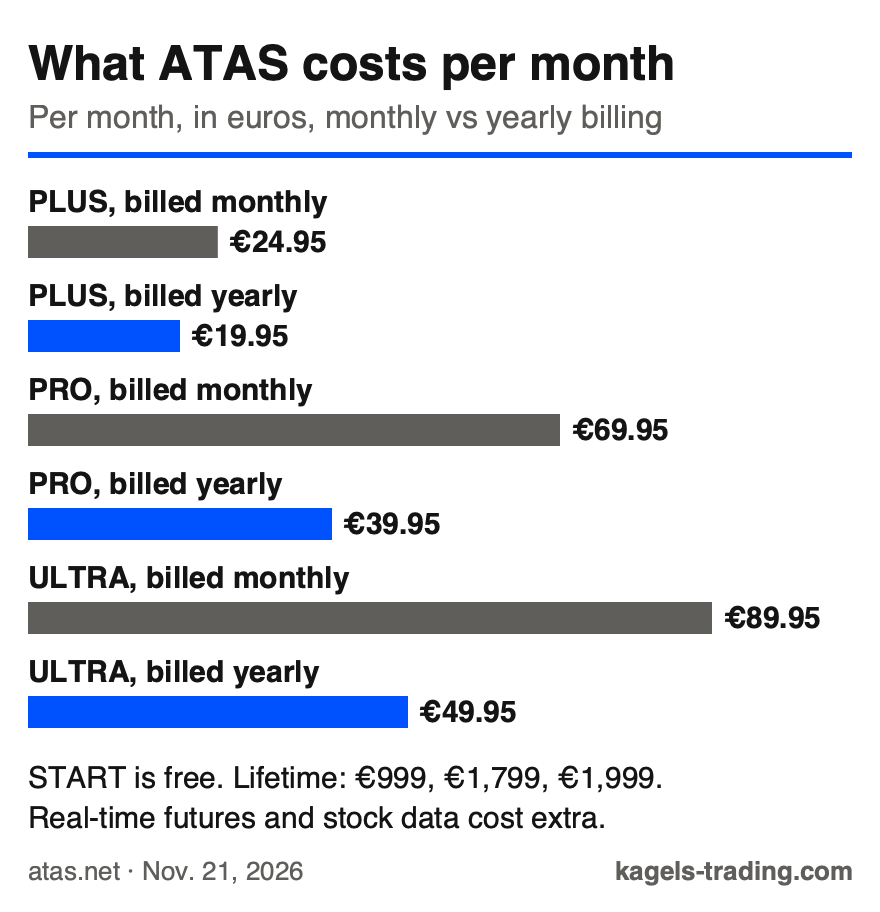 Click to enlarge
Source: Kagels Trading, own graphic from the ATAS pricing page.
The plans differ most in data rights, not in charts. This is the point many short reviews get wrong. START and PLUS get crypto exchange data in real time, but futures only with a 15-minute delay and no real-time stock data. Real-time futures and stocks start with PRO.
| Plan | Data rights | Limits |
|---|---|---|
| START | Crypto real time, futures delayed 15 minutes | 2 instruments, 3 indicators per chart, 1 crypto connection |
| PLUS | Same as START | 6 instruments, 6 indicators, 1 crypto connection, Market Replay |
| PRO | Adds real-time futures and stocks | 20 instruments, 12 indicators, 3 connections, options tools |
| ULTRA | Same as PRO | No limits, extra tools such as AI Connect and Extended API |
Source: plan flags on the ATAS pricing page, November 21, 2026. Futures and stock data are paid separately to your data provider.
Real-time futures and stock data subscriptions cost extra. Only the crypto exchange data comes free with the plans. For futures and stocks, the pricing page says: “Quotes are not included in the subscription cost.” For live CME futures, you need a data subscription through a provider such as Rithmic or dxFeed, and those fees come on top of the ATAS plan. For a futures day trader, the real monthly cost is the PRO plan plus the data.
Trial, refund and contract: what to check before you pay
The 14-day trial needs a card or PayPal, and it turns into a paid plan by itself. Under section 3.3 of the license agreement, a trial that is not cancelled before it ends “is automatically converted” to the paid plan. Each user gets the trial once; ATAS may block a second trial for two years.
ATAS’s contractual refund wording is discretionary. The pricing page says “a refund is available within 14 days” of the first purchase. The license agreement is narrower: ATAS “has the right to decide on a refund” if you stop using the software within 14 days of your first payment. In the same section, the agreement says the buyer accepts the software as digital content and waives the right to reject it and get a refund. Whether such a waiver holds against the consumer law of your country is a separate question. Ask support in writing before you rely on a refund.
Lifetime fees are not refunded if the agreement ends early. The license agreement says previously paid license fees, “including perpetual license fees”, are not refundable on early termination, except where the agreement says otherwise. A lifetime license is therefore a bet that ATAS keeps developing the classic version and ATAS X.
What changes on November 27 and December 1, 2026?
ATAS runs a one-day Black Friday sale on November 27, 2026. The sale page promises up to 65 percent off PLUS, PRO and ULTRA for one-month and one-year subscriptions and lifetime licenses, from 00:00 to 23:59 UTC. The quantity is limited to 4,000 subscriptions and 400 lifetime licenses. For subscriptions, the sale price applies to the first payment only; renewals run at the standard price.
From December 1, 2026, the MBO Bundle is no longer part of ULTRA. The bundle contains the Iceberg Tracker, Stop Runs Tracker and Sweeps Tracker. It then costs €35 for 31 days, or €23 for one indicator, as an add-on on the ATAS Marketplace, and the add-on still requires ULTRA. The bundle also needs Rithmic, dxFeed or Plus500 data.
Free access depends on what you have active on December 1, 2026. According to the sale conditions, ULTRA lifetime licenses keep the bundle. ULTRA subscriptions keep it only while auto-renewal is on; if you switch auto-renewal off, access ends at once and can only be bought back on the Marketplace. ULTRA subscribers without auto-renewal must switch it on by December 6, 2026, 23:59 UTC, or they lose free access.
Which brokers and data feeds work with ATAS?
For futures, the pricing page lists 14 providers. These are CQG, CTS, dxFeed, Exante, Interactive Brokers, IQFeed, MT5, NinjaTrader, Rithmic, TAI-PAN, Trading Technologies, Quik, Transaq and HKEX. If you already trade with Interactive Brokers, our Interactive Brokers review covers what its market data costs.
Free crypto data comes from eight exchanges. The plan tooltip names Binance, Kraken, Bitfinex, Bitget, Bybit, OKX, Phemex and Whitebit. Whether you may trade on these exchanges depends on where you live; several of them do not serve US residents.
Prop firm accounts connect through Rithmic or dxFeed. ATAS’s prop firm page says you can connect evaluation and funded accounts this way and track drawdowns with its journal. Check with your prop firm which platforms it allows before you buy a plan. Our guide to the prop firm drawdown explains the loss limits you will be tracking.
ATAS vs Bookmap, Quantower and TradingView
Each tool has a different main strength, so pick by the question you trade. ATAS is strongest in the footprint and the tape. Bookmap is the reference for the liquidity heatmap. Quantower is a broker-neutral platform with many connections, and TradingView is the best general charting tool.
| Software | Main strength | Best for |
|---|---|---|
| ATAS | Footprint, tape, volume profile | Futures order flow traders |
| Bookmap | Order book heatmap over time | Traders who read resting liquidity |
| Quantower | Many broker connections, Windows only | Multi-broker traders |
| TradingView | Charts, screeners, community scripts | Chart analysis across markets |
ATAS or Bookmap? Bookmap shows resting limit orders as a color map over time; ATAS shows what actually traded inside each candle. Both now offer some of the other’s tools, but the main strength is still where they started. Many traders who scalp the order book prefer Bookmap; traders who read absorption in the footprint prefer ATAS.
ATAS or Quantower? Quantower connects to more brokers, also outside futures, but runs only on Windows. ATAS has the deeper tape tools and, with ATAS X, a Mac version. Prices are similar: compare the plan you need, including data, not the cheapest entry price.
ATAS or TradingView? TradingView is better for charts, screening and scripts across all markets. Real tick-level footprint analysis and DOM trading on futures are not its strength. Many traders use both: TradingView for the overview, ATAS for execution. More options are in our list of TradingView alternatives.
What do users say about ATAS?
On Trustpilot, ATAS had a rating of 4.0 from 457 reviews on November 21, 2026. The profile has been claimed by the company since November 2022, and Trustpilot says it does not fact-check reviews. Recent positive reviews praise ATAS X on the Mac and the support. A rating says little about whether the tools fit your trading style; the free plan is the better test.
Pros and cons of ATAS
Pros
- Deep order flow tools: footprint, Smart Tape, Smart DOM and the cluster indicators in one platform.
- Free entry: the START plan has no time limit and needs no card.
- Lower price with commitment: yearly billing saves up to 44 percent, and lifetime licenses exist.
- Mac and browser: ATAS X runs on macOS, and a browser beta is available.
Cons
- Real-time futures cost PRO: START and PLUS show futures only with a 15-minute delay.
- Data costs extra: futures data is billed by your data provider on top of the plan.
- Strict contract: the trial converts automatically, and a refund is at ATAS’s discretion.
- Learning curve: order flow analysis takes weeks of practice before it helps.
Conclusion: who is ATAS for?
ATAS is for traders who want to trade futures by reading the orders, not by reading indicators. If that is you, the footprint, the Smart Tape and the volume profile tools are among the deepest you can get. Plan on PRO plus a data subscription; START and PLUS are for learning and for crypto.
If you mainly analyze charts or are just starting, ATAS is more than you need. TradingView or a simple broker platform will cost less. Use the free START plan to see if order flow suits you before you pay, and check the auto-renewal date if you start a trial.
Frequently asked questions about ATAS
What is ATAS?
ATAS is order flow and volume analysis software from SIA ATAS in Riga, Latvia. It shows footprint charts, the tape, the order book and volume profiles. ATAS is not a broker: you connect it to a broker or data feed.
How much does ATAS cost per month?
The paid plans cost €24.95, €69.95 and €89.95 a month, as of November 21, 2026. With yearly billing, they cost €19.95, €39.95 and €49.95 a month. Lifetime licenses cost €999, €1,799 and €1,999. Real-time futures and stock data cost extra.
Is ATAS free?
Yes, the START plan is free without a time limit and without a card. It gives you real-time crypto data, futures with a 15-minute delay, two instruments and three indicators per chart.
Which ATAS plan do I need for real-time futures?
You need PRO or ULTRA to connect real-time futures and stock data. START and PLUS show futures only with a delay. The data itself is paid separately to a provider such as Rithmic or dxFeed.
Does ATAS run on a Mac?
Yes, through ATAS X, which runs natively on macOS Tahoe or later. ATAS calls ATAS X an early version that does not yet have every classic feature. The classic ATAS version runs on Windows only.
Is ATAS better than Bookmap?
It depends on what you read in the market, and the two tools have different strengths. Bookmap is stronger at showing resting orders as a heatmap over time. ATAS is stronger at the footprint and the tape, the record of what actually traded.
Can I get a refund from ATAS?
A refund is possible within 14 days of the first payment, but ATAS decides. The license agreement gives ATAS “the right to decide on a refund”. Cancel a trial before it ends, because it converts into a paid plan automatically.
This English edition is based on our German edition on kagels-trading.de and has been adapted for international readers.
More Order Flow & Volume Analysis guides
- Read order flow
Order Flow Trading: What the Data Shows and What It Hides
Market and limit orders, DOM, tape, footprint and profile, three patterns, a worked ES example with a failure, and the limits of the data.
- Read volume by price
Volume Profile: POC, Value Area and a Test of 1,438 Days
POC, value area and volume nodes, the six TradingView profiles, and what 1,438 SPY daily profiles say about the popular rules.
- Understand the auction
Auction Market Theory: Balance, Value and the 80% Rule
Price vs value, balance and imbalance, initiative and responsive trading, and what our SPY test shows about the 80% rule.
- Test volume profile setups
Volume Profile Strategy: 3 Setups Backtested on SPY
POC bounce, value area reversal and breakout as fixed rules on 1,403 SPY days and QQQ: how often 2R came and why the POC result is fragile.
- Choose an order book tool
Bookmap Review 2026: Pricing, Data Costs and Who It Suits
What the Bookmap heatmap shows, the four packages, why US market data costs extra and how it compares with ATAS.
- Interpret volume
Volume Analysis in Trading: How to Read Volume Honestly
What volume counts in stocks, futures, forex and crypto, how to read it against its own average, and our SPY test of high-volume days since 2001.
- Check Deepcharts
Deepcharts Review: Order Flow, Pricing, and IQ Capital Access
Deepchart footprint, profile and DOM for futures: bundle prices checked 7 November 2026, data costs, the narrow refund terms and access through IQ Capital.