
Trade Copier: Copy Trades From TradingView and Telegram to MT4, MT5 and cTrader


Contents
- Trade copier in 30 seconds
- What is a trade copier?
- Trade copier or copy trading: what is the difference?
- Copying TradingView trades to MT4, MT5 and cTrader
- Setting up a trade copier, step by step
- Copying Telegram signals automatically
- Providers and prices compared
- Trade copiers at prop firms: what is allowed
- Pros and cons of a trade copier
- Conclusion: who a trade copier is worth it for
- Frequently asked questions about trade copiers
- About the author
Your analysis runs in TradingView, you trade on MT5, and a prop account needs the same trade again in a different size. If you work like this, you enter every idea two or three times. That is where a trade copier comes in: the software sends a trade from one account to as many other trading accounts as you connect.
The benefit is real; the expectations often are not. A copier saves clicks and reaction time, but it does not improve a weak strategy. It copies mistakes as reliably as winners, and with prop firms, the fine print decides whether you may use one at all. This article follows our editorial policy.
Trade copier in 30 seconds
- What it does: it sends trades from a master account to one or more target accounts, with adjusted position size.
- Most common use: a bridge from TradingView to MT4, MT5 or cTrader, the platforms most prop firms use.
- Telegram: separate copiers read signal messages and turn them into orders.
- Prices: selected plans shown below start at about €9 per account a month; larger plans cost more, depending on the tool.
- Prop firms: the rules depend on each firm; FTMO, for example, forbids third-party access and trading and opposite positions across accounts for manipulative purposes.
What is a trade copier?
A trade copier is software that copies trades from a master account to one or more other trading accounts in real time, each with its own position size and risk rules.
The master is the account where the trade starts. The receiving accounts are often called slave or follower accounts. As soon as a position is opened, changed or closed on the master, the copier passes the change on and applies it to the connected accounts.
A copier does more than pass orders on: it recalculates the position size for each target account. If you risk 1% of your capital on the master, you can set the target to 1% as well, to a fixed lot size or to a multiple of the master. That way, accounts of very different sizes can follow the same strategy; our guide to position sizing shows the risk per trade calculation.
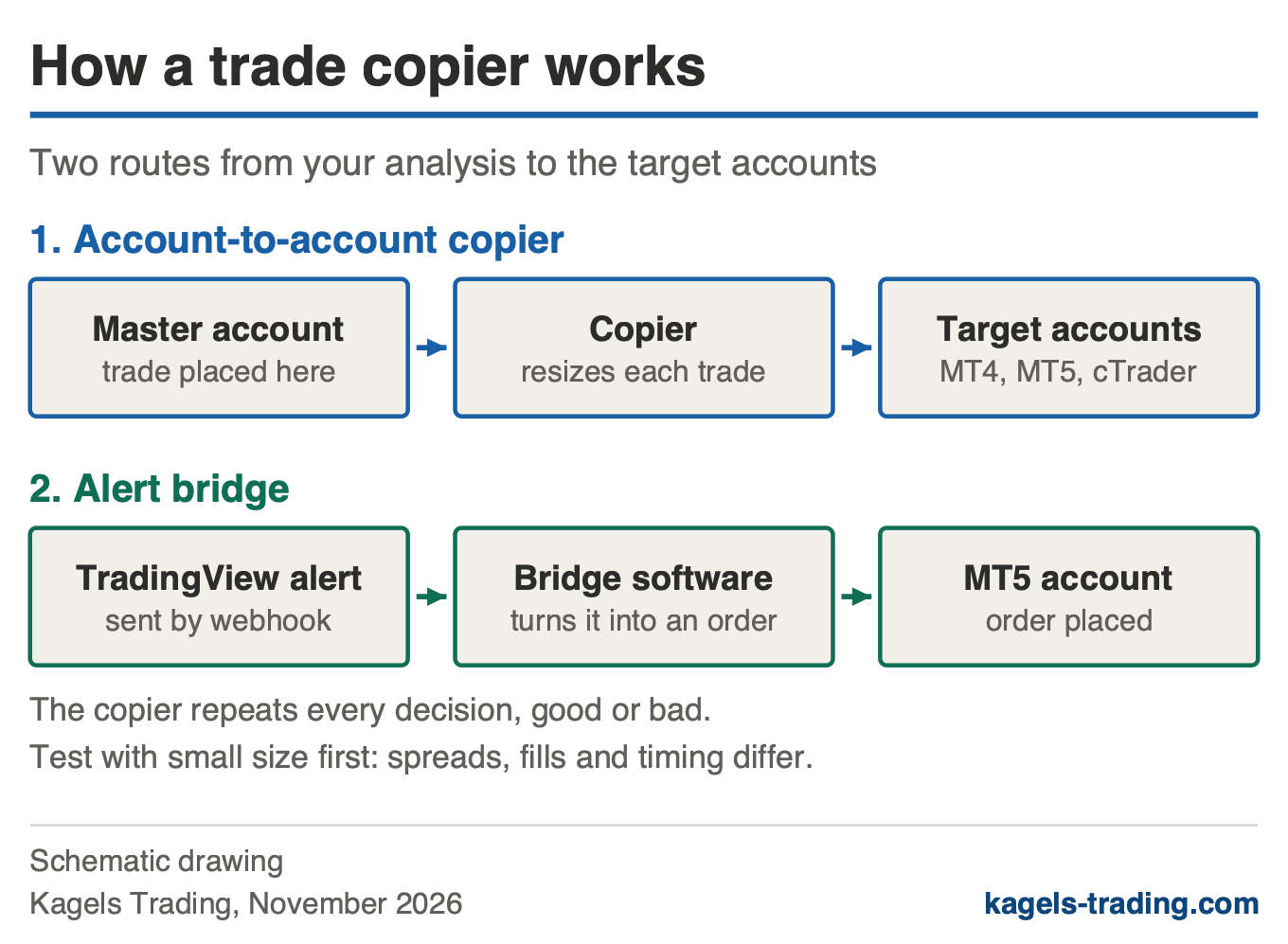
One limit stays fixed: a copier is not a trading system. It makes no decisions, it duplicates them. The result depends entirely on what happens on the master account, and the copier repeats each mistake as faithfully as each good trade.
 Click to enlarge
Source: Kagels Trading, own drawing; TradingView broker list.
Trade copier or copy trading: what is the difference?
The two terms are mixed up all the time, but they mean different things. The difference lies less in the technology than in who controls the signal source and who holds the account access.
With copy trading, you follow another trader through a provider’s platform. The provider organises the connection, the billing and the choice of signal providers; our ZuluTrade review shows how a copy trading platform works.
A trade copier is a tool you configure yourself with your own account logins. You decide which account is the master, and you can mirror your own account without any third party involved. This difference also decides whether a prop firm allows it, as you will see below.
Copying TradingView trades to MT4, MT5 and cTrader
TradingView is the analysis platform of choice for many traders. You can also trade from its chart with connected brokers; our overview of TradingView brokers lists the connected brokers by market. The problem starts when your target account is not among them: most prop firms run their accounts on MT4, MT5 or cTrader.
There are two technically different solutions, and they are often confused. Both save you from entering the trade a second time by hand, but one starts from a broker account and the other from an alert:
- Account-to-account copier: you trade in TradingView through a connected broker, and the copier mirrors that real account to your MT5 or cTrader account; Duplikium works this way.
- Alert bridge: a TradingView alert goes by webhook to software that turns it into an order on MetaTrader; PineConnector is the best-known example and suits Pine Script strategies.
For the first route, you need a broker account you can trade from TradingView. A demo account can be enough, as long as its size roughly matches the target account, so the conversion factor stays close to one.
Setting up a trade copier, step by step
Setup looks harder than it is. With cloud-based tools, the steps are similar and take about an hour if the accounts already exist. Here is the usual workflow:
- Choose the master account: the account that creates the trades, with a size close to the target.
- Prepare the target account: for a prop firm challenge, choose the platform there; cTrader, MT4 and MT5 all work, depending on the tool.
- Connect both accounts: enter logins and server, one as master, one as follower; cloud tools need no server of your own, local tools need a PC or VPS that runs around the clock.
- Set the risk rules: same percentage of capital, fixed lot size or a multiplier, plus which instruments to copy and whether stop and target go along.
- Test with small size: run it for several days with minimal size, because different spreads and execution times mean the results are never identical.
For two MetaTrader accounts on the same computer, a local tool can be enough. FX Blue’s Personal Trade Copier, for example, copies trades between MT4 or MT5 installations on the same computer and lets you change lot size and risk.
Copying Telegram signals automatically
Many signal providers send their entries through Telegram, because it is fast and easy to manage. The catch is obvious: a signal only helps if someone acts on it, and that rarely happens in the moment the message arrives. Telegram copiers solve this by parsing the messages themselves.
The software reads instrument, direction, entry, stop and target from the text and places the order on the connected MT4 or MT5 account. That has a built-in weakness: it depends on a consistent message format. If the provider writes “SL 1.0850” one day and “stop at 1.0850” the next, the parser may miss the stop and place a trade without protection.
More important than the software is the source. A copier does not make a bad signal better, it only executes it faster. Our guide to trading signals shows how to check a provider before you connect any account.
Providers and prices compared
Prices differ mainly by whether you pay per account or per package. Compare plans for the same number of accounts, features and currency before you decide. These were the prices of selected plans on the providers’ pages on 23 November 2026:
| Provider | Connects | Price from |
|---|---|---|
| Duplikium | MT4, MT5, cTrader, TradingView, DXtrade and more | €9 per account a month |
| Social Trader Tools | MT4 and MT5 | $20 a month for 2 accounts |
| PineConnector | TradingView alerts to MT5 | $59 a month for 3 accounts |
| TelegramFxCopier | Telegram to MT4 and MT5 | $49.99 a month, plus MetaAPI |
| Tradesyncer | futures platforms and prop firms | $49 a month |
Prices as shown on the providers’ websites on November 23, 2026; promotions and taxes not included.
A few details are worth a second look. Duplikium offers its subscription from €9 per account a month or a prepay plan from €0.50 per account a day, with €20 of free starting credit; Tradovate and NinjaTrader connections are marked as beta. Social Trader Tools charges $20 for up to two, $60 for five and $120 for ten MT4/MT5 accounts a month.
PineConnector now prices by the number of MT5 accounts. Core costs $59 a month for three accounts and Plus $129 for ten, with discounts on annual plans. TelegramFxCopier costs $49.99 a month or $199.99 a year, but requires a MetaAPI subscription that you buy separately.
Trade copiers at prop firms: what is allowed
This section decides between success and a closed account, and most guides skip it. Prop firms set their own rules, and what one firm allows, another may forbid. FTMO, for example, forbids third-party access and third-party trading, so read the current rules of your firm before you connect a copier.
FTMO puts it clearly in its list of forbidden practices. According to FTMO’s forbidden trading practices, you may not let a third party access or use your account, nor work with a third party who trades for you. FTMO also forbids opposite positions entered for manipulative purposes, including between connected accounts, except on a single account.
Three practical rules follow for using a copier at a prop firm. Check them against the current terms and conditions of your firm, because rule sets change and differ from firm to firm:
- Mirroring your own accounts is the lower-risk case: master and target belong to the same person, and the software only replaces manual clicks, if your firm’s rules allow copying at all.
- Copying someone else’s signals to a challenge account needs a careful check: a paid signal alone is not third-party account access, but automated execution of outside signals may break a firm’s rules, so ask the firm.
- Watch opposite positions across linked accounts: FTMO forbids them for manipulative purposes; when you mirror one trade to several accounts, keep all of them on the same side of the market.
Futures prop firms work differently. Firms such as Apex Trader Funding use Tradovate, NinjaTrader or Rithmic instead of MetaTrader, and copying across many of your own accounts is part of the model; our Apex Trader Funding review covers its rules. MetaTrader copiers do not work there, so you need a futures tool such as Tradesyncer.
Pros and cons of a trade copier
A copier is an execution tool, not a safety net. These points come up most often in practice, and most of them can be handled in a demo test before you trade real money.
Pros of a trade copier
- Saves time across accounts: one click instead of five, on every entry and exit.
- Separates analysis and execution: charting stays where it works best, the order still lands on the right account.
- Individual risk per account: a small account can follow the same strategy at half size.
- Fewer missed signals: you no longer miss an entry just because you are away from your trading desk.
Cons of a trade copier
- Mistakes are copied too: a wrong stop multiplies across all accounts.
- Results always differ: spreads, slippage and timing mean the target never matches the master exactly.
- Technical dependence: if the connection fails, a position may stay open after the master has closed it, a so-called orphan position.
- Running costs: the fee is due every month, whether or not the strategy makes a profit.
- Rule risk at prop firms: a badly configured copier can break a rule unnoticed until the payout review.
Conclusion: who a trade copier is worth it for
A trade copier pays off once more than one account regularly needs the same decision. For traders with a single account, it adds costs without a real benefit. The clearest benefit goes to prop firm traders who analyse in TradingView and to traders who run several accounts at once.
Be careful where a copier is meant to hide another problem. A strategy that loses on one account loses on five accounts five times. The sound order is: prove the strategy on one account, test the copier with minimal size, then scale, and our guide to prop firm drawdown shows how fast copied losses hit a loss limit.
Frequently asked questions about trade copiers
What is a trade copier?
A trade copier is software that copies trades from a master account to one or more target accounts automatically. You set the position size for each account, for example as a fixed percentage of capital or a fixed lot size.
How does a trade copier work technically?
The copier is connected to all accounts and watches the master for changes. When a position opens, changes or closes there, it repeats the action on the target accounts. Cloud tools do this on their own servers; local tools need a running PC or VPS.
Can I copy trades from TradingView to MT5?
Yes, there are two ways to copy trades from TradingView to MT5. Either a copier mirrors a broker account you trade from TradingView to your MT5 account, or an alert bridge such as PineConnector turns a TradingView alert into an order, which suits automated Pine Script strategies.
Is a trade copier allowed at FTMO?
FTMO forbids letting a third party access your account or trade for you. Mirroring between your own accounts is not covered by that rule; whether automated execution of bought signals is allowed, check with FTMO before you start. Opposite positions across connected accounts for manipulative purposes are also forbidden.
How much does a trade copier cost?
On 23 November 2026, prices started at €9 per account a month at Duplikium. Social Trader Tools started at $20 a month, PineConnector at $59 and TelegramFxCopier at $49.99, plus a separate MetaAPI subscription.
Does a trade copier work for futures?
Yes, but with different tools than for MetaTrader. For Tradovate, NinjaTrader or Rithmic, you need a futures copier such as Tradesyncer, which started at $49 a month.
This English edition is based on our German edition on kagels-trading.de and has been adapted for international readers.
More TradingView guides
- Choose a plan
TradingView Review 2026: Plans, Pricing and Is It Worth It?
Prices of all plans in US dollars, real-time data costs, Black Friday and whether it is worth it.
- Learn the basics
How to Use TradingView: A Beginner Tutorial in 11 Steps
A beginner tutorial in 11 steps: chart, symbol search, drawings, indicators, log scale, watchlists, alerts, layouts and trading.
- Save on a plan
TradingView Black Friday Sale 2026: Start Date and Prices
Expected 2026 timing, verified past deals and what to check before buying a plan.
- Practice without risk
TradingView Paper Trading: Setup, Limits and Tips (2026)
Set up the free paper trading account, place your first orders and learn where the simulation falls short.
- Compare platforms
TradingView Alternatives 2026: 7 Platforms Compared
Seven platforms compared, with a decision aid for when switching makes sense.
- Connect a broker
Best Brokers for TradingView 2026: A Guide for US Traders
Which US brokers work with TradingView and what to check before you connect one.
- Connect an AI assistant
TradingView MCP and API: What Is Official in 2026
What the official MCP server, webhooks and community MCP servers can do, and why there is no data API.
- Test a strategy
TradingView Backtesting: Test a Strategy Without Real Money
Manual testing with Bar Replay and automatic testing with the strategy report.
- Write an indicator
Pine Script in TradingView: Basics, Editor and Version 6
Pine Script basics, the editor and version 6, with code you can copy.
- Use the AI Copilot
TradingView AI Copilot Review: 7 Tests, Price and Limits
Seven real tasks for the paid AI add-on: what it costs, what it got right and where you must check it.
- Filter stocks with the screener
TradingView Stock Screener: How to Use It and What It Costs
How the stock screener works, what the free plan can do, the Pine Screener and three tested popular screens.
- Read volume inside each bar
TradingView Volume Footprint: Setup, Plans and Limits
Open and set up the volume footprint, which plan includes it and how accurate its buy and sell split is.