
Python Trading Bot: Step-by-Step SMA200 Backtest


Contents
- Python trading bot in 30 seconds
- What is a Python trading bot?
- Why is Python ideal for algo trading?
- Build a Python trading bot step by step
- Build a trading bot with AI: ChatGPT and Claude as coding helpers
- From backtest to a real bot: paper trading and a broker API
- Open-source frameworks: Freqtrade, Jesse and NautilusTrader instead of your own skeleton
- Limits and risks: what the simple bot cannot do
- Conclusion: what this bot shows and what it does not
- FAQ about trading with Python
- About the author
Python is the default language in algo trading, the rule-based, automated side of the market. With a handful of libraries (ready-made code modules) and some background knowledge you can build a simple trading bot that reads market data and generates signals from fixed rules.
In this guide I walk you through it step by step. You get the complete example code for an SMA200 strategy as a historical backtest on the Nasdaq 100, then how to continue with AI help and what a real live bot needs on top. You do not need advanced programming skills. This article follows our editorial policy.
Python trading bot in 30 seconds
- In Python you can code a simple SMA200 trend-following bot in four code blocks. The full example code is in this article.
- Three libraries are enough to start: yfinance for prices, pandas for the data, matplotlib for the chart. Tested with Python 3.13 only; other versions are not verified.
- The example code is a backtest: it checks the rules on historical data and sends no real orders. For live trading you also need a broker API and a paper-trading account.
- AI tools like ChatGPT or Claude speed up development. They write Python code on request but replace neither the backtest nor risk management.
What is a Python trading bot?
A Python trading bot is a trading system written in Python that reads market data and, following fixed rules, can send orders through a trading connection. This guide builds the backtest first; an order connection is not part of it yet.
The difference from ready-made bot platforms is access to the code. With a purchased trading bot you take the vendor’s logic as it is. With your own Python bot the code is open in front of you and you can change it. Whether you also understand it is a separate question, and that question decides whether you can trust the result. Ready-made bot offers save part of the coding work but still need checking. For Pionex in particular, note the warning by the German regulator BaFin from July 2025; readers in other countries should check how their own regulator treats the operator.
A bot has three core parts. A data fetch loads current or historical prices, a trading logic turns them into signals, and an execution layer places orders or, as in our example, evaluates the results as a backtest.
For a first project, pick a strategy with unambiguous rules. Simple rule sets such as the SMA200 trend filter below or mean-reversion rules translate directly into code. Our algo trading overview explains the full lifecycle around that step.
Why is Python ideal for algo trading?
Python is so common in algo trading because it combines simplicity, power and flexibility. That holds for your first steps as much as for complex strategies.
What makes Python so popular?
- Easy to learn: Python’s clear syntax lets you get going even without a programming background.
- Rich libraries: with tools like pandas and NumPy you can process and analyze market data.
- Exchange access: the open-source library ccxt offers one interface to supported crypto exchanges. For stocks and futures you need a broker-specific interface, for example the one from Interactive Brokers.
- Flexible for any strategy: from simple trend following to machine learning, Python handles both.
- Efficient and automatable: once coded, your trading bot can run in the background; the actual trading hours depend on the instrument and the venue.
In short: Python is the right choice when your trading bot should analyze data, test strategies and send orders automatically. The overhead stays manageable.
Build a Python trading bot step by step
In this section I show you how to code a simple trading bot in Python based on the SMA200 long-only strategy. Long-only means the bot only buys and never sells short. We go through the code block by block so you can follow it and reproduce it yourself.
Setup: prepare your Python environment
Before the code runs you need a Python environment. This article was tested with Python 3.13 only; other versions are not verified and may behave differently. The next lines work on macOS and Linux; on Windows you activate the environment in PowerShell with .\.venv\Scripts\Activate.ps1:
python3 -m venv .venv
source .venv/bin/activate
pip install yfinance pandas matplotlib
Create a file named sma200_bot.py and save the four code blocks below into it in order. Run it with python3 sma200_bot.py. The output lists the data period, the number of trades, and return and maximum drawdown for the strategy and the buy-and-hold comparison. The script also writes trades.csv with every transaction and the chart sma200_comparison.png. If Yahoo Finance answers with HTTP 429 (too many requests), try again after a few minutes.
For a reproducible run from a local copy, Block 1 reads an optional NDX_CSV environment variable. Save a successful download once with hist.to_csv("ndx.csv") and run later with NDX_CSV=ndx.csv python3 sma200_bot.py (on Windows PowerShell: $env:NDX_CSV="ndx.csv", then python sma200_bot.py). Do not change the test window, or the result no longer matches the rest of the article. The figures in this article come from our own saved Yahoo Finance snapshot (downloaded on 23 October 2026, 4,969 daily bars); Yahoo’s terms do not allow us to share that file. With identical input the code repeats our numbers exactly; a fresh download can differ slightly, because Yahoo sometimes revises historical data. The venv documentation explains virtual environments in more detail.
What the code models and what it does not: a hypothetical, fractional index account on the Nasdaq 100. The index itself cannot be traded, and no instrument has identical costs. Dividends, spreads, taxes and financing or interest on cash are NOT modeled. The transaction fee FEE_RATE is an illustrative assumption (5 basis points), not a checked ETF or futures cost. Fractional units at six decimals keep the bookkeeping simple; your real position size depends on the instrument and the broker (whole futures contracts, whole or fractional shares, finely divisible crypto). The end-of-sample liquidation on the last trading day is a predeclared backtest assumption, not a strategy signal. Benchmark and strategy pay the same fee.
What does the code do?
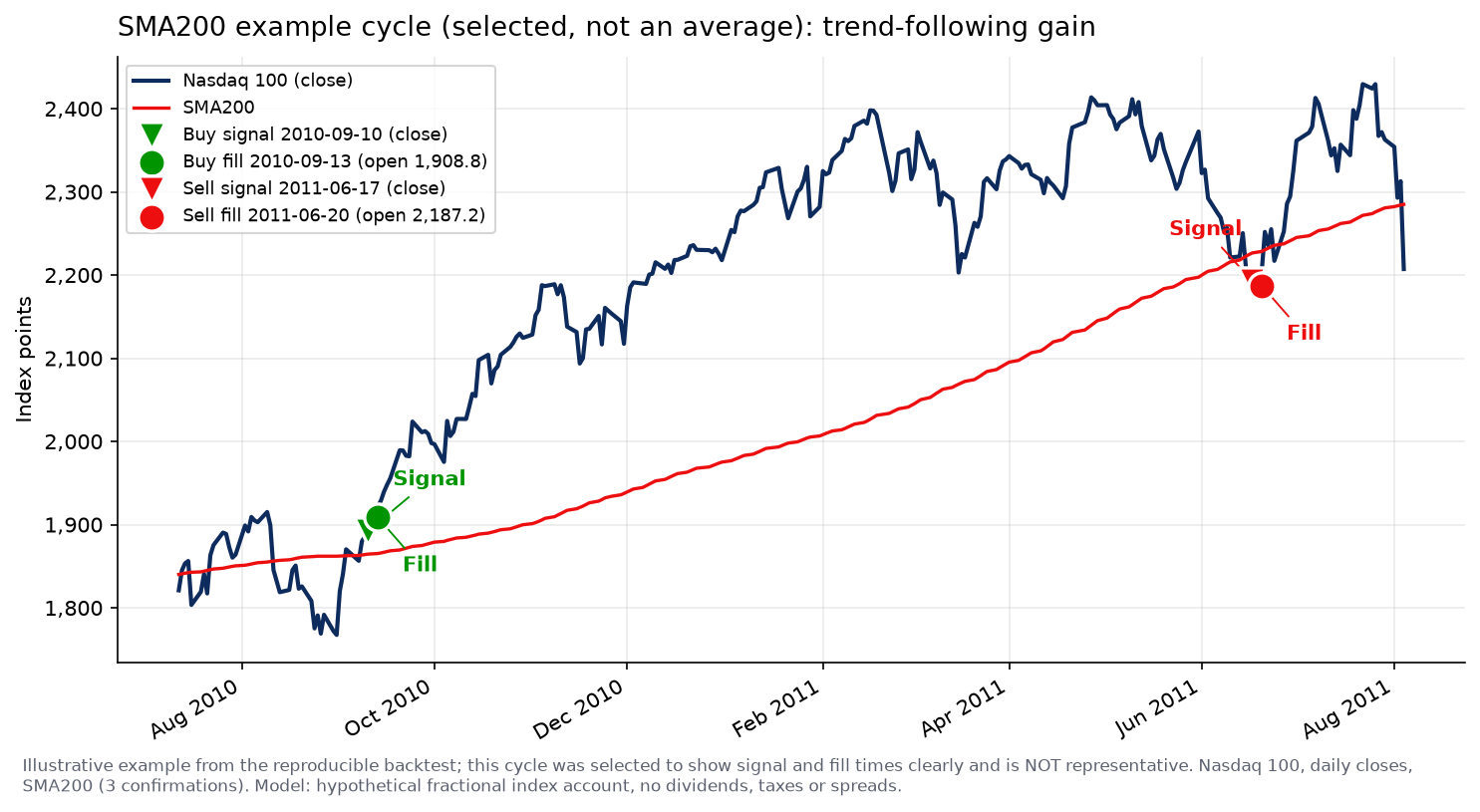
The bot follows a trend-following strategy with the SMA200, the simple moving average of the last 200 closes. The idea is to ride long-term uptrends and to write the rules down clearly:
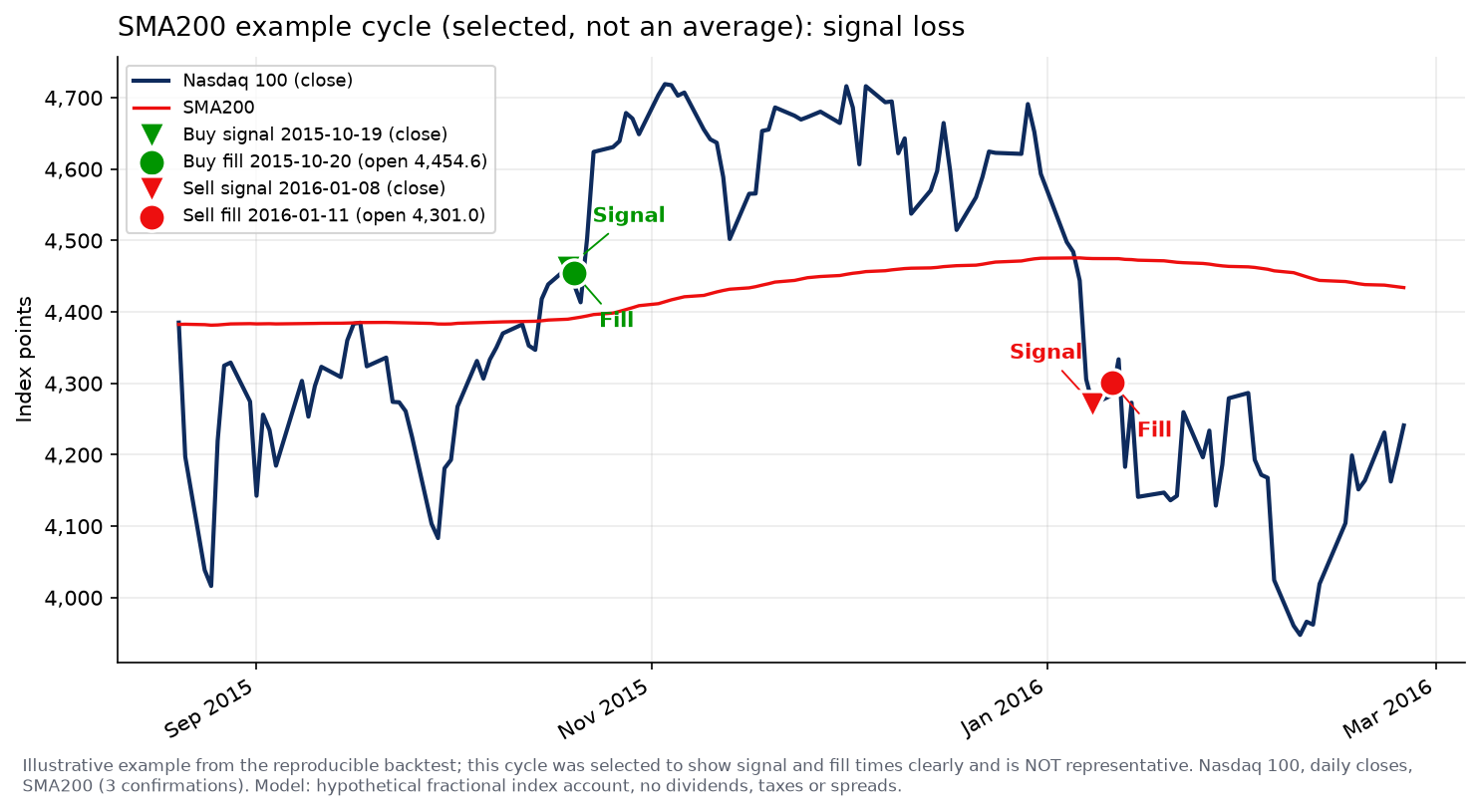
- Buy: a long position is opened when the close is above the SMA200 for three sessions in a row. The signal is confirmed at the third session’s close; the order is simulated at the next opening price.
- Sell: the mirror image, sell when the close is below the SMA200 for three sessions in a row. A close exactly on the SMA200 breaks both confirmation streaks. Missing data does not count as a signal.
 Click to enlarge
The focus is on an extremely simple rule set that is easy to follow. That makes it a good first look at algo trading.
Why the SMA200 as an indicator?
The SMA200 is the simple moving average of the last 200 closing prices. It is a widely used long-term trend filter.
The SMA200 is one of the most used moving averages in trading. When the price trades above the SMA200, it meets the entry rule of this strategy. When it falls below, that hints at weakness; the position of the price against the SMA200 alone does not prove a trend. The three-session confirmation can absorb short false signals, but it also delays every entry and exit; whether that helps is what the backtest answers. Our guide to moving averages compares the SMA with other types.
Step 1: import libraries and fetch data
First we import the Python libraries we need and load the historical Nasdaq 100 prices from Yahoo Finance. We use the fixed window from 1 January 2007 to 2 October 2026. The SMA needs the first 200 trading days to warm up, so the backtest effectively starts in mid-October 2007.
# === BLOCK 1 ===
# Step 1: imports and data preparation
import csv
import math
import os

import numpy as np
import pandas as pd
import yfinance as yf

TICKER = "^NDX"
START = "2007-01-01"
END = "2026-10-03"  # exclusive
INITIAL_CASH = 500.0
FEE_RATE = 0.0005  # 5 basis points per transaction (illustrative)
CONFIRM = 3
WINDOW = 200

CSV_CACHE = os.environ.get("NDX_CSV")  # optional: local CSV path for offline run
if CSV_CACHE:
    hist = pd.read_csv(CSV_CACHE, index_col=0, parse_dates=True)
else:
    hist = yf.download(
        TICKER, start=START, end=END, interval="1d",
        auto_adjust=False, actions=False, progress=False, threads=False,
    )
    if isinstance(hist.columns, pd.MultiIndex):
        hist.columns = [c[0] for c in hist.columns]

if getattr(hist.index, "tz", None) is not None:
    hist.index = hist.index.tz_localize(None)
What each library does:
- yfinance fetches prices through Yahoo’s unofficial interface. The library is not affiliated with Yahoo; its data is subject to Yahoo’s terms of use.
- pandas keeps the time series in a DataFrame and computes rolling averages.
- matplotlib renders the result as an image file. Alternatively, plotly produces interactive HTML charts; the code in this article uses matplotlib.
- Time span: the code loads daily prices for the Nasdaq 100 index over roughly 20 years.
Step 2: compute the SMA200 (with validation)
The SMA200 is the average of the last 200 closing prices. With min_periods=200 the SMA stays empty during the warm-up on purpose, so no signal can appear on partial data. Before that, the function _validate rejects empty, unsorted or inconsistent data instead of silently dropping rows.
# === BLOCK 2 ===
# Step 2: data validation (no silent dropping) and SMA200 computation
def _validate(df, min_window):
    """Reject empty, missing-column, NaN, unsorted, duplicate, OHLC-violating input.

    Only the four required columns (Open/High/Low/Close) are checked; optional
    extra columns such as Volume from yfinance are ignored but not removed.
    """
    if df.empty:
        raise ValueError("Empty dataset: data could not be loaded.")
    required = {"Open", "High", "Low", "Close"}
    missing = required - set(df.columns)
    if missing:
        raise ValueError(f"Missing columns: {sorted(missing)}")
    if not df.index.is_monotonic_increasing:
        raise ValueError("Time series not sorted ascending.")
    if df.index.duplicated().any():
        raise ValueError("Time series contains duplicate timestamps.")
    for col in sorted(required):
        v = df[col].astype(float)
        if not np.isfinite(v).all():
            raise ValueError(f"Column {col} has non-finite values.")
        if (v <= 0).any():
            raise ValueError(f"Column {col} has non-positive values.")
    o = df["Open"].astype(float)
    h = df["High"].astype(float)
    l_ = df["Low"].astype(float)
    c = df["Close"].astype(float)
    if ((h < o) | (h < c)).any():
        raise ValueError("OHLC violation: High < max(Open, Close).")
    if ((l_ > o) | (l_ > c)).any():
        raise ValueError("OHLC violation: Low > min(Open, Close).")
    if (h < l_).any():
        raise ValueError("OHLC violation: High < Low.")
    if len(df) < min_window + 1:
        raise ValueError(f"Dataset too short: {len(df)} < {min_window + 1}.")


_validate(hist, min_window=WINDOW)
hist["SMA200"] = hist["Close"].rolling(window=WINDOW, min_periods=WINDOW).mean()
Step 3: buy and sell rules with clean bookkeeping
Now we define the strategy rules. Important: the signal comes from the close of the third confirming day; the execution is simulated at the next session’s opening price. Position, cash and equity are valued at the close every day. A close equal to the SMA breaks the confirmation streak, and missing SMA values do not count as signals.
# === BLOCK 3 ===
# Step 3: signal, fill, bookkeeping, end-of-sample liquidation
close_ok = hist["Close"].notna()
sma_ok = hist["SMA200"].notna()
valid = close_ok & sma_ok

above = (hist["Close"] > hist["SMA200"]) & valid
below = (hist["Close"] < hist["SMA200"]) & valid


def _consec(mask):
    groups = (~mask).cumsum()
    return mask.astype(int).groupby(groups).cumsum()


entry_signal = (_consec(above) >= CONFIRM).to_numpy()
exit_signal = (_consec(below) >= CONFIRM).to_numpy()

cash = INITIAL_CASH
units = 0.0
equity = []
held_before_eod = []
trades = []  # (signal_date, fill_date, side, price, size, fee, reason)

for i, ts in enumerate(hist.index):
    today_open = float(hist["Open"].iloc[i])
    if i > 0:
        if units == 0.0 and entry_signal[i - 1]:
            size = math.floor(cash / (today_open * (1 + FEE_RATE)) * 1e6) / 1e6
            if size > 0:
                cost = size * today_open
                fee = cost * FEE_RATE
                cash -= cost + fee
                units += size
                trades.append((hist.index[i - 1], ts, "BUY", today_open, size, fee,
                               f"{CONFIRM} closes > SMA{WINDOW}"))
        elif units > 0.0 and exit_signal[i - 1]:
            proceeds = units * today_open
            fee = proceeds * FEE_RATE
            cash += proceeds - fee
            trades.append((hist.index[i - 1], ts, "SELL", today_open, units, fee,
                           f"{CONFIRM} closes < SMA{WINDOW}"))
            units = 0.0
    held_before_eod.append(units > 0.0)
    equity.append(cash + units * float(hist["Close"].iloc[i]))

# End-of-sample liquidation (predeclared, not a signal exit)
if units > 0.0:
    last_close = float(hist["Close"].iloc[-1])
    proceeds = units * last_close
    fee = proceeds * FEE_RATE
    cash += proceeds - fee
    trades.append((hist.index[-1], hist.index[-1], "SELL_END", last_close, units, fee,
                   "End-of-sample liquidation (predeclared backtest assumption, not a signal)"))
    units = 0.0
    equity[-1] = cash

hist["Equity"] = equity
Step 4: show the results and read them honestly
For the evaluation we build a buy-and-hold comparison with the same starting capital and the same fee, compute the metrics and plot both account curves with a drawdown panel.
# === BLOCK 4 ===
# Step 4: buy-and-hold benchmark (same fee), metrics, console summary, chart
first_valid = int(valid.to_numpy().argmax())
bh_entry = float(hist["Open"].iloc[first_valid])
bh_size = math.floor(INITIAL_CASH / (bh_entry * (1 + FEE_RATE)) * 1e6) / 1e6
bh_cash_after_entry = INITIAL_CASH - bh_size * bh_entry * (1 + FEE_RATE)
bh = [float("nan")] * first_valid
for j in range(first_valid, len(hist)):
bh.append(bh_cash_after_entry + bh_size * float(hist["Close"].iloc[j]))
last_close = float(hist["Close"].iloc[-1])
bh[-1] = bh_cash_after_entry + bh_size * last_close * (1 - FEE_RATE)
hist["BuyAndHold"] = bh
eval_start = hist.index[first_valid]
eval_end = hist.index[-1]
days = (eval_end - eval_start).days
years = days / 365.25
def _ann(total):
return (1 + total) ** (1 / years) - 1 if years > 0 else float("nan")
def _max_dd(curve):
# Peak = observed high but at least the initial capital. The first value is NOT
# overwritten, otherwise a first day below the starting capital would be hidden.
peak = curve.cummax().clip(lower=INITIAL_CASH)
return float((curve / peak - 1.0).min())
strat_curve = hist["Equity"].iloc[first_valid:]
bh_curve = hist["BuyAndHold"].iloc[first_valid:]
strat_total = float(strat_curve.iloc[-1]) / INITIAL_CASH - 1
bh_total = float(bh_curve.iloc[-1]) / INITIAL_CASH - 1
exposure = sum(held_before_eod[first_valid:]) / len(held_before_eod[first_valid:])
print(f"Period: {eval_start.date()} to {eval_end.date()} ({days} days, warm-up excluded)")
print(f"Strategy final: {strat_curve.iloc[-1]:.2f} USD "
f"({strat_total*100:.2f} %, {_ann(strat_total)*100:.2f} % p.a., max DD {_max_dd(strat_curve)*100:.2f} %)")
print(f"Buy-and-hold: {bh_curve.iloc[-1]:.2f} USD "
f"({bh_total*100:.2f} %, {_ann(bh_total)*100:.2f} % p.a., max DD {_max_dd(bh_curve)*100:.2f} %)")
print(f"Trades: {sum(1 for t in trades if t[2]=='BUY')} entries, "
f"{sum(1 for t in trades if t[2]=='SELL')} signal exits, "
f"{sum(1 for t in trades if t[2]=='SELL_END')} end-of-sample liquidation; "
f"exposure {exposure*100:.1f} % of evaluation days")
# Transaction log with csv.writer; reasons can contain commas (SELL_END).
with open("trades.csv", "w", newline="") as fh:
writer = csv.writer(fh, quoting=csv.QUOTE_MINIMAL)
writer.writerow(["signal_date", "fill_date", "side", "price", "size", "fee", "reason"])
for sig, fill, side, price, size, fee, reason in trades:
writer.writerow([
sig.date().isoformat(),
fill.date().isoformat(),
side,
f"{price:.4f}",
f"{size:.6f}",
f"{fee:.6f}",
reason,
])
print("Transactions saved: trades.csv")
# Chart: equity curve against buy-and-hold with a drawdown panel.
import matplotlib
matplotlib.use("Agg") # headless, no GUI
import matplotlib.pyplot as plt
import matplotlib.ticker as mticker
dd_s = strat_curve / strat_curve.cummax().clip(lower=INITIAL_CASH) - 1.0
dd_bh = bh_curve / bh_curve.cummax().clip(lower=INITIAL_CASH) - 1.0
fig, (ax1, ax2) = plt.subplots(
2, 1, figsize=(10, 6.6),
gridspec_kw={"height_ratios": [3, 1.3], "hspace": 0.14},
sharex=True,
)
ax1.plot(strat_curve.index, strat_curve, color="#0052FF", linewidth=1.9,
label=f"SMA200 strategy (final {strat_curve.iloc[-1]:.0f} USD)")
ax1.plot(bh_curve.index, bh_curve, color="#5B616E", linewidth=1.6,
label=f"Buy and hold (final {bh_curve.iloc[-1]:.0f} USD)")
ax1.set_yscale("log")
ax1.set_ylabel("Account in USD (log scale)")
ax1.set_title(f"Account curve starting at {INITIAL_CASH:.0f} USD, {eval_start.date()} to {eval_end.date()}",
fontsize=12, loc="left")
ymin = min(strat_curve.min(), bh_curve.min()) * 0.8
ymax = max(strat_curve.max(), bh_curve.max()) * 1.15
ax1.set_ylim(ymin, ymax)
ax1.yaxis.set_major_locator(mticker.FixedLocator([200, 500, 1000, 2000, 5000, 10000]))
ax1.yaxis.set_major_formatter(mticker.FuncFormatter(lambda x, _: f"{int(x):,}"))
ax1.yaxis.set_minor_locator(mticker.NullLocator())
ax1.legend(loc="upper left", fontsize=8.5)
ax1.grid(True, alpha=0.25)
ax2.fill_between(dd_s.index, dd_s * 100, 0, color="#0052FF", alpha=0.35,
label=f"DD strategy (max {dd_s.min()*100:.1f} %)")
ax2.fill_between(dd_bh.index, dd_bh * 100, 0, color="#5B616E", alpha=0.35,
label=f"DD B&H (max {dd_bh.min()*100:.1f} %)")
ax2.set_ylabel("Drawdown in %")
ax2.legend(loc="lower right", fontsize=8.5)
ax2.grid(True, alpha=0.25)
fig.autofmt_xdate()
fig.savefig("sma200_comparison.png", dpi=150, bbox_inches="tight")
plt.close(fig)
print("Chart saved: sma200_comparison.png")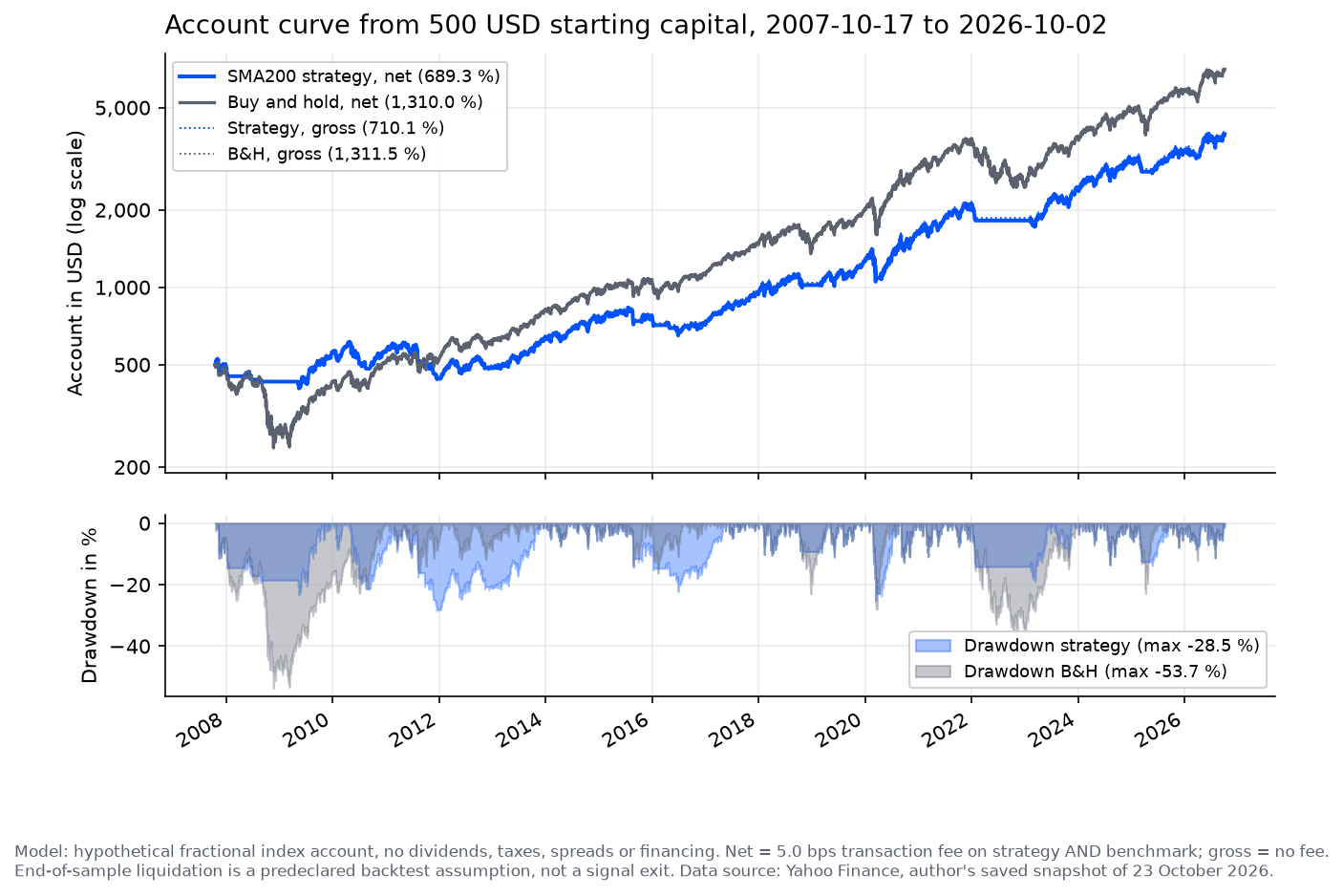 Click to enlarge
What does the backtest show? From 17 October 2007 to 2 October 2026 the strategy account grows net from 500 USD to 3,946 USD. That is about 689 percent total return or 11.5 percent a year, with a maximum drawdown of 28.5 percent. Buy and hold with the same fees ends the period at 7,050 USD: 1,310 percent total return or 15.0 percent a year, with a maximum drawdown of 53.7 percent.
Without the fee (“gross”), the strategy makes 710 percent and the benchmark 1,311 percent. The fee assumption moves the numbers but does not change the ranking. In this window the strategy therefore did worse than the benchmark but its maximum drawdown, measured at daily closes, was roughly half the benchmark’s in this sample. That is a historical measurement, not a loss limit: the strategy has no stop-loss order. Over the full period there were 26 entries, 25 signal exits and one end-of-sample liquidation; the position was invested on 79.9 percent of the evaluation days (counted before the end-of-sample liquidation).
 Click to enlarge
With this example I wanted to show that a simple rule set can be traced and measured end to end. It also shows why claims like “beats the index” are worth little without numbers. Past performance is no indicator of future results. The Nasdaq 100 itself cannot be traded; the real counterpart would be an ETF, a futures contract or a CFD with its own costs, dividends and tax treatment.
In bull markets the strategy stays mostly invested and shows little advantage over buy and hold. In sideways markets or bear markets the filter can avoid part of a decline, at the price of late entries and whipsaws when the market swings around the moving average. How to test such a rule properly, including out-of-sample data, is covered in our backtesting guide.
Build a trading bot with AI: ChatGPT and Claude as coding helpers
AI language models have lowered the entry barrier for coding bots a lot. ChatGPT, Claude and similar tools can write a complete code skeleton when you describe your strategy precisely.
A workable prompt looks like this. The more concrete you are about rules, market and time window, the better the code:
Write a Python script that uses yfinance to download daily prices of the
Nasdaq 100 from 1 January 2007 to 2 October 2026, computes the SMA200 and
backtests a long-only strategy: signal on the close, fill at the next open;
buy after 3 closes strictly above the SMA200, sell after 3 closes strictly
below. Equality and missing SMA break the streak. Show the equity curve and
drawdown against buy-and-hold with matplotlib.
Never trust AI code blindly. AI models sometimes use outdated library syntax or add silent logic errors, for example in the order of signal and execution. Read every suggestion carefully, ask the model to explain unclear lines and always check the result with your own backtest. API keys and passwords do not belong in a prompt; the AI speeds up the typing, the thinking stays with you.
From backtest to a real bot: paper trading and a broker API
Important: the example code above is a pure backtest. It does not trade; it replays the strategy on historical prices. A real bot needs two more things: a test phase without real money and a connection to a broker.
A backtest checks a trading strategy on historical prices. It shows how the rules would have done in the past but guarantees no future result.
The sensible path to live trading has four stages:
- Refine the backtest: test the strategy over different time windows and markets, not only on the chart that looks best.
- Set up a broker API and a demo account: open a demo account at a broker that offers a programming interface, and let your bot send orders there instead of only printing them.
- Paper trading: let the bot run for weeks on the demo account with simulated fills. Mistakes cost nothing, but you also do not see real executions: latency, rejections and partial fills behave differently on demo accounts than in real markets.
- Live with small size: only when the bot runs stably does real money come in, and even then with a small position.
A broker API is a programming interface through which a program fetches prices and sends orders directly to the broker.
Automated paper trading needs the same programming access as later live trading. What differs is the account mode and the risk, and often also the quality of the market data and of the simulated fills (no partial fills, no margin rejections, sometimes different spreads).
For stocks and futures, Interactive Brokers is one option, including a paper-trading account; see our Interactive Brokers review. For US stocks with a lean, API-first broker, see our Alpaca review. Which broker you can use depends on your country of residence. For crypto, the open-source library ccxt connects your Python code to many crypto exchanges through one interface; it is not built for stocks or futures.
What your bot also needs before it trades real money: instrument and size checks, reconciliation against the account state, protection against duplicate orders, handling of rejected or partly filled orders, a clean reconnect after a network loss, logs and hard loss limits. API secrets never belong in public code or an AI prompt. Give the key only the permissions the test really needs; disabling withdrawals does not prevent trading losses.
To be fair: a live bot is not set-and-forget income. You have to maintain the code, monitor positions and fix things when the API changes. If you do not want that work, rule-based manual trading is often the better choice.
Open-source frameworks: Freqtrade, Jesse and NautilusTrader instead of your own skeleton
The bot above is built by hand on purpose so you can see every step. For long-term operation you need more than signals: order management, a reconnect after a lost connection, logging, and a clean backtest with fees and slippage. These projects provide open-source software or an open-source core. Cloud operation, extra features, market data and trading can still cost money.
- Freqtrade: open source, focused on crypto exchanges. Includes backtesting, hyperopt optimization, control through Telegram or a web interface, and example strategies.
- Jesse: open-source core, strategies as Python classes; the vendor also offers paid services for live trading.
- NautilusTrader: Rust core, Python strategies, event-driven, several asset classes including stocks and futures.
- Hummingbot: open source, focused on market making and arbitrage on centralized and decentralized venues.
- OctoBot: open-source software with a graphical interface; the linked cloud version adds paid plans and ready-made strategies.
What no framework does for you: choosing a strategy that suits you. All of these provide the plumbing around trading; some include example strategies or building blocks. Being available is no proof of profitable trading. Your rules, your position size and your stop remain your job. Your own code can be inspected and changed, but only if you actually check its logic and dependencies. Before you run any framework with real money, let it run for weeks in paper mode and make sure you know what it does when the connection drops.
Limits and risks: what the simple bot cannot do
The backtest uses rough fees but no taxes, no spreads and no slippage. Real performance can be noticeably worse than the chart lines. The fee of 5 basis points is an assumption.
Slippage is the difference between the expected and the actual execution price of an order. It appears mainly in fast markets and at low liquidity.
The second trap is overfitting. If you tune parameters until the backtest looks perfect, you fit the strategy to the past rather than to the future.
Overfitting means a trading strategy has been fitted too tightly to historical prices. In live trading it then often fails.
Then there is market risk. The SMA200 strategy depends on stable trends. In long sideways markets it produces false signals again and again. A bot does not replace risk management: position size, maximum loss per trade and a plan for technical failures belong to every live run.
Legal framing (not legal advice): whether you may run a bot on your own account depends on your country, the instrument, your access to the market and your broker’s terms; check the rules that apply to you before you connect a bot to an account. Offering trading services to others, such as personal investment advice, discretionary portfolio management or signals sold to the public, often needs a licence or registration, and the rules differ by country (for example BaFin in Germany, the FCA in the UK, the SEC and CFTC in the US, FINMA in Switzerland). In Germany, for example, the regulated activities are defined in § 2 of the Securities Institutions Act (WpIG) and the licence requirement in § 15 WpIG. The fact that a signal service charges money does not by itself make it regulated investment advice; check the rules of your jurisdiction before you offer services to others.
Conclusion: what this bot shows and what it does not
The SMA200 example delivers a clear but unspectacular lesson in this test. With three libraries and four straightforward code blocks you can test a trend-following rule end to end, bookkeeping and transaction log included. The numbers from our 2007 to 2026 window also show why sweeping claims of “outperformance” without a calculation are worth little: the strategy fell short of buy and hold but had a much smaller maximum drawdown. Whether that trade-off is worth it depends on your own goals.
Algo trading separates decisions from emotions but does not replace trading skill. Progress is not guaranteed, and even small live positions can mean real losses. A clean backtest, a long enough phase on a demo account and a small starting size limit the damage if the idea does not hold up.
A practical tip: when you get stuck in the code, search for the error message or ask an AI. Many traders have faced the same problems, and the solutions are already in forums and blogs.
FAQ about trading with Python
What do I need for a Python trading bot?
To start, you need a Python environment, a stable internet connection and three libraries. This article was tested with Python 3.13; other versions are not verified. Use yfinance for prices, pandas for the data and matplotlib for the evaluation, plus basic knowledge of trading strategies and risk management. This setup is enough for the backtest; as soon as your bot should send orders automatically, even to a demo account, you also need access to a broker API.
Does the example code trade with real money?
No. The example code is a historical backtest. It runs the rules on past prices and writes a transaction log, but it sends no orders to a broker. For real trading you also need a broker API, a demo account and a test phase before real capital is at stake.
What is a trading bot?
A trading bot is an automated program that makes buy and sell decisions based on fixed rules. It analyzes market data, can execute orders and works without emotional decisions. The actual trading hours depend on the instrument and the venue.
Which mistakes should I avoid when I program a trading bot?
A common mistake is making the bot too complicated. Keep the strategy simple, like the SMA200 trend filter, and test it thoroughly before you use real capital. The second classic mistake is sloppy bookkeeping: signal and execution belong apart, a tie and missing values must not create signals, and fees and slippage belong in the backtest. Markets change, so check regularly whether the strategy still works.
Are trading bots legal?
It depends on your country, the instrument, your market access and your broker’s terms. Check the rules that apply to you before you connect a bot to an account. For services to others, whether a licence is needed depends on the specific offer and the jurisdiction; in Germany, for example, personal investment advice or discretionary portfolio management can need a licence under §§ 2 and 15 WpIG. Paid trading signals are not automatically the same as licensed investment advice. Also check your broker’s terms: some brokers restrict automated trading.
Which programming language is best for trading bots?
The right language depends on the platform, the available libraries and your requirements. Python is often a good fit for data analysis and prototypes, and it is easy to learn. If you already know another language or use a ready-made platform, C++, Java or Pine Script are good routes as well.
This English edition is based on our German edition on kagels-trading.de and has been adapted for international readers.
More Algo Trading guides
- Get started
Algo Trading: How It Works, Platforms and Risks
What algo trading is, the six stages of a trading system, platforms and languages, risks and US rules.
- Choose an API broker
Alpaca Trading Review 2026: API Broker Tested
Alpaca tested with paper-trading orders: fees, data plans, the API and AI connector, regulation and fines.