
AI Trading Bots: Build One with Claude and TradingView


Contents
- AI trading bots in 30 seconds
- What is an AI trading bot?
- What an AI trading bot can and cannot do
- The five rules every trading bot needs
- Build a semi-automated bot with Claude and TradingView
- Our backtest: the 55/20 bot on Bitcoin, 2015 to 2026
- Running the bot: supervision and when to switch it off
- Risks and red flags
- Conclusion: the AI builds faster, the testing stays your job
- Frequently asked questions about AI trading bots
- About the author
An AI trading bot is usually not an AI that trades, but a rule-based bot that an AI helped you build. The AI assistant writes the code, reads the chart and sets up alerts. The decisions come from fixed rules that you can test, and that is a good thing.
In this guide we build such a bot with Claude and TradingView and then test it ourselves. The example is a simplified Turtle breakout on Bitcoin. We reran it in Python on our own data with costs and slippage, an out-of-sample check, the original Turtle rules and buy and hold for comparison. This article follows our editorial policy.
AI trading bots in 30 seconds
- Most “AI trading bots” are rule-based bots built with AI help. The AI writes code and alerts; the rules decide the trades.
- A semi-automated bot sends you a signal and you place the order. That keeps a human between the alert and your broker account.
- Claude can work inside TradingView through an MCP server, which lets it write Pine Script, read the chart and help with alerts. The official MCP has no order tools.
- Our Bitcoin test is sobering: the simplified 55/20 bot turned $10,000 into $26,126 from 2015 to 2026 after costs, while buy and hold reached $2.35 million.
- The bot’s drawdown on daily closes was about 18%, not the 3% that a closed-trades-only figure shows. With a 2012 start it was 54%. From 2021 on it made 17% in almost six years.
What is an AI trading bot?
An AI trading bot is a program that turns market data into trading signals or orders, where artificial intelligence either builds the rules or makes the decisions itself.
In practice there are three levels, and most retail offers sit on the first two. The level tells you who places the order and where the risk sits. The difference between AI and plain rule-based automation is explained in our guide to AI trading.
| Level | What the AI does | Who places the order | Main risk |
|---|---|---|---|
| AI-built signal bot | writes the code and the alerts | you, by hand | wrong code that looks right |
| AI-built auto bot | writes the code; a separate service sends orders | the bot, through a broker API | errors trade before you see them |
| AI decides | a model picks trades from data | the bot | rules nobody can check or test |
This guide covers the first level and shows where the second one starts. A rule you can read and test is the base for everything else. The second level needs an order connection, and if its signals come from TradingView, its Terms of Use restrict that use (see Step 5). Ready-made bot platforms, their costs and the checks before you connect an account are in our trading bots guide.
What an AI trading bot can and cannot do
An AI makes building a bot faster, but it does not make a weak strategy strong. It can turn plain English into code, explain an error message and compare results. It cannot know whether your rule will work next year, and it can be confidently wrong about a value it reads from a chart.
A US regulator has warned against exactly this promise. The Commodity Futures Trading Commission published a customer advisory in January 2024 titled “AI Won’t Turn Trading Bots into Money Machines.” It says AI cannot predict the future or sudden market changes, and it tells readers to count fees and subscription costs.
The useful question is therefore not “is it AI?” but “can I check it?” A bot whose rules you can write in five lines can be backtested, checked trade by trade and switched off when it behaves differently from the test. A black box can only be believed.
The five rules every trading bot needs
Every bot, with or without AI, needs five decisions written down before any code exists. If one of them is missing, the AI will fill the gap with a guess, and you will not notice it in the code.
- Market and time frame: which instrument, which data feed and which bar size. Our example: Bitcoin in US dollars, daily bars.
- Entry: the exact condition and the fill price. A close above a level is different from a touch during the day.
- Exit: when the bot leaves a winning trade. Trend systems use an opposite breakout, not a price target.
- Stop: where a losing trade ends, and whether the stop is fixed or moves.
- Position size: how much the bot buys. This rule has the biggest effect on returns and drawdown, as our test shows below.
These five rules are the specification you give to the AI. Our algo trading guide shows the full path from idea to live system around this step.
Build a semi-automated bot with Claude and TradingView
The workflow below uses Claude as the builder and TradingView as the chart, the strategy tester and the alarm. It is semi-automated: TradingView raises an alert, and you decide whether to place the order. Nothing in it needs a broker login or an API key.
What you need
You need three things: TradingView, an AI assistant and a connection between them. On our own computer we use TradingView Desktop, Claude and a community MCP server (Model Context Protocol, a standard way for an AI to use outside tools). The connection is optional: you can also copy code between Claude and the Pine Editor by hand. TradingView also sells its own assistant inside the app, which we tested in our TradingView AI Copilot review.
There are two kinds of TradingView MCP, and they differ in what they may do. TradingView’s official MCP server runs in its cloud, needs the Essential plan or higher, offers simple price alerts and has no order tools (as of our check on 21 October 2026). Community servers such as the open-source tradingview-mcp project control the desktop app on your own computer, including the Pine Editor; their fit with TradingView’s Terms of Use is unclear. As of 8 November 2026, sections 27.3 and 27.4 of those terms allow the official server only for an individual’s personal, non-commercial use and rule out automated trading with its output, including connecting its alerts to a webhook or bot. The limited permission for AI processing in section 27.4 is written for that official server. The details, the risks and our own experience are in our guide to the TradingView MCP and API.
Step 1: write the rules in plain English
Start with the rules, not with code. Our example is a simplified version of the Turtle System 2 breakout. The original rules of Richard Dennis’s traders are in our guide to Turtle trading; this version keeps the 55-day entry and the 20-day exit and drops the rest.
Build a TradingView Pine Script v6 strategy for BTC/USD on the daily chart.
Long only, one position at a time.
Entry: a daily close above the highest high of the previous 55 bars
(the current bar not included). Buy at the next bar's open.
Stop: fixed at the signal bar's close minus 2 x ATR(20). It never moves.
Exit: a daily close below the lowest low of the previous 20 bars
(the current bar not included). Sell at the next bar's open.
Size: risk 1% of current equity between the signal close and the stop.
Costs: 0.10% commission per side, plus slippage.
Alerts: an alert() call with alert.freq_once_per_bar_close when an entry or exit
signal fires, with the signal and, for an entry, the stop price.
Before you write any code, repeat these rules in your own words and
list every point where they could be read in two ways.
The last two lines of the prompt matter most. An AI that restates the rules shows you what it understood. The list of ambiguities shows you what you forgot to decide.
Step 2: let the AI confirm the rules before it codes
Five details decide whether the code does what you meant. We found all five while rebuilding the bot in Python, and each one changes the trade list:
- “Previous” high: if the 55-day high includes today’s bar, the bot never trades, because a close can never be above its own day’s high.
- Close or touch: our rule waits for the daily close. The original Turtles bought as soon as price crossed the level during the day.
- The ATR formula: TradingView’s ATR uses Wilder’s smoothing. That is the same formula as the Turtles’ N, (19 × previous N + today’s true range) / 20.
- Fixed or trailing stop: the stop is calculated once at the signal. Code that recalculates it on every bar creates a trailing stop, a different system.
- Size on what: 1% of current equity compounds; 1% of the starting capital does not. If the code sets no size, the strategy’s default order size decides instead.
Step 3: build the strategy and set the costs
Only now let Claude write the Pine Script strategy. Compile it, read the error list and ask the AI to explain every line you do not understand. Our Pine Script guide covers the language and its strategy functions.
We do not print Pine code here, because we did not compile one for this test. We did not use Karsten’s TradingView account for it. Our numbers come from a Python reimplementation of the same rules, which you can compare with the trade list of your own strategy report.
Set commission, slippage and starting capital in the strategy properties before you read any result. A backtest without costs flatters every system that trades often. TradingView sets slippage in ticks, so convert it to a price for your symbol. How to read the strategy tester is in our guide to TradingView backtesting.
Step 4: check trades by hand
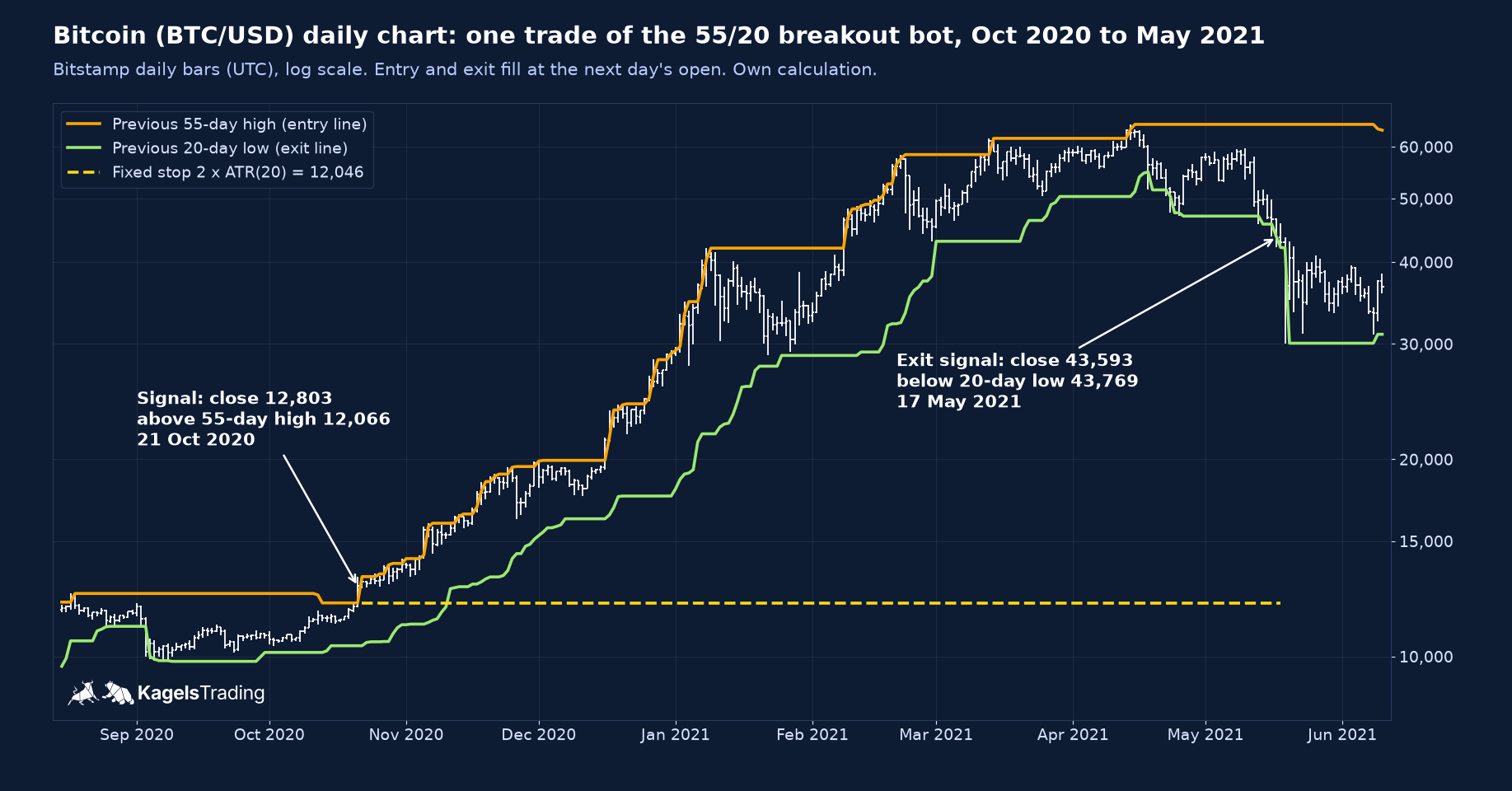
Check at least three trades against the chart, not one. Pick a winner, a loser that hit the stop and a loser that left through the exit rule. For each one, write down the signal close, the 55-day high, the ATR, the stop and the exit by hand.
We checked these three with a separate script that reads the raw prices directly. All three matched the backtest engine to the cent. The ATR values are the Wilder ATR(20) on the signal day.
| Signal (UTC) | Close | Previous 55-day high | ATR(20) | Stop | How it ended |
|---|---|---|---|---|---|
| 21 Oct 2020 | 12,802.67 | 12,065.82 | 378.44 | 12,045.79 | close 43,593.39 below 20-day low on 17 May 2021 |
| 17 Mar 2023 | 27,466.00 | 26,533.00 | 1,145.51 | 25,174.98 | close 25,739.00 below 20-day low on 5 Jun 2023 |
| 13 Aug 2025 | 123,360.00 | 123,236.00 | 2,794.48 | 117,771.03 | stop hit the next day, low 117,201.00 |
 Click to enlarge
Source: Price data from the Bitstamp public API, own calculation.
The August 2025 trade shows why the stop matters. The breakout cleared the old high by only 124 dollars and failed the next day. With 1% risk the loss stayed small; that small loss repeated is the normal cost of a trend system.
Step 5: alerts instead of orders
The bot’s job ends with a message, not with a trade. Create the alert yourself in TradingView’s dialog and choose the condition for alert() calls only; the script itself sets the frequency with alert.freq_once_per_bar_close. The official MCP creates only simple price alerts, so we do not rely on an AI for this step. TradingView also offers order-fill alerts, but those fire when its simulator fills the strategy’s order, which is too late for a look at the signal.
Plan the live order before the first alert arrives. After an entry alert you check the chart, buy at your broker and enter the stop order there at once, at the price in the alert, because TradingView’s stop in the test protects nothing in your account. After an exit alert you sell. Your reaction time is a cost the backtest does not contain: it assumes a fill at the next open, and you may be asleep when a daily bar closes at midnight UTC.
Keep the order step in your own hands, for two reasons. First, section 3 of TradingView’s Terms of Use restricts automated order generation with its data, including through alerts and webhooks (automatic messages to another program); the MCP guide linked above explains the clause. Second, a human check catches data errors and code bugs before they cost money. Never give an AI assistant your broker login or an API key with trading rights.
Alerts need care like any other part of the bot. According to TradingView’s alert help, a standard alert lives at most two months; Premium and Ultimate plans offer an open-ended option. Note the expiry date and renew the alert in time. A bot that silently stops alerting is a missing exit, which is worse than a missing entry.
Our backtest: the 55/20 bot on Bitcoin, 2015 to 2026
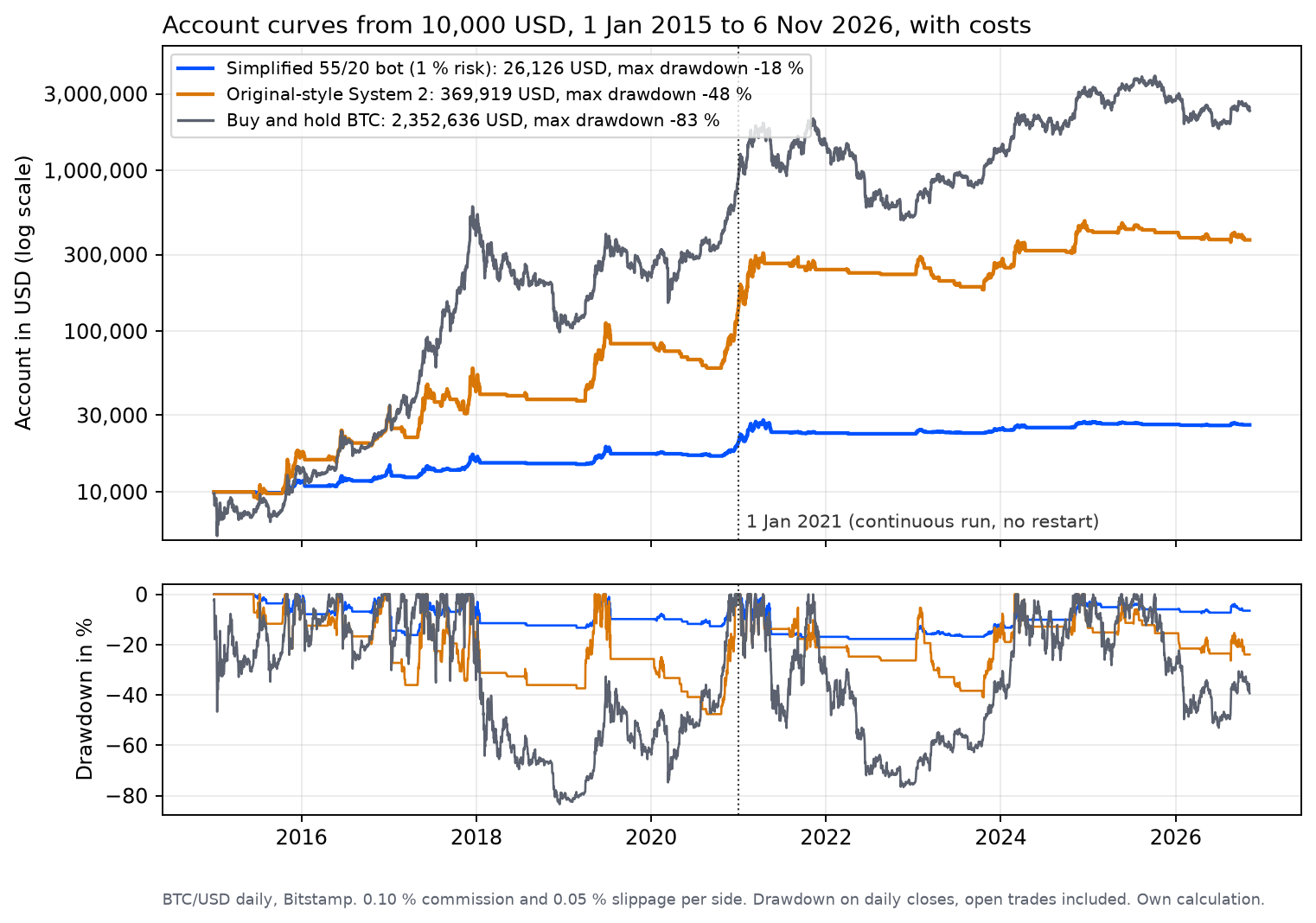
We tested the rules ourselves instead of trusting a strategy report. The data are daily BTC/USD bars from Bitstamp’s public API (UTC days, downloaded on 7 November 2026), tested from 1 January 2015 to 6 November 2026 with a start of $10,000.
The execution is deliberately cautious. Entries and rule exits fill at the next day’s open; a stop fills at the stop price or at a worse opening price after a gap. Each side pays 0.10% commission and 0.05% slippage, both assumptions rather than one exchange’s fees. Slippage is the gap between the price a rule expects and the price you actually get. Cash earns no interest, and there are no taxes or funding costs.
We tested two versions of the Turtle idea against buy and hold. All three use the same data, costs and start date:
- Simplified 55/20: the five rules from Step 1, exactly as written. Long only, one position, 1% risk with a fixed 2 ATR stop.
- Original-style System 2: closer to the 2003 rulebook. Entry during the day at the 55-day high, a unit of 1% of equity per N (so 2% risk at the 2N stop), up to four units added every half N, exits at the 20-day low. We kept it long only and unleveraged, capped at 100% of the account, and left out the short side, other markets and the rule that shrinks size after losses. A daily bar does not show the order of events inside the day, so we assume the unfavourable one: a stop that trades comes first, then no new trade that day; after a new entry or add, the day’s low comes last. An add needs cash for at least 10% of a unit, otherwise it is skipped. That threshold alone moves the end value between about $232,000 and $377,000, so read this column as a rough estimate.
- Buy and hold: the whole account in Bitcoin on the first day, with the same costs.
| Result, 2015 to 2026, with costs | Simplified 55/20 | Original-style System 2 | Buy and hold |
|---|---|---|---|
| End value of $10,000 | $26,126 | $369,919 | $2,352,636 |
| Return per year | 8.4% | 35.6% | 58.6% |
| Max drawdown, closed trades only | -3.2% | -31.3% | n/a |
| Max drawdown, daily closes (open trades included) | -17.8% | -47.6% | -83.4% |
| Closed trades | 37 | 65 | 1 position |
| Win rate | 40.5% | 26.2% | n/a |
| Profit factor | 5.61 | 2.32 | n/a |
| Average position, share of equity | 16.7% at entry | 78.9% at its largest | 100% |
| Time in the market | 37.5% | 32.7% | 100% |
 Click to enlarge
Source: Price data from the Bitstamp public API, own calculation.
These are simulated results on one market and one period, not a forecast. Bitcoin rose from about $320 at the start of 2015 to about $75,700 at the end of the test, a move few markets have ever made. Past performance is no indicator of future results.
Closed-trade drawdown hides the real risk
The most important lines in the table are -3.2% and -17.8%, measured on the same bot. A drawdown based only on closed trades ignores everything that happens while a trade is open. During long trends the simplified bot gave back up to 18% of its peak equity on daily closes before the exit came. Moves inside the day can go deeper than that.
Ask which drawdown a strategy report shows before you trust it. Open-trade drawdown is the one you live through. TradingView documents that its own max drawdown counts open positions bar by bar, including intrabar lows; a closed-trades-only figure is not comparable with it. For the original-style system the gap is 31% against 48%.
Position size: same rules, five different results
The simplified bot is not a weak strategy, it is a small one. In our test the 2 ATR stop sat 6.8% below the entry on average, so 1% risk buys only about 17% of the account. The rest sits in cash and earns nothing in our test.
To isolate this effect we changed only the risk per trade and kept every other rule. All five runs have the same 37 trades. Positions are capped at 100% of the account, which limits the two largest settings, so the drawdown figures are not a simple multiple of each other.
| Risk per trade | End value of $10,000 | Return per year | Max drawdown, daily closes | Average position at entry |
|---|---|---|---|---|
| 0.5% | $16,546 | 4.3% | -10.9% | 8.3% |
| 1% | $26,126 | 8.4% | -17.8% | 16.7% |
| 2% | $58,636 | 16.1% | -27.1% | 33.4% |
| 4% | $205,579 | 29.1% | -35.9% | 65.0% |
| 8% | $417,166 | 37.0% | -47.0% | 95.0% |
This is one path through one rising market, so it does not show which size is right. More size earned more only because Bitcoin rose so far, and the drawdown grew with it. The original-style system is a separate comparison, not a sizing test: it also differs in entry timing, stop placement, exits and pyramiding.
Costs and slippage
Costs did not change the ranking, but they matter far more for the active version. Without any costs the simplified bot gains 166%; with our base costs 161%; with 0.25% commission and 0.10% slippage per side 155%. The original-style system falls from 4,527% without costs to 3,599% with base costs and 2,977% with the high costs, because its adds create more transactions.
Out of sample: what happened after 2020
The rules were not fitted to Bitcoin, but the period still matters. We split the test at 1 January 2021: 2015 to 2020 as the in-sample part and 2021 to November 2026 as the out-of-sample part, each starting flat with $10,000. How such a split works in general is in our backtesting guide.
| With base costs | 2015 to 2020 | 2021 to Nov 2026 |
|---|---|---|
| Simplified 55/20: return | +102.9% (12.5% a year) | +17.1% (2.7% a year) |
| Simplified 55/20: max drawdown, daily closes | -16.2% | -8.9% |
| Simplified 55/20: profit factor | 6.24 | 2.72 |
| Original-style System 2: return | +1,295% (55.2% a year) | +4.3% (0.7% a year) |
| Original-style System 2: max drawdown, daily closes | -47.6% | -52.9% |
| Buy and hold: return | +8,905% | +160.4% (17.8% a year) |
| Buy and hold: max drawdown, daily closes | -83.4% | -76.7% |
After 2020 the return shrank in every version, and most in the two bots. The simplified bot made 2.7% a year in almost six years, and its profit factor fell from 6.2 to 2.7. The original-style system made 0.7% a year with a drawdown above 50%. A system that looks excellent on the whole chart can be ordinary in the recent half.
Changing the parameters does not rescue it
We also tried 16 combinations of entry and exit length on the in-sample part only. Entries of 20, 40, 55, 80 and 100 days, exits of 10 to 40 days. The best in-sample setting, a 20-day entry with a 10-day exit, made 128% before 2021 and 29% after it.
The ranking held up reasonably, but every setting lost most of its return out of sample. The rank correlation between the two periods was 0.72, and the classic 55/20 sat in sixth place in both. Tuning the numbers moves the result by a few points; it does not bring back the 2015 to 2020 returns. That is the honest limit of parameter optimization.
The start date changes the picture
The same rules started on 1 January 2012 give a very different report. The simplified bot then ends at $86,083 (15.6% a year) and shows a profit factor of 7.46 and a win rate of 45.2%. Its drawdown on daily closes is -53.8%, from 9 to 16 April 2013, while the closed-trades figure stays at -3.2%. Buy and hold would have reached about $165 million with a drawdown of 84.9%.
That single week shows the limit of a fixed stop. The trade was opened at about $13.21 on 6 December 2012 with a stop at $12.37, and that stop stayed in place while the price passed $200, so the position had grown to most of the account. We start our main test in 2015 because Bitstamp’s median daily turnover in 2012 was only about $7,000, in our judgement too thin for this result, and the test models no market impact. Always ask which start date a backtest uses and what it leaves out.
Bot or buy and hold?
Buy and hold made more money than both bots, in both periods. The price was a drawdown of 83% between December 2017 and December 2018 and another 77% from November 2021 to November 2022. Few people hold through that, and it is an individual decision whether to try.
The simplified bot’s value is the smaller drawdown, not the higher return. Whether a 2.7% yearly return with a 9% drawdown is better than 17.8% with a 77% drawdown is a personal decision about risk, not a question a backtest can answer for you. Compare a bot with the simplest alternative before you run it.
Running the bot: supervision and when to switch it off
A bot needs a supervisor and a written stop rule for itself. Decide before the first live alert what makes you pause it, for example a drawdown deeper than the worst one in the backtest on daily closes, or a run of losses longer than any in the test.
- Compare live with the test: every month, check that real fills, slippage and the number of signals match the backtest.
- Keep a log: date, signal, your decision and the fill. Without it you cannot tell a bad market from a bad bot.
- Change one thing at a time: if you edit the rules, run the backtest again first.
- Watch the data feed: a different exchange or a different daily close time creates different signals.
The first live weeks belong on a paper account. Our guide to the Python trading bot shows the path from a backtest to paper trading and a broker API, including what a live bot needs on top.
Risks and red flags
The largest risks of an AI trading bot sit outside the code. Sellers promise monthly returns, show a curve without costs and call any indicator “AI”. Treat every fixed return promise as a red flag.
- Unchecked AI output: a strategy can compile and still trade different rules from the ones you wrote.
- Wrong numbers from the chart: an AI reading a busy chart can take the wrong value. Check every level before money depends on it.
- Terms of use: community connections to TradingView may conflict with its Terms of Use, and automated orders based on its data are restricted.
- Account access: never hand an AI your broker password or a trading API key. Withdrawal rights especially do not belong in any bot.
- Legal limits: running a bot on your own account is a different matter from selling signals or managing money for others, which can need a licence. This is not legal advice.
Conclusion: the AI builds faster, the testing stays your job
Claude and TradingView make it easy to turn five plain rules into a working signal bot in an afternoon. That speed is real. What the AI does not supply is the evidence that the rules are worth following.
Our Bitcoin test shows how much depends on the checks. The same rules produced $16,546 or $417,166, depending only on the risk per trade, and the closed-trades drawdown understated the one on daily closes by a factor of more than five. After 2020 every version earned far less, and buy and hold beat both bots on return. Build the bot, then test it the way we did: costs, open-trade drawdown, a second period and the simplest alternative.
This article is market education, not investment advice. All results are simulations on historical data.
Frequently asked questions about AI trading bots
Do AI trading bots work?
Some rule-based bots work in some markets and periods, but AI alone does not make a bot profitable. In our test the 55/20 breakout on Bitcoin gained 161% from 2015 to 2026 after costs, but only 17% after 2020, and buy and hold made far more. Judge a bot by an out-of-sample test with costs, not by the word AI.
Can Claude trade for me on TradingView?
No, and it should not. TradingView’s official MCP server has no order tools, and its Terms of Use restrict automated orders based on its data. Claude can write the Pine Script strategy, read the chart and help you set up alerts; the order stays with you and your broker.
Do I need to code to build an AI trading bot?
No, but you need to read and check what the AI writes. Claude can produce a Pine Script strategy from plain English. You still have to confirm the rules, set costs in the strategy properties and check several trades by hand, because code that compiles can still trade the wrong rules.
What is the difference between an AI trading bot and a normal trading bot?
A normal trading bot follows rules that a person wrote, while an AI trading bot either had its rules built with AI help or lets a model decide. Most retail AI bots are the first kind. The second kind is harder to test, because its rules may change with new data.
Why did the bot make less than buy and hold?
Because it was out of the market most of the time and small when it was in. The simplified bot held Bitcoin on about 38% of the days, with about 17% of the account per trade. Bitcoin rose more than 200-fold in the test period, so any rule that sits out misses part of that rise. The trade-off is a much smaller drawdown.
Is it legal to use an AI trading bot?
Using a bot on your own account is generally a matter of your broker’s terms and your country’s rules. Check both before you connect anything. Selling signals or running bots for others is a different matter and can need a licence; the rules differ by jurisdiction. This is not legal advice.
A German edition of this article is available on kagels-trading.de.
More Algo Trading guides
- Get started
Algo Trading: How It Works, Platforms and Risks
What algo trading is, the six stages of a trading system, platforms and languages, risks and US rules.
- Choose an API broker
Alpaca Trading Review 2026: API Broker Tested
Alpaca tested with paper-trading orders: fees, data plans, the API and AI connector, regulation and fines.
- Compare an options API broker
Tradier Review 2026: Pricing, API and MCP Server
Tradier from its own documents: the three plans, the API and sandbox, the MCP server for AI assistants and two fines.
- Code your first bot
Python Trading Bot: Step-by-Step SMA200 Backtest
A four-block SMA200 backtest in Python on the Nasdaq 100, with honest results and the path to paper trading.
- Pick a trading bot
Trading Bots: How They Work, Costs and Risks
Six common bot approaches, provider desk research, costs with billing basis, legal checks and what to verify before you connect an account.