
CoinTracking Review 2026: Prices, Free Plan and Tax Reports


Contents
- CoinTracking in 30 seconds (as of November 21, 2026)
- What is CoinTracking?
- What does CoinTracking cost?
- Free plan, trial and refund
- Which features matter for traders?
- The full-service option
- What do users say about CoinTracking?
- Alternatives to CoinTracking
- Pros and cons of CoinTracking
- Conclusion: who is CoinTracking for?
- Frequently asked questions about CoinTracking
- About the author
CoinTracking is a crypto portfolio tracker and tax report tool, and it has been around since 2012. It imports your trades from exchanges and wallets and turns them into gains, losses and tax reports such as IRS Form 8949. If you trade on several platforms, it saves you from rebuilding every trade in a spreadsheet. How crypto is taxed in the US is summarized in our guide to trading taxes.
This review explains the tool, not your taxes. We do not give tax advice. A report from any software is only as good as the data you import and the method you choose, so have your return checked by a tax professional, such as a CPA or enrolled agent in the US, or a chartered tax adviser in the UK. All prices and terms are as of November 21, 2026, read on CoinTracking’s own pages. We did not buy a plan and have no business relationship with CoinTracking. How we work is on our editorial policy page.
CoinTracking in 30 seconds (as of November 21, 2026)
- What it is: a portfolio tracker and tax report tool from CoinTracking GmbH near Munich, Germany. It holds no coins and places no trades.
- Free plan: portfolio view only. Tax reports and new imports after the trial need a paid plan.
- Cost: from $49 a year (Starter, 200 transactions) to $899 a year (Unlimited); lifetime licenses from $249.
- Trial and refund: a 7-day trial with unlimited imports and no card, a 14-day refund policy, and a 14-day right of withdrawal for consumers in the terms.
- Key limit: auto-sync and API imports start with the Pro plan at $169 a year.
What is CoinTracking?
CoinTracking collects all your crypto transactions in one place and calculates gains, losses and tax reports from them. You connect exchanges and wallets by API or upload their CSV files, and the software matches buys, sells, transfers and income such as staking. The home page names 400+ exchanges and wallets and tax reports for more than 100 countries, including IRS Form 8949, Schedule D, HMRC and ATO reports.
The company is CoinTracking GmbH in Gräfelfing near Munich. It is registered at the district court of Munich under HRB 238142. Its security page says the platform is ISO/IEC 27001:2017 certified, hosted in the EU and GDPR compliant. CoinTracking names more than 2.2 million users; we could not check that figure.
| Fact | CoinTracking |
|---|---|
| Company | CoinTracking GmbH, Gräfelfing (Munich), Germany |
| On the market | Since 2012 (company statement) |
| Connections | 400+ exchanges and wallets (company statement) |
| Tax reports | 100+ countries, incl. US Form 8949 and UK HMRC |
| Free plan | Portfolio view only |
| Security | ISO/IEC 27001:2017, EU hosting, GDPR |
Sources: cointracking.info home page, imprint and security page, read November 21, 2026.
What does CoinTracking cost?
CoinTracking sells plans by the number of transactions you have, counted over all years. According to the FAQ, every imported transaction from every year counts toward the limit. A plan then covers every tax year at no extra charge. If you outgrow your plan, you upgrade and pay the difference.
| Plan | 1 year | Lifetime (one-time) |
|---|---|---|
| Free | $0, portfolio view only | $0 |
| Starter (200 transactions) | $49 | $249 |
| Pro (3,500 transactions) | $169 | $749 |
| Expert (20,000 / 50,000 / 100,000) | $259 / $349 / $459 | $1,199 / $1,599 / $2,499 |
| Unlimited | $899 | $7,199 |
Source: CoinTracking pricing page, read November 21, 2026. Two-year plans: Starter $79, Pro $259, Expert $399, $539 or $729, Unlimited $1,399. Euro prices are lower in number, for example Pro €129 a year.
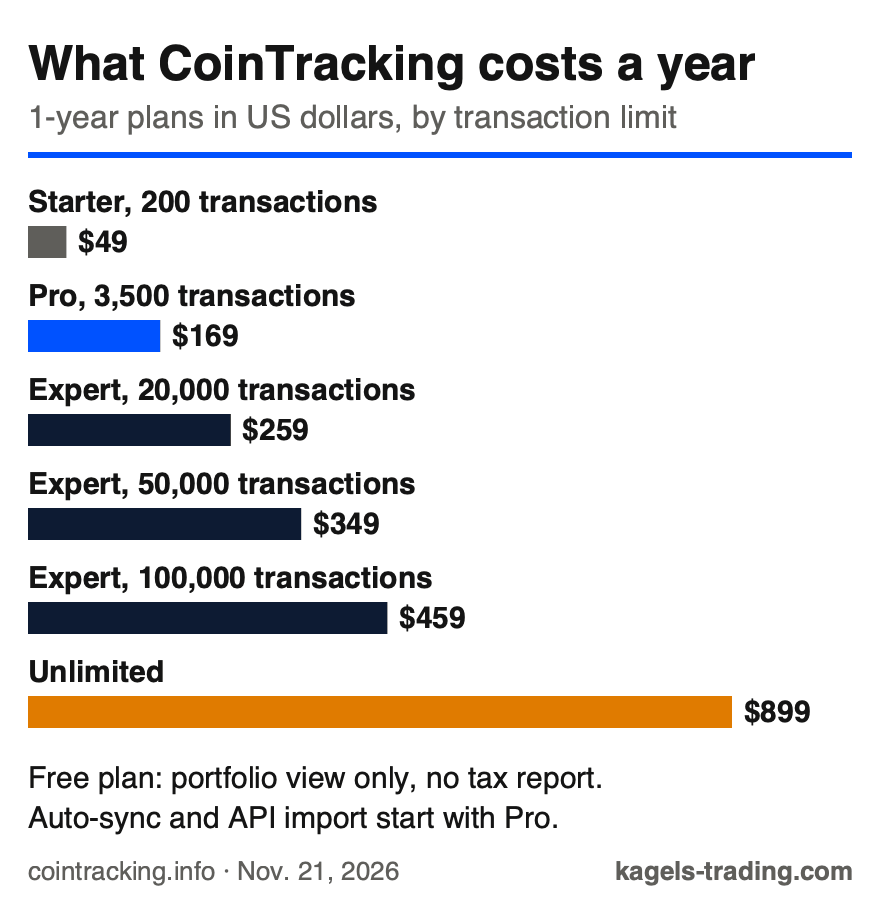 Click to enlarge
Source: Kagels Trading, own graphic from the CoinTracking pricing page.
The jump that matters is from Starter to Pro. After the trial, Free only shows the existing portfolio. Starter lets you import by hand, for example with CSV files, but has no auto-sync and no API access. Pro adds both, plus the Source of Funds report, which traces a withdrawal back to its origin for a bank or an accountant. Expert adds priority support.
A lifetime license pays off only if you use the tool for years. For Pro, $749 once equals about 4.4 years of the $169 yearly price; against the cheaper two-year plan it takes longer. If you are not sure you will still trade crypto then, a shorter plan is the safer bet. With credit cards, CoinTracking says payments are set up for recurring billing, so note your renewal date.
Payment works by card, PayPal, Klarna or crypto. Crypto payments through NOWPayments or Crypto.com are one-time payments, and the FAQ promises a 5 percent discount for Bitcoin.
Free plan, trial and refund
The free plan is a portfolio view, not a tax tool. Every new account starts with a 7-day trial with unlimited imports and no credit card. After that, the account stays free, but you can only view the existing portfolio. New imports and tax reports need a paid plan. Use the seven days to check whether your exchanges and wallets import cleanly.
CoinTracking’s own refund policy and the legal withdrawal right both run 14 days. The pricing page names a 14-day refund policy and asks you to contact support; it is the provider’s policy, not an unconditional guarantee. The terms of service also grant consumers a 14-day right of withdrawal. If you ask for the service to start during that period, you may owe a share for the part already provided. The right also ends once the service is fully performed after you expressly agreed and confirmed that you lose the right on full performance.
Export your data before you cancel, not after. According to the terms, your usage rights end when the agreement ends, and you get the chance to export your data before termination. CoinTracking deletes the stored data 30 days after termination. Keep your own export of every tax year you filed.
Which features matter for traders?
The import decides how much work the tool saves you. API imports pull trades automatically from supported exchanges; CSV imports work for others. Wallet and blockchain imports read addresses directly. Check the list of supported platforms for your exchanges before you pay.
The reports cover more than taxes. CoinTracking groups them into trades, balances, gains, checks and an easy tracking mode. The checks for missing and duplicate transactions matter most. Missing or misclassified transfers can distort the report.
Transaction types need a professional eye. The software lets you mark trades, transfers, staking, mining, airdrops, lending and other transaction types, and the report follows those choices. Ask your tax professional to check transfers, swaps and income classifications.
CoinTracking is not limited to taxes. The dashboard shows your total portfolio value, the split by coin and exchange and your balance over time. For a free price overview, our CoinGecko review covers a portfolio that needs no subscription, but it gives you no tax report.
New AI features are not tax advice. The terms say AI outputs “do not constitute legal advice, tax advice, or investment advice” and may contain errors. The AI Tax Saver showed “Not available in your country yet” when we checked from Germany. Treat any AI suggestion as a draft for your adviser.
The full-service option
CoinTracking also sells done-for-you services through its own team. According to its full-service page, the Basic package starts at $1,099 for simple portfolios with fewer than 2,000 transactions and fewer than three exchanges or wallets, without DeFi, NFTs, bots or derivatives. Advanced starts at $2,799 with no transaction limit, and an Express service costs $439 an hour. Tax adviser support is listed as optional.
For businesses, CoinTracking Corporate costs $1,799 a year. It includes three unlimited accounts, multi-client management and your own branding. Each additional account costs $299 a year. It is aimed at accountants, tax advisers and fund managers.
What do users say about CoinTracking?
On Trustpilot, CoinTracking had 4.7 stars from 553 reviews when we checked from Germany on November 21, 2026. The profile has been claimed since April 2022, and Trustpilot marks it as a company with a paid subscription. Trustpilot says it does not fact-check reviews. The pricing page also cites 4.8 on ProvenExpert, which we did not check.
Alternatives to CoinTracking
The main question is whether you pay per year or per tax year. CoinTracking sells yearly plans that cover all tax years. Some competitors give portfolio tracking for free and sell the tax report per tax year. If you trade little and need one report a year, a per-year purchase can be cheaper; if you sync many trades all year, a plan can be the better deal. Compare the transaction limits of each tool for your own history.
Your exchange may already give you a tax form. US crypto platforms now send Form 1099-DA for sales, as our trading taxes guide explains. A tool like CoinTracking is most useful when you trade on several platforms or move coins between wallets, because a single exchange form cannot see the full picture.
Pros and cons of CoinTracking
Pros
- Long track record: on the market since 2012, based in Germany.
- All tax years in one plan: no extra charge per tax year.
- Clear trial: 7 days of unlimited imports without a card.
- Consumer protection: a 14-day withdrawal right in the terms.
Cons
- No free tax report: the free plan is portfolio view only.
- Automation from Pro: auto-sync and API cost at least $169 a year.
- Expensive at scale: Unlimited costs $899 a year or $7,199 once.
- You stay responsible: the report still needs a professional check.
Conclusion: who is CoinTracking for?
CoinTracking fits traders who use several exchanges and wallets and want all tax years in one place. For most active traders, Pro is the realistic entry, because it adds automatic imports. Starter suits a small history that you are happy to upload by hand.
It is a record-keeping tool, not a tax adviser. The software does the math; the decisions about methods, income types and filing belong with you and a tax professional. Use the 7-day trial to test your imports before you pay.
Frequently asked questions about CoinTracking
Is CoinTracking free?
Only the portfolio view is free. After a 7-day trial with unlimited imports, the free plan shows your existing portfolio. Tax reports and new imports need a paid plan from $49 a year.
How much does CoinTracking cost?
Plans cost from $49 to $899 a year, as of November 21, 2026. Pro with 3,500 transactions costs $169 a year, Expert $259 to $459 depending on the limit. Lifetime licenses cost from $249 to $7,199.
Does CoinTracking create IRS Form 8949?
Yes, CoinTracking says it generates Form 8949 and Schedule D reports. Check the report with a tax professional before you file, because the result depends on your imported data and the method you choose.
Can I use the CoinTracking report for my tax return?
It can be the basis of your return, but it does not replace a professional check. Tax rules differ by country and situation. Ask a tax professional whether the report and the chosen method fit your case.
Is CoinTracking safe?
CoinTracking says it is ISO/IEC 27001:2017 certified, EU-hosted and GDPR compliant. As a general precaution, use read-only API keys without withdrawal rights when you connect exchanges, and turn on two-factor login for your account.
Can I get a refund from CoinTracking?
CoinTracking names a 14-day refund policy, and consumers have a 14-day right of withdrawal. The refund policy is the provider’s own; contact support. The withdrawal right can carry a pro-rata charge if the service started at your request, and it ends once the service is fully performed after you expressly agreed and confirmed that you lose the right on full performance.
What is the difference between Starter and Pro?
Pro adds automatic imports and a much higher limit. Starter covers 200 transactions with manual uploads. Pro covers 3,500 transactions and adds auto-sync, API access and the Source of Funds report.
This English edition is based on our German edition on kagels-trading.de and has been adapted for international readers.
More Crypto guides
- Choose an exchange
Crypto Exchanges in Europe: 5 MiCA Platforms Compared
Bitvavo, Bitpanda, Kraken, Coinbase and Bitstamp: licence, fees and the published charges on a 1,000 euro bitcoin buy.
- Check one provider in depth
Bitpanda Review 2026: Fees, MiCA Licences and Who It Suits
Bitpanda: two MiCA licences, the 2026 FMA fine, fees per coin, Fusion, margin costs and who can open an account.
- Check one provider in depth
Kraken Review 2026: Fees and Safety in the US and EU
Kraken for US and EU customers: which company you deal with, Kraken Pro fees from 0.40 percent, the app fee, licences and the SEC history.
- Check if an exchange is safe
Coinbase Review 2026: Is It Safe? Fees and Licences
Coinbase for US and EU customers: licences, custody, insurance, the 2025 data theft, fees and Coinbase One.
- Check if you can use an exchange
MEXC Review 2026: Who Can Use It? Restrictions and Fees
MEXC: where it is prohibited or winding down, what regulators say, fees, identity checks and the limits of its reserve data.
- Check prices and market data
CoinGecko Review 2026: Data Accuracy, Trust Score, Cost
CoinGecko: how accurate its data is against CoinMarketCap, what the Trust Score measures, where the sponsored buttons are and what Premium costs.
- Learn from exchange hacks
Crypto Exchange Hacks: 11 Major Cases Since Mt. Gox
Eleven major crypto exchange hacks from Mt. Gox to Binance in 2026: how attackers got in, what customers got back and how to protect your coins.
- Spot a pump and dump
Pump and Dump: How the Scheme Works and How to Spot It
How organizers inflate a stock or coin and sell into the hype, real cases from Stratton Oakmont to SQUID, the warning signs and the law.